[CVE-2026–110186] Langflow : How a Default-On Auto-Login Opens the Door to Unauthenticated RCE
Langflow shipped with an auto-login setting enabled by default, so an unauthenticated request to the auto-login endpoint returned a superuser session cookie. With that session, the author argues a caller could reach the MCP tooling and run a flow containing a custom Python component, giving code execution on the server.
 Published on medium.com
Security
The full write-up lives on its author's site
It belongs to its author, so we link to it rather than copy it. The other two tabs are our own rewrites, checked against it.
Context
Langflow is a low-code tool for building AI agents and workflows, called flows, by wiring components together. Two features of the product matter for this story. The first is custom components: components where the user writes Python directly, which Langflow executes on the server. That is a legitimate feature, but if anyone can create one, it is remote code execution by design. The second is MCP (Model Context Protocol), a standard for AI apps to call external tools. Langflow exposes flows as tools over MCP, and the endpoint /api/v1/agentic/mcp lists tools for building and running flows.
The MCP endpoint does require authentication. The problem described here is that a separate entry point handed out valid credentials to anyone. The chain that follows from that is CVE-2026-110186.
Setup
- Affected: Langflow OSS 1.0.0 through 1.12.8
- Severity: CVSS 3.1 9.8 (Critical), CWE-94 (code injection)
- Fixed in: 1.13.0 (released 2026-10-22)
- Workaround: none published by IBM
The source excerpts in the walkthrough below are from the v1.12.8 files, trimmed, with ... marking omissions. They should be verified against the repository before relying on exact line content.
A note on what is confirmed and what is not. The vendor advisory describes CVE-2026-110186 only as improper control of code generation leading to unauthenticated RCE. There is no public exploit that executes code on the server, and the public Metasploit module covers the sibling CVE-2026-93680 (auth bypass) and only lists MCP tools. So the first half of the chain (auto-login, MCP enumeration, the patch diff) is based on public source, and step 3 (custom component execution) is a reconstruction from the advisory and that source. It is marked as such below.
Finding it
The starting point is a setting, AUTO_LOGIN, that defaults to True. While it is on, an unauthenticated endpoint hands out a superuser session. With that session, the MCP layer can be used to reach Langflow's execute-user-Python feature (custom components). That chain is CVE-2026-110186.
The key insight: the MCP endpoint does require authentication, but there was a separate entry point that hands out valid credentials to anyone.
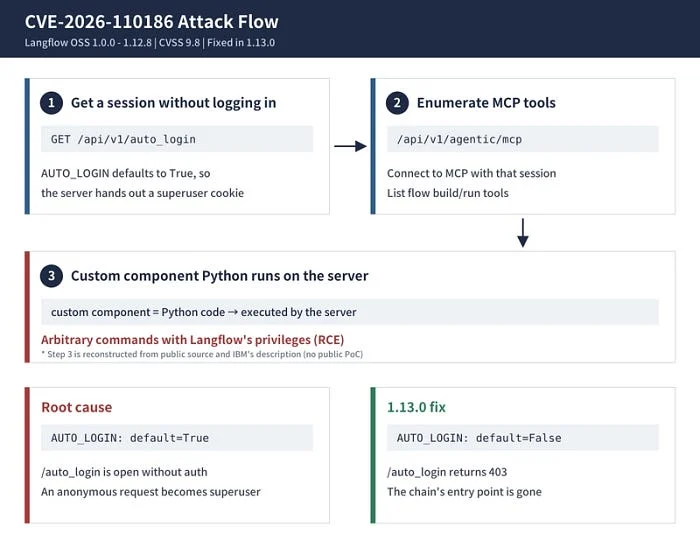
The diagram shows the chain in rows. The top row (blue, steps 1 to 2) shows an attacker getting a session without logging in (1), then using it to connect to MCP and see which tools exist (2). The middle row (red, step 3) shows Python inside a custom component running on the server; this is where the attack completes, and it is the reconstructed step. Bottom left (red) is the root cause: the AUTO_LOGIN default of True combined with an /auto_login endpoint that asks for no credentials. Bottom right (green) is the fix, which flips the default to False and so removes the entry point.
Exploitation
Step 1: the setting that starts it all
src/lfx/src/lfx/services/settings/auth.py
AUTO_LOGIN: bool = Field( default=True, # TODO: Set to False in v2.0 description=( "Enable automatic login with a configured or generated bootstrap account. " "SECURITY WARNING: This bypasses authentication and should only be used in development environments. " "Set to False in production. This will default to False in v2.0." ),)
AUTO_LOGIN is a development convenience that logs every visitor in as a superuser. The description itself says "development only", yet the default is True. If an operator forgets to turn it off, it stays on. The TODO shows the safer default was deferred to v2.0.
Step 2: the endpoint that issues a session with no credentials
src/backend/base/langflow/api/v1/login.py
@router.get("/auto_login", include_in_schema=False)async def auto_login(request: Request, response: Response, db: DbSession): auth_settings = get_settings_service().auth_settingsif auth_settings.AUTO_LOGIN: auth = get_auth_service() user_id, tokens = await auth.create_user_longterm_token(db) ... response.set_cookie( auth_cookie_name("access_token_lf", request), tokens["access_token"], ...
Line by line:
@router.get("/auto_login"): a single GET request reaches this. There is no username or password parameter anywhere in the signature.if auth_settings.AUTO_LOGIN:: checks the flag from step 1. Because the default isTrue, most default installs pass this check.create_user_longterm_token(db): finds the configured superuser (or the first superuser in the DB) and mints a token for that account.response.set_cookie(...): sends that token back as a cookie. From that moment the caller is a superuser.
The function never asks "who are you?". This is the core of CVE-2026-93680 (authentication bypass), which IBM describes as an incomplete fix of the auto-login security control.
Step 3: why the earlier fix did not close it
An earlier fix, referenced in a source comment as GHSA-fjgc-vj2f-77hm, replaced a 365-day superuser token with a short-lived access token plus a refresh token. That shortened how long the key works, but an anonymous caller still received a superuser session. The lifetime of the key changed; the fact that the door gave keys to anyone did not.
Step 4: after the session, MCP and custom components (reconstructed)
This is the code-execution half of CVE-2026-110186. Here is what is confirmed and what is inferred.
- Confirmed:
/api/v1/agentic/mcplists flow build and run tools, and it authenticates the caller with a session token or API key. IBM's description ties this CVE to MCP tool enumeration. - Reconstructed: with a superuser session, a caller can create and run a flow containing a custom component, and Langflow executes that Python on the server. That last link is not shown by a public PoC. It is inferred from the source above and the CVE description.
One open question: IBM classifies the issue as requiring no authentication, but the advisory does not say whether servers with auto-login disabled are affected. Since the MCP path authenticates callers, the reading here is that disabling auto-login stops this chain from starting. That is an interpretation, not an official statement.
Attack flow (concept level)
anonymous request -> /auto_login -> superuser cookie -> connect to MCP endpoint with that session -> enumerate flow build/run tools -> run a flow that contains a custom component (Python) -> code runs on the server with Langflow's privileges
There is no public PoC, so request formats and payloads are deliberately not included. To check whether an instance you operate is exposed, request /api/v1/auto_login and look at the status code: 403 means auto-login is off, 200 means a session is being issued.
curl -s -o /dev/null -w "%{http_code}\n" http://your-langflow-host:7860/api/v1/auto_login
Only run this against servers you own or are authorized to test.
Root cause
The mistake is a default. AUTO_LOGIN is a development convenience that logs every visitor in as a superuser, and its own description warns that it bypasses authentication and should only be used in development environments, yet it ships as True. The /auto_login handler then checks only that flag, with no credential in the request signature, and mints a token for the configured superuser (or the first superuser in the database) before setting it as a cookie.
The earlier fix did not address this. It replaced a 365-day superuser token with a short-lived access token plus a refresh token, which shortened how long the key works but left the anonymous caller receiving a superuser session.
Impact
An unauthenticated attacker can obtain a superuser session on a default install. With that session, the MCP layer can be used to reach Langflow's execute-user-Python feature, so the chain ends in code running on the server with Langflow's privileges. The vendor rates this CVSS 3.1 9.8 (Critical), CWE-94 (code injection).
The code-execution half is a reconstruction from the advisory and the source, not something demonstrated by a public PoC. IBM classifies the issue as requiring no authentication, but the advisory does not say whether servers with auto-login disabled are affected; since the MCP path authenticates callers, the reading here is that disabling auto-login stops this chain from starting, which is an interpretation rather than an official statement.
Fix
The core change in 1.13.0 is one default:
AUTO_LOGIN: bool = Field(- default=True, # TODO: Set to False in v2.0+ default=False, # TODO: Set the development default to False in v2.0.
With default=False, /auto_login returns 403. No session is issued, so steps 2 and 3 have no entry point.
The same release also blocks pydoc and ctypeslib re-export patterns in the agent assistant's code scanning, and stops the MCP loopback client from inheriting the server process's LANGFLOW_API_KEY. Those belong to the same advisory batch, including CVE-2026-110193 (a low-privilege account path).
Limits: if an operator re-enables LANGFLOW_AUTO_LOGIN=true after upgrading, the same entry point reopens. Also, if you relied on auto-login, prepare password-based accounts before upgrading or you may lock yourself out.
What to do:
- Back up your database, secret key, and uploaded files.
- If you used auto-login, set up password-based accounts first.
- Upgrade:
pip install --upgrade "langflow==1.13.0"or use the Docker imagelangflowai/langflow:1.13.0. - If the instance was internet-facing, consider rotating secrets stored on the server, such as model provider API keys and database passwords.
- Until you can upgrade, restrict network access to the Langflow port to trusted networks. This is only a stopgap and does not cover the low-privilege path (CVE-2026-110193).
Variants to test
- Other default-on development flags. Look for settings whose own description warns that they bypass authentication or are for development only, but whose default enables them. A positive result is a default install where the documented warning is contradicted by the shipped value.
- Unauthenticated session-issuing endpoints. Search the router for handlers that mint a token or set an auth cookie without a credential in the signature. A positive result is a GET that returns a session cookie to an anonymous caller.
- Shortened token lifetime as a fix. Where a previous fix only reduced token lifetime, check whether the anonymous issuance path still exists. A positive result is the same endpoint still returning a session, just with a shorter-lived token.
- Authenticated tool layers behind an unauthenticated entry point. For products that expose tool or agent endpoints requiring a session, check whether any other endpoint hands out that session. A positive result is reaching the authenticated tool listing with a cookie obtained without credentials.
- Exposure check on your own instances. Request
/api/v1/auto_loginand read the status code: 403 means auto-login is off, 200 means a session is being issued.
What happened, in plain words
Langflow is a program for building AI assistants and automated workflows without writing much code. You drag components onto a canvas and connect them, like wiring together Lego bricks, and the result is called a flow. Some of those components let you type Python code directly, and Langflow runs that code on the server where Langflow is installed. That is a real feature, meant for people who want full control, but it also means that anyone who can create such a component can make the server run whatever they like. In security language, that is remote code execution: an attacker somewhere else on the internet gets their instructions carried out on your machine.
The report describes a chain of events that ends in exactly that, on a default installation of Langflow. The chain has a name: CVE-2026-110186. A CVE is a public catalogue number for a known security flaw, so people can talk about the same bug unambiguously.
The starting point is a setting called AUTO_LOGIN. It is a convenience for developers: while it is switched on, anyone who visits the Langflow web address is automatically logged in as a superuser, the most powerful kind of account. The setting ships switched on by default. Its own description in the source code warns that it bypasses authentication and should only be used in development, yet the default value is True. If the person who installed Langflow never turns it off, it stays on.
Once an attacker has that superuser session, they can talk to a second part of Langflow called MCP, which lists tools for building and running flows. MCP does ask for a login, but the attacker now has one, obtained without typing any password. From there, the attacker can build a flow containing a custom component, and the Python inside it runs on the server.
Before going further, a word on what is proven and what is not. The vendor's official advisory describes CVE-2026-110186 only as improper control of code generation leading to unauthenticated RCE. There is no public exploit that actually executes code on a server, and the public Metasploit module (Metasploit is a well-known collection of ready-made attack tools) covers a sibling bug, CVE-2026-93680, the authentication bypass, and only lists MCP tools. So the first half of the chain, the auto-login, the MCP enumeration and the patch, is based on public source code, while the last step, running a custom component, is a reconstruction from the advisory and that source. The report marks it as such, and so does this article.
The pieces you need to know
Three ideas come up again and again, so here they are from zero.
Langflow is a low-code tool for building AI agents and workflows, called flows, by wiring components together. Think of a flowchart where each box does one job, such as reading a document or calling an AI model, and the arrows decide what happens next.
Custom components are components where the user writes Python directly. Langflow executes that code on the server. That is a legitimate feature, but if anyone can create one, it is remote code execution by design. The everyday comparison: a restaurant kitchen that lets any customer step behind the counter and cook. Fine if the customer is the chef; not fine if the customer is a stranger off the street.
MCP (Model Context Protocol) is a standard for AI apps to call external tools. Langflow exposes flows as tools over MCP, and the endpoint /api/v1/agentic/mcp lists tools for building and running flows. An endpoint is simply a web address inside a program that accepts requests, like a service window at a counter: you knock at a specific window and ask for a specific thing. An API is the general name for this arrangement, one program asking another for something in a structured way.
The MCP endpoint does require authentication. The problem described here is that a separate entry point handed out valid credentials to anyone. The chain that follows from that is CVE-2026-110186.
The facts at a glance
- Affected: Langflow OSS 1.0.0 through 1.12.8
- Severity: CVSS 3.1 9.8 (Critical), CWE-94 (code injection)
- Fixed in: 1.13.0 (released 2026-10-22)
- Workaround: none published by IBM
A few of those terms deserve a plain explanation. CVSS is a scoring system for how serious a vulnerability is, from 0 to 10; 9.8 is near the top, hence Critical. CWE-94 is a category label meaning code injection, that is, a program ends up running code that an attacker supplied. OSS means open source software, whose code anyone can read. A workaround is a way to protect yourself without installing the official fix; here IBM, the vendor, published none.
The source excerpts in the walkthrough below are from the v1.12.8 files, trimmed, with ... marking omissions. They should be verified against the repository before relying on exact line content.
Finding it
The starting point is a setting, AUTO_LOGIN, that defaults to True. While it is on, an unauthenticated endpoint hands out a superuser session. With that session, the MCP layer can be used to reach Langflow's execute-user-Python feature (custom components). That chain is CVE-2026-110186.
The key insight: the MCP endpoint does require authentication, but there was a separate entry point that hands out valid credentials to anyone. Picture a building where the server room is locked, but the reception desk hands out the master key to anyone who asks politely.
The diagram shows the chain in rows. The top row (blue, steps 1 to 2) shows an attacker getting a session without logging in (1), then using it to connect to MCP and see which tools exist (2). The middle row (red, step 3) shows Python inside a custom component running on the server; this is where the attack completes, and it is the reconstructed step. Bottom left (red) is the root cause: the AUTO_LOGIN default of True combined with an /auto_login endpoint that asks for no credentials. Bottom right (green) is the fix, which flips the default to False and so removes the entry point.
Exploitation
Step 1: the setting that starts it all
The file is src/lfx/src/lfx/services/settings/auth.py.
AUTO_LOGIN: bool = Field( default=True, # TODO: Set to False in v2.0 description=( "Enable automatic login with a configured or generated bootstrap account. " "SECURITY WARNING: This bypasses authentication and should only be used in development environments. " "Set to False in production. This will default to False in v2.0." ),)
Line by line, in plain words:
AUTO_LOGIN: bool = Field(declares a setting namedAUTO_LOGINthat holds a yes/no value (boolis short for boolean, true or false).default=Trueis the value used when nobody has chosen otherwise. This is the heart of the problem: out of the box, the setting is on.# TODO: Set to False in v2.0is a note left by the developers to themselves, saying the safer value was postponed to a future major version.- The
description=(...)block is the text shown to whoever configures Langflow. It says the setting enables automatic login with a configured or generated bootstrap account, and it carries a security warning: it bypasses authentication and should only be used in development environments, and should be set to False in production.
AUTO_LOGIN is a development convenience that logs every visitor in as a superuser. The description itself says "development only", yet the default is True. If an operator forgets to turn it off, it stays on. The TODO shows the safer default was deferred to v2.0. The everyday comparison: a spare key left under the doormat for the builder, with a note saying "remove before moving in". Many people never remove it.
Step 2: the endpoint that issues a session with no credentials
The file is src/backend/base/langflow/api/v1/login.py.
@router.get("/auto_login", include_in_schema=False)async def auto_login(request: Request, response: Response, db: DbSession): auth_settings = get_settings_service().auth_settingsif auth_settings.AUTO_LOGIN: auth = get_auth_service() user_id, tokens = await auth.create_user_longterm_token(db) ... response.set_cookie( auth_cookie_name("access_token_lf", request), tokens["access_token"], ...
Line by line:
@router.get("/auto_login", include_in_schema=False)registers a handler for a single GET request to the address/auto_login. A GET request is the ordinary kind your browser makes when you open a page.async def auto_login(request: Request, response: Response, db: DbSession):defines the function that runs when that address is hit. It receives the incoming request, an object for building the reply, and a database session. Notice what is missing: there is no username or password parameter anywhere in the signature.auth_settings = get_settings_service().auth_settingsfetches the current settings, including theAUTO_LOGINflag from step 1.if auth_settings.AUTO_LOGIN:checks that flag. Because the default isTrue, most default installs pass this check.auth = get_auth_service()obtains the component that knows how to create logins.user_id, tokens = await auth.create_user_longterm_token(db)finds the configured superuser (or the first superuser in the database) and mints a token for that account. A token is a short string that proves who you are, like a stamped wristband at an event: show it and you get in without being asked again.response.set_cookie(...)sends that token back as a cookie. A cookie is a small piece of data a website asks your browser to store and send back with every later request, so the site can remember you between page loads.auth_cookie_name("access_token_lf", request)builds the cookie's name, andtokens["access_token"]is the value placed inside it.
The function never asks "who are you?". This is the core of CVE-2026-93680 (authentication bypass), which IBM describes as an incomplete fix of the auto-login security control. Authentication bypass means getting past a login check without knowing any credentials.
Step 3: why the earlier fix did not close it
An earlier fix, referenced in a source comment as GHSA-fjgc-vj2f-77hm, replaced a 365-day superuser token with a short-lived access token plus a refresh token. That shortened how long the key works, but an anonymous caller still received a superuser session. The lifetime of the key changed; the fact that the door gave keys to anyone did not.
A refresh token is a second, longer-lived token used to obtain a new short-lived access token when the first one expires, so you do not have to log in again. The comparison: instead of handing out a key valid for a year, the desk now hands out a key valid for a few minutes plus a voucher to get a new one. The key expires sooner, but the desk still gives it to anyone who walks up.
Step 4: after the session, MCP and custom components (reconstructed)
This is the code-execution half of CVE-2026-110186. Here is what is confirmed and what is inferred.
- Confirmed:
/api/v1/agentic/mcplists flow build and run tools, and it authenticates the caller with a session token or API key. IBM's description ties this CVE to MCP tool enumeration. Enumeration here means simply asking the service what tools it offers, like reading a menu. - Reconstructed: with a superuser session, a caller can create and run a flow containing a custom component, and Langflow executes that Python on the server. That last link is not shown by a public PoC. It is inferred from the source above and the CVE description. A PoC, proof of concept, is a small demonstration that a vulnerability really works.
One open question: IBM classifies the issue as requiring no authentication, but the advisory does not say whether servers with auto-login disabled are affected. Since the MCP path authenticates callers, the reading here is that disabling auto-login stops this chain from starting. That is an interpretation, not an official statement.
Attack flow (concept level)
anonymous request -> /auto_login -> superuser cookie -> connect to MCP endpoint with that session -> enumerate flow build/run tools -> run a flow that contains a custom component (Python) -> code runs on the server with Langflow's privileges
Read the arrows as "then". A stranger sends a request to /auto_login and receives a superuser cookie. With that cookie, they connect to the MCP endpoint, which accepts them because the cookie is valid. They ask which tools exist for building and running flows. They run a flow containing a custom component, and the Python inside it executes on the server with the same powers Langflow itself has.
There is no public PoC, so request formats and payloads are deliberately not included. To check whether an instance you operate is exposed, request /api/v1/auto_login and look at the status code: 403 means auto-login is off, 200 means a session is being issued. A status code is the three-digit number a web server returns with every reply; 200 means "here you go, fine", 403 means "forbidden".
curl -s -o /dev/null -w "%{http_code}\n" http://your-langflow-host:7860/api/v1/auto_login
Line by line:
curlis a command-line tool for making web requests, available on most computers.-smeans silent: do not print progress or error chatter.-o /dev/nullthrows away the reply body, because only the status code matters here.-w "%{http_code}\n"prints the status code followed by a newline.http://your-langflow-host:7860/api/v1/auto_loginis the address being requested;7860is the port, the numbered door on the server.
Only run this against servers you own or are authorized to test.
Root cause
The mistake is a default. AUTO_LOGIN is a development convenience that logs every visitor in as a superuser, and its own description warns that it bypasses authentication and should only be used in development environments, yet it ships as True. The /auto_login handler then checks only that flag, with no credential in the request signature, and mints a token for the configured superuser (or the first superuser in the database) before setting it as a cookie.
The earlier fix did not address this. It replaced a 365-day superuser token with a short-lived access token plus a refresh token, which shortened how long the key works but left the anonymous caller receiving a superuser session.
Impact
An unauthenticated attacker can obtain a superuser session on a default install. With that session, the MCP layer can be used to reach Langflow's execute-user-Python feature, so the chain ends in code running on the server with Langflow's privileges. The vendor rates this CVSS 3.1 9.8 (Critical), CWE-94 (code injection).
In everyday terms: someone who has never had an account can end up running their own instructions on your machine, with the same rights as the Langflow service.
The code-execution half is a reconstruction from the advisory and the source, not something demonstrated by a public PoC. IBM classifies the issue as requiring no authentication, but the advisory does not say whether servers with auto-login disabled are affected; since the MCP path authenticates callers, the reading here is that disabling auto-login stops this chain from starting, which is an interpretation rather than an official statement.
Fix
The core change in 1.13.0 is one default:
AUTO_LOGIN: bool = Field(- default=True, # TODO: Set to False in v2.0+ default=False, # TODO: Set the development default to False in v2.0.
This is a diff, the format used to show what changed between two versions of a file. Lines starting with - are removed and lines starting with + are added. Here the old line default=True is gone and the new line default=False takes its place, with the comment updated to say the development default should become False in v2.0.
With default=False, /auto_login returns 403. No session is issued, so steps 2 and 3 have no entry point.
The same release also blocks pydoc and ctypeslib re-export patterns in the agent assistant's code scanning, and stops the MCP loopback client from inheriting the server process's LANGFLOW_API_KEY. Those belong to the same advisory batch, including CVE-2026-110193 (a low-privilege account path). In plain words: the update also tightens what code the assistant is allowed to pass through, and stops one internal part of Langflow from silently picking up the server's API key. An API key is a long secret string that acts like a password for programs rather than people.
Limits: if an operator re-enables LANGFLOW_AUTO_LOGIN=true after upgrading, the same entry point reopens. Also, if you relied on auto-login, prepare password-based accounts before upgrading or you may lock yourself out.
What to do:
- Back up your database, secret key, and uploaded files. A backup is a copy you can restore if something goes wrong.
- If you used auto-login, set up password-based accounts first, so you still have a way in once the automatic door closes.
- Upgrade:
pip install --upgrade "langflow==1.13.0"or use the Docker imagelangflowai/langflow:1.13.0.pipis Python's package installer; Docker is a way of running software in a pre-packaged container. - If the instance was internet-facing, consider rotating secrets stored on the server, such as model provider API keys and database passwords. Rotating means replacing a secret with a fresh one, on the assumption the old one may have been seen.
- Until you can upgrade, restrict network access to the Langflow port to trusted networks. This is only a stopgap and does not cover the low-privilege path (CVE-2026-110193). A stopgap is a temporary measure that reduces risk without fixing the underlying flaw.
Variants to test
These are patterns worth looking for in other software, not instructions to attack anything.
- Other default-on development flags. Look for settings whose own description warns that they bypass authentication or are for development only, but whose default enables them. A positive result is a default install where the documented warning is contradicted by the shipped value.
- Unauthenticated session-issuing endpoints. Search the router for handlers that mint a token or set an auth cookie without a credential in the signature. A positive result is a GET that returns a session cookie to an anonymous caller.
- Shortened token lifetime as a fix. Where a previous fix only reduced token lifetime, check whether the anonymous issuance path still exists. A positive result is the same endpoint still returning a session, just with a shorter-lived token.
- Authenticated tool layers behind an unauthenticated entry point. For products that expose tool or agent endpoints requiring a session, check whether any other endpoint hands out that session. A positive result is reaching the authenticated tool listing with a cookie obtained without credentials.
- Exposure check on your own instances. Request
/api/v1/auto_loginand read the status code: 403 means auto-login is off, 200 means a session is being issued.
Takeaway
A development convenience flag, left on by default, turned an authenticated feature (MCP tooling that can run user Python) into an unauthenticated one. The patch is one line, but the lesson is about defaults: "development only" settings should not ship enabled. If a setting's own description says it is dangerous, the safe value should be the one you get without doing anything.
Glossary
- API: the set of addresses and rules one program uses to ask another program to do something.
- API key: a long secret string that identifies a program to a service, like a password for software.
- Authentication: proving who you are, usually with a password or a token.
- Authentication bypass: getting past a login check without valid credentials.
- Backup: a copy of data kept so it can be restored if the original is lost or damaged.
- Boolean: a value that is either true or false.
- Cookie: a small piece of data a website asks your browser to store and send back with later requests, so the site can remember you.
- Critical: the top severity band in the CVSS scoring system.
- curl: a command-line tool for making web requests.
- Custom component: in Langflow, a component where the user writes Python that the server then executes.
- CVE: a public catalogue number for a known security vulnerability.
- CWE-94: the category label for code injection, where a program ends up running attacker-supplied code.
- CVSS: a scoring system from 0 to 10 for how serious a vulnerability is.
- Diff: the format showing which lines changed between two versions of a file, with
-for removed and+for added lines. - Docker: a way of packaging and running software in an isolated container.
- Endpoint: a specific web address inside a program that accepts requests.
- Enumeration: asking a service to list what it offers, such as its available tools.
- Flow: in Langflow, a workflow built by wiring components together.
- GET request: the ordinary kind of web request a browser makes when you open a page.
- GHSA: a public identifier for a security advisory, used by GitHub's advisory database.
- Langflow: a low-code tool for building AI agents and workflows by connecting components.
- MCP (Model Context Protocol): a standard for AI apps to call external tools.
- Metasploit: a well-known collection of ready-made attack tools and modules.
- OSS: open source software, whose code anyone can read.
- pip: Python's package installer, used to install and upgrade Python software.
- PoC (proof of concept): a small demonstration showing that a vulnerability really works.
- Port: the numbered door on a server where a particular service listens, such as 7860 for Langflow.
- Refresh token: a longer-lived token used to obtain a new short-lived access token without logging in again.
- Remote code execution (RCE): an attacker getting their own instructions run on someone else's machine.
- Rotating (a secret): replacing a secret with a fresh one, assuming the old one may have been exposed.
- Status code: the three-digit number a web server returns with each reply, such as 200 for success or 403 for forbidden.
- Stopgap: a temporary measure that reduces risk without fixing the underlying flaw.
- Superuser: the most powerful kind of account, allowed to do anything in the application.
- Token: a string that proves who you are, so you are not asked to log in again on every request.
- Workaround: a way to protect yourself without installing the official fix.
- 403: the status code meaning the server understood the request but refuses to allow it.
- 200: the status code meaning the request succeeded.


