CVE-2026–1357 Explained: The Cost of Never Checking Whether Decryption Failed
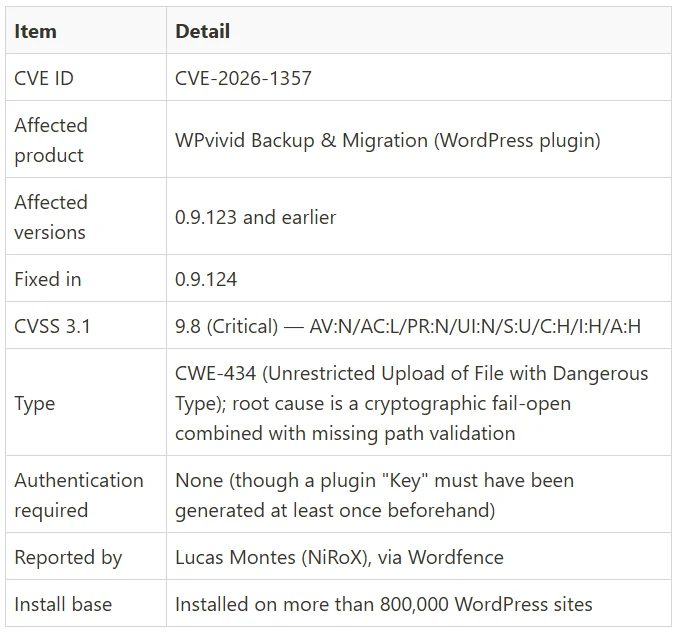
The WPvivid Backup & Migration plugin failed to check whether RSA decryption succeeded, so a failed decryption produced a predictable null-byte AES key. Combined with missing filename validation, an unauthenticated attacker could write a PHP web shell into the public uploads directory and execute it.
 Published on medium.com
WordPress
The full write-up lives on its author's site
It belongs to its author, so we link to it rather than copy it. The other two tabs are our own rewrites, checked against it.
Context
WPvivid Backup & Migration is a WordPress plugin that creates backups and moves them to another server. To transfer backup data between sites securely, the plugin implements its own protocol: it encrypts backup chunks with an AES session key, which is itself wrapped in RSA. The cryptographic design is sound on paper. The problem is that it never answered one question: what should happen when RSA decryption fails?

The flaw sits in the cross-site backup transfer protocol. WPvivid exposes an AJAX action called send_to_site to move a backup from one site to another. The request carries a packet structured like this:
[RSA ciphertext length (3 hex digits)][AES key encrypted with RSA][AES ciphertext length (16 hex digits)][JSON payload encrypted with AES]
The intent is straightforward: the AES key itself is encrypted with an RSA public key, the receiving side recovers it using its own private key, and that recovered key decrypts the actual backup data (JSON). If this worked as designed, an attacker without the RSA private key should have no way to produce a valid AES key in the first place.
Setup
The report does not describe a lab, accounts, roles or tooling beyond the source analysis and the published proof of concept. The only precondition it names is that a "Key" (API token) must have been generated at some point in the plugin's settings. Because the plugin's own internal logic often turns this on automatically whenever the relevant feature is used, rather than requiring deliberate admin action each time, this precondition holds often enough in real deployments. No credentials, no RSA private key and not even a valid session are required beyond that.
Finding it
When openssl_private_decrypt() fails, PHP returns false. The plugin never checked that return value. It passed false straight into the next stage, phpseclib's AES decryption function, as the key. phpseclib treats a non-string value like false as a zero-length string, and because AES requires a fixed-length key, the library's internal padding/casting logic turns that into a predictable key filled entirely with null bytes. The RSA private key, the entire point of the protection, is effectively bypassed. Layer a second flaw on top, the uploaded filename is never validated, and an unauthenticated attacker can drop a PHP web shell directly into WordPress's upload directory.
Exploitation
Step 1: the RSA decryption result is used without being checked
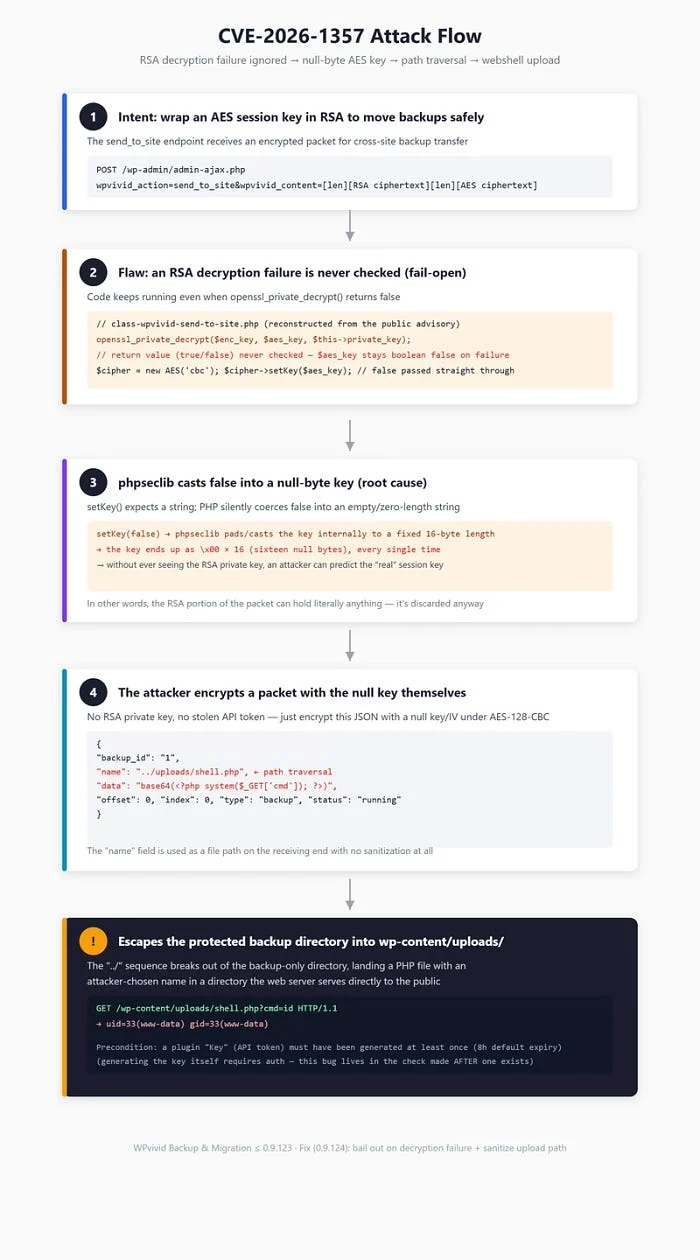
The handling logic in class-wpvivid-send-to-site.php looks roughly like this, reconstructed from the public advisory and the published PoC:
openssl_private_decrypt($encrypted_aes_key, $aes_key, $this->private_key);$cipher = new \phpseclib\Crypt\AES('cbc');$cipher->setKey($aes_key); $cipher->setIV($iv);$json = $cipher->decrypt($encrypted_payload);
openssl_private_decrypt() returns true and fills its third argument ($aes_key) with the decrypted value on success, or returns false, leaving $aes_key unset or unchanged, on failure. Correct code checks that return value and rejects the request immediately on failure. This code discards the return value entirely and uses $aes_key as the AES key on the very next line, whatever state it is in.
Step 2: phpseclib casts false into a null-byte key
setKey() expects a string. PHP is loosely typed, so when false lands where a string is expected, an implicit conversion happens. Inside phpseclib, as the key gets padded out to the block cipher's required length (16 bytes for AES-128), false is effectively treated as an empty string of length zero, and padding that out to 16 bytes produces a key consisting of sixteen repeated \x00 bytes.
openssl_private_decrypt() fails → $aes_key = falsesetKey(false) → phpseclib pads it out, landing on "\x00" × 16 in practice
This is the crux of the whole bug. An AES key that should only be derivable with the RSA private key instead collapses to the exact same value, sixteen null bytes, every single time decryption fails. The attacker does not need to know the server's RSA private key at all; they only need to know that this server falls back to a fixed key whenever decryption of the attacker's own crafted request fails. The RSA-ciphertext portion of the packet can contain literally anything, including something that is not valid RSA ciphertext at all: it fails to decrypt either way, and either way the result is the same null-byte key. The public PoC does exactly this, filling the RSA slot with the meaningless placeholder "ABC" and encrypting only the AES portion with a null key and null IV.
null_key = b"\x00" * 16null_iv = b"\x00" * 16cipher = AES.new(null_key, AES.MODE_CBC, iv=null_iv) fake_key = b"ABC" packet = ( format(len(fake_key), "03x").encode() + fake_key + format(len(encrypted), "016x").encode() + encrypted)
Step 3: the file path inside the decrypted JSON is used with no validation
Once the server decrypts the attacker's AES ciphertext using the null-byte key, it gets back exactly the JSON the attacker intended:
{ "backup_id": "1", "name": "../uploads/shell.php", "data": "[redacted]+", "offset": 0, "index": 0, "type": "backup", "status": "running"}
The name field here is both the filename and the path a backup chunk gets written to. In normal use, this field presumably assumes only a filename under the plugin's internal directory will ever appear, but there is no check at all for whether this value can escape that directory: no path normalization, no blocking of ../, no allowed-extension checks. The data field is the base64-encoded file content itself, which can hold PHP web shell code directly.
Step 4: path traversal lands the file in the public upload directory
The ../ sequence embedded in name is interpreted literally when the plugin writes the file, breaking out of the intended backup-only directory and landing it in WordPress's public upload directory (wp-content/uploads/). Because the web server serves that directory directly, the uploaded PHP file executes the moment it is requested by URL, with no separate trigger needed.
curl "http://target/wp-content/uploads/shell.php?cmd=id"# → uid=33(www-data) gid=33(www-data) groups=33(www-data
Root cause
Two mistakes combine. First, the return value of openssl_private_decrypt() is discarded, so the failure path is not a rejection but a continuation with false as the key. Second, phpseclib's implicit conversion of false to an empty string, padded to the block size, yields a deterministic sixteen-null-byte key. The RSA private key, the entire point of the protection, is effectively bypassed: the attacker chooses the ciphertext, knows it will fail, and knows the exact key that failure produces.
The second mistake is the absence of any validation on the name value taken from the decrypted JSON. Data being encrypted does not mean every value inside it, especially a file path, can be trusted once decrypted. There is no check at all for whether the name value can escape the backup directory: no path normalization, no blocking of ../, no allowed-extension checks.
Impact
An unauthenticated attacker can write a PHP web shell into wp-content/uploads/ and execute it by requesting the file, as the curl output above shows with command execution as www-data. No credentials, no RSA private key and no valid session are required. The only precondition is that a "Key" (API token) has been generated at some point in the plugin's settings, which the plugin's own logic often does automatically when the relevant feature is used.
Fix
WPvivid 0.9.124 fixed this in two places:
- It now checks the return value of
openssl_private_decrypt()and rejects the request immediately on failure, sofalsenever reaches the next stage at all. - It added path normalization and directory-traversal protection to the uploaded file's
namevalue, making it impossible to write outside the designated backup directory.
The report's remediation advice:
- Update WPvivid Backup & Migration to 0.9.124 or later immediately.
- If an immediate update is not possible, consider revoking any generated "Key" in the plugin's settings and disabling the cross-site transfer feature until it can be regenerated.
- Blocking PHP execution inside
wp-content/uploads/at the web server level (an Nginxlocationrule, an Apache.htaccessdirective) is a useful common defence against this entire class of upload vulnerability. - If exposure is possible, check
wp-content/uploads/for unfamiliar.phpfiles, and cross-reference web server access logs forwpvivid_action=send_to_siterequests followed by access to the upload directory.
Variants to test
- Other callers of
openssl_private_decrypt()in WordPress plugins. Search plugin code for the function and check whether the return value is tested before the output buffer is used. A positive result is a code path where a failed decryption still reaches asetKey(),hash_hmac()or similar sink with an unset orfalsevariable. - Other phpseclib key setters fed from loosely typed input. Look for
setKey()orsetPassword()calls whose argument can befalse,nullor an integer. A positive result is a deterministic key or IV derived from the failed conversion, which you can reproduce locally by encrypting a payload with the resulting null bytes. - Filename fields inside decrypted or deserialised payloads. Wherever a JSON or serialised blob carries a
name,pathorfilenamethat is later written to disk, try../sequences and absolute paths. A positive result is a file appearing outside the intended directory, ideally in a web-served one. - Upload directories with PHP execution enabled. Request a written
.phpfile directly and observe whether it executes rather than being served as text. A positive result is command output in the response body. - Token-gated AJAX actions. Check whether actions such as
send_to_sitecan be reached with a token that the plugin generates automatically, rather than one an administrator deliberately created. A positive result is a request that passes the gate without any manual configuration step.
What happened, in plain words
A WordPress plugin called WPvivid Backup & Migration lets a site owner copy a backup from one WordPress site to another. To keep that copy private, the plugin scrambles (encrypts) the backup data before sending it, and it uses two different scrambling methods stacked on top of each other. The design looks sensible. The mistake is what the plugin does when one of those scrambling steps goes wrong: instead of stopping, it carries on with a broken value, and that broken value always turns into the same, guessable key. Because of that, someone with no account and no password can make the plugin write a small program (a web shell) into a folder the website serves publicly, and then run commands on the server by visiting that file in a browser.
This article walks through the whole story from zero. You do not need to know any cryptography or PHP to follow it. Every term is explained where it first appears, and there is a glossary at the end.
The product and the feature
WordPress is a popular system for building websites. It is extended with plugins: extra pieces of software that add features. WPvivid Backup & Migration is one such plugin. Its job is to make copies of a WordPress site (backups) and to move those copies to another server, for example when you migrate a site to a new host.
Moving a backup between two sites means sending data over the internet. Anyone in the middle of that connection could otherwise read it, so the plugin encrypts the data first. Encryption is the process of turning readable data into scrambled data using a key; only someone holding the right key can turn it back into readable data. The plugin uses two kinds of encryption, one nested inside the other, and the rest of this article is about how that nesting breaks.
The two kinds of encryption involved
AES is a fast, widely used encryption method. It takes your data and a key, which is a string of bytes of a fixed length (16 bytes for the variant used here), and produces scrambled output. The same key is used to scramble and to unscramble, which is why it is called symmetric encryption. Think of it like a padlock with one physical key: the same key locks and unlocks.
RSA is a different method, called asymmetric encryption. It uses a pair of keys: a public key that anyone may have, and a private key that only the owner keeps. Data scrambled with the public key can only be unscrambled with the private key. Think of it as a mailbox with a slot: anyone can drop a letter in (public key), but only the person with the mailbox key can take letters out (private key).
RSA is slow, so it is rarely used to encrypt large amounts of data. Instead, systems use a hybrid approach: generate a random AES key, use it to encrypt the bulk data, then use RSA to encrypt just that small AES key. The receiver uses its RSA private key to recover the AES key, then uses the AES key to decrypt the data. That is exactly what WPvivid does.
The packet the plugin sends
WPvivid exposes an AJAX action called send_to_site. AJAX is a way for a web page to send a request to the server in the background, without reloading the page; an action is simply the name the server uses to decide which piece of code should handle the request. The request carries a packet built like this:
[RSA ciphertext length (3 hex digits)][AES key encrypted with RSA][AES ciphertext length (16 hex digits)][JSON payload encrypted with AES]
Line by line, in plain words:
[RSA ciphertext length (3 hex digits)]is a three-character label saying how long the next piece is. "Hex digits" means the length is written in hexadecimal, a number system with sixteen symbols (0 to 9 and a to f) instead of ten. Three hex digits can describe lengths from 0 to 4095.[AES key encrypted with RSA]is the AES key, scrambled with the receiver's RSA public key. This is the piece that only the receiver's RSA private key should be able to open.[AES ciphertext length (16 hex digits)]is a sixteen-character label saying how long the final piece is. Sixteen hex digits can describe much larger lengths, which makes sense because the backup data is bigger than a key.[JSON payload encrypted with AES]is the actual backup data, scrambled with the AES key. JSON is a simple text format for structured data, made of names and values in curly braces, like{"name": "value"}.
The intent is straightforward: the AES key is protected by RSA, the receiver recovers it with its private key, and that recovered key decrypts the backup data. If this worked as designed, an attacker without the RSA private key should have no way to produce a valid AES key in the first place.
What you need before trying this
The report does not describe a lab, accounts, roles or tooling beyond reading the plugin's source code and the published proof of concept. A proof of concept (PoC) is a small piece of code that demonstrates a vulnerability actually works, rather than just describing it.
The only precondition the report names is that a "Key" (an API token) must have been generated at some point in the plugin's settings. An API token is a long random-looking string that acts like a password for software rather than a person: a program presents it to prove it is allowed to talk to the server. The report notes that the plugin's own internal logic often turns this on automatically whenever the relevant feature is used, rather than requiring an administrator to deliberately create it each time, so this precondition holds often enough in real deployments. Beyond that, no credentials, no RSA private key and not even a valid session are required. A session is the state a website keeps about a logged-in visitor, usually tied to a cookie, which is a small piece of data the browser stores and sends back with each request.
Finding it
When openssl_private_decrypt() fails, PHP returns false. PHP is the programming language WordPress and its plugins are written in, and openssl_private_decrypt() is a built-in function that performs the RSA decryption step. Like many PHP functions, it reports success or failure through its return value: true for success, false for failure.
The plugin never checked that return value. It passed false straight into the next stage, phpseclib's AES decryption function, as the key. phpseclib is a PHP library, meaning a collection of ready-made code that other programs can use; this one provides the AES functions. phpseclib treats a non-string value like false as a zero-length string, and because AES requires a fixed-length key, the library's internal padding and casting logic turns that into a predictable key filled entirely with null bytes. A null byte is a byte whose value is zero, written \x00; it is not the character "0" but an invisible byte with no value at all.
The RSA private key, the entire point of the protection, is effectively bypassed. Layer a second flaw on top, the uploaded filename is never validated, and an unauthenticated attacker can drop a PHP web shell directly into WordPress's upload directory. "Unauthenticated" means the attacker has not logged in and holds no account. A web shell is a small program uploaded to a server that lets the attacker run commands on it through the browser.
Exploitation
Step 1: the RSA decryption result is used without being checked
The handling logic in class-wpvivid-send-to-site.php looks roughly like this, reconstructed from the public advisory and the published PoC. A file ending in .php is a PHP source file; this one is the part of the plugin that handles sending a backup to another site.
openssl_private_decrypt($encrypted_aes_key, $aes_key, $this->private_key);$cipher = new \phpseclib\Crypt\AES('cbc');$cipher->setKey($aes_key); $cipher->setIV($iv);$json = $cipher->decrypt($encrypted_payload);
Line by line:
openssl_private_decrypt($encrypted_aes_key, $aes_key, $this->private_key);asks the RSA function to decrypt$encrypted_aes_keyusing the private key stored in$this->private_key, and to put the result into$aes_key. The function also returnstrueorfalse, but here that return value is thrown away.$cipher = new \phpseclib\Crypt\AES('cbc');creates an AES object configured in CBC mode. CBC is a mode of operation, a set of rules for how AES handles data longer than one block; you do not need the details to follow the bug.$cipher->setKey($aes_key);hands the AES object the key it should use. This is the line where the broken value arrives.$cipher->setIV($iv);sets the initialisation vector, a second input to CBC mode that makes the output different even when the same key and data are used twice.$json = $cipher->decrypt($encrypted_payload);decrypts the backup data and stores the result in$json.
openssl_private_decrypt() returns true and fills its third argument ($aes_key) with the decrypted value on success, or returns false, leaving $aes_key unset or unchanged, on failure. Correct code checks that return value and rejects the request immediately on failure. This code discards the return value entirely and uses $aes_key as the AES key on the very next line, whatever state it is in.
Step 2: phpseclib casts false into a null-byte key
setKey() expects a string. PHP is loosely typed, meaning it does not strictly enforce what kind of value a variable holds; when false lands where a string is expected, an implicit conversion happens. Inside phpseclib, as the key gets padded out to the block cipher's required length (16 bytes for AES-128), false is effectively treated as an empty string of length zero, and padding that out to 16 bytes produces a key consisting of sixteen repeated \x00 bytes.
openssl_private_decrypt() fails → $aes_key = falsesetKey(false) → phpseclib pads it out, landing on "\x00" × 16 in practice
In plain words: the RSA step fails, so the key variable holds false; that false is handed to the AES library; the library stretches it to the required length, and the result is sixteen zero bytes. The arrow means "leads to".
This is the crux of the whole bug. An AES key that should only be derivable with the RSA private key instead collapses to the exact same value, sixteen null bytes, every single time decryption fails. The attacker does not need to know the server's RSA private key at all; they only need to know that this server falls back to a fixed key whenever decryption of the attacker's own crafted request fails. The RSA-ciphertext portion of the packet can contain literally anything, including something that is not valid RSA ciphertext at all: it fails to decrypt either way, and either way the result is the same null-byte key. The public PoC does exactly this, filling the RSA slot with the meaningless placeholder "ABC" and encrypting only the AES portion with a null key and null IV.
null_key = b"\x00" * 16null_iv = b"\x00" * 16cipher = AES.new(null_key, AES.MODE_CBC, iv=null_iv) fake_key = b"ABC" packet = ( format(len(fake_key), "03x").encode() + fake_key + format(len(encrypted), "016x").encode() + encrypted)
Line by line:
null_key = b"\x00" * 16builds the sixteen-zero-byte key the server will end up using. Thebprefix means these are raw bytes, not text.null_iv = b"\x00" * 16builds an initialisation vector of the same sixteen zero bytes.cipher = AES.new(null_key, AES.MODE_CBC, iv=null_iv)creates an AES object on the attacker's own machine, using the guessed key and IV, so the attacker can produce ciphertext the server will be able to decrypt.fake_key = b"ABC"is the meaningless placeholder that goes into the RSA slot. It is not valid RSA ciphertext and is not meant to be.packet = (starts building the packet described earlier.format(len(fake_key), "03x").encode() + fake_keywrites the length of the placeholder as three hex digits and appends the placeholder itself. This is the RSA length field and the RSA slot.+ format(len(encrypted), "016x").encode() + encrypted)writes the length of the AES ciphertext as sixteen hex digits and appends the ciphertext itself. This is the AES length field and the AES slot.
The attacker is not breaking RSA. They are deliberately making it fail, because they know exactly what the failure produces.
Step 3: the file path inside the decrypted JSON is used with no validation
Once the server decrypts the attacker's AES ciphertext using the null-byte key, it gets back exactly the JSON the attacker intended:
{ "backup_id": "1", "name": "../uploads/shell.php", "data": "[redacted]+", "offset": 0, "index": 0, "type": "backup", "status": "running"}
Line by line:
"backup_id": "1"is an identifier for the backup chunk. A chunk is one piece of a backup that is sent in parts."name": "../uploads/shell.php"is the filename and path the chunk will be written to. The../part is the interesting one: in file paths,..means "the folder above the current one"."data": "[redacted]+"is the file content, encoded in base64. Base64 is a way of writing arbitrary bytes using only ordinary text characters, so binary content can travel inside JSON. Decoded, this particular string is PHP code for a web shell."offset": 0,"index": 0,"type": "backup","status": "running"are bookkeeping fields describing where this chunk fits and what state the transfer is in.
The name field here is both the filename and the path a backup chunk gets written to. In normal use, this field presumably assumes only a filename under the plugin's internal directory will ever appear, but there is no check at all for whether this value can escape that directory: no path normalization, no blocking of ../, no allowed-extension checks. Path normalization means cleaning up a path so that .. and similar shortcuts are resolved before use; allowed-extension checks mean refusing filenames ending in dangerous extensions such as .php. The data field is the base64-encoded file content itself, which can hold PHP web shell code directly.
This is a second flaw layered on top: the plugin trusts a filename that arrived from outside.
Step 4: path traversal lands the file in the public upload directory
The ../ sequence embedded in name is interpreted literally when the plugin writes the file, breaking out of the intended backup-only directory and landing it in WordPress's public upload directory (wp-content/uploads/). This trick is called path traversal: using .. to walk out of the folder you were supposed to stay in. Because the web server serves that directory directly, the uploaded PHP file executes the moment it is requested by URL, with no separate trigger needed. A web server is the program that hands web pages and files to browsers; "serves directly" means it will return a file from that folder to anyone who asks for it.
curl "http://target/wp-content/uploads/shell.php?cmd=id"# → uid=33(www-data) gid=33(www-data) groups=33(www-data
Line by line:
curlis a command-line tool for making web requests, available on most computers."http://target/wp-content/uploads/shell.php?cmd=id"is the address being requested.targetstands for the victim site's hostname. The path points at the uploaded file.?cmd=idis a parameter, a name and value passed to the program in the address; here it tells the web shell to run the commandid.# → uid=33(www-data) gid=33(www-data) groups=33(www-datais the output that came back.idis a standard command that reports which user the program is running as. The answer shows the web server's own user account,www-data, which means the attacker's command ran on the server.
No credentials, no RSA private key and no valid session are required. The only precondition is that a "Key" (API token) must have been generated at some point in the plugin's settings, and because the plugin's own internal logic often turns this on automatically whenever the relevant feature is used, rather than requiring deliberate administrator action each time, this precondition holds often enough in real deployments.
Root cause
Two mistakes combine. First, the return value of openssl_private_decrypt() is discarded, so the failure path is not a rejection but a continuation with false as the key. Second, phpseclib's implicit conversion of false to an empty string, padded to the block size, yields a deterministic sixteen-null-byte key. Deterministic means it comes out the same every time. The RSA private key, the entire point of the protection, is effectively bypassed: the attacker chooses the ciphertext, knows it will fail, and knows the exact key that failure produces. Confidentiality means keeping data secret; authenticity means being sure data really came from who it claims.
The second mistake is the absence of any validation on the name value taken from the decrypted JSON. Data being encrypted does not mean every value inside it, especially a file path, can be trusted once decrypted. There is no check at all for whether the name value can escape the backup directory: no path normalization, no blocking of ../, no allowed-extension checks.
Impact
An unauthenticated attacker can write a PHP web shell into wp-content/uploads/ and execute it by requesting the file, as the curl output above shows with command execution as www-data. The only precondition is that a "Key" (API token) has been generated at some point in the plugin's settings, which the plugin's own logic often does automatically when the relevant feature is used.
Fix
WPvivid 0.9.124 fixed this in two places:
- It now checks the return value of
openssl_private_decrypt()and rejects the request immediately on failure, sofalsenever reaches the next stage at all. - It added path normalization and directory-traversal protection to the uploaded file's
namevalue, making it impossible to write outside the designated backup directory.
The report's remediation advice, meaning the steps to take to remove the risk:
- Update WPvivid Backup & Migration to 0.9.124 or later immediately.
- If an immediate update is not possible, consider revoking any generated "Key" in the plugin's settings and disabling the cross-site transfer feature until it can be regenerated.
- Blocking PHP execution inside
wp-content/uploads/at the web server level (an Nginxlocationrule, an Apache.htaccessdirective) is a useful common defence against this entire class of upload vulnerability. Nginx and Apache are two common web servers; both let you add rules that change how a folder is handled. - If exposure is possible, check
wp-content/uploads/for unfamiliar.phpfiles, and cross-reference web server access logs forwpvivid_action=send_to_siterequests followed by access to the upload directory. Access logs are the web server's record of every request it received.
Variants to test
These are ideas for looking for the same kind of mistake elsewhere. Each one names what to look for and what a positive result looks like.
- Other callers of
openssl_private_decrypt()in WordPress plugins. Search plugin code for the function and check whether the return value is tested before the output buffer is used. A positive result is a code path where a failed decryption still reaches asetKey(),hash_hmac()or similar sink with an unset orfalsevariable. A sink is a place where a value finally gets used in a way that matters. - Other phpseclib key setters fed from loosely typed input. Look for
setKey()orsetPassword()calls whose argument can befalse,nullor an integer. A positive result is a deterministic key or IV derived from the failed conversion, which you can reproduce locally by encrypting a payload with the resulting null bytes. - Filename fields inside decrypted or deserialised payloads. Wherever a JSON or serialised blob carries a
name,pathorfilenamethat is later written to disk, try../sequences and absolute paths. A positive result is a file appearing outside the intended directory, ideally in a web-served one. Deserialised means turned back from a stored format into live data. - Upload directories with PHP execution enabled. Request a written
.phpfile directly and observe whether it executes rather than being served as text. A positive result is command output in the response body. - Token-gated AJAX actions. Check whether actions such as
send_to_sitecan be reached with a token that the plugin generates automatically, rather than one an administrator deliberately created. A positive result is a request that passes the gate without any manual configuration step.
Glossary
- AES: a fast, widely used symmetric encryption method that uses one key of a fixed length to both scramble and unscramble data.
- AJAX: a way for a web page to send requests to a server in the background without reloading the page.
- API token: a long random-looking string that software presents to a server to prove it is allowed to make a request, like a password for programs.
- Asymmetric encryption: encryption that uses a pair of keys, a public one for scrambling and a private one for unscrambling.
- Base64: a way of writing arbitrary bytes using only ordinary text characters.
- CBC: a mode of operation for AES that defines how data longer than one block is handled, using an initialisation vector.
- Chunk: one piece of a larger file or backup that is sent in parts.
- Confidentiality: the property of keeping data secret from anyone not authorised to read it.
- Cookie: a small piece of data a browser stores for a website and sends back with later requests.
- Credentials: the information used to prove who you are, such as a username and password.
- curl: a command-line tool for making web requests.
- Deterministic: producing the same result every time for the same input.
- Encryption: turning readable data into scrambled data using a key, so that only someone with the right key can read it.
- Hex digit: one of the sixteen symbols 0 to 9 and a to f, used to write numbers in hexadecimal.
- Initialisation vector (IV): a second input to some encryption modes that makes output differ even when the same key and data are reused.
- JSON: a simple text format for structured data, made of names and values in curly braces.
- Key: the string of bytes that an encryption method uses to scramble and unscramble data.
- Library: a collection of ready-made code that other programs can use.
- Null byte: a byte whose value is zero, written
\x00; not the character "0". - Parameter: a name and value passed to a program, often in a web address after a
?. - Path normalization: cleaning up a file path so that shortcuts such as
..are resolved before the path is used. - Path traversal: using
..in a file path to escape the folder you were supposed to stay in. - phpseclib: a PHP library that provides cryptographic functions, including AES.
- PHP: the programming language WordPress and its plugins are written in.
- Plugin: extra software added to WordPress to provide a feature.
- PoC (proof of concept): a small piece of code that demonstrates a vulnerability actually works.
- Private key: the secret half of an RSA key pair, used to unscramble data that was scrambled with the matching public key.
- Public key: the shareable half of an RSA key pair, used to scramble data that only the matching private key can unscramble.
- Return value: the value a function hands back to the code that called it, often
truefor success andfalsefor failure. - RSA: an asymmetric encryption method that uses a public and a private key.
- Session: the state a website keeps about a logged-in visitor, usually tied to a cookie.
- Sink: a place in code where a value is finally used in a way that matters.
- Symmetric encryption: encryption that uses the same key to scramble and unscramble data.
- Unauthenticated: not logged in, holding no account or credentials.
- Web server: the program that hands web pages and files to browsers.
- Web shell: a small program uploaded to a server that lets an attacker run commands on it through the browser.
- WordPress: a popular system for building websites, extended with plugins.


