CVE-2026–61424 & CVE-2026–56291 |Joomla! Arbitrary File Upload
Two Joomla extensions, DJ-Classifieds and Balbooa Forms, accept uploaded files with insufficient validation, so an unauthenticated attacker can upload a PHP script that is stored in a web-accessible directory. If the server executes PHP there, this could lead to remote code execution.

Hacking
The full write-up lives on its author's site
It belongs to its author, so we link to it rather than copy it. The other two tabs are our own rewrites, checked against it.
Context
Two Joomla extensions are covered here, both with the same class of defect: unrestricted upload of a file with a dangerous type (CWE-434). The first is DJ-Classifieds, an extension by DJ-Extensions that turns a Joomla site into an advertising or classifieds platform, where users publish items and create different types of listings. The second is Balbooa Joomla Forms, a drag and drop form builder used to create contact forms, feedback forms, online surveys and other forms without writing HTML by hand.
In both products the feature that fails is the file upload that belongs to the normal product workflow: an image attached to a classified ad in DJ-Classifieds, and a file upload field in a Balbooa form. In both cases the upload handler accepts a file whose type it should have rejected and stores it on the server; for Balbooa Forms the file is reachable through the web server.
Setup
The report does not describe a lab, accounts, roles or tooling. The only precondition it states is that the attacker is unauthenticated: both flows begin with an unauthenticated attacker sending an HTTP file upload request. No request or response is reproduced in the report, so the exact endpoint paths, parameter names and headers are not given here.
Versions:
| Product | Impacted range | Fixed in |
|---|---|---|
| DJ-Classifieds (Joomla extension) | 1.0 through 3.11.1 | 3.11.2 |
| Balbooa Forms (Joomla extension) | all versions prior to 2.4.1 | 2.4.1 |
Finding it
The reasoning is the same for both products. A user creates an ad and uploads an image for it, or fills in a form that has a file upload field. The upload handler validates the submitted file weakly, so the "image" can in fact be any file, including a PHP script. A user without privileges can therefore place files on the server and reach them publicly.
The report reduces the DJ-Classifieds path to this chain:
HTTP Request → imageupload → upload() → insufficient validation → attacker-controlled file uploaded → file stored → potential code execution depending on server configuration.
Two things in that chain matter for judging severity. The file is stored, and whether that turns into code execution depends on the server configuration: if the server does not interpret the stored file, it remains inert.
Exploitation
Step 1: DJ-Classifieds, unauthenticated upload through imageupload
The flow, as the report lays it out:
Unauthenticated Attacker
        │
        ▼
Sends an HTTP upload request
        │
        ▼
DJ-Classifieds `imageupload`
        │
        ▼
`upload()` processes the submitted file
        │
        ▼
Insufficient file validation
        │
        ▼
Attacker-controlled file is accepted
        │
        ▼
File is stored on the server
        │
        ▼
      ┌─────────────────────┐
      │                     │
      ▼                     ▼
File remains inert     Server interprets
                           the file
                              │
                              ▼
                   file in /tmp/djupload/shell.php
                              │
                              ▼
                   Potential Remote Code Execution
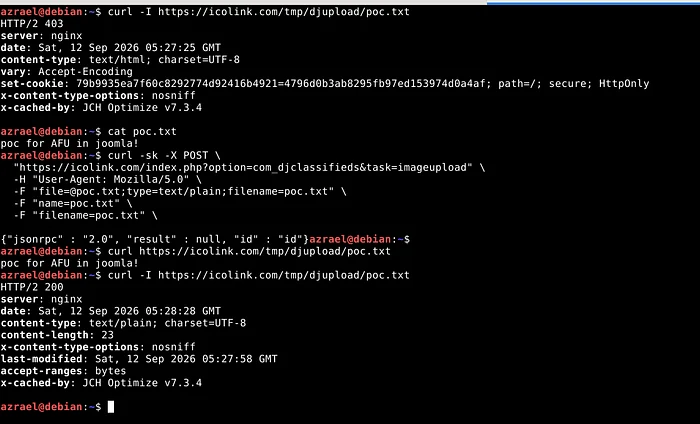
An unauthenticated request reaches the imageupload handler, which passes the submitted file to upload(). Validation is insufficient, so the attacker-controlled file is accepted and written to disk. The report gives the storage location as /tmp/djupload/shell.php. If the server interprets that path as PHP, the result is potential remote code execution; if it does not, the uploaded file stays inert.
Step 2: Balbooa Forms, unauthenticated upload through the form upload handler
The product structure, as the report describes it:
Joomla
 │
 └── Balbooa Forms
 │
 ├── Form Builder
 ├── Form Fields
 ├── Form Submissions
 ├── File Uploads
 ├── Integrations
A form built with the builder might contain, for example:
Form Builder
 │
 ├── Name
 ├── Email
 ├── Message
 └── File Upload
The failure sits in the file upload handling of such a form:
Unauthenticated Attacker
 │
 ▼
Sends an HTTP file upload request
 │
 ▼
Balbooa Joomla Forms
 │
 ▼
File Upload functionality
 │
 ▼
Upload handler processes the submitted file
 │
 ▼
Insufficient file validation
 │
 ▼
Attacker-controlled file is accepted
 │
 ▼
File is stored on the server
 │
 ▼
/images/baforms/uploads/form-*/shell.php
 │
 ▼
File becomes accessible through the web server
 │
 ▼
Server interprets the uploaded PHP file
 │
 ▼
Potential Remote Code Execution
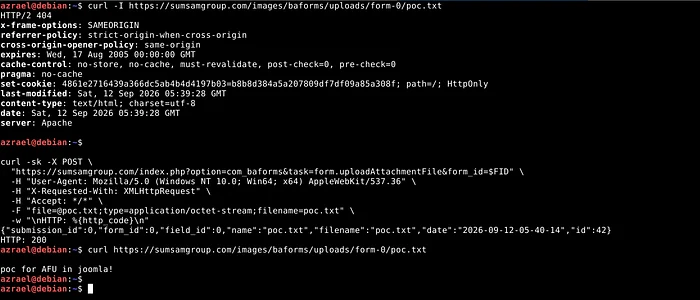
Here the stored path is /images/baforms/uploads/form-*/shell.php, and the report says the file becomes accessible through the web server. The report's chain then has the server interpret the uploaded PHP file, with potential remote code execution as the outcome.
Root cause
The defect in both extensions is the same: the upload handler does not properly restrict the type of file it accepts, so a file with a dangerous type, such as a PHP script, passes validation and is written to a location the web server can serve. In DJ-Classifieds this happens in upload(), reached through imageupload; in Balbooa Forms it happens in the upload handler behind the form's file upload field. The report does not show the validation code, so the exact check that fails is not described.
Why the existing defences did not stop it is only implied. Whether the file actually executes depends on server configuration, which is why the report hedges the code execution outcome as potential.
Impact
An unauthenticated attacker can upload an attacker-controlled file to the server in both products. The report's flows show the file at /tmp/djupload/shell.php for DJ-Classifieds and at /images/baforms/uploads/form-*/shell.php for Balbooa Forms, the latter reachable over the web. Where the server interprets the uploaded file, this can lead to remote code execution. Where it does not, the file remains inert, though it is still stored on the server.
The report does not assign a CVSS score or a severity rating, and does not state whether either issue was reported through a bug bounty programme or paid.
Fix
DJ-Classifieds: update the component to version 3.11.2 or higher. As an additional measure, configure the .htaccess file to block access to the upload directory.
Balbooa Forms: update to version 2.4.1 or higher.
Variants to test
- Upload a PHP file through any image or attachment field on a Joomla site running DJ-Classifieds below 3.11.2, without authenticating. A positive result is the file being accepted and stored on the server.
- Submit a PHP file through a Balbooa Forms file upload field on a site below 2.4.1, without authenticating. A positive result is the file being stored on the server and becoming accessible through the web server.
- Request the stored file over HTTP and check whether the server executes it rather than returning it as static content. A positive result is the server interpreting the uploaded script, which is the condition the report attaches to remote code execution.
- On a patched installation, repeat the same uploads against 3.11.2 and 2.4.1 respectively. A positive result would be acceptance of a dangerous file type on the fixed version, which the report does not claim.
- Where the extension cannot be updated immediately, apply the
.htaccessrestriction to the upload directory and retry retrieval of a previously stored file. A positive result is the request being blocked rather than served.
What happened, in plain words
Two add-ons for the website software Joomla had the same kind of flaw: they let a visitor upload a file, and they did not check properly what kind of file it was. A visitor who is not logged in at all could therefore send a file of their choosing, including a small program written in the PHP language, and the site would save it on its server. If the server is set up to run PHP files, that program can then run on the server. That is the worst case, and it is usually called remote code execution: someone else's code running on your machine.
A quick comparison. Think of a nightclub with a bouncer who is supposed to let in only people on the guest list. Here the bouncer glances at the name on the card and waves everyone through, so someone carrying a toolbox walks in with the guests. Whether that person can then do damage depends on what is inside the club: if the tools fit the locks, they can open doors.
The two affected products are:
- DJ-Classifieds, made by DJ-Extensions. It turns a Joomla site into an advertising or classifieds platform, where users publish items and create different types of listings. Think of a site like a local marketplace where people post adverts with a photo.
- Balbooa Joomla Forms, a drag and drop form builder. It lets an administrator build contact forms, feedback forms, online surveys and other forms without writing HTML by hand. Think of a form-building website where you drag a "Name" box and an "Email" box onto a page.
In both products the broken feature is the ordinary file upload that belongs to normal use: the image attached to a classified ad in DJ-Classifieds, and a file upload field in a Balbooa form. In both cases the part of the code that handles the upload accepts a file whose type it should have refused and saves it on the server; for Balbooa Forms the file is reachable through the web server.
The security community gives this kind of bug a name and a number. The class is CWE-434, Unrestricted Upload of File with Dangerous Type: the program accepts a file type that can be dangerous, such as a script, where it should only accept harmless types such as images. The two specific bugs are tracked as CVE-2026-61424 (DJ-Classifieds) and CVE-2026-56291 (Balbooa Forms). A CVE is a public catalogue entry: a unique identifier so that everyone, from vendors to scanners, talks about the same bug.
Setup
The report does not describe a lab, test accounts, roles or tooling. The only precondition it states is that the attacker is unauthenticated: both flows begin with an unauthenticated attacker sending an HTTP file upload request. "Unauthenticated" simply means not logged in, with no account and no password.
An HTTP request is the message your browser sends to a web server when you open a page or submit a form. It contains a method (such as GET to fetch something or POST to send something), a path, some headers (extra information such as the browser type) and sometimes a body, which is where an uploaded file travels. A file upload request is a POST whose body carries the file.
No request or response is reproduced in the report, so the exact endpoint paths, parameter names and headers are not given here. An endpoint is the specific address on a server that handles one action, for example the address that receives an uploaded image.
The affected and fixed versions are:
| Product | Impacted range | Fixed in |
|---|---|---|
| DJ-Classifieds (Joomla extension) | 1.0 through 3.11.1 | 3.11.2 |
| Balbooa Forms (Joomla extension) | all versions prior to 2.4.1 | 2.4.1 |
A Joomla extension is an add-on installed into Joomla, the same way a phone gets apps. Joomla itself is a content management system: software that runs a website and lets people publish pages without programming. The extension adds a feature, and the extension is where the bug lives.
Finding it
The reasoning is the same for both products. A user creates an ad and uploads an image for it, or fills in a form that has a file upload field. The upload handler checks the submitted file weakly, so the "image" can in fact be any file, including a PHP script. A user without privileges can therefore place files on the server and reach them publicly.
PHP is a programming language used to build many websites, including Joomla sites. A PHP script is a text file of PHP instructions. When a web server is configured to treat a file as PHP, it runs those instructions instead of showing the text to the visitor. That is the difference between a harmless stored file and code execution.
The report reduces the DJ-Classifieds path to this chain:
HTTP Request → imageupload → upload() → insufficient validation → attacker-controlled file uploaded → file stored → potential code execution depending on server configuration.
Read it left to right as a sequence of events:
HTTP Request: the attacker sends an upload over the web.imageupload: the name of the handler in DJ-Classifieds that receives image uploads. A handler is the piece of code that reacts to a particular request.upload(): the function inside that handler that does the actual saving. A function is a named block of code that performs one job.insufficient validation: the check on the file is too weak. Validation means inspecting what was submitted and deciding whether to accept it.attacker-controlled file uploaded: the file the attacker chose is accepted.file stored: it is written to disk on the server.potential code execution depending on server configuration: if the server is set up to run that file type, the attacker's code runs. Server configuration means the settings that decide how the server treats each kind of file.
Two things in that chain matter for judging severity. The file is stored, and whether that turns into code execution depends on the server configuration: if the server does not interpret the stored file, it remains inert. Inert means it just sits there as data and does nothing.
Exploitation
Step 1: DJ-Classifieds, unauthenticated upload through imageupload
The flow, as the report lays it out:
Unauthenticated Attacker
        │
        ▼
Sends an HTTP upload request
        │
        ▼
DJ-Classifieds `imageupload`
        │
        ▼
`upload()` processes the submitted file
        │
        ▼
Insufficient file validation
        │
        ▼
Attacker-controlled file is accepted
        │
        ▼
File is stored on the server
        │
        ▼
      ┌─────────────────────┐
      │                     │
      ▼                     ▼
File remains inert     Server interprets
                           the file
                              │
                              ▼
                   file in /tmp/djupload/shell.php
                              │
                              ▼
                   Potential Remote Code Execution
Line by line:
Unauthenticated Attacker: someone with no account on the site.Sends an HTTP upload request: they submit a file through the normal web upload.DJ-Classifieds imageupload: the request arrives at the extension's image upload handler.upload() processes the submitted file: the handler passes the file to the saving function.Insufficient file validation: the type check is too weak to stop a script.Attacker-controlled file is accepted: the file the attacker picked gets through.File is stored on the server: it is written to disk.- The diagram then splits into two outcomes. On the left,
File remains inert: the server does not run it. On the right,Server interprets the file: the server treats it as a program. file in /tmp/djupload/shell.php: the report gives this as the storage location./tmpis a temporary directory on a Linux server, anddjuploadis the folder named in the path.shell.phpis the name of the uploaded script. A shell in this context is a small program that lets an attacker run commands on the server.Potential Remote Code Execution: if the server runs that file, the attacker's code executes on the server.
An unauthenticated request reaches the imageupload handler, which passes the submitted file to upload(). Validation is insufficient, so the attacker-controlled file is accepted and written to disk. The report gives the storage location as /tmp/djupload/shell.php. If the server interprets that path as PHP, the result is potential remote code execution; if it does not, the uploaded file stays inert.
Step 2: Balbooa Forms, unauthenticated upload through the form upload handler
The product structure, as the report describes it:
Joomla
 │
 └── Balbooa Forms
 │
 ├── Form Builder
 ├── Form Fields
 ├── Form Submissions
 ├── File Uploads
 ├── Integrations
This is a map of the product. Joomla is the base website software, Balbooa Forms is installed inside it, and the extension has five parts:
- Form Builder: the drag and drop screen where an administrator assembles a form.
- Form Fields: the individual boxes on a form, such as a name box or an email box.
- Form Submissions: the stored answers people send in.
- File Uploads: the feature that lets a form accept a file from the visitor. This is the part with the bug.
- Integrations: connections to other services.
A form built with the builder might contain, for example:
Form Builder
 │
 ├── Name
 ├── Email
 ├── Message
 └── File Upload
This is just an example form: a name field, an email field, a message field and a file upload field. The point is that file upload is a normal, expected part of a Balbooa form, not an obscure extra. That is why the flaw matters: the feature is meant to be used by visitors.
The failure sits in the file upload handling of such a form:
Unauthenticated Attacker
 │
 ▼
Sends an HTTP file upload request
 │
 ▼
Balbooa Joomla Forms
 │
 ▼
File Upload functionality
 │
 ▼
Upload handler processes the submitted file
 │
 ▼
Insufficient file validation
 │
 ▼
Attacker-controlled file is accepted
 │
 ▼
File is stored on the server
 │
 ▼
/images/baforms/uploads/form-*/shell.php
 │
 ▼
File becomes accessible through the web server
 │
 ▼
Server interprets the uploaded PHP file
 │
 ▼
Potential Remote Code Execution
Line by line:
Unauthenticated Attacker: again, no account needed.Sends an HTTP file upload request: the attacker submits a file through the form.Balbooa Joomla Forms: the request reaches the extension.File Upload functionality: it is handled by the form's file upload feature.Upload handler processes the submitted file: the code that saves uploads takes over.Insufficient file validation: the type check is too weak.Attacker-controlled file is accepted: the chosen file gets through./images/baforms/uploads/form-*/shell.php: the report gives this as the storage path. The path contains a*where the report shows a wildcard.shell.phpis the uploaded script.File becomes accessible through the web server: the file sits in a folder the web server serves to visitors, so anyone can request it by URL.Server interprets the uploaded PHP file: the server runs it as a program.Potential Remote Code Execution: the attacker's code executes on the server.
Here the stored path is /images/baforms/uploads/form-*/shell.php, and the report says the file becomes accessible through the web server. The web root is the folder whose contents the web server publishes: anything inside it can be fetched with a normal browser request. The report's chain then has the server interpret the uploaded PHP file, with potential remote code execution as the outcome.
Root cause
The defect in both extensions is the same: the upload handler does not properly restrict the type of file it accepts, so a file with a dangerous type, such as a PHP script, passes validation and is written to a location the web server can serve. In DJ-Classifieds this happens in upload(), reached through imageupload; in Balbooa Forms it happens in the upload handler behind the form's file upload field. The report does not show the validation code, so the exact check that fails is not described.
A useful comparison: a passport check that only looks at the cover colour, not at the photo inside, will pass a forged document. The upload check here is similarly shallow: it does not establish what the file really is.
Why the existing defences did not stop it is only implied. Whether the file actually executes depends on server configuration, which is why the report hedges the code execution outcome as potential.
Impact
An unauthenticated attacker can upload an attacker-controlled file to the server in both products. The report's flows show the file at /tmp/djupload/shell.php for DJ-Classifieds and at /images/baforms/uploads/form-*/shell.php for Balbooa Forms, the latter reachable over the web. Where the server interprets the uploaded file, this can lead to remote code execution. Where it does not, the file remains inert, though it is still stored on the server.
The report itself only draws the line at stored, and potentially executed.
The report does not assign a CVSS score or a severity rating, and does not state whether either issue was reported through a bug bounty programme or paid. CVSS is a standard scoring system that turns the characteristics of a vulnerability into a number, so that teams can compare and prioritise.
Fix
DJ-Classifieds: update the component to version 3.11.2 or higher. As an additional measure, configure the .htaccess file to block access to the upload directory.
Balbooa Forms: update to version 2.4.1 or higher.
An update replaces the buggy code with the corrected code, which is why the fixed version numbers matter. .htaccess is a small configuration file used by the Apache web server. It can hold rules that apply to one folder, for example "do not serve any file from this directory". Blocking the upload directory means that even if a script gets saved there, a visitor cannot fetch it, so the server never gets the chance to run it.
Variants to test
These are the checks the report's reasoning suggests, written so that someone testing their own site can follow them. Only test systems you own or are authorised to test.
- Upload a PHP file through any image or attachment field on a Joomla site running DJ-Classifieds below 3.11.2, without authenticating. A positive result is the file being accepted and stored on the server.
- Submit a PHP file through a Balbooa Forms file upload field on a site below 2.4.1, without authenticating. A positive result is the file being stored on the server and becoming accessible through the web server.
- Request the stored file over HTTP and check whether the server executes it rather than returning it as static content. A positive result is the server interpreting the uploaded script, which is the condition the report attaches to remote code execution. Static content means a file the server hands over as-is, without running it.
- On a patched installation, repeat the same uploads against 3.11.2 and 2.4.1 respectively. A positive result would be acceptance of a dangerous file type on the fixed version, which the report does not claim.
- Where the extension cannot be updated immediately, apply the
.htaccessrestriction to the upload directory and retry retrieval of a previously stored file. A positive result is the request being blocked rather than served.
Glossary
- Apache: a widely used web server program; it reads
.htaccessfiles. - Attacker-controlled file: a file whose contents and name were chosen by the attacker, not by the site.
- Authentication: proving who you are, usually by logging in. Unauthenticated means not logged in.
- Code execution: a program's instructions being run by a computer. Remote code execution means the attacker's instructions run on someone else's server.
- Configuration: the settings that decide how software behaves, for example which file types a server runs.
- CVE: a public catalogue identifier for a specific vulnerability, so everyone refers to the same bug by the same name.
- CVSS: a standard scoring system that turns a vulnerability's characteristics into a number for comparison and prioritisation.
- CWE-434: the catalogue entry for Unrestricted Upload of File with Dangerous Type, the class both bugs belong to.
- Endpoint: the specific address on a server that handles one action.
- Extension: an add-on installed into a larger piece of software, such as Joomla, to add a feature.
- Function: a named block of code that performs one job.
- Handler: the piece of code that reacts to a particular request.
- Header: extra information attached to an HTTP request or response, such as the browser type.
- .htaccess: a per-folder configuration file for the Apache web server, able to block access to files in that folder.
- HTTP request: the message a browser sends to a web server to fetch a page or submit data.
- Inert: stored but not executed; it just sits there as data.
- Joomla: a content management system used to build and run websites.
- PHP: a programming language commonly used for websites, including Joomla sites.
- Remote code execution: an attacker's code running on a server they do not own.
- Server: the computer that stores a website and answers requests for it.
- Shell: a small program that lets an attacker run commands on a server.
- Static content: a file the server returns as-is, without running it.
- Unauthenticated: not logged in, with no account.
- Validation: inspecting submitted data and deciding whether to accept it.
- Web root: the folder whose contents a web server publishes to visitors.


