CVE-2026–66066 (KindaRails2Shell): Arbitrary File Read to RCE in Rails Active Storage via libvips
Rails Active Storage trusted a client-supplied content type and let libvips choose a decoder by sniffing only the first bytes of an uploaded file, while libmatio chose its parser from a different header field. A crafted file could therefore make HDF5 external storage read arbitrary server files into image pixels, and with the leaked secret key an attacker could sign new transformations and reach code execution.
 Published on medium.com
Cve
The full write-up lives on its author's site
It belongs to its author, so we link to it rather than copy it. The other two tabs are our own rewrites, checked against it.
Context
CVE-2026-66066, nicknamed KindaRails2Shell, is an arbitrary file read that escalates to remote code execution in Rails Active Storage when libvips is the variant processor. The affected component is Active Storage together with libvips, configured with variant_processor = :vips. Since Rails 7.0, any application running load_defaults 7.0 or later uses libvips as the default Active Storage image processor, so the default configuration is the one in scope.
The feature involved is the image upload and variant pipeline: a client uploads a file, Active Storage stores it as a blob, and later requests for representations (variants) run the blob through image_processing and libvips to produce resized or converted images. The report frames the bug as two separate trust failures stacking on top of each other: the point where Rails decides a blob "is an image", and the point where libvips decides which file-format parser to use. Underneath both sits a third failure: libvips and libmatio, the MAT-file library libvips delegates to, do not agree on how to read the same header.

Setup
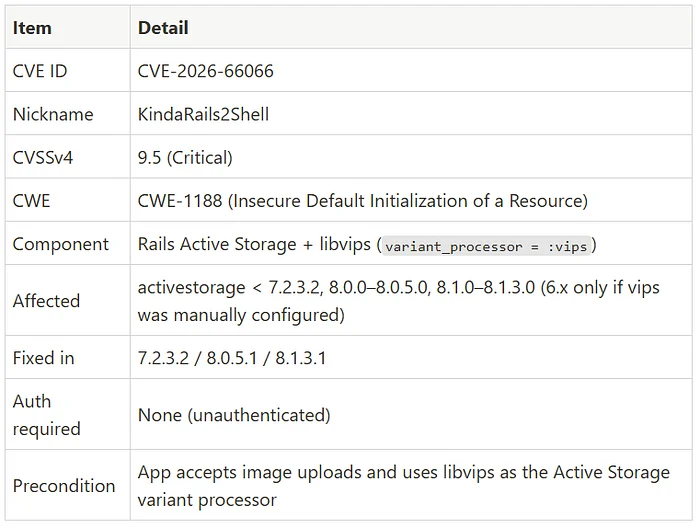
The report gives the following facts about the vulnerability:
| Item | Detail |
|---|---|
| CVE ID | CVE-2026-66066 |
| Nickname | KindaRails2Shell |
| CVSSv4 | 9.5 (Critical) |
| CWE | CWE-1188 (Insecure Default Initialization of a Resource) |
| Component | Rails Active Storage + libvips (variant_processor = :vips) |
| Affected | activestorage < [redacted], 8.0.0 to [redacted], 8.1.0 to [redacted] (6.x only if vips was manually configured) |
| Fixed in | [redacted] / [redacted] / [redacted] |
| Auth required | None (unauthenticated) |
| Precondition | App accepts image uploads and uses libvips as the Active Storage variant processor |
The only precondition is that the application accepts image uploads and uses libvips as the variant processor. No account or role is needed. The source walkthrough uses Rails 8.0.5, libvips 8.16.1, libmatio 1.5.28 and image_processing 1.14.0.
Finding it
The chain, as summarised in the report:
- The Direct Upload API stores the client-supplied
content_typewith zero validation. - Active Storage decides "this is an image" purely from that stored string; it never opens the file.
- The signed
variation_keyused to request a representation is verified independently of the blob ID, so a legitimate key issued for one blob can be replayed against another. - libvips picks its loader by sniffing the first 10 bytes of the file. libmatio, which actually parses MAT files, picks its format by reading bytes 124 to 125. A single crafted file can satisfy both checks differently: "MATLAB 5.0" for libvips, "MAT 7.3 / HDF5" for libmatio.
- MAT 7.3 is HDF5 under the hood, and HDF5 datasets support External Storage, a legitimate feature that lets a dataset's bytes come from an attacker-chosen path and offset on disk. libvips renders whatever comes back as pixel data.
- Arbitrary server files such as
/proc/self/environandconfig/master.keyget leaked as pixel values inside a normal-looking PNG. Once an attacker recoverssecret_key_basefrom that, they can sign a brand-new variation and reachKernel#spawn/Kernel#evalthroughimage_processing's method dispatch, giving full RCE.
Exploitation
Step 1: store an attacker-controlled content_type via direct upload
In Rails 8.0.5, ActiveStorage::DirectUploadsController takes the client's parameters and forwards them straight into blob creation:
class ActiveStorage::DirectUploadsController < ActiveStorage::BaseController def create blob = ActiveStorage::Blob.create_before_direct_upload!(**blob_args) render json: direct_upload_json(blob) end
private def blob_args params.expect(blob: [:filename, :byte_size, :checksum, :content_type, metadata: {}]) .to_h.symbolize_keys # [2] end
def create_before_direct_upload!(key: nil, filename:, byte_size:, checksum:, content_type: nil, metadata: nil, service_name: nil, record: nil) metadata = filter_metadata(metadata) create! key: key, filename: filename, byte_size: byte_size, checksum: checksum, content_type: content_type, metadata: metadata, service_name: service_name end
[1] and [2] accept content_type straight from the request. [3] writes it to the blob record without touching the actual bytes.
This matters because the direct-upload path skips the server-side sniffing step (the Marcel-based "unfurl" flow) that a normal multipart upload goes through. Uploading the exact same crafted file via a standard multipart attachment makes Rails re-identify it as MATLAB data before it ever reaches the image pipeline. Direct upload never runs that re-identification at all.
Once the blob exists, whether it is eligible for transformation is decided purely from the stored column:
def variant(transformations) if variable? variant_class.new(self, ActiveStorage::Variation.wrap(transformations).default_to(default_variant_transformations)) else raise ActiveStorage::InvariableError, "Can't transform blob with ID=#{id} and content_type=#{content_type}" endend
# Returns true if the variant processor can transform the blob (its content# type is in +ActiveStorage.variable_content_types+).def variable? ActiveStorage.variable_content_types.include?(content_type) # [4]end
[4] is a plain set-membership check against a string. No file is opened. A MAT/HDF5 payload registered as image/png sails straight into the image variant pipeline.
Step 2: replay a variation_key against a different blob
Requesting a variant needs two signed parameters: a blob_id and a variation_key. Rails verifies them independently:
module ActiveStorage::SetBlob extend ActiveSupport::Concern included do before_action :set_blob end
private def set_blob @blob = blob_scope.find_signed!(params[:signed_blob_id] || params[:signed_id]) # [5] rescue ActiveSupport::MessageVerifier::InvalidSignature head :not_found endend
class ActiveStorage::Representations::BaseController < ActiveStorage::BaseController include ActiveStorage::SetBlob before_action :set_representation
private def set_representation @representation = @blob.representation(params[:variation_key]).processed # [6] rescue ActiveSupport::MessageVerifier::InvalidSignature head :not_found endend
def decode(key) new ActiveStorage.verifier.verify(key, purpose: :variation) end
[5] checks the blob ID's signature. [6] and [7] separately check the variation key's signature. Nothing cross-checks that the key was actually issued for that blob. An attacker can grab any variation_key exposed by a legitimate representation URL from the same app and replay it against the signed ID of their own freshly-created direct-upload blob.
The important consequence: the file-read stage does not require secret_key_base at all.
Step 3: let libvips choose the decoder
Active Storage hands the tempfile path off to image_processing. The loader(page: 0) call reads as if it is picking a decoder, but it is not: it just stores options for whichever loader libvips ends up choosing on its own.
def process(file, format:) processor. source(file). loader(page: 0). # [8] convert(format). apply(operations). # [9] callend
image_processing 1.14.0's actual load logic:
def self.load_image(path_or_image, loader: nil, autorot: true, **options) if path_or_image.is_a?(::Vips::Image) image = path_or_image else path = path_or_image if loader image = ::Vips::Image.public_send(:"#{loader}load", path, **options) else options = Utils.select_valid_loader_options(path, options) image = ::Vips::Image.new_from_file(path, **options) end end image = image.autorot if autorot && !options.key?(:autorotate) imageend
loader is nil, so [12] leaves the choice entirely to libvips's own file sniffers. This is the point where "what Rails believes the file is" and "what libvips decides the file is" fully diverge.
Step 4: exploit the disagreement between libvips and libmatio
In libvips 8.16.1, matload is explicitly flagged as untrusted:
static voidvips_foreign_load_mat_class_init(VipsForeignLoadMatClass *class){ operation_class->flags |= VIPS_OPERATION_UNTRUSTED; foreign_class->suffs = vips__mat_suffs; load_class->is_a = vips__mat_ismat;
Vulnerable Active Storage releases never actually used that flag to block the loader. The sniffer behind it is minimal:
intvips__mat_ismat(const char *filename){ unsigned char buf[15];
if (vips__get_bytes(filename, buf, 10) == 10 && vips_isprefix("MATLAB 5.0", (char *) buf)) // [15] return 1; return 0;}
[15]: if the first 10 bytes start with "MATLAB 5.0", libvips commits to matload. A genuine MAT 7.3 file's header text actually reads "MATLAB 7.3 MAT-file", so it would fail this exact check; as far as libvips is concerned, this file looks like old-style MAT 5.0, nothing more.
The library that actually parses the content, libmatio (1.5.28), does not look at that descriptive text at all. It reads a fixed version field at bytes 124 to 125:
enum mat_ft{ MAT_FT_MAT73 = 0x0200, MAT_FT_MAT5 = 0x0100, MAT_FT_MAT4 = 0x0010, MAT_FT_UNDEFINED = 0};
Mat_Open(const char *matname, int mode){ bytesread += fread(mat->header, 1, 116, fp); mat->header[116] = '\0'; bytesread += fread(mat->subsys_offset, 1, 8, fp); bytesread += 2 * fread(&tmp2, 2, 1, fp); bytesread += fread(&tmp, 1, 2, fp);
if ( 128 == bytesread ) { mat->byteswap = -1; if ( tmp == 0x4d49 ) mat->byteswap = 0; else if ( tmp == 0x494d ) { mat->byteswap = 1; Mat_int16Swap(&tmp2); } mat->version = (int)tmp2; // [17] <- read from bytes 124–125 if ( (mat->version == 0x0100 || mat->version == 0x0200) && -1 != mat->byteswap ) { mat->bof = ftello((FILE *)mat->fp); mat->next_index = 0; } else { mat->version = 0; } }
[17] decides the actual parsing path:
static intReadData(mat_t *mat, matvar_t *matvar){ if ( mat->version == MAT_FT_MAT5 ) return Mat_VarRead5(mat, matvar);#if defined(MAT73) && MAT73 else if ( mat->version == MAT_FT_MAT73 ) return Mat_VarRead73(mat, matvar); #endif else if ( mat->version == MAT_FT_MAT4 ) return Mat_VarRead4(mat, matvar); return MATIO_E_FAIL_TO_IDENTIFY;}
Put the two together:
- libvips commits to
matloadif the first 10 bytes read"MATLAB 5.0". - libmatio commits to the HDF5-backed
Mat_VarRead73path if bytes 124 to 125 read0x0200.
A single file where the front says "MATLAB 5.0" and bytes 124 to 125 say 0x0200 satisfies libvips's gate while still landing in libmatio's HDF5 parser. This works because HDF5 explicitly reserves up to a 512-byte "userblock" at the start of the file for exactly this kind of prefix data. The attacker plants a fake MAT 5.0 header text in that userblock, then appends a real HDF5 superblock right after it.
Step 5: turn HDF5 External Storage into an arbitrary file read
MAT 7.3 files are HDF5 containers. HDF5 datasets support External Storage, a legitimate, spec-compliant feature where a dataset's actual values live in a separate file, at a caller-specified path and offset, rather than inside the container itself. The feature is fine in isolation; the problem is that here the attacker fully controls the dataset definition, and therefore controls which file and offset get read.
libmatio's actual HDF5 read call:
static intMat_H5ReadData(hid_t dset_id, hid_t h5_type, hid_t mem_space, hid_t dset_space, int isComplex, void *data){ herr_t herr; if ( !isComplex ) { herr = H5Dread(dset_id, h5_type, mem_space, dset_space, H5P_DEFAULT, data); if ( herr < 0 ) { return MATIO_E_GENERIC_READ_ERROR; }
There is no H5Pget_external_count() check before [19]: nothing verifies whether this dataset is even supposed to reference external storage before HDF5 goes and reads it. The runtime resolves the external reference and copies bytes straight from the attacker-chosen file into the MAT variable's data buffer. libvips then treats that buffer as pixel data, encodes it as PNG (or whatever format was requested), and Active Storage serves it back as a normal representation.
End to end: arbitrary file on disk, to pixel values, to PNG, to HTTP response.
Variants are not required to trigger the read
The advisory is explicit that generating variants is not a separate requirement. Active Storage also calls Vips::Image.new_from_file during image analysis, which runs automatically after a blob is attached, with no variant request needed. In that path, libmatio ends up reading external bytes while computing the dimensions of an empty array, and those bytes can surface as the reported width/height metadata instead of pixel values. That is lower bandwidth per request, but it breaks the assumption that "if we never render a variant, we're safe".
Step 6: from file read to RCE
Arbitrary file read alone is enough to pull SECRET_KEY_BASE out of /proc/self/environ. Once an attacker has that, they can derive the Active Storage verifier key and sign brand-new variations instead of just replaying stolen ones, which means they can request arbitrary transformations, not just the ones already exposed in the app.
image_processing 1.14.0's Chainable#apply:
def apply(operations) operations.inject(self) do |builder, (name, argument)| if argument == true || argument == nil builder.public_send(name) elsif argument.is_a?(Array) builder.public_send(name, *argument) elsif argument.is_a?(Hash) builder.public_send(name, **argument) else builder.public_send(name, argument) end endend
[22]: the transformation's name is passed directly into public_send. If name is "send", the first element of the array becomes a second-order method call, reaching private methods like Kernel#spawn or Kernel#eval.
These JSON-compatible shapes are enough for code execution:
{"send":["spawn","/bin/sh","-c","id"]}{"send":["eval","File.write('/tmp/kr2s', %x{id})"]}
The asymmetry worth noting: :mini_magick transformations go through validate_transformation, which checks method names. :vips transformations do not get the same check. That specific gap is tracked separately in Rails PR rails/rails#56995; it is a distinct bug from the MAT/HDF5 header confusion, but chained together they turn file read into read secrets, forge signature, RCE as one continuous path. Execution happens while the processing pipeline is still being built, so even if the final HTTP response comes back as a 500, the command has already run.
Full attack chain
As a plain-text summary:
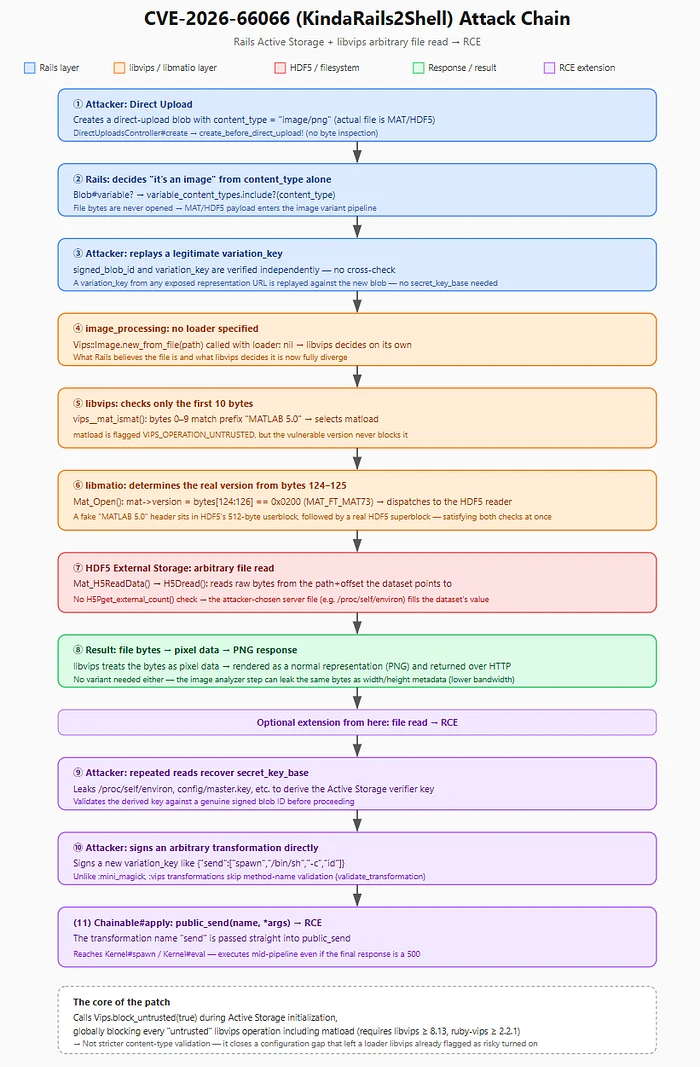
[Attacker] [Rails: stores content_type only, no byte inspection] [Rails: blob ID / variation_key verified independently, no cross-check] [image_processing: no loader specified, calls Vips.new_from_file] [libvips: "MATLAB 5.0" prefix matches -> selects matload] [libmatio: MAT_FT_MAT73 (0x0200) -> dispatches to HDF5 reader] [HDF5: reads attacker-chosen file via External Storage] [Returned to client as a normal PNG representation] | +[Attacker derives the Active Storage verifier key] [image_processing Chainable#apply: public_send(name, *args)]
Root cause
The root cause is a stack of trust decisions that never meet in the middle. Rails trusts a client-supplied string to decide that a blob is an image, and the direct-upload path never re-identifies the bytes. The variation key is verified without being bound to the blob it is used against, so a key from any legitimate representation URL can be replayed. libvips then picks its loader from the first 10 bytes, while libmatio picks its parser from bytes 124 to 125, and the HDF5 userblock makes it possible to satisfy both with one file. Finally, HDF5 External Storage lets the dataset definition name an arbitrary path and offset, and libmatio reads it without checking H5Pget_external_count() first.
The existing defence that should have stopped this is the VIPS_OPERATION_UNTRUSTED flag on matload. libvips had already marked the loader as untrusted, but vulnerable Active Storage releases never used that flag to block the loader. The second gap is in image_processing: :mini_magick transformations are checked by validate_transformation, while :vips transformations are not, which is what allows public_send to reach Kernel#spawn and Kernel#eval.
Impact
An unauthenticated attacker against an application that accepts image uploads and uses libvips as the variant processor can read arbitrary files from the server, including /proc/self/environ and config/master.key, and receive them as pixel values inside a normal-looking PNG. The same read can also surface through image analysis metadata without any variant request. Recovering secret_key_base lets the attacker derive the Active Storage verifier key, sign new variations, and reach Kernel#spawn / Kernel#eval through image_processing's method dispatch, giving remote code execution. Execution happens while the pipeline is being built, so a 500 response does not mean the command did not run.
The report rates this 9.5 Critical (CVSSv4). The file-read stage needs no secret at all; only the escalation to arbitrary transformations requires the recovered key. Applications using MiniMagick instead of :vips as the variant processor are not exposed to this specific attack path.
Fix
The v8.0.5 to v8.0.5.1 diff does not add a content-type check. It loads a new initializer that flips a switch libvips already exposed:
+require "active_storage/vips"
diff --git a/activestorage/lib/active_storage/vips.rb (new file)+if ActiveStorage::VIPS_AVAILABLE+ begin+ require "image_processing/vips"+ rescue LoadError+ end++ unless Vips.respond_to?(:block_untrusted) # [20]+ raise <<~ERROR.squish+ libvips's unfuzzed operations are not safe to use with untrusted content, and Active Storage+ cannot disable them. Disabling them requires libvips 8.13 or later and ruby-vips 2.2.1 or+ later. Please upgrade libvips and ruby-vips, or remove the ruby-vips gem from your Gemfile.+ ERROR+ end++ Vips.block_untrusted(true) # [21]+end
[20] makes the app refuse to boot if the installed ruby-vips/libvips pair does not support the blocking API, with no silent fallback to the vulnerable behaviour. [21] blocks every operation libvips itself has flagged VIPS_OPERATION_UNTRUSTED, globally, at boot. Since matload already carried that flag, this single call closes the path before a crafted file ever reaches libmatio.
The fix is not "check the content harder". It is "stop leaving a loader enabled that upstream already told you not to trust with untrusted input".
Remediation steps from the report:
- Upgrade Active Storage to [redacted] / [redacted] / [redacted] or later.
- Run libvips 8.13 or later and ruby-vips 2.2.1 or later alongside the patch. Without them,
Vips.block_untrusted(true)is not available and the patched Active Storage will refuse to boot rather than run unprotected. - Rails 7.1 and earlier, and 6.x, have no official backport; a major version upgrade is the only vendor-supported fix. If that is not immediately feasible, mitigate with WAF rules or a backported patch in the meantime.
- Rotate
secret_key_base,RAILS_MASTER_KEY, and any service credentials the app process could read, regardless of when you patch, because the read itself could already have happened before the upgrade.
A positive result is a blob that reaches the variant pipeline without the server re-identifying the bytes.
A positive result is a processed representation for the second blob rather than a 404.
A positive result is the MAT loader being chosen for a file Rails believes is an image.
A positive result is libmatio dispatching to Mat_VarRead73 while libvips still accepts the file.
A positive result is that file's bytes appearing in the returned image or in the reported width/height metadata.
A positive result is external bytes surfacing in the metadata, confirming that skipping variants is not a mitigation.
A positive result is a second-order call reaching a private method such as Kernel#spawn or Kernel#eval, even if the HTTP response is a 500.
A negative result there is expected and confirms the exposure is specific to the vips path.
What happened, in plain words
A security researcher found a way to make a Ruby on Rails web application hand over files from its own server, and then to run commands on that server, without ever logging in. The trick relies on the way Rails handles uploaded images. The vulnerability is tracked as CVE-2026-66066 and nicknamed KindaRails2Shell. It was rated 9.5 Critical on the CVSSv4 scale, which is a standard way of scoring how serious a security flaw is.
To follow this, you need a few ideas explained from zero.
- A web application is a program that runs on a server (a computer somewhere in a data centre) and answers requests from browsers. When you upload a profile picture, the application receives the file and stores it.
- Rails (Ruby on Rails) is a popular toolkit for building web applications. Many sites you use are built with it.
- Active Storage is the part of Rails that handles uploaded files. It stores each upload as a record called a blob (think of a blob as a labelled box in a warehouse: the box has a label describing what is inside, and the actual contents are kept separately).
- libvips is a separate program library that opens image files and can resize or convert them. Rails asks libvips to do that work when a site needs a smaller version of an uploaded picture.
- A variant is such a derived version: the thumbnail, the resized copy, the converted format. When a page shows a small version of your photo, the application generated a variant.
- Remote code execution (RCE) means an attacker can make the server run commands of their choosing. It is the most severe outcome in this kind of report, because the attacker effectively gains control of the machine.
- Arbitrary file read means an attacker can ask the server to hand back the contents of any file on its disk, not just the ones meant to be public.
The report describes the bug as two separate trust failures stacking on top of each other: the point where Rails decides a blob "is an image", and the point where libvips decides which file-format parser to use. Underneath both sits a third failure: libvips and libmatio, the MAT-file library libvips delegates to, do not agree on how to read the same header. A parser is the piece of software that reads a file's internal structure; a header is the first part of a file, which usually describes what kind of file it is.
The facts at a glance
The report gives the following facts about the vulnerability:
| Item | Detail |
|---|---|
| CVE ID | CVE-2026-66066 |
| Nickname | KindaRails2Shell |
| CVSSv4 | 9.5 (Critical) |
| CWE | CWE-1188 (Insecure Default Initialization of a Resource) |
| Component | Rails Active Storage + libvips (variant_processor = :vips) |
| Affected | activestorage < [redacted], 8.0.0 to [redacted], 8.1.0 to [redacted] (6.x only if vips was manually configured) |
| Fixed in | [redacted] / [redacted] / [redacted] |
| Auth required | None (unauthenticated) |
| Precondition | App accepts image uploads and uses libvips as the Active Storage variant processor |
A CVE is a public catalogue number for a known security flaw, so people can refer to the same bug unambiguously. CWE-1188 is a category label meaning the software shipped with an unsafe default setting. Unauthenticated means the attacker does not need an account, a password or any role on the site: anyone who can reach the upload feature can try.
The only precondition is that the application accepts image uploads and uses libvips as the variant processor. Since Rails 7.0, any application running load_defaults 7.0 or later uses libvips as the default Active Storage image processor, so the default configuration is the one in scope. In other words, a site does not have to opt in to anything unusual; the standard modern setup is enough.
The source walkthrough uses Rails 8.0.5, libvips 8.16.1, libmatio 1.5.28 and image_processing 1.14.0. image_processing is a small Ruby library that sits between Rails and libvips and translates requests like "resize to 100 pixels" into libvips operations.
How the researcher found it
The chain, as summarised in the report:
- The Direct Upload API stores the client-supplied
content_typewith zero validation. - Active Storage decides "this is an image" purely from that stored string; it never opens the file.
- The signed
variation_keyused to request a representation is verified independently of the blob ID, so a legitimate key issued for one blob can be replayed against another. - libvips picks its loader by sniffing the first 10 bytes of the file. libmatio, which actually parses MAT files, picks its format by reading bytes 124 to 125. A single crafted file can satisfy both checks differently: "MATLAB 5.0" for libvips, "MAT 7.3 / HDF5" for libmatio.
- MAT 7.3 is HDF5 under the hood, and HDF5 datasets support External Storage, a legitimate feature that lets a dataset's bytes come from an attacker-chosen path and offset on disk. libvips renders whatever comes back as pixel data.
- Arbitrary server files such as
/proc/self/environandconfig/master.keyget leaked as pixel values inside a normal-looking PNG. Once an attacker recoverssecret_key_basefrom that, they can sign a brand-new variation and reachKernel#spawn/Kernel#evalthroughimage_processing's method dispatch, giving full RCE.
Some of those terms need unpacking before the steps make sense.
- An API is a defined way for one program to talk to another over the network. The Direct Upload API is the set of addresses and rules a browser uses to send a file straight to storage.
content_typeis a short text label such asimage/pngortext/plainthat says what kind of data a file holds. It is normally just a claim; the bytes themselves are the reality.- A signed value is a piece of data with a cryptographic stamp attached, so the server can tell it was produced by the server and not invented by the visitor. Think of a wax seal on an envelope: the recipient can check the seal without knowing who carried the envelope.
variation_keyis such a signed value describing which transformation (for example, a resize) is being requested.secret_key_baseis the master secret a Rails application uses to produce those stamps. Whoever holds it can mint valid stamps for anything./proc/self/environis a special file on Linux that shows the environment variables of the running process, which often include secrets.config/master.keyis a file Rails uses to decrypt its stored credentials.- MAT is a file format used by MATLAB, a maths and engineering program. HDF5 is a container format for large scientific datasets. MAT 7.3 files are HDF5 files with MATLAB conventions on top.
- Pixel values are the colour numbers that make up an image. If you can make a file's bytes become pixel colours, you can send those bytes back to yourself as a picture.
Step 1: store an attacker-controlled content_type via direct upload
In Rails 8.0.5, ActiveStorage::DirectUploadsController takes the client's parameters and forwards them straight into blob creation:
class ActiveStorage::DirectUploadsController < ActiveStorage::BaseController def create blob = ActiveStorage::Blob.create_before_direct_upload!(**blob_args) render json: direct_upload_json(blob) end
Line by line: this defines a class called ActiveStorage::DirectUploadsController, which is the piece of code that answers direct-upload requests. The create method is what runs when a browser asks to create a new upload. It calls ActiveStorage::Blob.create_before_direct_upload! with the arguments collected by blob_args, and then replies to the browser with a JSON description of the new blob. JSON is a plain-text data format that programs use to exchange structured information.
private def blob_args params.expect(blob: [:filename, :byte_size, :checksum, :content_type, metadata: {}]) .to_h.symbolize_keys # [2] end
This private method builds the argument list. params holds whatever the browser sent. expect picks out the blob section and allows exactly these fields: filename, byte_size, checksum, content_type and a free-form metadata hash. to_h turns it into a plain hash and symbolize_keys makes the field names usable as Ruby symbols. The point to notice is that content_type is on the allowed list, so whatever the browser claims becomes an accepted input.
def create_before_direct_upload!(key: nil, filename:, byte_size:, checksum:, content_type: nil, metadata: nil, service_name: nil, record: nil) metadata = filter_metadata(metadata) create! key: key, filename: filename, byte_size: byte_size, checksum: checksum, content_type: content_type, metadata: metadata, service_name: service_name end
This method takes the same fields and writes them into a new database record with create!. The content_type value goes straight into the record. Nothing here opens the uploaded file to check whether the label is true.
[1] and [2] accept content_type straight from the request. [3] writes it to the blob record without touching the actual bytes.
Why does that matter? Because the direct-upload path skips the server-side sniffing step (the Marcel-based "unfurl" flow) that a normal multipart upload goes through. Sniffing means looking at the actual bytes of a file to work out what it really is, rather than trusting the label. Marcel is the Ruby library Rails uses for that sniffing. A multipart upload is the ordinary browser form upload where the file is sent as one part of a larger form submission. Uploading the exact same crafted file via a standard multipart attachment makes Rails re-identify it as MATLAB data before it ever reaches the image pipeline. Direct upload never runs that re-identification at all. So the attacker chooses the label, and the label is the only thing anyone checks.
Once the blob exists, whether it is eligible for transformation is decided purely from the stored column:
def variant(transformations) if variable? variant_class.new(self, ActiveStorage::Variation.wrap(transformations).default_to(default_variant_transformations)) else raise ActiveStorage::InvariableError, "Can't transform blob with ID=#{id} and content_type=#{content_type}" endend
This method is what a request for a derived image calls. If variable? returns true, it builds a variation object describing the requested transformation. If not, it raises an error saying the blob cannot be transformed, and the message includes the blob's ID and its stored content type.
# Returns true if the variant processor can transform the blob (its content# type is in +ActiveStorage.variable_content_types+).def variable? ActiveStorage.variable_content_types.include?(content_type) # [4]end
variable? asks one question: is the stored content_type string in the list of types that the variant processor is allowed to transform? The comment above it says exactly that. [4] is a plain set-membership check against a string. No file is opened. A MAT/HDF5 payload registered as image/png sails straight into the image variant pipeline.
Why this step was taken: the attacker needs Rails to believe a non-image is an image. The cheapest way to achieve that is to find the one upload route that records the label without verifying it, and use it.
Step 2: replay a variation_key against a different blob
Requesting a variant needs two signed parameters: a blob_id and a variation_key. Rails verifies them independently:
module ActiveStorage::SetBlob extend ActiveSupport::Concern included do before_action :set_blob end
This module is mixed into controllers that deal with a single blob. The included do ... end block registers set_blob as a before_action, meaning it runs automatically before the controller's own action. Think of it as a doorman who checks one ticket before anyone gets to the desk.
private def set_blob @blob = blob_scope.find_signed!(params[:signed_blob_id] || params[:signed_id]) # [5] rescue ActiveSupport::MessageVerifier::InvalidSignature head :not_found endend
set_blob takes the signed blob identifier from the request parameters and asks Rails to find the matching blob, verifying the signature in the process. If the signature is invalid, the rescue catches the error and replies with a bare 404 Not Found. [5] is the signature check for the blob ID.
class ActiveStorage::Representations::BaseController < ActiveStorage::BaseController include ActiveStorage::SetBlob before_action :set_representation
This controller handles requests for representations, which is the general name for derived versions of a blob. It includes the blob-checking module above, and adds a second before-action, set_representation, which runs after the blob has been found.
private def set_representation @representation = @blob.representation(params[:variation_key]).processed # [6] rescue ActiveSupport::MessageVerifier::InvalidSignature head :not_found endend
set_representation takes the variation_key from the request, asks the blob for that representation, and marks it to be processed. If the key's signature is invalid, it again replies 404. [6] is the signature check for the variation key.
def decode(key) new ActiveStorage.verifier.verify(key, purpose: :variation) end
This is the code that actually verifies a variation key. It hands the key to the application's verifier, stating that the key is meant for the :variation purpose. If the stamp is genuine, the verifier returns the transformation details inside; if not, it raises an error.
[5] checks the blob ID's signature. [6] and [7] separately check the variation key's signature. Nothing cross-checks that the key was actually issued for that blob. An attacker can grab any variation_key exposed by a legitimate representation URL from the same app and replay it against the signed ID of their own freshly-created direct-upload blob.
A useful comparison: imagine a concert where the door staff check that your ticket is genuine and separately check that your name is on the guest list, but never check that the ticket was issued for you. A real ticket from any concert in the same venue gets you in.
The important consequence: the file-read stage does not require secret_key_base at all. The attacker does not need to forge anything; a key that the application itself handed out earlier is enough.
Step 3: let libvips choose the decoder
Active Storage hands the tempfile path off to image_processing. The loader(page: 0) call reads as if it is picking a decoder, but it is not: it just stores options for whichever loader libvips ends up choosing on its own.
def process(file, format:) processor. source(file). loader(page: 0). # [8] convert(format). apply(operations). # [9] callend
This method builds a chain of operations. source(file) says which file to work on. loader(page: 0) records a loader option, with page: 0 meaning the first page for formats that have pages. convert(format) says which output format is wanted. apply(operations) applies the requested transformations. call finally runs the whole chain. The comment markers [8] and [9] point at the loader option and the transformation application respectively.
image_processing 1.14.0's actual load logic:
def self.load_image(path_or_image, loader: nil, autorot: true, **options) if path_or_image.is_a?(::Vips::Image) image = path_or_image else path = path_or_image if loader image = ::Vips::Image.public_send(:"#{loader}load", path, **options) else options = Utils.select_valid_loader_options(path, options) image = ::Vips::Image.new_from_file(path, **options) end end image = image.autorot if autorot && !options.key?(:autorotate) imageend
Line by line: if the input is already a libvips image object, it is used as is. Otherwise the path is kept. If a loader name was supplied, the code calls the matching libvips function by name, for example pngload for PNG. If no loader was supplied, it filters the options and calls Vips::Image.new_from_file, which lets libvips inspect the file and decide for itself. Finally, if autorotation is enabled and not overridden, the image is rotated according to its metadata. Autorotate means applying the orientation stored in a photo so it is not sideways.
loader is nil, so [12] leaves the choice entirely to libvips's own file sniffers. This is the point where "what Rails believes the file is" and "what libvips decides the file is" fully diverge. Rails believes the label; libvips believes the bytes. The attacker needs those two beliefs to disagree in a controlled way.
Step 4: exploit the disagreement between libvips and libmatio
In libvips 8.16.1, matload is explicitly flagged as untrusted:
static voidvips_foreign_load_mat_class_init(VipsForeignLoadMatClass *class){ operation_class->flags |= VIPS_OPERATION_UNTRUSTED; foreign_class->suffs = vips__mat_suffs; load_class->is_a = vips__mat_ismat;
This is C code that sets up the MAT loader. The middle line adds the VIPS_OPERATION_UNTRUSTED flag to the operation's flags. In plain terms, libvips itself is saying: this loader is not safe to run on files from people you do not trust. The other two lines register the file suffixes the loader handles and the function used to recognise a MAT file.
Vulnerable Active Storage releases never actually used that flag to block the loader. The warning existed; nobody acted on it. The sniffer behind it is minimal:
intvips__mat_ismat(const char *filename){ unsigned char buf[15];
This declares the recognition function and a 15-byte buffer to hold the start of the file.
if (vips__get_bytes(filename, buf, 10) == 10 && vips_isprefix("MATLAB 5.0", (char *) buf)) // [15] return 1; return 0;}
It reads the first 10 bytes of the file. If it got 10 bytes and those bytes start with the text "MATLAB 5.0", it returns 1, meaning "yes, this is a MAT file". Otherwise it returns 0. [15] marks the prefix comparison.
[15]: if the first 10 bytes start with "MATLAB 5.0", libvips commits to matload. A genuine MAT 7.3 file's header text actually reads "MATLAB 7.3 MAT-file", so it would fail this exact check; as far as libvips is concerned, this file looks like old-style MAT 5.0, nothing more. That detail is the opening: the attacker can write the old text at the front while the rest of the file is something newer.
The library that actually parses the content, libmatio (1.5.28), does not look at that descriptive text at all. It reads a fixed version field at bytes 124 to 125:
enum mat_ft{ MAT_FT_MAT73 = 0x0200, MAT_FT_MAT5 = 0x0100, MAT_FT_MAT4 = 0x0010, MAT_FT_UNDEFINED = 0};
This defines named constants for the MAT format versions. 0x0200 means MAT 7.3, 0x0100 means MAT 5, 0x0010 means MAT 4, and zero means unknown. The 0x prefix means the numbers are written in hexadecimal, a base-16 way of writing numbers that programmers use a lot.
Mat_Open(const char *matname, int mode){ bytesread += fread(mat->header, 1, 116, fp); mat->header[116] = '\0'; bytesread += fread(mat->subsys_offset, 1, 8, fp); bytesread += 2 * fread(&tmp2, 2, 1, fp); bytesread += fread(&tmp, 1, 2, fp);
Mat_Open is the function that opens a MAT file. It reads the file in fixed chunks and counts how many bytes it has consumed. First 116 bytes into a header buffer, then a terminator. Then 8 bytes of subsystem offset. Then 2 bytes into tmp2, counted as two bytes read. Then 2 more bytes into tmp. The running total bytesread is how the code knows it has reached the expected 128-byte header.
if ( 128 == bytesread ) { mat->byteswap = -1; if ( tmp == 0x4d49 ) mat->byteswap = 0; else if ( tmp == 0x494d ) { mat->byteswap = 1; Mat_int16Swap(&tmp2); } mat->version = (int)tmp2; // [17] <- read from bytes 124–125 if ( (mat->version == 0x0100 || mat->version == 0x0200) && -1 != mat->byteswap ) { mat->bof = ftello((FILE *)mat->fp); mat->next_index = 0; } else { mat->version = 0; } }
If exactly 128 bytes were read, the code works out the byte order from the two bytes in tmp: 0x4d49 means one order, 0x494d means the other, in which case the two-byte version value is swapped. Byte order is the question of whether a multi-byte number is stored most significant byte first or last; getting it wrong turns a number into nonsense. Then mat->version is set from tmp2, which came from bytes 124 and 125. [17] marks that assignment. If the version is either 0x0100 or 0x0200 and the byte order was recognised, the file position is recorded and parsing continues; otherwise the version is reset to zero, meaning "not a MAT file I understand".
[17] decides the actual parsing path:
static intReadData(mat_t *mat, matvar_t *matvar){ if ( mat->version == MAT_FT_MAT5 ) return Mat_VarRead5(mat, matvar);#if defined(MAT73) && MAT73 else if ( mat->version == MAT_FT_MAT73 ) return Mat_VarRead73(mat, matvar); #endif else if ( mat->version == MAT_FT_MAT4 ) return Mat_VarRead4(mat, matvar); return MATIO_E_FAIL_TO_IDENTIFY;}
ReadData is the function that reads a variable's data. It looks at the version recorded earlier and calls the matching reader: Mat_VarRead5 for MAT 5, Mat_VarRead73 for MAT 7.3 if support was compiled in, Mat_VarRead4 for MAT 4. If none match, it returns an error code saying it could not identify the format. So the two bytes at positions 124 and 125 decide which parser runs.
Put the two together:
- libvips commits to
matloadif the first 10 bytes read"MATLAB 5.0". - libmatio commits to the HDF5-backed
Mat_VarRead73path if bytes 124 to 125 read0x0200.
A single file where the front says "MATLAB 5.0" and bytes 124 to 125 say 0x0200 satisfies libvips's gate while still landing in libmatio's HDF5 parser. This works because HDF5 explicitly reserves up to a 512-byte "userblock" at the start of the file for exactly this kind of prefix data. A userblock is a reserved area at the beginning of an HDF5 file where an application may put its own bytes; the real HDF5 structure starts after it. The attacker plants a fake MAT 5.0 header text in that userblock, then appends a real HDF5 superblock right after it. A superblock is the HDF5 file's own table of contents at its start.
Why this step was taken: the attacker needs one file that two different programs will classify in two different ways. Finding two checks that look at different byte positions is what makes that possible.
Step 5: turn HDF5 External Storage into an arbitrary file read
MAT 7.3 files are HDF5 containers. HDF5 datasets support External Storage, a legitimate, spec-compliant feature where a dataset's actual values live in a separate file, at a caller-specified path and offset, rather than inside the container itself. A dataset is a named block of data inside an HDF5 file, roughly like a table. External Storage is the feature that says "the numbers for this dataset are not here; read them from that other file, starting at that position". The feature is fine in isolation; the problem is that here the attacker fully controls the dataset definition, and therefore controls which file and offset get read.
libmatio's actual HDF5 read call:
static intMat_H5ReadData(hid_t dset_id, hid_t h5_type, hid_t mem_space, hid_t dset_space, int isComplex, void *data){ herr_t herr; if ( !isComplex ) { herr = H5Dread(dset_id, h5_type, mem_space, dset_space, H5P_DEFAULT, data); if ( herr < 0 ) { return MATIO_E_GENERIC_READ_ERROR; }
This function reads a dataset's data into memory. If the data is not complex, it calls H5Dread, the HDF5 library's read function, passing the dataset, the data type, the memory and dataset spaces, default properties and the destination buffer. If the read fails, it returns a generic read error. The important part is what is not there.
There is no H5Pget_external_count() check before [19]: nothing verifies whether this dataset is even supposed to reference external storage before HDF5 goes and reads it. H5Pget_external_count() is the HDF5 function that would report how many external files a dataset references; calling it first would let the code refuse datasets that point outside the container. The runtime resolves the external reference and copies bytes straight from the attacker-chosen file into the MAT variable's data buffer. libvips then treats that buffer as pixel data, encodes it as PNG (or whatever format was requested), and Active Storage serves it back as a normal representation.
End to end: arbitrary file on disk, to pixel values, to PNG, to HTTP response. HTTP is the protocol browsers and servers use to exchange requests and responses; a response is what the server sends back, including the status code and the body.
Why this step was taken: once the attacker controls which file gets read, they need a way to see the contents. Turning the bytes into pixels and returning them as an image is that way, and it looks like an ordinary picture download.
Variants are not required to trigger the read
The advisory is explicit that generating variants is not a separate requirement. Active Storage also calls Vips::Image.new_from_file during image analysis, which runs automatically after a blob is attached, with no variant request needed. Image analysis is the step where Rails works out an image's width and height so it can store that information. In that path, libmatio ends up reading external bytes while computing the dimensions of an empty array, and those bytes can surface as the reported width/height metadata instead of pixel values. That is lower bandwidth per request, but it breaks the assumption that "if we never render a variant, we're safe".
Step 6: from file read to RCE
Arbitrary file read alone is enough to pull SECRET_KEY_BASE out of /proc/self/environ. Once an attacker has that, they can derive the Active Storage verifier key and sign brand-new variations instead of just replaying stolen ones, which means they can request arbitrary transformations, not just the ones already exposed in the app. Derive here means compute the key from the master secret using the same method the application uses.
image_processing 1.14.0's Chainable#apply:
def apply(operations) operations.inject(self) do |builder, (name, argument)| if argument == true || argument == nil builder.public_send(name) elsif argument.is_a?(Array) builder.public_send(name, *argument) elsif argument.is_a?(Hash) builder.public_send(name, **argument) else builder.public_send(name, argument) end endend
Line by line: apply takes a list of operations and folds them one at a time into a builder object, starting with self. For each operation it splits the entry into a name and an argument. If the argument is true or nil, it calls the method named name with no arguments. If the argument is an array, it spreads the array into separate arguments. If it is a hash, it spreads it into named arguments. Otherwise it passes the argument as a single value. In every branch, public_send is what performs the call, and public_send calls a method by name at runtime. A method is a named block of code in Ruby; calling it by name from a string is what makes this dangerous.
[22]: the transformation's name is passed directly into public_send. If name is "send", the first element of the array becomes a second-order method call, reaching private methods like Kernel#spawn or Kernel#eval. send is a Ruby method that calls another method by name; Kernel#spawn starts a new operating-system process, and Kernel#eval runs a string as code. A private method is one the programmer did not intend outsiders to call directly; send bypasses that intention.
These JSON-compatible shapes are enough for code execution:
{"send":["spawn","/bin/sh","-c","id"]}{"send":["eval","File.write('/tmp/kr2s', %x{id})"]}
The first object asks for a transformation named send with an array argument. That becomes a call to send with spawn, /bin/sh, -c and id, which in turn starts a shell and runs the id command. The second calls send with eval and a Ruby expression that writes the output of the id command into a file at /tmp/kr2s. %x{...} in Ruby runs a shell command and returns its output.
The asymmetry worth noting: :mini_magick transformations go through validate_transformation, which checks method names. :vips transformations do not get the same check. MiniMagick is an alternative image library that Rails can use instead of libvips. That specific gap is tracked separately in Rails PR rails/rails#56995; it is a distinct bug from the MAT/HDF5 header confusion, but chained together they turn file read into read secrets, forge signature, RCE as one continuous path. Execution happens while the processing pipeline is still being built, so even if the final HTTP response comes back as a 500, the command has already run. A 500 is the HTTP status code for a server error; seeing one does not mean nothing happened on the server.
Why this step was taken: reading files is serious, but running commands is worse. The recovered master secret lets the attacker stop replaying other people's keys and start minting their own, which is what unlocks arbitrary transformations and therefore the method-call trick.
Full attack chain
As a plain-text summary:
[Attacker] [Rails: stores content_type only, no byte inspection] [Rails: blob ID / variation_key verified independently, no cross-check] [image_processing: no loader specified, calls Vips.new_from_file] [libvips: "MATLAB 5.0" prefix matches -> selects matload] [libmatio: MAT_FT_MAT73 (0x0200) -> dispatches to HDF5 reader] [HDF5: reads attacker-chosen file via External Storage] [Returned to client as a normal PNG representation] | +[Attacker derives the Active Storage verifier key] [image_processing Chainable#apply: public_send(name, *args)]
Read top to bottom, this is the whole journey. The attacker uploads a file. Rails stores only the claimed content type and never inspects the bytes. Rails checks the blob ID and the variation key separately, without checking that they belong together. image_processing does not name a loader, so it calls Vips.new_from_file and lets libvips decide. libvips sees the "MATLAB 5.0" prefix and selects matload. libmatio sees 0x0200 at bytes 124 and 125 and dispatches to the HDF5 reader. HDF5 reads the attacker-chosen file through External Storage. The result comes back to the client as an ordinary PNG. The branch at the bottom shows the second phase: with the verifier key derived, Chainable#apply passes the attacker's method name into public_send.
Root cause
The root cause is a stack of trust decisions that never meet in the middle. Rails trusts a client-supplied string to decide that a blob is an image, and the direct-upload path never re-identifies the bytes. The variation key is verified without being bound to the blob it is used against, so a key from any legitimate representation URL can be replayed. libvips then picks its loader from the first 10 bytes, while libmatio picks its parser from bytes 124 to 125, and the HDF5 userblock makes it possible to satisfy both with one file. Finally, HDF5 External Storage lets the dataset definition name an arbitrary path and offset, and libmatio reads it without checking H5Pget_external_count() first.
The existing defence that should have stopped this is the VIPS_OPERATION_UNTRUSTED flag on matload. libvips had already marked the loader as untrusted, but vulnerable Active Storage releases never used that flag to block the loader. The second gap is in image_processing: :mini_magick transformations are checked by validate_transformation, while :vips transformations are not, which is what allows public_send to reach Kernel#spawn and Kernel#eval.
Impact
An unauthenticated attacker against an application that accepts image uploads and uses libvips as the variant processor can read arbitrary files from the server, including /proc/self/environ and config/master.key, and receive them as pixel values inside a normal-looking PNG. The same read can also surface through image analysis metadata without any variant request. Recovering secret_key_base lets the attacker derive the Active Storage verifier key, sign new variations, and reach Kernel#spawn / Kernel#eval through image_processing's method dispatch, giving remote code execution. Execution happens while the pipeline is being built, so a 500 response does not mean the command did not run.
The report rates this 9.5 Critical (CVSSv4). The file-read stage needs no secret at all; only the escalation to arbitrary transformations requires the recovered key. Applications using MiniMagick instead of :vips as the variant processor are not exposed to this specific attack path.
Fix
The v8.0.5 to v8.0.5.1 diff does not add a content-type check. A diff is a side-by-side listing of what changed between two versions of code. It loads a new initializer that flips a switch libvips already exposed. An initializer is a file Rails runs once at startup to set things up.
+require "active_storage/vips"
The plus sign means this line was added. It makes Rails load the new file.
diff --git a/activestorage/lib/active_storage/vips.rb (new file)+if ActiveStorage::VIPS_AVAILABLE+ begin+ require "image_processing/vips"+ rescue LoadError+ end++ unless Vips.respond_to?(:block_untrusted) # [20]+ raise <<~ERROR.squish+ libvips's unfuzzed operations are not safe to use with untrusted content, and Active Storage+ cannot disable them. Disabling them requires libvips 8.13 or later and ruby-vips 2.2.1 or+ later. Please upgrade libvips and ruby-vips, or remove the ruby-vips gem from your Gemfile.+ ERROR+ end++ Vips.block_untrusted(true) # [21]+end
Line by line: the file is new. If libvips is available, it tries to load the image_processing/vips integration, ignoring a missing-library error. Then, unless the installed libvips library offers a method called block_untrusted, it raises an error explaining that libvips's unfuzzed operations are not safe with untrusted content, that disabling them needs libvips 8.13 or later and ruby-vips 2.2.1 or later, and that the user should upgrade or remove the gem. Unfuzzed here means operations that have not been through fuzzing, the automated testing that throws malformed input at software to find crashes. If the method does exist, the last line calls Vips.block_untrusted(true).
[20] makes the app refuse to boot if the installed ruby-vips/libvips pair does not support the blocking API, with no silent fallback to the vulnerable behaviour. [21] blocks every operation libvips itself has flagged VIPS_OPERATION_UNTRUSTED, globally, at boot. Since matload already carried that flag, this single call closes the path before a crafted file ever reaches libmatio.
The fix is not "check the content harder". It is "stop leaving a loader enabled that upstream already told you not to trust with untrusted input".
Remediation steps from the report:
- Upgrade Active Storage to [redacted] / [redacted] / [redacted] or later.
- Run libvips 8.13 or later and ruby-vips 2.2.1 or later alongside the patch. Without them,
Vips.block_untrusted(true)is not available and the patched Active Storage will refuse to boot rather than run unprotected. - Rails 7.1 and earlier, and 6.x, have no official backport; a major version upgrade is the only vendor-supported fix. If that is not immediately feasible, mitigate with WAF rules or a backported patch in the meantime. A backport is a fix written for an older version than the one it was originally made for. A WAF (web application firewall) is a filter placed in front of a site that can block suspicious requests.
- Rotate
secret_key_base,RAILS_MASTER_KEY, and any service credentials the app process could read, regardless of when you patch, because the read itself could already have happened before the upgrade. Rotating a secret means replacing it with a new one so the old value is useless.
A positive result is a blob that reaches the variant pipeline without the server re-identifying the bytes.
A positive result is a processed representation for the second blob rather than a 404.
A positive result is the MAT loader being chosen for a file Rails believes is an image.
A positive result is libmatio dispatching to Mat_VarRead73 while libvips still accepts the file.
A positive result is that file's bytes appearing in the returned image or in the reported width/height metadata.
A positive result is external bytes surfacing in the metadata, confirming that skipping variants is not a mitigation.
A positive result is a second-order call reaching a private method such as Kernel#spawn or Kernel#eval, even if the HTTP response is a 500.
A negative result there is expected and confirms the exposure is specific to the vips path.
Glossary
- Active Storage: the part of Rails that stores uploaded files and generates derived versions of them.
- API: a defined way for one program to talk to another over a network.
- Arbitrary file read: the ability to make a server return the contents of any file on its disk.
- Autorotate: applying the orientation stored in an image so it is not displayed sideways.
- Backport: a fix written for an older software version than the one it was originally made for.
- Blob: Active Storage's record for one uploaded file, holding its label and metadata separately from the stored bytes.
- Byte order: whether a multi-byte number is stored most significant byte first or last.
- Content type: a short text label such as
image/pngdescribing what kind of data a file holds. - CVE: a public catalogue number for a known security vulnerability.
- CVSSv4: a standard scoring system for the severity of a vulnerability.
- CWE-1188: a category label for insecure default initialisation of a resource.
- Dataset: a named block of data inside an HDF5 file.
- Derive: compute a value from another value using a known method.
- Diff: a listing of what changed between two versions of code.
- Direct upload: an upload route where the browser sends the file straight to storage and the server records only the metadata.
- External Storage: an HDF5 feature letting a dataset's values live in a separate file at a chosen path and offset.
- HDF5: a container file format for large scientific datasets.
- Header: the first part of a file, usually describing what kind of file it is.
- HTTP: the protocol browsers and servers use to exchange requests and responses.
- image_processing: a Ruby library that translates image operations into libvips or MiniMagick calls.
- Initializer: a file Rails runs once at startup to configure the application.
- JSON: a plain-text format for structured data exchange between programs.
- libmatio: the library that parses MAT files, used by libvips for that format.
- libvips: an image processing library that opens, resizes and converts images.
- Marcel: the Ruby library Rails uses to identify a file by inspecting its bytes.
- MAT: a file format used by MATLAB; MAT 7.3 files are HDF5 containers.
- Method: a named block of code in Ruby that can be called by name.
- MiniMagick: an alternative image library Rails can use instead of libvips.
- Multipart upload: the ordinary browser form upload where a file is sent as one part of a form submission.
- Parser: the software that reads and interprets a file's internal structure.
- Pixel values: the colour numbers that make up an image.
- Private method: a method a programmer did not intend to be called directly from outside.
- Remote code execution (RCE): the ability to make a server run commands of the attacker's choosing.
- Response: what a server sends back to a request, including a status code and a body.
- Rotate (a secret): replace a secret with a new value so the old one is useless.
- secret_key_base: the master secret a Rails application uses to produce signed values.
- Signed value: data with a cryptographic stamp proving the server produced it.
- Sniffing: identifying a file by inspecting its actual bytes rather than trusting its label.
- Superblock: the HDF5 file's own table of contents at its start.
- Unauthenticated: reachable without an account, password or role.
- Unfuzzed: not yet tested with automated malformed-input testing (fuzzing).
- Userblock: a reserved area at the start of an HDF5 file where an application may place its own bytes.
- Variant: a derived version of an uploaded file, such as a thumbnail or converted copy.
- variation_key: a signed value describing which transformation is being requested.
- WAF: a web application firewall, a filter in front of a site that can block suspicious requests.


