CVE-2026–68771 — Unauthenticated RCE in ComfyUI via Insecure Deserialization in the LoadTrainingDataset Node
ComfyUI's LoadTrainingDataset node loaded pickle files with torch.load() without weights_only=True, and an unauthenticated upload endpoint allowed arbitrary files to be written to the output directory. An attacker could upload a crafted pickle and trigger its deserialisation to run arbitrary commands.
 Published on medium.com
AI Agent
The full write-up lives on its author's site
It belongs to its author, so we link to it rather than copy it. The other two tabs are our own rewrites, checked against it.
Context
ComfyUI is an open-source node-graph GUI and backend for running Stable Diffusion-style diffusion models. Workflows are built from nodes, and one of the built-in training nodes, LoadTrainingDataset, reads training shards from disk. The node deserializes .pkl files with torch.load() and, in the vulnerable version, does so without the weights_only=True safety flag.
What turns this from a theoretical weakness into a critical issue is a second, independent flaw: the same instance accepts an upload of that .pkl file with no authentication at all. The report describes the CVE as a chain of two bugs:
- A file upload endpoint that performs no content or extension validation whatsoever.
- A training dataset loader that deserializes the uploaded file with
pickleunder the hood, without the safety flag enabled.

Setup
The attack requires no account, no role and no credentials. The only precondition is that a ComfyUI instance is reachable over the network with default settings, that is, with no authentication configured. The report does not name specific ComfyUI versions; it notes that PyTorch versions older than 2.6 default weights_only to False.
Finding it
The starting point is the background behaviour of torch.load(). PyTorch uses Python's pickle module internally, and pickle is not merely a data format: it encodes an executable opcode stream that describes how to reconstruct an object during deserialisation.
One of those opcodes, REDUCE, calls a (callable, args) tuple directly whenever it encounters one during unpickling. Planting an object like this in a pickle file:
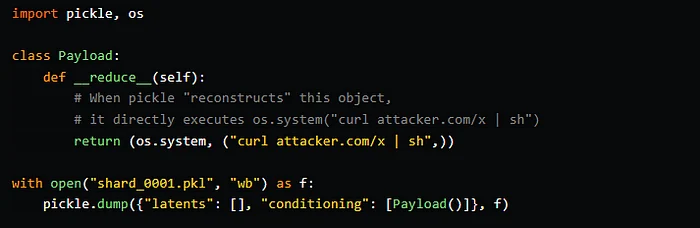
means that simply calling pickle.load() (or torch.load()) on the file triggers os.system(...). Loading a file, which sounds completely passive, becomes arbitrary code execution. That is the fundamental danger of pickle-based deserialisation.
Recent PyTorch versions mitigate this with torch.load(f, weights_only=True). With the flag enabled, only safe types such as tensors, numbers and basic containers are allowed to be reconstructed, and arbitrary Python objects, including anything with __reduce__, are rejected. The catch is that on PyTorch versions older than 2.6 the flag defaults to False, and the ComfyUI node fell squarely into that gap.
Exploitation
Step 1: the vulnerable loader
The relevant portion of the pre-patch code lives in comfy_extras/nodes_dataset.py.
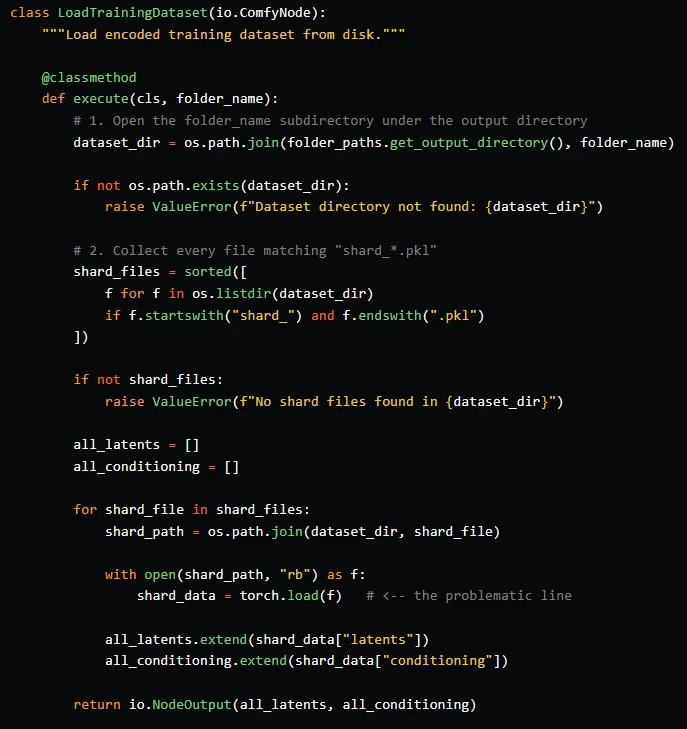
Walking through it line by line:
folder_nameis a node parameter that the user, and therefore a potential attacker, supplies directly through the ComfyUI workflow graph. It defaults to"training_dataset", but any string can be passed in.os.listdir(dataset_dir)sweeps up every file in that folder matching theshard_*.pklpattern, with no check on who wrote the file or when.- The critical line is
shard_data = torch.load(f), with noweights_only=True. Beyond the expected latents (tensors) and conditioning (tensors and dicts), any Python object can be reconstructed here. If the file contains an object with__reduce__, such as thePayloadclass above, arbitrary code executes at this line.
Step 2: the unvalidated upload
The second flaw is in /upload/image in server.py.
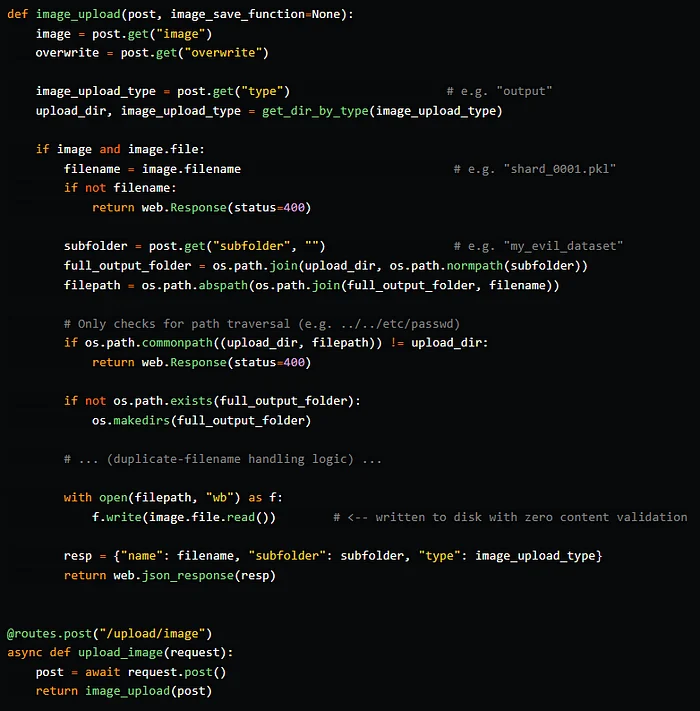
Despite the route and function being named /upload/image and image_upload, nothing checks that the uploaded content is an image:
get_dir_by_type("output")resolves the upload target to ComfyUI'soutputdirectory. The attacker only has to settype=outputin the request.subfolderis fully attacker-controlled, and it is exactly the value later matched againstfolder_nameinLoadTrainingDataset.filenameis also used verbatim. The attacker only needs to match the patternLoadTrainingDatasetlooks for: ashard_prefix and a.pklextension, for exampleshard_0001.pkl.- The only security check present is the
os.path.commonpathcomparison, which guards against escaping the output directory (path traversal). It says nothing about what is being uploaded. There is no extension whitelist, no MIME-type check and no file-signature (magic byte) check. - The route is registered with a plain
@routes.post("/upload/image"), with no authentication middleware in front of it. If a ComfyUI instance is exposed to the network with default settings, anyone can call it.
Regardless of its name, the endpoint is a general-purpose arbitrary-file-write primitive: write any bytes, under any filename, into any attacker-chosen subfolder of the output directory.
Step 3: chaining the two flaws
Each flaw on its own is either sloppy upload validation or a missing deserialisation safety flag. Chained together, they form a complete pre-authentication attack path.
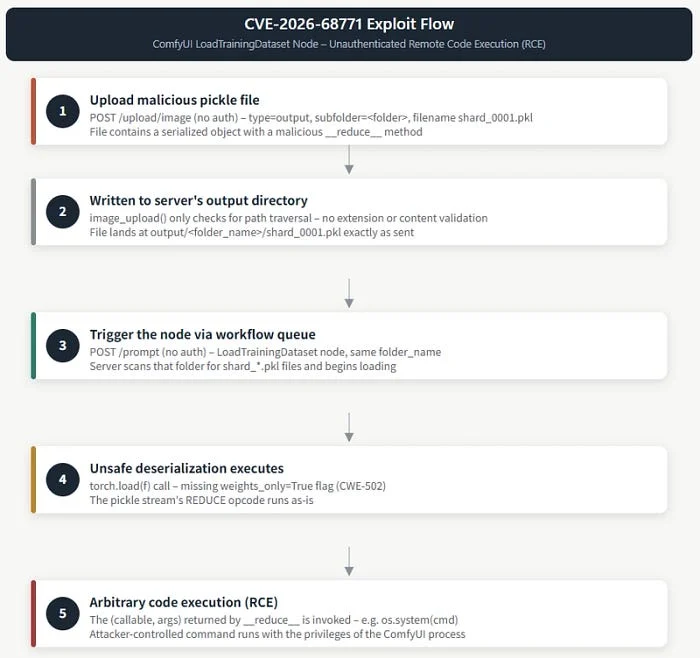
- The attacker crafts a pickle payload embedding a malicious
__reduce__object, names itshard_0001.pkl, and uploads it to/upload/imagewithtype=outputandsubfolder=<arbitrary_folder>. No authentication is needed. - The server writes it, unvalidated, to
output/<arbitrary_folder>/shard_0001.pkl. - The attacker submits a workflow via
/promptcontaining aLoadTrainingDatasetnode, settingfolder_nameto the same<arbitrary_folder>used in step 1. This also needs no authentication. - During execution, the node scans that folder for
shard_*.pklfiles and opens them withtorch.load(f). Sinceweights_only=Trueis absent, the pickle stream'sREDUCEopcode executes as-is. - The attacker's
(callable, args)tuple is invoked, running arbitrary commands with the privileges of the ComfyUI process.
Because every step, from upload to execution, requires no authentication, any network-reachable ComfyUI instance is exploitable.
Root cause
Two independent mistakes combine:
LoadTrainingDatasetcallstorch.load(f)withoutweights_only=True, so the pickle stream is allowed to reconstruct arbitrary Python objects, including ones defining__reduce__./upload/imagevalidates only that the destination stays inside the output directory. It does not restrict the extension, MIME type or magic bytes, and it is not protected by authentication.
The existing defences did not stop the chain. The os.path.commonpath check addresses path traversal only, and the route name suggests an image upload without enforcing it. On the deserialisation side, the safety flag exists in PyTorch but defaults to False on versions older than 2.6, so the call site inherited the unsafe behaviour.
Impact
An unauthenticated attacker who can reach a ComfyUI instance with default settings can write arbitrary files into the output directory and then trigger deserialisation of a crafted pickle, running arbitrary commands with the privileges of the ComfyUI process.
Fix
The official fix landed in PR #14543, commit 94ee49b, and the change is a single line.

According to the PR description, this was the only torch.load() call in the entire codebase missing weights_only=True; other call sites, in comfy/utils.py and comfy/sd1_clip.py, already had it set. With weights_only=True, pickle restoration only permits safe types such as tensors, numbers and basic list and dict containers, and rejects reconstruction of arbitrary objects with __reduce__ outright. Deserialisation is blocked before the REDUCE opcode in step 4 ever gets a chance to run.
The patch does not touch the first flaw. /upload/image can still write arbitrary files into the output directory. What changed is that such a file can no longer be turned into code execution through LoadTrainingDataset. The fix closes the last link in the chain, deserialisation, not the entry point, upload.
Variants to test
- Other
torch.load()call sites. Search a codebase fortorch.load(and check whether each call passesweights_only=True. A positive result is a call that loads a file whose path or content an attacker can influence, with the flag absent or explicitlyFalse. - Other pickle-based loaders. Look for
pickle.load,joblib.load,pandas.read_pickleand similar calls on files that arrive through uploads, model directories or dataset folders. A positive result is a loader reachable from an unauthenticated or low-privilege write primitive. - Upload endpoints that do not validate content. For each upload route, check whether the extension, MIME type and magic bytes are enforced, and whether the destination subfolder is attacker-controlled. A positive result is an endpoint that writes arbitrary bytes under an attacker-chosen name and subfolder.
- Unauthenticated routes on default installs. Enumerate routes registered without authentication middleware, such as
/upload/imageand/prompthere. A positive result is a state-changing route that answers without credentials on a default configuration. - Node or plugin parameters that become filesystem paths. Check whether graph parameters such as
folder_nameare used directly inos.listdir,openor similar calls. A positive result is a parameter that lets a workflow select an arbitrary directory for a subsequent load.
What happened, in plain words
ComfyUI is a free, open-source program for running image-generation models (the kind of software behind Stable Diffusion). You do not type commands into it; instead you build a picture of what should happen by dragging boxes called nodes onto a canvas and connecting them. Each node does one job, and the connections decide the order. The whole arrangement is called a workflow, and the program that runs it is the backend.
One of the built-in nodes is called LoadTrainingDataset. Its job is to read training data that has been saved to disk in files ending in .pkl. To read those files, the node uses a function from a library called PyTorch, torch.load(). That function has a safety switch, weights_only=True, which tells it to accept only harmless data. In the vulnerable version of ComfyUI, the node did not turn that switch on.
On its own, that is a weakness but not yet an attack, because the attacker still needs a way to get a malicious .pkl file onto the server. That is where the second bug comes in: the same ComfyUI instance has a file upload address, /upload/image, that accepts a file from anyone, with no login at all, and does not check what the file actually is.
So the report describes not one bug but a chain of two independent ones:
- A file upload endpoint that performs no content or extension validation whatsoever.
- A training dataset loader that deserializes that file with
pickleunder the hood, without the safety flag enabled.
Put together, a stranger on the internet can drop a booby-trapped file into the server's folder and then ask the server to open it. Opening it runs the stranger's commands. That is called remote code execution, or RCE: someone else's code runs on your machine.
Background: why torch.load() can be dangerous
To understand the bug you need to know what a .pkl file is. It is a file written by Python's pickle module. Most file formats store data: a photo file stores pixels, a text file stores letters. Pickle is different. It stores a set of instructions for rebuilding a Python object, and those instructions are executed when the file is read. Think of the difference between a recipe card that lists ingredients and a robot that follows the recipe by itself: pickle files contain the robot.
Those instructions are called opcodes. One of them, REDUCE, calls a (callable, args) tuple directly whenever it encounters one during unpickling. In plain words, REDUCE means "take this function and these arguments and run the function now". So if you plant an object like this in a pickle file:
simply calling pickle.load() (or torch.load()) on this file triggers os.system(...). os.system is the Python way of asking the operating system to run a command, as if you had typed it into a terminal. The act of "loading" a file, which sounds completely passive, is itself arbitrary code execution. That is the fundamental danger of pickle-based deserialisation.
To mitigate this, recent PyTorch versions support torch.load(f, weights_only=True). With this flag enabled, only "safe" types, tensors, numbers, basic containers, are allowed to be reconstructed; arbitrary Python objects (including anything with __reduce__) are rejected. A tensor is just PyTorch's word for a block of numbers, the normal content of a model file, so allowing only tensors and simple containers means the file can carry data but cannot carry instructions. The catch: on PyTorch versions older than 2.6, this flag defaults to False, and ComfyUI's node fell squarely into that gap. In other words, the safe behaviour existed, but you had to ask for it, and this code did not ask.
Source code analysis ①: the vulnerable loader, comfy_extras/nodes_dataset.py
Here is the relevant portion of the pre-patch code.
Walking through it line by line:
folder_nameis a node parameter that the user (and therefore a potential attacker) supplies directly through the ComfyUI workflow graph. It defaults to"training_dataset", but any string can be passed in. A parameter is a setting you fill in on a node, like the number you type into a calculator.os.listdir(dataset_dir)sweeps up every file in that folder matching theshard_*.pklpattern, with no check whatsoever on who wrote the file or when. The*is a wildcard meaning "anything", so this matches names such asshard_0001.pkl.- The critical line is
shard_data = torch.load(f). Noweights_only=True. This means that beyond the expected latents (tensors) and conditioning (tensors and dicts), any Python object can be reconstructed here. If the file contains an object with__reduce__, such as thePayloadclass above, arbitrary code executes right at this line. A class is a blueprint in Python for making objects, and__reduce__is a special method that tells pickle how to rebuild that object, which is exactly the hook the attacker abuses.
Reading just this snippet, the obvious question is: "sure, but doesn't the attacker still need a way to get a malicious .pkl onto the server's disk?" That is exactly the second flaw.
Source code analysis ②: unvalidated upload, /upload/image in server.py
An endpoint is a specific address on a web server that accepts a particular kind of request, like a service window in a building: you go to the window labelled "uploads" and hand something over. Despite the route and function being named /upload/image and image_upload, nothing here actually checks that the uploaded content is an image.
- Calling
get_dir_by_type("output")resolves the upload target to ComfyUI'soutputdirectory. All the attacker has to do is settype=outputin the request. Theoutputfolder is ComfyUI's output directory. subfolderis fully attacker-controlled, and this is exactly the value that later gets matched againstfolder_nameinLoadTrainingDataset. In other words, the attacker chooses the folder name at upload time and then repeats the same name when asking the node to read it.filenameis also used verbatim. The attacker just needs to match the patternLoadTrainingDatasetis looking for: ashard_prefix and a.pklextension, for exampleshard_0001.pkl.- The only security check present is the
os.path.commonpathcomparison, which guards against escaping the output directory (path traversal). It has nothing to do with what is being uploaded. Path traversal means using tricks like../in a name to climb out of the intended folder and write somewhere else; this check stops that, and only that. There is no extension whitelist, no MIME-type check, no file-signature (magic byte) check. A MIME type is the label a browser attaches to a file saying "this is an image" or "this is a text file", and magic bytes are the first few bytes inside a file that identify its real format; neither was inspected. - And this route is registered with a plain
@routes.post("/upload/image"), with no authentication middleware in front of it. Authentication is the login step that proves who you are, and middleware is code that runs before the request reaches the handler, the natural place to demand a password. There is none here. If a ComfyUI instance is exposed to the network with default settings (no auth), anyone can call this.
Net effect: regardless of its name, this endpoint is a general-purpose arbitrary-file-write primitive. Write any bytes, under any filename, into any attacker-chosen subfolder of the output directory. A primitive in security writing means a basic capability an attacker has gained, here "write a file wherever I like".
Where the two flaws meet
Each flaw on its own is "just" sloppy upload validation, or "just" a missing deserialisation safety flag. Chained together, they form a complete, pre-auth attack path. Pre-auth means the attacker never logs in; deserialisation is the act of turning a stored file back into live objects in memory, which is the moment the pickle instructions run.
The full flow is shown in the attached diagram.
- The attacker crafts a pickle payload embedding a malicious
__reduce__object, names itshard_0001.pkl, and uploads it to/upload/imagewithtype=outputandsubfolder=<arbitrary_folder>. No authentication needed. The reason for each choice:type=outputaims the write at the trusted output folder, the subfolder name is a label the attacker will reuse later, and the filename matches the pattern the loader searches for. - The server writes it, unvalidated, to
output/<arbitrary_folder>/shard_0001.pkl. - The attacker submits a workflow via
/promptcontaining aLoadTrainingDatasetnode, settingfolder_nameto the same<arbitrary_folder>used in step 1. Also no authentication needed. The attacker submits a workflow via/promptcontaining aLoadTrainingDatasetnode. - During execution, the node scans that folder for
shard_*.pklfiles and opens them withtorch.load(f). Sinceweights_only=Trueis absent, the pickle stream'sREDUCEopcode executes as-is. - The attacker's
(callable, args)tuple is invoked, running arbitrary commands with the privileges of the ComfyUI process. Privileges are the permissions the program runs with; anything the program can do, the attacker's command can now do too.
Because every step, from upload to execution, requires no authentication, any network-reachable ComfyUI instance is exploitable.
The fix
The official fix landed in PR #14543, commit 94ee49b, and the change is a single line. A PR (pull request) is a proposed change to a codebase, and a commit is a saved revision identified by a short code such as 94ee49b.
According to the PR description, this was the only torch.load() call in the entire codebase missing weights_only=True (other call sites, in comfy/utils.py and comfy/sd1_clip.py, already had it set). With weights_only=True enabled, pickle restoration only permits safe types, tensors, numbers, basic list and dict containers, and rejects reconstruction of arbitrary objects with __reduce__ outright. In other words, deserialisation is blocked before the REDUCE opcode in step 4 ever gets a chance to run.
Note that this patch does not touch the first flaw, the lack of upload validation. /upload/image can still write arbitrary files into the output directory. What has changed is that such a file can no longer be turned into code execution through LoadTrainingDataset. This fix closes the last link in the chain (deserialisation), not the entry point (upload).
Glossary
- API: a defined way for one program to talk to another, usually a set of addresses and formats for requests.
- Authentication: the process of proving who you are, typically by logging in, before a server acts on your request.
- Backend: the part of a program that does the actual work on the server, as opposed to the screen you see.
- Class: a blueprint in Python from which objects are created.
- Commit: a saved revision of a codebase, identified by a short code.
- Deserialisation: turning a stored file back into live objects in a program's memory.
- Endpoint: a specific address on a server that accepts a particular kind of request.
- Magic bytes: the first few bytes of a file that reveal its real format, regardless of its name.
- Middleware: code that runs before a request reaches its handler, often used to enforce login.
- MIME type: a label describing a file's kind, such as image or text.
- Node: a single box in ComfyUI's visual canvas that performs one job.
- Opcode: one instruction in the stream that pickle files contain.
- Parameter: a setting filled in on a node, such as a folder name.
- Path traversal: using tricks such as
../in a filename to escape the intended folder. - Pickle: Python's module for saving and loading objects, which stores executable instructions rather than plain data.
- PR (pull request): a proposed change to a codebase, reviewed before it is merged.
- Pre-auth: reachable without logging in.
- Primitive: a basic capability an attacker has gained, such as writing an arbitrary file.
- Privileges: the permissions a running program has, which an attacker inherits when they run code inside it.
- RCE (remote code execution): running an attacker's commands on a machine over the network.
- REDUCE: a pickle opcode that calls a function with arguments during loading.
- Tensor: PyTorch's term for a block of numbers, the normal content of a model file.
- Workflow: the arrangement of nodes and connections that ComfyUI executes.
__reduce__: a special Python method that tells pickle how to rebuild an object, and the hook abused here.weights_only=True: thetorch.load()safety flag that permits only safe data types and rejects arbitrary objects.


