CVE-2026–89274: When a Comment Meets do_shortcode() in WP Recipe Maker
WP Recipe Maker passed the text of approved, rated comments through do_shortcode() while building recipe JSON-LD, so any shortcode written in a comment was executed on the server on every page render. An attacker could use this to run registered shortcodes and expose whatever data those shortcodes return to all visitors.
 Published on medium.com
Cybersecurity
The full write-up lives on its author's site
It belongs to its author, so we link to it rather than copy it. The other two tabs are our own rewrites, checked against it.
Context
WP Recipe Maker is a WordPress plugin that turns rated comments on a recipe post into structured data. When a recipe page is rendered, the plugin collects the approved comments that carry a rating and builds a JSON-LD block so that search engines can read the recipe's reviews. Each comment becomes an entry in the review array, with the comment text placed in reviewBody.
JSON-LD is public by design: it sits in the page source and is read by every visitor and every crawler. That makes anything written into it a disclosure channel if untrusted text can reach it.
CVE-2026-89274 covers WP Recipe Maker 10.8.1 and earlier. The text of a visitor's rated comment is passed to do_shortcode() while the plugin builds its recipe JSON-LD, so any [shortcode] written in an approved comment is executed on the server each time the page renders, and the output lands in the page for everyone to see.

One caveat up front: this is not arbitrary PHP execution. An attacker can only run shortcodes that are already registered on the site, so the real impact depends on what those shortcodes do.
Background you need
What a shortcode is
A shortcode is WordPress's [tag option="value"] syntax. When do_shortcode() sees one, it calls the PHP function registered for that tag and swaps the shortcode for the return value.
add_shortcode( 'hello', function() { return 'Hello!';});echo dshortcode( 'Hi [hello]' );
The important part is that do_shortcode() runs every shortcode it finds in the string. That is fine for text written by editors and authors, who are trusted. It is not fine for text written by anonymous visitors, such as comments.
What JSON-LD is
JSON-LD is structured data placed in the page so search engines can understand it. A recipe page carries something like this:
<script type="application/ld+json">{ "@type": "Recipe", "name": "...", "review": [ { "reviewBody": "..." } ] }</script>
WP Recipe Maker turns rated comments into entries of that review array, with the comment text as reviewBody. This block is public: every visitor and every crawler can read it.
Setup
The vulnerable code is in includes/public/class-wprm-metadata.php from version 10.8.1. Some of the code shown below is simplified to make the flow easier to follow.
The preconditions are straightforward:
- A post that contains a recipe card.
- A comment on that post that carries the
wprm-comment-ratingmeta key, so the plugin treats it as a review. - The comment must be approved, either automatically or by an administrator.
WordPress ships with "comment author must have a previously approved comment" enabled, so a first-time commenter is often held in moderation. That raises the bar somewhat. Sites with looser moderation are exposed immediately.
Finding it
The data flow is a five-step chain, top to bottom. The amber card at the top is the untrusted source, and the red card at the bottom is the sink. The small gray text on each card is the line number. The dashed red bracket on the right marks the point of the whole bug: from step 1 to step 5 there is no validation or filtering of any kind.
comment_content └─▶ reviewBody (class-wprm-metadata.php:1016-1017) └─▶ $metadata['review'][] (:1028) └─▶ sanitize_metadata( get_metadata($recipe) ) (:374) └─▶ do_shortcode( ... ) <- sink (:553)
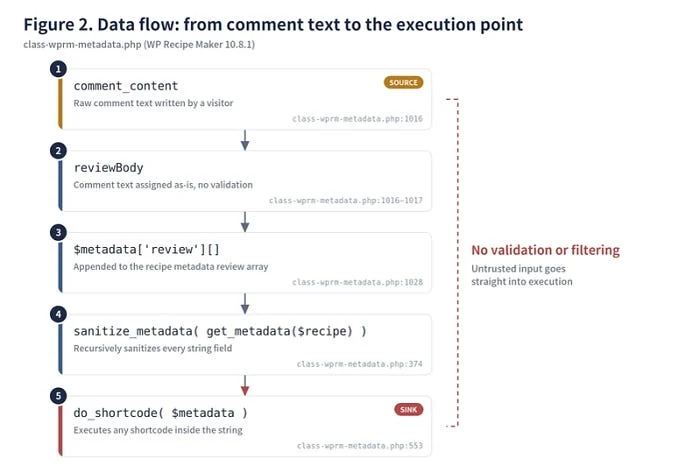
Step 1: which comments get collected
$comments = get_comments( array( 'post_id' => $recipe->parent_post_id(), // the post the recipe card sits in 'status' => 'approve', // approved comments only 'meta_key' => 'wprm-comment-rating', // only comments that carry a rating) );foreach ( $comments as $comment ) { $review = array( '@type' => 'Review', 'reviewBody' => $comment->comment_content, ); $metadata['review'][] = $review;}
The plugin takes approved, rated comments from the post that contains the recipe and puts comment_content straight into reviewBody. Nothing is wrong yet. The problem is what happens to that array next.
Step 2: the sanitizer that executes
Before output, the metadata goes through sanitize_metadata(). It recurses into arrays and cleans every string it finds.
public static function sanitize_metadata( $metadata ) { if ( is_array( $metadata ) ) { foreach ( $metadata as $key => $value ) { $metadata[ $key ] = self::sanitize_metadata( $value ); } return $metadata; } $sanitized = strip_shortcodes( wp_strip_all_tags( do_shortcode( $metadata ) ) ); return $sanitized;}
Read that one line from the inside out:
| Order | Function | What it does |
|---|---|---|
| 1 | do_shortcode( $metadata ) |
Executes shortcodes and replaces them with their output |
| 2 | wp_strip_all_tags( ... ) |
Removes HTML tags from the result |
| 3 | strip_shortcodes( ... ) |
Removes any shortcode syntax still left |
The developer's intent was probably "strip shortcodes and tags so only clean text reaches the JSON-LD". But execution (step 1) happens before the stripping (steps 2 and 3). The later steps only clean up output that has already been produced, so they cannot stop the shortcode from running.
An analogy: it is like opening a package and letting its contents run, and only then inspecting the wrapping paper.
Why reviewBody is the way in
sanitize_metadata() applies do_shortcode() to every string in the array. For fields like the recipe title or ingredients, that is harmless, because an administrator wrote them. reviewBody is the one place where text from anonymous visitors flows into the same array. A pipeline designed for trusted data ended up receiving untrusted data.
Exploitation
Step 1: post a rated comment
An attacker posts a rated comment on the post that contains a recipe, with shortcode syntax in the body. The rating (wprm-comment-rating) is what makes the comment count as a review.
Step 2: get it approved
The comment gets approved, either automatically or by an administrator.
Step 3: trigger metadata generation
Someone opens the recipe page, and the plugin builds the metadata. The approved comment is now inside review.
Step 4: the shortcode runs
sanitize_metadata() calls do_shortcode() on the comment text, and the shortcode runs on the server.
Step 5: the output is published
The output is written into reviewBody in the JSON-LD and is visible to every visitor and crawler.
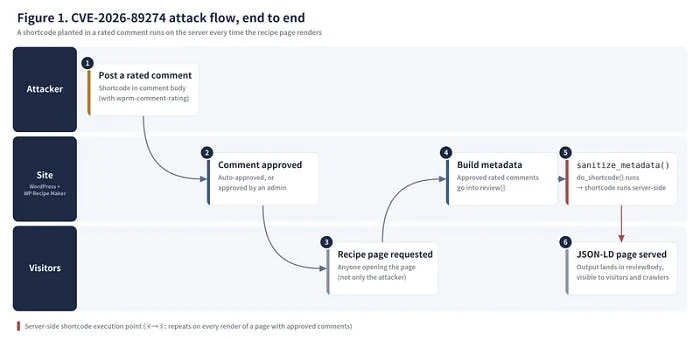
The figure shows three horizontal lanes (attacker, site, visitors), followed in the order of the numbered badges. The attacker appears only in step 1. Everything after that happens in the site and visitor lanes, and the curved arrows between lanes are the hand-offs: approval, then a page request, then metadata generation. Only card 5 has a red accent, because it is the point where code runs on the server. The red arrow from 5 to 6 shows that the result is delivered to ordinary visitors, not to the attacker.
Root cause
The mistake is ordering. sanitize_metadata() was written to strip shortcodes and tags so that only clean text reaches the JSON-LD, but it calls do_shortcode() first and strips afterwards. The stripping steps operate on output that has already been produced, so they cannot prevent execution.
The design mistake is that the same sanitizer is applied to every string in the metadata array, including reviewBody, which is the one field fed by anonymous visitors. A pipeline built for trusted data (titles, ingredients) ended up receiving untrusted data without any validation or filtering between the source and the sink.
Impact
- Because the output is embedded in the page, any shortcode that returns data becomes a disclosure channel. The public advisory mentions things like attachment captions, fields of private posts, and data exposed by other installed plugins.
- If a shortcode has side effects, it can fire on every render of the page.
- It is not RCE. The attacker cannot run arbitrary PHP, only what the site has registered as shortcodes.
The attacker does not need to see the result directly: the output is delivered to ordinary visitors and crawlers, not to the attacker. Exposure depends on comment moderation: sites that hold first-time commenters in moderation are harder to exploit, while sites with looser moderation are exposed immediately.
Fix
The patch is in 10.8.2. One call changes: do_shortcode() becomes WPRM_Instacart::do_shortcode_safe().
$sanitized = strip_shortcodes( wp_strip_all_tags( do_shortcode( $metadata ) ) );$sanitized = strip_shortcodes( wp_strip_all_tags( WPRM_Instacart::do_shortcode_safe( $metadata ) ) );
do_shortcode_safe()does not execute anything. It removes the shortcode tags and keeps only the inner content (class-wprm-instacart.php:501).- The same comment no longer produces shortcode output in
reviewBody. - The plugin's changelog describes the change as preventing shortcode execution from comment text in recipe metadata.
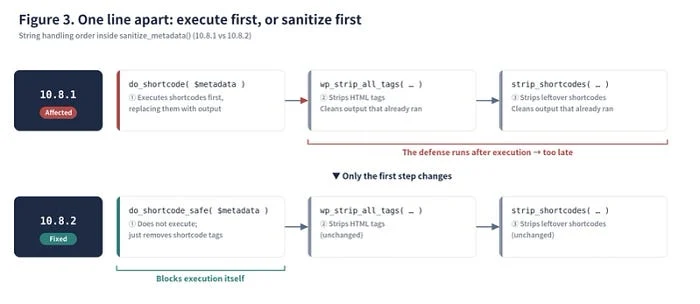
The figure compares 10.8.1 and 10.8.2. The top row is 10.8.1 and the bottom row is 10.8.2. In each row, only the first card has a colour, and the other two are gray. That is the whole patch: the first step changed and the rest did not. The red bracket under the top row says the two cleanup steps come after execution and are too late. The teal bracket under the bottom row says the fix blocks execution at the first step.
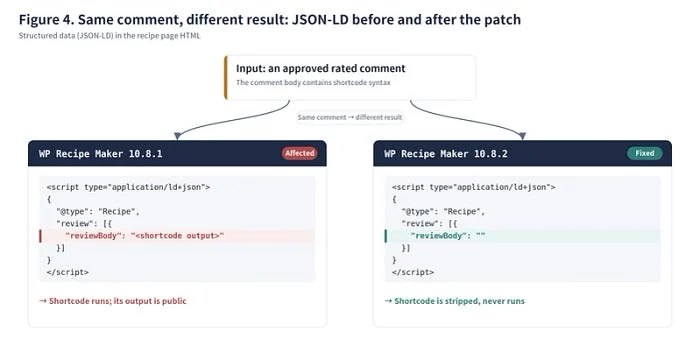
The last figure shows one approved comment at the top feeding both versions. On the left (10.8.1), the highlighted reviewBody line contains the shortcode's output, which is public. On the right (10.8.2), the shortcode is stripped and never runs. The empty value on the right assumes a comment that contains only a shortcode. If the shortcode wraps some inner text, that text can remain.
What to do:
- Update WP Recipe Maker to 10.8.2 or later, preferably the latest release.
- Until you can update, switch rated comments to manual approval and review pending and approved comments for
[and]syntax. - Review which shortcodes your site registers, and check whether any of them return sensitive data.
Variants to test
- Other plugins that build JSON-LD from comments. Look for review or rating markup generated from
comment_content. A positive result is a comment containing a registered shortcode whose output appears in the page's structured data. - Other sanitizers that call
do_shortcode()before stripping. Grep fordo_shortcodeinside functions namedsanitize_*orclean_*. A positive result is a function where execution precedesstrip_shortcodes()andwp_strip_all_tags(). - Shortcodes with side effects. Enumerate registered shortcodes and check which ones send mail, write options or touch external services. A positive result is a shortcode that fires on every page render of a recipe with an approved rated comment.
- Shortcodes that return private data. Test shortcodes that read from private posts, attachments or other plugins. A positive result is private content appearing in the public JSON-LD.
- Moderation bypass. Check whether a site auto-approves comments from registered users or first-time commenters. A positive result is a shortcode payload reaching
reviewBodywithout manual review.
What happened, in plain words
A WordPress plugin called WP Recipe Maker had a bug. The plugin takes the text of comments that visitors leave on a recipe page and puts that text into a hidden block of the page that search engines read. While building that block, the plugin also ran anything inside square brackets as a WordPress "shortcode", which is a small instruction that makes the site do something and print the result. So if a visitor wrote a shortcode in a comment, and that comment was approved, the site would run the shortcode every time someone opened the recipe page, and the result would appear in the page for everyone to see.
The bug is tracked as CVE-2026-89274 and affects WP Recipe Maker 10.8.1 and earlier. The fix is in 10.8.2.
One thing to get straight before we go further: this is not a way to run any code the attacker likes. A shortcode only works if the site already has it set up. So how bad it is depends on which shortcodes the site has and what they do.
Background you need
What a shortcode is
WordPress lets authors write a short instruction in square brackets, like [tag option="value"], and the site replaces it with something. When WordPress sees that instruction, it calls a piece of PHP code (the language WordPress is written in) that was registered for that tag, and puts the code's result in place of the instruction.
add_shortcode( 'hello', function() { return 'Hello!';});echo dshortcode( 'Hi [hello]' );
Line by line:
add_shortcode( 'hello', ... )tells WordPress: whenever you see[hello], run this little function.- The function returns the text
Hello!. echo dshortcode( 'Hi [hello]' )is meant to print the text with the shortcode replaced. The report shows it exactly as written, withdshortcoderather thando_shortcode.
The key point: do_shortcode() runs every shortcode it finds in the text it is given. That is fine for text written by editors and authors, because the site trusts them. It is not fine for text written by anonymous visitors, such as comments.
What JSON-LD is
JSON-LD is a block of structured data placed inside a page so that search engines can understand what the page is about. A recipe page carries something like this:
<script type="application/ld+json">{ "@type": "Recipe", "name": "...", "review": [ { "reviewBody": "..." } ] }</script>
Line by line:
<script type="application/ld+json">opens a script block. The type tells browsers and crawlers that this is structured data, not code to run."@type": "Recipe"says the page describes a recipe."name": "..."is the recipe's name."review": [ { "reviewBody": "..." } ]is a list of reviews, and each review has a body of text.</script>closes the block.
WP Recipe Maker turns rated comments into entries of that review list, with the comment text as reviewBody. This block is public: every visitor and every crawler can read it. Think of it as a label on the outside of a parcel: anyone walking past can read it.
Setup
The vulnerable code is in includes/public/class-wprm-metadata.php from version 10.8.1. Some of the code shown below is simplified to make the flow easier to follow.
Three things have to be true for the bug to matter:
- A post that contains a recipe card.
- A comment on that post that carries the
wprm-comment-ratingmeta key, so the plugin treats it as a review. A meta key is an extra label stored with a comment; this one marks the comment as having a star rating. - The comment must be approved, either automatically or by an administrator.
WordPress ships with "comment author must have a previously approved comment" enabled, so a first-time commenter is often held in moderation. That raises the bar somewhat. Sites with looser moderation are exposed immediately.
Finding it
The data flow is a five-step chain, top to bottom. The amber card at the top is the untrusted source, and the red card at the bottom is the sink. The small gray text on each card is the line number. The dashed red bracket on the right marks the point of the whole bug: from step 1 to step 5 there is no validation or filtering of any kind.
comment_content └─▶ reviewBody (class-wprm-metadata.php:1016-1017) └─▶ $metadata['review'][] (:1028) └─▶ sanitize_metadata( get_metadata($recipe) ) (:374) └─▶ do_shortcode( ... ) <- sink (:553)
Read it as a chain of hand-offs:
comment_contentis the raw text a visitor typed in a comment.- It is copied into
reviewBody. - That review is added to the
$metadata['review']list. - The whole metadata list is passed to
sanitize_metadata(), a function meant to clean it. - Inside that function,
do_shortcode()runs the text. That is the sink, the place where the harm happens.
Step 1: which comments get collected
$comments = get_comments( array( 'post_id' => $recipe->parent_post_id(), // the post the recipe card sits in 'status' => 'approve', // approved comments only 'meta_key' => 'wprm-comment-rating', // only comments that carry a rating) );foreach ( $comments as $comment ) { $review = array( '@type' => 'Review', 'reviewBody' => $comment->comment_content, ); $metadata['review'][] = $review;}
Line by line:
get_comments( array( ... ) )asks WordPress for a list of comments.'post_id' => $recipe->parent_post_id()limits the list to the post the recipe card sits in.'status' => 'approve'keeps only approved comments.'meta_key' => 'wprm-comment-rating'keeps only comments that carry a rating.foreach ( $comments as $comment )goes through the list one comment at a time.'@type' => 'Review'labels the entry as a review.'reviewBody' => $comment->comment_contentcopies the comment text into the review body.$metadata['review'][] = $reviewadds the review to the metadata list.
The plugin takes approved, rated comments from the post that contains the recipe and puts comment_content straight into reviewBody. Nothing is wrong yet. The problem is what happens to that list next.
Step 2: the sanitizer that executes
Before output, the metadata goes through sanitize_metadata(). It recurses into arrays and cleans every string it finds.
public static function sanitize_metadata( $metadata ) { if ( is_array( $metadata ) ) { foreach ( $metadata as $key => $value ) { $metadata[ $key ] = self::sanitize_metadata( $value ); } return $metadata; } $sanitized = strip_shortcodes( wp_strip_all_tags( do_shortcode( $metadata ) ) ); return $sanitized;}
Line by line:
public static function sanitize_metadata( $metadata )defines a cleaning function that takes some data.if ( is_array( $metadata ) )checks whether the data is a list of items rather than a single piece of text.foreach ( $metadata as $key => $value )walks through each item in the list.$metadata[ $key ] = self::sanitize_metadata( $value )cleans that item by calling the same function on it. This is the recursion: the function keeps calling itself until it reaches plain text.return $metadatahands the cleaned list back.$sanitized = strip_shortcodes( wp_strip_all_tags( do_shortcode( $metadata ) ) )is the line that matters. It is one line with three steps nested inside each other.return $sanitizedhands back the result.
Read that one line from the inside out:
| Order | Function | What it does |
|---|---|---|
| 1 | do_shortcode( $metadata ) |
Executes shortcodes and replaces them with their output |
| 2 | wp_strip_all_tags( ... ) |
Removes HTML tags from the result |
| 3 | strip_shortcodes( ... ) |
Removes any shortcode syntax still left |
The developer's intent was probably "strip shortcodes and tags so only clean text reaches the JSON-LD". But execution (step 1) happens before the stripping (steps 2 and 3). The later steps only clean up output that has already been produced, so they cannot stop the shortcode from running.
An analogy: it is like opening a package and letting its contents run, and only then inspecting the wrapping paper.
Why reviewBody is the way in
sanitize_metadata() applies do_shortcode() to every string in the list. For fields like the recipe title or ingredients, that is harmless, because an administrator wrote them. reviewBody is the one place where text from anonymous visitors flows into the same list. A pipeline designed for trusted data ended up receiving untrusted data.
Exploitation
Step 1: post a rated comment
An attacker posts a rated comment on the post that contains a recipe, with shortcode syntax in the body. The rating (wprm-comment-rating) is what makes the comment count as a review.
Step 2: get it approved
The comment gets approved, either automatically or by an administrator.
Step 3: trigger metadata generation
Someone opens the recipe page, and the plugin builds the metadata. The approved comment is now inside review.
Step 4: the shortcode runs
sanitize_metadata() calls do_shortcode() on the comment text, and the shortcode runs on the server.
Step 5: the output is published
The output is written into reviewBody in the JSON-LD and is visible to every visitor and crawler.
The figure shows three horizontal lanes (attacker, site, visitors), followed in the order of the numbered badges. The attacker appears only in step 1. Everything after that happens in the site and visitor lanes, and the curved arrows between lanes are the hand-offs: approval, then a page request, then metadata generation. Only card 5 has a red accent, because it is the point where code runs on the server. The red arrow from 5 to 6 shows that the result is delivered to ordinary visitors, not to the attacker.
Root cause
The mistake is ordering. sanitize_metadata() was written to strip shortcodes and tags so that only clean text reaches the JSON-LD, but it calls do_shortcode() first and strips afterwards. The stripping steps operate on output that has already been produced, so they cannot prevent execution.
The design mistake is that the same sanitizer is applied to every string in the metadata list, including reviewBody, which is the one field fed by anonymous visitors. A pipeline built for trusted data (titles, ingredients) ended up receiving untrusted data without any validation or filtering between the source and the sink.
Impact
- Because the output is embedded in the page, any shortcode that returns data becomes a disclosure channel. The public advisory mentions things like attachment captions, fields of private posts, and data exposed by other installed plugins.
- If a shortcode has side effects, it can fire on every render of the page. A side effect is anything the shortcode does besides printing text, such as sending an email or changing a setting.
- It is not RCE. RCE means remote code execution, where an attacker runs any code they like on the server. Here the attacker cannot run arbitrary PHP, only what the site has registered as shortcodes.
The attacker does not need to see the result directly: the output is delivered to ordinary visitors and crawlers, not to the attacker. Exposure depends on comment moderation: sites that hold first-time commenters in moderation are harder to exploit, while sites with looser moderation are exposed immediately.
Fix
In 10.8.2, one call changes: do_shortcode() becomes WPRM_Instacart::do_shortcode_safe().
$sanitized = strip_shortcodes( wp_strip_all_tags( do_shortcode( $metadata ) ) );$sanitized = strip_shortcodes( wp_strip_all_tags( WPRM_Instacart::do_shortcode_safe( $metadata ) ) );
Line by line:
- The first line is the old code from 10.8.1: it runs the shortcodes, then strips tags, then strips shortcode syntax.
- The second line is the new code from 10.8.2: the only change is that
do_shortcode()is replaced byWPRM_Instacart::do_shortcode_safe().
do_shortcode_safe()does not execute anything. It removes the shortcode tags and keeps only the inner content (class-wprm-instacart.php:501).- The same comment no longer produces shortcode output in
reviewBody. - The plugin's changelog describes the change as preventing shortcode execution from comment text in recipe metadata.
The figure compares 10.8.1 and 10.8.2. The top row is 10.8.1 and the bottom row is 10.8.2. In each row, only the first card has a colour, and the other two are grey. That is the whole patch: the first step changed and the rest did not. The red bracket under the top row says the two cleanup steps come after execution and are too late. The teal bracket under the bottom row says the fix blocks execution at the first step.
The last figure shows one approved comment at the top feeding both versions. On the left (10.8.1), the highlighted reviewBody line contains the shortcode's output, which is public. On the right (10.8.2), the shortcode is stripped and never runs. The empty value on the right assumes a comment that contains only a shortcode. If the shortcode wraps some inner text, that text can remain.
What to do:
- Update WP Recipe Maker to 10.8.2 or later, preferably the latest release.
- Until you can update, switch rated comments to manual approval and review pending and approved comments for
[and]syntax. - Review which shortcodes your site registers, and check whether any of them return sensitive data.
Variants to test
- Other plugins that build JSON-LD from comments. Look for review or rating markup generated from
comment_content. A positive result is a comment containing a registered shortcode whose output appears in the page's structured data. - Other sanitizers that call
do_shortcode()before stripping. Grep fordo_shortcodeinside functions namedsanitize_*orclean_*. A positive result is a function where execution precedesstrip_shortcodes()andwp_strip_all_tags(). - Shortcodes with side effects. Enumerate registered shortcodes and check which ones send mail, write options or touch external services. A positive result is a shortcode that fires on every page render of a recipe with an approved rated comment.
- Shortcodes that return private data. Test shortcodes that read from private posts, attachments or other plugins. A positive result is private content appearing in the public JSON-LD.
- Moderation bypass. Check whether a site auto-approves comments from registered users or first-time commenters. A positive result is a shortcode payload reaching
reviewBodywithout manual review.
Glossary
- WordPress: a popular system for building websites, written in PHP, extended by plugins.
- Plugin: an add-on that gives a website extra features, such as recipe cards.
- WP Recipe Maker: the WordPress plugin affected here; it turns rated comments into recipe review data.
- CVE: a public identifier for a known security flaw, here CVE-2026-89274.
- Shortcode: WordPress syntax in square brackets, like
[tag option="value"], that the site replaces with the result of some code. do_shortcode(): the WordPress function that finds shortcodes in text and runs them.- PHP: the programming language WordPress and its plugins are written in.
- JSON-LD: a block of structured data inside a page that search engines read.
reviewBody: the field in the recipe data that holds the text of a review.- Meta key: an extra label stored alongside a comment or post;
wprm-comment-ratingmarks a comment as rated. - Sanitizer: a function meant to clean data before it is used or shown.
sanitize_metadata(): the plugin function that cleans the recipe data, and the place where the bug lives.- Source: the place untrusted data enters the system, here the comment text.
- Sink: the place where that data causes harm, here
do_shortcode(). - Validation / filtering: checking or cleaning data as it moves between steps; the report says there is none between source and sink.
- Recursion: a function calling itself, used here to clean nested lists.
- HTML tag: a piece of markup such as
<b>that formats a page;wp_strip_all_tags()removes them. strip_shortcodes(): a WordPress function that removes shortcode syntax from text without running it.- Render: the act of building and showing a page when someone requests it.
- Crawler: a program, such as a search engine bot, that reads pages automatically.
- Disclosure channel: a way for private data to become visible to the public.
- Side effect: anything code does besides returning text, such as sending mail or changing a setting.
- RCE (remote code execution): running arbitrary code on a server; the report stresses this bug is not that.
- Moderation: the site owner's review of comments before they are approved.
- Patch: the code change that fixes a bug, here in version 10.8.2.
- Changelog: the list of changes a plugin publishes for each version.
- Grep: a command-line tool for searching text files for a pattern.




