Firebase Exploit bug bounty
A Firebase Realtime Database was misconfigured with public read and write permissions, allowing anyone to read all data and create or overwrite files. The author demonstrates how to find the Firebase configuration and exploit these permissions, noting that the issue was marked as not applicable in a bug bounty programme.

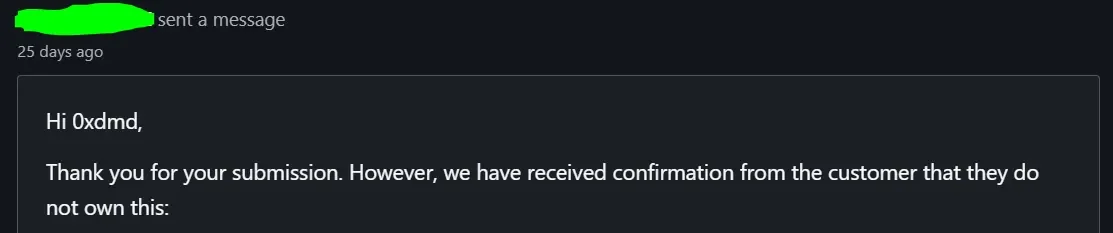
Recently I manage to exploit a read/write permission on firebase but unfortunately it was marked as not applicable honestly it was also kinda odd that it has the same name of the company but they do not own this.
The full write-up lives on its author's site
It belongs to its author, so we link to it rather than copy it. The other two tabs are our own rewrites, checked against it.
Context
This write-up is about misconfigured Firebase Realtime Database rules. The researcher found a database that allowed read and write access without authentication, but the report was marked as not applicable. The researcher notes that the target had the same name as a company but was not owned by that company.
A Firebase Realtime Database is normally protected by security rules that decide who may read and write each path. When those rules are left open, the database can be queried directly over HTTP. The researcher demonstrates the issue on a deliberately vulnerable copy of the scenario, built with a small CRUD todo application backed by Firebase.
Setup
The researcher cloned two tools:
FireBaseScanner is used to check a Firebase project name for a misconfiguration. Insecure-Firebase-Exploit is used to test write permission.
For the demo, the researcher created a vulnerable Firebase project and cloned a CRUD application that already supports create, read, update and delete operations:
Finding it
There are many tools that can locate a Firebase configuration file in a web application: burpbounty, nuclei, reconftw (described in the report as an all in one recon and va tool), js link finder, js miner, bevigil, and others. The manual alternative is to check the page source and look for the configuration.
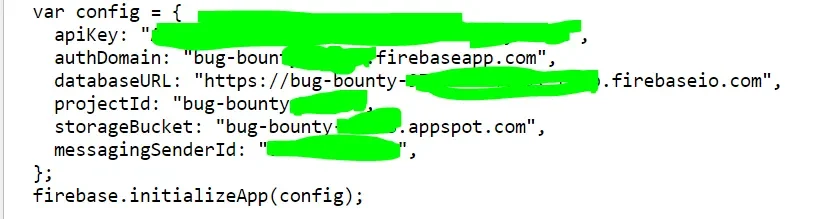
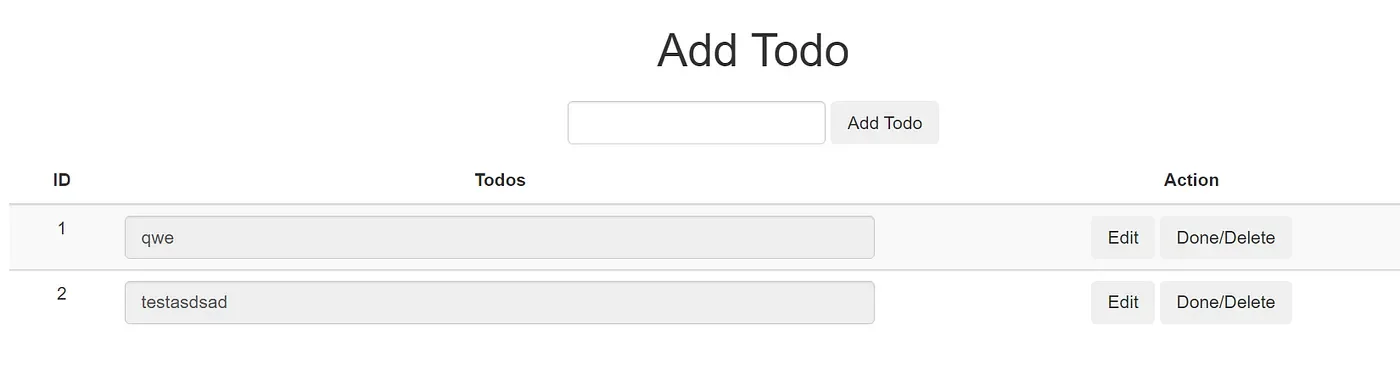
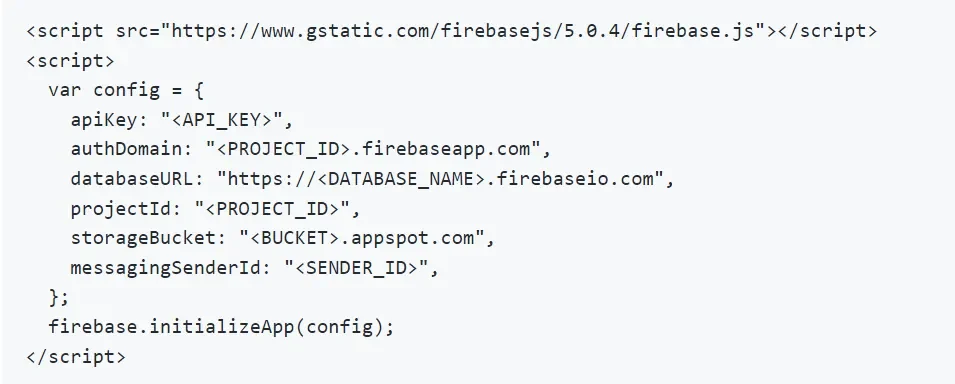
The demo website lets a user add, delete, update and read data. Checking the source of that page is how the Firebase configuration is found.
From the bug bounty reports the researcher had read, Firebase misconfigurations mostly fall into two categories: read permission issues and write permission issues.
Exploitation
Step 1: test read permission with the .json endpoint
The first way to check for a read misconfiguration is to request the database root with the .json suffix:
https://target.firebaseio.com/.json
This returns all existing data in the database. In the demo it listed the two records that had been created through the web application.
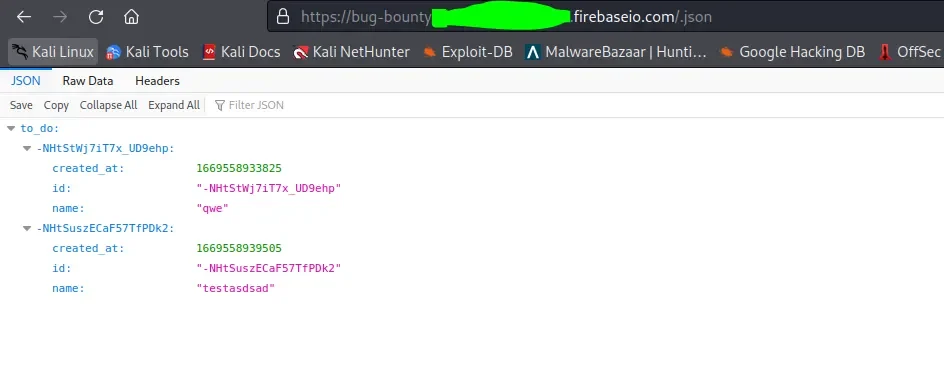
Step 2: test read permission with FirebaseScanner
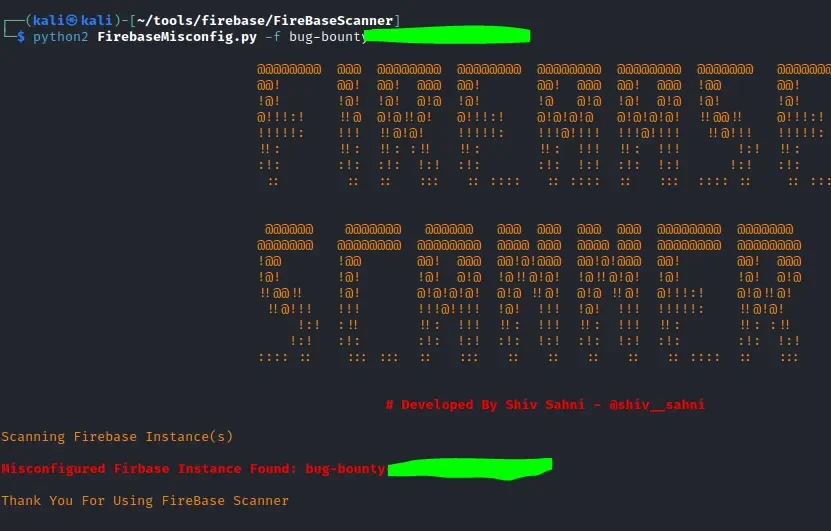
The second way is to run FirebaseScanner against the Firebase name, which in most cases is (target).firebaseio.com.
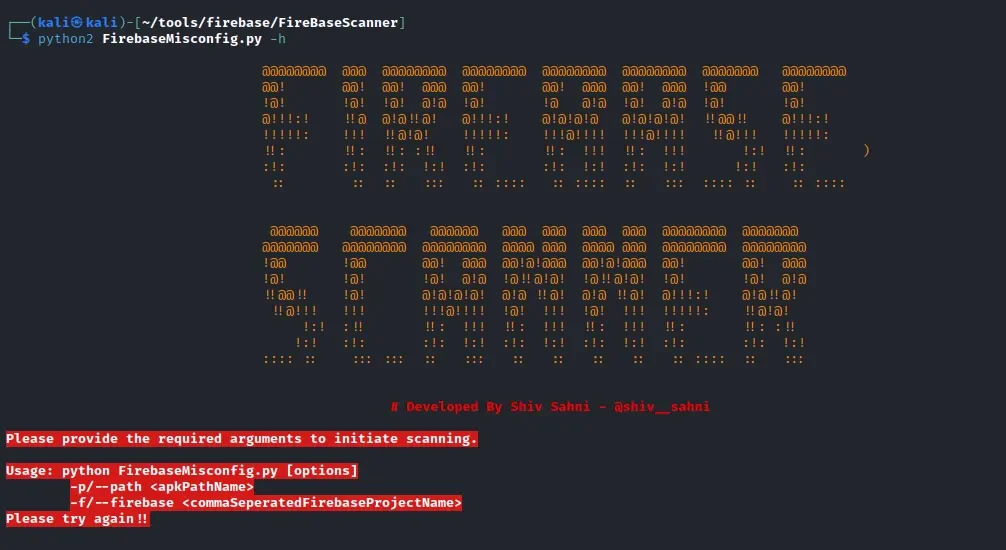
The tool reports a misconfigured Firebase.
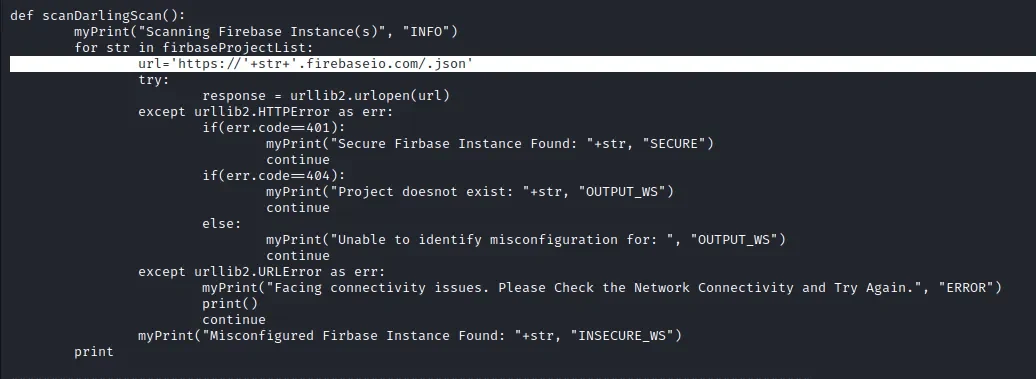
Looking at the tool's code, it performs the same .json request described above.
Step 3: test write permission with Insecure-Firebase-Exploit
Write permission is tested with Insecure-Firebase-Exploit. There are two write scenarios: write together with read permission, and write without read permission.
The researcher warns that exploiting write permission can overwrite files, so it must be done carefully, and the filename in the script must not be left blank.
If the script returns the response shown below, the database has write permission and the written data can also be read.
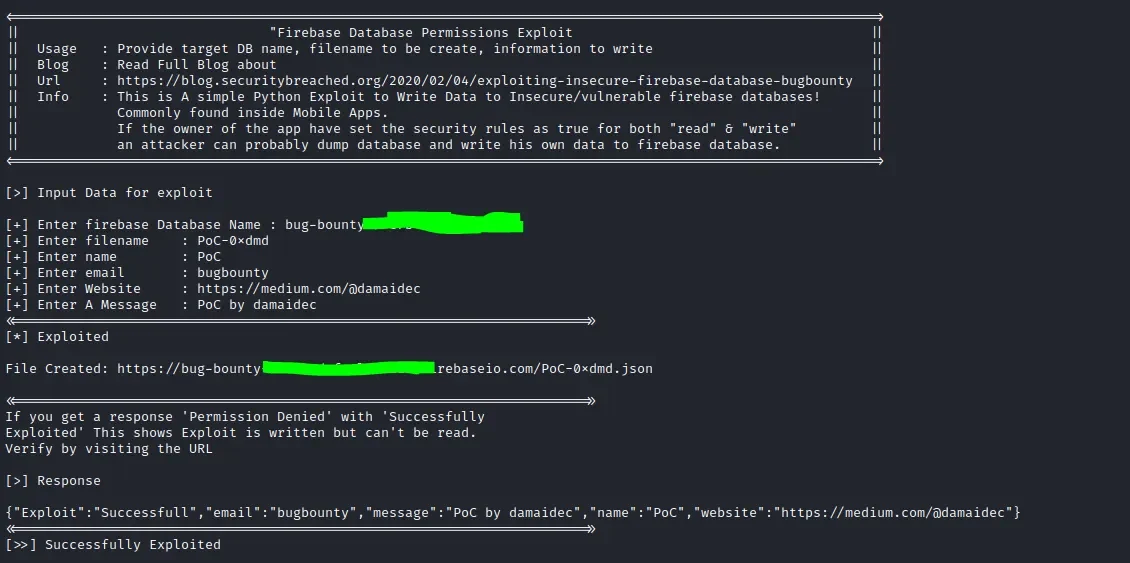
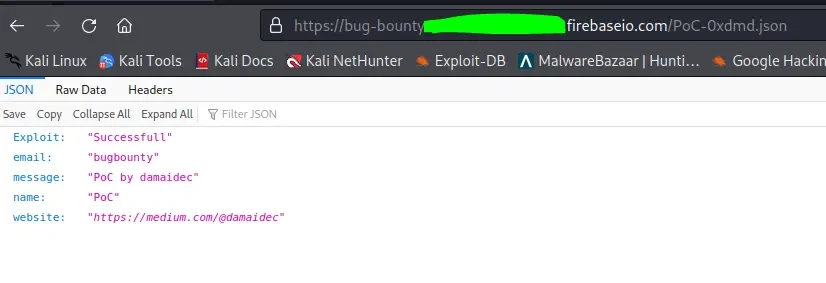
To validate the exploit further, navigate to the file that was written:
target.firebaseio.com/<filename>.json
Step 4: remove read access and retest
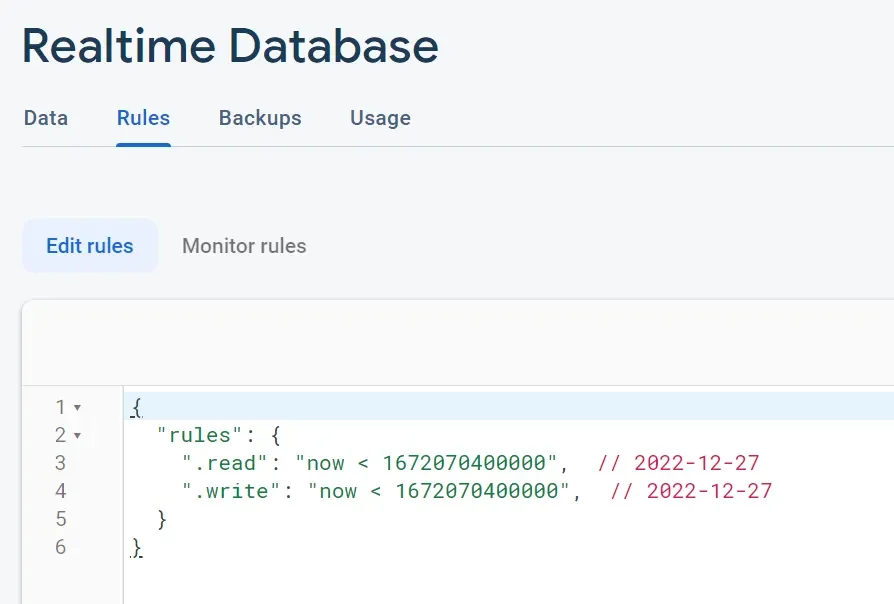
For the second scenario, the read rule is changed to auth.uid !== null.
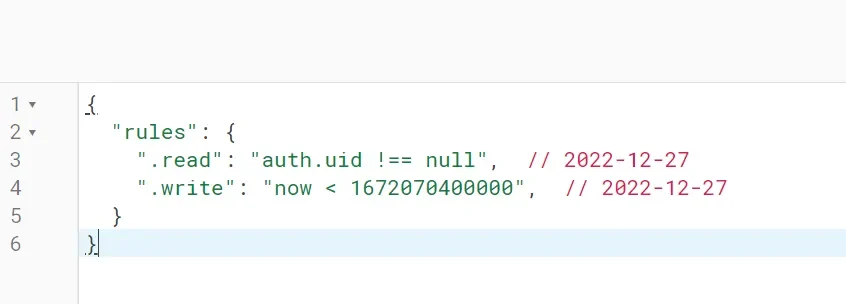
Re-running the previous exploit now returns permission denied.
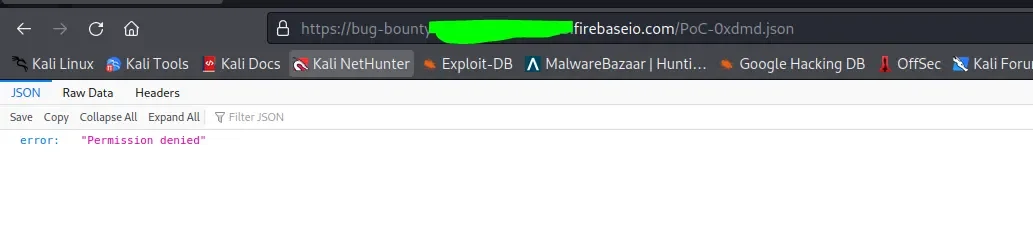
Running the tool again shows permission denied on read, but success on write. The file also does not appear on the web application.
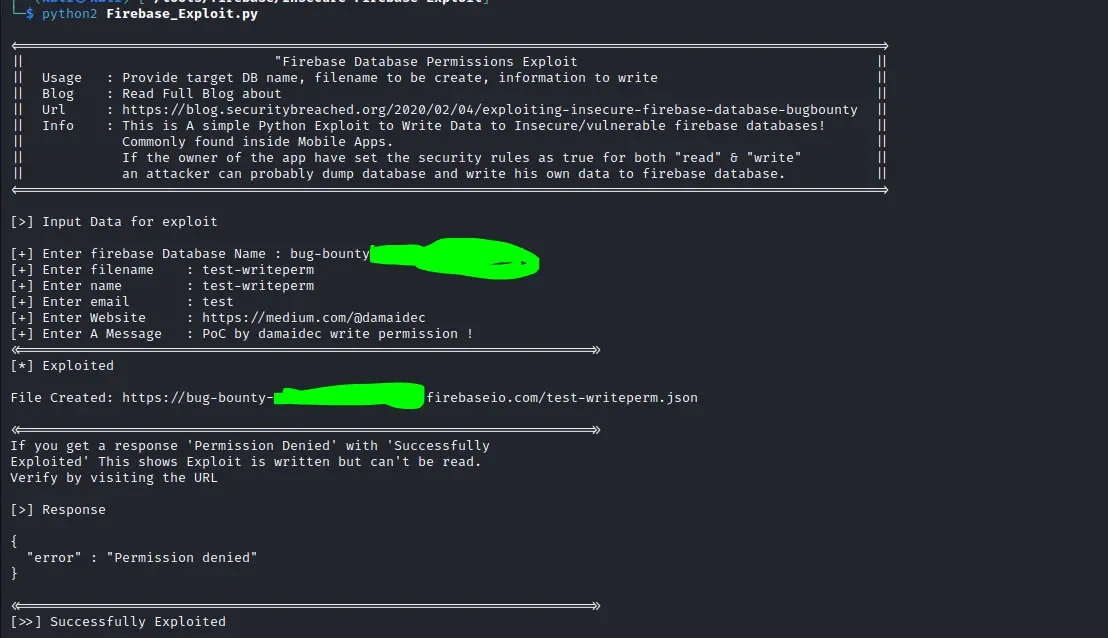
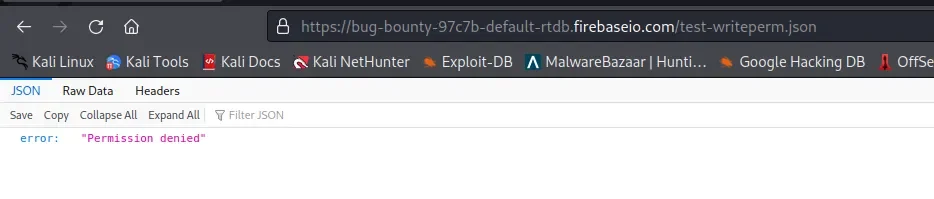
A response like the one below means the file was created but cannot be read.
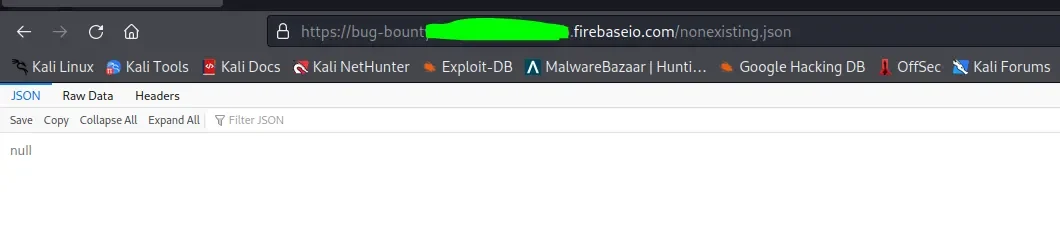
If write permission is also missing, attempting to add the filename returns a response like this.
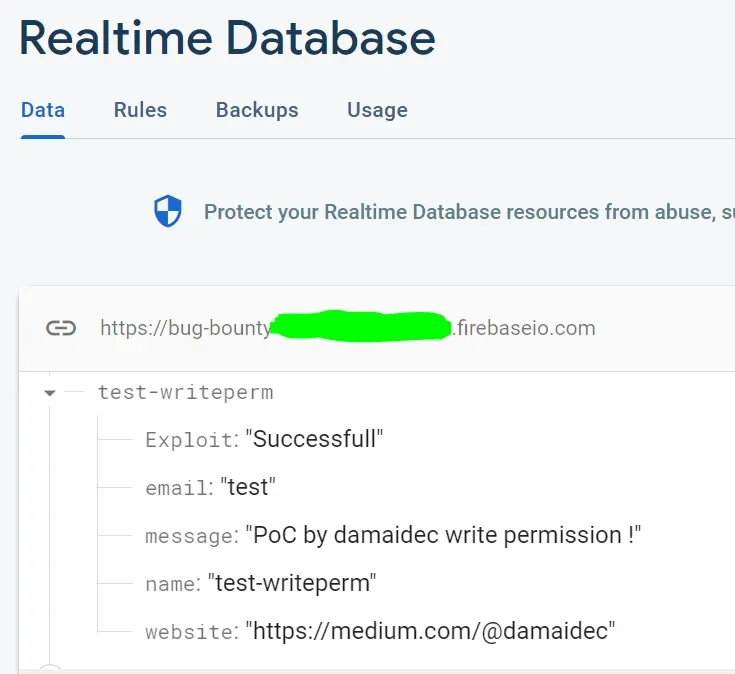
In the Firebase console, the realtime database dashboard shows the created file and the data that was entered.
Step 5: use the HackTricks script
The HackTricks script can also be used to check for Firebase misconfigurations.
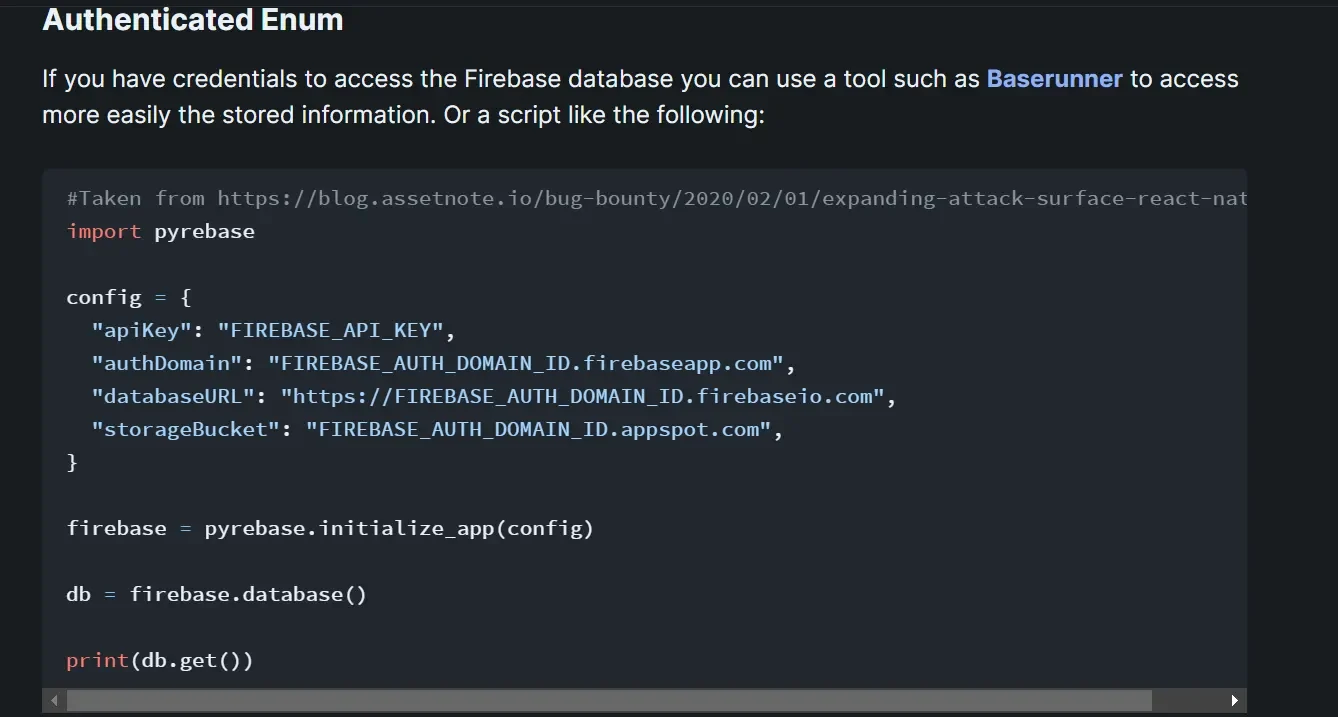
The researcher applies it to the rootcon 2022 qualifier challenge "Illusive Mind with Illusive Thoughts", which is available at:
https://ctf.laet4x.com/ctf-2022/rootcon-16-pre-qualifier/1-easy-300-illusive-mind-with-illusive-thoughts
Once the Firebase configuration is obtained, it is copied into the script and the script is run. The researcher obfuscated the configuration to avoid spoiling the challenge.
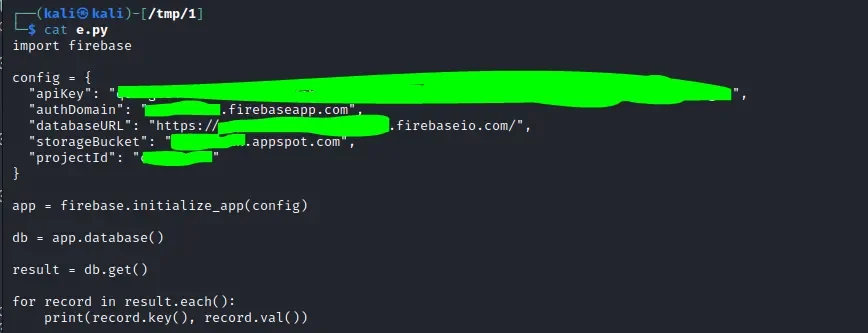
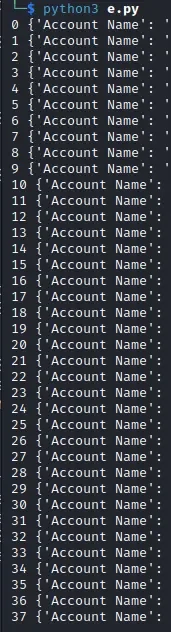
Running the script returns a lot of data, and eventually something odd appears that helps retrieve the flag. The same data can be obtained by requesting /.json, which is the same read permission misconfiguration described earlier.
Root cause
The root cause is a Firebase Realtime Database whose security rules do not require authentication for the affected paths. When the rules permit public reads, the whole database can be downloaded through the .json endpoint. When they permit public writes, arbitrary files can be created or overwritten through the same interface. The researcher's second scenario shows that read and write rules are evaluated separately: setting the read rule to auth.uid !== null blocks reads while writes still succeed.
Impact
An unauthenticated attacker can read all data stored in the database, and, where write rules are open, create or overwrite files. The researcher notes that write access can overwrite existing files, which makes it more dangerous than read access alone. In the CTF example, the exposed data contained something odd that helped retrieve the flag. The report was marked as not applicable, and the researcher notes the target was not owned by the company whose name it used.
Fix
Firebase security rules should require authentication for read and write access. The researcher's own demonstration shows the effect of changing the read rule to auth.uid !== null, which denies unauthenticated reads. The same principle applies to write rules: they should not allow unauthenticated writes. The report does not describe any fix applied to the original target.
Variants to test
- Request
https://target.firebaseio.com/.jsonon any host that references a Firebase project. A positive result is a JSON body containing database contents. - Run FirebaseScanner with the project name. A positive result is the tool reporting a misconfigured Firebase.
- Run Insecure-Firebase-Exploit with a non-blank filename. A positive result is a success response on write, and the file being retrievable at
target.firebaseio.com/<filename>.jsonif read is also open. - After a read rule is tightened, retest write separately. A positive result is permission denied on read but success on write, with the file visible in the realtime database dashboard.
- Run the HackTricks Firebase script with a discovered configuration. A positive result is a large data dump containing unexpected records.
What happened, in plain words
A security researcher found a Firebase Realtime Database that anyone on the internet could read from and write to without logging in. They reported it through a bug bounty programme, but the report was marked as not applicable. The researcher points out that the target had the same name as a company but was not actually owned by that company.
To explain the issue without exposing the real target, the researcher built their own deliberately vulnerable copy of the same setup: a small to-do list web application backed by Firebase that can create, read, update and delete items. Everything below is demonstrated on that copy.
Before going further, a few ideas in plain words:
- Firebase is a service from Google that gives web and mobile apps a ready-made database and other back-end features, so the app developer does not have to build a server. The part used here is the Realtime Database, which stores data as a tree of JSON (text-based) records and lets apps read and write it over the internet.
- Security rules are the settings on a Firebase database that decide who is allowed to read and who is allowed to write each part of the data. Think of them as the lock on a filing cabinet: if the lock is left open, anyone who knows the address can take papers out or put new ones in.
- A misconfiguration means the software was set up wrongly, not that it has a coding bug. The feature works exactly as designed; the person who set it up just left a door unlocked.
- An API (application programming interface) is the way one program talks to another over the internet. When your browser asks a website for data, it sends a request to an address (a URL) and gets a response back, often in JSON, a text format for structured data.
- A configuration file in this context is a small piece of the web app's code that tells the app which Firebase project to talk to. It contains the project's name and keys. It is not secret by design, but it does reveal the address of the database, which is what an attacker needs.
Setup
The researcher started by downloading two free tools from GitHub, a website where people share code. git clone is a command that copies a project from GitHub onto your computer.
Line by line:
- The first command downloads FireBaseScanner, a tool that checks whether a Firebase project name is misconfigured.
- The second command downloads Insecure-Firebase-Exploit, a tool that tests whether a Firebase database lets you write data without logging in.
For the demo, the researcher created their own Firebase project with the same weakness and downloaded a ready-made to-do list application that already supports creating, reading, updating and deleting items (often shortened to CRUD):
This command copies the demo web app onto the computer so it can be run and inspected.
Finding it
How do you find a Firebase configuration in the first place? There are many tools that scan websites and pick out configuration files automatically: burpbounty, nuclei, reconftw (described in the report as an all in one recon and va tool, meaning reconnaissance and vulnerability assessment), js link finder, js miner, bevigil, and others.
The manual alternative is simpler and needs nothing but a browser: open the web page, right-click, choose View source (or View page source), and look through the code for the Firebase configuration.
The demo website lets a user add, delete, update and read data. Checking the source of that page is how the Firebase configuration is found.
From the bug bounty reports the researcher had read, Firebase misconfigurations mostly fall into two categories: problems with read permission (anyone can see the data) and problems with write permission (anyone can add or change the data).
Exploitation
Step 1: test read permission with the .json endpoint
The first way to check whether anyone can read the database is to ask for the database's root address with .json added at the end:
https://target.firebaseio.com/.json
What this means: target.firebaseio.com is the address of a Firebase Realtime Database (here target stands in for the real project name). Adding /.json asks Firebase to return the whole database as JSON text. If the security rules allow public reads, the response is the entire contents of the database. In the demo it listed the two records that had been created through the web application.
Step 2: test read permission with FirebaseScanner
The second way is to run FirebaseScanner against the Firebase name, which in most cases is (target).firebaseio.com.
The tool reports a misconfigured Firebase.
Looking at the tool's code, it performs the same .json request described above. In other words, the tool is doing automatically what you could do by typing the address into a browser.
Step 3: test write permission with Insecure-Firebase-Exploit
Write permission is tested with Insecure-Firebase-Exploit. There are two write scenarios: write together with read permission, and write without read permission.
The researcher warns that exploiting write permission can overwrite files, so it must be done carefully, and the filename in the script must not be left blank. Think of it as writing into someone else's notebook: if you pick a name that already exists, you may scribble over what was there.
If the script returns the response shown below, the database has write permission and the written data can also be read.
To validate the exploit further, navigate to the file that was written:
target.firebaseio.com/<filename>.json
Here <filename> is the name you gave the file in the script. Opening that address in a browser asks Firebase for that specific record. If it comes back, the write really happened and the data can be read back.
Step 4: remove read access and retest
For the second scenario, the read rule is changed to auth.uid !== null. In plain words, this rule says: only allow a read if the user is logged in (auth.uid is the identifier of a logged-in user, and !== null means it is not empty). An anonymous visitor has no user identifier, so the read is refused.
Re-running the previous exploit now returns permission denied.
Running the tool again shows permission denied on read, but success on write. The file also does not appear on the web application. This is the important lesson: read and write rules are checked separately, so locking the read side does not lock the write side.
A response like the one below means the file was created but cannot be read.
If write permission is also missing, attempting to add the filename returns a response like this.
In the Firebase console (the web dashboard where the project owner manages the database), the realtime database dashboard shows the created file and the data that was entered. This confirms the write went through even though the web app itself does not display it.
Step 5: use the HackTricks script
The HackTricks script can also be used to check for Firebase misconfigurations. HackTricks is a well-known public collection of security notes and scripts.
The researcher applies it to the rootcon 2022 qualifier challenge "Illusive Mind with Illusive Thoughts", which is available at:
https://ctf.laet4x.com/ctf-2022/rootcon-16-pre-qualifier/1-easy-300-illusive-mind-with-illusive-thoughts
A CTF (capture the flag) is a practice challenge where the goal is to find a hidden piece of text called the flag. Once the Firebase configuration is obtained, it is copied into the script and the script is run. The researcher obfuscated the configuration to avoid spoiling the challenge, meaning they hid the real values so other players cannot simply copy them from the write-up.
Running the script returns a lot of data, and eventually something odd appears that helps retrieve the flag. The same data can be obtained by requesting /.json, which is the same read permission misconfiguration described earlier.
Root cause
The root cause is a Firebase Realtime Database whose security rules do not require authentication for the affected paths. When the rules permit public reads, the whole database can be downloaded through the .json endpoint. When they permit public writes, arbitrary files can be created or overwritten through the same interface. The researcher's second scenario shows that read and write rules are evaluated separately: setting the read rule to auth.uid !== null blocks reads while writes still succeed.
Impact
An unauthenticated attacker can read all data stored in the database, and, where write rules are open, create or overwrite files. The researcher notes that write access can overwrite existing files, which makes it more dangerous than read access alone. In the CTF example, the exposed data contained something odd that helped retrieve the flag. The report was marked as not applicable, and the researcher notes the target was not owned by the company whose name it used.
Fix
Firebase security rules should require authentication for read and write access. The researcher's own demonstration shows the effect of changing the read rule to auth.uid !== null, which denies unauthenticated reads. The same principle applies to write rules: they should not allow unauthenticated writes. The report does not describe any fix applied to the original target.
Variants to test
- Request
https://target.firebaseio.com/.jsonon any host that references a Firebase project. A positive result is a JSON body containing database contents. - Run FirebaseScanner with the project name. A positive result is the tool reporting a misconfigured Firebase.
- Run Insecure-Firebase-Exploit with a non-blank filename. A positive result is a success response on write, and the file being retrievable at
target.firebaseio.com/<filename>.jsonif read is also open. - After a read rule is tightened, retest write separately. A positive result is permission denied on read but success on write, with the file visible in the realtime database dashboard.
- Run the HackTricks Firebase script with a discovered configuration. A positive result is a large data dump containing unexpected records.
Glossary
- API: the way one program asks another program for data or actions over the internet.
- Authentication: proving who you are, usually by logging in.
- Bug bounty programme: a scheme where organisations pay researchers for reporting security problems.
- Configuration file: a piece of code or settings that tells an app how to connect to services such as a database.
- CRUD: create, read, update and delete, the four basic operations on stored data.
- CTF (capture the flag): a practice security challenge where the goal is to find a hidden piece of text called the flag.
- Firebase: Google's service that provides ready-made back-end features such as databases for apps.
- Firebase Realtime Database: the part of Firebase that stores data as a tree of JSON records and lets apps read and write it over the internet.
- Flag: the hidden piece of text that proves you solved a CTF challenge.
- JSON: a text format for structured data, made of names and values.
- Misconfiguration: a setting left wrong, so a feature behaves in an unintended and unsafe way.
- Obfuscation: hiding real values so they cannot be read or copied easily.
- Permission denied: the server's answer when the rules do not allow the requested action.
- Read permission: the rule that decides who may view data.
- Reconnaissance (recon): the information-gathering phase of a security test.
- Security rules: the settings on a Firebase database that decide who may read and who may write each part of the data.
- Unauthenticated: not logged in, so the server does not know who you are.
- URL: the address of something on the internet, such as a web page or an API endpoint.
- Write permission: the rule that decides who may add or change data.



