Found SSRF and LFI in Just 10 minutes of using burp!
A URL parameter named src accepted user-supplied URLs and was used server-side, allowing an attacker to make the server request arbitrary addresses (SSRF) and to read local files by supplying a Windows file path (LFI). The SSRF was limited by an internal WAF blocking localhost and cloud metadata, but the LFI exposed internal server files.
 Published on xelkomy.medium.com
At the beginning of the article, I have to say the vulnerability is so sample, but it needs some browsing into your targets, I have got two vulnerabilities in just one parameter named src and this parameter is taken URL as an input.
The full write-up lives on its author's site
It belongs to its author, so we link to it rather than copy it. The other two tabs are our own rewrites, checked against it.
Context
This is a short account of two vulnerabilities found in a single parameter called src, which takes a URL as its input. The report does not name the target program or describe the product or feature behind the parameter; it only says that the parameter accepts a URL and that the same parameter later turned out to be vulnerable to local file inclusion. The work was done with a browser and Burp Suite, without any special tooling beyond a recon script and a couple of Burp extensions.

Setup
The only requirement stated is Burp Suite, Professional or Community edition. The researcher's normal workflow starts with a bash recon script that runs subfinder, amass, assetfinder, httpx, nuclei, ffuf, uncover, notify…etc, after which manual testing begins in a fresh Burp project with extensions such as AutoRepeater and ActiveScan++,.etc loaded.
The key ingredient is an AutoRepeater regex the researcher had seen three years earlier in a Medium post by Renato Dante about automating SSRF testing. It had produced nothing in those three years, but this time it led to a bounty.
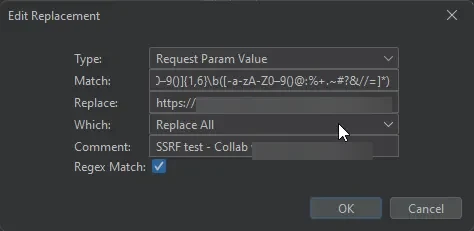
https?://(www.)?[-a-zA-Z0–9@:%.+~#=]{1,256}.[a-zA-Z0–9()]{1,6}\b([-a-zA-Z0–9()@:%+.~#?&//=]*)
Finding it
The researcher did not describe a specific observation that made the src parameter look wrong. The approach was breadth first: crawl broadly, let AutoRepeater rewrite every URL-shaped value it saw, and watch for a Collaborator interaction.
Exploitation
Step 1: collect live hosts
Alive subdomains from subfinder are piped into httpx.
Step 2: prepare Burp and AutoRepeater
Open Burp Suite, create a new project, and configure AutoRepeater with the regex above and the replacement settings shown in the screenshot.
Step 3: crawl through Burp
Katana (by ProjectDiscovery) is run with its proxy option pointed at the default Burp proxy address, http://[redacted]:8080.
Step 4: browse manually
Open the subdomains in the browser and visit every login page and any other page seen on the target.
Step 5: read the AutoRepeater results
Back in Burp, the extension shows what it caught. Any parameter that takes an input like http://google.com is changed to the Collaborator URL configured in AutoRepeater. If no response reaches Collaborator, the tested URL stays saved in AutoRepeater until Burp is closed.
The one-liner used to chain subfinder, httpx and katana into the Burp proxy:
subfinder -d hackerone.com | httpx -timeout 10 | katana -proxy http://[redacted]:8080 -jc -aff
Everything Katana requests passes through Burp, so AutoRepeater sees the traffic and can rewrite URL-shaped values.
Step 6: confirm the SSRF
The researcher obtained an SSRF this way, but describes it as low impact: nothing could be reached locally on the vulnerable website because an internal WAF blocked access to [redacted] and to the AWS internal metadata IP.
Step 7: pivot to LFI on the same parameter
After further testing of multiple vulnerabilities on the same parameter, the researcher found LFI with this input:
?src=c%3a%5cwindows%5cwin.ini
Decoded, the value is c:\windows\win.ini, a Windows path passed to the src parameter. The researcher stopped there to avoid being banned from the H1 platform for pulling sensitive information about the internal system without permission.
The report was submitted and paid a $$$$ bounty roughly a week to a week and a half later.
Root cause
A parameter that accepts a URL and is then used by the server to fetch or read a resource is the classic setup for SSRF: the server makes the request on the attacker's behalf, from a position where it can reach internal addresses. The same parameter accepting c:\windows\win.ini points to the value being used as a file path or resource locator without adequate validation, which is the classic setup for LFI. The internal WAF blocked loopback and the AWS metadata IP, so the SSRF was constrained, but it did not stop the file read.
Impact
With the SSRF, an attacker could make the server issue requests to a URL of their choosing, but in this instance the internal WAF blocked [redacted] and the AWS metadata IP, so the practical impact was low. With the LFI, an attacker could read local files on the server, and the researcher states that this produced a good deal of information about the target. The report does not enumerate which other files were readable or what exactly was disclosed.
Fix
The measures that would address both issues are to validate the src value against an allowlist of permitted schemes and hosts before any fetch, to resolve and reject internal, loopback and link-local addresses (including cloud metadata addresses) at request time, and to stop treating the parameter as a filesystem path, resolving it only inside a fixed directory if file access is genuinely required. The WAF that blocked loopback and metadata addresses limited the SSRF but did not prevent the LFI, so filtering at the WAF alone is not sufficient.
Variants to test
- Run the same AutoRepeater regex against other targets and watch Collaborator for hits. A positive result is an interaction from the target's infrastructure after a URL-shaped parameter is rewritten.
- Try the same
srcparameter with a Windows path such asc:\windows\win.ini, URL-encoded as in the report. A positive result is the contents of the file in the response. - Where the SSRF is blocked by a WAF for
[redacted]and the metadata IP, try other internal representations and hosts to see whether the block is complete. A positive result is any response that originates from inside the network. - Test other parameters that accept URLs on the same host, since the report found two distinct issues in one parameter and the same input handling may be reused elsewhere.
What happened, in plain words
A security researcher found two different security problems in the same place on a website: one parameter, called src, that takes a web address (a URL) as its input. The first problem let the website's own server be tricked into fetching a web address chosen by the researcher. The second problem, found in the very same parameter, let the researcher read a file that lives on the server itself.
The researcher found both with nothing more than a normal web browser and a tool called Burp Suite, which sits between your browser and a website and lets you look at, and change, everything that travels between them. The report does not name the website or the company, and it does not describe what feature the src parameter belongs to. It only says the parameter accepts a URL, and that later the same parameter turned out to be able to read a local file.
Before going further, two ideas need explaining, because everything else builds on them.
What is a parameter? When you fill in a form on a website, or click a link, the address in your browser's address bar often carries extra pieces of information after a question mark. In https://example.com/page?colour=blue, the part colour=blue is a parameter: a named value the website's server reads and acts on. Here the parameter is named src (short for "source"), and the value it expects is a web address.
What is a server? When you visit a website, your browser asks another computer, the server, to send it the page. The server is the machine that stores the site and does the work behind it. Some features work by having the server itself go and fetch something from another address, for example to show a preview of a link. That behaviour is exactly what the first vulnerability abuses.
The two vulnerabilities, in plain words
SSRF (Server-Side Request Forgery). Normally, when you type a web address, your browser fetches it. With SSRF, you give the website a web address, and the website's server fetches it instead, on your behalf. That matters because the server sits inside the company's private network, where it can reach machines that you, from the outside internet, cannot reach. It is like asking a receptionist to make a phone call for you: they can dial internal extensions you have no direct line to.
LFI (Local File Inclusion). Here the website takes a value you supply and uses it as the name of a file on its own disk, then shows you the contents. If the value is not checked properly, you can point it at files that were never meant to be shown to visitors. It is like a library clerk who, instead of fetching the book you asked for from the public shelf, fetches whatever you name from the staff room because nobody checks the request.
What you need
The report says the only requirement is Burp Suite, either the Professional edition (paid) or the Community edition (free). That is enough because the whole technique is: browse the target with Burp recording the traffic, and let a Burp extension called AutoRepeater test things automatically.
The story
On a normal bug bounty day, the researcher starts with a bash script (bash is a program for typing commands to your computer) that runs a list of tools: subfinder, amass, assetfinder, httpx, nuclei, ffuf, uncover, notify…etc. These are reconnaissance tools: they discover which parts of a company's systems exist and are reachable. After the script finishes, manual work begins: a fresh Burp Suite project is created and Burp is prepared with extensions such as AutoRepeater and ActiveScan++,.etc.
The key ingredient is a pattern (a "regex", explained below) that the researcher had seen three years earlier in a Medium blog post by Renato Dante, in a write-up about automating SSRF testing. In those three years the pattern had produced nothing, but this time it led to a bounty.
The screenshot shows the AutoRepeater replacement settings.
https?://(www.)?[-a-zA-Z0–9@:%.+~#=]{1,256}.[a-zA-Z0–9()]{1,6}\b([-a-zA-Z0–9()@:%+.~#?&//=]*)
This is a regular expression, or regex: a compact way of describing a shape of text, so a computer can find anything matching that shape. Reading it piece by piece:
https?://means the text starts withhttp://orhttps://. The?aftersmeans "the s is optional".(www.)?means an optionalwww.at the start of the host name.[-a-zA-Z0–9@:%.+~#=]{1,256}means one to 256 characters drawn from letters, digits and a set of symbols, which is roughly what a host name looks like..[a-zA-Z0–9()]{1,6}means a dot followed by one to six letters or digits, roughly the ending of a domain such as.com.\bmarks a word boundary, so the match stops cleanly.([-a-zA-Z0–9()@:%+.~#?&//=]*)means any number of characters that can appear in a path, query or fragment, so the whole rest of the URL is included.
Burp Collaborator is a service that gives you a unique address you control and tells you when anything contacts it; if the target's server fetches your Collaborator address, you get a notification, which proves the server made the request.
Finding it
The report does not describe a specific observation that made the src parameter look suspicious. The approach was breadth first: crawl broadly, let AutoRepeater rewrite every URL-shaped value it sees, and watch for a Collaborator interaction.
Exploitation, step by step
Step 1: collect live hosts
Alive subdomains from subfinder are piped into httpx. A subdomain is a part of a larger domain, such as shop.example.com under example.com. subfinder finds subdomains; httpx checks which of them actually respond over HTTP, so you do not waste time on dead ones.
Step 2: prepare Burp and AutoRepeater
Open Burp Suite, create a new project, and configure AutoRepeater with the regex above and the replacement settings shown in the screenshot. This is the setup that makes the automatic rewriting happen.
Step 3: crawl through Burp
Katana (by ProjectDiscovery) is run with its proxy option pointed at the default Burp proxy address, http://[redacted]:8080. A proxy is a middleman: instead of talking to websites directly, a program sends its traffic through the proxy, which can inspect and record it. [redacted] is the address a computer uses to refer to itself, so this tells Katana to send its traffic to Burp running on the same machine.
Step 4: browse manually
Open the subdomains in the browser and visit every login page and any other page seen on the target. Manual browsing matters because some pages and forms are only reachable by clicking around, and every request made this way also passes through Burp.
Step 5: read the AutoRepeater results
Back in Burp, the extension shows what it caught. Any parameter that takes an input like http://google.com is changed to the Collaborator URL configured in AutoRepeater. If no response reaches Collaborator, the tested URL stays saved in AutoRepeater until Burp is closed. In other words, a hit in Collaborator means the server fetched your address; silence means it did not.
The one-liner used to chain subfinder, httpx and katana into the Burp proxy:
subfinder -d hackerone.com | httpx -timeout 10 | katana -proxy http://[redacted]:8080 -jc -aff
Line by line:
subfinder -d hackerone.comruns subfinder for the domainhackerone.comand lists its subdomains.|is a pipe: it takes the output of the command on its left and feeds it as input to the command on its right.httpx -timeout 10takes those subdomains and keeps only the ones that respond over HTTP, giving up after ten seconds per host.|pipes those live hosts into the next tool.katana -proxy http://[redacted]:8080 -jc -affcrawls each live host, sending all its traffic through the Burp proxy athttp://[redacted]:8080, with-jcand-affenabling its crawling options.
Everything Katana requests passes through Burp, so AutoRepeater sees the traffic and can rewrite URL-shaped values.
Step 6: confirm the SSRF
The researcher obtained an SSRF this way, but describes it as low impact: nothing could be reached locally on the vulnerable website because an internal WAF blocked access to [redacted] and to the AWS internal metadata IP. A WAF (Web Application Firewall) is a filter that inspects incoming requests and blocks ones it considers dangerous. The AWS metadata IP is a special address inside Amazon's cloud that, if reachable, can hand out information about the server; blocking it is a common defensive measure.
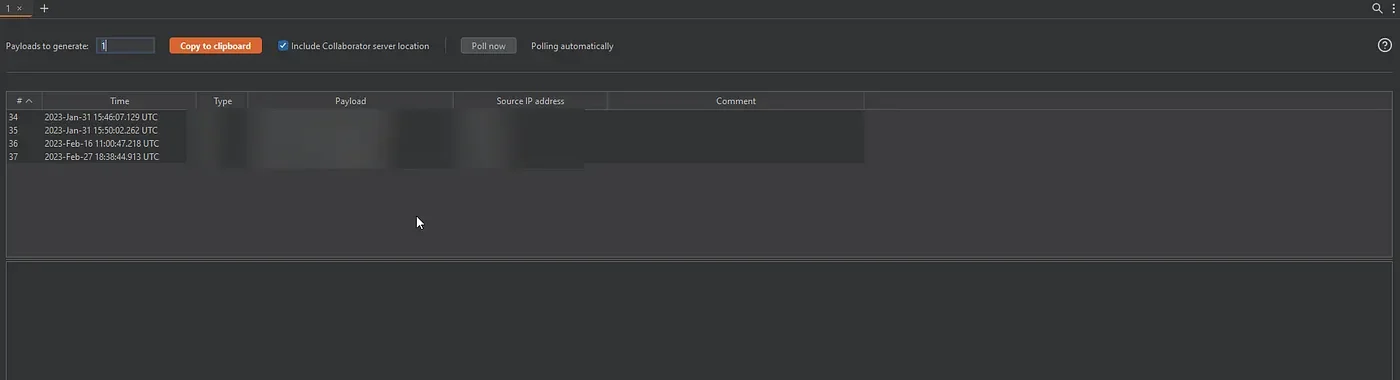
The screenshot shows Burp Collaborator, the service used to detect whether the target's server actually made the request. A hit there is what confirms the SSRF.
Step 7: pivot to LFI on the same parameter
After further testing of multiple vulnerabilities on the same parameter, the researcher found LFI with this input:
?src=c%3a%5cwindows%5cwin.ini
Line by line:
?src=starts the query string and names the parametersrc.c%3ais the URL-encoded form ofc:. Characters that are not safe in a URL are written as a percent sign followed by their code, so%3ameans a colon.%5cis the URL-encoded form of a backslash\.windows%5cwin.iniiswindows\win.ini.
Decoded, the value is c:\windows\win.ini, a Windows file path passed to the src parameter. win.ini is a standard Windows configuration file. The LFI yielded a good deal of information about the target. The researcher stopped there to avoid being banned from the H1 platform for pulling sensitive information about the internal system without permission. H1 here refers to HackerOne, the bug bounty platform.
The report was submitted and paid a $$$$ bounty roughly a week to a week and a half later.
Why it worked
A parameter that accepts a URL and is then used by the server to fetch or read a resource is the classic setup for SSRF: the server makes the request on the attacker's behalf, from a position where it can reach internal addresses. The same parameter accepting c:\windows\win.ini points to the value being used as a file path or resource locator without adequate validation, which is the classic setup for LFI. The internal WAF blocked loopback and the AWS metadata IP, so the SSRF was constrained, but it did not stop the file read.
What an attacker could do
With the SSRF, an attacker could make the server issue requests to a URL of their choosing, but in this instance the internal WAF blocked [redacted] and the AWS metadata IP, so the practical impact was low. With the LFI, an attacker could read local files on the server, and the researcher states that this produced a good deal of information about the target. The report does not enumerate which other files were readable or what exactly was disclosed.
How it should be fixed
The measures that would address both issues are to validate the src value against an allowlist of permitted schemes and hosts before any fetch, to resolve and reject internal, loopback and link-local addresses (including cloud metadata addresses) at request time, and to stop treating the parameter as a filesystem path, resolving it only inside a fixed directory if file access is genuinely required. The WAF that blocked loopback and metadata addresses limited the SSRF but did not prevent the LFI, so filtering at the WAF alone is not sufficient.
Things to try on other targets
- Run the same AutoRepeater regex against other targets and watch Collaborator for hits. A positive result is an interaction from the target's infrastructure after a URL-shaped parameter is rewritten.
- Try the same
srcparameter with a Windows path such asc:\windows\win.ini, URL-encoded as in the report. A positive result is the contents of the file in the response. - Where the SSRF is blocked by a WAF for
[redacted]and the metadata IP, try other internal representations and hosts to see whether the block is complete. A positive result is any response that originates from inside the network. - Test other parameters that accept URLs on the same host, since the report found two distinct issues in one parameter and the same input handling may be reused elsewhere.
Glossary
- Parameter: a named value sent to a website, usually after a
?in the address, that the server reads and acts on. - URL: a web address, such as
https://example.com/page. - Server: the computer that stores a website and does the work behind it.
- SSRF (Server-Side Request Forgery): a flaw where an attacker makes the server fetch a web address of the attacker's choosing.
- LFI (Local File Inclusion): a flaw where an attacker makes the server read and return a file from its own disk.
- Burp Suite: a tool that sits between your browser and a website so you can inspect and change the traffic.
- Burp Community / Professional: the free and paid editions of Burp Suite.
- Extension: an add-on that gives Burp extra features.
- AutoRepeater: a Burp extension that automatically rewrites values in requests when they match a pattern.
- ActiveScan++: another Burp extension, mentioned as part of the researcher's setup.
- Regex (regular expression): a compact way of describing a shape of text so a computer can find matches.
- Burp Collaborator: a service that gives you a unique address and tells you when anything contacts it, used to confirm that a server made a request.
- Proxy: a middleman that traffic passes through, which can inspect and record it.
[redacted]: the address a computer uses to refer to itself (loopback).- WAF (Web Application Firewall): a filter that inspects incoming requests and blocks ones it considers dangerous.
- AWS metadata IP: a special address inside Amazon's cloud that can reveal information about the server; blocking it is a common defence.
- Subdomain: a part of a larger domain, such as
shop.example.comunderexample.com. - subfinder: a tool that discovers subdomains.
- httpx: a tool that checks which hosts respond over HTTP.
- Katana: a crawling tool by ProjectDiscovery that follows links on a site.
- Crawl: to automatically visit pages and follow links to discover more of a site.
- Bash: a program for typing commands to your computer.
- Pipe (
|): a way to feed the output of one command into another. - URL encoding: writing unsafe characters as a percent sign plus a code, such as
%3afor a colon. win.ini: a standard Windows configuration file, often requested when testing whether a server will read files.- H1 / HackerOne: a bug bounty platform where researchers report vulnerabilities.
- Bug bounty: a programme that pays researchers for reporting security flaws.
- Recon (reconnaissance): discovering which parts of a company's systems exist and are reachable.
- Allowlist: a list of things explicitly permitted, with everything else rejected.
- Loopback: traffic that stays inside the same machine, using
[redacted]. - Link-local address: an address only valid within a local network segment.
- Impact: how much harm a vulnerability could realistically cause.





