The effectiveness of employing BChecks to uncover significant secrets
A JavaScript file exposed sensitive credentials including a GitHub token, an npm token, and a private SSH key. An attacker with these tokens could access private repositories, stop servers, or publish malicious packages.
 Published on xelkomy.medium.com
The context of this article suggests that the method I employed to uncover this issue is accessible to anyone. I utilized tools such as Burp Suite, along with the Burp BCheck templates during the discovery process, the monster of this blog is the BCheks it was a great to use by built custom bchecks to find for us the…
The full write-up lives on its author's site
It belongs to its author, so we link to it rather than copy it. The other two tabs are our own rewrites, checked against it.
Context
This write-up comes from a penetration testing engagement for a company. During the engagement a single JavaScript file was found to contain the developers' secrets: a GitHub token, an npm token, and more sensitive material including a private SSH key. The author's point is that the technique used to find them is available to anyone, and that the main tool was Burp Suite with custom BChecks running as part of a passive scan.
Setup
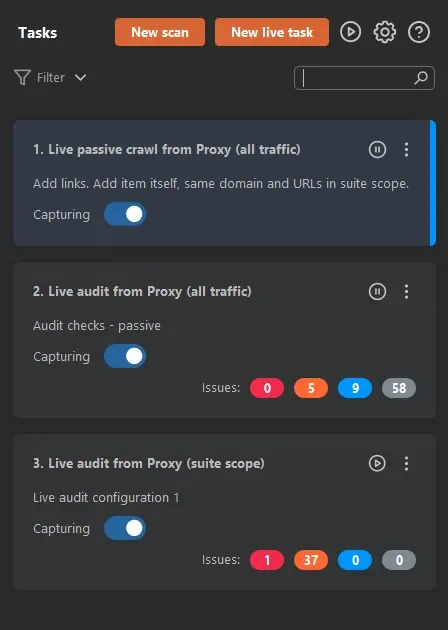
The only tooling described is Burp Suite, used as a proxy against the target, with the passive scan enabled on the Burp dashboard so that traffic passing through the proxy is scanned as the tester browses. The author used custom BCheck templates during discovery. Those templates are public and can be imported by anyone holding a Burp Suite Pro licence:
- Information Disclosure Secret Finder, certain: Certain-leaks-checker.bcheck
- Information Disclosure Secret Finder, tentative: Tentative-leaks-checker.bcheck
The precondition is simply that the tester's browser traffic to the target goes through the Burp proxy and that passive scanning is on, as shown in the default task view when Burp Suite is opened:
Finding it
With the proxy and passive scan in place, the BCheck templates flagged secrets inside the JavaScript files served by the site, and across the site generally, without any active probing. The author describes the templates as effective at uncovering numerous secrets, including the company's GitHub secret key and npm token. The findings as they appeared in Burp Suite:
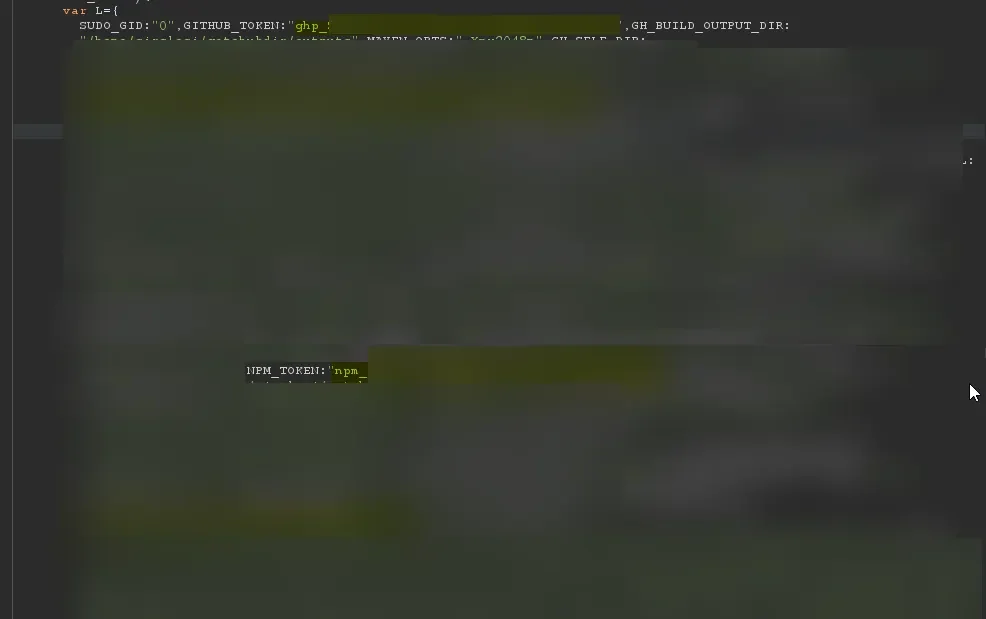
All of the credentials in this case sat inside one JavaScript file, which is what made the exposure notable: a single client-side asset carried a GitHub token, an npm token and a private SSH key.
Exploitation
Step 1: Validate the GitHub token
To work out what the GitHub key could do, the author created a GitHub repository named KeyHacks, searched that page for the term "github", and found a proof of concept command for checking the permissions attached to a GitHub secret key:
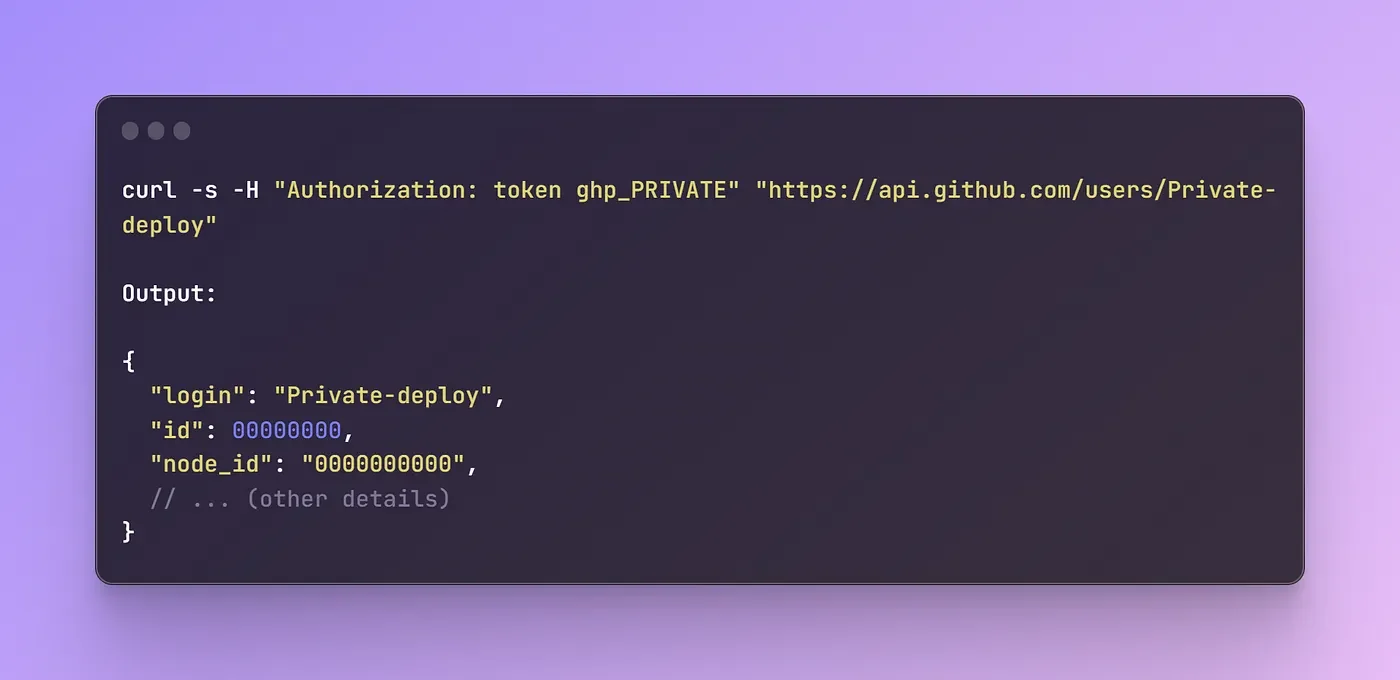
Executing that command would have allowed downloading deployment information, halting the running server, and accessing private GitHub repositories, but on a black box engagement those actions were not taken. On a black box engagement those actions were not taken.
Step 2: Validate the npm token
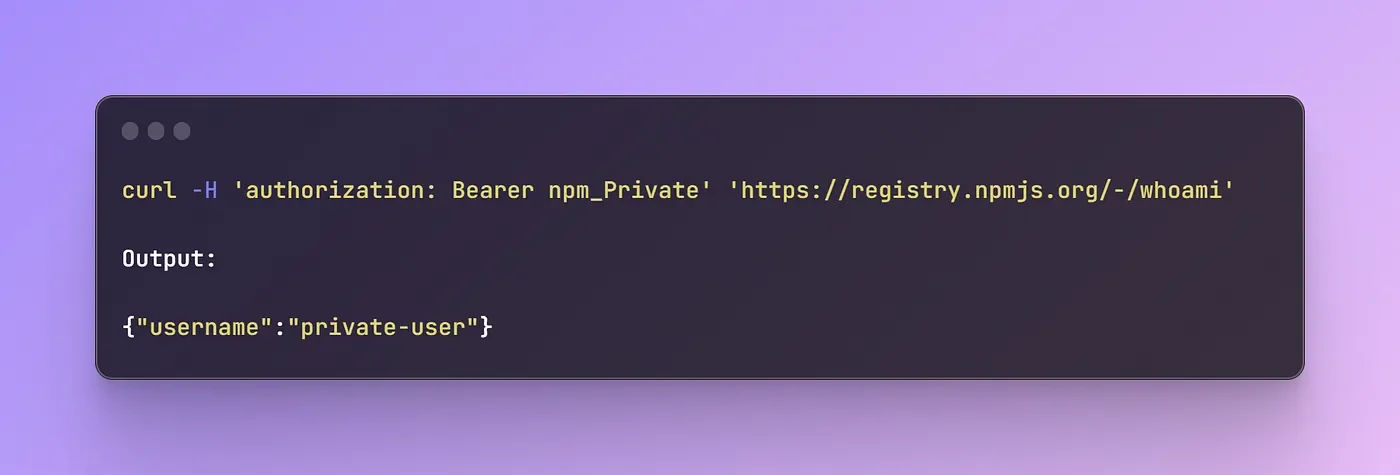
Validating the exposed npm token surfaced further possibilities: the token gave access to a project published on npmjs. The author considered the dependency confusion trend from two years earlier, in which an attacker adds a backdoor to a package and publishes it, and contemplated the equivalent here, updating the package with a backdoor. That was not done. As the author puts it, penetration testers refrain from such actions without the explicit permission of the victim, particularly when the secrets belong to a production site rather than a testing environment.
The validation commands above served only as proof of concept for the findings. Actual exploitation cannot be pursued without explicit permission from the target, and authorisation should be sought from the client before any such action. Unauthorised actions can lead to severe consequences, including termination and reputational damage.
Root cause
The report does not analyse the server-side code or build pipeline, so the precise mechanism is not stated. What it shows is that live credentials, a GitHub token, an npm token and a private SSH key, were shipped to clients inside a JavaScript file.
Impact
With the GitHub token, an attacker holding the same permissions could download deployment information, stop the running server, and reach private GitHub repositories. With the npm token, an attacker could reach a project published on npmjs and, in the scenario the author describes, publish an updated package carrying a backdoor. These are the capabilities the author validated or reasoned about; the report does not describe any exploitation actually being carried out, and all of it depends on the tokens and key remaining valid and on the permissions they carry.
Fix
The report does not describe a remediation or a change made by the client.
Variants to test
- Run the two public BChecks (certain and tentative secret finders) as passive scan checks while browsing a target through Burp Suite Pro. A positive result is a passive scan issue pointing at a JavaScript file or response containing a token or key.
- Inspect JavaScript bundles directly for GitHub tokens, npm tokens and private key blocks. A positive result is a string in a served
.jsfile that matches the shape of one of those credentials. - Validate any GitHub token found with the KeyHacks proof of concept command and check the permissions it reports. A positive result is a token whose scope allows repository access or deployment actions.
- Validate any npm token found and check which packages and projects it can reach. A positive result is a token tied to a published package that could be updated.
- Search for private SSH keys in client-side assets. A positive result is a key block in a response served to unauthenticated users.
Any validation should stay within the engagement's authorisation, and no package should be published or server stopped without explicit permission from the client.
What happened, in plain words
A security tester was hired by a company to try to break into its website, with permission. While testing, the tester found that one of the website's JavaScript files contained secrets that should never have been visible to anyone outside the company. These included a GitHub token, an npm token, and a private SSH key. The tester used a tool called Burp Suite with custom scripts called BChecks to automatically spot these secrets as they browsed the site. The tester then checked what those secrets could do, but did not actually misuse them because that would require extra permission. This article explains how you, even with no security background, can understand and repeat this process.
Let’s do it
Scenario
The tester says the method used to find this issue is available to anyone. The main tools were Burp Suite and custom BCheck templates. BChecks are small scripts that Burp Suite runs to look for patterns in the traffic between your browser and the website. The tester used them to find secrets inside JavaScript files and across the whole site, using a passive scan. A passive scan means Burp Suite just watches the traffic that goes through it as you browse normally, without sending any extra requests. To set this up, you need to have Burp Suite open and its passive scan enabled, as shown in the default tasks when you open Burp Suite:
The Default Tasks when you open the burp suite
The custom BChecks used are now public, so anyone with a Burp Suite Pro licence can download and import them. You can get them from these links:
- Information Disclosure Secret Finder, certain: Certain-leaks-checker.bcheck
- Information Disclosure Secret Finder, tentative: Tentative-leaks-checker.bcheck
These BCheck templates proved effective in uncovering numerous secrets, including the GitHub secret key and NPM token for the company.
The Finding I have got by the templates into the burp suite
The Exploitation Phase:
GitHub
After finding these keys, the tester thought about how to maximise their impact. With the secrets in hand, the tester created a GitHub repository named KeyHacks. Searching that page for the term “github”, the tester found a Proof of Concept (PoC) command that allowed checking the permissions associated with the GitHub secret key:
GitHub Validation Command
Running that command would have allowed the tester to perform various actions on the target, including downloading deployment information, halting the running server, and accessing private GitHub repositories, but as penetration testers on a black box engagement, they cannot do it. But as penetration testers on a black box engagement, they cannot do it.
NPM
Furthermore, upon validating the exposed npm token, insights into potential exploitations surfaced. The validated token revealed a project published on npmjs. Reflecting on a trend from two years ago involving confused dependencies, where attackers added a backdoor to a package and published it, the tester contemplated a similar scenario. The idea was to update the package with a backdoor. However, it’s crucial to emphasise that, as penetration testers, they refrain from such actions without the explicit permission of the victim, especially when dealing with secrets present in a production site rather than a testing environment.
NPM Validation Command for the token
The examples above served solely as proof of concept for the identified findings. However, it’s crucial to emphasise that actual exploitation cannot be pursued without explicit permission from the target. As a responsible penetration tester, it is imperative to seek authorisation from the client before proceeding with any actions. While the excitement of exploiting vulnerabilities may be tempting, unauthorised actions could lead to severe consequences, including termination from your company and irreparable damage to its reputation. Always prioritise ethical and responsible conduct in the realm of penetration testing.
Those findings were while engaging with a client on the tester's work with BugSwagger LLC.
Please don't hesitate to reach out to the tester anytime on X, also known as Twitter.
The tester trusts that this write-up proves helpful to you in any way.
Don’t Miss Our Company Cyber AR: CyberAR | Penetration testing | Cyber Security
Glossary
- Penetration testing: A simulated cyber attack against a computer system to check for exploitable vulnerabilities, done with permission.
- JavaScript: A programming language that runs in web browsers to make websites interactive.
- Token: A piece of data that acts like a password or key, often used to authenticate to a service.
- GitHub: A website for hosting and sharing code, often used by developers to store and collaborate on projects.
- npm: A package manager for JavaScript, used to install and share code packages.
- SSH key: A cryptographic key used to securely access remote servers, often for logging in without a password.
- Burp Suite: A tool used by security testers to intercept and inspect web traffic between a browser and a server.
- BCheck: A custom script for Burp Suite that automatically checks for specific patterns in web traffic.
- Passive scan: A scan that only observes traffic without sending additional requests, so it does not alter the target.
- Proxy: An intermediary server that sits between your browser and the internet, allowing you to inspect and modify traffic.
- Proof of Concept (PoC): A demonstration that a vulnerability can be exploited, often using a simple command or script.
- Black box engagement: A penetration test where the tester has no prior knowledge of the target's internal systems.
- Dependency confusion: A type of attack where an attacker publishes a malicious package with the same name as a legitimate internal package, hoping it gets installed.
- Backdoor: A hidden method of bypassing normal authentication or gaining unauthorised access to a system.
- Production site: The live version of a website that real users interact with, as opposed to a test environment.






