From a Blocked Login Screen to Full Data Chain — How I Exploite
An unauthenticated API endpoint exposed internal user identifiers, and several other endpoints accepted those identifiers without any authentication or authorisation checks. An attacker could use the leaked identifiers to enumerate incident reports, customer details, audit logs and invoice data.

Cybersecurity
The full write-up lives on its author's site
It belongs to its author, so we link to it rather than copy it. The other two tabs are our own rewrites, checked against it.
Context
The target was a web application with an IncidentToolWeb module, sitting under the path /IncidentToolWeb/. The feature that mattered was an incident management workflow: incidents have a responsible user (idUsuario), a customer (customerid), an incident identifier (incidenceld), an invoice number (invoiceNumber), audit log entries (getBitacora), and tax data tied to invoices. The report does not describe what the application is called beyond the module path, nor which environment it was.
The researcher never got that far: the login screen refused to let them in.
Setup
The only tool named in the report is Burp Suite, used to intercept traffic and read HTTP history. No accounts, roles, credentials or versions are mentioned. The precondition was simply that the login screen was reachable and that the frontend still loaded its static resources, including JavaScript, even though the user could not authenticate.
Finding it
Opening the target produced no dashboard and no accessible features, only a red error message:
El usuario debe validar su información
That is, the user must validate their information. Most testers would treat this as a dead end and move on. The researcher's reasoning was different: if the frontend is blocking access, is the backend actually protecting itself, or is it relying on the UI to hide the doors?
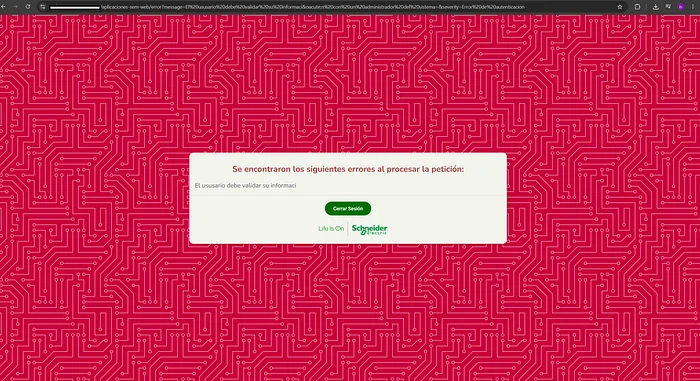
The screenshot shows the red validation message that greeted the researcher.
Exploitation
Step 1: Hunting for hidden endpoints in JavaScript
With Burp running, the researcher submitted a dummy login and then walked every JavaScript file in the HTTP history. The goal at this stage was not a standard vulnerability class but hidden endpoints: internal routes that the frontend knows about but never exposes through visible navigation.
One module stood out: /IncidentToolWeb/.... A random internal route taken from the JavaScript was pasted into the browser:
/IncidentToolWeb/transfer
The page loaded but was empty, a blank frontend container with no visible buttons or functions. What made it useful was the background traffic: as soon as the blank page loaded, it fired an unauthenticated API call:
GET /IncidentTool/it/getAutorizadorConsultingForcombobox
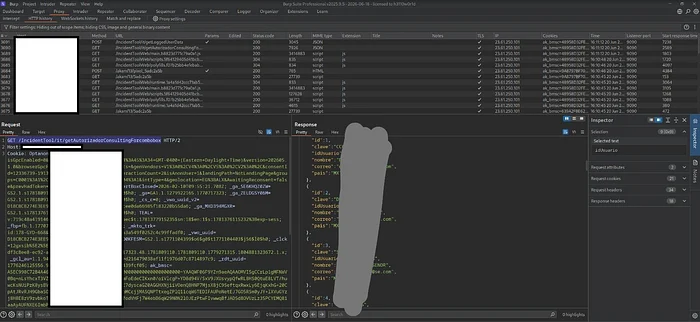
The Burp history entry for getAutorizadorConsultingForcombobox.
Step 2: The first leak
The response to that request was a large JSON array of internal system users. The fields listed in the report are:
- internal
idUsuario/ SESA IDs - full names
- corporate emails
- country codes and system roles
On its own this is information disclosure. The researcher explicitly notes that it is nice but not high impact by itself, and that most people would report it immediately for a low or medium severity. The question that drove the rest of the work was: why is the server handing out these IDs, and what if they are keys to other doors?
Step 3: Chaining the IDs
The researcher went back to the extracted JavaScript and collected every API endpoint related to /IncidentTool/it/. The hypothesis was simple: does the backend check that the caller actually owns the ID being supplied, or does it trust any valid ID?
The leaked idUsuario from the first response was fed into:
POST /IncidentTool/it/getIncidencesByResponsable
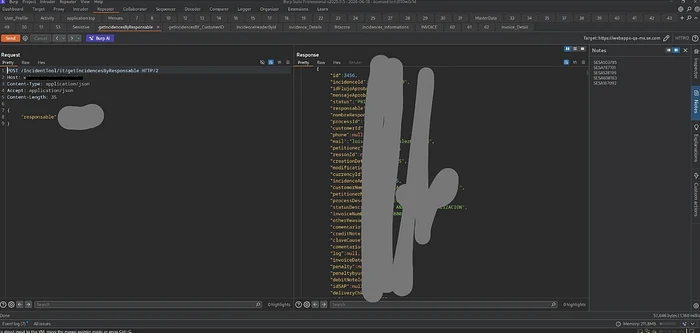
The response returned live incident records. Those records contained deeper identifiers:
customeridincidenceldinvoiceNumber- sensitive financial amounts and statuses
Each of these was then used to pivot further into the workflow.
Feeding customerid into:
POST /IncidentTool/it/getIncidences
disclosed full customer details and related company records.
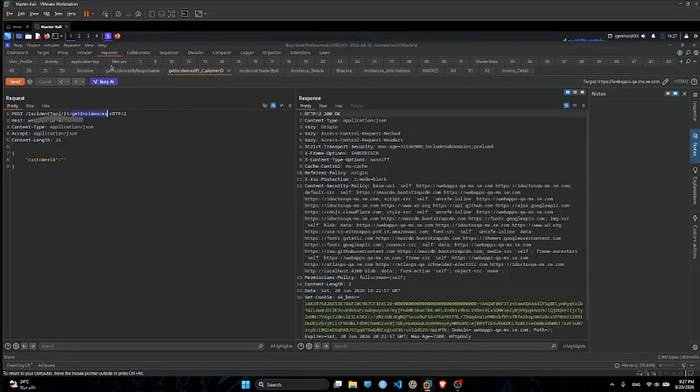
Feeding incidenceld into:
POST /IncidentTool/it/getIncidenceDetailById
and into:
GET /IncidentTool/it/getBitacora/{incidenceld}
unlocked internal audit logs, employee comments, material descriptions and order quantities.
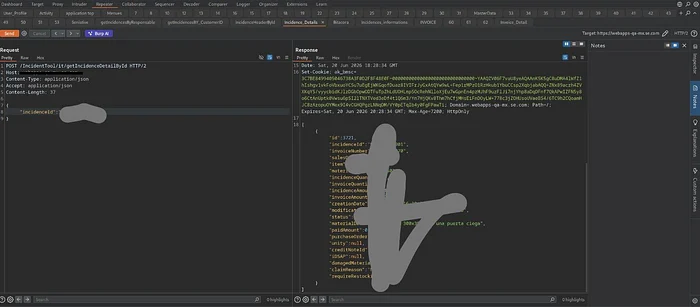
Feeding invoiceNumber into:
GET /IncidentTool/it/getIvaOfInvoice?invoiceNumber=...
exposed tax details and financial invoice data.
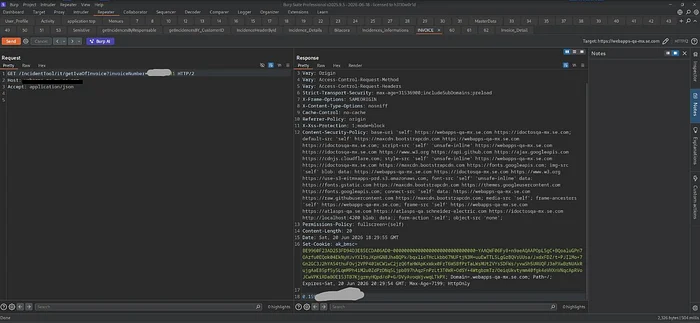
Across all of these calls, the researcher's conclusion is that every endpoint trusted the input implicitly: no authentication headers were required, no session checks were performed, and no authorisation controls were applied.
Root cause
The design mistake is that the backend treated identifiers as sufficient proof of entitlement. Any caller who could reach /IncidentTool/it/ endpoints could pass an idUsuario, customerid, incidenceld or invoiceNumber and receive the associated data, with no check that the caller was authenticated or that the object belonged to them. This is a classic broken access control pattern, in this case applied to object references rather than to a single endpoint.
The existing defences did not stop it because the only barrier was the frontend: the login screen refused to render the application, but the static JavaScript and the background API calls still loaded and executed. The backend appears to have relied on the UI to hide the doors. The report does not describe any server-side session or token validation that was bypassed; it states plainly that none was required.
Impact
The researcher characterises the chain as a complete broken access control issue, and the introduction asks whether a blocked login screen can lead to an 8.2 High vulnerability. Without logging in, an attacker could:
- harvest internal employee and approver identities
- enumerate all company incident reports
- access sensitive customer data, order details and financial invoice records
- read internal audit trails and operational status history
The impact described is limited to what the endpoints returned during the assessment.
Fix
Based on the described behaviour, the fix should be server-side: require authentication on every /IncidentTool/it/ endpoint, and enforce object-level authorisation so that a caller can only retrieve incidents, customers, invoices and audit logs that belong to them or that their role permits. The unauthenticated getAutorizadorConsultingForcombobox call in particular should not be reachable without a session, or should return only the data the caller is entitled to see.
Variants to test
- Blank or empty frontend routes. Load routes found in JavaScript that render nothing visible and watch the HTTP history for background API calls. A positive result is an unauthenticated request to an internal endpoint that returns data.
- Combobox and lookup endpoints. Endpoints that populate dropdowns often return full user or reference lists. A positive result is a JSON array of internal users, IDs, emails or roles returned without a session.
- Identifier substitution. Take an ID from one response and pass it to a different endpoint that accepts the same parameter name. A positive result is data for an object the caller does not own.
- Chained pivots. Use identifiers returned by one endpoint (
customerid,incidenceld,invoiceNumber) as input to sibling endpoints. A positive result is each successive endpoint returning deeper records without an authorisation check. - Missing headers. Replay the requests with no cookies, tokens or authentication headers at all. A positive result is the same response body as an authenticated request.
What happened, in plain words
A security researcher opened a web application expecting to test it like any other site. Instead of a working application, they got a red error message and nothing else. There was no dashboard, no menu, no feature they could click. On the surface, the site was useless.
Most people would have closed the tab at that point. The researcher did not. They asked a simple question: the front of the site is refusing to let me in, but is the back of the site actually checking who I am, or is it just trusting that the front end will keep people out?
To answer that, they used a tool called Burp Suite, which sits between the browser and the website and records every request and response. They found that even though the visible page was blocked, the site was still quietly loading its code files and making background requests to its own servers. Those background requests had no login attached to them, and the servers answered them anyway, handing over internal user lists, incident records, customer details, audit logs and invoice data.
By taking one identifier from each response and pasting it into the next request, the researcher walked deeper and deeper into the system without ever logging in. The report calls the overall issue broken access control, and its introduction asks whether a blocked login screen can lead to an 8.2 High vulnerability.
This article retells that chain from zero. You only need to know how to use a browser. Every technical term is explained where it first appears, and there is a glossary at the end.
The target and the feature
The application has an IncidentToolWeb area, living under the path /IncidentToolWeb/. A module is just one part of a larger website, the way a single department is one part of a company. The path is the part of the address that tells the server which department you want.
The feature inside that module is an incident management workflow. An incident, in this context, is a recorded problem or case that staff track until it is resolved. Each incident is tied to several pieces of information:
- a responsible user, identified by
idUsuario - a customer, identified by
customerid - an incident identifier,
incidenceld - an invoice number,
invoiceNumber - audit log entries, reached through something called
getBitacora - tax data tied to invoices
An identifier (often shortened to ID) is a label the system uses to tell records apart, like a ticket number at a queue. idUsuario is Spanish for user ID, and the application's messages are in Spanish, which is why several names look the way they do.
The researcher never got that far, because the login screen refused to let them in.
The setup
The only tool named in the report is Burp Suite. Think of it as a recording device placed on the wire between your browser and a website: every request your browser sends and every response the site sends back passes through it and is written down. That written record is called HTTP history.
HTTP is the language browsers and web servers speak to each other. A request is what the browser asks for; a response is what the server sends back.
No accounts, roles, credentials or software versions are mentioned in the report. The only precondition was that the login screen could be reached and that the site still loaded its static resources, including JavaScript, even though the user could not log in.
Static resources are files that do not change per visitor: images, style sheets and JavaScript files. JavaScript is the programming language that runs inside your browser and makes pages interactive. It is also where a lot of a web application's logic lives, including the addresses of the servers it talks to.
Finding it
Opening the target produced no dashboard and no accessible features, only a red error message:
El usuario debe validar su información
Line by line, this is a single line of text shown by the application. In English it means the user must validate their information.
Most testers would treat this as a dead end and move on. The researcher's reasoning was different: if the front end is blocking access, is the back end actually protecting itself, or is it relying on the user interface to hide the doors?
The front end is everything that runs in your browser: the pages, the buttons, the JavaScript. The back end is the server and the database behind it. A useful comparison is a shop with a locked front door and an open loading bay at the back. The lock on the door you can see says nothing about the state of the building behind it.
The screenshot shows the red validation message that greeted the researcher.
Exploitation
Step 1: Hunting for hidden endpoints in JavaScript
With Burp running, the researcher submitted a dummy login and then walked every JavaScript file in the HTTP history. A dummy login means typing made-up credentials just to see what the site does, not to get in.
The goal at this stage was not a standard vulnerability class but hidden endpoints. An endpoint is a specific address on a server that does a specific job, like a service window in a government office: one window for passports, another for taxes. A hidden endpoint is one the application uses internally but never shows you in its menus or buttons.
One module stood out: /IncidentToolWeb/.... The three dots simply stand for the rest of the path, which the report does not spell out. A random internal route taken from the JavaScript was pasted into the browser:
/IncidentToolWeb/transfer
This is a path, the part of a web address after the site name. Pasting it into the browser's address bar is the same as typing a full URL that ends with it. The researcher picked it because it appeared in the JavaScript files, which means the application itself knows about it.
The page loaded but was empty: a blank front end container with no visible buttons or functions. What made it useful was the background traffic. As soon as the blank page loaded, it fired an unauthenticated API call:
GET /IncidentTool/it/getAutorizadorConsultingForcombobox
Line by line:
GETis the type of request. It means give me something, as opposed to send something. The other common type you will see later isPOST, which sends data to the server./IncidentTool/it/getAutorizadorConsultingForcomboboxis the path being requested. The name suggests it fills a combobox, which is a dropdown list in a form, with authoriser or consulting data.- The word unauthenticated is the important one. It means the request carried no proof of who was making it: no login, no session, nothing.
An API is a way for one piece of software to ask another for data, without a human clicking anything. When the blank page loaded, its JavaScript quietly asked the server for a list, and the server answered. A call is simply one such request.
The Burp history entry for getAutorizadorConsultingForcombobox.
Step 2: The first leak
The response to that request was a large JSON array of internal system users. JSON is a text format for structured data, built from lists and labelled values, and an array is simply a list. So the server sent back a list of user records.
The fields listed in the report are:
- internal
idUsuario/ SESA IDs - full names
- corporate emails
- country codes and system roles
A field is one labelled piece of data inside a record, like one line on a form. A role is what a user is allowed to do in the system, for example approver or administrator.
On its own this is information disclosure: the server revealed information to someone who should not have seen it. The researcher explicitly notes that it is nice but not high impact by itself, and that most people would report it immediately for a low or medium severity. Severity is a rough measure of how much damage a flaw could cause.
The question that drove the rest of the work was: why is the server handing out these IDs, and what if they are keys to other doors?
Step 3: Chaining the IDs
The researcher went back to the extracted JavaScript and collected every API endpoint related to /IncidentTool/it/. The hypothesis was simple: does the back end check that the caller actually owns the ID being supplied, or does it trust any valid ID?
This is the heart of the whole report. Many systems are built so that the server only checks whether an ID looks real, not whether the person asking is allowed to see what that ID points to. The everyday comparison is a hotel receptionist who hands out a room key to anyone who can say a room number, without checking that the person is the guest staying there.
The leaked idUsuario from the first response was fed into:
POST /IncidentTool/it/getIncidencesByResponsable
Line by line:
POSTmeans the browser is sending data to the server, here the user ID, rather than just asking for a page./IncidentTool/it/getIncidencesByResponsableis the endpoint. The name suggests it returns incidents by responsible person, which is exactly what anidUsuarioidentifies.- The ID itself is not shown in the report's code block; the report says it was plugged into this request.
The response returned live incident records. Those records contained deeper identifiers:
customeridincidenceldinvoiceNumber- sensitive financial amounts and statuses
Each of these was then used to pivot further into the workflow. A pivot means using something learned in one step as the input to the next, the way one clue in a treasure hunt leads to the next.
Feeding customerid into:
POST /IncidentTool/it/getIncidences
disclosed full customer details and related company records.
Line by line: this is again a POST to an endpoint whose name suggests it returns incidents, this time selected by customer. The customer ID came from the previous response, so the researcher did not guess it; the system itself supplied it.
Feeding incidenceld into:
POST /IncidentTool/it/getIncidenceDetailById
and into:
GET /IncidentTool/it/getBitacora/{incidenceld}
unlocked internal audit logs, employee comments, material descriptions and order quantities.
Line by line:
- The first request is a
POSTto an endpoint whose name suggests it returns the detail of one incident by its ID. - The second is a
GETto an endpoint whose name suggests it returns the bitacora, Spanish for logbook, for a given incident. The{incidenceld}part is a placeholder: in the real request the actual incident ID sits in that position in the path. - An audit log is a record of who did what and when. Employee comments are notes staff wrote on the case. Material descriptions and order quantities are details of what was ordered.
Feeding invoiceNumber into:
GET /IncidentTool/it/getIvaOfInvoice?invoiceNumber=...
exposed tax details and financial invoice data.
Line by line:
GETasks for data./IncidentTool/it/getIvaOfInvoiceis the endpoint. IVA is Spanish for VAT, the tax added to sales.- The question mark starts the query string, the part of a URL that carries parameters. A parameter is a named value passed to the server.
invoiceNumber=...is that parameter. The three dots stand for the actual invoice number, which the report does not print.
Across all of these calls, the researcher's conclusion is that every endpoint trusted the input implicitly: no authentication headers were required, no session checks were performed, and no authorisation controls were applied.
A header is a small labelled line sent alongside a request or response, carrying extra information such as who you are. Authentication is proving who you are, like showing a passport. A session is the server's memory of you after you log in, usually represented by a cookie, which is a small piece of data your browser stores and sends back with each request. Authorisation is a separate question: not who you are, but what you are allowed to do. The report says none of these checks happened.
Root cause
The design mistake is that the back end treated identifiers as sufficient proof of entitlement. Any caller who could reach /IncidentTool/it/ endpoints could pass an idUsuario, customerid, incidenceld or invoiceNumber and receive the associated data, with no check that the caller was authenticated or that the object belonged to them.
This is a classic broken access control pattern, in this case applied to object references rather than to a single endpoint. Broken access control means the rules about who may access what are missing or wrong. An object reference is simply a pointer to a specific record, such as one customer or one invoice. When a system accepts any valid reference from anyone, the flaw is often called insecure direct object reference.
The existing defences did not stop it because the only barrier was the front end: the login screen refused to render the application, but the static JavaScript and the background API calls still loaded and executed. The back end appears to have relied on the user interface to hide the doors. The report does not describe any server-side session or token validation that was bypassed; it states plainly that none was required.
A token is a piece of data, similar in role to a cookie, that proves a session. The point is that the report does not claim the researcher defeated such a check; the check was simply absent.
Impact
The researcher characterises the chain as a complete broken access control issue, and the introduction asks whether a blocked login screen can lead to an 8.2 High vulnerability. Without logging in, an attacker could:
- harvest internal employee and approver identities
- enumerate all company incident reports
- access sensitive customer data, order details and financial invoice records
- read internal audit trails and operational status history
To enumerate means to walk through records one by one, collecting them all. An approver is a member of staff whose role includes signing off on something.
The report does not state how many records or users were exposed, nor whether the issue was reported, triaged or fixed. Triage is the process of reviewing a report and deciding how serious it is. The impact described is limited to what the endpoints returned during the assessment.
Fix
Based on the described behaviour, the fix should be server-side: require authentication on every /IncidentTool/it/ endpoint, and enforce object-level authorisation so that a caller can only retrieve incidents, customers, invoices and audit logs that belong to them or that their role permits. The unauthenticated getAutorizadorConsultingForcombobox call in particular should not be reachable without a session, or should return only the data the caller is entitled to see.
Object-level authorisation means checking, for each individual record, that this particular caller may see this particular record. It is the receptionist actually checking the guest list, not just accepting a room number.
Variants to test
These are patterns to look for on other applications, not steps the researcher performed beyond what is described above.
- Blank or empty frontend routes. Load routes found in JavaScript that render nothing visible and watch the HTTP history for background API calls. A positive result is an unauthenticated request to an internal endpoint that returns data.
- Combobox and lookup endpoints. Endpoints that populate dropdowns often return full user or reference lists. A positive result is a JSON array of internal users, IDs, emails or roles returned without a session.
- Identifier substitution. Take an ID from one response and pass it to a different endpoint that accepts the same parameter name. A positive result is data for an object the caller does not own.
- Chained pivots. Use identifiers returned by one endpoint (
customerid,incidenceld,invoiceNumber) as input to sibling endpoints. A positive result is each successive endpoint returning deeper records without an authorisation check. - Missing headers. Replay the requests with no cookies, tokens or authentication headers at all. A positive result is the same response body as an authenticated request.
Glossary
- API: a way for one piece of software to ask another for data, without a human clicking anything.
- Array: a list of values in JSON, written between square brackets.
- Audit log: a record of who did what and when inside a system.
- Authentication: proving who you are, for example by logging in.
- Authorisation: the rules about what an authenticated (or unauthenticated) caller is allowed to do.
- Back end: the server and database behind a website, as opposed to what runs in your browser.
- Broken access control: a flaw where the rules about who may access what are missing or wrong.
- Burp Suite: a tool that sits between browser and website and records every request and response.
- Call: one request made by software to a server.
- Combobox: a dropdown list in a form.
- Cookie: a small piece of data your browser stores and sends back with each request, often used to remember a session.
- Endpoint: a specific address on a server that performs a specific job.
- Enumerate: to walk through records one by one and collect them all.
- Field: one labelled piece of data inside a record.
- Front end: everything that runs in your browser: pages, buttons, JavaScript.
- GET: a request type that asks the server for something.
- Header: a small labelled line sent with a request or response carrying extra information, such as identity.
- HTTP: the language browsers and web servers use to talk to each other.
- HTTP history: Burp Suite's written record of every request and response it saw.
- Identifier (ID): a label the system uses to tell records apart.
- Information disclosure: a flaw where a server reveals information to someone who should not see it.
- Insecure direct object reference: accepting any valid record reference from any caller without checking ownership.
- JavaScript: the programming language that runs in your browser and makes pages interactive.
- JSON: a text format for structured data, built from lists and labelled values.
- Module: one part of a larger website or application.
- Object-level authorisation: checking, for each individual record, that this caller may see this record.
- Parameter: a named value passed to the server, usually in the query string of a URL.
- Path: the part of a web address that tells the server which part of the site you want.
- Pivot: using something learned in one step as the input to the next.
- POST: a request type that sends data to the server.
- Query string: the part of a URL after the question mark that carries parameters.
- Request: what a browser or program asks a server for.
- Response: what the server sends back.
- Role: what a user is allowed to do in a system, such as approver or administrator.
- Session: the server's memory of you after you log in, usually carried by a cookie.
- Severity: a rough measure of how much damage a flaw could cause.
- Static resources: files that do not change per visitor, such as images, style sheets and JavaScript.
- Token: a piece of data, similar in role to a cookie, that proves a session.
- Triage: the process of reviewing a security report and deciding how serious it is.
- Unauthenticated: carrying no proof of who is making the request.
- URL: the full address of something on the web.

