From Tutorial Video OSINT to Unauthenticated API Exploitation — Chaining UI Shells into Broken Access Control on Schneider Electric ⚡🔥
An unauthenticated backend API accepted an employee identifier and returned live profile data, including a predictable authentication secret, without checking who was calling. The identifier was found in a public tutorial video, so an attacker could harvest it and query several downstream APIs to leak employee details and map internal admin routes.

Cybersecurity
The full write-up lives on its author's site
It belongs to its author, so we link to it rather than copy it. The other two tabs are our own rewrites, checked against it.
Context
The target was a web application whose main workflow the researcher intended to test. On login, the application redirected to a blank frontend page: no dashboard, no dynamic data, and no backend requests passing through Burp. The only thing that rendered was a static shell, and the researcher describes it as a ghost town.
The interesting surface was the client-side JavaScript behind that shell. The client-side JavaScript referenced a /portal route and Spanish-named API paths under /aplicaciones-sem/, including a user profiler, an access/menu service and a top-applications service. The report does not name the specific product or version.
Setup
The researcher used Burp Suite, including Repeater to replay requests, and a browser. The key precondition was simply an authenticated session into the application, enough to reach the blank frontend. No special role is described. The exploitation itself required no account at all: the requests that returned data were sent unauthenticated, with no tokens, no session cookies and no login.
Finding it
After the redirect to the empty page, the researcher collected all client-side JavaScript files and analysed them for hidden routes. The search produced three paths:
/aplicaciones-sem-web/portal/aplicaciones-sem-web/portal/admin/usuarios/aplicaciones-sem-web/portal/admin/catalogo-cursos
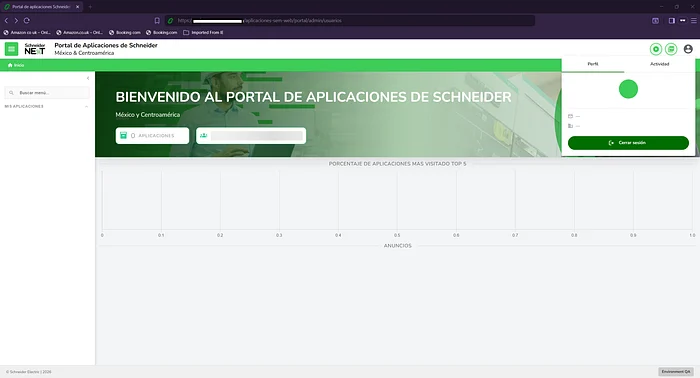
These looked like an admin portal, user management and a course catalogue, and they loaded in the browser without a login screen or an access error. That first impression did not hold: the pages were empty UI shells with no data, no interactive features and no backend API calls in the background.
Exploitation
Step 1: Harvesting an identifier from a tutorial video
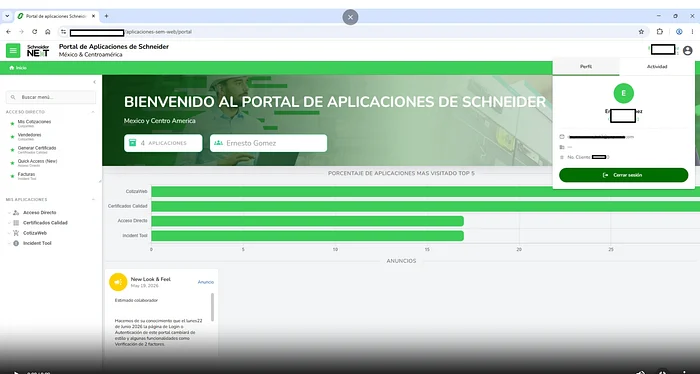
While exploring the static /portal route, the researcher noticed a small button at the top labelled Play Tutorial Video. It opened a walkthrough video intended to show internal users how to navigate the system, and it demonstrated features and workflows that were not rendering in the live session.
In the top corner of the recorded session, the administrator who recorded the video had left their screen visible. The video exposed:
- Admin name
- Corporate email
- A valid employee identifier,
idEmpleado(value redacted in the report)
An exposed identifier alone was not enough. The next question was whether the backend actually protected itself or simply trusted anyone holding that identifier.
Step 2: Finding an endpoint that accepts the identifier
Returning to the JavaScript analysis notes, the researcher searched for backend API routes that accepted an employee identifier parameter. Several candidates existed, including:
GET /aplicaciones-sem/userprofiler/getUserProfileIdEmpleado?idEmpleado=
The path names a user profiler lookup keyed on idEmpleado, the same parameter leaked in the video.
Step 3: Unauthenticated request with the leaked identifier
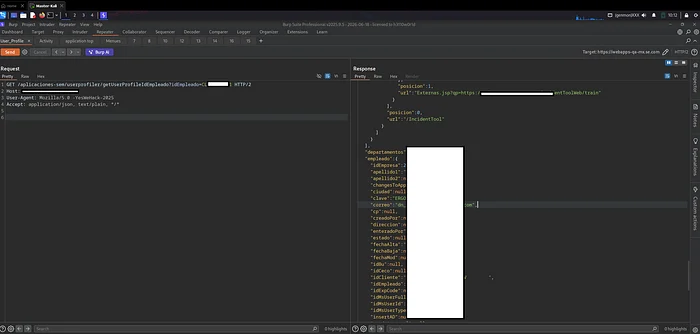
In Burp Repeater, the researcher pasted the leaked idEmpleado and sent the request completely unauthenticated: no tokens, no session cookies, no login.
HTTP/2 200 OK
The server answered with a large JSON payload containing live account data:
- User full name and email (domain redacted in the report)
- Role assignments and company identifiers
- Navigation maps and restricted admin paths (
/Admon) - Authentication factor / predictable secret (
clave)
Step 4: Negative control
To rule out a static or hardcoded response, the researcher ran a negative control:
- Sent a random, fake identifier,
idEmpleado=NOTREAL123. The server returned500 Internal Server Error. - Restored the valid identifier. The server immediately returned
200 OKwith live account details.
This showed the backend was performing a live database lookup and failing to authorise the caller.
Step 5: Downstream APIs with the same identifier
Using the leaked context, the researcher queried several further APIs without authentication:
GET /aplicaciones-sem/userprofiler/fetchActivity?idEmpleado=...
GET /aplicaciones-sem/accesos-directo/accesos-menus?idEmpleado=...
GET /aplicaciones-sem/aplicaciones-top/obtenerAplicacionesTop?idEmpleado=...
These returned activity history, menu and application structure, and usage statistics respectively. The report does not reproduce their response bodies.
Triage
The triage team initially replied that they received 403 Forbidden or 502 Bad Gateway and could not reproduce the issue. The researcher pushed back on three points: the application showed intermittent server behaviour; the submitted video and frame-by-frame evidence showed the unauthenticated 200 OK response; and a typo in the context had been clarified to reinforce that zero login was required. The team re-tested, verified the proof of concept and accepted the report.
Root cause
The backend returned the profile for any caller who supplied a valid idEmpleado, without checking credentials. Any caller who supplied a valid identifier received that employee's profile, roles, navigation map, admin paths and clave value, with no session, token or other credential checked. The negative control indicates the lookup is a live database query rather than a static response, so the failure is in authorisation, not in data handling. The report does not describe the server-side code, so the exact mechanism is likely a missing authorisation check on the profiler and the downstream endpoints.
The admin routes rendered as shells without a login screen, and the tutorial video, intended for internal users, was reachable from the /portal route and disclosed the identifier needed to query the backend.
Impact
What began as a blank page became a broken access control and information exposure chain. Per the report, an attacker could:
- Harvest valid employee identifiers from public tutorial media.
- Query backend APIs to leak sensitive profile details, predictable authentication factors and corporate emails.
- Map internal administrative routes and downstream business applications.
The report does not quantify how many accounts were affected or whether the clave value could be used to authenticate elsewhere.
Fix
The fix implied by the findings is to authorise every profiler and downstream endpoint against the caller's authenticated session rather than trusting a client-supplied idEmpleado, and to stop exposing the tutorial video, and the identifiers visible in it, from the public portal.
Variants to test
- Identifier-keyed API parameters. Look for endpoints such as
getUserProfileIdEmpleado?idEmpleado=in client-side JavaScript and replay them without cookies. A positive result is a200 OKwith live account data, confirmed by a fake value returning an error. - Negative control on every candidate. Send a random identifier and compare the status and body with the valid one. A
500on the fake value and200on the real one indicates a live lookup without authorisation. - Public tutorial and demo media. Review walkthrough videos, screenshots and help pages for visible employee IDs, emails, admin paths and screen-recorded sessions. A positive result is any identifier that works against a backend endpoint.
- Empty UI shells. When a route renders without data, enumerate the JavaScript for API paths and call them directly. A positive result is a backend response the UI never showed.
- Downstream services sharing the identifier. Test activity, menu and usage endpoints with the same parameter. A positive result is any of them returning data unauthenticated.
What happened, in plain words
A security researcher was testing a website. The plan was to log in and try the normal features of the application, the way a tester usually starts. Instead, after logging in, the site sent the browser to a completely blank page. There was no dashboard, no data, nothing to click. The researcher describes it as a ghost town.
Most people would close the tab and move on. The researcher did not. The reasoning was simple: if the page is being drawn by the browser, then the code that draws it must be sitting somewhere, and that code might mention other pages or services that are not linked from the menu.
That hunch led to a chain of three findings:
- Some hidden admin-looking pages existed, but they were empty shells with nothing behind them.
- A public tutorial video on the site showed an administrator's screen, and that screen revealed an employee identifier.
- The backend service behind the site accepted that identifier from anyone, with no login at all, and returned the employee's profile, roles, admin paths and a secret value.
In security language, the last part is called broken access control: the server had a rule about who is allowed to see what, and it did not apply that rule. It also leaked information, because the video and the API responses exposed details that should have stayed internal.
This article walks through the same steps the researcher took, in the same order, and explains every term from scratch. You only need to know how to use a browser.
Background: the words you will meet
Before the steps, a few ideas that come up again and again.
- Frontend and backend. The frontend is what your browser shows you: buttons, pages, colours. The backend is a computer (or several) elsewhere that stores data and answers questions. The frontend asks the backend for information, and the backend replies.
- API. An API is the way the frontend talks to the backend. Think of a restaurant: you (the frontend) do not walk into the kitchen; you tell the waiter what you want, and the waiter brings it. The API is the waiter, and each request is an order written in a fixed format. Most modern web APIs are reached by a URL, and the reply usually comes back as JSON, a text format for structured data that looks like a list of labelled values.
- Endpoint. One specific address on that API, for example a URL that returns a user's profile. Each endpoint does one job.
- Request and response. Your browser sends a request ("give me this"), and the server sends back a response. The response starts with a status code, a three-digit number that summarises what happened.
200 OKmeans success.403 Forbiddenmeans the server understood but refused.500 Internal Server Errormeans the server tried and something broke on its side. - Cookie and token. After you log in, the server needs a way to recognise you on the next request, because the web forgets everything between requests. It gives your browser a small piece of text, a session cookie or a token, which the browser sends back with every request. It works like a cloakroom ticket: the ticket itself is not your coat, but whoever holds it gets the coat. If a request carries no ticket and the server still hands over data, that is a serious problem.
- Unauthenticated. A request sent with no login, no cookie and no token. The server has no idea who is asking.
- JavaScript. The programming language that runs inside your browser and makes pages interactive. The files containing it are downloaded by your browser, so anyone can read them. That is why they are a good place to look for hidden addresses.
- Burp Suite. A tool used by testers that sits between the browser and the website. Its Proxy records every request and response, and its Repeater lets you take one request and send it again and again, changing a detail each time. Think of Repeater as a photocopier for requests: you keep the original and edit the copy.
- OSINT. Open-source intelligence: finding useful information in things that are publicly available, such as videos, screenshots, help pages or social media, rather than breaking into anything.
The setup
The researcher used a browser and Burp Suite. The only precondition was a normal logged-in session, enough to reach the blank page. No special role is described. The important part is that the requests which actually returned data were sent with no account at all: no tokens, no session cookies, no login.
Step 1: The false hope of hidden endpoints
After being redirected to the empty page, the researcher collected all the JavaScript files the browser had downloaded and read through them looking for addresses that the visible site did not link to.
That search produced three paths:
/aplicaciones-sem-web/portal/aplicaciones-sem-web/portal/admin/usuarios/aplicaciones-sem-web/portal/admin/catalogo-cursos
A path is the part of a web address after the site name, like the folder structure of a filing cabinet. The names are in Spanish: portal means portal, admin means administrator, usuarios means users and catalogo-cursos means course catalogue. So these looked like an admin area, a user management page and a course list.
The researcher pasted them into the browser. They loaded with no login screen and no access error. For a moment it looked like the jackpot: admin pages reachable by anyone.
It was not. The pages were empty UI shells. The frame of the page appeared, but there was no data, nothing interactive, and no requests to the backend happening in the background. The researcher's own words: total disappointment.
Why does this matter for the rest of the story? Because an empty page is not the same as an empty backend. The page had no data because it never asked for any. The question that follows is whether the backend would answer if asked directly. That is exactly what the next steps test.
Step 2: The OSINT breakthrough inside a tutorial video
The researcher did not give up and kept exploring the static /portal route. At the top of it there was a small button labelled Play Tutorial Video.
Clicking it opened a walkthrough video made to teach internal users how to use the system. The video demonstrated features and workflows that were not appearing in the live session. In other words, the video showed the application as it was meant to look, while the researcher's own session showed only the empty shell.
Then came the find. In the top corner of the recording, the administrator who recorded the video had left their own screen visible. The video exposed:
- The admin's name
- Their corporate email address
- A valid employee identifier,
idEmpleado(the value is redacted in the report)
An identifier is simply a value that names a specific record, like a student number or a customer number. idEmpleado is Spanish for "employee ID". It is not a password, but it is a name for a person inside the system, and names are exactly what a backend uses to look things up.
This is classic OSINT: nothing was hacked to get it. It was published by the organisation itself, in a video meant to be helpful.
But an exposed identifier alone proves nothing. The researcher's next question was the important one: does the backend actually check who is asking, or does it simply trust anyone who presents this identifier? A cloakroom that hands out any coat to anyone who says the right number is not secure, even if the numbers are hard to guess.
Step 3: Finding an endpoint that accepts the identifier
The researcher went back to the notes from reading the JavaScript and searched for backend API addresses that take an employee identifier as a parameter. A parameter is an extra piece of information attached to a URL, after a question mark, in the form name=value. It is how you tell an endpoint which record you want.
Several candidates turned up, including this one:
GET /aplicaciones-sem/userprofiler/getUserProfileIdEmpleado?idEmpleado=
Line by line:
GETis the type of request. It means "give me something". It is the same kind of request your browser makes when you open a page./aplicaciones-sem/userprofiler/getUserProfileIdEmpleadois the endpoint path.userprofilersuggests a user profile service, andgetUserProfileIdEmpleadoreads as "get the user profile by employee ID".?marks the start of the parameters.idEmpleado=is the parameter name, with an empty value waiting to be filled in. This is the same name that appeared in the video.
The match between the leaked name and the parameter name is the whole point. The video gave a key; this endpoint is a lock shaped for that key.
Step 4: Sending the request with no login at all
In Burp Repeater, the researcher pasted the leaked idEmpleado value into the request and sent it completely unauthenticated: no tokens, no session cookies, no login.
The server replied:
HTTP/2 200 OK
Line by line:
HTTP/2is the version of the protocol used to carry the request. It is simply the language the browser and server speak.200 OKis the status code. The server understood the request, processed it and is returning a successful answer.
That single line is the finding. A request with no identity attached was answered as if it came from a legitimate user.
The response body was a large JSON payload containing live account data:
- The user's full name and email address (the domain is redacted in the report)
- Role assignments and company identifiers
- Navigation maps and restricted admin paths (
/Admon) - An authentication factor or predictable secret (
clave)
A few of those deserve a plain explanation:
- Role assignments say what a person is allowed to do, for example administrator or regular user. Knowing someone's role tells an attacker how valuable that account is.
- Navigation maps and restricted admin paths are the internal addresses of the admin area.
/Admonis one such path. This is a map of the building handed out at the door. claveis Spanish for "key" or "password". The report calls it an authentication factor or predictable secret. An authentication factor is something used to prove identity, such as a password or a code. If it is predictable, it can be guessed or reused.
So the backend did not just confirm that the employee exists. It handed over the profile, the permissions, the internal map and a secret, all to an anonymous caller.
Step 5: Proving it is real with a negative control
A good tester does not stop at one successful response. Maybe the server returns the same thing to everybody, or maybe the data is hardcoded in the application. To rule that out, the researcher ran a negative control: a test where you deliberately use a wrong input and check that the result changes. It is the same logic as checking that a scale reads zero when nothing is on it.
The steps were:
- Send a random, fake identifier,
idEmpleado=NOTREAL123. The server returned500 Internal Server Error. - Restore the valid identifier. The server immediately returned
200 OKwith live account details.
The fake request looked like this:
Line by line:
GETis again the "give me" request type.- The path is the same profiler endpoint as before.
idEmpleado=NOTREAL123is the parameter with a made-up value.NOTREAL123is not a real employee, so the backend has nothing to find.
And the answer was:
Line by line:
HTTP/2is the protocol version, unchanged.500 Internal Server Errormeans the server hit a problem while handling the request. In this context it is informative: the server went looking for the record, found nothing, and failed instead of politely saying "not found".
Why does this matter? Because the two responses differ. A fake value breaks the server; the real value returns data. That proves the backend is doing a live lookup in a database, not serving a fixed page. And it proves the lookup happens without checking who is asking. The failure is in authorisation, the step where the server decides whether you are allowed to do what you are asking. Authentication is "who are you"; authorisation is "are you allowed". Here the server skipped the second question entirely.
Step 6: The same key opens more doors
With the identifier confirmed, the researcher used it against several further APIs, again without authentication:
GET /aplicaciones-sem/userprofiler/fetchActivity?idEmpleado=...
Line by line:
GETrequests data./aplicaciones-sem/userprofiler/fetchActivityis an endpoint in the same profiler service.fetchActivityreads as "get the activity".idEmpleado=...is the same parameter. The three dots stand for the real value, which is not reproduced in the report.
GET /aplicaciones-sem/accesos-directo/accesos-menus?idEmpleado=...
Line by line:
GETrequests data./aplicaciones-sem/accesos-directo/accesos-menusis an endpoint whose name suggests direct access and menus.accesosmeans accesses,menusmeans menus.idEmpleado=...is the same employee identifier again.
GET /aplicaciones-sem/aplicaciones-top/obtenerAplicacionesTop?idEmpleado=...
Line by line:
GETrequests data./aplicaciones-sem/aplicaciones-top/obtenerAplicacionesTopis an endpoint whose name suggests "get the top applications".obtenermeans to obtain, andaplicaciones topmeans top applications.idEmpleado=...is the same identifier.
These returned, respectively, activity history, the menu and application structure, and usage statistics. The report does not reproduce their response bodies.
The lesson is that one leaked identifier often works across many services, because they all trust the same parameter. Each additional endpoint widens the picture an attacker can build: what the person did, what they can reach and what they use.
The triage battle
Reporting a finding is not the end. A triage team is the group that receives reports and decides whether they are real. They first replied that they got 403 Forbidden or 502 Bad Gateway and could not reproduce the issue.
403 Forbiddenmeans the server understood the request but refused it.502 Bad Gatewaymeans a server in the middle could not get a valid answer from the server behind it.
Neither matches the researcher's 200 OK, so from the team's side the report looked wrong.
Instead of accepting the rejection, the researcher pushed back on three points:
- The application showed intermittent server behaviour, meaning it sometimes worked and sometimes did not, which explains why a retest can land on a bad moment.
- The submitted video and frame-by-frame evidence clearly showed the unauthenticated
200 OKresponse. - A typo in the report's context had been clarified, to reinforce that zero login was required.
The team re-tested, verified the proof of concept and accepted the report. A proof of concept (PoC) is the smallest set of steps and evidence that demonstrates a problem is real.
The impact
What started as a blank, useless page became a chain of broken access control and information exposure. According to the report, an attacker could:
- Harvest valid employee identifiers from public tutorial media.
- Query backend APIs to leak sensitive profile details, predictable authentication factors and corporate emails.
- Map internal administrative routes and downstream business applications.
The report does not quantify how many accounts were affected, or whether the clave value could be used to log in somewhere else.
Root cause
The backend returned the profile for any caller who supplied a valid idEmpleado, without checking credentials. Anyone who supplied a valid identifier received that employee's profile, roles, navigation map, admin paths and clave value, with no session, token or other credential checked. The negative control shows the lookup is a live database query rather than a fixed response, so the failure is in authorisation, not in how the data is stored. The report does not describe the server-side code, so the exact mechanism is most likely a missing authorisation check on the profiler and the downstream endpoints.
The admin routes rendered as shells without a login screen, and the tutorial video, intended for internal users, was reachable from the /portal route and disclosed the identifier needed to query the backend.
Fix
The fix implied by the findings is to authorise every profiler and downstream endpoint against the caller's authenticated session, rather than trusting a client-supplied idEmpleado, and to stop exposing the tutorial video, and the identifiers visible in it, from the public portal.
Variants to test
If you want to look for similar problems on sites you are allowed to test, these are the patterns from this report:
- Identifier-keyed API parameters. Look for endpoints such as
getUserProfileIdEmpleado?idEmpleado=in client-side JavaScript and replay them without cookies. A positive result is a200 OKwith live account data, confirmed by a fake value returning an error. - Negative control on every candidate. Send a random identifier and compare the status and body with the valid one. A
500on the fake value and200on the real one indicates a live lookup without authorisation. - Public tutorial and demo media. Review walkthrough videos, screenshots and help pages for visible employee IDs, emails, admin paths and screen-recorded sessions. A positive result is any identifier that works against a backend endpoint.
- Empty UI shells. When a route renders without data, enumerate the JavaScript for API paths and call them directly. A positive result is a backend response the UI never showed.
- Downstream services sharing the identifier. Test activity, menu and usage endpoints with the same parameter. A positive result is any of them returning data unauthenticated.
In the end
A blank page. A two-minute tutorial video. A single employee ID. The researcher's closing point is worth keeping: never judge a target by its empty frontend. Sometimes the key to the castle is hiding in the help menu.
Glossary
- API: the set of addresses and rules a frontend uses to ask a backend for data or actions, like a waiter carrying orders to a kitchen.
- Authentication: proving who you are, usually by logging in.
- Authentication factor: something used to prove identity, such as a password or a code.
- Authorisation: deciding whether an identified caller is allowed to do what they are asking.
- Backend: the server-side system that stores data and answers requests.
- Broken access control: a flaw where the server does not enforce who is allowed to see or do what.
- Burp Suite: a testing tool that records and replays web traffic; Proxy observes, Repeater resends edited requests.
- Cookie: a small piece of text a site stores in your browser, often used to recognise a logged-in session.
- Endpoint: one specific address on an API that performs one job.
- Frontend: what the browser displays and runs.
- GET: the request type used to ask for data.
- HTTP/2: the version of the protocol browsers and servers use to exchange requests and responses.
- Identifier: a value that names a specific record, such as an employee number.
- idEmpleado: Spanish for employee ID; the parameter used throughout this report.
- Intermittent: happening sometimes and not others, which makes retesting unreliable.
- JavaScript: the language that runs in the browser and makes pages interactive; its files are downloadable and readable by anyone.
- JSON: a text format for structured data, made of labelled values.
- Negative control: a test with a deliberately wrong input, to check that the result changes and the finding is real.
- OSINT: open-source intelligence, finding useful information in publicly available material.
- Parameter: an extra name and value attached to a URL after a question mark.
- Path: the part of a web address after the site name, like a folder location.
- Proof of concept (PoC): the minimal steps and evidence that show a problem is real.
- Request and response: the message you send to a server and the message it sends back.
- Role: a label saying what a user is allowed to do, such as administrator.
- Session: the period during which a site recognises you as logged in.
- Status code: a three-digit number at the start of a response summarising the outcome, such as
200 OK,403 Forbidden,500 Internal Server Erroror502 Bad Gateway. - Token: a piece of text, similar to a cookie, that proves a session or identity to the server.
- Triage team: the group that receives security reports and decides whether they are valid.
- UI shell: a page frame that renders without data or working features behind it.
- Unauthenticated: sent with no login, cookie or token.

