From a Payment Receipt Upload to Full Server Compromise: An Arbitrary File Upload Case Study
An authenticated user could upload a PHP web shell as a payment receipt because the endpoint accepted any file type and stored it under a web-served directory with its original extension. Requesting the stored file executed it, giving arbitrary command execution and access to secrets such as database and payment-gateway credentials.

Cybersecurity
The full write-up lives on its author's site
It belongs to its author, so we link to it rather than copy it. The other two tabs are our own rewrites, checked against it.
Context
The target was an online auction platform with a wallet feature. To add funds, a user could select Wire Transfer and then Upload Receipt, a field intended for an image or PDF of a bank-transfer confirmation. That single input, "upload a receipt", was the entire attack surface required.
The engagement was a web application penetration test. The write-up is published with the client's consent, with the organisation name, branding, domains, hostnames, IP addresses, account data and credentials redacted or replaced with neutral placeholders: the fictional "gzone" auction platform on demo.gzone.com, RFC 5737 example IP ranges, and demo secrets. The vulnerability was reported through the engagement channel and has since been remediated.
The author classifies the issue as Arbitrary / Unrestricted File Upload leading to Remote Code Execution, severity Critical, CVSS 3.1 9.9 (AV:N/AC:L/PR:N/UI:N/S:C/C:H/I:L/A:H).
Setup
Any authenticated user could reach the receipt-upload feature; no special role is described. The only tooling named in the report is Burp Suite, used to intercept the upload request. A browser was used to request the stored file, and an interactive reverse shell was obtained during post-exploitation. No product versions are given.
The precondition is the one the report states explicitly: an account on the platform, from which the wallet top-up flow is reachable.
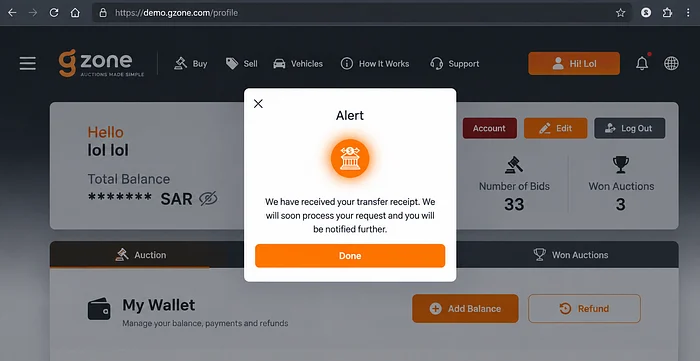
Figure 1: The wallet top-up flow. Any authenticated user can reach the receipt-upload feature; the application confirms the receipt was received.
Finding it
The researcher's framing is that file uploads are among the oldest and most dependable footholds in web application security. The attacker's first objective is to place their own code on the target; an upload feature does precisely that. The second objective is to have it executed.
An upload turns into code execution when three conditions hold at once, and in practice they frequently do:
- The application does not genuinely restrict the file type (no meaningful validation of extension or content).
- The file is written inside the web root, where the web server will serve it back.
- The stored file retains an executable extension (
.php,.jsp,.aspx) in a directory the interpreter is willing to run.
When those align, uploading a .php file and then requesting it grants code execution in the security context of the web server. Consequences range from full system takeover and data theft to internal pivoting, persistence, and defacement, depending entirely on what the application does with the file and where it lands.
The report notes that "upload your bank receipt" reads like a convenience feature rather than an attack surface, and that it is one of the most dangerous kinds.
Exploitation
Step 1: Upload a PHP web shell in place of a receipt
Rather than an image, a minimal PHP web shell was submitted to the receipt endpoint. Intercepting the request in Burp Suite, the payload was sent as receipt_image with the filename testhyder.php, and the server accepted it, responding "Receipt successfully attached."
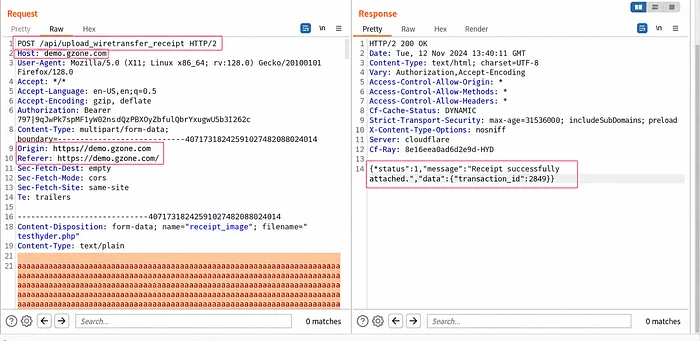
Figure 2: The POST /api/upload_wiretransfer_receipt request carries a .php file. The server returns status: 1, "Receipt successfully attached" with a transaction_id, and performs no file-type validation.
The endpoint is POST /api/upload_wiretransfer_receipt. The multipart field name is receipt_image and the supplied filename is testhyder.php. The response carries status: 1, the message "Receipt successfully attached", and a transaction_id. No file-type validation took place.
The web shell was intentionally minimal: it executes whatever operating-system command is supplied as a request parameter and returns the output.
Step 2: Recover the stored file path
A web shell is only useful if it can be reached. The storage path did not need to be guessed; the application disclosed it. Loading the wallet triggers a POST /api/get_transactions request.
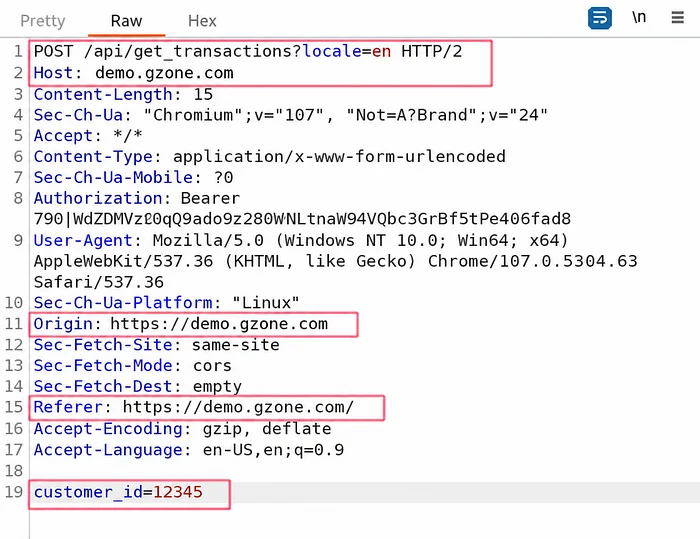
Figure 3: The get_transactions API call the wallet page issues for the current customer_id.
For each transaction, the response returns receipt_image and receipt_url: the exact server-side path at which the uploaded shell was written.
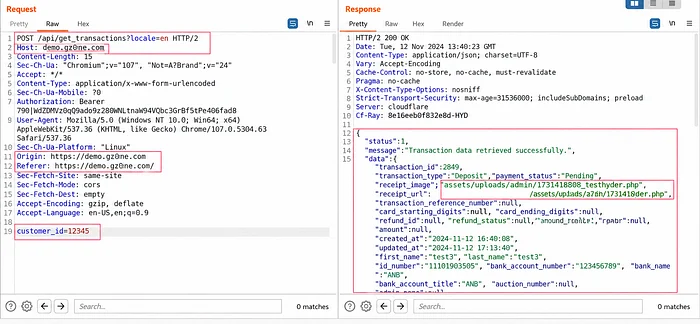
Figure 4: The response returns receipt_image: "assets/uploads/admin/…_testhyder.php". The upload is stored under the web-served assets/uploads/ directory, with the .php extension intact.
The path shown is under assets/uploads/admin/, with the .php extension intact.
Step 3: Execute the shell and confirm remote code execution
Requesting that path directly in the browser did not download or reject the file: it was executed by the PHP interpreter, confirming code execution on the server.
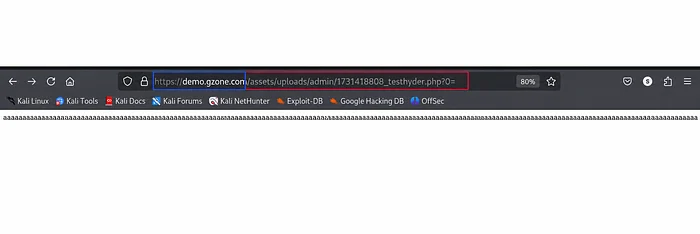
Figure 5: Requesting https://demo.gzone.com/assets/uploads/admin/…_testhyder.php runs the file server-side.
With execution confirmed, commands were passed through the shell's parameter. Listing the upload directory (ls):
?0=ls
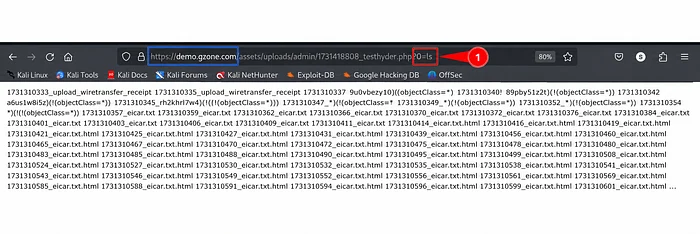
Figure 6: Appending ?0=ls runs the ls command server-side and returns the directory contents.
Reading the host's network configuration (ip a):
?0=ip a
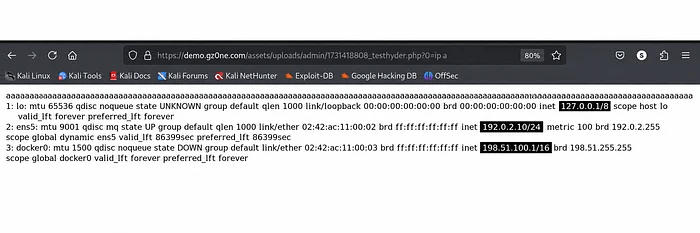
Figure 7: ?0=ip a returns the server's interfaces and IP addresses (example ranges shown).
Commands were passed through the shell's parameter, and the output came back in the response.
Step 4: Post-exploitation and full compromise
From arbitrary command execution, access was escalated to a fully interactive reverse shell and the application was enumerated. Reading the framework's environment file (cat .env) exposed the most sensitive material in cleartext:
cat .env
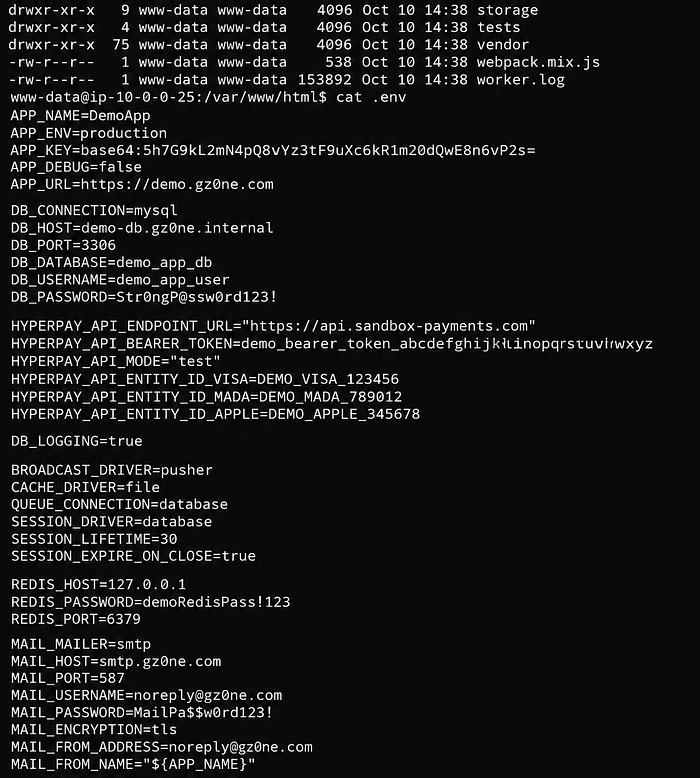
Figure 8: cat .env from the interactive shell exposes database host/username/password, mail credentials, the Redis password, and payment-gateway keys, all in cleartext (demo values shown).
The exposed material covers database host, username and password, mail credentials, the Redis password, and payment-gateway keys. At this point the outcome was unambiguous: complete compromise of the production web server and its data (database access, mail-system access, and payment-gateway secrets), reachable by any registered user through a receipt-upload button.
Root cause
The application trusted the uploaded file on three fronts simultaneously:
- No file-type validation: the endpoint accepted an arbitrary extension and content type rather than enforcing an allow-list of expected formats (for example PNG, JPG, PDF) validated by content, not by filename.
- Storage inside the web root: uploads landed in
assets/uploads/, a directory served directly by the web server, so a stored file could be requested and run. - Execution left enabled: the upload directory still permitted script execution, so a
.phpfile placed there ran as code.
Any one of these controls, applied correctly, would have broken the chain. All three were absent.
Separately, an unrelated API, get_transactions, disclosed the exact storage location in its receipt_image and receipt_url fields, removing the only real obstacle to using the upload. The report notes that the application did the hardest part for the researcher.
Impact
Code execution as the web service account is a launchpad: read every application secret, reach the database and mail server, pivot into internal networks, deploy persistence, or tamper with financial records. On a platform that moves money, the report describes that as as serious as it gets.
The conditions are those of the finding: any registered user, through the receipt-upload button, with no exploit chain and no specialist tooling required, just a single .php file, one disclosed path, and a browser. The report's severity rating is Critical, CVSS 3.1 9.9.
Fix
The report recommends the following remediation. It also states that during reassessment the client had implemented server-side MIME-type restrictions on the upload endpoint, which block the upload of executable files and resolve this vulnerability.
- Validate by content, not by name. Enforce a strict allow-list of accepted types using server-side MIME and magic-byte inspection, and reject everything else. Do not trust the client-supplied extension or Content-Type.
- Store uploads outside the web root. Keep user files where the web server will neither execute nor serve them directly, and return them through a controlled handler that sets a safe Content-Type and Content-Disposition. If they must live under the web root, host them on a separate domain or bucket with execution disabled.
- Disable script execution in upload directories. Configure the web and application server so that no interpreter runs anything under the upload path; for example, remove handler mappings for that directory.
- Rename stored files. Replace the user-supplied filename with a server-generated identifier (random or hashed, plus a timestamp) and a normalised, safe extension, preventing extension smuggling and overwrites.
- Do not leak internal storage paths. API responses should reference uploads via opaque identifiers or signed URLs, never raw server-side file system paths.
- Enforce size limits and malware scanning, and apply least privilege so that a compromised web process cannot read application-wide secrets or reach sensitive back-end systems.
Variants to test
- Extension allow-list bypass. If a blacklist rejects
.php, try alternative executable extensions the stack may still run, such as.phtml,.php5,.phar, or case variants like.PHP. A positive result is the file being stored with that extension and executed when requested. - Content-Type and magic-byte confusion. Send a valid image header followed by PHP code, or a PHP file labelled
image/jpeg. A positive result is acceptance by a check that inspects only the declared type or the first bytes, with the file still executed on request. - Double extensions and trailing characters. Try names such as
shell.php.jpg,shell.php%00.jpg, orshell.php.where the platform strips or truncates part of the name. A positive result is a stored file whose effective extension is executable. - Path disclosure through other APIs. Look for any response that returns a server-side path for an uploaded object, such as a receipt, avatar, or KYC document. A positive result is a raw filesystem or web-root path that can be requested directly.
- Execution in adjacent directories. If
assets/uploads/is locked down, check other writable, web-served directories for the same handler configuration. A positive result is any upload path where a script runs rather than being served as static content. - Filename overwrite. Upload a file whose name collides with an existing one to see whether the server replaces it. A positive result is a successful overwrite of another user's or the application's file.
If an application accepts files anywhere (receipts, avatars, KYC documents, support attachments), it is worth confirming that a renamed .php can neither be stored with its extension, nor served, nor executed.
What happened, in plain words
An online auction website let people put money into a virtual wallet. To do that, you chose Wire Transfer and then uploaded a picture or PDF of your bank receipt, so the site could check that the money had really been sent. That upload box was the only thing the tester needed.
The site took whatever file you gave it, put it in a folder that the website itself serves to visitors, and kept the file's original name ending. So instead of a receipt, the tester uploaded a tiny program written in a language called PHP, the language this website runs on. The site saved it, told the tester exactly where it had saved it, and when the tester opened that address in a browser, the server ran the program instead of showing it. From there the tester could run commands on the server, look around the machine, and read the site's configuration file, which held database passwords, mail passwords and payment-gateway keys.
In security language this is called an Arbitrary File Upload (or Unrestricted File Upload) leading to Remote Code Execution. The report rates it Critical, with a CVSS 3.1 score of 9.9 (AV:N/AC:L/PR:N/UI:N/S:C/C:H/I:L/A:H).
A few words before we start, because they come up constantly:
- A server is the computer that runs a website. Your browser asks it for pages; it sends them back.
- A web root is the folder on that server whose contents the website is allowed to hand out to visitors. Anything inside it can be fetched by anyone who knows the address.
- An extension is the bit after the dot in a filename, like
.jpgor.pdf. It is a label that tells software what kind of file it is, and on many servers it also decides whether the file is shown or run. - PHP is a programming language commonly used to build websites. A file ending in
.phpis not displayed as text by a PHP server; it is executed as a program. - A web shell is a very small program uploaded by an attacker whose only job is to run whatever command it is given and send back the result. Think of it as a remote control for the server, hidden inside an ordinary-looking file.
The report is published with the client's consent. Names, branding, domains, hostnames, IP addresses, account data and credentials have been removed or replaced with placeholders: a fictional auction platform called "gzone" at demo.gzone.com, example IP address ranges reserved for documentation, and demo secrets. The issue was reported through the engagement channel and has since been fixed.
The setup
This was a penetration test: an authorised attempt to break into a system, done on behalf of its owner so the problems can be fixed before a real attacker finds them.
The only precondition was an ordinary account on the platform. Any logged-in user could reach the wallet top-up flow; no special role is described. The only tool named in the report is Burp Suite, a program that sits between your browser and a website and lets you look at, pause and change the requests your browser sends. A normal browser was used to open the uploaded file, and later an interactive reverse shell was obtained (more on that in Step 4). No product versions are given.
Figure 1 shows the wallet top-up flow. Any logged-in user can reach the receipt-upload feature, and the application confirms that the receipt was received.
Why start here? Because a feature that accepts a file is a feature that accepts content chosen by a stranger. The report's framing is that file uploads are among the oldest and most dependable footholds in web application security. The attacker's first goal is to get their own code onto the target machine, and an upload box does exactly that. The second goal is to get that code to run.
An upload becomes code execution when three conditions are true at the same time, and in practice they often are:
- The application does not genuinely restrict the file type. There is no meaningful check of the extension or of the file's actual content.
- The file is written inside the web root, the folder the web server hands out to visitors.
- The stored file keeps an executable extension (
.php,.jsp,.aspx) in a folder where the interpreter is willing to run it.
When all three line up, uploading a .php file and then requesting it gives you code execution with the same permissions as the web server. What follows depends on what the application does and where the file lands: full system takeover, data theft, moving deeper into the internal network, leaving a way back in later, or defacing the site.
The report notes that "upload your bank receipt" reads like a convenience feature rather than an attack surface, and that it is one of the most dangerous kinds.
Step 1: Upload a PHP web shell in place of a receipt
Instead of an image, a minimal PHP web shell was sent to the receipt endpoint. The request was intercepted in Burp Suite, the payload was sent as receipt_image with the filename testhyder.php, and the server accepted it, replying "Receipt successfully attached."
Figure 2 shows the POST /api/upload_wiretransfer_receipt request carrying a .php file. The server returns status: 1, the message "Receipt successfully attached" and a transaction_id, and performs no file-type validation.
What is going on in that request, piece by piece:
POSTis the type of request a browser sends when it is submitting something, rather than just asking for a page. A form submission is a POST./api/upload_wiretransfer_receiptis the address on the server that handles receipt uploads. The/api/part tells you this is an API endpoint: a doorway meant for software to talk to software, rather than a page meant for a person. The wallet page in your browser calls it behind the scenes when you pick a file.receipt_imageis the field name. When a form is submitted, each input has a name, and the server uses that name to know which piece of data is which. Here the server expects a field calledreceipt_imageto hold the receipt file.testhyder.phpis the filename the tester chose. This is the whole trick: the field is meant for a picture, but the name ends in.php, which on a PHP server means "run me as a program".- The response contains
status: 1, meaning success, the message "Receipt successfully attached", and atransaction_id, an identifier for the new transaction record. No file-type validation took place: the server did not check that the file really was an image or a PDF.
The web shell itself was deliberately minimal: it runs whatever operating-system command is supplied as a request parameter and returns the output. The idea is the same as a light switch: the file contains almost no logic of its own, it just waits for you to tell it what to do.
Why intercept the request at all? Because a browser normally makes it awkward to send a file the site did not ask for. Burp Suite lets you pause the request after the browser has built it, change the filename and contents, and then let it go. It is the difference between filling in a form as intended and handing the clerk a different document in the same envelope.
Step 2: Find out where the file was saved
A web shell is only useful if you can reach it. You need its address. Here the address did not have to be guessed: the application gave it away. Loading the wallet page triggers a POST /api/get_transactions request.
Figure 3 shows the get_transactions API call that the wallet page makes for the current customer_id.
Two more terms:
customer_idis an identifier for the logged-in customer. The wallet page sends it so the server knows whose transactions to return.get_transactionsis simply an API that lists the customer's transactions. It has nothing to do with uploading files. That is the point: an unrelated feature leaked the information.
For each transaction, the response returns receipt_image and receipt_url: the exact server-side path where the uploaded shell was written.
Figure 4 shows the response returning receipt_image: "assets/uploads/admin/…_testhyder.php". The upload is stored under the web-served assets/uploads/ directory, with the .php extension intact.
Read that path slowly, because it contains two separate problems:
assets/uploads/is inside the web root. It is a folder the web server serves to visitors, so anything in it can be fetched with a browser.- The name still ends in
.php. The original extension was kept, so the server will treat the file as a program rather than as a picture.
Why does this step matter so much? Normally, after uploading a file, an attacker has to guess where it went. That guessing is the hard part, and it is often what stops an upload from becoming anything worse. Here an ordinary API answered the question for free. The report puts it bluntly: the application did the hardest part for the researcher.
Step 3: Run the shell and confirm remote code execution
Opening that path directly in the browser did not download the file and did not reject it: the PHP interpreter ran it. That confirmed code execution on the server.
Figure 5 shows a request to https://demo.gzone.com/assets/uploads/admin/…_testhyder.php running the file server-side.
Think about what you would expect. You upload a picture, you open its link, you see the picture. Here the browser asked for a .php file and the server treated the request as "please run this program". The program ran, and its output came back as the response.
With execution confirmed, commands were passed through the shell's parameter. Listing the upload directory (ls):
?0=ls
Figure 6 shows that appending ?0=ls runs the ls command server-side and returns the directory contents.
Line by line:
- The
?starts the query string, the part of a URL that carries extra values to the server. 0is the parameter name shown in the request; the shell takes the command from a request parameter.lsis a standard command that lists the files in the current directory. It is the command-line equivalent of opening a folder and looking inside.
So the URL means: "run the program, and give it the command ls". The response is the folder listing, produced on the server and sent back to the browser.
Reading the host's network configuration (ip a):
?0=ip a
Figure 7 shows ?0=ip a returning the server's network interfaces and IP addresses (example ranges shown).
ipis a command that reports on networking.ais short for "address" and asks it to list every network interface and its address.
Why look at the network? Because knowing which addresses a machine has, and which networks it can reach, tells you what else might be within reach from there. It is the difference between knowing a house exists and knowing which doors connect to which rooms.
The parameter's value is the operating-system command to run, and the output comes back in the HTTP response.
Step 4: After the break-in, and full compromise
From arbitrary command execution, access was escalated to a fully interactive reverse shell and the application was enumerated. Reading the framework's environment file (cat .env) exposed the most sensitive material in cleartext:
cat .env
Figure 8 shows cat .env from the interactive shell exposing the database host, username and password, mail credentials, the Redis password and payment-gateway keys, all in cleartext (demo values shown).
What those pieces mean:
- A reverse shell is a connection that the server opens back to the attacker's machine, giving the attacker a command prompt on the server. It is called "reverse" because the direction is reversed: instead of the attacker connecting in, the server connects out, which often slips past network defences. "Interactive" means commands can be typed and answered one after another, like a normal terminal session.
- Enumeration means systematically listing what is on the machine: users, files, services, configuration. It is the survey you do after getting in, before deciding what to take.
catis a command that prints the contents of a file..envis a common configuration file for web frameworks. It holds settings the application needs at runtime, and those settings very often include passwords and keys. The leading dot means the file is hidden from a normal directory listing, but it is still readable if you know its name.- Cleartext means not encrypted and not hashed: anyone who can read the file can read the secrets directly.
- Redis is a data store often used for caching and sessions. Its password being exposed matters because whoever holds it can read or change whatever is stored there.
- Payment-gateway keys are the credentials an application uses to talk to a payment provider. With them, an attacker may be able to interact with the payment system as if they were the application.
The exposed material covers the database host, username and password, mail credentials, the Redis password and payment-gateway keys. At that point the outcome was unambiguous: complete compromise of the production web server and its data, meaning database access, mail-system access and payment-gateway secrets, all reachable by any registered user through a receipt-upload button.
Why this matters
- The entry point looks harmless. "Upload your bank receipt" reads like a convenience feature, not an attack surface. It is one of the most dangerous kinds.
- The barrier to entry is low. No long exploit chain and no specialist tooling: a single
.phpfile, one disclosed path, and a browser. - The impact changes scope. Code execution as the web service account is a launchpad: read every application secret, reach the database and mail server, move into internal networks, leave a way back in, or tamper with financial records. On a platform that moves money, the report calls that as serious as it gets.
- The application did the hardest part. An unrelated API,
get_transactions, disclosed the exact storage location, removing the only real obstacle to using the upload.
Root cause
The application trusted the uploaded file on three fronts at once:
- No file-type validation. The endpoint accepted any extension and any content type, instead of enforcing an allow-list of expected formats (for example PNG, JPG, PDF) checked by content rather than by filename.
- Storage inside the web root. Uploads landed in
assets/uploads/, a folder served directly by the web server, so a stored file could be requested and run. - Execution left enabled. The upload folder still allowed scripts to run, so a
.phpfile placed there ran as code.
Any one of these controls, applied correctly, would have broken the chain. All three were missing.
Separately, an unrelated API, get_transactions, disclosed the exact storage location in its receipt_image and receipt_url fields, removing the only real obstacle to using the upload.
The fix
The report lists the following remediation, and states that during reassessment the client had implemented server-side MIME-type restrictions on the upload endpoint, which block the upload of executable files and resolve the vulnerability.
- Validate by content, not by name. Enforce a strict allow-list of accepted types using server-side MIME and magic-byte inspection, and reject everything else. Do not trust the client-supplied extension or Content-Type. In plain terms: look inside the file and check what it really is, rather than believing the label on the front.
- Store uploads outside the web root. Keep user files where the web server will neither execute nor serve them directly, and return them through a controlled handler that sets a safe Content-Type and Content-Disposition. If they must live under the web root, host them on a separate domain or bucket with execution disabled.
- Disable script execution in upload directories. Configure the web and application server so that no interpreter runs anything under the upload path; for example, remove handler mappings for that directory.
- Rename stored files. Replace the user-supplied filename with a server-generated identifier (random or hashed, plus a timestamp) and a normalised, safe extension, preventing extension smuggling and overwrites.
- Do not leak internal storage paths. API responses should reference uploads via opaque identifiers or signed URLs, never raw server-side file system paths.
- Enforce size limits and malware scanning, and apply least privilege so that a compromised web process cannot read application-wide secrets or reach sensitive back-end systems.
Variants worth testing
These are the other things to try when you are checking an upload feature. Each one is a way of getting past a partial defence.
- Extension allow-list bypass. If a blacklist rejects
.php, try other executable extensions the stack may still run, such as.phtml,.php5,.phar, or case variants like.PHP. A positive result is the file being stored with that extension and executed when requested. - Content-Type and magic-byte confusion. Send a valid image header followed by PHP code, or a PHP file labelled
image/jpeg. A positive result is acceptance by a check that inspects only the declared type or the first bytes, with the file still executed on request. - Double extensions and trailing characters. Try names such as
shell.php.jpg,shell.php%00.jpg, orshell.php.where the platform strips or truncates part of the name. A positive result is a stored file whose effective extension is executable. - Path disclosure through other APIs. Look for any response that returns a server-side path for an uploaded object, such as a receipt, avatar, or KYC document. A positive result is a raw filesystem or web-root path that can be requested directly.
- Execution in adjacent directories. If
assets/uploads/is locked down, check other writable, web-served directories for the same handler configuration. A positive result is any upload path where a script runs rather than being served as static content. - Filename overwrite. Upload a file whose name collides with an existing one to see whether the server replaces it. A positive result is a successful overwrite of another user's or the application's file.
If an application accepts files anywhere, whether receipts, avatars, KYC documents or support attachments, it is worth confirming that a renamed .php can neither be stored with its extension, nor served, nor executed.
Glossary
- API: a doorway on a website built for software to talk to software, rather than for a person to read a page.
- Arbitrary File Upload / Unrestricted File Upload: a flaw where a site accepts a file of any type, including types it should never accept.
- Burp Suite: a tool that sits between your browser and a website so you can inspect, pause and change requests.
- Cleartext: stored or sent without encryption or hashing, so anyone who can read it can read the secret.
- Content-Disposition: an instruction in a web response telling the browser whether to display a file or download it.
- Content-Type: a label in a request or response saying what kind of content it carries, such as an image or a web page.
- Cookie / token: a small piece of data the browser keeps and sends back to a site so the site can recognise you between requests, for example to keep you logged in.
- CVSS: a standard scoring system for the severity of a security flaw, from 0 to 10.
- Endpoint: a specific address on a server that handles a particular kind of request.
- Enumeration: systematically listing what exists on a system, such as files, users and services.
- Extension: the part of a filename after the dot, such as
.jpgor.php, which often decides how software treats the file. - Field name: the label attached to one piece of data in a submitted form, so the server knows what it is.
- Interpreter: the program on a server that reads and runs code written in a particular language, such as PHP.
- Magic bytes: the first few bytes of a file, which reveal its real type regardless of its name.
- MIME type: the standard name for a kind of content, such as
image/jpegfor a JPEG picture. - Multipart: the format a browser uses to send a form that includes a file.
- Penetration test: an authorised attempt to break into a system, done on behalf of its owner so the problems can be fixed.
- PHP: a programming language widely used to build websites; files ending in
.phpare run as programs by a PHP server. - POST: the type of web request used to submit data to a server, as opposed to simply asking for a page.
- Query string: the part of a URL after the
?, carrying extra values to the server. - Redis: a data store often used for caching and sessions, which can hold sensitive data.
- Remote Code Execution (RCE): a flaw that lets an attacker run their own commands on someone else's server.
- Reverse shell: a connection the server opens back to the attacker, giving the attacker a command prompt on the server.
- Root cause: the underlying reason a flaw exists, as opposed to its visible symptom.
- Server: the computer that runs a website and answers requests from browsers.
- Transaction ID: an identifier for a single transaction record.
- Web root: the folder on a server whose contents the website is allowed to hand out to visitors.
- Web shell: a small uploaded program whose only job is to run commands it is given and return the output.
customer_id: an identifier for the logged-in customer, used by the site to know whose data to return.get_transactions: the API that lists a customer's transactions; here it also leaked the stored path of uploaded files.receipt_image/receipt_url: the fields in the transaction response that held the server-side path of the uploaded receipt..env: a configuration file for a web framework, commonly holding passwords and keys.


