Non-Blind SSRF via Avatar-from-URL: Reaching Loopback Services and Reading the Response
An avatar-from-URL endpoint fetched any URL supplied by the user and returned details of the upstream response, including a preview of its body. An authenticated attacker could point it at loopback services and read their responses directly.
 Published on medium.com
Ssrf
The full write-up lives on its author's site
It belongs to its author, so we link to it rather than copy it. The other two tabs are our own rewrites, checked against it.
Context
The target feature is an avatar-from-URL endpoint on a web application: POST /api/profile/avatar-from-url. Instead of uploading an image file, a user supplies a URL and the application sets the avatar from whatever that URL returns. The important architectural detail is that the server, not the browser, performs the fetch. Any time a backend makes an outbound request using a value the client controls, that is SSRF territory until proven otherwise, and it needs to be tested in stages rather than jumped into directly.
The finding is classified as CWE-918: Server-Side Request Forgery, with CVSS 3.1 score 7.7 (High), vector AV:N/AC:L/PR:L/UI:N/S:C/C:H/I:N/A:N. The researcher is Neel Chauhan.
Setup
Testing required an authenticated session: the endpoint is behind authentication, and the requests that reach the fetch logic carry a session cookie. The out-of-band check used Burp Collaborator, which generates a unique subdomain and logs any DNS resolution or HTTP hit against it. That gives independent, out-of-band evidence that the server really made a request, rather than relying on what the application's own JSON response claims.
Finding it
The starting observation is the feature itself: a URL supplied by the client is fetched by the server. That alone justifies testing, because the server's network position is different from the client's. The second observation, made during testing, is that the endpoint does not merely fetch and discard the upstream response: it relays details of that response back to the caller in the JSON body, including status, content_type and a response_preview field. That turns a potentially blind SSRF into a non-blind one, where the attacker can read what the internal service returned.
Exploitation
Stage 1: confirm authentication is enforced (negative baseline)
Before testing anything interesting, the researcher checked that the endpoint is not reachable without a session, ruling out the simplest failure mode.
POST /api/profile/avatar-from-url HTTP/2Content-Type: application/json
{"url":"https://example.com/avatar.png"}
HTTP/2 401 Unauthorized
No session, no access. The endpoint correctly rejects unauthenticated requests.
Stage 2: out-of-band confirmation with Burp Collaborator
Before assuming the server actually reaches attacker-controlled infrastructure, the researcher wanted independent, blind-safe proof that a real outbound request was happening, not just a plausible-looking response. The request was repeated with an authenticated session cookie and a Collaborator subdomain as the URL.
POST /api/profile/avatar-from-url HTTP/2Cookie: [redacted] application/json
{"url":"https://<unique-id>.oastify.com"}
HTTP/2 200 OK
{ "ok": true, "fetched": true, "status": 200, "content_type": "text/html", "response_preview": "<html>...</html>"}
The Collaborator client logged the interaction independently:
DNS lookup for <unique-id>.oastify.comDNS lookup for <unique-id>.oastify.comDNS lookup for <unique-id>.oastify.comHTTP request receivedSource IPs: [redacted] / [redacted] / [redacted] / [redacted]
This confirmed that the server genuinely made an outbound DNS resolution and HTTP request against a domain the researcher controls, entirely independent of the application's own claimed response. This is the step that turns "the JSON says fetched: true" into something backed by third-party evidence.
Stage 3: public URL, checking what gets disclosed back
Next, a public image URL was supplied to see what the endpoint returns to the caller.
POST /api/profile/avatar-from-url HTTP/2Content-Type: application/json
{"url":"https://picsum.photos/id/237/200/300"}
HTTP/2 200 OK
{ "ok": true, "fetched": true, "status": 200, "content_type": "image/jpeg", "response_preview": "..."}
The response includes status, content_type and a response_preview field. The application is not just fetching and discarding the upstream response; it is relaying details of that response straight back to the caller. That distinction matters enormously for the next test.
Stage 4: loopback access
If the server will fetch any URL and echo back what it finds, the next logical question is whether it can reach services that are only supposed to be accessible from inside the host itself.
POST /api/profile/avatar-from-url HTTP/2Content-Type: application/json
{"url":"http://[redacted]:8080/"}
HTTP/2 200 OK
{ "ok": true, "fetched": true, "status": 200, "content_type": "text/html; charset=utf-8", "response_preview": "<!DOCTYPE html>..."}
The response_preview field came back containing the application's own front-end HTML. That is direct confirmation that this endpoint can be used to reach services bound to the server's own loopback interface, services that were never meant to be reachable from outside the host at all, and that the actual response content is handed straight back to whoever made the request.
Root cause
The endpoint accepts a client-supplied URL and has the server fetch it; the report does not describe any destination restriction, and requests to [redacted] succeeded. The second half of the problem is the response handling: the application returns status, content_type and a response_preview of the upstream response to the caller, so the internal service's content is disclosed rather than merely contacted. Authentication is enforced, but authentication does not help here because any authenticated user can supply any URL.
Impact
An authenticated attacker can make the server issue requests to services bound to its loopback interface and read the returned content through response_preview. In the demonstrated case this exposed the application's own front-end HTML served on [redacted]:8080. The non-blind nature upgrades the practical severity significantly: an attacker does not need to guess at what is running internally, they can read it directly. On typical cloud deployments, the same technique frequently extends to the instance metadata endpoint (commonly [redacted]), which can expose temporary cloud credentials if reachable. The researcher notes that as a natural next step to test in a follow-up engagement with explicit authorisation for that specific target; it was not tested here.
Fix
The report does not describe a fix or a change made by the vendor.
Variants to test
What happened, in plain words
A website had a feature that let you set your profile picture by giving it a web address (a URL) instead of uploading a picture file. When you did that, the website's own computer, the server, went off and downloaded whatever was at that address. The person who tested it, Neel Chauhan, realised that if the server will fetch any address you give it, you can ask it to fetch addresses that ordinary visitors are not supposed to reach, including services running on the server itself. Worse, the feature sent back a preview of whatever it downloaded, so the tester could actually read the contents of those internal services. This kind of flaw is called Server-Side Request Forgery, or SSRF. The finding was rated CWE-918 with a CVSS 3.1 score of 7.7, High.
The feature, and why it is worth testing
The feature is an endpoint at POST /api/profile/avatar-from-url. An endpoint is simply a specific address on a website that does one job, like a counter in a shop that only handles one kind of request. POST is the method used when your browser sends data to the server rather than just asking for a page. This endpoint lets a logged-in user set their avatar (profile picture) by supplying a URL instead of uploading a file.
The crucial detail is who does the downloading. When you normally load a web page, your browser fetches things. Here, the server fetches the URL. That matters because the server sits in a different place on the network than you do: it can often reach machines that you cannot, such as other servers in the same building or services running quietly on the same machine.
Whenever a backend (the part of a website that runs on the server) makes an outgoing request using a value that the client (your browser) controls, that is SSRF territory until proven otherwise. The everyday comparison: imagine a hotel concierge who will go and fetch anything from any address you write on a note. If you write the address of a shop down the street, fine. If you write the address of the staff-only storage room, the concierge can walk in and bring you back what is inside, because the concierge is allowed in places you are not.
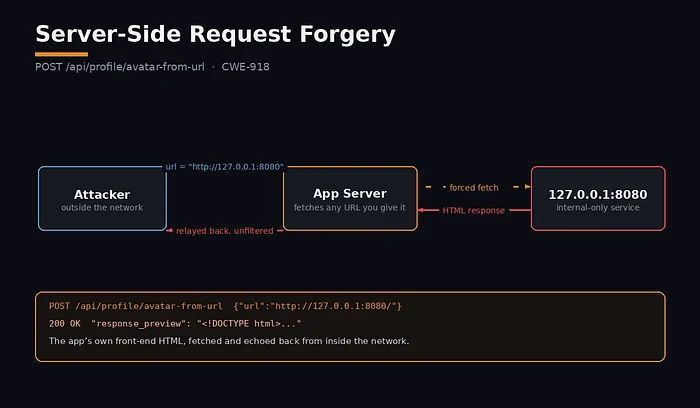
The tester's approach was to test in stages rather than jump straight to the interesting part. Each stage answers one question and makes the next stage meaningful.
Stage 1: confirm authentication is enforced (negative baseline)
A negative baseline means checking that the obvious protection works before looking for holes. If the endpoint were open to anyone, that would be a simpler and different problem. So the first test was to send a request with no login at all.
POST /api/profile/avatar-from-url HTTP/2Content-Type: application/json
Line by line:
POST /api/profile/avatar-from-urlsays which endpoint is being called and that data is being sent to it.HTTP/2is the version of the web protocol being used.Content-Type: application/jsontells the server that the body of the request is formatted as JSON, a common text format for structured data that looks like{"key": "value"}.
{"url":"https://example.com/avatar.png"}
This is the body of the request: a single field called url whose value is an ordinary public image address. example.com is a reserved example domain, so nothing real is being touched.
HTTP/2 401 Unauthorized
This is the server's reply. 401 Unauthorized is the standard status code for "you are not logged in, so no". The endpoint correctly refused the request. That rules out the simplest failure mode before testing anything more interesting.
Stage 2: out-of-band confirmation with Burp Collaborator
Before assuming the server really reaches addresses the tester controls, the tester wanted independent proof that a real outgoing request was happening, not just a plausible-looking reply. A server could, in principle, make up a response without fetching anything.
Burp Collaborator is a tool that gives you a unique, throwaway subdomain (a made-up web address under a domain the tool owns) and records any attempt to look it up or connect to it. "Out-of-band" means the evidence arrives through a separate channel, not through the application's own answer. The everyday comparison: instead of trusting a delivery driver who says "I dropped off the parcel", you put a camera at the door and watch the driver arrive.
A cookie is a small piece of data your browser stores for a website and sends back with each request. A session cookie is what proves you are logged in: after you sign in, the server gives your browser a session cookie, and every later request carrying it is treated as coming from you. In the request below, the tester supplied a valid session cookie so the server would treat the call as coming from a logged-in user.
POST /api/profile/avatar-from-url HTTP/2Cookie: [redacted] application/json
Line by line:
POST /api/profile/avatar-from-urlis the same endpoint as before.Cookie: [redacted] is the header carrying the login cookie. The value is shown as a placeholder,<authenticated>`, because the real value is a secret that must not be published.Content-Type: application/jsonagain says the body is JSON.
{"url":"https://<unique-id>.oastify.com"}
Here the url field points at the unique Collaborator subdomain, <unique-id>.oastify.com. If the server really fetches it, the Collaborator service will see the attempt.
HTTP/2 200 OK
200 OK means the request was accepted and processed.
{ "ok": true, "fetched": true, "status": 200, "content_type": "text/html", "response_preview": "<html>...</html>"}
This is the server's JSON reply. ok: true means the operation succeeded. fetched: true means the server claims it downloaded something. status: 200 is the status code the fetched address returned. content_type: text/html says the fetched content was a web page. response_preview is a snippet of what was downloaded. On its own, this is only the application's word for it.
The Collaborator client logged the interaction independently:
DNS lookup for <unique-id>.oastify.comDNS lookup for <unique-id>.oastify.comDNS lookup for <unique-id>.oastify.comHTTP request receivedSource IPs: [redacted] / [redacted] / [redacted] / [redacted]
Line by line:
DNS lookup for <unique-id>.oastify.comappears three times. DNS is the internet's address book: before connecting to a name likeoastify.com, a computer asks a DNS server what numeric address it corresponds to. Three lookups mean the server tried to resolve the name more than once.HTTP request receivedmeans an actual web request arrived at the Collaborator domain, not just a name lookup.Source IPs:lists the numeric addresses the connections came from. An IP address is the number that identifies a machine on a network, like a postal address for computers.
This confirmed that the server genuinely made an outgoing DNS resolution and HTTP request against a domain the tester controls, entirely independent of the application's own claimed response. This is the step that turns "the JSON says fetched: true" into something backed by third-party evidence.
Stage 3: public URL, checking what gets disclosed back
Next, a public image URL was supplied to see exactly what the endpoint returns to the caller. The point was not to attack anything yet, but to learn how much detail the reply contains.
POST /api/profile/avatar-from-url HTTP/2Content-Type: application/json
Same endpoint, same JSON body format, as in Stage 1.
{"url":"https://picsum.photos/id/237/200/300"}
This is a public image address. picsum.photos is a site that serves placeholder photos, and the path asks for a particular image at a particular size.
HTTP/2 200 OK
The request succeeded.
{ "ok": true, "fetched": true, "status": 200, "content_type": "image/jpeg", "response_preview": "..."}
Line by line:
ok: trueandfetched: trueagain say the fetch succeeded.status: 200is the status the image site returned.content_type: image/jpegsays the fetched content was a JPEG image.response_preview: "..."is a snippet of the fetched content, shortened here.
The response includes status, content_type and a response_preview field. The application is not just fetching and discarding the upstream response; it is relaying details of that response straight back to the caller. That distinction matters enormously for the next test: if the server can be pointed at an internal service, the reply will carry that service's content back to the tester.
Stage 4: the part that actually matters, loopback access
If the server will fetch any URL and echo back what it finds, the next logical question is whether it can reach services that are only supposed to be accessible from inside the host itself. Loopback is the special address a computer uses to talk to itself. The address [redacted] always means "this same machine", and localhost is its name. Services listening there are reachable only from the machine itself, not from the outside internet. The everyday comparison: the staff-only corridor inside a building, which visitors cannot walk down but staff can.
POST /api/profile/avatar-from-url HTTP/2Content-Type: application/json
Same endpoint and body format again.
{"url":"http://[redacted]:8080/"}
Line by line:
http://is the scheme, meaning plain web traffic.[redacted]is the loopback address, the machine talking to itself.:8080is the port number. A port is like a numbered door on a machine: one machine can run many services, each listening on a different door. Port 8080 is a common choice for a second web service./is the root path, the front page of whatever is listening there.
HTTP/2 200 OK
The request succeeded.
{ "ok": true, "fetched": true, "status": 200, "content_type": "text/html; charset=utf-8", "response_preview": "<!DOCTYPE html>..."}
Line by line:
ok: trueandfetched: truesay the fetch succeeded.status: 200is the status the internal service returned.content_type: text/html; charset=utf-8says the content was a web page, encoded in UTF-8, a common way of representing text.response_preview: "<!DOCTYPE html>..."is the beginning of an HTML page.<!DOCTYPE html>is the standard opening line of a web page.
The response_preview field came back containing the application's own front-end HTML. That is direct confirmation that this endpoint can be used to reach services bound to the server's own loopback interface, services that were never meant to be reachable from outside the host at all, and that the actual response content is handed straight back to whoever made the request.
Why "non-blind" matters here
Plenty of SSRF findings are blind: you can only infer success through response timing, or by watching for an out-of-band callback, and you never actually see what the internal service returned. This one hands the content directly back in the JSON body. That upgrades the practical severity significantly, because an attacker does not need to guess at what is running internally, they can read it directly.
On typical cloud deployments, the same technique frequently extends to the instance metadata endpoint, commonly [redacted]. That is a special address that cloud platforms make available from inside a virtual machine, and it can expose temporary cloud credentials if reachable. The tester notes that as a natural next step to test in a follow-up engagement with explicit authorisation for that specific target; it was not tested here.
Root cause
The endpoint accepts a client-supplied URL and has the server fetch it; the report does not describe any destination restriction, and requests to [redacted] succeeded. The second half of the problem is the response handling: the application returns status, content_type and a response_preview of the upstream response to the caller, so the internal service's content is disclosed rather than merely contacted. Authentication is enforced, but authentication does not help here because any authenticated user can supply any URL.
Impact
An authenticated attacker can make the server issue requests to services bound to its loopback interface and read the returned content through response_preview. In the demonstrated case this exposed the application's own front-end HTML served on [redacted]:8080. The non-blind nature upgrades the practical severity significantly: an attacker does not need to guess at what is running internally, they can read it directly. On typical cloud deployments, the same technique frequently extends to the instance metadata endpoint, commonly [redacted], which can expose temporary cloud credentials if reachable. The researcher notes that as a natural next step to test in a follow-up engagement with explicit authorisation for that specific target; it was not tested here.
Fix
The report does not describe a fix or a change made by the vendor.
Variants to test
Glossary
- API: a defined set of addresses on a website that programs (and browsers) can send requests to, each doing a specific job.
- Endpoint: one specific address in an API, such as
/api/profile/avatar-from-url. - POST: the HTTP method used when sending data to a server rather than just asking for a page.
- HTTP: the protocol browsers and servers use to exchange requests and responses.
- HTTP/2: a version of HTTP.
- Header: a line of extra information sent with a request or response, such as
Content-TypeorCookie. - JSON: a text format for structured data, written as
{"key": "value"}. - Status code: a number in a response saying what happened, such as
200 OKor401 Unauthorized. - 401 Unauthorized: the status code meaning the request was refused because the caller is not logged in.
- Cookie: a small piece of data a browser stores for a site and sends back with each request.
- Session cookie: a cookie that proves you are logged in.
- Authentication: proving who you are, usually by logging in.
- Backend / server: the part of a website that runs on a remote machine and handles requests.
- Client: the program making requests, usually your browser.
- SSRF (Server-Side Request Forgery): a flaw where an attacker can make a server send requests to addresses of the attacker's choosing.
- CWE-918: the standard catalogue number for SSRF.
- CVSS 3.1: a standard scoring system for rating the severity of a security flaw.
- Out-of-band: evidence that arrives through a separate channel, not through the application's own response.
- Burp Collaborator: a tool that provides a unique throwaway subdomain and records any DNS lookup or HTTP request made to it.
- DNS: the internet's address book, translating names like
example.cominto numeric addresses. - DNS lookup: a computer asking DNS what numeric address a name corresponds to.
- IP address: the number identifying a machine on a network.
- Loopback: the special address a computer uses to talk to itself,
[redacted]. - Port: a numbered door on a machine, letting several services run on one machine.
- Content type: a label saying what kind of content something is, such as
text/htmlorimage/jpeg. - HTML: the language web pages are written in.
- Blind SSRF: SSRF where you cannot see the response, only infer that a request happened.
- Non-blind SSRF: SSRF where the response content is returned to the attacker.
- Instance metadata endpoint: a special address inside a cloud virtual machine, commonly
[redacted], that can expose information about the machine, including temporary credentials. - Allowlist: a list of things that are permitted, with everything else refused.
- Redirect: a server telling a browser or client to go to a different address instead.
- DNS rebinding: a trick where a hostname resolves to one address first and a different address later, to slip past checks.
- Link-local address: an address only valid on the local network segment, not routable across the internet.
- Private address range: address ranges reserved for internal networks, not reachable from the public internet.



