Unauthenticated Account Takeover: When the Password Reset API Hands You the Token
The forgot-password API returned the full, working password reset link in its JSON response for existing accounts, and the frontend also displayed it in a visible debug element. Anyone who knew a target's email address could take the token, set a new password and log in as that user without any inbox access.
 Published on medium.com
Account Takeover
The full write-up lives on its author's site
It belongs to its author, so we link to it rather than copy it. The other two tabs are our own rewrites, checked against it.
Context
The target is a web platform whose authentication API exposes a forgot-password flow under /api/auth/. The feature is the standard one: a user submits an email address, the server generates a reset token, and the token is supposed to reach only the account owner through their verified inbox. The researcher frames the whole security model of the feature around that single assumption, and the write-up is about testing it directly rather than trying to guess or brute-force a token.
The report classifies the issue as CWE-640 (Weak Password Recovery Mechanism), CWE-200 (Exposure of Sensitive Information to an Unauthorized Actor) and CWE-204 (Observable Response Discrepancy), with a CVSS 3.1 score of 9.1 (Critical), vector AV:N/AC:L/PR:N/UI:N/S:U/C:H/I:H/A:N. The researcher is Neel Chauhan, and the write-up was published on 21 September 2026.
Setup
The testing used a real, existing test account on the platform, referred to in the requests as <existing-test-account-email>, plus a non-existent address, [redacted], as a control. The work was done against the JSON API, and the forgot-password page was also loaded in a browser to see what a normal user would encounter. No special role or prior access is described: the whole point of the finding is that none is needed.
Finding it
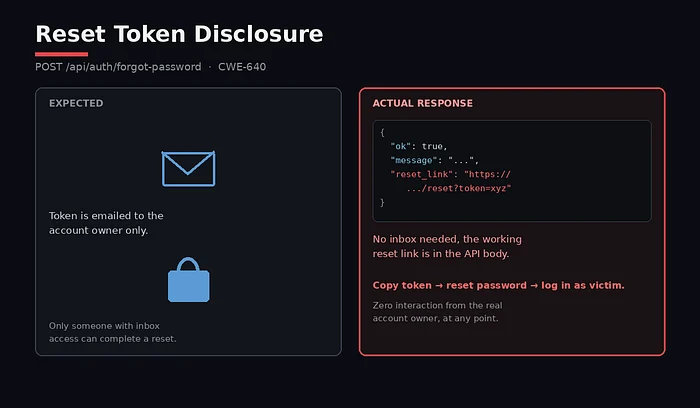
The starting assumption was that the reset token only ever reaches the account owner's verified email inbox. If that breaks anywhere, the recovery flow stops being a recovery flow and becomes a bypass for authentication entirely. The researcher wanted to test that assumption by checking exactly what data the API returns and where it goes, rather than by guessing or brute-forcing a token.
Exploitation
Step one: the enumeration oracle
Before testing token exposure, the researcher checked whether the endpoint behaved differently for an email that has an account versus one that does not. This matters on its own, separately from the bigger finding.
First, the request against a non-existent address:
POST /api/auth/forgot-password HTTP/2Content-Type: application/json
{"email":"[redacted]"}
HTTP/2 200 OK
{ "ok": true, "message": "If the email exists, a reset link has been sent."}
The response is generic and non-committal, which is exactly what a forgot-password endpoint should return regardless of whether the account exists.
Then the same request against the real, existing test account:
POST /api/auth/forgot-password HTTP/2Content-Type: application/json
{"email":"<existing-test-account-email>"}
HTTP/2 200 OK
{ "ok": true, "message": "If the email exists, a reset link has been sent.", "reset_link": "https://<target>/reset-password?[redacted]"}
The message text is identical in both cases, but the second response carries an entire extra field, reset_link, containing a live, working reset URL with the token embedded directly in the query string. The mere presence or absence of that field is already an account enumeration primitive: an attacker can determine whether any given email address has a registered account just by checking whether reset_link shows up. That is the smaller half of the finding.
Step two: the token itself, in the response body
The reset_link field is not a placeholder or a redacted preview. It is the complete, functional reset URL, the exact same thing that would normally only be delivered to the account owner's inbox. The researcher copied the token straight out of the JSON response and used it immediately:
POST /api/auth/reset-password HTTP/2Content-Type: application/json
{ "token": "<TOKEN copied directly from the forgot-password response>", "password": "NewAttackerControlled_Pass1!"}
HTTP/2 200 OK
{ "ok": true, "message": "Password reset successful."}
That is the entire attack: one request to learn that the target's email has an account, a second request that hands back a working credential, and a third request that consumes it. No email inbox access is required at any point, and there is no phishing, no social engineering and no waiting for a victim to click anything.
Confirming the takeover
To close the loop, the researcher authenticated with the new password against the standard login endpoint:
POST /api/auth/login HTTP/2Content-Type: application/json
{ "email": "<existing-test-account-email>", "password": "NewAttackerControlled_Pass1!"}
HTTP/2 200 OK
{ "ok": true, "user": { "id": "...", "email": "..." }}
A full session was established: complete account takeover, start to finish, using nothing but a target email address. Such an address is very often public information, guessable from a company's naming convention, or, on this specific platform, obtainable from a separate BOLA finding the researcher documented in another endpoint.
Checking the frontend, not just the API
A raw API response like this can turn out to be a debug artifact that is stripped before rendering, which would make the real-world attack surface smaller than it looks from a proxy alone. So the researcher loaded the actual forgot-password page in a browser to see what a normal user, or attacker, would visually encounter.
The page rendered a visible "Debug preview" element directly on screen, displaying the same reset link a second time, in plain view, with no developer tools required. Whatever internal reasoning led to that debug element being added, it meant this was not a subtle API-only issue that only a proxy user would ever find: it was directly visible to anyone who loaded the page.
Root cause
The forgot-password handler builds the full reset URL, including the token, and returns it in the JSON response body alongside the generic message. The generic message shows the developers intended not to disclose whether an account exists, but the extra field defeats that intent twice over: its presence reveals account existence, and its contents hand over a working credential. The frontend then renders the same link in a visible "Debug preview" element, so the exposure is not confined to the API.
Why existing defences did not stop it: the identical message text suggests the enumeration concern was considered, but nothing in the flow prevented the token from being serialised into the response. The report does not describe any server-side check that would have caught this, and the debug element on the page suggests the link was surfaced for development purposes and not removed before release. The exact code path is not shown.
Impact
An unauthenticated attacker who knows a target's email address can take over the account completely: request a reset, read the token from the response, set a new password, and log in. No foothold, victim interaction or inbox access is needed. The bar for full account takeover is reduced to a single fact, knowing an email address.
The researcher also notes a separate finding, documented elsewhere, that reset tokens are never invalidated after use. Combined with this issue, every token exposed this way stays valid indefinitely, compounding the exposure window.
Fix
The report does not state what was changed. Based on the finding, the reset link and token should never appear in the forgot-password response body: the response should contain only the generic message, with the link delivered solely to the account owner's verified email. The "Debug preview" element should be removed from the production page, and the response shape should be identical whether or not the account exists. Given the separate finding about token reuse, tokens should also be invalidated after use.
Variants to test
- Extra fields in reset responses. Send a forgot-password request for an existing and a non-existing account and diff the JSON keys, not just the message. A positive result is any field present only for real accounts, especially one containing a URL, token or code.
- Debug output in the UI. Load the forgot-password page in a browser with no developer tools and look for previews, debug panels or auto-filled links. A positive result is a visible reset link or token on screen.
- Token reuse after reset. Complete a reset, then replay the same token. A positive result is a second successful reset with the old token.
- Enumeration through timing or status. Where the body is identical, compare response times and status codes between existing and non-existing accounts. A positive result is a consistent, measurable difference.
- Other recovery channels. Try the same pattern on email-change, invitation and magic-link endpoints, which often reuse the same response-building code. A positive result is a link or token returned in the response body.
What happened, in plain words
A website had a "forgot my password" feature. You know the kind: you type your email address, the site sends you a link by email, you click the link, and you set a new password. The whole point of that feature is that only the person who owns the email inbox can ever see the link.
On this platform, the server that handles the forgot-password request was sending the reset link back to whoever asked for it, in the reply itself. Not by email. In the reply. So anyone who knew your email address could ask the site for a password reset, read the link straight out of the reply, and use it to set a new password on your account. Then they could log in as you.
No email access. No tricking you into clicking anything. Just your email address, which is often public.
The researcher who found this is Neel Chauhan, and the write-up was published on 21 September 2026. The report rates the issue as Critical, with a CVSS 3.1 score of 9.1 and the vector AV:N/AC:L/PR:N/UI:N/S:U/C:H/I:H/A:N. It also files it under three weakness categories: CWE-640 (Weak Password Recovery Mechanism), CWE-200 (Exposure of Sensitive Information to an Unauthorized Actor) and CWE-204 (Observable Response Discrepancy).
Before going further, a few words on the pieces involved.
What is an API? A website has two faces. One is the page you see in your browser: buttons, text, colours. The other is a set of behind-the-scenes addresses that the page talks to in order to get and send data. That second face is the API (Application Programming Interface). Think of a restaurant: the dining room is the web page, the kitchen is the server, and the waiter who carries your order back and forth is the API. When you click "send reset link", your browser does not talk to the kitchen directly; it asks the waiter, and the waiter brings back a reply.
What is a request and a response? A request is the message your browser sends ("please do this for me"). A response is the message the server sends back ("done, and here is the result"). Both are just text, and tools exist that let you read and replay them.
What is JSON? It is a common way of writing data as text so that programs can read it easily. It looks like a list of labels and values inside curly brackets, for example {"ok": true}. When you see a block of JSON in this article, it is the body of a response: the actual data the server sent back.
What is a token? A token is a short piece of secret text that stands in for proof of identity. Think of a cloakroom ticket: whoever holds the ticket gets the coat, no questions asked. A password reset token works the same way. If you have the ticket, you can collect the coat, meaning you can set a new password. That is why the ticket must only ever go to the rightful owner.
What is account takeover? It means someone else ends up in control of your account: they can read your data, change your settings, and lock you out. It is the worst ordinary outcome in web security.
What is account enumeration? It means figuring out which email addresses have accounts on a site, usually by noticing that the site answers slightly differently for real and fake addresses. On its own it is a privacy leak; combined with something else, it becomes a map for an attacker.
What is a proxy? A tool that sits between your browser and the website and lets you read and edit every message that passes. Security testers use it to see what the API really says, rather than what the page chooses to show.
The assumption being tested
The entire security model of a password reset feature rests on one assumption: the reset token only ever reaches the account owner, through their verified email inbox. If that assumption breaks anywhere, the whole recovery flow stops being a recovery flow and becomes a bypass for authentication entirely.
The researcher wanted to test that assumption directly, not by trying to guess or brute-force a token, but by checking exactly what data the API returns and where it goes. That distinction matters. Guessing a token is like trying to guess a stranger's cloakroom number: slow, noisy, and usually pointless if the numbers are long and random. Reading the token out of the reply is like finding the ticket lying on the counter. Much simpler, and it tells you something about the design rather than about the randomness.
The testing used a real, existing test account on the platform, referred to in the requests as <existing-test-account-email>, plus a non-existent address, [redacted], as a control. A control is a deliberately boring comparison case: you send the same request to an address you know has no account, so you can see what "no account" looks like and compare it with "account exists". The work was done against the JSON API, and the forgot-password page was also loaded in a browser to see what a normal user would encounter. No special role or prior access is described: the whole point of the finding is that none is needed.
Step one: the enumeration oracle
Before testing token exposure, the researcher checked whether the endpoint behaved differently for an email that has an account versus one that does not. This matters on its own, separately from the bigger finding. The reason to check it first is order of operations: if the two cases already look different, you have learned something before you even get to the token, and you have a clean baseline for what "normal" looks like.
First, the request against a non-existent address:
POST /api/auth/forgot-password HTTP/2Content-Type: application/json
Line by line: POST is the type of request that means "here is some data, please act on it". /api/auth/forgot-password is the address on the server that handles the forgot-password feature. HTTP/2 is the version of the web protocol being used. Content-Type: application/json tells the server that the data being sent is in JSON format, so it knows how to read it.
{"email":"[redacted]"}
This is the body of the request: one label, email, with the fake address as its value. example.com is a reserved domain meant for examples, so this address certainly has no account.
HTTP/2 200 OK
This is the first line of the response. 200 OK is the standard code for "the request worked". Codes in the 200s mean success, 400s mean the request was wrong, 500s mean the server broke.
{ "ok": true, "message": "If the email exists, a reset link has been sent."}
The server replies with two fields. ok: true says the request was accepted. The message is deliberately vague: "If the email exists, a reset link has been sent." It does not confirm or deny anything. This is standard practice, and it is exactly what you want a forgot-password endpoint to return regardless of whether the account exists, because a vague answer gives an attacker nothing to work with.
Then the same request against the real, existing test account:
POST /api/auth/forgot-password HTTP/2Content-Type: application/json
Same request type, same address, same declared format. The only thing that changes is the email inside.
{"email":"<existing-test-account-email>"}
Here the placeholder stands for the address of the researcher's own test account, a real account on the platform.
HTTP/2 200 OK
Again a success code. So far, nothing looks different.
{ "ok": true, "message": "If the email exists, a reset link has been sent.", "reset_link": "https://<target>/reset-password?[redacted]"}
And here is the problem. The message text is identical in both cases, but the second response carries an entire extra field, reset_link, containing a live, working reset URL with the token embedded directly in the query string. The query string is the part of a web address after the question mark; it is how a link can carry a value, in this case the token, along with it.
The mere presence or absence of that field is already an account enumeration primitive: an attacker can determine whether any given email address has a registered account just by checking whether reset_link shows up. An "oracle" in this context just means a yes/no question you can ask the system as many times as you like and always get a reliable answer from. That is the smaller half of the finding.
Step two: the token itself, in the response body
The reset_link field is not a placeholder or a redacted preview. It is the complete, functional reset URL, the exact same thing that would normally only be delivered to the account owner's inbox. The researcher copied the token straight out of the JSON response and used it immediately:
POST /api/auth/reset-password HTTP/2Content-Type: application/json
This is a different address: /api/auth/reset-password, the endpoint that actually performs the reset. Normally you would only reach this after clicking the emailed link, because only then would you have the token to send. Here the token came from the previous reply instead.
{ "token": "<TOKEN copied directly from the forgot-password response>", "password": "NewAttackerControlled_Pass1!"}
Two fields. token is the value lifted from the earlier response, pasted in unchanged. password is the new password the researcher wants to set, in this case NewAttackerControlled_Pass1!. The name is chosen to make clear that the attacker, not the owner, picked it.
HTTP/2 200 OK
The server accepted the request.
{ "ok": true, "message": "Password reset successful."}
And confirmed it: the password has been changed. That is the entire attack: one request to learn that the target's email has an account, a second request that hands back a working credential, and a third request that consumes it. No email inbox access is required at any point, and there is no phishing, no social engineering and no waiting for a victim to click anything.
Confirming the takeover
To close the loop, the researcher authenticated with the new password against the standard login endpoint:
POST /api/auth/login HTTP/2Content-Type: application/json
This is the ordinary login address, the same one the site's own login form uses.
{ "email": "<existing-test-account-email>", "password": "NewAttackerControlled_Pass1!"}
The original email address, paired with the password the researcher just set. If this works, the takeover is real and not just a server message that says nice things.
HTTP/2 200 OK
Success.
{ "ok": true, "user": { "id": "...", "email": "..." }}
The reply includes a user object with an id and an email, which is what a server returns when it has accepted your credentials and started a session for you. A session is the state of being logged in: the server remembers who you are for a while, usually by giving your browser a cookie, which is a small piece of data the browser stores and sends back with every later request, like a wristband at an event.
A full session was established: complete account takeover, start to finish, using nothing but a target email address. Such an address is very often public information, guessable from a company's naming convention, or, on this specific platform, obtainable from a separate BOLA finding the researcher documented in another endpoint. BOLA stands for Broken Object Level Authorisation: a class of bug where the server lets you ask for someone else's object, such as another user's record, simply because it does not check that the object belongs to you.
Checking the frontend, not just the API
A raw API response like this can turn out to be a debug artifact that is stripped before rendering, which would make the real-world attack surface smaller than it looks from a proxy alone. In plain terms: maybe the server says too much, but the page quietly throws that part away before showing anything, so an ordinary visitor would never see it. That would still be a bug, but a less alarming one.
So the researcher loaded the actual forgot-password page in a browser to see what a normal user, or attacker, would visually encounter.
The page rendered a visible "Debug preview" element directly on screen, displaying the same reset link a second time, in plain view, with no developer tools required. Developer tools are the hidden panel in a browser that lets you inspect what a page is doing; the point here is that you did not need them. Whatever internal reasoning led to that debug element being added, it meant this was not a subtle API-only issue that only a proxy user would ever find: it was directly visible to anyone who loaded the page.
Why this outranks almost everything else in severity
A privilege escalation bug or an XSS finding usually requires the attacker to already have some foothold, an account, a victim who clicks something, some existing access. Privilege escalation means going from a low level of access to a higher one. XSS, cross-site scripting, means getting your own code to run inside someone else's browser session. Both are serious, but both usually need a starting position.
This one requires none of that. It reduces the entire authentication model down to a single fact: knowing an email address. That is the bar for full account takeover here. Combined with a separate finding the researcher documented around reset tokens never being invalidated after use, every token exposed this way also stays valid indefinitely, compounding the exposure window even further. "Never invalidated after use" means the cloakroom ticket still works after the coat has been collected: the same token can be used again and again, so a leaked one never stops being useful.
Root cause
The forgot-password handler builds the full reset URL, including the token, and returns it in the JSON response body alongside the generic message. The generic message shows the developers intended not to disclose whether an account exists, but the extra field defeats that intent twice over: its presence reveals account existence, and its contents hand over a working credential. The frontend then renders the same link in a visible "Debug preview" element, so the exposure is not confined to the API.
Why existing defences did not stop it: the identical message text suggests the enumeration concern was considered, but nothing in the flow prevented the token from being serialised into the response. Serialised here simply means turned into text and included in the reply. The report does not describe any server-side check that would have caught this, and the debug element on the page suggests the link was surfaced for development purposes and not removed before release. The exact code path is not shown.
Impact
An unauthenticated attacker who knows a target's email address can take over the account completely: request a reset, read the token from the response, set a new password, and log in. Unauthenticated means without logging in first, without any account of their own. No foothold, victim interaction or inbox access is needed. The bar for full account takeover is reduced to a single fact, knowing an email address.
The researcher also notes a separate finding, documented elsewhere, that reset tokens are never invalidated after use. Combined with this issue, every token exposed this way stays valid indefinitely, compounding the exposure window.
Fix
The report does not state what was changed. Based on the finding, the reset link and token should never appear in the forgot-password response body: the response should contain only the generic message, with the link delivered solely to the account owner's verified email. The "Debug preview" element should be removed from the production page, and the response shape should be identical whether or not the account exists. Given the separate finding about token reuse, tokens should also be invalidated after use.
Variants to test
If you want to look for the same kind of mistake elsewhere, these are checks worth trying. Each one is written as a small experiment with a clear pass or fail.
- Extra fields in reset responses. Send a forgot-password request for an existing and a non-existing account and diff the JSON keys, not just the message. A positive result is any field present only for real accounts, especially one containing a URL, token or code.
- Debug output in the UI. Load the forgot-password page in a browser with no developer tools and look for previews, debug panels or auto-filled links. A positive result is a visible reset link or token on screen.
- Token reuse after reset. Complete a reset, then replay the same token. A positive result is a second successful reset with the old token.
- Enumeration through timing or status. Where the body is identical, compare response times and status codes between existing and non-existing accounts. A positive result is a consistent, measurable difference.
- Other recovery channels. Try the same pattern on email-change, invitation and magic-link endpoints, which often reuse the same response-building code. A positive result is a link or token returned in the response body.
Glossary
- Account takeover: gaining control of someone else's account, including the ability to change its password and lock the owner out.
- Account enumeration: working out which email addresses have accounts on a site, usually from small differences in how the site responds.
- API (Application Programming Interface): the set of behind-the-scenes addresses a website's pages use to exchange data with its server.
- Authentication: proving who you are, normally by logging in.
- BOLA (Broken Object Level Authorisation): a bug where the server lets you access another user's object because it does not check that the object belongs to you.
- Brute-force: trying many guesses in sequence until one works.
- Control: a deliberately known comparison case used to see what a normal result looks like.
- Cookie: a small piece of data a browser stores for a site and sends back with later requests, often used to keep you logged in.
- CVSS: a standard scoring system for the severity of a security issue, with a numeric score and a vector string describing the conditions.
- CWE: a catalogue of common weakness types, each with a number and a name.
- Debug artifact: leftover output added for development purposes that was not removed before release.
- Endpoint: a specific address on a server that performs a specific job, such as
/api/auth/login. - Frontend: the part of a site you see and interact with in the browser.
- HTTP: the protocol browsers and servers use to exchange requests and responses.
- JSON: a text format for structured data, written as labelled values inside curly brackets.
- Magic link: a link that logs you in when clicked, without a password.
- Oracle: any system behaviour that reliably answers a yes/no question you can ask repeatedly.
- Phishing: tricking someone into handing over credentials or clicking a malicious link.
- Privilege escalation: moving from a lower level of access to a higher one.
- Proxy: a tool placed between browser and server that lets you read and edit the messages passing through.
- Query string: the part of a web address after the question mark, used to carry values such as a token.
- Request: the message a browser or tool sends to a server asking it to do something.
- Response: the message a server sends back, including a status code and usually a body of data.
- Serialise: turn data into text so it can be sent or stored.
- Session: the state of being logged in, which the server remembers across requests.
- Social engineering: manipulating a person into doing something that helps an attacker.
- Status code: the three-digit number at the start of a response, such as 200 for success.
- Token: a short secret value that proves a right, such as permission to reset a password.
- Unauthenticated: acting without being logged in.
- XSS (cross-site scripting): a bug that lets an attacker's code run inside another user's browser session.



