From File Upload to Remote Code Execution: How I Bypassed MIME Type Validation
The file upload feature validated the filename and content type but a double filename parameter with a null byte caused a mismatch between the validated name and the stored name, allowing a PHP file to be saved with a .php extension. The attacker could then execute arbitrary PHP code on the server, achieving remote code execution.

Cybersecurity
The full write-up lives on its author's site
It belongs to its author, so we link to it rather than copy it. The other two tabs are our own rewrites, checked against it.
Context
The target is a website with a support ticket feature where users can raise tickets for their queries. The author uses https://example.com/help/support as a placeholder endpoint and example.com as a placeholder for the real target, and notes that the exact endpoint names are not used in the write-up, though the methodology is the same.
The site runs PHP on the backend. The author had been testing it for a couple of days before looking at the upload functionality attached to the ticket feature. The upload field shown throughout the requests is named screenshot.
All testing was carried out with proper authorisation, and the target was notified.
Setup
No specific tooling, accounts or roles are described beyond the author's own testing session on the site. The relevant preconditions are:
- A feature that accepts file uploads (here, the support ticket form).
- A backend known to be PHP, so an uploaded PHP file is worth pursuing.
- An upload location that is web-accessible, so a stored file can be requested directly.
The author first spent time on the ticket form itself, trying Blind XSS. The site encoded the XSS vectors properly, so the input was sanitised and that path went nowhere. The upload feature was the next target: if a PHP file could be stored in a web-accessible path and the server executed it, that would be code execution.
Finding it
After the bypass, the author concluded that each individual defence was correct and that the validation logic and the storage logic appeared to read different parts of the multipart part.
Exploitation
Attempt 1: direct PHP upload
The obvious first try is a .php file:
Content-Disposition: form-data; name="screenshot"; filename="rev.php"Content-Type: application/pdf
Response:
{"status":false,"message":"File extension .php is not allowed for security reasons."}
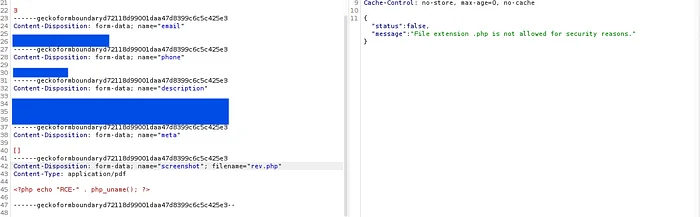
The extension was blocked outright.
Attempt 2: double extension
Appending a safe extension after the PHP one, hoping only the last extension is checked:
filename="rev.php.jpg"
Response:
{"status":false,"message":"Invalid file name format. Double extensions or hidden script files are forbidden."}
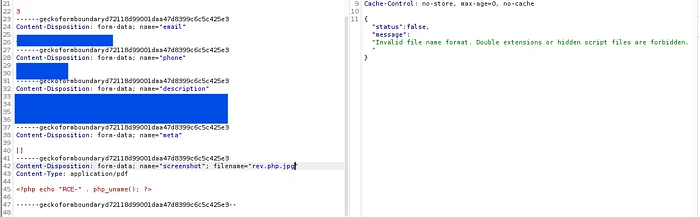
The server explicitly checked for double extensions.
Attempt 3: null byte injection
Null bytes historically cause some parsers to truncate a string, so rev.php%00.jpg would be treated internally as rev.php while the validator sees .jpg:
filename="rev.php%00"filename="rev.php%00.jpg"
Response:
{"status":false,"message":"Invalid file extension .php%00. Allowed extensions: jpg, jpeg, png, gif, webp, pdf, doc, docx, txt"}
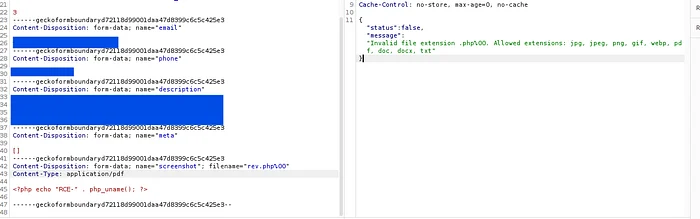
The server stripped the null byte and flagged the underlying .php extension. The error message also lists the allowed extensions: jpg, jpeg, png, gif, webp, pdf, doc, docx, txt.
Attempt 4: other standard techniques
The remaining common bypasses were tried and all rejected:
rev.php%00.jpg: rejectedContent-Type: image/jpegwith PHP content: rejected- GIF magic bytes (
GIF89a;) prepended to PHP content: rejected - Various other filename manipulations: all rejected
At this point every individual technique had failed.
The bypass that worked
The next attempt combined two techniques at once instead of testing them separately.
Technique 1: double filename parameter with a null byte. Two filename parameters were submitted in the same Content-Disposition header:
filename="rev.php%00"
Some multipart parsers read the first filename value while the validation logic reads the last, or the other way round. That creates a gap between what is validated and what is written to the filesystem.
Technique 2: spoofing an allowed Content-Type. Instead of claiming application/php or image/jpeg, the Content-Type was set to application/pdf.
The full upload part:
Content-Disposition: form-data; name="screenshot"; filename="rev.php%00"; filename="rev.php%00.gif"Content-Type: application/pdf
Response:
{ "status": true, "message": "Ticket created successfully", "ticket_id": 25}
HTTP 201 Created. The file was uploaded successfully.
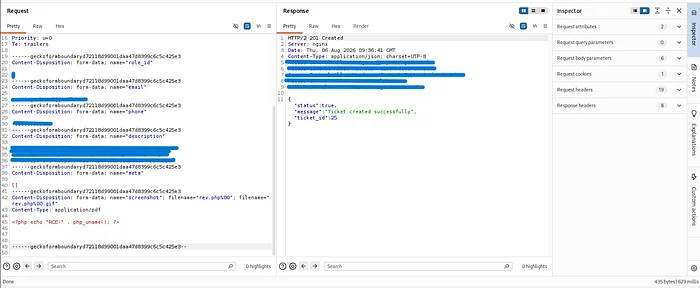
The remaining question was whether the server would execute it.
Confirming execution
Rather than going straight for a reverse shell, the author uploaded a minimal single-line proof of concept:
<?php echo "RCE-" . php_uname(); ?>
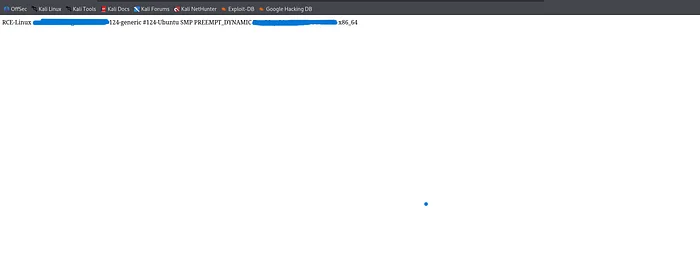
The uploaded file's direct URL was then opened in the browser, which returned:
RCE-Linux [hostname] 6.8.0-124-generic #124-Ubuntu SMP PREEMPT_DYNAMIC XXX XXXX XXXXX UTC 2026 x86_64
php_uname() is a PHP runtime function, not static content, so its output in the browser confirmed that the PHP interpreter executed the uploaded file on the production server.
Root cause
The server had genuinely good individual checks. It correctly blocked .php extensions, blocked double extensions, handled null bytes in isolation, blocked magic byte spoofing and blocked obvious Content-Type manipulation.
The failure came from the combination of the double filename parameter and the application/pdf Content-Type claim. That combination created a gap between what the validator inspected and what the filesystem actually stored the file as. The individual defences were solid; the inconsistency between the parsing paths is what made the bypass possible. The report does not show the server-side code, so the exact parser behaviour is inferred from the responses rather than observed.
Impact
An attacker who can reach the upload feature can store a PHP file in a web-accessible directory and have the production server execute it, which is remote code execution in the context of the web server. In this case the upload sits behind the support ticket form, so the attacker needs to be able to create a ticket with an attachment. The author confirmed execution with a harmless proof of concept rather than a reverse shell.
Fix
No fix is described in the report. The lesson it draws is that validation and storage must agree on which filename value and which Content-Type they act on: a single, normalised filename should be parsed once and used for both the checks and the write, and the stored extension should be derived from that same value rather than from a separate parse of the multipart part.
Variants to test
- Duplicate
filenameparameters in oneContent-Dispositionheader, with the first value carrying the dangerous extension and the second a safe one, and the reverse order. A positive result is a201or success response where the stored file keeps the dangerous extension. - Duplicate
filenameparameters combined with a null byte in one of the values. A positive result is the same: success, with the null byte truncated away at storage time. - A
Content-Typethat matches an allowed type (application/pdf,image/jpeg) while the filename carries a script extension. A positive result is acceptance where the extension check should have rejected the file. - Requesting the stored file's direct URL after upload. A positive result is the output of a PHP function such as
php_uname()appearing in the response, which proves execution rather than static delivery. - Repeating the same combinations on other upload fields and other multipart parsers, since the gap depends on how each parser picks the
filenamevalue. A positive result is any case where the validated value and the stored value differ.
What happened, in plain words
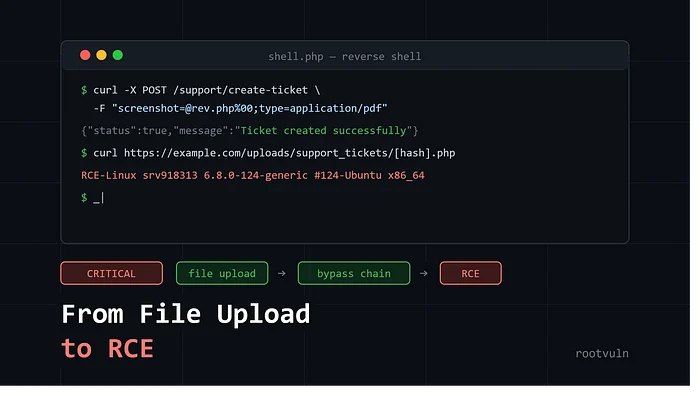
A security researcher who goes by the name rootvuln found a way to make a website run their own code on its server. The website had a form where visitors could open a support ticket and attach a file, for example a screenshot of a problem. Getting a server to run code you wrote is called remote code execution, or RCE for short, and it is one of the most serious things that can go wrong on a website.
The interesting part is that every single check on the site was well built. Each trick the researcher tried on its own was refused. The bypass only worked when two tricks were used at the same time, because the part of the program that inspects a file and the part that saves it ended up looking at different pieces of information.
All testing was done with permission, and the site owner was told about the problem. In the write-up the real site is replaced with the placeholder example.com, and the exact names of the pages involved are changed too, though the methodology is the same.
The website and the feature
A support ticket is a message a visitor sends to a company asking for help. On this site there was a page where you could fill in such a ticket, and the page had a file upload field so you could attach a picture or a document. The researcher uses https://example.com/help/support as a stand-in address for that page.
A file upload field is a small piece of a web page that lets you pick a file from your computer and send it to the server. Behind the scenes the browser packages the file into a message and posts it to the server. That message is called a multipart request, because it can carry several separate pieces (called parts) in one go: the text of the ticket, the attached file, and so on. Each part has a small header describing it, including a name (which form field it belongs to) and a filename (the name of the file on your computer).
The upload field in this story is named screenshot, which is why that word appears in every request below.
A server is simply the computer somewhere else that stores the website and answers when your browser asks for a page. This site was built with a programming language called PHP. PHP is a language used to build web pages: when a visitor requests a page ending in .php, the server runs the PHP instructions inside that file and sends the result to the browser. That is the key fact here. If you can get a .php file onto the server in a place the browser can reach, and the server runs it instead of just handing it back as text, then you can make the server do things.
Why the researcher looked at the upload at all
The researcher had been testing the site for a couple of days before looking at the upload. The first idea was a Blind XSS. XSS, short for cross-site scripting, means slipping a small piece of code into a page so that it runs in someone else's browser later, for example in the browser of a support agent who reads the ticket. "Blind" means the attacker cannot see the result directly, because the code runs in someone else's session. Think of it as hiding a note in a letter so that whoever opens the letter later gets a surprise.
That attempt failed: the site encoded the input properly. Encoding means turning special characters into harmless text so the browser shows them as characters rather than treating them as instructions. The site did this correctly, so the XSS path went nowhere.
That is when the upload field became interesting. The researcher already knew the backend was PHP, so the question was simple: can I get a PHP file stored somewhere the browser can reach, and will the server run it? If yes, that is code execution.
Attempt 1: just upload a PHP file
The most obvious thing to try first is to upload a file ending in .php and see what happens.
Content-Disposition: form-data; name="screenshot"; filename="rev.php"Content-Type: application/pdf
This is one line from the header of the uploaded part. Reading it piece by piece:
Content-Disposition: form-datasays this part is one piece of a larger form submission.name="screenshot"says which field on the page this part belongs to, here the screenshot upload field.filename="rev.php"is the name of the file being sent. The researcher choserev.php, a name ending in.php.Content-Type: application/pdfis a label saying what kind of file it is. Here the label claims the file is a PDF document, even though the name ends in.php. The label and the name disagree, which is deliberate.
A MIME type, also called a Content-Type, is that kind of label. It is a short text like image/jpeg for a photo or application/pdf for a PDF, used so that programs can agree on what a file is without opening it. Think of it as the label on a jar: it tells you what is inside, but nothing forces the label to be true.
Response:
{"status":false,"message":"File extension .php is not allowed for security reasons."}
The server answered with a small block of JSON. JSON is a plain text format for structured data, made of names and values in curly brackets, and it is what many web servers send back when a page talks to them in the background. Here:
"status":falsemeans the request failed."message":"..."is a human-readable explanation: the.phpextension is not allowed, for security reasons.
An extension is the part of a filename after the last dot, like .jpg or .pdf. It is a hint about the file type, and servers often use it to decide whether to accept an upload. This server looked at the extension and refused.
Blocked, as expected. On to the next idea.
Attempt 2: two extensions, rev.php.jpg
A common trick is to put a safe extension after the dangerous one, hoping the server only looks at the last extension. If the server checks only the final .jpg, it might accept the file, while some other part of the system might still treat it as PHP because of the .php in the middle.
filename="rev.php.jpg"
This is just the filename part of the upload header, changed so the name ends in .jpg but still contains .php before it.
Response:
{"status":false,"message":"Invalid file name format. Double extensions or hidden script files are forbidden."}
Again status is false, and the message says the filename format is invalid: double extensions or hidden script files are forbidden. A double extension is exactly what was tried, a name with two extensions in a row. The server was explicitly checking for this pattern, not just the last extension.
Solid validation. The researcher moved on.
Attempt 3: the null byte trick
A null byte is a special character, written %00 when it travels inside a URL or a header, that marks the end of a piece of text in some programming languages. Historically, some programs would stop reading a filename when they hit a null byte. So a name like rev.php%00.jpg might be cut down to rev.php by the part that saves the file, while the part that checks the extension still sees the .jpg at the end and lets it through. Think of it as writing two different addresses on one envelope: the postal worker reads one, the delivery driver reads the other.
filename="rev.php%00"filename="rev.php%00.jpg"
This line contains two filename values in a row. The first is rev.php%00, the second is rev.php%00.jpg. Both contain the null byte %00.
Response:
{"status":false,"message":"Invalid file extension .php%00. Allowed extensions: jpg, jpeg, png, gif, webp, pdf, doc, docx, txt"}
The server refused again. The message says the extension .php%00 is invalid, which shows the server did not get confused by the null byte: it stripped it and flagged the .php underneath. The message also lists the extensions the site does accept: jpg, jpeg, png, gif, webp, pdf, doc, docx, txt. Those are ordinary picture formats and document formats.
So the server handled null bytes correctly too.
Attempt 4: the other standard tricks
The researcher then worked through the remaining well-known bypasses:
rev.php%00.jpg: rejectedContent-Type: image/jpegwith PHP content: rejected. This means labelling the file as a JPEG photo while the contents are PHP code.- GIF magic bytes (
GIF89a;) prepended to PHP content: rejected. Magic bytes are the first few characters of a file that identify its real format, like a signature at the top of a letter.GIF89a;is the signature of a GIF image. The idea is to start the file with that signature so a checker thinks it is an image, then put the PHP code after it. - Various other filename manipulations: all rejected.
Every individual technique had now failed.
The bypass that worked
The researcher tried one more combination that had not been tested yet: using two techniques at the same time instead of one after another.
Technique 1: two filename values plus a null byte. Instead of a single filename, two filename values were put into the same Content-Disposition header:
filename="rev.php%00"
This is the first of the two values. The point is that some programs that read multipart requests take the first filename they see, while the checking code takes the last one, or the other way round. If the checker reads one value and the saving code reads the other, then the file that gets checked is not the file that gets saved. That gap is the whole trick.
Technique 2: claiming an allowed Content-Type. Instead of claiming application/php or image/jpeg, the researcher set the Content-Type to application/pdf. The researcher set the Content-Type to application/pdf.
The full upload part:
Content-Disposition: form-data; name="screenshot"; filename="rev.php%00"; filename="rev.php%00.gif"Content-Type: application/pdf
Line by line:
Content-Disposition: form-datamarks this as one part of a multipart form submission.name="screenshot"ties the part to the screenshot upload field.filename="rev.php%00"is the first filename value, ending in.phpfollowed by a null byte.filename="rev.php%00.gif"is the second filename value.Content-Type: application/pdfclaims the file is a PDF, also on the allowed list.
So the request contains two filename values and a type label; the report infers that different code paths read different values.
Response:
{ "status": true, "message": "Ticket created successfully", "ticket_id": 25}
This time status is true, the message says the ticket was created successfully, and a ticket_id of 25 is returned. A ticket ID is just a number the site gives to the new ticket so it can be referred to later.
HTTP 201 Created. HTTP is the language browsers and servers use to talk to each other, and every reply carries a three-digit status code. 201 means "created": the server accepted the request and made something new, here the ticket with its attachment. The file had been uploaded successfully.
The file was stored with a .php extension in a web-accessible uploads directory. A web-accessible directory is a folder on the server that the browser can fetch files from directly, just like any normal page. The remaining question was whether the server would actually run the file, or merely hand it back as text.
Confirming that the code really runs
Rather than immediately trying a full reverse shell, the researcher uploaded a minimal one-line proof of concept. A reverse shell is a program that connects back from the server to the attacker and gives them a command prompt on the machine; it is powerful and intrusive, so it makes sense to prove the point with something harmless first.
<?php echo "RCE-" . php_uname(); ?>
This is a tiny PHP program. <?php and ?> mark where the PHP code starts and ends. echo means "print this out". php_uname() is a built-in PHP function that returns information about the operating system the server is running on. The dot joins the text RCE- to whatever php_uname() returns, so the page should print something like RCE-Linux ... if it runs.
The uploaded file's direct URL was then opened in the browser, and it returned:
RCE-Linux [hostname] 6.8.0-124-generic #124-Ubuntu SMP PREEMPT_DYNAMIC XXX XXXX XXXXX UTC 2026 x86_64
This is the output of the little program: the word RCE-, then the operating system details, including a Linux kernel version and x86_64, which describes the processor type. php_uname() is a PHP function that runs at the moment the page is requested, not fixed text sitting in a file. If the server had merely stored the file and sent it back unchanged, the browser would have shown the PHP source code itself. Instead it showed the result of running that code, which proves the PHP interpreter executed the uploaded file on the production server. The production server is the live machine that serves real visitors, not a test copy.
RCE confirmed.
Why this worked
The server had genuinely good individual checks. It correctly blocked .php extensions, correctly blocked double extensions, correctly handled null bytes on their own, correctly blocked magic byte spoofing, and correctly blocked obvious Content-Type manipulation.
The failure came from the combination of the two filename values and the application/pdf label. That combination created a gap between what the validator inspected and what the filesystem actually stored the file as. The validator is the part of the code that checks a file before accepting it. Each defence was solid on its own; the inconsistency between the different pieces of code that read the same request is what made the bypass possible. The report does not show the server-side code, so the exact behaviour of the parser is inferred from the responses rather than observed directly.
What this means in practice
Someone who can reach the upload feature can store a PHP file in a web-accessible folder and have the live server run it. That is remote code execution in the context of the web server, meaning the attacker's code runs with the same powers the website itself has. Here the upload sits behind the support ticket form, so the attacker first needs to be able to create a ticket with an attachment. The researcher confirmed execution with a harmless proof of concept rather than a reverse shell.
The report does not describe a fix. The lesson it draws is that the checking code and the saving code must agree on which filename value and which Content-Type they act on. A single, normalised filename should be read once and used both for the checks and for the write, and the stored extension should come from that same value rather than from a separate reading of the multipart part. Normalised means cleaned up into one standard form, so there is only one version of the name to reason about.
Variants worth testing
- Two
filenamevalues in oneContent-Dispositionheader, with the dangerous extension first and the safe one second, and then the reverse order. A positive result is a201or success response where the stored file keeps the dangerous extension. - Two
filenamevalues combined with a null byte in one of them. A positive result is the same: success, with the null byte cut away when the file is stored. - A
Content-Typethat matches an allowed type (application/pdf,image/jpeg) while the filename carries a script extension. A positive result is acceptance where the extension check should have rejected the file. - Requesting the stored file's direct URL after upload. A positive result is the output of a PHP function such as
php_uname()appearing in the response, which proves execution rather than plain delivery of the file. - Repeating the same combinations on other upload fields and other multipart parsers, since the gap depends on how each parser picks the
filenamevalue. A positive result is any case where the checked value and the stored value differ.
Glossary
- API: a way for one program to talk to another, with agreed requests and replies; here, the background requests the page sends to the server.
- Blind XSS: cross-site scripting where the attacker cannot see the result directly, because the injected code runs later in someone else's browser.
- Content-Type (MIME type): a short label saying what kind of file something is, such as
image/jpegorapplication/pdf; it is a claim, not a guarantee. - Cookie / token: a small piece of data a site gives your browser so it can recognise you on later requests; not used in this report's requests.
- Cross-site scripting (XSS): slipping code into a page so it runs in another visitor's browser.
- Double extension: a filename with two extensions in a row, such as
rev.php.jpg. - Encoding: turning special characters into harmless text so they are displayed rather than treated as instructions.
- Extension: the part of a filename after the last dot, such as
.jpgor.php. - HTTP: the language browsers and servers use to exchange requests and replies.
- HTTP 201 Created: a status code meaning the server accepted the request and created something new.
- JSON: a plain text format for structured data, made of names and values in curly brackets.
- Magic bytes: the first few characters of a file that identify its real format, like a signature.
- MIME type: another name for Content-Type.
- Multipart request: one request that carries several separate pieces, such as form text plus an attached file.
- Null byte (
%00): a special character that marks the end of text in some languages; some programs stop reading a string when they meet it. - Parser: the part of a program that reads a request or file and works out what it contains.
- PHP: a programming language used to build web pages; the server runs the PHP instructions in a
.phpfile and sends the result to the browser. php_uname(): a built-in PHP function that returns information about the server's operating system.- Production server: the live machine that serves real visitors, as opposed to a test copy.
- Remote code execution (RCE): getting a server to run code that you wrote.
- Reverse shell: a program that connects back from the server to the attacker and gives them a command prompt on the machine.
- Sanitised: cleaned up so that dangerous characters or code cannot take effect.
- Server: the computer somewhere else that stores a website and answers your browser's requests.
- Status code: the three-digit number in every HTTP reply, such as
201. - Support ticket: a message a visitor sends to a company asking for help.
- Upload field: a part of a web page that lets you pick a file and send it to the server.
- Validator: the part of the code that checks a file before accepting it.
- Web-accessible directory: a folder on the server whose files the browser can fetch directly.
x86_64: a description of the processor type, seen in the output ofphp_uname().



