From Hobby to Hacking
An exposed jQuery File Upload server-side PHP endpoint on a subdomain accepted file uploads without proper restriction, allowing the author to upload a web shell. The author claims the uploaded shell was reachable in the files directory, which could let an attacker run code on the server.
Muhammad Syahrul Haniawan Follow
 Published on medium.com
Hello,my name is Muhammad Syahrul Haniawan. I am from Indonesia and this is my first write up on Medium.com.
The full write-up lives on its author's site
It belongs to its author, so we link to it rather than copy it. The other two tabs are our own rewrites, checked against it.
Context
This is a write-up of a first bug bounty finding against a private program. The target is a Japanese news website that the author refers to as redacted.com, one of the biggest Japanese news sites in Indonesia. The author was a regular reader of the site, not a hired tester, and had no prior engagement with the program when he started looking.
The feature involved is not part of the news application itself. It is a bundled copy of the jQuery File Upload plugin, left reachable on a subdomain under the path jquery-fileupload. The plugin ships with a PHP server-side handler that accepts multipart uploads and writes the files to disk. That handler is what the author found and abused.
Setup
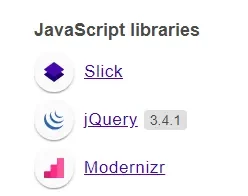
There were no accounts, roles or credentials involved. The author was an anonymous visitor to the public site. The only tools mentioned are manual browsing, viewing page source, and directory fuzzing. The version detail that mattered was the front-end library: the site loaded jQuery 3.4.1, released in 2019, which the author noticed while reading the page source.
Jquery version
Finding it
The author was reading news about Japan, prompted by the announcement that the actress Yui Aragaki was marrying a Japanese actor, and landed on the site he used to frequent.

He had no intention of testing the site, but the page source caught his attention: the plugins in use loaded an older version of jQuery, 3.4.1. That version alone is not the bug, but it pointed him towards the plugin stack.
He fuzzed directories on the main domain and did not get a good entry point. He then found subdomain.redacted.com and did directory reconnaissance there, partly by reading the page source of the main page. That surfaced a suspicious directory called jquery-fileupload.

He connected the directory name to a public article about jQuery File Upload, which describes three vulnerabilities in the plugin, and decided to try the same approach.
Exploitation
Step 1: locate the upload handler
He browsed to the PHP server handler that ships with the plugin:
https://subdomain.redacted.com/jquery-fileupload/server/php
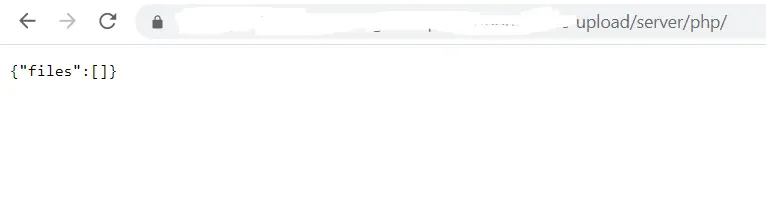
The page exposed the upload entry point and showed the field name files[]. That is the parameter the plugin's client-side code uses for multipart uploads, and its presence on a public page means the server-side handler is reachable without authentication.
Entry point
Step 2: upload a webshell through a simple CSRF
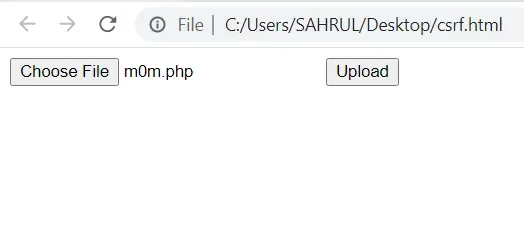
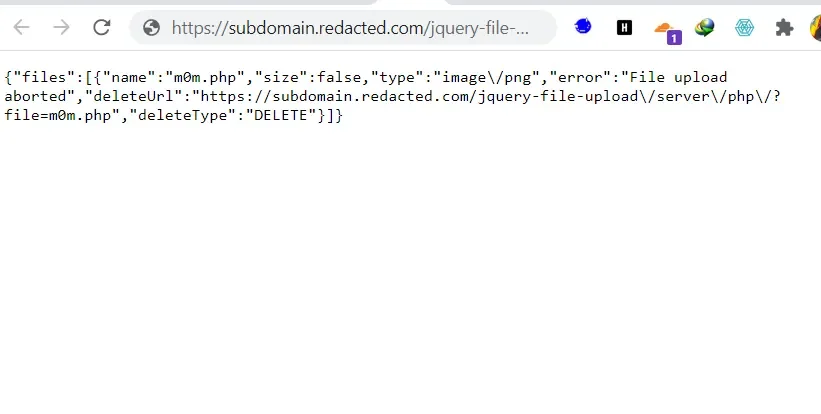
With the entry point confirmed, he built a simple CSRF page to submit a file to it, with the intention of uploading a webshell. The report shows the result of that submission rather than the page source of the CSRF form.
result CSRF
The response did show an error message, but the author judged from it that the webshell had in fact been uploaded successfully. The error did not prevent the file from being written.
Step 3: find the uploaded file
The remaining question was where the files land. The answer was to append one more directory to the handler path, /files/. Requesting that location returned the uploaded file, confirming the webshell had been written to a publicly served directory.
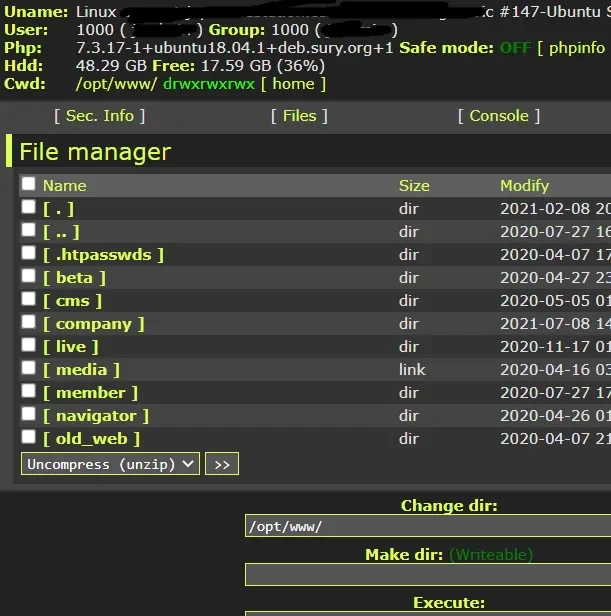
Root cause
The jQuery File Upload plugin's PHP handler was deployed on a public subdomain with no authentication in front of it, and it accepted a file upload from an unauthenticated request. The handler returned an error message, but the file was still written to the files/ directory, which was also publicly served. The combination of an unauthenticated upload endpoint and a writable directory inside the web root is what turned a leftover plugin directory into a stored webshell. The report does not include the handler's source, so the exact validation that failed is not shown; the observable behaviour is that the upload succeeded despite the error response.
Impact
An unauthenticated attacker who can reach the handler can upload a webshell and then retrieve it from the files/ directory, which places attacker-controlled code on the server hosting the subdomain. The author demonstrated this on a private program's asset. The report does not describe what data or systems the subdomain could reach, so the blast radius beyond the host itself is not established here.
Fix
The report does not say what the developer changed. The measures that address what was demonstrated are: remove the unused jquery-fileupload directory from the public subdomain, or put authentication and authorisation in front of the handler; reject uploads whose content or extension is executable; store uploaded files outside the web root, or serve them from a location that does not execute them; and make the handler fail closed, so that a request that produces an error response does not leave a file on disk.
Variants to test
- Leftover plugin directories. Fuzz for paths such as
jquery-fileupload,fileupload,uploadifyand similar on every subdomain, not just the main host. A positive result is a handler page that renders an upload form or names a field likefiles[]. - Handler reachable without a session. Request the PHP handler with no cookies at all. A positive result is the same entry point being served to an anonymous client.
- Error response with a written file. Submit a file that the handler reports an error for, then request it under
/files/. A positive result is the file being served back despite the error. - Executable content in the upload. Upload a script file and request it from the files directory. A positive result is the file being served back from the files directory.
- Cross-site submission. Host a form on another origin that posts to the handler, as the author did with his CSRF page. A positive result is a file arriving from a cross-origin submission with no token check.
- Old front-end libraries as a lead. When page source shows an outdated library such as jQuery 3.4.1, enumerate the plugins loaded alongside it and look for their server-side components. A positive result is a plugin whose server handler is deployed and reachable.
What happened, in plain words
A security researcher in Indonesia was reading a Japanese news website that he visited often, one of the biggest Japanese news sites in Indonesia. He calls it redacted.com in his write-up because it was part of a private bug bounty program, meaning the company invites testers to look for problems and pays or rewards them for reporting what they find. He was not hired to test the site. He was just a reader.
While reading, he looked at the page's source code, the behind-the-scenes text a browser uses to build the page you see. He noticed the site loaded an old version of a piece of software called jQuery. That alone is not a security hole, but it made him curious about the other add-on software the site used. He poked around a bit, found a subdomain (a second address under the same main website, like a side entrance to the same building), and on it found a folder called jquery-fileupload. That folder contained a file-upload tool that anyone on the internet could reach, with no login required. He used it to upload a small program of his own, a webshell, and then found it in a publicly served folder. The report does not show the server running it.
He reported it, the developer replied quickly, and he was rewarded with a one-month internship at the company and a certificate of appreciation. The timeline in his write-up: bug found on 10 July 2021, reported on 11 July 2021, rewarded on 12 July 2021.
This article walks through exactly what he did, in the order he did it, explaining each idea from scratch. You only need a browser and a computer to follow along.
Background: what the site was, and what was not the bug
The target was a news website, and the feature that turned out to be vulnerable was not part of the news application at all. It was a bundled copy of a free, widely used add-on called jQuery File Upload, left reachable on a subdomain under the path jquery-fileupload. That add-on comes with a small server-side program written in PHP (a programming language commonly used to build websites) that accepts files sent from a browser and saves them to disk. That server-side program is what the researcher found and abused.
No accounts, passwords or special permissions were involved. He was an anonymous visitor, the same as any reader. The only tools he mentions are browsing normally, viewing the page source, and directory fuzzing: trying a long list of common folder and file names against a website to see which ones exist, the way you might try many door handles in a corridor to find one that is unlocked.
Step 1: noticing an old library
He was reading news about Japan, prompted by the announcement that the actress Yui Aragaki was marrying a Japanese actor, and landed on the site he used to frequent.
He had no intention of testing the site's security. But the page source caught his attention: the plugins in use loaded an older version of jQuery 3.4.1, which was released in 2019.
Jquery version
What is jQuery? It is a JavaScript library: a collection of ready-made code that web pages include so they do not have to write common behaviour themselves. Think of it as a toolbox that many sites share. A plugin is an extra tool that plugs into that toolbox, in this case a tool for uploading files.
Why did the version matter? An old version is not automatically a vulnerability. Software versions are like the model year of a car: an older model is not broken, but it may lack fixes that newer models have, and it tells you something about how carefully the owner maintains things. Seeing jQuery 3.4.1 told him the site was running a stack that had not been updated recently, so the plugins around it were worth a look. It was a lead, not the bug.
Step 2: finding the suspicious folder
He fuzzed directories on the main domain and did not get a good entry point. He then found subdomain.redacted.com and did directory reconnaissance there, partly by reading the page source of the main page. That surfaced a suspicious directory called jquery-fileupload.
A subdomain is a name that sits under a main domain, for example shop.example.com next to example.com. Companies often run many of them, and each one is a separate place to look. An entry point is simply a place where you can send input to the server, a door you can knock on. He had not found one on the main domain, so he moved to the subdomain and looked there.
Reading the page source is a simple form of reconnaissance: the browser menu option that shows the raw HTML and scripts the page is built from. It often reveals paths, file names and library versions that are not visible on the rendered page. That is how the jquery-fileupload folder came to his attention.
He connected the folder name to a public article about jQuery File Upload, which describes three vulnerabilities in the plugin, and decided to try the same approach. The article is at https://blog.detectify.com/2018/12/13/jquery-file-upload-a-tale-of-three-vulnerabilities/. Reading public research about a product and then checking whether a target uses that product is a standard technique: you are not guessing blindly, you are testing a known weak spot.
Step 3: locating the upload handler
He browsed to the PHP server handler that ships with the plugin:
https://subdomain.redacted.com/jquery-fileupload/server/php
Line by line, in plain words:
https://is the secure version of the protocol browsers use to fetch web pages.subdomain.redacted.comis the subdomain he had found.redacted.comstands in for the real company name./jquery-fileupload/is the folder named after the plugin./server/phppoints at the server-side part of the plugin, the piece written in PHP that receives uploads.
The page exposed the upload entry point and showed the field name files[]. That is the parameter the plugin's client-side code uses for multipart uploads, and its presence on a public page means the server-side handler is reachable without authentication.
Entry point
A few terms here. A parameter (or field name) is the label a form gives to a piece of data it sends, like the label on a form field: the server reads the value under that label. files[] is the label this plugin uses for uploaded files; the square brackets are a convention meaning "a list of files", so several files can be sent at once. A multipart upload is the format a browser uses to send a file together with other form data in one request, packaging the parts separately the way a parcel might contain several labelled items. Authentication means proving who you are, usually by logging in. A handler that answers an anonymous visitor with an upload form is unauthenticated: no login was asked for, and none was needed.
Why did this matter? Because an upload form that anyone can reach is a place where anyone can put a file onto the server. Whether that is dangerous depends on what the server does with the file, which is what he tested next.
Step 4: uploading a webshell through a simple CSRF
With the entry point confirmed, he built a simple CSRF page to submit a file to it, with the intention of uploading a webshell. The report shows the result of that submission rather than the page source of the CSRF form.
result CSRF
What is a webshell? It is a small program, usually a script, that an attacker uploads to a server so that they can later send it commands through the browser and have the server run them. The name is literal: a shell (a command interface) that you reach over the web. If a server will store such a file and then execute it when someone requests it, the attacker effectively has a foothold on the machine.
What is CSRF? It stands for Cross-Site Request Forgery. Normally it describes an attack where a malicious page makes a logged-in user's browser send a request to another site without the user meaning to, because the browser automatically attaches the user's cookies. Here the researcher uses the term loosely: he made a simple page that submits a form to the upload handler, to see whether the handler would accept a file sent from a page on a different origin. An origin is the combination of scheme, host and port, roughly "which site this page came from". If the handler accepts a submission from another origin without any check, that is a sign it does not care who is sending the file.
The response did show an error message, but the author judged from it that the webshell had in fact been uploaded successfully. The error did not prevent the file from being written. This is an important lesson: an error message tells you what the application says, not necessarily what it did. A server can report a problem and still save the file. The researcher did not stop at the error text; he went looking for the file.
Step 5: finding the uploaded file
The remaining question was where the files land. The answer was to append one more directory to the handler path, /files/. Requesting that location returned the uploaded file, confirming the webshell had been written to a publicly served directory.
Why does this work? The plugin saves uploaded files into a folder, and that folder sits inside the part of the server that the website serves to visitors, the web root. Anything in a publicly served folder can be fetched by URL. So if the handler is at /jquery-fileupload/server/php, the saved files were reachable under /jquery-fileupload/server/php/files/ (the report describes it as adding /files/ to the handler path). When he requested his uploaded file there, the server returned it, showing that uploaded files were publicly reachable.
Why it was possible
The jQuery File Upload plugin's PHP handler was deployed on a public subdomain with no authentication in front of it, and it accepted a file upload from an unauthenticated request. The handler returned an error message, but the file was still written to the files/ directory, which was also publicly served. Two things combined: an upload endpoint anyone could reach and a writable directory inside the web root. Together they turned a leftover plugin folder into a publicly reachable webshell.
The report does not include the handler's source, so the exact validation that failed is not shown. What is observable is the behaviour: the upload succeeded despite the error response.
What an attacker could do
An unauthenticated attacker who can reach the handler can upload a webshell and then retrieve it from the files/ directory, placing attacker-controlled code on the server hosting the subdomain. The researcher demonstrated this on a private program's asset. The report does not describe what data or systems the subdomain could reach, so how far the damage could spread beyond that host is not established here.
How to fix it
The measures that address what was demonstrated are:
- Remove the unused
jquery-fileuploaddirectory from the public subdomain, or put authentication and authorisation in front of the handler. Authorisation means deciding what a proven identity is allowed to do; authentication is who you are, authorisation is what you may do. - Reject uploads whose content or extension is executable. The extension is the part of a file name after the dot, such as
.php, which tells the server how to treat the file. - Store uploaded files outside the web root, or serve them from a location that does not execute them.
- Make the handler fail closed: if a request produces an error response, no file should be left on disk. Failing closed means that when something goes wrong, the safe outcome happens, like a door that locks when the power fails rather than swinging open.
Variants worth testing
These are the same checks, phrased as things you could try on a site you are authorised to test:
- Leftover plugin directories. Fuzz for paths such as
jquery-fileupload,fileupload,uploadifyand similar on every subdomain, not just the main host. A positive result is a handler page that renders an upload form or names a field likefiles[]. - Handler reachable without a session. Request the PHP handler with no cookies at all. A cookie is a small piece of data a site stores in your browser to remember you, for example that you are logged in; sending no cookies means arriving as a stranger. A positive result is the same entry point being served to an anonymous client.
- Error response with a written file. Submit a file that the handler reports an error for, then request it under
/files/. A positive result is the file being served back despite the error. - Executable content in the upload. Upload a script file and request it from the files directory. A positive result is the file being served back from the files directory.
- Cross-site submission. Host a form on another origin that posts to the handler, as the author did with his CSRF page. A positive result is a file arriving from a cross-origin submission with no token check. A token here means a secret value embedded in a form that the server checks to confirm the request came from its own page; without one, any page can submit.
- Old front-end libraries as a lead. When page source shows an outdated library such as jQuery 3.4.1, enumerate the plugins loaded alongside it and look for their server-side components. A positive result is a plugin whose server handler is deployed and reachable.
Glossary
- Authentication: proving who you are, usually by logging in.
- Authorisation: deciding what a proven identity is allowed to do.
- Bug bounty program: an arrangement where a company invites people to find and report security problems, often with a reward.
- Cookie: a small piece of data a website stores in your browser to remember you between requests.
- CSRF (Cross-Site Request Forgery): an attack where a page on one site causes a browser to send a request to another site, often relying on cookies being attached automatically.
- Directory fuzzing: trying many common folder and file names against a website to discover which exist.
- Entry point: any place where you can send input to a server, such as a form or an upload handler.
- Extension: the part of a file name after the dot, such as
.php, which indicates the file type. - Fail closed: when something goes wrong, the safe outcome happens by default.
- Handler: the server-side program that receives and processes a request, here the PHP code that accepts uploads.
- jQuery: a widely used JavaScript library that web pages include for common behaviour.
- JavaScript: the programming language browsers run to make pages interactive.
- Multipart upload: the format a browser uses to send a file, possibly with other form data, in one request.
- Origin: the combination of scheme, host and port that identifies which site a page came from.
- Parameter (field name): the label under which a piece of data is sent to a server, such as
files[]. - PHP: a programming language commonly used for server-side website code.
- Plugin: an add-on that extends a library or application with extra features.
- Remote code execution (RCE): getting your own code to run on someone else's server.
- Subdomain: a name under a main domain, such as
subdomain.example.comunderexample.com. - Token: a secret value a server checks to confirm a request came from its own page, used to prevent forgery.
- Web root: the folder on a server whose contents are served publicly to visitors.
- Webshell: a small script uploaded to a server that lets an attacker send it commands through the browser.


