Full account takeover worth $1000 Think out of the box
The password change endpoint did not validate the CSRF token and accepted a hidden 'uid' parameter, allowing an attacker to change any user's password without knowing the old password. The attacker could then log in as the victim if they knew the victim's email address.
 Published on mokhansec.medium.com
Hi everyone how are you doing today? I hope you are doing great and scoring lots of bounties.
The full write-up lives on its author's site
It belongs to its author, so we link to it rather than copy it. The other two tabs are our own rewrites, checked against it.
Context
The target is a normal website with little functionality: you can create an account, log in, change your password, and edit account information. The researcher does not have permission to disclose the target, so it is referred to throughout as example.com. The bug described here allows taking over any user's account. In the researcher's own words it was a P4 issue that was not reported on its own, but chained into a P1.

The site uses a CSRF token to protect state-changing requests. In the page source, the researcher found that the site assigns a userID to every user, and that this ID is six digits long, so it can be guessed easily.
Setup
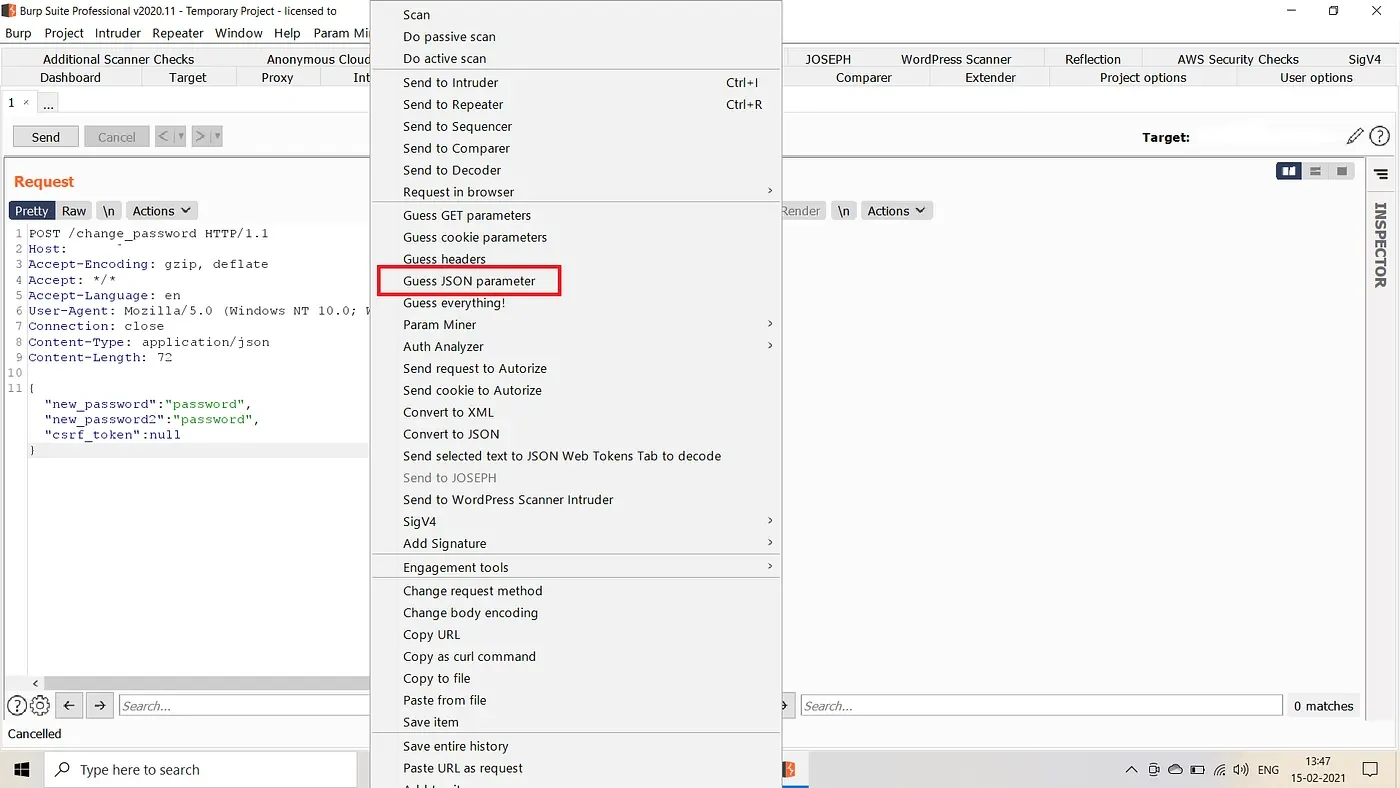
Two accounts were created, one acting as the victim and one as the attacker. All traffic was inspected in Burp Suite. Param Miner, a free Burp Suite extension by James 'albinowax' Kettle, identifies hidden, unlinked parameters. The researcher selected its Guess JSON parameter mode to look for hidden parameters in a JSON body.
Finding it
While logged in as the victim, the researcher checked every request and response. Changing account information was protected by the CSRF token: replaying the change from the attacker account, and attempts to remove the token or switch POST to GET, all failed. The change email page behaved the same way. The same was true for the change username functionality.

The change password functionality was different. It normally asks for the current password and then the new password. The researcher found that removing the current password parameter still allowed the password to be changed.

That alone is a low-severity issue, since it only affects your own account. The researcher left it unreported and stopped for a few hours. A conversation with a friend, who had found a CSRF bug on a private program where CSRF tokens were validated on the change info page but not on a notification toggle, prompted a second look at the change password page's CSRF handling.
Exploitation
Step 1: Capture the change request as the victim
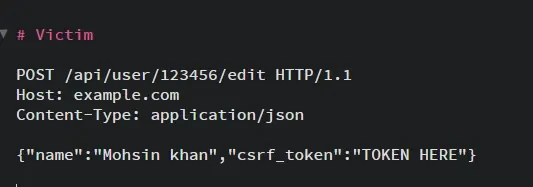
Logged in as the victim, the researcher changed some account information in account settings and captured the request.
Step 2: Test the CSRF token on change password
The researcher checked whether the change password page validates its CSRF token. Removing the csrf_token and using null instead still allowed the password to be changed.

At this point the issue is still limited: to change another user's password you must know their email, because the email is needed to log in.
Step 3: Look for a user identifier in the request
The screenshot of the change password request shows no userID. The researcher tried paths such as /api/user/userID/change_password, but nothing happened.

Step 4: Guess hidden JSON parameters
The last idea was to put the user ID into the JSON body, but the parameter name was unknown. Param Miner was run in Guess JSON parameter mode against the JSON body. A few minutes later it found the uid parameter.
Step 5: Change any user's password
Adding the uid parameter to the change password JSON body allowed the researcher to change all users' passwords without any interaction from the user.

Root cause
Adding a uid parameter to the change password JSON body allowed the researcher to change all users' passwords. The CSRF token check could be bypassed by removing the csrf_token and sending null, and the current password check could be bypassed by removing the current password parameter. The researcher tested only their own account and stated they could change all users' passwords. The report does not describe the server-side code, so the exact implementation is not stated.
Impact
An attacker with an account on the site can change the password of any other user, without the victim's interaction, by supplying the victim's uid. Because the ID is six digits, it can be guessed easily. The researcher only tested against their own account, and noted in the report that they could demonstrate further impact by changing all users' passwords and logging in to [redacted]. The report does not state whether the email address is required to complete the login after the password change.

Fix
The team replied after the report and fixed the issue, and rewarded the researcher with $1000.

Variants to test
- Hidden identifier parameters in JSON bodies. Run Param Miner's Guess JSON parameter mode on state-changing endpoints. A positive result is a hidden parameter such as
uidthat changes which account the action applies to. - CSRF token bypass by nulling. Replace the token value with
null, an empty string, or remove the parameter entirely. A positive result is the action succeeding without a valid token. - Current password bypass. Remove the current password parameter from a password change request. A positive result is the password changing without the old one.
- Sequential identifiers. Where IDs are short and numeric, try neighbouring values in requests that reference an account. A positive result is a response or state change affecting another account.
- Path-based identifiers. Try paths such as
/api/user/userID/change_passwordwith another user's ID. A positive result is the action applying to that user.
What happened, in plain words
A security researcher found a way to take over any user's account on a website. The site had a feature to change your password. Normally, to change your password you must first type your current password, and the site also uses a secret code (called a CSRF token) to make sure the request really came from you. The researcher discovered that you could skip both checks: remove the current password field, and replace the CSRF token with the word null. Then, by adding a hidden parameter called uid to the request, you could tell the site to change the password of any user, not just your own. Because user IDs were only six digits long, they were easy to guess. The researcher reported the issue, the site fixed it, and the researcher received a $1000 bounty. This article explains every step in simple terms, assuming you know nothing about security.
The target
The website is called example.com here because the researcher did not have permission to reveal its real name. It is a normal website with basic features: you can create an account, log in, change your password, and edit your account information. That is all you need to know to follow along.
Two accounts and a tool called Burp Suite
To test safely, the researcher created two accounts: one to act as the victim and one to act as the attacker. All the communication between the browser and the website was watched using a tool called Burp Suite. Burp Suite sits between your browser and the website and lets you see and modify every request and response. Think of it as a pause button and editor for web traffic.
Another tool used was Param Miner, a free extension for Burp Suite made by James 'albinowax' Kettle. Param Miner tries to guess hidden parameters that a website might accept but that are not shown in the normal forms. The researcher used its Guess JSON parameter mode to look for hidden parameters inside a JSON body. JSON is a common format for sending data to a website, like a structured note. A parameter is just a named piece of data, for example "username": "alice".
First attempts: changing account information
While logged in as the victim, the researcher inspected every request and response. Changing account information (like username or email) was protected by a CSRF token. A CSRF token is a secret, random value that the website includes in forms and checks when the form is submitted. It prevents an attacker from tricking you into submitting a form you did not intend to. The researcher tried to change the victim's information from the attacker's account, and also tried removing the CSRF token or switching the request from POST to GET (two common ways to send data). All attempts failed. The change email page and change username page behaved the same way: without the correct CSRF token, nothing happened.
The change password feature
The change password page was different. Normally it asks for your current password and your new password. The researcher found that if you remove the current password parameter entirely, the site still lets you change the password. That means you can change your own password without knowing the old one. On its own, this is a low-severity issue (rated P4 or P5) because it only affects your own account. The researcher did not report it at that point and stopped for a few hours.
A conversation that led to a breakthrough
The researcher talked to a friend who had found a similar bug on another program. The friend said that on that site, CSRF tokens were checked on the change info page but not on a notification toggle. That gave the researcher an idea: maybe the change password page also did not properly check the CSRF token. So the researcher started testing again.
Step 1: Capture the change request as the victim
Logged in as the victim, the researcher went to account settings, changed some information, and captured the request that was sent. Capturing means recording the exact HTTP request so you can replay or modify it later.
Step 2: Test the CSRF token on change password
The researcher checked whether the change password page actually validates the CSRF token. The test was to remove the csrf_token parameter and replace it with the word null. The request still succeeded: the password was changed. That means the site did not properly check the token.
At this point, the issue is still limited: to change someone else's password, you would need to know their email address, because the email is used to log in. The researcher did not know other users' emails.
Step 3: Look for a user identifier in the request
The screenshot of the change password request shows no userID. The researcher tried guessing URL paths like /api/user/userID/change_password, but nothing worked. An API is a way for programs to talk to each other; here it is the part of the website that handles actions like changing a password. The path is the part of the URL after the domain, like a folder structure.
Step 4: Guess hidden JSON parameters
The last idea was to put the user ID into the JSON body of the request, but the parameter name was unknown. So the researcher used Param Miner in Guess JSON parameter mode against the JSON body. After a few minutes, Param Miner found a parameter called uid. That is likely short for user ID.
Step 5: Change any user's password
Adding the uid parameter to the change password JSON body allowed the researcher to change the password of any user, without any interaction from the victim. The uid tells the site which account to change. Since user IDs are only six digits, they can be guessed easily (for example, 000001, 000002, and so on).
Why it worked
Adding a uid parameter to the change password JSON body let the researcher change all users' passwords. A session is how a website remembers who you are after you log in, usually with a cookie. A cookie is a small piece of data stored in your browser and sent with every request. The site should have used the session to identify the user, not a value supplied by the client. Additionally, the CSRF token check could be bypassed by sending null instead of a valid token, and the current password check could be bypassed by removing the current password parameter. The researcher tested only their own account and stated they could change all users' passwords. The report does not describe the server-side code, so the exact implementation is not stated.
Impact
An attacker with an account on the site can change the password of any other user without the victim's interaction, simply by supplying the victim's uid. Because the ID is six digits, it can be guessed easily. The researcher only tested against their own account, and noted in the report that they could demonstrate further impact by changing all users' passwords and logging in to [redacted]. The report does not state whether the email address is required to complete the login after the password change.
The fix and the reward
The team replied after the report, fixed the issue, and rewarded the researcher with $1000.
Variants to test
If you want to look for similar bugs, here are some ideas based on this report:
- Hidden identifier parameters in JSON bodies. Run Param Miner's Guess JSON parameter mode on requests that change data. Look for a hidden parameter such as
uidthat might let you specify another user. - CSRF token bypass by nulling. Try replacing the token value with
null, an empty string, or removing the parameter entirely. If the action still succeeds, the token is not being checked properly. - Current password bypass. Remove the current password parameter from a password change request. If the password changes without the old one, that is a bug.
- Sequential identifiers. Where IDs are short and numeric, try neighbouring values in requests that reference an account. If you see a response or state change affecting another account, that is a finding.
- Path-based identifiers. Try paths like
/api/user/userID/change_passwordwith another user's ID. If the action applies to that user, it is a bug.
Glossary
- Account takeover: A situation where an attacker gains control of another person's account.
- API: A set of rules that lets programs communicate with each other; often used by websites to handle actions.
- Burp Suite: A tool that intercepts and modifies web traffic between a browser and a website.
- Cookie: A small piece of data stored in your browser and sent with requests to a website, often used to remember you.
- CSRF token: A secret, random value included in forms to prevent attackers from submitting forms on your behalf.
- GET: An HTTP method used to request data from a server; often used for reading, not changing, data.
- JSON: A text format for structured data, commonly used to send information between a browser and a server.
- Parameter: A named piece of data sent in a request, like
username=alice. - Param Miner: A Burp Suite extension that guesses hidden parameters.
- POST: An HTTP method used to send data to a server, often used for actions that change data.
- P4/P5: Severity ratings; P4 is low, P5 is informational.
- Request: A message sent from a browser to a website asking for something.
- Response: The message a website sends back to the browser.
- Session: A way for a website to remember who you are across multiple requests, usually using a cookie.
- uid: A parameter name likely standing for user ID.
- userID: A number that identifies a user on the website.
- Victim: The person whose account is being attacked.
- Attacker: The person trying to gain unauthorised access.



