GitLab account takeover, no clicks required — $35,000 bounty
GitLab's password reset endpoint accepted an array of email addresses instead of a single string, and sent the same reset token to every address in the array. An attacker who knew a victim's email could add their own address to the request and receive the victim's reset link, then set a new password and take over the account without any interaction from the victim.
 Published on pawanjswal.medium.com
Cybersecurity
The full write-up lives on its author's site
It belongs to its author, so we link to it rather than copy it. The other two tabs are our own rewrites, checked against it.
Context
GitLab's password reset flow is the feature under test here. It takes an email address, looks up the matching account, and sends a reset link to that address. It is a public, unauthenticated endpoint: the only thing it needs from the caller is knowledge of the target's email address.
The report is HackerOne #2293343, filed by asterion04 against GitLab and disclosed through HackerOne. The write-up is by Pawan Jaiswal. The bounty across both payouts totalled $35,000, and no CVE was assigned.
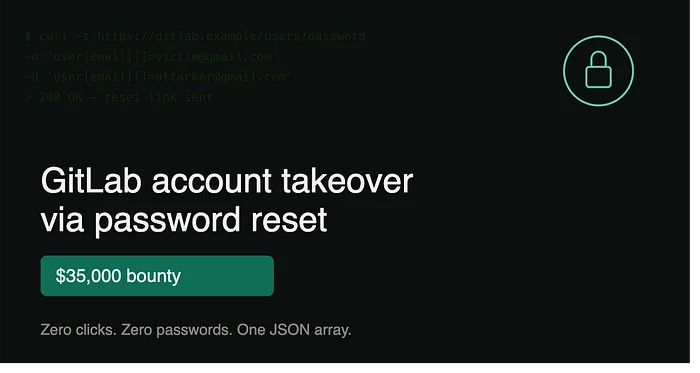
HackerOne report #2293343, GitLab account takeover, $35,000 bounty.
Setup
The request was intercepted in Burp Suite and converted to JSON with the Content-Type Converter extension. The starting point was the ordinary "Forgot your password?" form on GitLab, submitted with a single email address. No account on the target, no session and no prior access to the victim's account were needed. The only precondition was knowing the victim's email address.
Finding it
The observation came from staring at a normal reset request with one email address in it, then converting the request to JSON and swapping one string for an array. The backend accepted user[email] as an array instead of a single string, and did not push back when that array contained more than one address.
Exploitation
Step 1: reach the unauthenticated form
Go to the "Forgot your password?" link on GitLab. No login is needed, which is the whole point: there is no session context to authenticate against.
Step 2: intercept the submission
Enter the victim's email and intercept the submit request in Burp Suite. The normal reset form submission looked like this in the intercepted request:
"user[email]":"[redacted]"
This is the single string field the backend is supposed to treat as one recipient.
Step 3: convert the body to JSON
Use Burp's Content-Type Converter extension to convert the request body to JSON.
Step 4: turn the string into an array
Replace the single user[email] string with an array containing both the victim's email and the attacker's own email:
"user" { "email" [ "[redacted]", "[redacted]" ] },
This is the entire exploit. The backend does not reject the array or split it apart. It iterates over both entries and treats each one as a valid recipient for the same reset token.
Step 5: forward the request
Forward the modified request. No authentication check catches this, because there is nothing to authenticate.
Step 6: both inboxes receive the same link
Both addresses receive an email containing the exact same password reset link.
Step 7: reset and log in
Click the link, set a new password, and log in as the victim.
Each step proves something specific. Steps 1 and 2 prove the entry point needs zero authentication. Step 4 proves the input is not validated for type or cardinality. Steps 6 and 7 prove the token is not bound to a single verified recipient.
Root cause
The backend accepted user[email] as an array rather than a single string, and did not reject an array containing more than one address. Instead of validating the type and cardinality of the field, it iterated over the entries and mailed the same reset token to both addresses. The token was accepted by whichever recipient clicked the link, so a malformed request could fan it out to multiple addresses.
Existing defences did not stop it because the endpoint is public and unauthenticated: there is no session or authorisation check in the path to catch the malformed input. The report does not describe GitLab's server-side handling beyond this behaviour.
Impact
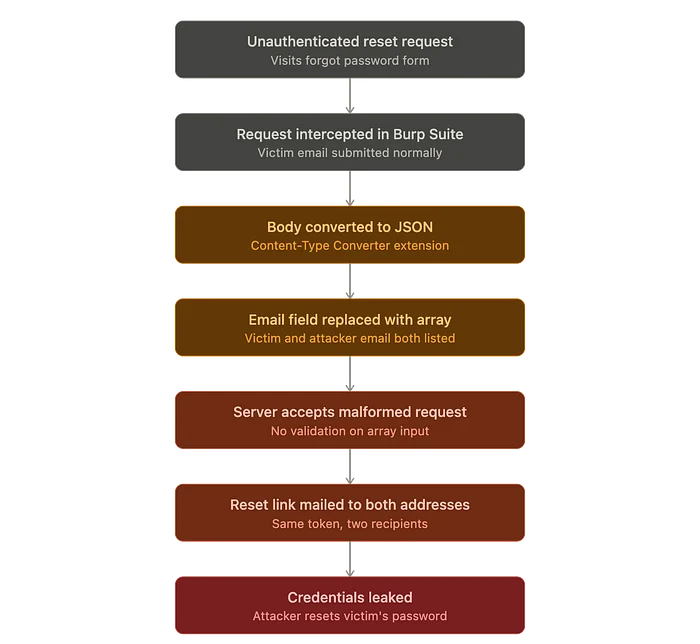
The full request chain from report #2293343: one array turns a password reset into a takeover.
The report frames the impact simply: knowing a victim's email address is enough to fully take over their account, with zero interaction from that victim. No phishing, no social engineering and no MFA bypass tricks, just a malformed request.
- The victim never sees anything unusual: the attacker's reset email carries a legitimate GitLab-issued token.
- The attacker needs no prior access to the account, only the email address, which for many organisations is a predictable format (
[redacted]). - Once the password is reset, the attacker inherits whatever that account can reach: private repositories, CI/CD variables, and any linked integrations.
- Because it is silent, there is no failed-login alert or suspicious-activity trigger for the victim to notice before it is too late.
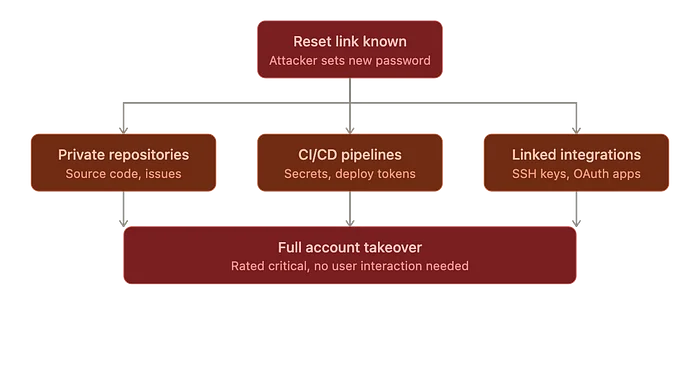
How one leaked reset link cascades, per report #2293343's stated impact.
Total bounty across both payouts: $35,000. No CVE was assigned.
Fix
The disclosed report does not include a remediation section or describe GitLab's actual code fix, so the specific patch is not part of this disclosure. The report itself only documents the vulnerability and the bounty. What the underlying flaw calls for, in general terms:
- Reject non-string types on the email parameter of the password reset endpoint outright, rather than iterating over whatever the client sends.
- Enforce strict schema validation on all password-reset-adjacent endpoints, not just type checking on the happy path.
- Bind the generated reset token to a single verified recipient at generation time, so even a malformed request cannot fan a token out to multiple addresses.
Variants to test
- Content-Type conversion on other forms. Take any form-encoded endpoint and convert the body to JSON with Burp's Content-Type Converter. A positive result is the backend accepting the JSON body and processing it as before, which shows it never validated types on the original path.
- Single-value fields that accept lists. Send an array where a string is expected, for example on email, username or identifier parameters. A positive result is the backend iterating over the entries or accepting the array without an error.
- Multi-recipient fan-out on token flows. On password reset, account recovery and email verification, submit two addresses in one field. A positive result is both inboxes receiving the same token or link.
- Auth-free endpoints generally. Password reset, account recovery and email verification deserve extra scrutiny because there is no session context to muddy the exploit. A positive result is any state change triggered without authentication.
- Severity reassessment.
What happened, in plain words
GitLab is a website where software teams keep their code, plan work and run automated build jobs. Like almost every website with user accounts, it has a "Forgot your password?" page. You type your email address, press submit, and GitLab emails you a link that lets you choose a new password.
A security researcher found that this page could be tricked into sending that same reset link to two email addresses at once: the victim's and the attacker's own. The attacker then opens the link, sets a new password, and is logged in as the victim. The victim does nothing at all. They do not click anything, they do not approve anything, and the email they receive looks completely ordinary.
The researcher reported it to GitLab through HackerOne, a platform where companies run bug bounty programmes: people who find security problems report them and can be paid a reward, called a bounty. The report is HackerOne #2293343, filed by asterion04. The bounty across both payouts totalled $35,000, and no CVE was assigned. A CVE is a public catalogue number given to a known security flaw so people can track it; this one never got a number.
HackerOne report #2293343, GitLab account takeover, $35,000 bounty.
The pieces you need to know first
Before the steps make sense, here are the few ideas the whole bug rests on.
A form and a request. When you fill in a box on a web page and press a button, your browser packages up what you typed and sends it to the website's computer, called a server. That package is called a request. The server reads it, does something, and sends back a response, usually a new page.
An endpoint. An endpoint is one specific address on the server that accepts one specific kind of request. Think of a large office building: the building is the website, and each counter inside is an endpoint. The "reset my password" counter only handles password resets.
An API. An API is the set of rules for how a program talks to another program. The password reset form is really a small program in your browser talking to the server through an API: it sends the email address in a fixed format and expects a fixed kind of answer.
Form-encoded versus JSON. When a browser submits a form, it usually sends the data in a simple format called form-encoded, which looks like name=value pairs joined together. JSON is another format for the same data, written with curly braces and square brackets, and it is the format most modern APIs prefer. The same information can be written in either format.
A string and an array. A string is a piece of text, such as one email address. An array is a list that can hold several items, such as two email addresses. To a human these look similar. To a program they are different types of thing, and a well-built server should check which type it received.
A token. A token is a long random string that acts like a temporary key. When you ask to reset your password, the server creates a token, stores it, and puts it in the link it emails you. When you open the link, the server checks the token and, if it matches, lets you set a new password. The token is what proves the person opening the link is the person who received the email.
Authentication and authorisation. Authentication means proving who you are, usually by logging in. Authorisation means deciding what a logged-in user is allowed to do. An unauthenticated endpoint is one that does not require you to be logged in at all, and the password reset page has to be one of those, because people who forgot their password cannot log in.
Account takeover. Account takeover means someone else gains control of your account. In this case the attacker ends up with a working password for the victim's account.
The vulnerability class. This bug is an input validation problem: the server accepted a kind of input it should have refused. More specifically it is a mass-assignment style flaw, where a field meant to hold one value quietly accepts a list of values. The everyday comparison: a hotel receptionist is told "one guest, room 12". If someone hands over a note saying "guests: Alice, Bob" and the receptionist gives both of them a key to room 12 without checking, that is the same mistake.
Setting up
The researcher worked in Burp Suite, a tool that sits between your browser and the website and lets you pause, read and edit requests before they reach the server. The request was converted to JSON with a Burp extension called Content-Type Converter, which rewrites a request from one data format to another.
The starting point was the ordinary "Forgot your password?" form on GitLab, submitted with a single email address. No account on the target, no session and no prior access to the victim's account were needed. The only precondition was knowing the victim's email address.
Finding it
The observation came from staring at a normal reset request with one email address in it, then converting the request to JSON and swapping one string for an array. The backend accepted user[email] as an array instead of a single string, and did not push back when that array contained more than one address.
That is worth pausing on, because it is the heart of the bug. The request carried two addresses in one field. The server should have rejected the array. Instead it sent the same reset link to both.
Exploitation, step by step
Step 1: reach the unauthenticated form
Go to the "Forgot your password?" link on GitLab. No login is needed, which is the whole point: there is no session context to authenticate against. A session is the server's memory of "this browser is logged in as this user", usually carried in a cookie, a small piece of data your browser stores and sends back with every request. Because there is no session here, there is no logged-in identity for the server to check the request against.
Step 2: intercept the submission
Enter the victim's email and intercept the submit request in Burp Suite. Intercepting means telling Burp to hold the request instead of letting it go straight to the server, so you can read and edit it first. The normal reset form submission looked like this in the intercepted request:
"user[email]":"[redacted]"
Line by line: user[email] is the name of the field. The square brackets are a naming convention that tells the server the value belongs to a user object, specifically its email property. [redacted] is the value, a single string, one address. The quotes around each part are how the data is delimited. This is the single string field the backend is supposed to treat as one recipient.
Step 3: convert the body to JSON
Use Burp's Content-Type Converter extension to convert the request body to JSON. The body is the part of the request that carries the data you typed. The Content-Type is a label on the request saying which format the body is in, and the extension rewrites both the label and the body so they agree. The reason to do this: JSON has a natural way to express a list, so once the request is JSON, you can try sending a list where a single value is expected and see whether the server notices.
Step 4: turn the string into an array
Replace the single user[email] string with an array containing both the victim's email and the attacker's own email:
"user" { "email" [ "[redacted]", "[redacted]" ] },
Line by line: "user" opens the object that holds the user's details. { begins that object. "email" names the field. [ begins a list, and the two quoted addresses inside it are the list's items, separated by a comma. ] closes the list, } closes the object, and the final comma separates this object from whatever follows in the request. Compared with step 2, the one meaningful change is that a single value has become a list of two.
This is the entire exploit. The backend does not reject the array or split it apart. It iterates over both entries, meaning it goes through the list one item at a time, and treats each one as a valid recipient for the same reset token.
Step 5: forward the request
Forward the modified request. In Burp, forwarding means releasing the held request so it continues to the server. No authentication check catches this, because there is nothing to authenticate: the endpoint is public by design.
Step 6: both inboxes receive the same link
Both addresses receive an email containing the exact same password reset link. This is the moment the bug becomes visible. The attacker's inbox gets an identical one, with the same token inside the link.
Step 7: reset and log in
Click the link, set a new password, and log in as the victim. The server sees a valid token and lets the password be changed.
Each step proves something specific. Steps 1 and 2 prove the entry point needs zero authentication. Step 4 proves the input is not validated for type or cardinality: type means whether the value is text or a list, and cardinality means how many items it contains. Steps 6 and 7 prove the token is not bound to a single verified recipient, meaning the server never tied the token to one specific address.
Root cause
The backend accepted user[email] as an array rather than a single string, and did not reject an array containing more than one address. Instead of validating the type and cardinality of the field, it iterated over the entries and mailed the same reset token to both addresses. The token was accepted by whichever recipient clicked the link, so a malformed request could fan it out to multiple addresses.
Existing defences did not stop it because the endpoint is public and unauthenticated: there is no session or authorisation check in the path to catch the malformed input. The report does not describe GitLab's server-side handling beyond this behaviour.
Impact
The full request chain from report #2293343: one array turns a password reset into a takeover.
The report frames the impact simply: knowing a victim's email address is enough to fully take over their account, with zero interaction from that victim. No phishing, no social engineering and no MFA bypass tricks, just a malformed request. Phishing means tricking someone into handing over credentials with a fake page; social engineering means manipulating a person into doing something; MFA means multi-factor authentication, a second proof of identity such as a code from a phone. None of that was needed.
- The victim never sees anything unusual: the attacker's reset email carries a legitimate GitLab-issued token.
- The attacker needs no prior access to the account, only the email address, which for many organisations is a predictable format (
[redacted]). - Once the password is reset, the attacker inherits whatever that account can reach: private repositories, CI/CD variables, and any linked integrations. Repositories are the code stores; CI/CD variables are the settings and secrets used by automated build jobs; integrations are the outside services connected to the account.
- Because it is silent, there is no failed-login alert or suspicious-activity trigger for the victim to notice before it is too late.
How one leaked reset link cascades, per report #2293343's stated impact.
Total bounty across both payouts: $35,000. No CVE was assigned.
Fix
The disclosed report does not include a remediation section or describe GitLab's actual code fix, so the specific patch is not part of this disclosure. The report itself only documents the vulnerability and the bounty. What the underlying flaw calls for, in general terms:
- Reject non-string types on the email parameter of the password reset endpoint outright, rather than iterating over whatever the client sends. In plain words: if the field should hold one piece of text, refuse anything that is not one piece of text.
- Enforce strict schema validation on all password-reset-adjacent endpoints, not just type checking on the happy path. A schema is a written description of exactly what a request may contain; validating against it means checking every field, not only the ones you expect people to use.
- Bind the generated reset token to a single verified recipient at generation time, so even a malformed request cannot fan a token out to multiple addresses. In plain words: decide who the token is for at the moment you create it, and never let it work for anyone else.
Variants to test
- Content-Type conversion on other forms. Take any form-encoded endpoint and convert the body to JSON with Burp's Content-Type Converter. A positive result is the backend accepting the JSON body and processing it as before, which shows it never validated types on the original path.
- Single-value fields that accept lists. Send an array where a string is expected, for example on email, username or identifier parameters. A positive result is the backend iterating over the entries or accepting the array without an error.
- Multi-recipient fan-out on token flows. On password reset, account recovery and email verification, submit two addresses in one field. A positive result is both inboxes receiving the same token or link.
- Auth-free endpoints generally. Password reset, account recovery and email verification deserve extra scrutiny because there is no session context to muddy the exploit. A positive result is any state change triggered without authentication.
- Severity reassessment. Triage is the first pass where the receiving team decides how serious a report is.
Glossary
- Account takeover: a situation where an attacker gains control of someone else's account, here by setting a new password.
- API: the agreed set of rules and formats that let one program talk to another.
- Array: a list of values held together in one field, as opposed to a single value.
- Authentication: proving who you are, usually by logging in.
- Authorisation: deciding what an identified user is allowed to do.
- Body: the part of a web request that carries the data being sent.
- Bounty: a reward paid by a company for a valid security report.
- Bug bounty programme: a scheme where a company invites outside researchers to report security flaws, usually for payment.
- Burp Suite: a tool that sits between browser and server so requests can be paused, inspected and edited.
- Cardinality: how many items a field contains, for example one address versus two.
- CI/CD variables: settings and secrets used by automated build and deployment jobs.
- Content-Type: a label on a request saying which format its body is in.
- Content-Type Converter: a Burp extension that rewrites a request body from one format to another, such as form-encoded to JSON.
- Cookie: a small piece of data a browser stores for a site and sends back with each request, often used to carry a session.
- CVE: a public catalogue number assigned to a known security flaw so it can be tracked.
- Endpoint: one specific address on a server that accepts one specific kind of request.
- Form-encoded: a simple request format of
name=valuepairs, the default for many web forms. - HackerOne: a platform where security researchers report vulnerabilities to companies and receive bounties.
- Input validation: checking that data arriving at a server is the right type, shape and size before using it.
- Integration: an outside service connected to an account, such as a chat tool or a code analysis service.
- Intercept: to hold a request in a tool before it reaches the server, so it can be read and changed.
- JSON: a text format for structured data, using curly braces for objects and square brackets for lists.
- Mass assignment: a flaw where a field meant to hold one value quietly accepts several, letting the sender set more than intended.
- MFA: multi-factor authentication, a second proof of identity such as a code from a phone.
- Phishing: tricking someone into handing over credentials or clicking a malicious link, usually with a fake page or message.
- Repository: a store of code and its history, often private to a team.
- Request: the package a browser sends to a server asking it to do something.
- Response: what the server sends back after handling a request.
- Schema: a written description of exactly what a request or data record may contain.
- Session: the server's memory that a particular browser is logged in as a particular user.
- Social engineering: manipulating a person into doing something that helps an attacker.
- String: a piece of text, such as a single email address.
- Token: a long random string that acts as a temporary key, here proving the holder is allowed to reset a password.
- Triage: the first review where a receiving team decides how serious a report is.
- Type: the kind of value a field holds, for example text versus a list.
- Unauthenticated endpoint: an endpoint that works without anyone being logged in.




