Hacking on a Private Program (Salseforce crm)
A file upload feature allowed uploading a CSV file containing a formula injection payload. When another user downloaded and opened the file, the payload could execute commands on their machine.
 Published on thinkermaruf.medium.com
I was hunting on a private program of HackerOne so lets call it developer.target.com i found a register option so i registered there after some recon i found that its a salseforce crm while logging i encountered that it was logging through okta.
The full write-up lives on its author's site
It belongs to its author, so we link to it rather than copy it. The other two tabs are our own rewrites, checked against it.
Context
The target was a private program on HackerOne. The researcher refers to it as developer.target.com, a placeholder for the real host. The application offered a register option, and after registering and doing some recon the researcher identified the backend as a Salesforce CRM. Login was delegated to Okta, so the account was created on Okta rather than on the application itself.
The feature that mattered later was a developer profile area. The researcher found a URL of the form https://developer.target.com/developer/s/profile/{profileID}, and by changing a directory name in the path reached a page with more options, including a file upload feature. That upload feature is what the report is about: it accepts files, shows previews only for image extensions, and stores uploaded files so they can be retrieved through a Salesforce servlet endpoint.
Setup
- A private HackerOne program, referred to throughout as
developer.target.com. - A self-registered account on the application, created through Okta at
target.okta.com. - The application backend is Salesforce CRM.
- The researcher opened the download link from another browser, then again while authenticated on
developer.target.com.
No tooling, versions or special configuration are described beyond that.
Finding it
While logging in, the researcher noticed that authentication went through Okta, and the account had been created on Okta. The first attempt was therefore aimed at Okta, at target.okta.com, to look for something useful there. Logging in produced an error:
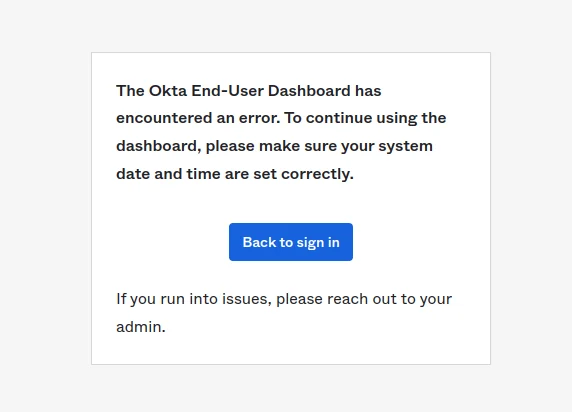
Changing the local date and time did not clear the error. After further research the researcher concluded that the problem could only be resolved from the Okta console, so that path was abandoned.
Returning to developer.target.com and logging in produced nothing interesting except this URL:
https://developer.target.com/developer/s/profile/{profileID}
After some time spent exploring, the researcher changed the settings directory in the path to profile, arriving at the same URL shape above, and found more options, including a file uploading feature.
Exploitation
Step 1: Probe the upload filter
The researcher tried uploading php, jsp and asp files. No preview was returned for those; only jpg, png and other image extensions produced a preview. No preview was returned for those files; only jpg, png and other image extensions produced a preview. The report does not say whether the non-image files were rejected or merely not previewed.
Step 2: Find the download endpoint
Further recon turned up this endpoint:
https://developer.target.com/developer/s/sfsites/c/sfc/servlet.shepherd/doucument/download/{fileID}
This is a Salesforce servlet path (servlet.shepherd) that serves a stored file by its ID. Seeing it told the researcher what to do next: get a file stored, then retrieve it through this endpoint.
Step 3: Upload a CSV with a formula payload
The researcher uploaded a CSV file containing a CSV injection payload, then copied the fileID of the uploaded file and placed it in the download URL:
https://developer.target.com/developer/s/sfsites/c/sfc/servlet.shepherd/document/download/001fdkd193
The payload placed in the CSV file was:
=10+20+cmd|' /C calc'!A0
The leading = makes spreadsheet software treat the cell as a formula. The cmd|' /C calc'!A0 portion is the DDE-style construct that, in a vulnerable spreadsheet client, causes the cmd program to run with /C calc, launching the calculator as a proof of concept.
Step 4: Test access to the download link
Opening the download link from another browser did not work. Opening the same link as an authenticated user, meaning an account on developer.target.com, did work and the file was downloaded. The report does not describe the exact response in the unauthenticated case beyond it not working.
Step 5: Result
Once other developers open the downloaded CSV file, the OS command executes on their machine. The researcher notes that the system should filter =, +, - and @ at the start of every cell. A bounty of $300 was awarded.
Root cause
The upload feature accepted a CSV file whose cell began with =, and the file could be downloaded through the Salesforce servlet.shepherd endpoint while authenticated. Because the content was delivered as a downloadable file rather than sanitised, a spreadsheet application that evaluates formulas and DDE can run the command on the machine of whoever opens it.
The only observed filtering was around previews: non-image extensions such as php, jsp and asp produced no preview, while image extensions did. The only observed behaviour was around previews: non-image extensions such as php, jsp and asp produced no preview, while image extensions did. A CSV with a formula prefix was accepted. Opening the download link from another browser did not work, while opening it as an authenticated user on developer.target.com downloaded the file.
Impact
An authenticated user who can upload a file can plant a CSV containing a formula payload. Any other developer who downloads that file through the servlet endpoint and opens it in a spreadsheet client that evaluates formulas and DDE can have an OS command executed on their machine. In the proof of concept the command was calc, but the same construct would run whatever command the payload specifies, subject to the client's protections.
The victim must open the file in a spreadsheet application that evaluates formulas and DDE. The report does not establish which client versions are affected.
Fix
The researcher's recommendation is that the system should filter =, +, - and @ at the start of every cell, which prevents spreadsheet software from interpreting the cell as a formula.
Variants to test
- Upload CSV, TSV and XLSX files with cells beginning with
=,+,-and@, and check whether the stored file is served back unchanged. A positive result is a downloaded file whose first cell still begins with the formula character. - Try the same payload through other file-accepting features on the same Salesforce-backed site, such as export or report download paths. A positive result is a generated file containing an unsanitised formula.
- Test the
servlet.shepherddownload endpoint with afileIDbelonging to another user's upload while authenticated as a low-privileged account. A positive result is a file you should not be able to read. - Test the same download endpoint without a session and with an expired session. A positive result is a file returned without authentication.
- Try uploads with double extensions and mixed case, such as
.csv,.CSVand.csv.jpg, to see whether the preview filter and any content filter disagree. A positive result is a file accepted and served with the formula intact. - On other targets, look for any user-supplied file that is later opened by staff or other users, such as support attachments or import templates. A positive result is a stored file that reaches a spreadsheet client with a leading formula character.
What happened, in plain words
A security researcher was testing a website that a company had invited people to test privately. He signed up for an account, poked around, and found a place where users could upload files. He uploaded a spreadsheet file (a CSV) that contained a special formula. When another developer downloaded that file and opened it in a spreadsheet program, the formula could make the developer's computer run a command. The company paid him $300 for finding it.
This article walks through the same steps for someone who has never done security testing before. Every technical word is explained the first time it appears, and there is a glossary at the end.
The setting: a private program and a Salesforce site
The researcher was working on a private program on HackerOne. HackerOne is a platform where companies publish rules for people who want to test their systems. A private program is one whose details are not public. In the write-up the site is referred to as developer.target.com, a stand-in name. Think of it like a nickname used in a story instead of a real name.
The site had a register option, so the researcher created his own account. After signing up he did some recon, short for reconnaissance: looking around a system to understand how it is built before trying anything clever. During that look-around he worked out that the site was built on Salesforce CRM. Salesforce is a large cloud service that companies use to manage customers, contacts and internal tools; CRM stands for customer relationship management. Many companies build their own small applications on top of Salesforce instead of writing everything from scratch, a bit like renting a furnished flat rather than building a house.
One more important detail: when the researcher logged in, the login was handled by Okta, a separate company that provides sign-in services. This pattern is called single sign-on (SSO): instead of the application checking your password itself, it sends you to a trusted login provider, and that provider tells the application who you are. It is like a building where the reception desk checks your ID and then gives you a visitor badge for the offices inside. Because of this, the researcher's account was actually created on Okta, not on the application.
The feature that mattered later was a developer profile area. The researcher found a web address (a URL, the text you type in the browser's address bar) shaped like this:
https://developer.target.com/developer/s/profile/{profileID}
{profileID} is a placeholder for a number or code that identifies one particular profile, the same way a house number identifies one house on a street. By changing one folder name in the path (the part of the URL after the domain, separated by slashes) from settings to profile, he reached a page with more options, including a file upload feature. A file upload feature is any button on a website that lets you send a file from your computer to the server, for example to attach a photo to a profile.
That upload feature is what the whole report is about. It accepted files, showed a preview (a small on-screen view of the file) for jpg, png and other image extensions, and stored the uploaded files so they could be fetched again later through a Salesforce endpoint. An endpoint is a specific address on a server that does one job, like a particular counter in a large office: you go to that counter to hand something in or ask for something.
Step 1: Trying Okta first
While logging in, the researcher noticed the login went through Okta, and that his account had been created on Okta. His first idea was therefore to look at Okta itself, at target.okta.com, to see whether there was anything useful to find there. This is a normal instinct in security testing: if a system depends on another service, that other service is part of the attack surface too. Attack surface means all the places where someone could try to interact with a system.
When he logged in, he got an error:
The screenshot shows the error he encountered after logging in through Okta. He then changed the date and time on his own computer, thinking the error might be caused by a clock mismatch. He then changed the date and time on his own computer. It did not help: the same error appeared. It did not help: the same error appeared.
After a lot of research he concluded that the problem could only be resolved from the Okta console, the administrative control panel. Since he had no access to that console, he gave up on the Okta path. This is worth noting for beginners: not every lead pays off, and part of the skill is deciding when to stop and go back to the main application.
Step 2: Back to the application, and a lucky path change
He returned to developer.target.com, logged in, and found nothing interesting except the profile URL shown earlier:
https://developer.target.com/developer/s/profile/{profileID}
After spending some time exploring, he changed the settings directory in the path to profile, arriving at that same URL shape, and found more options, including a file uploading feature. In plain terms: the site had one page at .../settings/... and another at .../profile/..., and the second one exposed more functionality. Changing part of a URL by hand to see what else exists is a simple but effective technique, a bit like trying different door numbers in the same corridor to see which ones open.
Step 3: Probing the upload filter
He tried uploading php, jsp and asp files. These are file extensions for code that a web server can run: PHP is a common web programming language, JSP is used in Java web applications, and ASP is used in Microsoft web applications. If a site lets you upload such a file and then runs it, that is a serious problem, because the uploaded code executes on the server. That is why he tried them first.
No preview was returned for those files; only jpg, png and other image extensions produced a preview. So no preview appeared for those files, while image extensions produced one. The report does not say whether the non-image files were rejected outright or merely not previewed. That distinction matters, because a filter that only controls what is displayed is not the same as a filter that controls what is stored.
Step 4: Finding the download endpoint
Further recon turned up this endpoint:
https://developer.target.com/developer/s/sfsites/c/sfc/servlet.shepherd/doucument/download/{fileID}
Line by line, in plain words:
https://developer.target.comis the site./developer/s/sfsites/c/sfc/is a path used by Salesforce's site-building features. You do not need to memorise it; what matters is that it is a fixed route inside the platform.servlet.shepherdis the name of a Salesforce component that handles stored files. A servlet is a small program on a server that answers a particular kind of request.doucument/download/{fileID}is the action: download the document whose ID is{fileID}. The worddoucumentis spelled that way in the report, and it is reproduced here exactly as written.
A file ID is a unique code the system gives to each stored file, like a ticket number at a cloakroom. If you know the ticket number, you can ask for the item back. Seeing this endpoint told the researcher what to do next: get a file stored, then retrieve it through this endpoint.
Step 5: Uploading a CSV with a formula payload
He uploaded a CSV file containing a CSV injection payload. A CSV (comma-separated values) file is a very simple spreadsheet format: plain text where each line is a row and commas separate the cells. It opens in Excel, LibreOffice Calc, Google Sheets and similar programs. CSV injection, also called formula injection, is a class of vulnerability where a cell begins with a character that spreadsheet software treats as the start of a formula. The dangerous characters are =, +, - and @. When the file is opened, the spreadsheet evaluates the cell as a formula instead of showing it as text.
He then copied the fileID of the uploaded file and placed it in the download URL:
Here 001fdkd193 is the file ID he copied. The URL is the same endpoint as before, with the placeholder replaced by a real value.
The payload placed in the CSV file was:
=10+20+cmd|' /C calc'!A0
What each part does:
- The leading
=tells the spreadsheet that this cell is a formula, not text. This is the same character you type in Excel beforeSUM(...). 10+20is ordinary arithmetic. It is there so the formula looks harmless and evaluates to something.cmd|' /C calc'!A0is a DDE construct. DDE stands for Dynamic Data Exchange, an old Windows feature that lets one program ask another program to do something. In a vulnerable spreadsheet client, this part makes Windows run thecmdprogram (the Windows command prompt) with the switch/C calc, which means run thecalcprogram and then close.calcis the Windows calculator. Launching the calculator is a classic proof of concept: it is harmless and obvious, so it proves code ran without damaging anything.!A0is part of the DDE syntax that points at a cell reference; it is included exactly as in the report.
A proof of concept (PoC) is a minimal demonstration that a vulnerability is real, usually doing the least harmful thing that still proves the point. Opening the calculator is the standard example.
Step 6: Testing who can download the file
He opened the download link from another browser and it did not work. He then opened the same link as an authenticated user, meaning while logged in to an account on developer.target.com, and the file was downloaded. The report does not describe the exact response in the unauthenticated case beyond it not working.
This step is about access control: who is allowed to fetch a stored file. Being logged in is proven by a session, a short-lived proof that you signed in. When you log in, the server gives your browser a cookie (a small piece of data stored by the browser) or a token, and the browser sends it back with every request so the server recognises you. Think of it as a wristband you get at an event: without it, the staff at the door turn you away. The test showed the link did not work without a logged-in session, and did work with one.
Step 7: The result
Once other developers open the downloaded CSV file, the OS command executes on their machine. OS means operating system, the core software of the computer (Windows, macOS, Linux). So the chain is: the researcher uploads a file, the site stores it, another logged-in developer downloads it, opens it in a spreadsheet, and the spreadsheet runs a command on that developer's computer.
The researcher notes that the system should filter =, +, - and @ at the start of every cell. A bounty of $300 was awarded. A bounty is a payment a company makes to someone who reports a valid security problem, as an incentive to report it privately instead of misusing it.
Why it worked
The upload feature accepted a CSV file whose cell began with =, and the file could be downloaded through the Salesforce servlet.shepherd endpoint while authenticated. Because the content was delivered as a downloadable file rather than sanitised, a spreadsheet application that evaluates formulas and DDE can run the command on the machine of whoever opens it. Sanitising means cleaning input so that dangerous characters cannot do anything harmful, for example by adding a harmless prefix so a cell is treated as text.
The only observed filtering was around previews: non-image extensions such as php, jsp and asp produced no preview, while image extensions did. The only observed behaviour was around previews: non-image extensions such as php, jsp and asp produced no preview, while image extensions did. A CSV with a formula prefix was accepted. Opening the download link from another browser did not work, while opening it as an authenticated user on developer.target.com downloaded the file.
What the impact is
An authenticated user who can upload a file can plant a CSV containing a formula payload. Any other developer who downloads that file through the servlet endpoint and opens it in a spreadsheet client that evaluates formulas and DDE can have an OS command executed on their machine. In the proof of concept the command was calc, but the same construct would run whatever command the payload specifies, subject to the client's protections.
The victim must open the file in a spreadsheet application that evaluates formulas and DDE. The report does not establish which client versions are affected.
How to fix it
The researcher's recommendation is that the system should filter =, +, - and @ at the start of every cell, which prevents spreadsheet software from interpreting the cell as a formula.
Variants to test
Each one describes what to try and what a positive result looks like.
- Upload CSV, TSV and XLSX files with cells beginning with
=,+,-and@, and check whether the stored file is served back unchanged. A positive result is a downloaded file whose first cell still begins with the formula character. TSV is the same idea as CSV but with tabs between cells; XLSX is the modern Excel file format. - Try the same payload through other file-accepting features on the same Salesforce-backed site, such as export or report download paths. A positive result is a generated file containing an unsanitised formula.
- Test the
servlet.shepherddownload endpoint with afileIDbelonging to another user's upload while authenticated as a low-privileged account. A positive result is a file you should not be able to read. This is called an IDOR (insecure direct object reference): the system uses an identifier in the URL without checking that you are allowed to see that particular object. - Test the same download endpoint without a session and with an expired session. A positive result is a file returned without authentication.
- Try uploads with double extensions and mixed case, such as
.csv,.CSVand.csv.jpg, to see whether the preview filter and any content filter disagree. A positive result is a file accepted and served with the formula intact. Filters that check only the last part of a filename are easy to confuse this way. - On other targets, look for any user-supplied file that is later opened by staff or other users, such as support attachments or import templates. A positive result is a stored file that reaches a spreadsheet client with a leading formula character.
Glossary
- Attack surface: all the places where someone could try to interact with a system, including the services it depends on.
- Authenticated: acting while logged in, with the server able to tell who you are.
- Bounty: a payment a company makes for a valid security report.
- Cookie: a small piece of data a website stores in your browser, often used to remember that you are logged in.
- CRM: customer relationship management, software for managing customers and contacts.
- CSV: comma-separated values, a plain-text spreadsheet format where commas separate cells.
- CSV injection: a vulnerability where a spreadsheet cell begins with a formula character, so spreadsheet software evaluates it as a formula when the file is opened.
- DDE: Dynamic Data Exchange, an old Windows feature that lets one program ask another to act; it can be abused through spreadsheet formulas.
- Endpoint: a specific address on a server that performs one job.
- File ID: a unique code the system assigns to a stored file.
- HackerOne: a platform where companies publish rules for security testing and receive reports.
- IDOR: insecure direct object reference, where an identifier in a request lets you reach data you should not access.
- Okta: a company that provides sign-in services for other applications.
- OS: operating system, the core software of a computer, such as Windows, macOS or Linux.
- Payload: the piece of input crafted to trigger a vulnerability.
- Preview: a small on-screen view of a file, such as a thumbnail of an image.
- Private program: a testing programme you can only join by invitation, with details not public.
- Proof of concept (PoC): a minimal demonstration that a vulnerability is real.
- Recon: reconnaissance, looking around a system to understand how it is built.
- Sanitise: clean input so dangerous characters cannot cause harm.
- Servlet: a small server-side program that answers a particular kind of request.
- Session: a short-lived proof that you signed in, usually carried by a cookie or token.
- Single sign-on (SSO): a login pattern where a trusted provider checks your identity for the application.
- Token: a piece of data, similar to a cookie, that proves your identity or permission to a server.
- URL: the address of a page or resource on the web.
- XLSX: the modern Excel spreadsheet file format.



