How a Random Password-less “SSO Token” Let a Full Account Takeover
An unauthenticated endpoint issued a request token that could be used to obtain a signed SSO token for any email address without verification. An attacker could then use that token to access another user's account details.

osintteam.blog
Published on osintteam.blog
Hacker
The full write-up lives on its author's site
It belongs to its author, so we link to it rather than copy it. The other two tabs are our own rewrites, checked against it.
Context
The target was a platform in a HackerOne private program that offers a "social auth" style login option. On the surface the flow is ordinary: you click login, the application performs an OAuth-like handshake in the background, and you land in your account. The researcher was watching that login flow through Burp rather than hunting for anything exotic, and the bug turned up in the plumbing behind the feature rather than in the feature itself.
The whole chain rests on two server-side endpoints under a /seco/<REDACTED>/ path plus a pre-authentication endpoint at /social-auth/request-token. The host is given only in redacted form, REDACTED.id.REDACTED.com, and the API key used in the requests is redacted as well.
Setup
The only tool described is Burp, kept running in the background throughout the flow so that the requests behind the "boring" parts of the login were captured. No accounts, roles, versions or other preconditions are stated in the report. The researcher needed nothing beyond the ability to reach the login page and to send requests to the endpoints observed in the proxy.
Finding it
While stepping through the social login, the researcher noticed a request that issues a token before any authentication has happened:
POST /social-auth/request-token HTTP/2Host: REDACTED.id.REDACTED.com
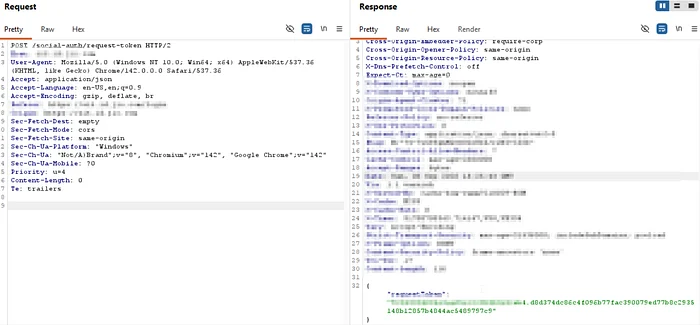
This endpoint returns a Request-Token and does so with zero authentication: no login, no session, nothing. You ask and it gives you a token. On its own that is unremarkable, since many applications use some kind of pre-auth token to start a login handshake. The question the researcher pursued was what that token can do downstream.
Exploitation
Step 1: obtain a request token without authenticating
The unauthenticated call above yields a Request-Token. Nothing else is required at this stage.
Step 2: exchange the token and an arbitrary email for a signed SSO token
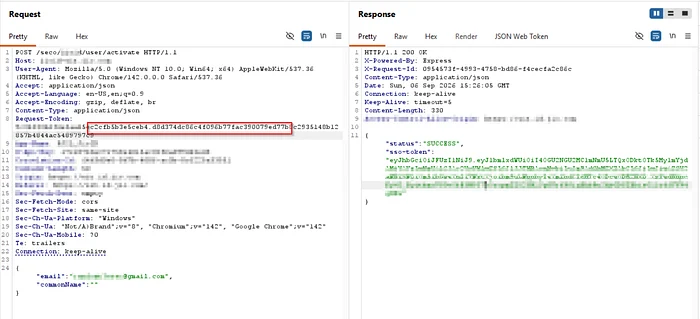
The request token is then used against the activation endpoint:
POST /seco/<REDACTED>/user/activateRequest-Token: <token from step 1>X-Api-Key: <REDACTED>{"email":"[redacted]","commonName":""}
The important part is the email field, which is taken straight from the client with no verification that the caller owns that address. No OTP is sent, no magic link, no password: the client simply asserts an email address and the server accepts it. The response is not a throwaway value but a fully signed Sso-Token, a JWT scoped to that exact email and account:
[redacted]...
The decoded payload carries a unique user ID, userType, authLevel, realm and the issued-at time, which is essentially everything downstream services need in order to trust that a request comes from that user. The chain at this point is:
No login required ↓Get a "request token" for free ↓Hand it any email address you want ↓Server hands back a signed session token for THAT account
The broken part in one sentence: the server treats "you typed an email" as proof that you are that email.
Step 3: use the forged token against another endpoint
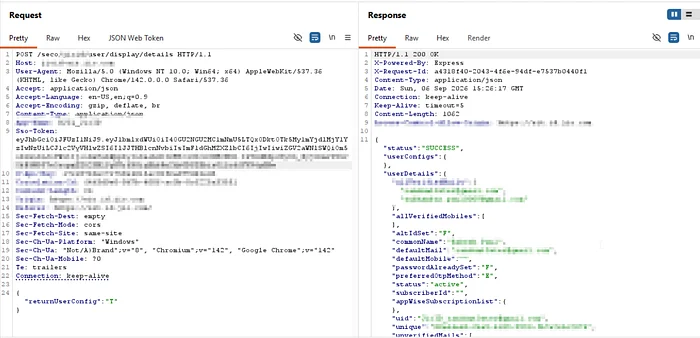
With a valid Sso-Token for an arbitrary account in hand, the researcher sent it to a profile endpoint to see whether it was trusted:
The endpoint returned that user's full account and profile details. No password was supplied, and no session cookie from a real login was involved: only a token minted moments earlier from an email address the researcher knew or guessed.
Root cause
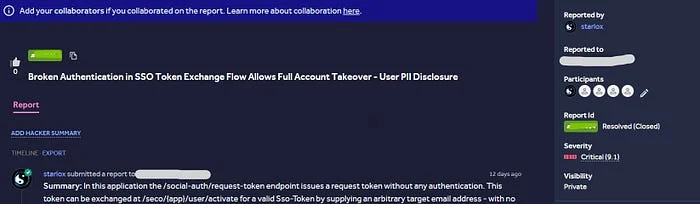
The login flow never checked the one thing login flows exist to check: whether the caller is actually who they claim to be. The activation endpoint accepts an email value from the client and issues a signed Sso-Token for that account without any proof of ownership, such as an OTP, a magic link or a password. Because the resulting JWT is properly signed and carries the claims downstream services rely on, those services accept it as genuine. The unauthenticated Request-Token endpoint is the entry point that makes the exchange possible. The activation endpoint issues a signed token for any email supplied, with no ownership check.
Impact
An unauthenticated attacker who knows or guesses a victim's email address can obtain a signed Sso-Token for that account and use it to retrieve the victim's full account and profile details, as demonstrated against the display/details endpoint. The report shows only retrieval of the victim's account and profile details; it does not demonstrate further actions with the token. The report does not enumerate further actions available with the token, nor does it state how many accounts or users were affected.
Fix
The report does not say what was changed. What the flow needs is an ownership check before an Sso-Token is issued for an email address: the activation step should require proof that the caller controls the address, for example an OTP or a magic link sent to it, rather than trusting the email field in the request body.
Variants to test
- Look for any endpoint that issues a token before authentication, such as a
request-tokenor handshake call, and follow that token into every endpoint that consumes it. A positive result is a downstream endpoint that returns another user's data when given a token obtained without logging in. - On activation or registration endpoints, replace the
emailfield with an address you do not control and observe whether a token or session is returned without an OTP or magic link. A positive result is a signed token scoped to the address you supplied. - Decode any JWT returned in these flows and check whether its claims, such as a unique user ID,
userType,authLevelandrealm, are accepted by other services. A positive result is a service that returns data for the account named in the claims. - Replay the same
Request-Tokenagainst the activation endpoint with several different email addresses. A positive result is a fresh signed token for each address from a single unauthenticated request token.
What happened, in plain words
A security researcher was testing a website that belongs to a private bug bounty programme on HackerOne. A bug bounty programme is a scheme where a company invites independent testers to look for security problems in its systems and report them, usually for a reward. "Private" means only invited testers can take part.
The website had a "social auth" login option. Social auth means you log in by proving you already control an account somewhere else, for example a Google or Facebook account, instead of typing a password on this site. On the surface everything looked normal: you click login, the site does a little back-and-forth with another service in the background, and you end up inside your account.
The researcher was not hunting for anything exotic. They simply had a tool called Burp running while they walked through that ordinary login. Burp is a proxy: it sits between your browser and the website and records every request and response that passes through, so you can read them afterwards. Think of it as a security camera pointed at the conversation between your browser and the server.
The bug was not in the login feature itself. It was in the plumbing behind it: a couple of server endpoints that the login flow calls, which trusted whatever the browser told them. By the end, the researcher could ask the server for a signed token for any email address they liked, without knowing that person's password, and use it to read that person's account and profile details.
Before going further, two words that come up constantly:
- An endpoint is one specific address on a server that does one specific job, like a counter in a large building. You send a request to that address, and it sends back an answer.
- An API is the collection of those endpoints, plus the rules for talking to them. It is how one piece of software asks another piece of software to do something, without a human clicking buttons.
The setup
The only tool the report describes is Burp, kept running in the background for the whole flow. The point of leaving it on during the "boring" parts is that the interesting request is often not the one the page is visibly doing, but one of the supporting calls behind it. The researcher needed nothing more than the ability to reach the login page and to send requests to the endpoints they saw in the proxy.
Finding it
While stepping through the social login, the researcher noticed a request that hands out a token before any authentication has happened:
POST /social-auth/request-token HTTP/2Host: REDACTED.id.REDACTED.com
Line by line:
POST /social-auth/request-token HTTP/2is the first line of an HTTP request.POSTis the method, meaning "I am sending some data and asking you to do something with it"./social-auth/request-tokenis the path, the specific endpoint being called.HTTP/2is the version of the language the browser and server use to talk.Host: REDACTED.id.REDACTED.comnames the server the request is addressed to. The real hostname has been blanked out in the report, so we cannot see it.
This endpoint returns something called a Request-Token, and it does so with zero authentication: no login, no session, nothing. You ask, and it gives you a token.
A token here is a short string of characters that a server hands out and later accepts back as proof of something. A useful comparison is a cloakroom ticket: you hand in your coat, you get a numbered ticket, and later the ticket gets your coat back. The ticket itself is not your coat and does not prove who you are; it only proves you were at the cloakroom. A session is similar: after you log in, the server gives your browser a cookie (a small piece of data stored by the browser) that identifies your logged-in visit, so you do not have to type your password on every page.
On its own, a token handed out before login is not remarkable. Many applications use some kind of pre-authentication token to start a login handshake, the same way a shop might give you a queue number before you have bought anything. The real question the researcher pursued was: what can this token do further down the line?
Turning "email" into "anyone's session"
The request token is then used against a second endpoint, the activation endpoint:
POST /seco/<REDACTED>/user/activateRequest-Token: <token from step 1>X-Api-Key: <REDACTED>{"email":"[redacted]","commonName":""}
Line by line:
POST /seco/<REDACTED>/user/activateis the endpoint being called. The middle part of the path is blanked out in the report. The wordactivatesuggests this step is meant to activate or set up a user.Request-Token: <token from step 1>is a header. Headers are extra labelled lines attached to a request, like the fields on an envelope. This one carries the token obtained in the previous step, so the server can see which handshake this request belongs to.X-Api-Key: <REDACTED>is another header, carrying an API key. An API key is a long secret string that identifies the calling application to the server, a bit like a membership card for software. Its value is blanked out in the report.{"email":"[redacted]","commonName":""}is the body: the actual data being sent. It is written in JSON, a common text format for structured data, where names and values sit in curly brackets. It contains anemailfield set to an address and acommonNamefield left empty.
The important part is that email field. It is taken straight from the client, meaning from whoever is sending the request, with no check that the sender owns that address. No OTP is sent, no magic link, no password. An OTP (one-time password) is a short code sent to your email or phone that you must type back to prove you control it. A magic link is a special link emailed to you that logs you in when clicked, again proving you can read that inbox. Here neither happens: the client simply states an email address and the server accepts it.
Why did the researcher try this? Because the activation step is exactly where a login flow is supposed to establish who you are. If it accepts an email address without any proof, then the identity it produces is only as trustworthy as the typist.
The response is not a throwaway value. It is a fully signed Sso-Token, a JWT scoped to that exact email and account:
[redacted]...
What is a JWT? The name stands for JSON Web Token. It is a token made of three parts separated by dots: a header, a payload and a signature. The header and payload are JSON, encoded so they can travel safely as text. The signature is produced with a secret key held by the server, and it lets other services check that the token really came from that server and was not altered on the way. "Signed" is the key word: a signed token is one that other parts of the system will believe.
In the token above, the first part (eyJhbGciOiJFUzI1NiJ9) is the header, the long middle part is the payload, and the last part (cwpZC7...) is the start of the signature, cut short in the report. The decoded payload carries a unique user ID, userType, authLevel, realm and the issued-at time. In plain terms, that is essentially everything downstream services need in order to trust that a request comes from that user. "Downstream" simply means the other services that receive the token later and act on it.
The chain at this point looks like this:
No login required ↓Get a "request token" for free ↓Hand it any email address you want ↓Server hands back a signed session token for THAT account
The broken part in one sentence: the server treats "you typed an email" as proof that you are that email. The everyday comparison is a club that lets you in if you say a name at the door, without checking any ID, and then writes that name on a wristband that the bar staff trust for everything else.
Cashing in the forged token
With a valid Sso-Token for an arbitrary account in hand, the researcher sent it to a profile endpoint to see whether it was trusted:
Line by line:
POST /seco/<REDACTED>/user/display/detailsis a different endpoint, one that sounds like it returns a user's details.Sso-Token: <forged token from step 2>is the header carrying the token obtained in the previous step. The researcher calls it "forged" because it was issued for an account they do not own.X-Api-Key: <REDACTED>is the same kind of API key header as before, value blanked out.{"returnUserConfig":"T"}is the JSON body, asking for the user configuration to be returned.
Why send it here? Because a token is only dangerous if something accepts it. The point of this step is to check whether a service that holds real user data will treat the token as proof of identity.
The endpoint returned that user's full account and profile details. No password was supplied, and no session cookie from a real login was involved: only a token minted moments earlier from an email address the researcher knew or guessed.
Why it worked
The login flow never checked the one thing login flows exist to check: whether the caller is actually who they claim to be. The activation endpoint accepts an email value from the client and issues a signed Sso-Token for that account without any proof of ownership, such as an OTP, a magic link or a password. Because the resulting JWT is properly signed and carries the claims downstream services rely on, those services accept it as genuine. "Claims" are simply the named facts inside a token, such as the user ID or the authentication level.
The unauthenticated Request-Token endpoint is the entry point that makes the exchange possible. The activation endpoint issues a signed token for any email supplied, with no ownership check.
In security terms, this is a broken authentication problem: the system confuses "a value was supplied" with "the value was proven".
What it means in practice
An unauthenticated attacker who knows or guesses a victim's email address can obtain a signed Sso-Token for that account and use it to retrieve the victim's full account and profile details, as demonstrated against the display/details endpoint. The report shows only retrieval of the victim's account and profile details; it does not demonstrate further actions with the token. The report does not enumerate further actions available with the token, nor does it state how many accounts or users were affected.
How it should be fixed
The report does not say what was changed. What the flow needs is an ownership check before an Sso-Token is issued for an email address: the activation step should require proof that the caller controls the address, for example an OTP or a magic link sent to it, rather than trusting the email field in the request body.
Variants to test
- Look for any endpoint that issues a token before authentication, such as a
request-tokenor handshake call, and follow that token into every endpoint that consumes it. A positive result is a downstream endpoint that returns another user's data when given a token obtained without logging in. - On activation or registration endpoints, replace the
emailfield with an address you do not control and observe whether a token or session is returned without an OTP or magic link. A positive result is a signed token scoped to the address you supplied. - Decode any JWT returned in these flows and check whether its claims, such as a unique user ID,
userType,authLevelandrealm, are accepted by other services. A positive result is a service that returns data for the account named in the claims. - Replay the same
Request-Tokenagainst the activation endpoint with several different email addresses. A positive result is a fresh signed token for each address from a single unauthenticated request token.
Glossary
- API: the set of endpoints and rules that let one piece of software ask another to do something.
- API key: a secret string that identifies a calling application to a server.
- Authentication: the process of proving who you are, for example with a password or a code.
- Body: the part of a request that carries the actual data, here written in JSON.
- Broken authentication: a flaw where a system fails to properly check identity, for example by trusting a value the client supplied.
- Burp: a proxy tool that sits between browser and server and records the requests and responses.
- Claim: a named fact inside a token, such as a user ID or an authentication level.
- Cookie: a small piece of data a browser stores for a site, often used to keep you logged in.
- Downstream: the later services that receive and act on a token.
- Endpoint: one specific address on a server that performs one specific job.
- Header: an extra labelled line attached to a request or response, carrying metadata such as a token or an API key.
- HTTP: the language browsers and servers use to exchange requests and responses.
- JSON: a text format for structured data, using names and values in curly brackets.
- JWT (JSON Web Token): a token made of a header, a payload and a signature, used to carry trusted facts between services.
- Magic link: a special link emailed to a user that logs them in when clicked, proving they can read that inbox.
- OTP (one-time password): a short code sent to your email or phone that you must type back to prove you control it.
- OAuth: a standard way for one site to let you log in using an account you already have elsewhere, without sharing your password with it.
- Payload: the middle part of a JWT, holding the claims.
- Pre-authentication: happening before the user has logged in.
- Proxy: an intermediary that sits between two parties and passes messages between them, often recording them.
- Request: a message a browser or tool sends to a server asking it to do something.
- Request-Token: the token handed out by the pre-authentication endpoint in this report, used to start the login handshake.
- Response: the message a server sends back after a request.
- Session: a logged-in visit to a site, usually identified by a cookie so you do not retype your password on every page.
- Signature: a value produced with a secret key that lets others check a token is genuine and unaltered.
- Social auth: logging in to a site by proving you already control an account on another service.
- Sso-Token: the signed JWT issued by the activation endpoint in this report, scoped to one email address and account.
- Token: a string a server hands out and later accepts back as proof of something, like a cloakroom ticket.



