How a Simple SVG XSS Test Led Me to Arbitrary HTML Upload
The file upload endpoint did not enforce the frontend's image-only restriction, allowing an attacker to upload an SVG with an XSS payload, a PHP file, and an HTML page. The SVG's JavaScript did not execute and the PHP source was returned rather than executed, but the uploaded HTML was served and rendered as a webpage, enabling phishing or content spoofing.

medium.com
Published on medium.com
Bug Hunting
The full write-up lives on its author's site
It belongs to its author, so we link to it rather than copy it. The other two tabs are our own rewrites, checked against it.
Context
The target was an application with a media upload feature. The frontend of that feature only allowed specific image formats, so the visible behaviour was that a user could pick an image and upload it, and the application would store it and hand back a URL for it. The report does not name the application, the endpoint path, the server software or any version numbers. What it does describe in detail is how the upload endpoint behaved when the request was sent directly rather than through the browser form.
The whole write-up is a chain of small tests, each one chosen because of the result of the previous one. The path was: JPG upload, then an SVG with an XSS payload, then a PHP file, then plain HTML.
Setup
The only tool mentioned is Burp Suite, used to capture the upload request and to resend modified versions of it through Repeater. The upload was sent to the media upload endpoint as multipart/form-data. No account details, roles or privilege levels are described, and the report does not say whether authentication was required for the endpoint.
The precondition for the whole exercise was simply that the researcher could reach the upload functionality and observe the request it generated.
Finding it
While testing the file upload functionality, the researcher noticed that the frontend only allowed specific image formats.

That restriction is a client-side control: it lives in the page the user interacts with. The question the researcher asked was whether the backend enforced the same restriction, or whether it trusted whatever the client sent. That question is what the rest of the testing answers.
Exploitation
Step 1: capture a legitimate upload
A normal JPG image was uploaded and the request was captured with Burp Suite. The upload went to the media upload endpoint using multipart/form-data. The report does not reproduce the raw request, so the field names, the endpoint path and the headers are not shown here.
Capturing a valid request first matters because it gives a baseline: the structure of a request the server is known to accept. Everything after this point changes only the file part of that request.
Step 2: swap the JPG for an SVG with an XSS payload
Instead of changing the request structure, the researcher replaced the JPG file with an SVG file containing an XSS payload and changed the filename to .svg. The modified request was sent through Burp Repeater.
The server accepted the file and returned a successful upload response. That was the first sign that the frontend restriction was not mirrored on the backend: the browser form would not normally let an SVG through, but a request edited by hand was accepted.
Step 3: check whether the XSS executed
The uploaded SVG was opened and checked for JavaScript execution. It did not execute. There was no JavaScript execution and no alert.
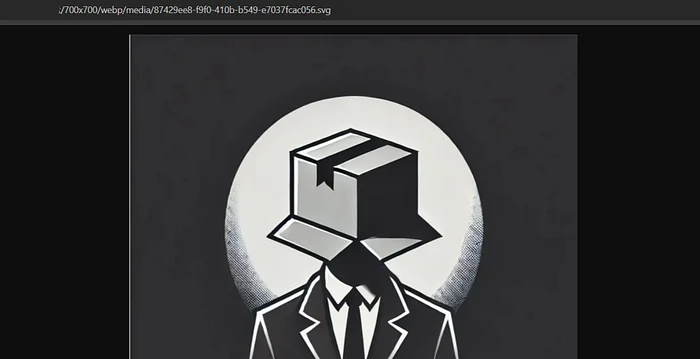
So at this point two separate facts were established: the upload validation could be bypassed, and the XSS impact could not be confirmed. The file was stored, but serving it back did not run the script inside it.
Step 4: try a server-side file
Since the backend accepted a file type that was not supposed to be uploaded, the next question was what happens with a server-side file. A simple PHP file was created and uploaded through the same endpoint.
The server accepted the upload and returned a URL for the file. The uploaded PHP file was then opened, expecting the PHP code to execute. It did not. Instead, the browser returned the PHP source code itself.
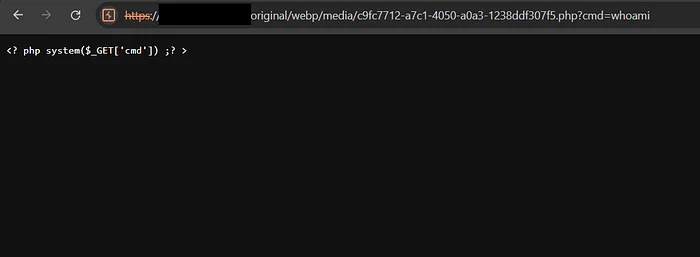
That result shows PHP execution was not enabled in the upload directory, which ruled out RCE through the uploaded PHP file. It also shows something else that turned out to be more useful: the server was willing to store arbitrary file content and serve it back.
Step 5: upload plain HTML
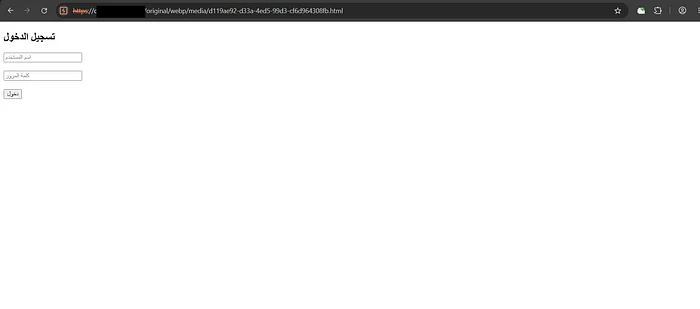
With execution ruled out, the researcher tried something simpler: a basic HTML page, uploaded using the exact same upload functionality. The server accepted the file and returned a URL pointing to the uploaded HTML file. Opening that URL in the browser rendered the HTML page normally.
Step 6: proof of concept
A simple login page was created as a proof of concept and uploaded the same way. The page was successfully hosted through the generated media URL.
The conclusion was that this was not just a bypass of the frontend's file extension restriction. Arbitrary HTML content could be uploaded and the application would serve it back as an actual webpage.
Root cause
The backend did not enforce the same file type restrictions as the frontend. The frontend limited the user to specific image formats, but the server accepted whatever file was placed in the multipart request, including SVG, PHP and HTML. The client-side check was the only check, and a request edited outside the browser went straight past it.
The second half of the cause is how uploaded files are served. The upload directory did not execute server-side code, which is why the PHP file came back as source. But files were still served in a way that let a browser render uploaded HTML as a page.
The failed SVG XSS is consistent with the same serving behaviour being applied to SVG, but the report does not analyse why the script did not run, so the reason is not established here.
Impact
Under the conditions tested, an attacker who can reach the upload endpoint can store arbitrary HTML on the application and get back a URL that renders it as a webpage. The proof of concept was a login page hosted through the generated media URL, The proof of concept was a login page hosted through the generated media URL.
The report does not claim script execution in the application's origin, and the SVG XSS test did not execute. It also does not claim remote code execution: PHP execution was not enabled in the upload directory. The impact described is limited to hosting and rendering arbitrary HTML content. Whether the endpoint required authentication, and therefore who could perform the upload, is not stated.
Fix
Enforce the allowed file types on the server, not only in the frontend, so that a request edited outside the browser is rejected the same way the form would reject it. Serve uploaded content so that it cannot be rendered as an active document, for example by returning it with a content type and disposition that force download or neutral rendering, and consider serving user uploads from a separate origin.
Variants to test
- Upload an SVG with a script payload and open the returned URL directly. A positive result is the script executing in the browser, which would confirm stored XSS rather than just stored content.
- Upload a PHP file and request it. A positive result is the code executing rather than the source being returned; source being returned confirms the directory does not execute code but still stores arbitrary content.
- Upload an HTML file and open the returned URL. A positive result is the page rendering as a document, which is the primitive demonstrated here.
- Upload an HTML file containing a script and check whether the script runs when the URL is opened. A positive result upgrades the finding from HTML hosting to script execution on the serving origin.
- Try other extensions that the frontend blocks but the backend may accept, such as other markup or script-bearing formats, and check both whether the upload succeeds and how the file is served back.
- Check whether the returned media URL is on the same origin as the application. A positive result means uploaded content shares the application's origin, which raises the impact of anything that renders as a document.
- Repeat the same request-editing approach on every other upload feature you find, since the pattern here is a frontend-only restriction rather than a flaw in one specific endpoint.
What happened, in plain words
A website had a feature that let people upload pictures. On the page itself, the upload box only accepted certain image formats, so if you tried to pick anything else, the page would not let you. That is what a normal visitor sees.
The researcher who wrote this report wanted to know whether that rule was real, or whether it was only a rule in the page. The difference matters: a rule in the page is like a sign on a door saying "staff only". A rule on the server is like a lock on that door. If the sign is the only thing there, anyone who walks around the door, rather than through it, gets in.
To walk around the door, the researcher used a tool called Burp Suite. It sits between the browser and the website and lets you look at, and then edit, the messages the browser sends. The browser's upload form is one kind of message; Burp lets you send a different one by hand.
The chain of tests went like this:
- Upload a normal JPG picture and capture the message the browser sends.
- Replace the JPG with an SVG file containing a script, and send it. The server accepted it.
- Open the uploaded SVG to see whether the script ran. It did not.
- Upload a PHP file, a file meant to be run by the server. The server accepted it, but when opened it showed its own source code instead of running.
- Upload a plain HTML page. The server accepted it, and opening the returned link showed the page as a real webpage.
- Upload a fake login page the same way, as proof. It was hosted and displayed through the link the site gave back.
The end result: the site would store any file you gave it and hand back a link that a browser would display as a webpage. That is not the same as running code on the server, and it is not the same as running JavaScript in the site's own pages. It is "arbitrary HTML upload": you can put any webpage you like on the site's storage and get a link to it.
The feature being tested
A media upload feature is a part of a website where a user sends a file, usually a picture, from their computer to the website's server. The server stores the file and gives back a URL, which is the address you can open in a browser to see the file again. Think of it like a cloakroom: you hand over your coat, you get a ticket with a number, and later that ticket gets your coat back.
The report does not name the application, the address of the upload endpoint, the server software or any version numbers. What it describes in detail is how the upload endpoint behaved when the message was sent directly rather than through the browser form.
The tools and the starting point
The only tool mentioned is Burp Suite, used to capture the upload request and to resend modified versions of it through a part of Burp called Repeater. Repeater is a screen where you paste a captured request, change something in it, press send, and read the reply, as many times as you like. It is like being able to re-read and edit a letter after you have posted it, before it actually goes.
The upload was sent to the media upload endpoint as multipart/form-data. That is a format for messages that carry a file. A normal web form message is a list of small text fields, like name and email. multipart/form-data is the same idea but each part can be a whole file, and each part has its own little label saying what it is. Think of an envelope containing several sealed bags, each labelled: "this one is the picture", "this one is the file name".
The report does not describe any account details, roles or permission levels, and does not say whether you had to be logged in to use the endpoint. The only precondition stated is that the researcher could reach the upload feature and see the message it produced.
Finding it
While testing the file upload functionality, the researcher noticed that the frontend only allowed specific image formats.
"Frontend" means the part of the website that runs in your browser: the page, its buttons, its menus, its checks. "Backend" means the part that runs on the server: the computer that stores the files and answers the requests. A check in the frontend is a convenience for the user, not a security control, because the user's own browser is doing the checking and the user controls the browser. The question the researcher asked was whether the backend enforced the same restriction, or whether it simply trusted whatever the browser sent. Everything that follows is an attempt to answer that question.
The tests, step by step
Step 1: capture a legitimate upload
A normal JPG image was uploaded and the request was captured with Burp Suite. The upload went to the media upload endpoint using multipart/form-data.
The report does not reproduce the raw request, so the field names, the endpoint path and the headers are not shown here. What matters is why this step comes first: capturing a request the server is known to accept gives you a template. You now have a message that works. Every later test changes only the file part of that same message, so if something is accepted or rejected, you know it was the file that made the difference, not some other detail you accidentally altered. It is like keeping a working recipe and changing one ingredient at a time.
Step 2: swap the JPG for an SVG with a script
Instead of changing the request structure, the researcher replaced the JPG file with an SVG file containing an XSS payload and changed the filename to .svg. The modified request was sent through Burp Repeater.
Two terms need unpacking here.
SVG stands for Scalable Vector Graphics. It is an image format, but unlike a JPG, which is a grid of coloured dots, an SVG is a text file describing shapes with instructions. Because it is text, and because browsers treat it as a document they can interpret, an SVG can also contain a script. That is why it is a favourite file type for testing uploads.
XSS stands for cross-site scripting. It means getting a browser to run JavaScript that the site's author did not intend, usually inside a page belonging to that site. JavaScript is the programming language that runs inside web pages and makes them interactive. An "XSS payload" is simply the piece of script you try to get executed. The report does not reproduce the payload itself, so there is no code to show for this step.
The server accepted the file and returned a successful upload response. That was the first sign that the frontend restriction was not mirrored on the backend: the browser form would not normally let an SVG through, but a request edited by hand was accepted. In plain terms, the sign on the door was the only thing stopping you, and walking around the door worked.
Step 3: check whether the script ran
The uploaded SVG was opened and checked for JavaScript execution. It did not execute. There was no JavaScript execution and no alert.
An "alert" is the simplest possible proof that script ran: a small pop-up box with a message. Testers use it because it is unmistakable. No alert means no script.
So at this point two separate facts were established. First, the upload validation could be bypassed: the server took a file the page would have refused. Second, the XSS impact could not be confirmed: the file was stored, but serving it back did not run the script inside it. A content type is the label a server puts on a response saying what kind of thing it is, such as "this is an image" or "this is a web page"; a disposition is an instruction saying whether the browser should display the file or download it. Either of those can stop a script from running.
Step 4: try a file meant for the server
Since the backend accepted a file type that was not supposed to be uploaded, the next question was what happens with a server-side file. A simple PHP file was created and uploaded through the same endpoint.
PHP is a programming language that runs on web servers, not in browsers. When you request a .php page, the server runs the code and sends back the result, usually HTML. If a server is configured to run PHP in a folder, then a PHP file placed in that folder becomes code the server will execute. If it is not configured that way, the file is just a file, and the server sends its contents as text.
The server accepted the upload and returned a URL for the file. The uploaded PHP file was then opened, expecting the PHP code to execute. It did not. Instead, the browser returned the PHP source code itself.
That result shows PHP execution was not enabled in the upload directory, which ruled out RCE through the uploaded PHP file. RCE stands for remote code execution: an attacker getting their own code to run on someone else's server. It is the most serious kind of finding, because the attacker's code then runs with the server's own powers. Here it did not happen.
But the test also showed something else, which turned out to be more useful: the server was willing to store arbitrary file content and serve it back. It did not care what was inside the file. It just kept it and gave you a link.
Step 5: upload a plain HTML page
With execution ruled out, the researcher tried something simpler: a basic HTML page, uploaded using the exact same upload functionality. The server accepted the file and returned a URL pointing to the uploaded HTML file. Opening that URL in the browser rendered the HTML page normally.
HTML is the language web pages are written in. It describes headings, paragraphs, links, images and forms. A browser's whole job is to read HTML and draw the page. So if a server stores an HTML file and hands it back in a way the browser treats as a page, the browser will draw it, exactly as if it were a page on that website. That is what "rendered" means: the browser turned the file into a visible page rather than showing you its text.
Step 6: the proof of concept
A simple login page was created as a proof of concept and uploaded the same way. The page was successfully hosted through the generated media URL.
A proof of concept is a small, harmless demonstration that shows a finding is real, rather than just theoretically possible. Here it was a login page: a form asking for a username and password. The point is not that the form did anything. The point is that a page looking like a login screen could be placed on the site's own storage and reached through a link the site itself generated.
The conclusion was that this was not just a bypass of the frontend's file extension restriction. Arbitrary HTML content could be uploaded and the application would serve it back as an actual webpage.
Why it worked
The backend did not enforce the same file type restrictions as the frontend. The frontend limited the user to specific image formats, but the server accepted whatever file was placed in the multipart request, including SVG, PHP and HTML. The client-side check was the only check, and a request edited outside the browser went straight past it.
The second half of the cause is how uploaded files are served. The upload directory did not execute server-side code, which is why the PHP file came back as source. But files were still served in a way that let a browser render uploaded HTML as a page. "Origin" here means the combination of scheme, host and port, for example https://example.com; two pages share an origin only if all three match. Content from the same origin is treated by the browser as part of the same site, which is why serving user uploads from the application's own origin matters.
The failed SVG XSS is consistent with the same serving behaviour being applied to SVG, but the report does not analyse why the script did not run, so the reason is not established here.
What someone could do with it
Under the conditions tested, an attacker who can reach the upload endpoint can store arbitrary HTML on the application and get back a URL that renders it as a webpage. The proof of concept was a login page hosted through the generated media URL, The proof of concept was a login page hosted through the generated media URL. Phishing means tricking someone into entering their credentials on a page that looks genuine.
The report does not claim script execution in the application's origin, and the SVG XSS test did not execute. It also does not claim remote code execution: PHP execution was not enabled in the upload directory. The impact described is limited to hosting and rendering arbitrary HTML content. Whether the endpoint required authentication, and therefore who could perform the upload, is not stated.
How to fix it
Enforce the allowed file types on the server, not only in the frontend, so that a request edited outside the browser is rejected the same way the form would reject it. Serve uploaded content so that it cannot be rendered as an active document, for example by returning it with a content type and disposition that force download or neutral rendering, and consider serving user uploads from a separate origin.
Other things worth trying
These are variations on the same idea, useful if you are learning and want to practise on a system you are allowed to test.
- Upload an SVG with a script payload and open the returned URL directly. A positive result is the script executing in the browser, which would confirm stored XSS rather than just stored content. Stored XSS means the malicious script is saved on the server and runs for whoever opens the page later.
- Upload a PHP file and request it. A positive result is the code executing rather than the source being returned; source being returned confirms the directory does not execute code but still stores arbitrary content.
- Upload an HTML file and open the returned URL. A positive result is the page rendering as a document, which is the primitive demonstrated here.
- Upload an HTML file containing a script and check whether the script runs when the URL is opened. A positive result upgrades the finding from HTML hosting to script execution on the serving origin.
- Try other extensions that the frontend blocks but the backend may accept, such as other markup or script-bearing formats, and check both whether the upload succeeds and how the file is served back.
- Check whether the returned media URL is on the same origin as the application. A positive result means uploaded content shares the application's origin, which raises the impact of anything that renders as a document.
- Repeat the same request-editing approach on every other upload feature you find, since the pattern here is a frontend-only restriction rather than a flaw in one specific endpoint.
Glossary
- Backend: the part of a website that runs on the server, storing data and answering requests.
- Burp Suite: a tool that sits between a browser and a website so you can capture, inspect and edit the messages sent between them.
- Burp Repeater: the part of Burp Suite where you can edit a captured request and resend it as many times as you like.
- Client-side control: a check performed in the user's browser, which the user can bypass because they control the browser.
- Content disposition: a response instruction telling the browser whether to display a file or download it.
- Content type: a label on a response saying what kind of content it is, such as an image or a web page.
- Cross-site scripting (XSS): getting a browser to run JavaScript that the site's author did not intend.
- Endpoint: a specific address on a server that accepts requests, such as the one that handles uploads.
- Frontend: the part of a website that runs in the user's browser: the page, its buttons and its checks.
- HTML: the language web pages are written in, describing headings, text, links, images and forms.
- JavaScript: the programming language that runs inside web pages and makes them interactive.
- JPG: a common image format made of a grid of coloured dots.
- Multipart/form-data: a message format for sending files and form fields together, with each part separately labelled.
- Origin: the combination of scheme, host and port, such as
https://example.com; pages share an origin only if all three match. - Phishing: tricking someone into entering credentials or other information on a page that looks genuine.
- PHP: a programming language that runs on web servers rather than in browsers.
- Proof of concept: a small, harmless demonstration showing that a finding is real.
- Remote code execution (RCE): an attacker getting their own code to run on someone else's server.
- Rendered: turned into a visible page by the browser, rather than shown as raw text.
- Stored XSS: a script saved on the server that runs for whoever opens the affected page later.
- SVG: an image format written as text instructions describing shapes, which can also contain a script.
- URL: the address of something on the web, which you can open in a browser.


