How ChatGPT helped me find a bug
An API endpoint for file uploads remained accessible even though the application had no visible upload feature. An attacker could upload a PDF containing JavaScript, which executed when the uploaded file was viewed, leading to cross-site scripting on a different domain.
 Published on abhishekgk.medium.com
Hello and welcome to my latest Medium writeup! I’m thrilled to share my thoughts and insights with you today on How I used chatgpt to find a bug easily.
The full write-up lives on its author's site
It belongs to its author, so we link to it rather than copy it. The other two tabs are our own rewrites, checked against it.
Context
The target is a private bug bounty program, so the author refers to it as redacted.com and modifies the Burp proof of concept, target details and other identifying information before publishing. The application itself is a web application with an API, and the relevant functionality is a file upload endpoint. The author notes that the application had no visible file upload feature at all, which is what made the endpoint interesting.
The weakness categories recorded for the report are XSS and file upload, and the reward was 200.00 USD.
Setup
The author starts with manual reconnaissance: reading the application's functionalities, parameters, pages and JavaScript code for sensitive information. To reduce the manual work of reading through JavaScript, two tools are used to scrape endpoints into Burp:
Burp Suite is used to replay and modify requests, including Intruder for brute forcing the file content type. ChatGPT is used to generate a sample upload request and, later, to research XSS via PDF upload.
Finding it
Running the scraping tools against the target produced many hidden endpoints. One of them looked like this:
/api/REDACTED/upload.php
The author then went back through the Burp requests and checked the entire application for a file upload feature that sends requests to this API path. There was no file upload feature in the application at all. The reasoning is that the application may have removed the file upload feature but forgotten to restrict the API request to the path, leaving the endpoint reachable.
Exploitation
Step 1: Generating an upload request
Because the author did not know how to construct an upload request from scratch, ChatGPT was asked to generate one. The author explicitly warns readers not to ask ChatGPT to generate malicious files, since the proof of concept would be modified anyway.
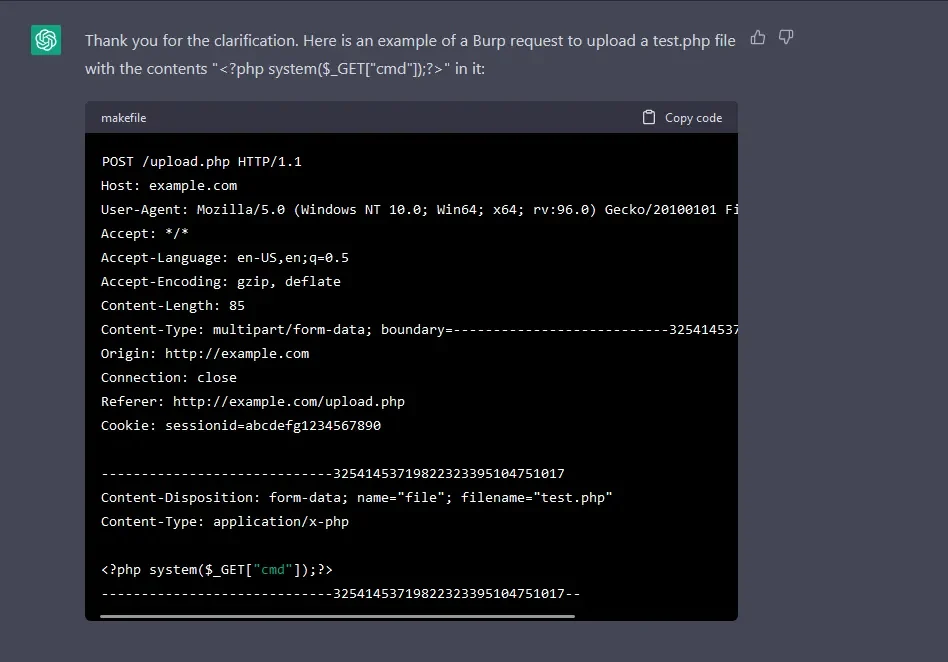
The image shows the sample Burp request generated by ChatGPT.
Step 2: Sending the request to the target
The generated request was copied into Burp, modified slightly to adjust it to the target, and sent to check whether the file got uploaded.
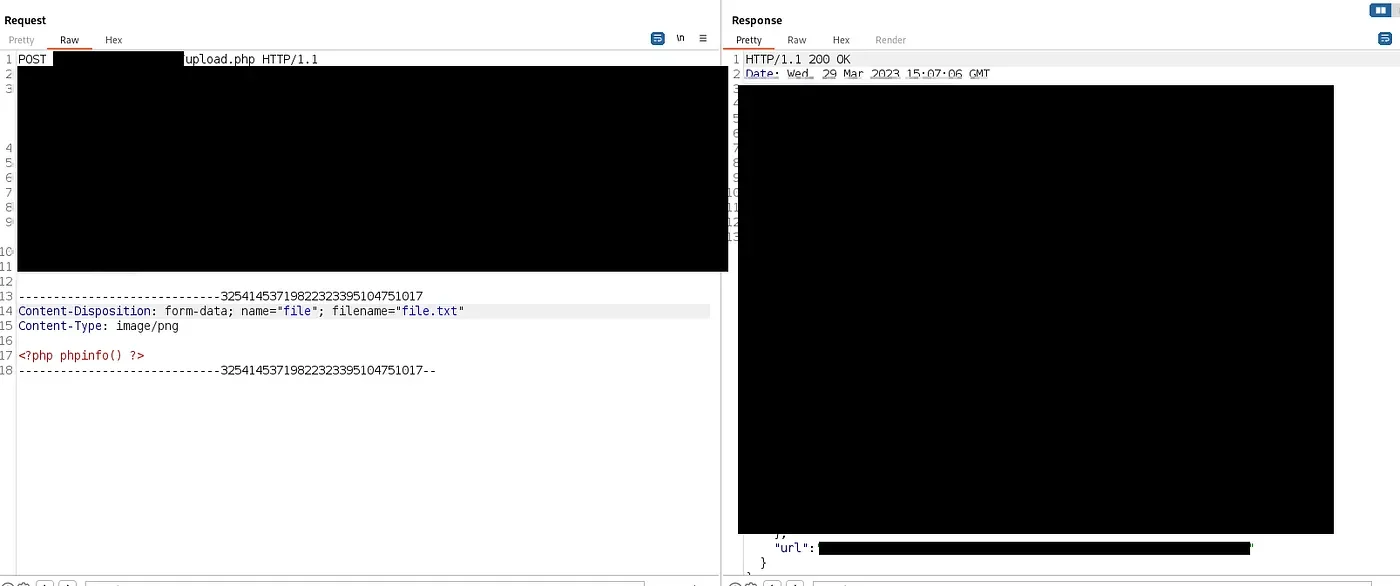
The image shows the file successfully uploaded.
The response returned the path of the uploaded file. However, the target did not execute any payload that was uploaded; it only echoed out the content of the uploaded file. The author tried different file extensions and this still did not work.
Step 3: Brute forcing the allowed content type
The file content type was brute forced with Burp Intruder to learn which file types are allowed. The result was that only PDF files are accepted.
At this point the author almost gave up, thinking there was no way to show potential impact by uploading a PDF file without putting malware in it.
Step 4: Researching XSS via PDF
After a few days of research and interaction with ChatGPT, the author learned that XSS via PDF file upload is possible. ChatGPT pointed to the PortSwigger research on portable data exfiltration, which the author describes as an amazing link. Adding JavaScript code to PDF content was new to the author. A second reference, a huntr.dev bounty, also helped in creating the PDF file.
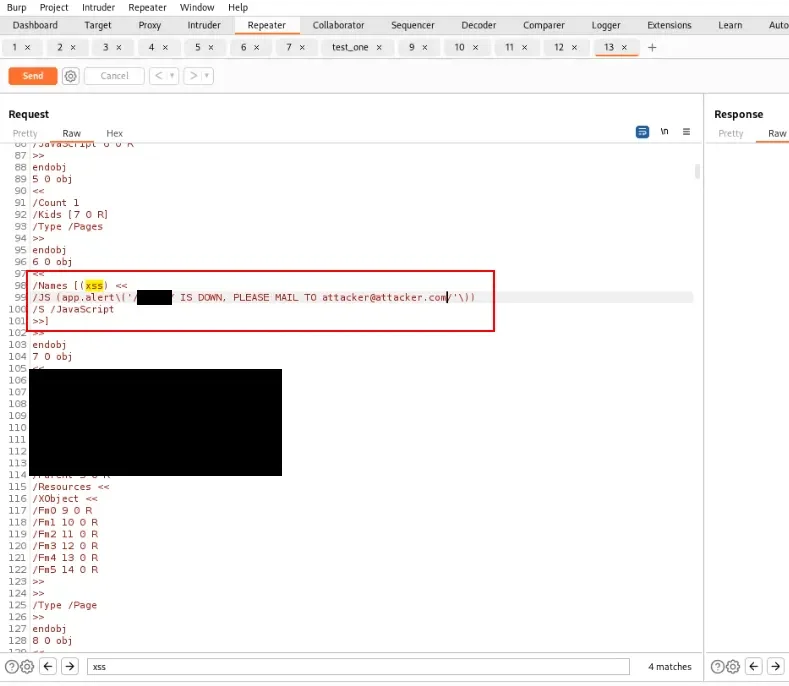
The image shows the PDF being modified to add the XSS payload.
Step 5: Submitting the payload
After submitting the payload to the target, the alert fired on the target file path.
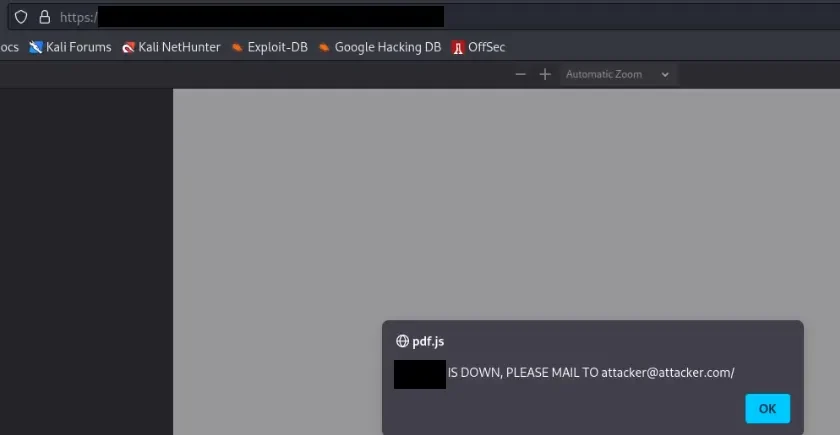
The image shows the XSS executed.
Root cause
The application allowed files to be uploaded through an API endpoint that had no corresponding feature in the interface, and only PDF files were accepted. The endpoint accepted uploads and returned the path of the stored file. The application echoed the content of uploaded files rather than executing it, and only PDF files were accepted, so the direct path to script execution was closed. The XSS came from the PDF itself: JavaScript embedded in the PDF content executed at the uploaded file's path. The report does not describe the server-side validation logic beyond the content type restriction, so the exact reason the PDF was served in a way that executed its embedded JavaScript is not stated.
Impact
The author reported the issue to the company. Because the file was executed on an entirely different domain and did not affect the target, the severity was reduced. The main issue, in the author's view, was the application allowing an arbitrary file to be uploaded, and the author was rewarded for it.
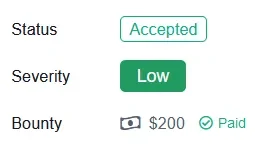
The image shows the reward for the issue.
Fix
The report does not describe any fix applied by the company.
Variants to test
- Look for API endpoints that have no corresponding feature in the interface, especially upload paths found through JavaScript scraping. A positive result is an endpoint that accepts a file and returns a stored path.
- When uploads are echoed rather than executed, try content types that browsers render actively. A positive result is a stored file whose embedded script runs when opened at its path.
- Brute force the accepted content type with Intruder when extensions are rejected. A positive result is a single accepted type that can carry active content, such as PDF.
- Test whether the stored file is served from a different domain than the target. A positive result is execution on a separate origin, which the author notes reduced the severity in this case.
What happened, in plain words
A security researcher found a hidden file upload feature on a website. The website had no visible way to upload files, but the researcher discovered an address (an API endpoint) that still accepted uploads. He used ChatGPT to help him create the request to upload a file, and later to learn that a PDF file can contain JavaScript that runs when someone opens it. He uploaded a PDF with a script, and the script ran at the uploaded file's path, showing an alert. The company rewarded him with 200 USD, but the severity was reduced because the script ran on a different domain, not on the main website.
This article explains every step in simple terms, so even if you are completely new to security, you can follow along.
Context
The target is a private bug bounty program. That means the company invited researchers to test their website but asked them not to reveal details publicly. So the author calls the target redacted.com and changes the technical details (like the exact request) before publishing. The application is a web application with an API. An API (Application Programming Interface) is a way for programs to talk to each other. Think of it as a waiter in a restaurant: you (the program) tell the waiter what you want, and the waiter brings it from the kitchen (the server). In a website, the API often handles actions like logging in, fetching data, or uploading files. The relevant functionality here is a file upload endpoint: a specific address where files can be sent.
The author notes that the application had no visible file upload feature at all. That is what made the endpoint interesting: if there is no feature, why does the endpoint exist?
The weakness categories recorded for the report are XSS (Cross-Site Scripting) and file upload. XSS is a type of vulnerability where an attacker can make a website run their own JavaScript code in a victim's browser. JavaScript is the programming language that makes web pages interactive. File upload is exactly what it sounds like: the ability to send a file to a server. The reward was 200.00 USD.
Setup
The author starts with manual reconnaissance. Reconnaissance (or recon) is the first phase of any security test: you explore the application to understand what it does, what pages it has, what parameters it uses, and you read its JavaScript code to look for sensitive information. Parameters are pieces of data you send to the server, like ?id=123 in a URL. JavaScript code can sometimes reveal hidden endpoints or logic.
To reduce the manual work of reading through JavaScript, the author uses two tools to scrape endpoints into Burp. Scraping means automatically collecting all the links and paths found in the code. Burp Suite is a popular tool for intercepting and modifying web traffic; it acts as a proxy between your browser and the server, letting you see and change every request. The tools are:
- Gospider, installed with
apt install gospider. This is a command-line tool that crawls a website and extracts links. - Katana, a tool by Project Discovery. It is a fast crawler that also finds endpoints.
Burp Suite is used to replay and modify requests. Replaying means sending the same request again, possibly with changes. Burp also has a feature called Intruder, which automates sending many requests with different values, for example to guess which file types are allowed. ChatGPT is used to generate a sample upload request and, later, to research XSS via PDF upload.
Finding it
Running the scraping tools against the target produced many hidden endpoints. An endpoint is a specific URL path that the application responds to, like a door in a building. One of them looked like this:
/api/REDACTED/upload.php
This is a path on the server. /api/ suggests it is part of the API. REDACTED is a placeholder for a name the author removed. upload.php is a PHP script (PHP is a programming language often used on web servers) that likely handles file uploads.
The author then went back through the Burp requests and checked the entire application for a file upload feature that sends requests to this API path. There was no file upload feature in the application at all. The reasoning is that the application may have removed the file upload feature but forgotten to restrict the API request to the path, leaving the endpoint reachable. In other words, the front-end (what you see in the browser) no longer has an upload button, but the back-end (the server) still accepts uploads if you know the address. This is like a building where the front door is bricked up, but the back door is still open.
Exploitation
Step 1: Generating an upload request
Because the author did not know how to construct an upload request from scratch, ChatGPT was asked to generate one. The author explicitly warns readers not to ask ChatGPT to generate malicious files, since the proof of concept would be modified anyway. A proof of concept (PoC) is a demonstration that a vulnerability exists, often a small, harmless example.
The image shows the sample Burp request generated by ChatGPT. It likely contains the structure of an HTTP request with headers and a body for uploading a file.
Step 2: Sending the request to the target
The generated request was copied into Burp, modified slightly to adjust it to the target, and sent to check whether the file got uploaded. Modifying might include changing the hostname, the path, or the file content.
The image shows the file successfully uploaded. The response from the server included the path where the file was stored.
The response returned the path of the uploaded file. However, the target did not execute any payload that was uploaded; it only echoed out the content of the uploaded file. Echoing means the server sent back the file's content as plain text, without running it. The author tried different file extensions (like .jpg, .txt) and this still did not work. An extension is the part of a filename after the dot, like .pdf or .exe, which tells the system what type of file it is.
Step 3: Brute forcing the allowed content type
The file content type was brute forced with Burp Intruder to learn which file types are allowed. Brute forcing means trying many possibilities systematically. Content type is a label in the request that tells the server what kind of file you are sending, like application/pdf or image/jpeg. The result was that only PDF files are accepted. PDF stands for Portable Document Format, a common file format for documents that can contain text, images, and sometimes JavaScript.
At this point the author almost gave up, thinking there was no way to show potential impact by uploading a PDF file without putting malware in it. Malware is malicious software designed to harm or exploit. He thought a PDF alone couldn't do anything harmful.
Step 4: Researching XSS via PDF
After a few days of research and interaction with ChatGPT, the author learned that XSS via PDF file upload is possible. XSS (Cross-Site Scripting) is a vulnerability that lets an attacker inject JavaScript into a web page viewed by others. Normally, XSS happens when a website displays user input without properly escaping it. But here, the XSS would come from the PDF itself: PDF files can contain JavaScript, and some PDF viewers (like a browser's built-in PDF viewer) will execute that JavaScript when the file is opened. ChatGPT pointed to the PortSwigger research on portable data exfiltration, which the author describes as an amazing link. Exfiltration means stealing data. Adding JavaScript code to PDF content was new to the author. A second reference, a huntr.dev bounty, also helped in creating the PDF file.
The image shows the PDF being modified to add the XSS payload. A payload is the actual code or data that exploits a vulnerability, in this case the JavaScript that will run.
Step 5: Submitting the payload
After submitting the payload to the target, the alert fired on the target file path. An alert is a simple pop-up dialog in JavaScript, often used to prove that code execution is possible.
The image shows the XSS executed, likely a browser alert box displaying something.
Root cause
The application allowed files to be uploaded through an API endpoint that had no corresponding feature in the interface, and only PDF files were accepted. The endpoint accepted uploads and returned the path of the stored file. The application echoed the content of uploaded files rather than executing it, and only PDF files were accepted, so the direct path to script execution was closed. The XSS came from the PDF itself: JavaScript embedded in the PDF content executed at the uploaded file's path. The report does not describe the server-side validation logic beyond the content type restriction, so the exact reason the PDF was served in a way that executed its embedded JavaScript is not stated.
Impact
The author reported the issue to the company. Because the file was executed on an entirely different domain and did not affect the target, the severity was reduced. A domain is the part of a URL that identifies a website, like example.com. Different domain means the uploaded file was served from a different website address, so the script ran in the context of that other domain, not the main target. The main issue, in the author's view, was the application allowing an arbitrary file to be uploaded, and the author was rewarded for it.
The image shows the reward for the issue, likely a screenshot of a payment or bounty confirmation.
Fix
The report does not describe any fix applied by the company.
Variants to test
- Look for API endpoints that have no corresponding feature in the interface, especially upload paths found through JavaScript scraping. A positive result is an endpoint that accepts a file and returns a stored path.
- When uploads are echoed rather than executed, try content types that browsers render actively. A positive result is a stored file whose embedded script runs when opened at its path.
- Brute force the accepted content type with Intruder when extensions are rejected. A positive result is a single accepted type that can carry active content, such as PDF.
- Test whether the stored file is served from a different domain than the target. A positive result is execution on a separate origin, which the author notes reduced the severity in this case.
Glossary
- API: Application Programming Interface; a set of rules that allows different software programs to communicate with each other, like a waiter taking your order to the kitchen.
- Endpoint: A specific URL path that an API or web application responds to, like a door in a building.
- XSS (Cross-Site Scripting): A vulnerability that allows an attacker to inject JavaScript code into a web page viewed by others, often to steal data or perform actions on behalf of the user.
- File upload: The ability to send a file from your computer to a server.
- Reconnaissance (recon): The first phase of a security test, where you gather information about the target, such as pages, parameters, and technologies used.
- JavaScript: A programming language used to make web pages interactive; it runs in the browser.
- Parameter: A piece of data sent to the server, often in the URL (like
?id=123) or in the request body. - Burp Suite: A tool for intercepting, viewing, and modifying HTTP traffic between your browser and a server.
- Proxy: An intermediary that sits between your browser and the server, allowing you to see and change requests.
- Scraping: Automatically collecting data (like links and endpoints) from a website or its code.
- Gospider: A command-line tool that crawls websites and extracts links.
- Katana: A fast crawler by Project Discovery that finds endpoints.
- Intruder: A Burp Suite feature that automates sending many requests with different values, used for brute forcing.
- Brute forcing: Trying many possibilities systematically until you find the right one.
- Content type: A label in an HTTP request or response that indicates the type of data being sent, like
application/pdforimage/jpeg. - PDF: Portable Document Format; a file format for documents that can include text, images, and JavaScript.
- Proof of concept (PoC): A small, often harmless demonstration that a vulnerability exists.
- Payload: The code or data that exploits a vulnerability, such as the JavaScript that runs.
- Alert: A JavaScript function that displays a pop-up dialog, often used to prove code execution.
- Domain: The part of a URL that identifies a website, like example.com.
- Origin: The combination of protocol, domain, and port that defines the security context of a web page; scripts from one origin cannot normally access data from another.
- Malware: Malicious software designed to harm or exploit.
- Exfiltration: The unauthorised transfer of data from a system.
- Echo: When a server returns the content of a file as plain text without executing it.
- Extension: The part of a filename after the dot, like .pdf, which indicates the file type.



