How I Almost Made $1,000 with a Pre-Account Takeover
The Change Email feature allowed an attacker to change the email address on their Google OAuth-created account to a victim's email without any verification. The victim could then reset the password and log in, but the attacker retained access via the original Google OAuth identity, creating a pre-account takeover.

medium.com
Published on medium.com
Bug Bounty
The full write-up lives on its author's site
It belongs to its author, so we link to it rather than copy it. The other two tabs are our own rewrites, checked against it.
Context
The target is a web application the author refers to only as redacted.com. The feature under test is authentication, specifically the interaction between sign-in with Google OAuth and the account settings page's Change Email function.
The author frames the result as a Pre-Account Takeover (Pre-ATO) rather than a full account takeover, and explains the distinction: the attacker does not take over an account the victim already has. Instead the attacker prepares an account in advance, associates it with the victim's email address, and keeps the authentication method they already control.
Setup
The setup is minimal and needs no special tooling beyond a browser and two email addresses the tester can receive mail at:
- An attacker-controlled Google account with the address
[redacted]. - A second address,
[redacted], used to play the part of the victim. - The target application at
redacted.com, with its Google OAuth sign-in and its Change Email feature.
No versions, headers, cookies or request captures appear in the report; the whole flow is described at the level of what the UI did.
Finding it
The author started by creating an account through Google OAuth using the address they controlled:
[redacted]
With the account created, they opened the account settings and found the Change Email feature. The intent at that point was simply to observe how the application handled email changes on an account that had been created through Google OAuth. They changed the account's email from the attacker address to the victim address:
The change went through immediately. No confirmation step and no verification of the new address was required; the stored email address was simply replaced. That is the first thing that looked wrong: an unverified address had become the account's email.
That raised the question the rest of the report answers: what happens if the real owner of [redacted] tries to create an account?
Exploitation
Step 1: create the account through Google OAuth
Sign up with Google using [redacted]. The application creates an account whose email is the attacker address and whose authentication method is the Google identity just used.
Step 2: change the account email to the victim address
In account settings, use Change Email and set the address to [redacted]. The application accepts it immediately, with no confirmation or verification of the new address. The account now carries the victim's email address while the Google identity behind it is still the attacker's.
Step 3: act as the victim and try to register
Switch to the victim's side and attempt to register with:
[redacted]
The application reports that the email address is already in use. The victim is redirected to the login page and uses the password reset functionality. After completing the reset, the victim sets a new password and logs in successfully.
Step 4: observe which account the victim landed in
The victim did not get a new, separate account. They logged into the account the attacker had created in step 1, the one whose email had been changed to the victim address in step 2. From the victim's point of view everything looked normal: registration was refused because the address existed, a password reset arrived, a new password was set, and login worked.
Step 5: log back in as the attacker through Google OAuth
The author returned to the attacker side and signed in with Google OAuth using the address originally used to create the account:
[redacted]
The expectation was that this would no longer work, since the account's email had been changed to [redacted]. It did work. The Google OAuth identity used at sign-up was still linked to the account, so two different authentication paths now reached the same account: the victim's password, and the attacker's Google identity.
Root cause
Two design decisions combine here, and the report describes both at the behavioural level rather than from the code:
- The Change Email feature accepts a new address without any confirmation or verification. Nothing proves that the person setting the address controls it, so an attacker can attach an address they do not own to an account they do own.
- The account keeps its original OAuth identity linked after the email changes. The email field and the authentication identities are treated as separate things, so changing the email does not invalidate the Google login that was used to create the account.
The result is that the victim's password reset flow led them into the attacker-prepared account. The victim's reset succeeds and gives them a working password, but it gives them a password to an account that still has the attacker's Google identity attached. The "email already in use" check on registration refused the duplicate, and the password reset flow then reset the password for the account holding that address.
Impact
Under the conditions in the report, an attacker who can create an account on the target can attach a chosen victim email address to it and keep access through the OAuth identity they used at sign-up. When the real owner of that address later tries to register, they are funnelled into the attacker-prepared account through the password reset flow, and both parties can then authenticate to the same account. The attacker keeps a working Google OAuth login to the same account.
The author is careful about the label: this is a Pre-ATO, not a full account takeover, because the attacker is not taking over an account the victim already had. The victim has no pre-existing account to lose; they are placed into one the attacker prepared. The report does not describe what data or actions were reachable inside the shared account, so the practical ceiling of the impact is not established there.
Fix
The report does not say what the vendor changed, if anything. Based on the behaviour described, the fixes that would close the issue are:
- Require verification of a new email address before it becomes the account's login identifier. Send a confirmation link or code to the new address and keep the old address active until it is confirmed.
- When the email on an OAuth-created account changes, decide explicitly what happens to the linked OAuth identity. Either keep the identity bound to the account and treat the email as a contact field only, or require re-authentication and re-verification before the change takes effect.
- Make the password reset flow aware of accounts whose email was set without verification, so that a reset cannot hand a password to someone other than the person who controls the address.
Variants to test
- Change Email without verification on other providers. Repeat the flow on accounts created through other OAuth providers. A positive result is the same pattern: the address changes instantly, and the original OAuth login still works afterwards.
- Registration plus reset on the victim side. After attaching the victim address, attempt registration with it. A positive result is "email already in use", followed by a reset that logs you into the attacker-prepared account.
- OAuth identity survives email change. Change the email on an OAuth account and then sign in again with the original provider identity. A positive result is a successful login to the account under its new address.
- Password login added to an OAuth-only account. If the victim's reset creates a password on an account that previously had none, check whether the attacker's OAuth path still works alongside it. A positive result is two working authentication paths to one account.
- Email change on accounts with existing passwords. Try the same change on a password-based account and see whether the old password still works after the address changes. A positive result is continued access under the new address without re-verification.
Disclosure
The author reported the issue through HackerOne, where it was marked as a duplicate.
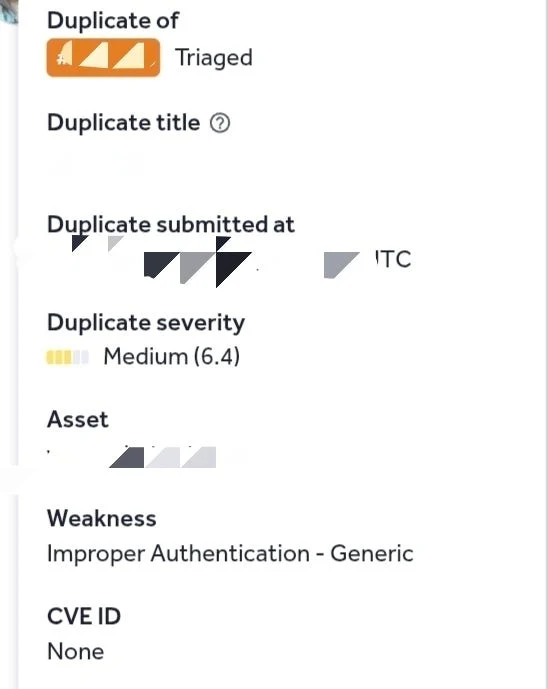
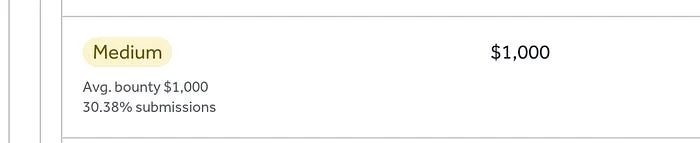
The author notes this is a first write-up, written after five months of bug bounty work.
What happened, in plain words
A security researcher found a way to prepare an account on a website in advance, attach someone else's email address to it, and then keep a secret way of logging in. When the real owner of that email address later tried to sign up, the website pushed them into the account the researcher had already prepared. Both people could then log in to the same account. The researcher calls this a Pre-Account Takeover, or Pre-ATO, because the victim did not already have an account that was stolen. Instead, the victim was placed into an account that had been set up for them.
The website is referred to only as redacted.com. The two features involved are signing in with Google (called Google OAuth) and a Change Email setting in the account page. The researcher reported the issue through HackerOne, a platform where security researchers send bug reports to companies. It was marked as a duplicate. The title mentions almost making $1,000, but the report does not say that any money was paid.
The pieces involved
Before walking through the steps, here is what each piece means.
- Web application: a program you use through your browser, such as a shopping site or a social network. Here it is
redacted.com. - Authentication: the process of proving who you are when you log in. A website needs to know that the person using an account is its owner.
- Google OAuth: a way to log in to a website using your Google account instead of creating a separate password. The website asks Google to confirm who you are, and Google sends back basic details, including your email address. The website then creates an account tied to that Google identity. Think of it like showing your passport at a hotel instead of filling in a registration card: the hotel trusts the passport office to have checked you.
- Change Email feature: a setting that lets a logged-in user replace the email address stored on their account. Email addresses often act as the account's name tag, so changing one is a sensitive operation.
- Email verification: the usual safety step where the website sends a message to the new address with a link or code. Only someone who can read that inbox can confirm the change. Without it, anyone can type any address they like.
- Account takeover (ATO): when an attacker gains access to an account that belongs to someone else. A full ATO means the victim already had the account and the attacker seized it.
- Pre-Account Takeover (Pre-ATO): the researcher's term for preparing an account before the victim has one, attaching the victim's email address to it, and keeping a login method. The victim is then funnelled into that prepared account.
- Password reset flow: the process where you click "forgot password", receive a message at your email address, and set a new password. Websites use it to let the owner of an email address regain access to the account registered with that address.
- Duplicate report: a bug report that describes a problem the company has already received from someone else. Platforms often close duplicates without a reward.
Setting up the test
The researcher needed only a browser and two email addresses they could read:
- A Google account with the address
[redacted], playing the attacker. - A second address,
[redacted], playing the victim. - The target website,
redacted.com, with its Google sign-in and Change Email feature.
The report does not include any version numbers, HTTP headers, cookies or captured requests. Everything is described at the level of what the screen did when buttons were clicked.
Finding the problem
The first goal was simple curiosity: see how the website handles an email change on an account that was created with Google rather than with a password. The researcher created an account through Google OAuth using the address they controlled:
[redacted]
This line is just the email address used for the Google account. There is no code or command here; it records which identity was used to sign up. The website created an account whose stored email was [redacted] and whose login method was the Google identity just used.
Next, the researcher opened the account settings and found Change Email. They changed the account's email from the attacker address to the victim address:
This line shows the before and after values: the account started with the attacker's address and was changed to the victim's address. The arrow means "changed to".
The change went through immediately. There was no confirmation step and no verification of the new address. The stored email was simply replaced. That is the first sign of a problem: an address nobody had proven they owned had become the account's email. In everyday terms, it is like a hotel letting you write any name on the guest register without checking your ID.
That raised the question the rest of the test answers: what happens if the real owner of [redacted] tries to create an account?
Walking through the attack
Step 1: create the account through Google OAuth
Sign up with Google using [redacted]. The website creates an account whose email is the attacker address and whose login method is the Google identity just used. The researcher did this first because the whole issue depends on an account existing that the attacker controls.
Step 2: change the account email to the victim address
In account settings, use Change Email and set the address to [redacted]. The website accepts it immediately, with no confirmation or verification of the new address. The account now carries the victim's email address while the Google identity behind it is still the attacker's. The researcher did this to see whether the website would let an unverified address become the account's identity. It did.
Step 3: act as the victim and try to register
Switch to the victim's side and attempt to register with:
[redacted]
This is the address typed into the registration form. The website reports that the email address is already in use. The victim is redirected to the login page and uses the password reset functionality. After completing the reset, the victim sets a new password and logs in successfully. The researcher did this to follow the victim's natural path: a person who cannot register because their address is taken will usually try to reset the password instead.
Step 4: observe which account the victim landed in
The victim did not get a new, separate account. They logged into the account the attacker had created in step 1, the one whose email had been changed to the victim address in step 2. From the victim's point of view everything looked normal: registration was refused because the address existed, a password reset arrived, a new password was set, and login worked. The researcher checked this because the interesting question is not whether the victim can log in, but which account they are logging in to.
Step 5: log back in as the attacker through Google OAuth
The researcher returned to the attacker side and signed in with Google OAuth using the address originally used to create the account:
[redacted]
This is the Google account used for the second login attempt. The expectation was that this would no longer work, since the account's email had been changed to [redacted]. It did work. The Google OAuth identity used at sign-up was still linked to the account, so two different login paths now reached the same account: the victim's password, and the attacker's Google identity. The researcher tried this to see whether changing the email had also removed the original Google login. It had not.
Why it works
Two design decisions combine here. The report describes both by their behaviour rather than by looking at the code.
- The Change Email feature accepts a new address without any confirmation or verification. Nothing proves that the person setting the address controls it, so an attacker can attach an address they do not own to an account they do own.
- The account keeps its original OAuth identity linked after the email changes. The email field and the login identities are treated as separate things, so changing the email does not invalidate the Google login that was used to create the account.
The result is that the victim's password reset led them into the attacker-prepared account. The victim's reset succeeds and gives them a working password, but it gives them a password to an account that still has the attacker's Google identity attached. The "email already in use" check on registration refused the duplicate, and the password reset flow then reset the password for the account holding that address.
What an attacker could do
Under the conditions in the report, an attacker who can create an account on the target can attach a chosen victim email address to it and keep access through the OAuth identity they used at sign-up. When the real owner of that address later tries to register, they are funnelled into the attacker-prepared account through the password reset flow, and both parties can then authenticate to the same account. The attacker keeps a working Google OAuth login to the same account.
The researcher is careful about the label: this is a Pre-ATO, not a full account takeover, because the attacker is not taking over an account the victim already had. The victim has no pre-existing account to lose; they are placed into one the attacker prepared. The report does not describe what data or actions were reachable inside the shared account, so how far the impact could go is not established there.
How to fix it
Based on the behaviour described, the fixes that would close the issue are:
- Require verification of a new email address before it becomes the account's login identifier. Send a confirmation link or code to the new address and keep the old address active until it is confirmed.
- When the email on an OAuth-created account changes, decide explicitly what happens to the linked OAuth identity. Either keep the identity bound to the account and treat the email as a contact field only, or require re-authentication and re-verification before the change takes effect.
- Make the password reset flow aware of accounts whose email was set without verification, so that a reset cannot hand a password to someone other than the person who controls the address.
Other things to try
- Change Email without verification on other providers. Repeat the flow on accounts created through other OAuth providers. A positive result is the same pattern: the address changes instantly, and the original OAuth login still works afterwards.
- Registration plus reset on the victim side. After attaching the victim address, attempt registration with it. A positive result is "email already in use", followed by a reset that logs you into the attacker-prepared account.
- OAuth identity survives email change. Change the email on an OAuth account and then sign in again with the original provider identity. A positive result is a successful login to the account under its new address.
- Password login added to an OAuth-only account. If the victim's reset creates a password on an account that previously had none, check whether the attacker's OAuth path still works alongside it. A positive result is two working authentication paths to one account.
- Email change on accounts with existing passwords. Try the same change on a password-based account and see whether the old password still works after the address changes. A positive result is continued access under the new address without re-verification.
Reporting it
The researcher reported the issue through HackerOne, where it was marked as a duplicate.
The researcher notes this is a first write-up, written after five months of bug bounty work.
Glossary
- Web application: a program you use through a browser, such as a shopping site or a social network.
- OAuth: a way to log in to a website using an account from another service, such as Google, instead of a separate password.
- Google OAuth: logging in to a website with a Google account; Google confirms your identity and passes basic details such as your email address to the website.
- Email verification: a safety step where the website sends a link or code to the new address so that only someone who can read that inbox can confirm the change.
- Pre-Account Takeover (Pre-ATO): preparing an account before the victim has one, attaching the victim's email address to it, and keeping a login method, so the victim is funnelled into that prepared account.
- HackerOne: a platform where security researchers send bug reports to companies.
- Bug bounty: a programme where companies pay researchers for reporting security problems.
- Vulnerability: a weakness in a website or program that can be used to cause harm or gain unauthorised access.
- Exploit: the set of steps that turns a vulnerability into a real effect, such as logging in as someone else.
- Root cause: the underlying design or coding decision that makes a vulnerability possible.
- Impact: what an attacker could actually do or reach if they exploited the vulnerability.
- Vendor: the company that makes or runs the website.
- OAuth identity: the specific account at the outside service (here, Google) that a website uses to recognise you.
- Login identifier: the piece of information, usually an email address, that the website uses to find your account when you log in.
- Persistent login path: a way of logging in that keeps working over time, even after other details change.



