How I found Phone OTP bypass by verification token confusion
The OTP verification flow used a client-supplied token that the backend only checked against the phone number, not against a successful verification. An attacker could bypass phone verification by replaying a token from an unverified request.
 Published on medium.com
Hacking
The full write-up lives on its author's site
It belongs to its author, so we link to it rather than copy it. The other two tabs are our own rewrites, checked against it.
Context
The target was a platform on HackerOne that the researcher picked up as a new program. The report does not name the platform or describe its business. What matters for the story is the registration flow: most of the platform's functionality sat behind an account, and creating an account required a phone number from the target country. The feature under examination is therefore the phone OTP verification step that gates signup, and the token that the client later replays to prove the phone number was verified.
The author is Ammar Momen, known as Ammar Harris, a CS student working towards a career in cybersecurity and penetration testing. He mentions a previous finding on ProtonVPN as his most valuable contribution so far, and frames this write-up as a walkthrough of an OTP bypass caused by confusion between two verification tokens.
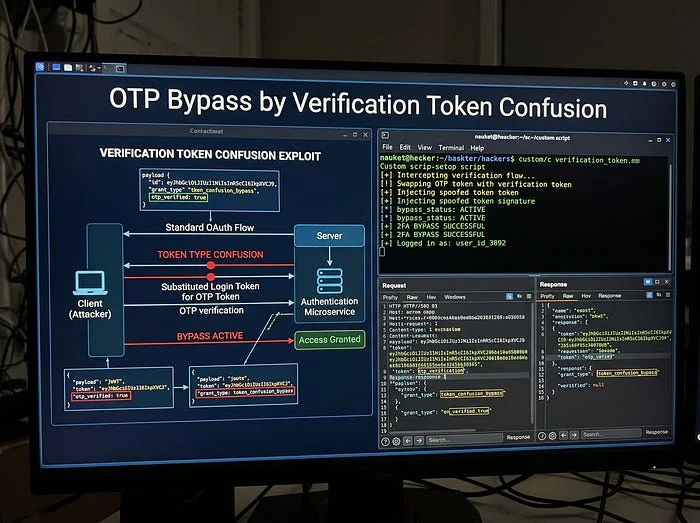
The diagram above is a system sequence diagram of the flow, showing the OTP request, the verification response and the later signup request that carries the verification token.
Setup
The preconditions were simple and entirely unglamorous:
- A HackerOne program with a registration flow that demanded a phone number from the target country.
- A disposable phone number, used to receive the OTP.
- The platform's JavaScript, pulled apart to understand how the OTP request was built, what the server expected in response, and what happened after a successful verification.
- Claude, used to help map out the API calls involved in the flow and to trace the request/response structure.
No account on the target existed at the start, and the researcher notes that fake numbers and his own number both failed. The disposable number was the only way in.
Finding it
The roadblock became the target. Because the registration could not be completed with an arbitrary number, the researcher spent about two weeks focused entirely on the OTP verification step.
Mapping the API calls revealed two things of interest. First, the OTP verification request included a field called requestToken. Second, a successful response flipped a flag from false to true. The first instinct was to force that flag to true manually, and that did not work. Looking further, the response contained another field: verificationToken.
That raised the obvious question: what if requestToken and verificationToken were meant to be the same value? That raised the question of whether requestToken and verificationToken were meant to be the same value.
Exploitation
Step 1: Request the OTP with a disposable number
The researcher used a disposable phone number to drive the normal OTP request. The report does not reproduce the request itself, only the observation that the verification request carried a requestToken field and that a successful response flipped a flag from false to true.
Step 2: Try to force the flag
Setting the flag to true by hand did not work.
Step 3: Reuse the token as the verification proof
The response also contained verificationToken. The researcher tested whether requestToken and verificationToken were interchangeable, and it worked. The verificationToken was then replayed in the signup request to prove the phone number had been verified.
The report does not include the raw HTTP requests or responses for these steps, so the exact parameter placement and response bodies are not shown here.
Step 4: Complete signup
The verificationToken was replayed in the signup request to prove the phone number had been verified; the report does not say whether signup then completed.
Root cause
The backend only checked that the token matched the phone number on record. It never confirmed that the token had actually come from a successful verification. The client was trusted to report its own verification state, and that trust was the vulnerability.
In other words, the verification token was treated as a bearer assertion of success rather than as a reference to a server-side record of a completed verification. The backend only checked that the token matched the phone number on record, never that it came from a successful verification.
Impact
The backend accepted the verificationToken as proof of verification without confirming a successful verification had occurred.
The report does not quantify the impact beyond account creation and access to the platform, and does not describe what an attacker could do once inside.
Fix
The lesson the author draws is that verification state should never be inferred from a token the client can simply echo back: the server needs to independently confirm that the verification step actually succeeded before accepting it as proof. The server needs to independently confirm that the verification step actually succeeded before accepting it as proof.
Variants to test
- Token substitution between stages. Capture the token issued at OTP request time and the token returned after a successful verification, then swap one for the other in the signup or finalisation request. A positive result is the server accepting the request-time token as proof of verification.
- Cross-number replay. Obtain a token for number A and submit it with number B in the signup request. A positive result is the account being created with B marked verified.
- Flag forcing. Where a response contains a boolean such as a verified flag, try setting it to
truein the next request. A positive result is the server honouring the client-supplied value; in this report it did not work, which is the expected behaviour. - Token reuse after expiry or failure. Request an OTP, fail the verification deliberately, then replay the token. A positive result is the token still being accepted as proof of a successful verification.
- Response field enumeration. Diff the JSON of a failed and a successful verification response. New fields that appear only on success, such as a verification token, are candidates for the substitution test above.
What happened, in plain words
A security researcher found a way to make a website treat a phone number as verified without completing a successful OTP verification. The site sent a one-time code (an OTP, short for one-time password) by SMS to a phone number, and you had to type that code back to prove the number was yours. The researcher discovered that the site handed out two different tokens (long random strings that act like a temporary pass) during this process, and that the server did not properly tell them apart. By replaying the verificationToken in the signup request, he could make the site treat the phone number as verified.
This article walks through the whole story from zero. You do not need any security background. You only need to know how to use a browser. Every technical word is explained the first time it appears, and there is a glossary at the end.
The researcher and the target
The author is Ammar Momen, who goes by the name Ammar Harris. He is a computer science student building a career in cybersecurity and penetration testing. He mentions an earlier finding on ProtonVPN as his most valuable contribution so far, and presents this write-up as a walkthrough of an OTP bypass caused by confusion between two verification tokens.
The target was a platform listed on HackerOne. HackerOne is a bug bounty platform: companies put their websites and apps on it and invite independent researchers to look for security flaws, usually paying a reward (a bounty) for valid findings. The report does not name the platform or describe what it does. What matters is its registration flow: most of the platform's features sat behind an account, and creating an account required a phone number from the target country.
The diagram is a system sequence diagram of the flow. A sequence diagram is a picture that shows, step by step, which party (here, the user's browser and the server) sends what to whom, in what order. It shows the OTP request, the verification response, and the later signup request that carries the verification token.
The setup
Before any testing, the researcher needed a few things in place:
- A HackerOne program with a registration flow that demanded a phone number from the target country.
- A disposable phone number, used to receive the OTP. A disposable number is a temporary number, often from an online service, that you can receive SMS on without using your real phone.
- The platform's JavaScript, pulled apart to understand how the OTP request was built, what the server expected in response, and what happened after a successful verification. JavaScript is the programming language that runs inside web pages; reading it tells you what requests the page sends to the server.
- Claude, an AI assistant, used to help map out the API calls involved in the flow and to trace the request/response structure. An API (application programming interface) is the set of addresses and rules a website's front end uses to talk to its back end. An API call is one such message, for example "please send an OTP to this number".
At the start the researcher had no account on the target. He notes that fake numbers and his own number both failed. The disposable number was the only way in.
Finding it
The roadblock became the target. Because registration could not be completed with an arbitrary number, the researcher spent about two weeks focused entirely on the OTP verification step.
Mapping the API calls revealed two things of interest. First, the OTP verification request included a field called requestToken. A field is one named piece of data inside a request, like one box on a form. Second, a successful response flipped a flag from false to true. A flag here is a simple true/false value that records a state, such as "verified: false".
The first instinct was to force that flag to true manually, and that did not work. Looking further, the response contained another field: verificationToken.
That raised the obvious question: what if requestToken and verificationToken were meant to be the same value? That raised the question of whether requestToken and verificationToken were meant to be the same value. The back end is the part of the site that runs on the server, out of sight of the browser.
Exploitation
Step 1: Request the OTP with a disposable number
The researcher used a disposable phone number to drive the normal OTP request. The report does not reproduce the request itself, only the observation that the verification request carried a requestToken field and that a successful response flipped a flag from false to true.
Why this step: you cannot test a verification flow without first triggering it. Requesting the OTP is what causes the server to create and hand out the requestToken.
Step 2: Try to force the flag
Setting the flag to true by hand did not work. "Client-supplied" means the value came from the browser rather than from the server. This is the correct behaviour: a server should never believe a browser that simply says "I am verified".
Why this step: the flag was the most obvious thing to tamper with. Ruling it out told the researcher the weakness lay somewhere else, in the token.
Step 3: Reuse the token as the verification proof
The response also contained verificationToken. The researcher tested whether requestToken and verificationToken were interchangeable, and it worked. The verificationToken was then replayed in the signup request to prove the phone number had been verified. "Replayed" means sending the same value again in a later request.
Why this step: if the two tokens are meant to represent two different moments (one issued when you ask for a code, one issued when you successfully enter it), then swapping them tests whether the server actually tracks which moment a token belongs to. Here it did not.
The report does not include the raw HTTP requests or responses for these steps, so the exact parameter placement and response bodies are not shown here.
Step 4: Complete signup
The verificationToken was replayed in the signup request to prove the phone number had been verified; the report does not say whether signup then completed.
Root cause
The back end only checked that the token matched the phone number on record. It never confirmed that the token had actually come from a successful verification. The client was trusted to report its own verification state, and that trust was the vulnerability.
In other words, the verification token was treated as a bearer assertion of success rather than as a reference to a server-side record of a completed verification. A bearer assertion is like a note that says "this person is verified": whoever holds the note is believed, without the server checking its own records. The backend only checked that the token matched the phone number on record, never that it came from a successful verification.
A useful comparison: imagine a cloakroom that gives you a ticket when you hand in a coat. If the attendant accepts any ticket, including one you wrote yourself, without checking it against the coats actually hanging there, then the ticket proves nothing. Here the server accepted a token without checking that a real verification had happened.
Impact
The backend accepted the verificationToken as proof of verification without confirming a successful verification had occurred.
The report does not quantify the impact beyond account creation and access to the platform, and does not describe what an attacker could do once inside.
Fix
The lesson the author draws is that verification state should never be inferred from a token the client can simply echo back: the server needs to independently confirm that the verification step actually succeeded before accepting it as proof. The server needs to independently confirm that the verification step actually succeeded before accepting it as proof.
Variants to test
If you want to look for similar bugs on other sites, these are the variations worth trying. Each one is a small experiment with a clear pass or fail result.
- Token substitution between stages. Capture the token issued at OTP request time and the token returned after a successful verification, then swap one for the other in the signup or finalisation request. A positive result is the server accepting the request-time token as proof of verification.
- Cross-number replay. Obtain a token for number A and submit it with number B in the signup request. A positive result is the account being created with B marked verified.
- Flag forcing. Where a response contains a boolean such as a verified flag, try setting it to
truein the next request. A positive result is the server honouring the client-supplied value; in this report it did not work, which is the expected behaviour. - Token reuse after expiry or failure. Request an OTP, fail the verification deliberately, then replay the token. A positive result is the token still being accepted as proof of a successful verification.
- Response field enumeration. Diff the JSON of a failed and a successful verification response. JSON is a common text format for data exchanged between a browser and a server, made of names and values. New fields that appear only on success, such as a verification token, are candidates for the substitution test above.
Glossary
- API (application programming interface): the set of addresses and rules a website's front end uses to talk to its back end.
- API call: one message sent from the browser to the server through the API, for example a request to send an OTP.
- Back end: the part of a website that runs on the server, out of sight of the browser.
- Bearer assertion: a value that is believed simply because the holder presents it, without the server checking its own records.
- Boolean: a value that is either true or false.
- Bug bounty: a programme where companies invite independent researchers to find security flaws, usually for a reward.
- Bypass: getting past a check or restriction that is supposed to stop you.
- Client: the browser (or app) on the user's side, as opposed to the server.
- Client-supplied: a value that came from the browser rather than from the server.
- Disposable phone number: a temporary number, often from an online service, used to receive SMS without using your real phone.
- Field: one named piece of data inside a request or response, like one box on a form.
- Flag: a simple true/false value that records a state, such as whether a phone number is verified.
- HackerOne: a bug bounty platform where companies list their programmes and researchers report findings.
- HTTP request / response: the message a browser sends to a server and the message the server sends back.
- JavaScript: the programming language that runs inside web pages and sends requests to the server.
- JSON: a common text format for data exchanged between a browser and a server, made of names and values.
- OTP (one-time password): a short code, often sent by SMS, that is valid once and is used to prove you control a phone number or account.
- Penetration testing: authorised, structured attempts to break into a system in order to find and fix its weaknesses.
- Replay: sending the same value again in a later request.
- Request token: in this report, the token the server hands out when an OTP is requested.
- Root cause: the underlying reason a vulnerability exists, as opposed to its visible symptom.
- Sequence diagram: a picture showing, step by step, which party sends what to whom, in what order.
- Server: the computer that runs the website and holds its data.
- Signup request: the request that creates the account, in this flow carrying the token that claims the phone number was verified.
- Token: a long random string that acts like a temporary pass, used to identify a session or prove a step was completed.
- Verification token: in this report, the token returned after a verification step, later replayed in the signup request.
- Vulnerability: a weakness in a system that allows someone to make it behave in a way its designers did not intend.



