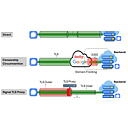
How i found Stored xss on your-domain.redacted.com
A stored XSS was found in a profile setting field; an initial payload was blocked but a modified one executed in the reporter's own dashboard.

{{media:0}} |
The full write-up lives on its author's site
It belongs to its author, so we link to it rather than copy it. The other two tabs are our own rewrites, checked against it.
What the report shows
The write-up describes a stored cross-site scripting (XSS) finding on your-domain.redacted.com, a site with user accounts and a profile or settings area. The researcher gives no program name, no severity, no bounty and no fix details, and the hostname is redacted throughout.
The flow the author walks through is short:
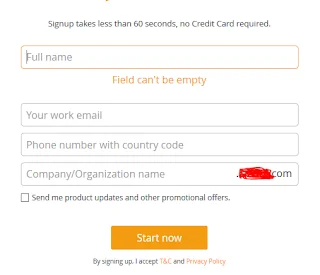
- Create an account on the signup page.
- After signing up, open the settings page.
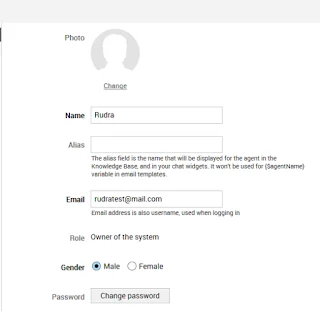
- The settings page is where profile data is edited.
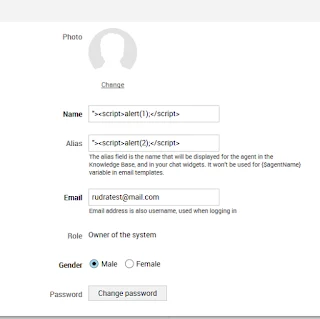
- A payload was placed in a profile field. The profile rendered it without executing anything, so the first attempt produced no XSS.
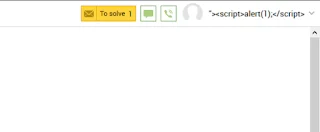
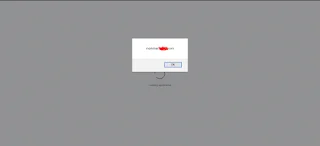
- A second, different payload was then used, and this time a JavaScript popup appeared, confirming execution.
- The author closes with a reaction GIF rather than further technical detail.

The report does not include the two payloads, the name of the vulnerable field, the request or response, or any note on how the value was stored and later rendered. It also does not say whether the finding was triaged, rewarded or fixed. What it does establish is the shape of the bug: input saved through the settings page was later rendered in a context where it executed as script, which is what makes it stored rather than reflected.
Root cause
The likely cause is that the application persists user-supplied profile data and later writes it into an HTML page without correct output encoding for the context it lands in. The first payload failing and the second succeeding points to context sensitivity: the value was probably filtered or escaped in a way that blocked the first syntax but not the second, for example because it was placed inside an attribute, inside a script block, or because a blacklist covered one tag or event handler but not another. The report does not identify which of these applies.
Impact
The demonstrated impact is a JavaScript popup on the profile page after the payload was saved. The report does not show the payload executing for any other user. The report does not show what an attacker could do beyond the popup. The report itself shows only an alert-style popup and makes no claim about what an attacker could steal or change, so the practical ceiling here is not established.
How this kind of bug works
Stored XSS happens when an application accepts data from one request, saves it, and later includes it in a page without encoding it for the place it appears. The browser cannot tell application data from application markup, so any <, >, quote or event handler that survives storage and rendering is treated as part of the document. The dangerous contexts are more varied than plain HTML body: attribute values, href and src URLs, inline <script> blocks, CSS, and JSON embedded in a page each need their own escaping rules. A filter that strips <script> does nothing for an onerror attribute or a javascript: URL, which is why blocklist approaches fail and context-aware output encoding plus a strict Content Security Policy succeed.
How to test for it
- Map every place the application stores data you control and every place that data is later displayed: profile fields, display names, comments, support tickets, filenames, address fields, admin-facing user lists.
- Submit a unique harmless marker first, such as a distinctive string, and find every page and API response where it comes back. This tells you which sinks exist before you try to break anything.
- For each sink, note the rendering context from the response body: HTML text, attribute value, URL, script block, or JSON.
- Send a payload matched to that context. For HTML text, a tag with an event handler; for an attribute, a value that breaks out of the quotes; for a URL, a
javascript:scheme; for a script block, a string that closes the existing literal. Keep each payload minimal and unique so you can tell which sink fired. - Reload the page in a fresh session and, where relevant, view it as a second account or as an administrator, since stored payloads often execute in a different user's context than the one that submitted them.
- A positive result is your own JavaScript running in the page's origin, visible as a dialog, a DOM change or a callback to a listener you control.
Common false positives: the marker appearing HTML-encoded in the response but the browser still showing it as text; payloads that only execute in your own browser because of an extension or a developer console paste; reflected execution on the same request rather than a stored value; and execution inside a sandboxed iframe or a separate origin that does not carry the session you care about. Always confirm the origin shown in the executing context.
How it is fixed
Encode output for the exact context at render time, using the framework's contextual escaping rather than hand-written replacements. Validate and normalise input on the server as a secondary layer, not as the primary defence. Apply a Content Security Policy that disallows inline script and restricts script sources, which limits the damage of any encoding mistake that slips through. Mark cookies HttpOnly where the application does not need them in JavaScript, and set SameSite appropriately. For rich-text fields, sanitise with a maintained HTML sanitiser that allows a small, explicit set of tags and attributes.
Hunting notes
Stored XSS tends to hide where data crosses a boundary: fields a user edits but an administrator views, names shown in notification emails and in-app inboxes, file names in upload lists, and values echoed into PDF or export templates. Recon signals worth following are admin panels reachable from a normal account, features that render other users' content, and any place where the same value appears in more than one context, since one context is often encoded and another is not. To make a report land, show the full path from submission to execution, state which user role triggers it and under what conditions, and demonstrate a concrete consequence such as reading a value from the page or performing an action, rather than only a popup. Note any authentication or interaction the victim must perform, and keep the proof minimal so triage can reproduce it quickly.
What happened, in plain words
This write-up describes a stored cross-site scripting (XSS) finding on your-domain.redacted.com, a site with user accounts and a profile or settings area. The researcher gives no program name, no severity, no bounty and no fix details, and the hostname is redacted throughout.
A quick word on the main idea before the steps. A web page is a document the browser reads and turns into what you see. Part of that document is text meant for humans, and part is instructions meant for the browser, such as markup and scripts. When a site takes something a user typed and later drops it into a page without marking it as plain text, the browser can mistake the user's text for instructions. If those instructions are JavaScript, the browser runs them. That is XSS. "Stored" means the value was saved on the server first, so it runs for anyone who later loads the page, not just for the person who typed it.
The flow the author walks through is short:
- Create an account on the signup page.
- After signing up, open the settings page.
- The settings page is where profile data is edited.
- A payload was placed in a profile field. A payload here just means the text you type in the hope that the browser will treat it as code. The profile rendered it without executing anything, so the first attempt produced no XSS.
- A second, different payload was then used, and this time a JavaScript popup appeared, confirming execution. A popup is the simplest proof that your code ran: the browser is doing something the site did not intend.
- The author closes with a reaction GIF rather than further technical detail.
The report does not include the two payloads, the name of the vulnerable field, the request or response, or any note on how the value was stored and later rendered. It also does not say whether the finding was triaged, rewarded or fixed. What it does establish is the shape of the bug: input saved through the settings page was later rendered in a context where it executed as script, which is what makes it stored rather than reflected. Reflected would mean the value comes back only in the immediate response to your own request; stored means it sits on the server and greets the next visitor.
Why the first attempt failed and the second worked
The likely cause is that the application saves user-supplied profile data and later writes it into an HTML page without correct output encoding for the context it lands in. Encoding means converting characters that have special meaning in HTML into harmless equivalents, so the browser shows them as text instead of acting on them.
The first payload failing and the second succeeding points to context sensitivity. The same characters mean different things depending on where they sit in a page: between two tags, inside an attribute such as href="...", inside a <script> block, or inside a block of data. A value was probably filtered or escaped in a way that blocked the first syntax but not the second, for example because it was placed inside an attribute, inside a script block, or because a blacklist covered one tag or event handler but not another. A blacklist is a list of things to block; it only works for the items someone thought of. The report does not identify which of these applies.
What it could mean in practice
The demonstrated impact is a JavaScript popup on the profile page after the payload was saved. The report does not show the payload executing for any other user. The report does not show what an attacker could do beyond the popup. A session is the site's way of remembering that you are logged in, usually via a cookie, a small piece of data the browser sends with each request. The report itself shows only an alert-style popup and makes no claim about what an attacker could steal or change, so the practical ceiling here is not established.
In general, how this kind of bug works
Stored XSS happens when an application accepts data from one request, saves it, and later includes it in a page without encoding it for the place it appears. The browser cannot tell application data from application markup, so any <, >, quote or event handler that survives storage and rendering is treated as part of the document. An event handler is an attribute that tells the browser to run code when something happens, such as an image failing to load.
The dangerous contexts are more varied than plain HTML body: attribute values, href and src URLs, inline <script> blocks, CSS, and JSON embedded in a page each need their own escaping rules. A filter that strips <script> does nothing for an onerror attribute or a javascript: URL, which is why blocklist approaches fail and context-aware output encoding plus a strict Content Security Policy succeed. A Content Security Policy is a header the server sends telling the browser which sources of script it may run, so even a mistake in encoding has less room to cause harm.
How to test for it
- Map every place the application stores data you control and every place that data is later displayed: profile fields, display names, comments, support tickets, filenames, address fields, admin-facing user lists.
- Submit a unique harmless marker first, such as a distinctive string, and find every page and API response where it comes back. This tells you which sinks exist before you try to break anything. A sink is any place where data ends up in the page.
- For each sink, note the rendering context from the response body: HTML text, attribute value, URL, script block, or JSON.
- Send a payload matched to that context. For HTML text, a tag with an event handler; for an attribute, a value that breaks out of the quotes; for a URL, a
javascript:scheme; for a script block, a string that closes the existing literal. Keep each payload minimal and unique so you can tell which sink fired. - Reload the page in a fresh session and, where relevant, view it as a second account or as an administrator, since stored payloads often execute in a different user's context than the one that submitted them.
- A positive result is your own JavaScript running in the page's origin, visible as a dialog, a DOM change or a callback to a listener you control. The origin is the scheme, host and port that identify the site, and it decides which cookies and permissions apply.
Common false positives: the marker appearing HTML-encoded in the response but the browser still showing it as text; payloads that only execute in your own browser because of an extension or a developer console paste; reflected execution on the same request rather than a stored value; and execution inside a sandboxed iframe or a separate origin that does not carry the session you care about. Always confirm the origin shown in the executing context.
How it is fixed
Encode output for the exact context at render time, using the framework's contextual escaping rather than hand-written replacements. Validate and normalise input on the server as a secondary layer, not as the primary defence. Apply a Content Security Policy that disallows inline script and restricts script sources, which limits the damage of any encoding mistake that slips through. Mark cookies HttpOnly where the application does not need them in JavaScript, and set SameSite appropriately. HttpOnly stops scripts from reading a cookie, and SameSite controls when the browser sends it with requests from other sites. For rich-text fields, sanitise with a maintained HTML sanitiser that allows a small, explicit set of tags and attributes.
Hunting notes
Stored XSS tends to hide where data crosses a boundary: fields a user edits but an administrator views, names shown in notification emails and in-app inboxes, file names in upload lists, and values echoed into PDF or export templates. Recon signals worth following are admin panels reachable from a normal account, features that render other users' content, and any place where the same value appears in more than one context, since one context is often encoded and another is not. To make a report land, show the full path from submission to execution, state which user role triggers it and under what conditions, and demonstrate a concrete consequence such as reading a value from the page or performing an action, rather than only a popup. Note any authentication or interaction the victim must perform, and keep the proof minimal so triage can reproduce it quickly.
Glossary
- Stored XSS: XSS where the value is saved on the server and runs for later visitors.
- Reflected XSS: XSS where the value comes back only in the response to the sender's own request.
- Payload: the text you submit in an attempt to make the browser run code.
- Output encoding: converting special characters so the browser displays them as text instead of acting on them.
- Context: the place in a page where a value lands, such as text, an attribute, a URL or a script block.
- Event handler: an HTML attribute that runs code when something happens, such as an image failing to load.
- Blacklist: a list of known-bad items to block, which misses anything not on the list.
- Sink: any place where data ends up in the page.
- Session: the site's way of remembering that you are logged in.
- Cookie: a small piece of data the browser stores and sends with requests.
- Origin: the scheme, host and port that identify a site and decide which cookies and permissions apply.
- Content Security Policy: a server header telling the browser which script sources it may run.
- HttpOnly: a cookie flag that stops scripts from reading the cookie.
- SameSite: a cookie flag controlling when the browser sends the cookie with cross-site requests.
- Sanitiser: a tool that strips dangerous markup from rich text while keeping a small allowed set of tags.
- Triage: the process of reviewing and validating a submitted report.