How I Gain Unrestricted File Upload Remote Code Execution Bug Bounty
The profile logo upload feature only checked file type in the browser, so an attacker could change the extension and content type in the request to upload a PHP script. The uploaded script could then be executed on the server, allowing arbitrary command execution.
 Published on medium.com
How I Gain Unrestricted File Upload Remote Code Execution Bug Bounty.
The full write-up lives on its author's site
It belongs to its author, so we link to it rather than copy it. The other two tabs are our own rewrites, checked against it.
Context
The target was a private-scope application, so the company name and branding are withheld and the write-up refers to it simply as target. The feature in scope was a profile logo upload: users can upload an image that is displayed as their profile logo. The upload endpoint shown in the report is:
https://target.com/profile/upload.php/
The vulnerability class is unrestricted file upload, which the author links to the OWASP page on the topic. The write-up was published on 17 February 2020, and the report timeline at the end records the disclosure as reported on 31 March 2019, answered on 8 April 2019 and rewarded on 9 May 2019. The author states that the vulnerability was patched and fixed by the team.
Setup
No accounts, roles or versions are described beyond the fact that the profile logo upload feature was in scope. The tooling named in the report is Burp Suite, used to intercept and modify the upload request in transit.
Finding it
After scoping the application, the author began testing for several vulnerability classes, starting with file upload functionality because the target had a profile upload feature in scope. The logo upload form accepts a file from the user and sends it to the server:
The form is the entry point for the attack. The report describes the filtering in place as client-side: the check is performed in the browser using JavaScript, VBScript or HTML5 before the file is sent to the server. The author explains that programmers use this method to optimise user interaction and issue a quick response at the browser level.
Exploitation
Step 1: load a valid image through the form
The author loaded an image through the browser so that the client-side check was satisfied and the request was generated normally.
Step 2: intercept and modify the request in Burp Suite
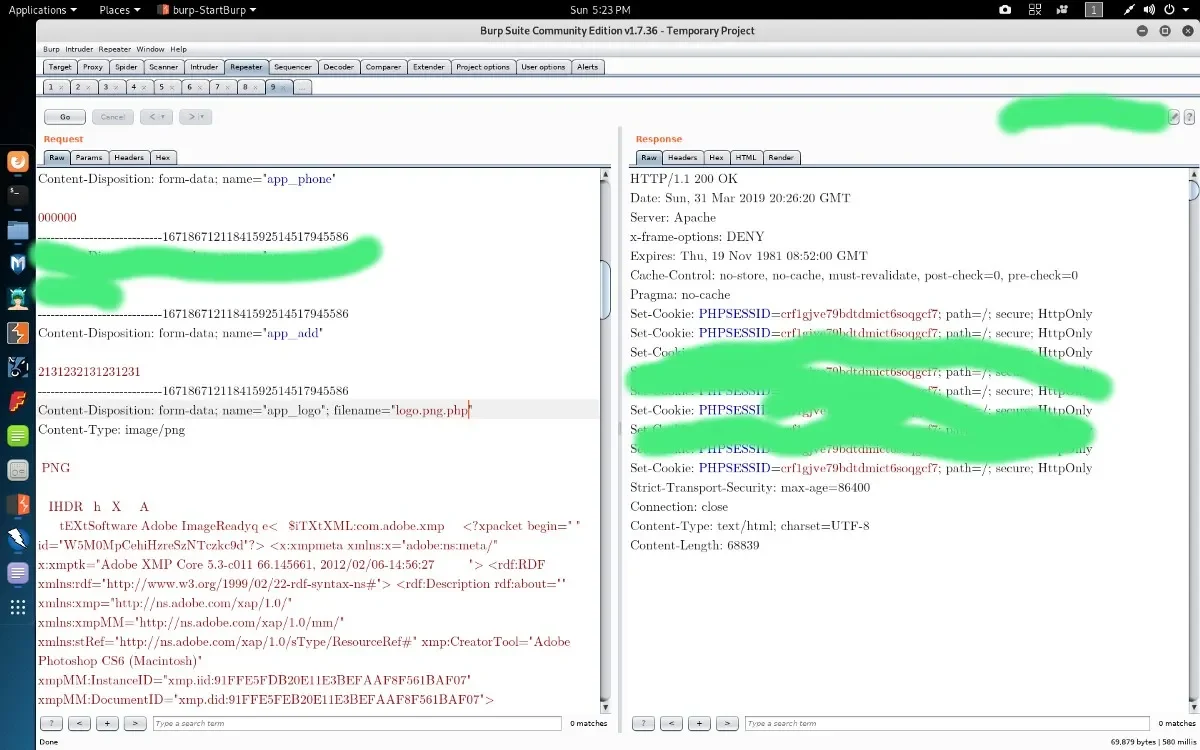
With the request intercepted, two changes were made before it reached the server:
- The file extension was changed from
.jpegto.php. - The content type of the file was changed from
image/pngtoapplication/php.
The report does not reproduce the raw HTTP request, so the exact headers and body are not shown here.
Step 3: replace the file contents with a command shell
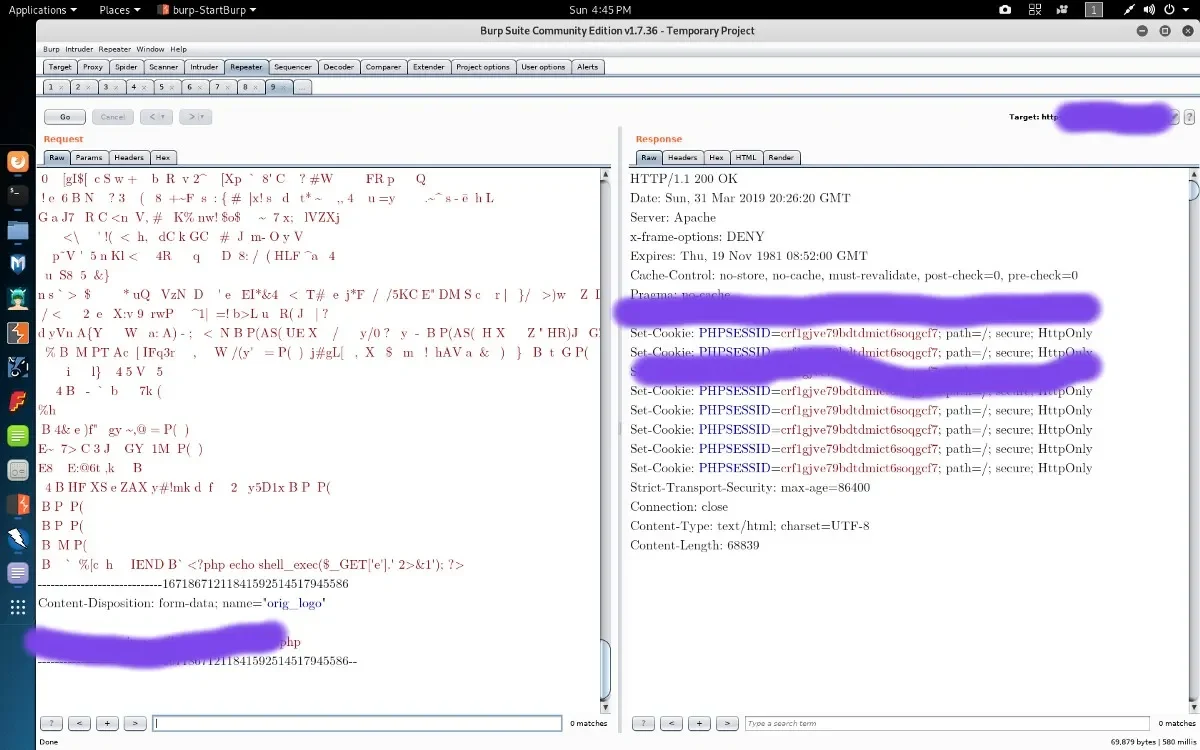
The contents of the file were replaced with a short PHP payload:
<?php echo shell_exec($_GET[’e’].’ 2>&1’); ?>
This is a basic command shell: it takes the value of the e query parameter, passes it to shell_exec, appends 2>&1 so that standard error is merged into the output, and echoes the result back in the response.
Step 4: upload and execute
The modified file was uploaded to the web server. The report shows the result of the upload and of running a command through the shell:
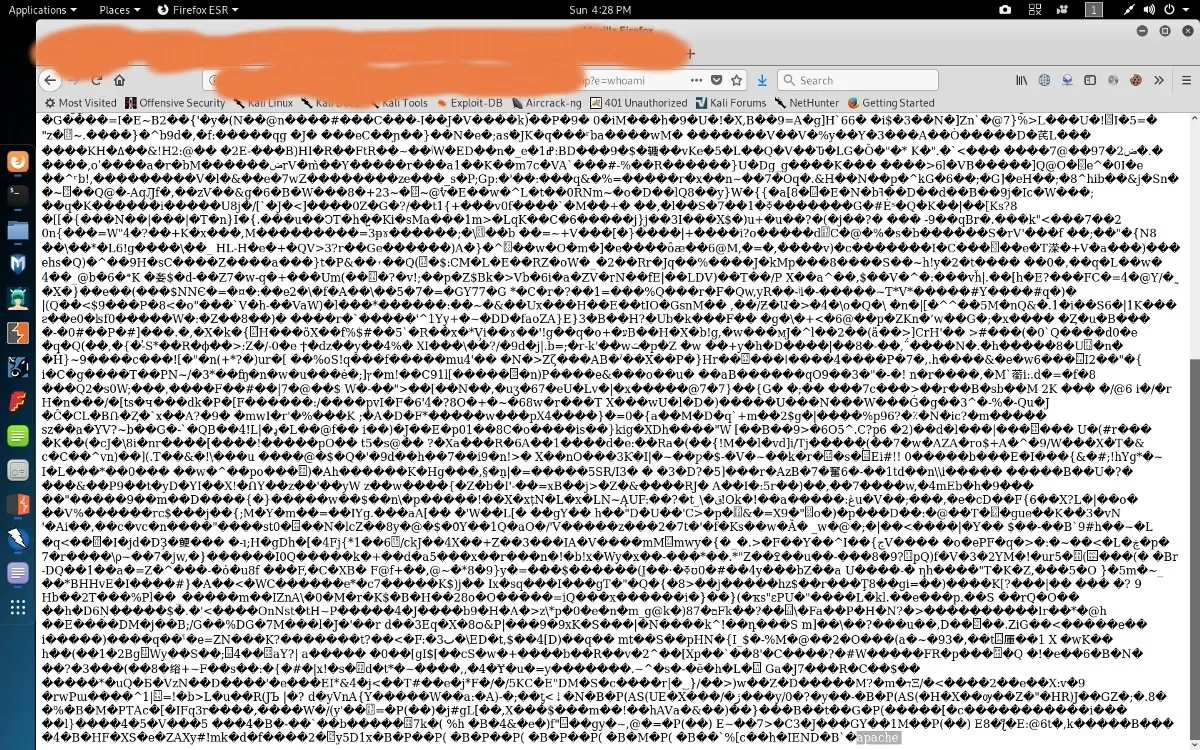
At the bottom right of that image, the author points out Apache, seen when running the command whoami. In other words, the command executed in the context of the Apache web server process. At that point the author stopped testing, because code execution had been achieved.
Root cause
The upload relied on client-side validation. The check ran in the browser before the file was sent, so an attacker who controls the request can change the extension and the declared content type after the check has passed. The server then accepted a .php file and executed it, which is what turned the upload into remote code execution. The report does not describe any server-side validation.
Impact
The author describes the consequences of unrestricted file upload as varying: complete system takeover, an overloaded file system or database, forwarding attacks to back-end systems, client-side attacks, or simple defacement. The impact is rated high, since code can be executed in the server context or on the client side. The likelihood of detection for the attacker is described as high, the prevalence as common, and the resulting severity as high. The report also notes that a file upload module's access controls should be examined to assess the risk properly.
On the server side, the web server can be compromised by uploading and executing a web shell that can run commands, browse system files, browse local resources, attack other servers, or exploit local vulnerabilities. In this case the demonstrated command ran in the context of the Apache web server process.
Detection tips for blue teams
The author offers two detection approaches.
Tip 1: two free Sigma rules. The first rule looks for web shell command line keywords on Windows process creation events, keyed on parent images such as Apache, Tomcat, w3wp.exe, php-cgi.exe, nginx.exe and httpd.exe, and command lines containing strings such as whoami, net user, ping -n, systeminfo, &cd&echo and cd /d:
title: Webshell Detection With Command Line Keywordsid: bed2a484-9348-4143-8a8a-b801c979301cdescription: Detects certain command line parameters often used during reconnaissance activity via web shellsauthor: Florian Rothreference: - https://www.fireeye.com/blog/threat-research/2013/08/breaking-down-the-china-chopper-web-shell-part-ii.htmldate: 2017/01/01modified: 2019/10/26tags: - attack.privilege_escalation - attack.persistence - attack.t1100logsource: category: process_creation product: windowsdetection: selection: ParentImage: - '*\apache*' - '*\tomcat*' - '*\w3wp.exe' - '*\php-cgi.exe' - '*\nginx.exe' - '*\httpd.exe' CommandLine: - '*whoami*' - '*net user *' - '*ping -n *' - '*systeminfo' - '*&cd&echo*' - '*cd /d*' # https://www.computerhope.com/cdhlp.htm condition: selectionfields: - CommandLine - ParentCommandLinefalsepositives: - unknownlevel: high
The second rule looks for suspicious shell commands on Linux, including download-and-execute patterns, reverse shell helpers, and common exploit and malware command lines:
title: Suspicious Activity in Shell Commandsid: 2aa1440c-9ae9-4d92-84a7-a9e5f5e31695description: Detects suspicious shell commands used in various exploit codes (see references)references: - http://www.threatgeek.com/2017/03/widespread-exploitation-attempts-using-cve-2017-5638.html - https://github.com/rapid7/metasploit-framework/blob/master/modules/exploits/multi/http/struts_code_exec_exception_delegator.rb#L121 - http://pastebin.com/FtygZ1cg - https://artkond.com/2017/03/23/pivoting-guide/author: Florian Rothdate: 2017/08/21modified: 2019/02/05logsource: product: linuxdetection: keywords: # Generic suspicious commands - 'wget * - http* | perl' - 'wget * - http* | sh' - 'wget * - http* | bash' - 'python -m SimpleHTTPServer' - '-m http.server' # Python 3 - 'import pty; pty.spawn*' - 'socat exec:*' - 'socat -O /tmp/*' - 'socat tcp-connect*' - '*echo binary >>*' # Malware - '*wget *; chmod +x*' - '*wget *; chmod 777 *' - '*cd /tmp || cd /var/run || cd /mnt*' # Apache Struts in-the-wild exploit codes - '*stop;service iptables stop;*' - '*stop;SuSEfirewall2 stop;*' - 'chmod 777 2020*' - '*>>/etc/[redacted]' # Metasploit framework exploit codes - '*base64 -d /tmp/*' - '* | base64 -d *' - '*/chmod u+s *' - '*chmod +s /tmp/*' - '*chmod u+s /tmp/*' - '* /tmp/haxhax*' - '* /tmp/ns_sploit*' - 'nc -l -p *' - 'cp /bin/ksh *' - 'cp /bin/sh *' - '* /tmp/*.b64 *' - '*/tmp/ysocereal.jar*' - '*/tmp/x *' - '*; chmod +x /tmp/*' - '*;chmod +x /tmp/*' condition: keywordsfalsepositives: - Unknownlevel: high
The advice is to forward Apache logs and Windows IIS logs into a SIEM such as Elasticsearch Kibana or Splunk, convert the Sigma rules for the chosen SIEM with the right index, and use them to detect someone uploading and executing a web shell on the server.
Tip 2: Microsoft Defender ATP (paid). Defender ATP exposes behaviours that indicate web shell installation and post-compromise activity by analysing script file writes and process executions. When alerted, security operations teams can use its investigation capabilities to resolve web shell attacks. The author links to a Microsoft Security blog post from 4 February 2020 on investigating web shell attacks.
Fix
The report does not describe the code change the team made; it only states that the vulnerability was patched and fixed. The author's recommendations for developers are:
- Only allow specific file extensions, using a whitelist of allowed files, so that executables, scripts and other potentially malicious content cannot be uploaded.
- Randomise uploaded file names, so attackers cannot try to access the file under the name they uploaded.
- Store uploaded files outside the webroot, so attackers cannot execute the file through a website URL.
- Use simple error messages, without directory paths, server configuration settings or other information an attacker could use.
- Scan anything that arrives via upload for malware and viruses, for example with the VirusTotal API or an EDR on the server.
- Never trust client-side validation; always use server-side validation.
Variants to test
- Extension swap on an image upload. Upload a valid image, intercept the request and change the extension to a server-side script extension the stack executes (
.php,.phtml,.jsp,.aspx). A positive result is the file being stored and executed when requested by URL. - Content type swap. Change the declared content type from an image type to a script type, as done here with
image/pngtoapplication/php. A positive result is the server accepting the file without re-checking the type against the actual content. - Client-side only checks. Disable JavaScript in the browser or intercept the request after the browser check has passed. A positive result is the server accepting a file the browser would have rejected.
- Filename tricks. Try alternative extensions, double extensions or trailing characters where the server maps files to handlers. A positive result is execution under a name the filter did not anticipate.
- Storage location. After a successful upload, request the file directly by URL. A positive result is the file being served from a path where the web server executes it rather than returning it as static content.
- Command execution confirmation. If a script is executed, run a harmless command such as
whoamithrough it. A positive result is command output in the response, which confirms code execution rather than mere file storage.
What happened, in plain words
A security researcher found a way to upload a file to a website that the website then ran as a program. That is the whole story in one sentence. The website had a feature that let people upload a picture to use as their profile logo. The site checked the file in the browser before sending it, and the researcher bypassed that check. By changing the file's name and contents on the way to the server, the researcher turned a harmless picture upload into a way to run commands on the server itself. This kind of mistake is called an unrestricted file upload, and when it lets you run commands it becomes remote code execution.
The write-up was published on 17 February 2020. The company is not named because the work was done under a private arrangement, so the report calls it simply target. The author says the problem was patched and fixed by the team.
The pieces you need to know first
Before walking through the steps, here are the ideas the report leans on, explained from scratch.
- A web server is the computer that holds a website and answers requests from browsers. When you type an address, your browser asks the server for a page and the server sends it back.
- A URL is the address of something on the web, like
https://target.com/profile/upload.php/. The part after the domain,/profile/upload.php/, points at a particular page or script on the server. - A file upload feature is any part of a website that lets you send a file from your computer to the server, for example a profile picture, a logo or a document.
- Client-side means the work happens in your browser, on your own computer. Server-side means it happens on the web server. This distinction is the heart of the whole bug.
- JavaScript, VBScript and HTML5 are technologies a browser uses to run small programs inside a web page. A site can use them to check a file before it is sent.
- A content type is a label attached to a file that says what kind of file it is, such as
image/pngfor a picture orapplication/phpfor a PHP script. It is just a label in the request; it does not have to match what the file really contains. - PHP is a programming language commonly used to build web pages. A file ending in
.phpis treated by the server as a program to run, not as a picture to show. - A web shell is a small script uploaded to a server that lets an attacker run commands on it through the browser.
- Remote code execution means an attacker can make the server run commands of their choosing from somewhere else.
- Burp Suite is a tool that sits between your browser and the server. It lets you pause a request, look at it, change it, and then send it on. Think of it as a postal worker who lets you open a letter, rewrite it, and seal it again before delivery.
- A query parameter is a value added to the end of a URL after a question mark, like
?e=whoami. The server can read it and use it. whoamiis a command that asks the computer which user account is currently running it. It is a harmless way to prove you can run commands.
Finding the vulnerability
After agreeing the scope of the test, the researcher began checking for several kinds of weakness. File upload features are a common place to start, and this target had a profile upload feature in scope. The feature lets a user upload a logo that is shown on their profile. The upload page is:
https://target.com/profile/upload.php/
That URL is the door the attack walks through. The form on that page takes a file from you and sends it to the server.
The image shows the logo upload form: the page where a user picks a file and submits it. This is the entry point. Everything that follows happens to the request this form produces.
The weakness: checking in the browser
The report describes the filtering on this form as client-side. The check is performed in the browser using JavaScript, VBScript or HTML5 before the file is sent to the server. The author explains that programmers use this method to give users a quick response and to make the interface feel smooth: if you pick the wrong kind of file, the page can tell you immediately without a round trip to the server.
The problem is that anything the browser does is under the control of the person using the browser. A check that runs in your own browser is like a nightclub bouncer who asks you to check your own ID and report back. You can simply say yes. The server, which is the only party that matters, never gets to make the decision.
Bypassing the check
The researcher loaded a normal image through the browser first. This matters because it lets the browser's own check pass and produces a normal, well-formed upload request. Then, using Burp Suite, the request was paused on its way to the server and two things were changed:
- The file extension was changed from
.jpegto.php. - The content type of the file was changed from
image/pngtoapplication/php.
The extension is the part of the file name after the dot. It tells the server what kind of file it is and, crucially, whether to treat it as a picture or as a program. The content type is the label in the request that says what the file is. Both were changed after the browser had already approved the file, so the browser's opinion no longer mattered.
The contents of the file were then replaced with a short PHP program:
<?php echo shell_exec($_GET[’e’].’ 2>&1’); ?>
Line by line, in plain words:
<?phpand?>mark the start and end of PHP code inside the file. Anything between them is run by the server as a program.$_GET[’e’]reads the value of a query parameter calledefrom the URL. If the URL ends in?e=whoami, this part becomeswhoami.shell_exec(...)hands that value to the operating system as a command and captures whatever the command prints.’ 2>&1’is appended to the command. In a shell,2>&1means "send error messages to the same place as normal output", so if the command fails you still see why.echoprints the captured output back into the web page, so the person who sent the request sees the result in their browser.
Together this is a basic command shell: a tiny program that runs whatever command you put in the URL and shows you the answer.
The image shows the file content being changed before upload.
Uploading and running it
The modified file was then sent to the web server. The modified file was sent to the web server, which accepted the .php file and executed it.
The image shows the result of the upload and of running a command through the shell. At the bottom right you can see Apache, which appeared when the command whoami was run. Apache is the web server software, so the command ran as the account the web server uses. That is the proof: the file was not just stored, it was executed.
At that point the researcher stopped testing, because code execution had been achieved. There was no need to go further.
Why it worked
The upload relied on client-side validation. The check ran in the browser before the file was sent, so anyone who controls the request can change the extension and the declared content type after the check has passed. The server then accepted a .php file and executed it, which is what turned a file upload into remote code execution. The report does not describe any server-side validation.
Impact
The author describes the consequences of unrestricted file upload as varying: complete system takeover, an overloaded file system or database, forwarding attacks to back-end systems, client-side attacks, or simple defacement. The impact is rated high, since code can be executed in the server context or on the client side. The likelihood of detection for the attacker is described as high, the prevalence as common, and the resulting severity as high. The report also notes that a file upload module's access controls should be examined to assess the risk properly.
On the server side, the web server can be compromised by uploading and executing a web shell that can run commands, browse system files, browse local resources, attack other servers, or exploit local vulnerabilities. In this case the demonstrated command ran in the context of the Apache web server process.
Detection tips for blue teams
A blue team is the group that defends systems, as opposed to the red team that attacks them. The author offers two detection approaches.
Tip 1: two free Sigma rules
Sigma is a way of writing detection rules in a common format that can be converted to whatever system you use to collect logs. The first rule looks for web shell command line keywords on Windows process creation events. It keys on parent images such as Apache, Tomcat, w3wp.exe, php-cgi.exe, nginx.exe and httpd.exe, and command lines containing strings such as whoami, net user, ping -n, systeminfo, &cd&echo and cd /d:
title: Webshell Detection With Command Line Keywordsid: bed2a484-9348-4143-8a8a-b801c979301cdescription: Detects certain command line parameters often used during reconnaissance activity via web shellsauthor: Florian Rothreference: - https://www.fireeye.com/blog/threat-research/2013/08/breaking-down-the-china-chopper-web-shell-part-ii.htmldate: 2017/01/01modified: 2019/10/26tags: - attack.privilege_escalation - attack.persistence - attack.t1100logsource: category: process_creation product: windowsdetection: selection: ParentImage: - '*\apache*' - '*\tomcat*' - '*\w3wp.exe' - '*\php-cgi.exe' - '*\nginx.exe' - '*\httpd.exe' CommandLine: - '*whoami*' - '*net user *' - '*ping -n *' - '*systeminfo' - '*&cd&echo*' - '*cd /d*' # https://www.computerhope.com/cdhlp.htm condition: selectionfields: - CommandLine - ParentCommandLinefalsepositives: - unknownlevel: high
What this rule says, in plain words:
title,id,description,author,dateandmodifiedare labels that describe the rule. They do not affect what it matches.referencepoints at background reading on web shells.tagsattach the rule to known attacker techniques, here privilege escalation, persistence and a technique numbered T1100.logsourcesays where the events come from: process creation events on Windows.detection.selection.ParentImagelists the programs whose child processes are interesting. If Apache, Tomcat, IIS (w3wp.exe), PHP (php-cgi.exe), nginx or httpd starts a process, that is worth a look, because web servers should rarely be starting command line programs.detection.selection.CommandLinelists the strings that suggest reconnaissance:whoami,net user,ping -n,systeminfo,&cd&echoandcd /d.condition: selectionmeans the rule fires when both the parent image and the command line match.fieldssays which parts of the event to show in the alert.falsepositives: unknownadmits the author does not know what legitimate activity might trigger it.level: highis the severity the rule assigns.
The second rule looks for suspicious shell commands on Linux, including download-and-execute patterns, reverse shell helpers, and common exploit and malware command lines:
title: Suspicious Activity in Shell Commandsid: 2aa1440c-9ae9-4d92-84a7-a9e5f5e31695description: Detects suspicious shell commands used in various exploit codes (see references)references: - http://www.threatgeek.com/2017/03/widespread-exploitation-attempts-using-cve-2017-5638.html - https://github.com/rapid7/metasploit-framework/blob/master/modules/exploits/multi/http/struts_code_exec_exception_delegator.rb#L121 - http://pastebin.com/FtygZ1cg - https://artkond.com/2017/03/23/pivoting-guide/author: Florian Rothdate: 2017/08/21modified: 2019/02/05logsource: product: linuxdetection: keywords: # Generic suspicious commands - 'wget * - http* | perl' - 'wget * - http* | sh' - 'wget * - http* | bash' - 'python -m SimpleHTTPServer' - '-m http.server' # Python 3 - 'import pty; pty.spawn*' - 'socat exec:*' - 'socat -O /tmp/*' - 'socat tcp-connect*' - '*echo binary >>*' # Malware - '*wget *; chmod +x*' - '*wget *; chmod 777 *' - '*cd /tmp || cd /var/run || cd /mnt*' # Apache Struts in-the-wild exploit codes - '*stop;service iptables stop;*' - '*stop;SuSEfirewall2 stop;*' - 'chmod 777 2020*' - '*>>/etc/[redacted]' # Metasploit framework exploit codes - '*base64 -d /tmp/*' - '* | base64 -d *' - '*/chmod u+s *' - '*chmod +s /tmp/*' - '*chmod u+s /tmp/*' - '* /tmp/haxhax*' - '* /tmp/ns_sploit*' - 'nc -l -p *' - 'cp /bin/ksh *' - 'cp /bin/sh *' - '* /tmp/*.b64 *' - '*/tmp/ysocereal.jar*' - '*/tmp/x *' - '*; chmod +x /tmp/*' - '*;chmod +x /tmp/*' condition: keywordsfalsepositives: - Unknownlevel: high
What this rule says, in plain words:
- The header fields do the same job as in the first rule: they name the rule, credit the author and point at references.
logsource.product: linuxsays the events come from Linux machines.detection.keywordsis a list of strings to look for in command lines. Each line is a pattern, and*means "anything here".- The first group covers generic suspicious commands. For example,
wget * - http* | shmeans downloading something and piping it straight into a shell, which is how a lot of malware starts.python -m SimpleHTTPServerand-m http.servermean someone is serving files from the machine.socatlines are often used to build a reverse shell, which is a connection back to the attacker. - The malware group covers download-then-make-executable patterns such as
wget *; chmod +x*, and moving into temporary directories such ascd /tmp || cd /var/run || cd /mnt. - The Apache Struts group covers commands seen in real attacks against that software, such as stopping firewalls.
- The Metasploit group covers commands left behind by a common attack toolkit, such as decoding base64 payloads, setting setuid bits, and starting listeners with
nc -l -p. condition: keywordsmeans the rule fires if any of the listed strings appears.falsepositives: Unknownandlevel: highwork as in the first rule.
The advice is to forward Apache logs and Windows IIS logs into a SIEM such as Elasticsearch Kibana or Splunk, convert the Sigma rules for the chosen SIEM with the right index, and use them to detect someone uploading and executing a web shell on the server. A SIEM is a system that collects logs from many machines in one place so you can search them.
Tip 2: Microsoft Defender ATP (paid)
Defender ATP exposes behaviours that indicate web shell installation and post-compromise activity by analysing script file writes and process executions. When alerted, security operations teams can use its investigation capabilities to resolve web shell attacks. The author links to a Microsoft Security blog post from 4 February 2020 on investigating web shell attacks.
Fix
The report does not describe the code change the team made; it only states that the vulnerability was patched and fixed. The author's recommendations for developers are:
- Only allow specific file extensions, using a whitelist of allowed files, so that executables, scripts and other potentially malicious content cannot be uploaded.
- Randomise uploaded file names, so attackers cannot try to access the file under the name they uploaded.
- Store uploaded files outside the webroot, so attackers cannot execute the file through a website URL. The webroot is the folder the web server publishes to the internet.
- Use simple error messages, without directory paths, server configuration settings or other information an attacker could use.
- Scan anything that arrives via upload for malware and viruses, for example with the VirusTotal API or an EDR on the server. An API is a way for one program to ask another program to do something, here asking VirusTotal to check a file. EDR is software that watches a computer for suspicious behaviour.
- Never trust client-side validation; always use server-side validation.
Variants to test
If you are learning, these are the variations worth trying on a system you are allowed to test:
- Extension swap on an image upload. Upload a valid image, intercept the request and change the extension to a server-side script extension the stack executes (
.php,.phtml,.jsp,.aspx). A positive result is the file being stored and executed when requested by URL. - Content type swap. Change the declared content type from an image type to a script type, as done here with
image/pngtoapplication/php. A positive result is the server accepting the file without re-checking the type against the actual content. - Client-side only checks. Disable JavaScript in the browser or intercept the request after the browser check has passed. A positive result is the server accepting a file the browser would have rejected.
- Filename tricks. Try alternative extensions, double extensions or trailing characters where the server maps files to handlers. A positive result is execution under a name the filter did not anticipate.
- Storage location. After a successful upload, request the file directly by URL. A positive result is the file being served from a path where the web server executes it rather than returning it as static content.
- Command execution confirmation. If a script is executed, run a harmless command such as
whoamithrough it. A positive result is command output in the response, which confirms code execution rather than mere file storage.
Timeline
- Reported @ Mar 31, 2019, 5:43 PM
- Response Apr 8, 2019, 10:47 Am
- Rewarded May 9, 2019
Glossary
- API: a way for one program to ask another program to do something on its behalf.
- Apache: a common web server program that answers browser requests and can run scripts.
- Blue team: the defenders who monitor and protect systems.
- Burp Suite: a tool that sits between browser and server so you can pause, inspect and change requests.
- Client-side: happening in the browser, on the user's own computer.
- Command shell: a small program that runs commands you give it and returns the output.
- Content type: a label on a file saying what kind of file it is, such as
image/pngorapplication/php. - EDR: software that watches a computer for suspicious behaviour and reports it.
- Extension: the part of a file name after the dot, such as
.php, which tells the server how to treat the file. - HTML5: the current version of the language used to build web pages, which can include checks and interactive features.
- JavaScript: a programming language that runs inside web pages in the browser.
- Log: a record of events that a computer keeps, such as which programs were started.
- Query parameter: a value added to a URL after a question mark, such as
?e=whoami. - Remote code execution: making a server run commands of your choosing from somewhere else.
- Server-side: happening on the web server, not in the browser.
- SIEM: a system that collects logs from many machines in one place so they can be searched.
- Sigma: a common format for writing detection rules that can be converted to different log systems.
- Unrestricted file upload: a weakness where a site accepts files it should not, often letting an attacker upload a program the server then runs.
- URL: the address of something on the web.
- VBScript: an older scripting language that some browsers could run inside pages.
- Web shell: a small script uploaded to a server that lets an attacker run commands through the browser.
- Webroot: the folder a web server publishes to the internet.
whoami: a command that reports which user account is currently running it.


