How I got Owned A Multi-Billion Dollar Retailer’s MySQL Databases Using Simple SQL Injection
A parameter on a retailer's user-experience suggestion pages was vulnerable to error-based SQL injection when the request method was changed to POST. An attacker could extract database names, the current user, and an admin password hash, potentially leading to control of multiple database servers.

This is my first article on Medium. Usually, I am not fond of writing blogs these days, as I am actively sharing my bug bounty experiences and tips on Twitter whenever I find something interesting.
The full write-up lives on its author's site
It belongs to its author, so we link to it rather than copy it. The other two tabs are our own rewrites, checked against it.
Context
This is the story of an error-based SQL injection I found on a country-specific eStore belonging to a multi-billion dollar retailer, and on their user experience enhancement program. The vulnerable feature is a suggestion page: a page where users submit feedback or suggestions about their experience. The parameter is shown throughout as xxx.
After the first finding I went on to find that the whole group's websites were vulnerable to the same issue through that single parameter, and eventually I was able to reach multiple database servers. In one case I even had a potential RCE on the server. The technique itself was simple error-based SQL injection.
The tools were the ordinary daily ones: Burp Suite, ParamSpider and SQLMap, plus Ghauri later on.
Setup
The target was found through Google dorks. I had seen a YouTube video where the presenter described finding RCE and SQL injection on a private bug bounty target using dorks such as:
site:*.*.xx inurl:bug inurl:bounty site:*.*.xx.xx intext:security report reward site:*.*.xx intext:security report reward
I had known these dorks for years but had never tried them. Running them returned hundreds of targets, most of them Vulnerability Disclosure Programs with Hall of Fame acknowledgements and no money. Among them was a non-English target: a major online and in-store retailer present in almost all countries worldwide.
Their security.txt page stated that the scope covered all web assets within their group of companies, including international ones. The reward table offered up to 3.5K EUR for SQL injection and RCE, and 500 EUR for XSS, IDORs, SSRF and other vulnerabilities. That is what made me focus on this target.
My working environment was a Kali machine. The tools I used for enumeration were Netlas, crt.sh and SecurityTrails, then HTTPx, ParamSpider, Burp Suite Professional, SQLMap and Ghauri.
Finding it
Subdomain enumeration
I started with certificate transparency: crt.sh and Netlas.io. Combining results from both gave roughly 4961 subdomains associated with the group name. A sample Netlas query for certificates:
https://app.netlas.io/certs/?q=certificate.subject.organization%3A%22Microsoft%20Corporation%22&page=1
I then used SecurityTrails with a curl command I had picked up in a Discord server, to find subdomains of their main website:
curl -s --request GET --url https://api.securitytrails.com/v1/domain/target.xx.xx/subdomains?apikey=***** | jq '.subdomains[]' | sed 's/\"//g' > target.xx.xx.txt 2> /dev/null && sed "s/$/.target.xx.xx/" target.xx.xx.txt | sed 's/ //g'
This returned some 2,000 subdomains. I put everything into an Excel spreadsheet and removed duplicates. After filtering I had 3,154 unique subdomains, which I moved to Kali and ran HTTPx against. That left 2,892 live URLs.
Parameter mining
ParamSpider by @0xAsm0d3us is, for me, one of the best parameter miners. I also use Arjun by @s0md3v, but I am more comfortable with ParamSpider. ParamSpider only accepts a single URL by default, so I used a script I had previously used with a friend: it takes a list of URLs, sends them through xargs, removes duplicates and gives a refined list. I hit some errors while running it but still got the list I wanted.
cat target.lst | xargs -n 1 -I {} python3 ~/ParamSpider/paramspider.py --domain {} --level high | urldedupe >> all_spiderparamters.txt
The result was 1,796,149 lines in total, about 96MB.
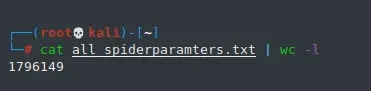
Running all of that through Burp Suite or SQLMap would have consumed a lot of resources and could have crashed my Kali host, so I split the file into 10MB chunks and worked through them one at a time.
The scan
I set up Burp Suite and scanned the first chunk. I found several low-hanging issues: open redirects, CORS misconfigurations and a few instances of XSS. Nothing high or critical. Scanning multiple URLs in Burp is possible with the Professional version.
I let Burp continue on the second chunk and took my wife and kids out for a weekend dinner. When we came back after 3 to 4 hours, Burp was still running, and there was a flashing red exclamation icon indicating an SQL Injection issue type.

Burp had found a boolean-based SQL injection. I confirmed the server was running Apache, sent the vulnerable URL to Repeater and tried sleep queries to test the response:
1'XOR(SELECT(1)FROM(SELECT(SLEEP(8)))a)XOR'Z
1' ORDER BY 1 -- +
1 or sleep(5)
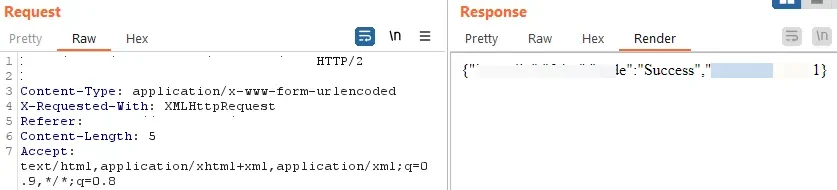
Every time I got a JSON message from the server saying "Success". The WAF or the server itself appeared to be sanitising or blocking known SQL injection payloads, so the exploitation did not go through.
Exploitation
Step 1: switching to POST
I spent an hour trying to provoke an error or execute sleep(), and nothing worked. The GET requests were unsuccessful. I changed the request method to POST and sent a simple payload as the value of the vulnerable parameter:
The server returned:
SQLSTATE[42000]: Syntax error or access violation: 1064 You have an error in your SQL syntax; check the manual that corresponds to your MySQL server version for the right syntax to use near ‘’1=1'’))
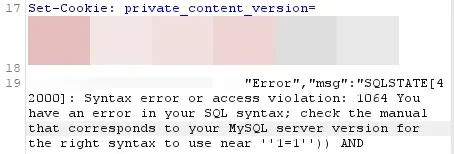
That error means the payload was not sanitised and broke the SQL query, which confirms the injection.
Step 2: how many endpoints use the parameter
With the injection confirmed, I wanted to know how many endpoints used the vulnerable parameter. I used grep on Kali to search for the parameter xxx across the 2,892 subdomains. Only 4 subdomains used it.
Opening those links redirected me to the homepage, so the pages were no longer active. I went to archive.org and found a cached version, which showed the pages were user experience enhancement suggestion pages, mostly in a language I did not know. I then went back to my Kali VM.
Step 3: SQLMap versus Ghauri
I had recently found that Ghauri outperforms SQLMap in some conditions: in several cases where SQLMap failed, Ghauri identified the exploit within minutes.
I saved the request to a file and ran SQLMap with minimal options: -r request.txt, -p xxx and -random-agent. SQLMap failed to find the exploit and returned various errors, including 500 and 4xx status codes.
I had asked the bug bounty community on Twitter about a similar situation. There were several suggestions, and none worked except the recommendation to use Ghauri.
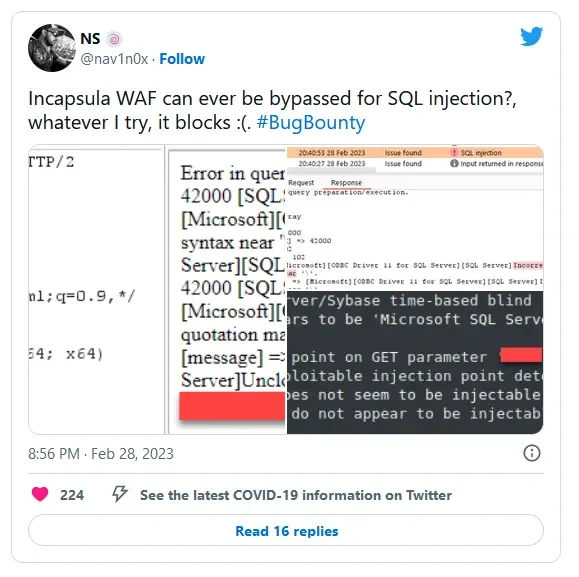
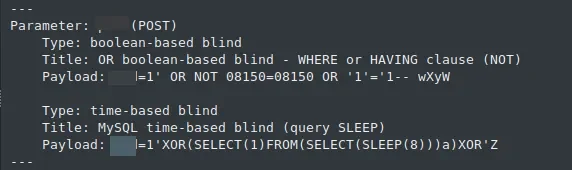
I submitted the same request to Ghauri. It identified both a time-based blind and a boolean-based blind SQL injection in just 4 minutes, much faster than SQLMap, which had failed on the same request.
Step 4: retrieving the database name
To validate the exploit I retrieved the database name:
ghauri -r xxx -p xxx - dbms=mysql - dbs
This returned a database name, shown in the report as xxx***, which suggests it is a production database.
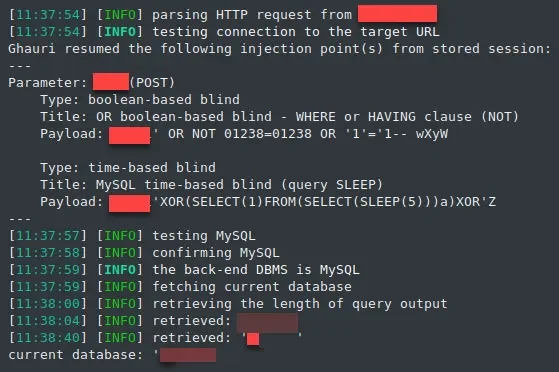
Running Ghauri across the whole set of endpoints revealed different databases, including staging and UAT (User Acceptance Testing) endpoints. That widened the scope of the exploit and gave information about the target's infrastructure.
Step 5: banner and current user
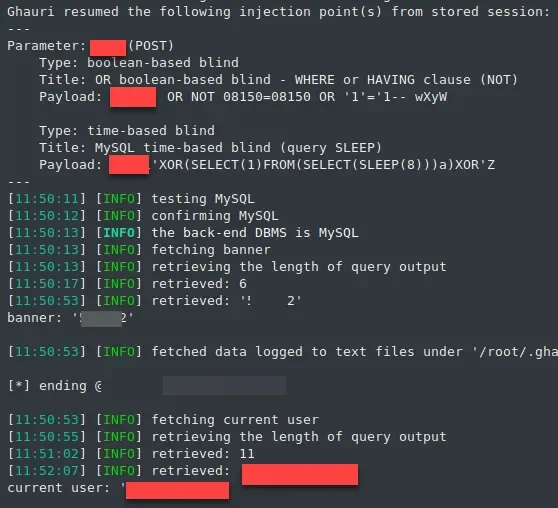
ghauri -r xxx -p xxx - dbms=mysql -D xxx**** - current-user -b
Step 6: admin username and password hash
I explored the tables in the main production database and found a table named admin_**_** with several columns.
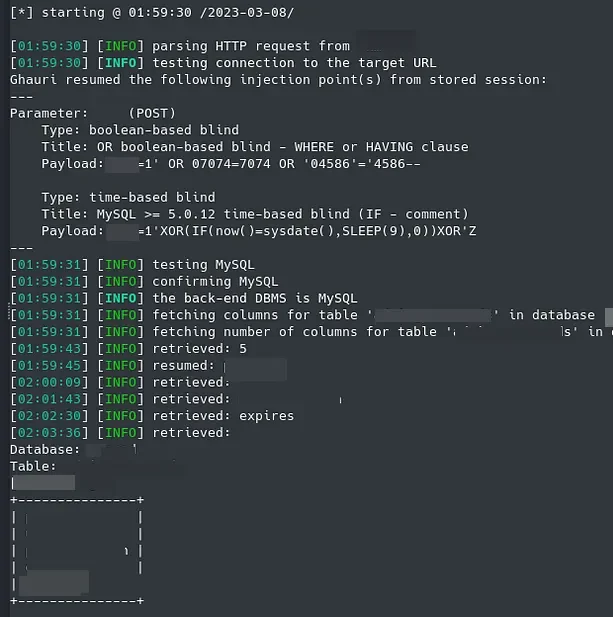
One of the columns, shown as p***_***_**, was present, which means I could have become the new owner of the database. I only wanted the bounty, not the database. I ran the following to retrieve the password hash:
ghauri -r xxx -p xxx - dbms=mysql -D xxx**** -T a****_**** -C p***_**** - dump
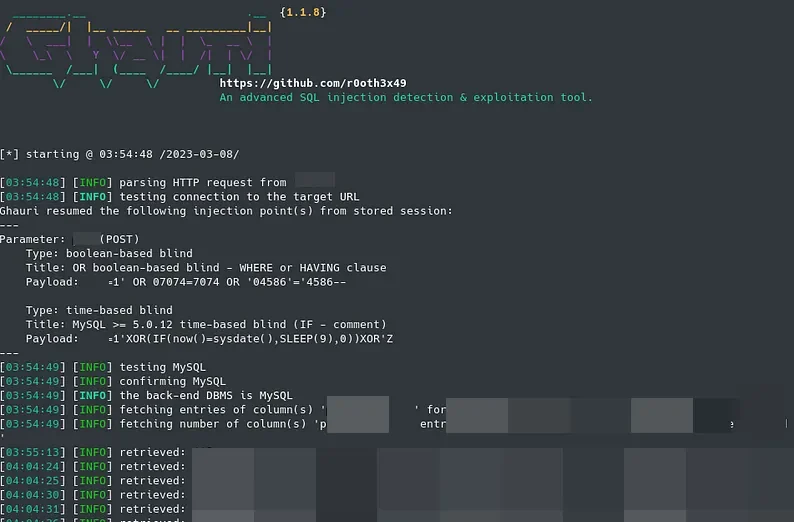
That gave me the admin password hash and the password, which would have let me own any of their databases across 3 major eStores.
Root cause
The suggestion page takes user input in a parameter and places it into a MySQL query without sanitising it. The error message shows the payload 1=1' breaking the query syntax, so the value is concatenated into the statement rather than bound as a parameter. The GET requests were blocked or sanitised by the WAF or the server, but the same parameter accepted through POST reached the query. The WAF or the server appeared to sanitise or block the GET payloads, while the same parameter sent by POST reached the query.
Impact
With this single parameter I could read the production database, including a table holding admin credentials, and dump the admin password hash and the password. According to the report, that password would have allowed access to any of their databases across 3 major eStores. I also reached staging and UAT databases, and in one case had a potential RCE on the server. The report does not give the number of records exposed or the exact privileges of the database user.
I submitted a report covering the admin password hash and the password. The organisation replied on Monday evening saying they wanted to investigate further for additional vulnerabilities. I could not find any more. Later that night they acknowledged the reported vulnerabilities and said they were discussing the bounty and the fixes internally. In total I reported four SQL injections, three XSS vulnerabilities and one open redirect, and I was expecting a minimum of 4.5K EUR.
Fix
The report does not describe the fix that was implemented.
Variants to test
- Send the same parameter as a POST body when GET payloads are blocked or return a generic success message. A positive result is a database error such as the
SQLSTATE[42000]syntax error above. - Search the live subdomain list for the parameter with
grep, then check the dead endpoints in archive.org. A positive result is a cached suggestion or feedback page that still uses the parameter. - Run the saved request through both SQLMap and Ghauri. A positive result is Ghauri reporting time-based blind and boolean-based blind injection where SQLMap returns 500 or 4xx errors.
- Enumerate databases with
-dbsand look for staging and UAT names alongside production. A positive result is several database names from one parameter. - Dump the current user and banner with
-current-user -b. A positive result is a privileged database account. - Look for an admin table with a password column. A positive result is a password hash and a password that would grant access to the group's databases.
- If the GET request fails, try POST and change the protocol from HTTP/1.0 to HTTP/2.0 to see whether it helps.
What happened, in plain words
A security researcher found a way to make a retailer's website reveal its database contents. The website had a suggestion page where customers could send feedback. The page passed what the customer typed into a database query without sanitising it. By sending a specially crafted piece of text, the researcher could make the database return error messages that revealed information, and eventually he could read the database itself, including an admin password. He reported it and was expecting a reward.
This article explains every step for someone who has never done security testing. You only need to know how to use a browser and a computer. We will go slowly, explain each term when it first appears, and show the exact commands and payloads from the original report.
Background: what is SQL injection?
A website often stores its information in a database. Think of a database as a very large, very organised spreadsheet. The website asks the database questions using a language called SQL (Structured Query Language). For example, when you log in, the website might ask the database: "Is there a user with this name and this password?"
When you fill in a form on a website, the website takes what you typed and inserts it into that SQL question. If the website does not clean your input first, you can type something that changes the question itself. That is SQL injection. It is like a fill-in-the-blank form where you write extra words that turn the sentence into a different instruction.
The researcher found this on a country-specific eStore (an online shop for one country) of a multi-billion dollar retailer, and on their user experience enhancement program. That program is a suggestion page: a page where users submit feedback or suggestions about their experience. The vulnerable parameter is shown throughout as xxx.
After the first finding, the researcher discovered that the whole group's websites were vulnerable to the same issue through that single parameter, and eventually he could reach multiple database servers. In one case he even had a potential RCE (remote code execution, meaning running commands on the server). The technique itself was simple error-based SQL injection: making the database produce error messages that leak information.
The tools used were ordinary daily ones: Burp Suite (a tool for inspecting and modifying web traffic), ParamSpider (a tool that finds parameters in web addresses), and SQLMap (a tool that automates SQL injection), plus Ghauri later on (another SQL injection tool).
Setup: how the target was found
The target was found through Google dorks. A Google dork is a search query that uses special operators to find specific things on the web, such as pages that mention "bug bounty" or "security report reward". The researcher had seen a YouTube video where the presenter described finding RCE and SQL injection on a private bug bounty target using dorks such as:
site:*.*.xx inurl:bug inurl:bounty site:*.*.xx.xx intext:security report reward site:*.*.xx intext:security report reward
This line is a Google search query. site:*.*.xx restricts results to a certain domain pattern. inurl:bug looks for URLs containing "bug". inurl:bounty looks for URLs containing "bounty". intext:security report reward looks for pages whose text contains those words. The researcher had known these dorks for years but had never tried them. Running them returned hundreds of targets, most of them Vulnerability Disclosure Programs (VDPs) with Hall of Fame acknowledgements and no money. A VDP is a programme where a company accepts security reports but does not pay a reward; a Hall of Fame is a public list of people who reported issues.
Among them was a non-English target: a major online and in-store retailer present in almost all countries worldwide.
Their security.txt page stated that the scope (the list of assets a programme allows you to test) covered all web assets within their group of companies, including international ones. The reward table offered up to 3.5K EUR for SQL injection and RCE, and 500 EUR for XSS (cross-site scripting, a way to inject scripts into pages), IDORs (insecure direct object references, where changing an identifier lets you access someone else's data), SSRF (server-side request forgery, making the server fetch a URL you choose) and other vulnerabilities. That is what made the researcher focus on this target.
The working environment was a Kali machine. Kali Linux is a Linux distribution that comes with many security tools pre-installed. The tools used for enumeration were Netlas, crt.sh and SecurityTrails, then HTTPx, ParamSpider, Burp Suite Professional, SQLMap and Ghauri.
Finding it
Subdomain enumeration
A subdomain is a part of a larger domain. For example, shop.example.com is a subdomain of example.com. Companies often have many subdomains for different services. Finding them is called subdomain enumeration.
The researcher started with certificate transparency: crt.sh and Netlas.io. Certificate transparency is a public log of SSL/TLS certificates. When a website uses HTTPS, it gets a certificate, and that certificate is often logged publicly. By searching these logs, you can find subdomains. Combining results from both gave roughly 4961 subdomains associated with the group name. A sample Netlas query for certificates:
https://app.netlas.io/certs/?q=certificate.subject.organization%3A%22Microsoft%20Corporation%22&page=1
This is a URL to the Netlas website. The q= part is the search query. certificate.subject.organization%3A%22Microsoft%20Corporation%22 is URL-encoded; decoded, it means certificate.subject.organization:"Microsoft Corporation". So it searches for certificates whose organisation field is "Microsoft Corporation". The page=1 shows the first page of results. The researcher used a similar query for the target organisation.
Then the researcher used SecurityTrails with a curl command. curl is a command-line tool for making web requests. The command was picked up in a Discord server, to find subdomains of their main website:
curl -s --request GET --url https://api.securitytrails.com/v1/domain/target.xx.xx/subdomains?apikey=***** | jq '.subdomains[]' | sed 's/\"//g' > target.xx.xx.txt 2> /dev/null && sed "s/$/.target.xx.xx/" target.xx.xx.txt | sed 's/ //g'
Let's break this down:
curl -s --request GET --url https://api.securitytrails.com/v1/domain/target.xx.xx/subdomains?[redacted] makes a GET request to the SecurityTrails API. An **API** (Application Programming Interface) is a way for programs to talk to each other. The[redacted] is an API key, a secret token that identifies the user. The-smeans silent mode, which hides progress.| jq '.subdomains[]'pipes the output tojq, a tool for processing JSON. JSON is a common data format that looks like{"key": "value"}. This extracts thesubdomainsarray and outputs each element.| sed 's/\"//g'pipes tosed, a stream editor. This removes double quotes.> target.xx.xx.txtredirects the output to a file namedtarget.xx.xx.txt.2> /dev/nullredirects error messages to/dev/null, which discards them.&&means run the next command only if the previous succeeded.sed "s/$/.target.xx.xx/" target.xx.xx.txtappends.target.xx.xxto each line.$matches the end of the line.| sed 's/ //g'removes spaces.
This returned some 2,000 subdomains. The researcher put everything into an Excel spreadsheet and removed duplicates. After filtering there were 3,154 unique subdomains, which were moved to Kali and run through HTTPx. HTTPx is a tool that checks which subdomains are alive by making HTTP requests. That left 2,892 live URLs.
Parameter mining
ParamSpider by @0xAsm0d3us is, for the researcher, one of the best parameter miners. A parameter miner is a tool that finds parameters in web addresses. A parameter is the part of a URL after a question mark, like ?name=value. The researcher also uses Arjun by @s0md3v, but is more comfortable with ParamSpider. ParamSpider only accepts a single URL by default, so the researcher used a script previously used with a friend: it takes a list of URLs, sends them through xargs, removes duplicates and gives a refined list. xargs is a command that builds and runs other commands from standard input. The researcher hit some errors while running it but still got the list.
cat target.lst | xargs -n 1 -I {} python3 ~/ParamSpider/paramspider.py --domain {} --level high | urldedupe >> all_spiderparamters.txt
Line by line:
cat target.lstprints the contents of the filetarget.lst, which contains the list of URLs.| xargs -n 1 -I {}pipes to xargs.-n 1means use one argument per command.-I {}replaces{}with each argument.python3 ~/ParamSpider/paramspider.py --domain {} --level highruns ParamSpider for each URL.--domain {}is the URL.--level hightells ParamSpider to do a deeper search.| urldedupepipes tourldedupe, a tool that removes duplicate URLs.>> all_spiderparamters.txtappends the output to the fileall_spiderparamters.txt.
The result was 1,796,149 lines in total, about 96MB.
Running all of that through Burp Suite or SQLMap would have consumed a lot of resources and could have crashed the Kali host, so the researcher split the file into 10MB chunks and worked through them one at a time.
The scan
The researcher set up Burp Suite and scanned the first chunk. Burp Suite is a tool that intercepts and modifies web traffic; it can also scan for vulnerabilities. Several low-hanging issues were found: open redirects (where a website redirects you to a URL you control), CORS misconfigurations (CORS is a browser security feature that controls which websites can read responses from another website; a misconfiguration can let attackers read data), and a few instances of XSS. Nothing high or critical. Scanning multiple URLs in Burp is possible with the Professional version.
The researcher let Burp continue on the second chunk and took his wife and kids out for a weekend dinner. When they came back after 3 to 4 hours, Burp was still running, and there was a flashing red exclamation icon indicating an SQL Injection issue type.
Burp had found a boolean-based SQL injection. In boolean-based injection, you ask the database true/false questions and watch how the page changes. The researcher confirmed the server was running Apache (a common web server software), sent the vulnerable URL to Repeater (a Burp tool that lets you resend a request many times with changes), and tried sleep queries to test the response. A sleep query asks the database to wait for a number of seconds; if the response is delayed, the injection works. The payloads were:
1'XOR(SELECT(1)FROM(SELECT(SLEEP(8)))a)XOR'Z
This payload tries to make the database sleep for 8 seconds. XOR is a logical operator. SELECT(1) returns 1. FROM(SELECT(SLEEP(8)))a creates a subquery that sleeps. The idea is that if the injection works, the response will be delayed.
1' ORDER BY 1 -- +
This payload tries to order the results by the first column. -- + is a comment in SQL, which ignores the rest of the query. If the number of columns is wrong, you get an error; if it is right, you might get a normal response. This helps determine the number of columns.
1 or sleep(5)
This payload tries to make the database sleep for 5 seconds if the condition is true. or is a logical operator.
Every time the researcher got a JSON message from the server saying "Success". The WAF (Web Application Firewall, a security system that filters malicious traffic) or the server itself appeared to be sanitising or blocking known SQL injection payloads, so the exploitation did not go through.
Exploitation
Step 1: switching to POST
The researcher spent an hour trying to provoke an error or execute sleep(), and nothing worked. The GET requests were unsuccessful. GET is the HTTP method used when you type a URL in your browser; the parameters are in the URL. The researcher changed the request method to POST. POST is another HTTP method, often used when submitting forms; the parameters are in the body of the request, not the URL. He sent a simple payload as the value of the vulnerable parameter:
This payload is just 1=1'. The single quote ' is often used to break out of a string in SQL. The server returned:
SQLSTATE[42000]: Syntax error or access violation: 1064 You have an error in your SQL syntax; check the manual that corresponds to your MySQL server version for the right syntax to use near ‘’1=1'’))
This is an error message from the database. SQLSTATE[42000] is an error code. 1064 is a MySQL error number for a syntax error. The message says there is a syntax error near ‘’1=1'’)). That means the payload was not sanitised and broke the SQL query, which confirms the injection.
Step 2: how many endpoints use the parameter
With the injection confirmed, the researcher wanted to know how many endpoints used the vulnerable parameter. An endpoint is a specific URL or API path that performs a function. He used grep on Kali to search for the parameter xxx across the 2,892 subdomains. grep is a command-line tool for searching text. Only 4 subdomains used it.
Opening those links redirected to the homepage, so the pages were no longer active. The researcher went to archive.org (the Internet Archive, which keeps cached copies of web pages) and found a cached version, which showed the pages were user experience enhancement suggestion pages, mostly in a language he did not know. He then went back to his Kali VM. A VM is a virtual machine, a computer simulated in software.
Step 3: SQLMap versus Ghauri
The researcher had recently found that Ghauri outperforms SQLMap in some conditions: in several cases where SQLMap failed, Ghauri identified the exploit within minutes.
He saved the request to a file and ran SQLMap with minimal options: -r request.txt, -p xxx and -random-agent. -r request.txt tells SQLMap to read the HTTP request from a file. -p xxx tells it which parameter to test. -random-agent makes it use a random User-Agent header, which can help avoid blocks. SQLMap failed to find the exploit and returned various errors, including 500 and 4xx status codes. HTTP status codes are numbers that indicate the result: 200 means OK, 500 means server error, 4xx means client error.
The researcher had asked the bug bounty community on Twitter about a similar situation. There were several suggestions, and none worked except the recommendation to use Ghauri.
He submitted the same request to Ghauri. It identified both a time-based blind and a boolean-based blind SQL injection in just 4 minutes, much faster than SQLMap, which had failed on the same request. "Blind" means the database does not return data directly; you infer it from behaviour such as delays or true/false responses.
Step 4: retrieving the database name
To validate the exploit the researcher retrieved the database name:
ghauri -r xxx -p xxx - dbms=mysql - dbs
This command runs Ghauri. -r xxx reads the request from a file named xxx. -p xxx specifies the parameter xxx. - dbms=mysql (note the space after the dash) tells Ghauri the database type is MySQL. - dbs (again with a space) asks Ghauri to list databases. The command returned a database name, shown in the report as xxx***, which suggests it is a production database (the live one used by real customers).
Running Ghauri across the whole set of endpoints revealed different databases, including staging and UAT (User Acceptance Testing) endpoints. Staging is a pre-production environment for testing. UAT is a testing phase where users check the system. That widened the scope of the exploit and gave information about the target's infrastructure.
Step 5: banner and current user
ghauri -r xxx -p xxx - dbms=mysql -D xxx**** - current-user -b
This command adds -D xxx**** to select a database named xxx****. - current-user asks for the current database user. -b asks for the banner, which is the version string of the database server. Knowing the user and version helps understand privileges and potential vulnerabilities.
Step 6: admin username and password hash
The researcher explored the tables in the main production database and found a table named admin_**_** with several columns. A table is like a sheet in a spreadsheet; a column is a field in that table.
One of the columns, shown as p***_***_**, was present, which means the researcher could have become the new owner of the database. He only wanted the bounty, not the database. He ran the following to retrieve the password hash:
ghauri -r xxx -p xxx - dbms=mysql -D xxx**** -T a****_**** -C p***_**** - dump
This command adds -T a****_**** to select the table, -C p***_**** to select the column, and - dump to extract the data. A password hash is the result of putting a password through a one-way function; it is not the password itself, but it can sometimes be cracked. The command gave the admin password hash and the password, which would have let the researcher own any of their databases across 3 major eStores.
Root cause
The suggestion page takes user input in a parameter and places it into a MySQL query without sanitising it. The error message shows the payload 1=1' breaking the query syntax, so the value is concatenated into the statement rather than bound as a parameter. Concatenation means joining strings together. Parameterised queries (or prepared statements) are a way to send the query and the data separately so the data cannot change the query. The GET requests were blocked or sanitised by the WAF or the server, but the same parameter accepted through POST reached the query. The WAF or the server appeared to sanitise or block the GET payloads, while the same parameter sent by POST reached the query.
Impact
With this single parameter the researcher could read the production database, including a table holding admin credentials, and dump the admin password hash and the password. According to the report, that password would have allowed access to any of their databases across 3 major eStores. He also reached staging and UAT databases, and in one case had a potential RCE on the server. The report does not give the number of records exposed or the exact privileges of the database user.
The researcher submitted a report covering the admin password hash and the password. The organisation replied on Monday evening saying they wanted to investigate further for additional vulnerabilities. He could not find any more. Later that night they acknowledged the reported vulnerabilities and said they were discussing the bounty and the fixes internally. In total he reported four SQL injections, three XSS vulnerabilities and one open redirect, and he was expecting a minimum of 4.5K EUR.
Fix
The report does not describe the fix that was implemented.
Variants to test
- Send the same parameter as a POST body when GET payloads are blocked or return a generic success message. A positive result is a database error such as the
SQLSTATE[42000]syntax error above. - Search the live subdomain list for the parameter with
grep, then check the dead endpoints in archive.org. A positive result is a cached suggestion or feedback page that still uses the parameter. - Run the saved request through both SQLMap and Ghauri. A positive result is Ghauri reporting time-based blind and boolean-based blind injection where SQLMap returns 500 or 4xx errors.
- Enumerate databases with
-dbsand look for staging and UAT names alongside production. A positive result is several database names from one parameter. - Dump the current user and banner with
-current-user -b. A positive result is a privileged database account. - Look for an admin table with a password column. A positive result is a password hash and a password that would grant access to the group's databases.
- If the GET request fails, try POST and change the protocol from HTTP/1.0 to HTTP/2.0 to see whether it helps.
Glossary
- API: Application Programming Interface; a way for programs to talk to each other.
- Apache: A common web server software.
- archive.org: The Internet Archive, which keeps cached copies of web pages.
- banner: The version string of a database server.
- boolean-based SQL injection: A technique where you ask the database true/false questions and observe changes.
- Burp Suite: A tool for inspecting and modifying web traffic, and for scanning.
- CORS: Cross-Origin Resource Sharing; a browser security feature that controls which websites can read responses from another website.
- crt.sh: A website that searches certificate transparency logs.
- curl: A command-line tool for making web requests.
- database: An organised collection of data, like a large spreadsheet.
- endpoint: A specific URL or API path that performs a function.
- error-based SQL injection: A technique that makes the database return error messages that leak information.
- GET: An HTTP method used when you type a URL in your browser; parameters are in the URL.
- Ghauri: A SQL injection tool.
- Google dork: A search query using special operators to find specific things on the web.
- grep: A command-line tool for searching text.
- HTTPx: A tool that checks which subdomains are alive by making HTTP requests.
- IDOR: Insecure Direct Object Reference; changing an identifier lets you access someone else's data.
- JSON: A common data format that looks like
{"key": "value"}. - Kali Linux: A Linux distribution with many security tools pre-installed.
- MySQL: A popular database system.
- Netlas: A search engine for internet-connected devices and certificates.
- open redirect: A vulnerability where a website redirects you to a URL you control.
- parameter: The part of a URL after a question mark, like
?name=value. - ParamSpider: A tool that finds parameters in web addresses.
- password hash: The result of putting a password through a one-way function; it is not the password itself.
- POST: An HTTP method often used when submitting forms; parameters are in the body.
- production database: The live database used by real customers.
- RCE: Remote Code Execution; running commands on the server.
- Repeater: A Burp tool that lets you resend a request many times with changes.
- scope: The list of assets a programme allows you to test.
- SecurityTrails: A service for finding subdomains and other DNS data.
- sleep query: A SQL query that asks the database to wait for a number of seconds.
- SQL: Structured Query Language; the language used to talk to databases.
- SQL injection: A vulnerability where user input changes the SQL query.
- SQLMap: A tool that automates SQL injection.
- SSRF: Server-Side Request Forgery; making the server fetch a URL you choose.
- staging: A pre-production environment for testing.
- subdomain: A part of a larger domain, like
shop.example.com. - table: A sheet in a database, like a sheet in a spreadsheet.
- time-based blind SQL injection: A technique where you infer data from delays.
- UAT: User Acceptance Testing; a testing phase where users check the system.
- VDP: Vulnerability Disclosure Program; a programme that accepts security reports but does not pay.
- VM: Virtual Machine; a computer simulated in software.
- WAF: Web Application Firewall; a security system that filters malicious traffic.
- xargs: A command that builds and runs other commands from standard input.
- XSS: Cross-Site Scripting; a way to inject scripts into pages.




