I helped a top Indian health benefits management platform from major PII leak by hacking their SQL Servers, AWS instance, DCs etc.
A forgotten mobile password-reset endpoint was vulnerable to time-based SQL injection through a JSON parameter, allowing the attacker to extract database contents. The exposed data included customer PII, insurance claim details, and infrastructure credentials such as AWS and domain controller passwords.

Here, with this article, I’m going to show how I was able to alert a major Indian health benefits management platform to protect the contact data, Personally Identifiable Information (PII), insurance claim details, and other sensitive information of thousands of their customers.
The full write-up lives on its author's site
It belongs to its author, so we link to it rather than copy it. The other two tabs are our own rewrites, checked against it.
Context
The target was a major Indian health benefits management platform that ran a public bug bounty program. The scope covered their main domain (*.target.com) plus their Android and iOS apps. The product is a set of web applications built on the .NET framework, and the feature at the centre of this write-up is a password reset flow reachable through the mobile version of the site.
One of the endpoints the researcher found had a search feature for insurance claims by ClaimID, UserID, Email, MobileNumber or PolicyNumbers, and the same page offered a login to the portal that also supported SSO through Google. The mobile versions of the apps lived on separate hostnames such as m.app.target.com, m.target.com and m.app2.target.com, each with its own code base for the same UI.
The author opens by noting that the company declined to pay, closing the report as an internally known issue, and that the endpoint was quietly removed after the report. The article is as much about that handling as about the bug.

Setup
The researcher worked from a Kali machine with Burp Suite, SQLMap, WayBackURLs, ParamSpider and HTTrack. The only precondition was obtaining a valid set of session cookies from the browser, which the researcher did by loading the page normally and copying the cookies out with a cookie editor. which the researcher did by loading the page normally and copying the cookies out with a cookie editor.
Subdomain enumeration produced only 10 subdomains after running httpx, despite the wildcard scope. Browsing was done from both a desktop browser and a mobile phone to compare how the apps responded.
Finding it
The mobile pages
Every web app had a separate mobile version, and the mobile version would render in mobile mode even when opened from a desktop browser. The author treats this as a design failure: two code bases for the same UI, with no redirect between the full and mobile versions depending on the client.

WayBackURLs
The researcher uses WayBackURLs with the -dates flag at the start of recon, on individual subdomains or a bulk list, and says this flag has been particularly helpful in finding SQL injections. Because the output is large, testing is focused on password reset forms, login forms and user registration forms. A grep with the filters password, Pass, Password and pass narrowed the archived URLs down to around 50 pages containing the keyword.
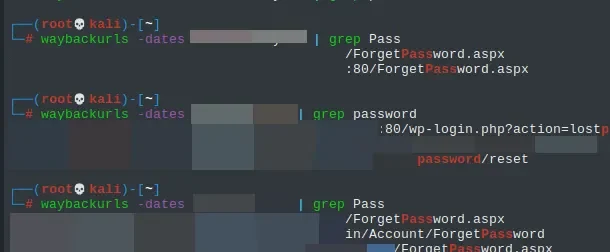
Two of those pages stood out:
https://target.com/Login.aspx/GetEncryptedPass
https://target.com/Login.aspx/ReAuthWithPass
On a desktop browser both redirected to a login page. On a mobile device the same pages showed a password reset page instead. Opening the mobile version from the desktop browser at https://m.target.com/Login.aspx/GetEncryptedPass produced the same password reset page, confirming that mobile and desktop clients are served by different pages. The author suggests the developers may have created the mobile page and forgotten to remove it after an update.
ParamSpider and HTTrack
ParamSpider found no archived reference to the mobile page. HTTrack was used to download the whole site for offline inspection of its links, and no page or hyperlink anywhere in the site referenced /Login.aspx/GetEncryptedPass. That confirmed it was a dead link the developer had forgotten to remove.
Inspecting the page source revealed a few parameters used in the password reset form, with the rest of the page looking ordinary:
{"param":"xxxx","key":"xxxx"}
Exploitation
Step 1: capture the request
A random username and date of birth were entered into the form and submitted, and Burp Suite was used to inspect the resulting traffic. A POST request carrying the same parameters appeared. The researcher redacted it before publishing:
POST /Login.aspx/GetEncryptedPass HTTP/1.1 Content-Type: application/json; charset=UTF-8 X-Requested-With: XMLHttpRequest Referer: https: Cookie: ASP.NET_SessionId=***; ***; _**__***_ses.12.1fef=*; __**__***_id.**.; loginattempt=9 Content-Length: 73 Accept: text/html,application/xhtml+xml,application/xml;q=0.9,*
The body is JSON with the two parameters from the page source. The request is an AJAX call (X-Requested-With: XMLHttpRequest) with a JSON content type, and it carries an ASP.NET_SessionId plus several other cookies.
Step 2: deal with the session expiry
Replaying the request in Repeater returned an error saying the session had expired or was not found. Recon showed that each request is sent with a specific set of cookies: ASP.NET_SessionId, a ___*_ses.12.1fef cookie, a ***_id. cookie and a loginattempt cookie (names hidden by the author). These cookies are valid for a maximum of three attempts. After the third failed attempt or request, all cookies including ASP.NET_SessionId are reset and a fresh set has to be sent.
The workaround was to make a new request from the browser, copy the fresh cookies from the cookie editor and replay them through Repeater. This time the server returned HTTP 200 OK, but the response page was blank and unchanged.
Step 3: time-based test on param
The first injection attempt was time-based, on the param parameter:
{"param":"AbcXYZ'; waitfor delay '0:0:6' --","key":"ABC1234"}
The response was normal, with no delay. The same payload was then moved to the key parameter:
{"param":"AbcXYZ","key":"ABC1234'; waitfor delay '0:0:6' -- "}
This time the server delayed the response by 7.599 seconds. Repeated requests with a new payload and a new session cookie consistently produced a delay matching the payload time plus about one second.
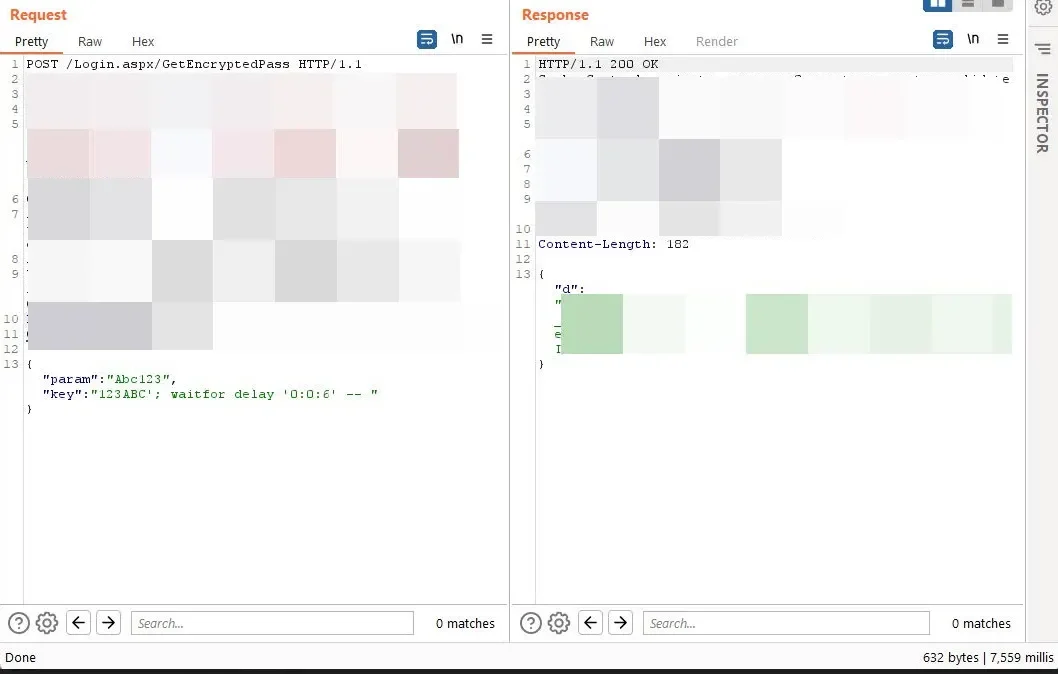
The researcher classifies the bug as a time-based JSON stacked query SQL injection.
Step 4: SQLMap fails, then succeeds
Because a time-based injection is sometimes rated high rather than critical, the researcher ran SQLMap to pull the database structure and raise the severity. The request was copied to the Kali machine and SQLMap was run with -p key, but it failed to detect the time-based injection even with different tamper scripts.
Reluctant to report a blind time-based injection, the researcher found a Stack Overflow thread suggesting direct injection of JSON stacked queries as data in a POST request. The approach was new to the researcher but was tried anyway. To cope with session expiry, --ignore-code=403 was added after a few runs failed with a 403 response:
sqlmap -u 'https: --data {"param":"AbcXYZ","key":"ABC1234'; waitfor delay '0:0:6' -- "} --random-agent --ignore-code=403 --current-user --current-db
Within a few minutes SQLMap identified the injection point, and a full exploit returned the host name, current user and current database.
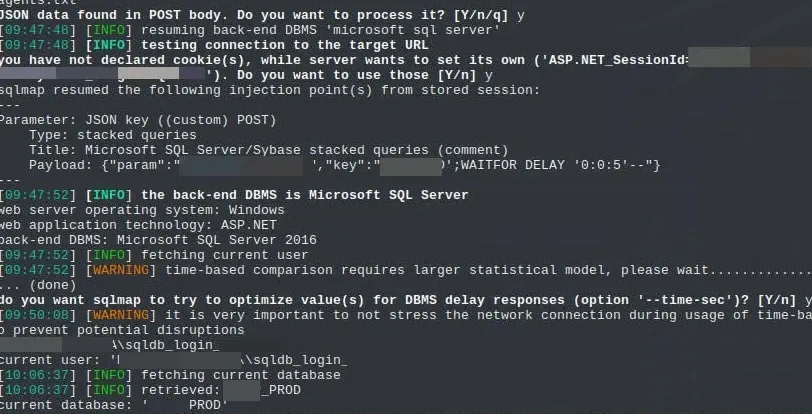
The database server was lagging badly, which slowed responses. To avoid blocks and improve the injection, the delay was increased and hex flags were used.
Step 5: enumerate databases
With the first step done, the next goal was the list of databases, to look for anything that would raise the severity:
sqlmap -u 'https://m.target.com/Login.aspx/GetEncryptedPass' --data {"param":"AbcXYZ","key":"ABC1234'; waitfor delay '0:0:6' -- "} --random-agent --ignore-code=403 --dbs --hex
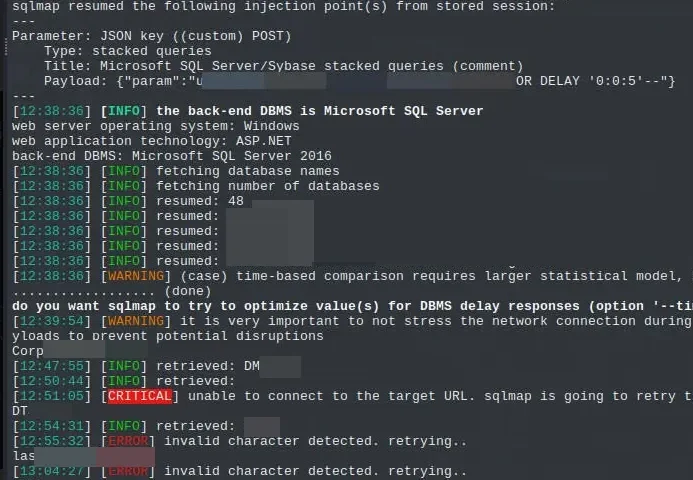
Step 6: what the databases held
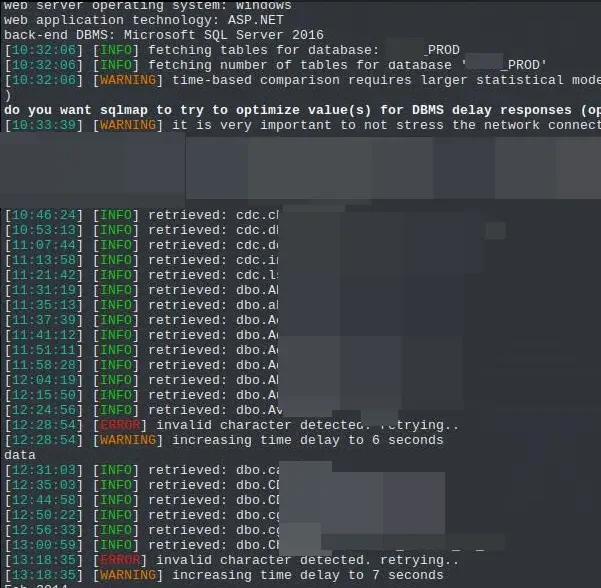
The production database contained a large amount of customer information: PII of the company's clients, client details of major insurance companies, information about client health, contact details such as phone numbers and email addresses, and login credentials of thousands of users. The data was spread across different databases, which widened the scope of the potential breach.
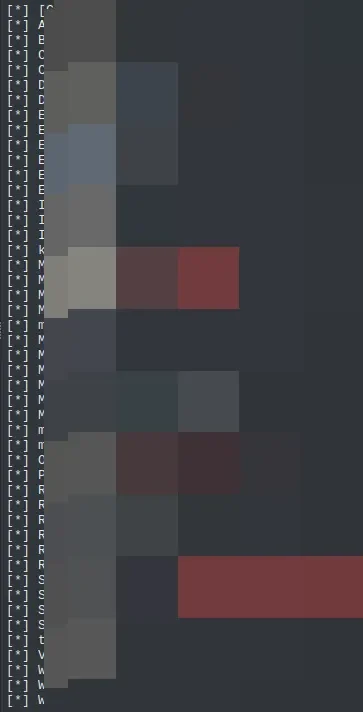
The company's data was not the only exposure. The data of a major insurance partner, a well-known group company referred to as "AB", was also at risk: PII of insurance holders, employee information and even a complete database backup.
One database held highly sensitive material: AWS instance login credentials, domain controller administrator passwords and exchange credentials. With the ability to run an OS shell, the researcher notes, there was a potential path to unauthorised access across the whole infrastructure.
Root cause
The key value is vulnerable to a time-based JSON stacked query SQL injection, so a single quote in the value lets the payload run as SQL. Because the server accepts stacked statements, waitfor delay runs as a second statement, which is what makes the injection observable through response timing.
The page itself is the second half of the problem. It is a forgotten mobile password reset page, reachable without authentication, that no link on the site points to. The author notes the endpoint had existed since at least 2020 or earlier, so the vulnerable code had been live for a long time. The report does not describe any WAF or input validation that would have blocked the payload; the only obstacle encountered was the three-attempt cookie reset, which is a session control rather than a defence against injection.
Impact
An unauthenticated attacker who can reach the mobile page can read data from the production databases: PII of the platform's clients, client details of major insurers, health information, phone numbers, email addresses and login credentials of thousands of users. The same access exposed the insurance partner's data, including PII of insurance holders, employee information and a full database backup, plus AWS instance credentials, domain controller administrator passwords and exchange credentials. The author states that with OS shell access there was a potential risk of unauthorised access to the entire infrastructure. The report does not show that shell access was obtained, only that the capability was present.
Fix
After the report, the endpoint was removed and the time-based injection no longer worked.
Variants to test
- Run WayBackURLs with
-dateson every subdomain in scope and grep the output forpass,Password,reset,loginandsignup. A positive result is an archived URL that still responds and behaves differently from the current login page. - Open archived mobile URLs (
m.hosts) from a desktop browser. A positive result is a page that renders a different flow, such as a password reset form, instead of redirecting to the desktop version. - Download the site with HTTrack and search for links to the archived paths. A path that appears in the archive but in no link on the live site is a candidate dead page.
- On any JSON endpoint, send a single quote in each parameter followed by a
waitfor delayand compare response times. A positive result is a delay matching the payload time plus normal processing time, repeated across fresh sessions. - When SQLMap fails on a JSON body, try injecting the stacked query directly as the data value with
--ignore-code=403and--hex, as in the commands above. A positive result is SQLMap identifying the injection point and returning the current user and database. - Watch for cookie sets that reset after a fixed number of attempts, such as the
loginattemptcookie here. A positive result is a fresh cookie set from the browser restoring access to the endpoint after the reset.
What happened, in plain words
A security researcher found a forgotten page on a large Indian health insurance company's website. That page was meant to help people reset their password, but it had been left online and unlinked after an update. Behind it sat a database query that could be tricked into running extra commands. By typing a special string into one of the form fields, the researcher could make the database wait on purpose, which proved the trick worked. From there, the researcher used a tool to read the database contents: customer personal details, health information, phone numbers, email addresses, login credentials, data belonging to a partner insurance company, and even credentials for servers and cloud accounts. The company replied that the issue was already known internally and paid nothing, then quietly removed the page. This article walks through the whole thing from the beginning, assuming you have never done security testing before.
Background: what a bug bounty is
A bug bounty programme is an offer from a company: if you find a security problem in our systems and tell us privately, we may pay you a reward. The company publishes a scope, which is the list of things you are allowed to test, such as a domain name or a mobile app. The researcher learned about this particular programme from a follower on Twitter, who had run into a problem and asked for help.
The researcher says up front that they are usually reluctant to join Indian bug bounty programmes, because in their experience many turn out to be fake or do not pay what the scope promises, and serious reports get dismissed as duplicates or as issues the company already knew about. They name Ola and PayTm as exceptions. Because this company was a major player with an interesting business model, the researcher decided to hunt only for high and critical issues and to skip easy, low-value bugs.
The target and the setup
The scope covered the company's main domain, written as *.target.com, plus their Android and iOS apps. The * is a wildcard: it means any subdomain of target.com, such as app.target.com or m.target.com. The product is a set of web applications built on the .NET framework, which is a Microsoft toolkit for building websites and services. The feature at the centre of the story is a password reset flow reachable through the mobile version of the site.
One endpoint the researcher found had a search feature for insurance claims, searchable by ClaimID, UserID, Email, MobileNumber or PolicyNumbers. The same page offered a login to the portal, and that login also supported SSO through Google. SSO, single sign-on, means you log in once with an account you already have, here a Google account, and the site trusts Google's confirmation instead of asking for a separate password.
The mobile versions of the apps lived on separate hostnames such as m.app.target.com, m.target.com and m.app2.target.com, each with its own code base for the same interface. A code base is the collection of source files a site is built from; two code bases for one interface means two separate sets of code that have to be maintained and fixed independently.
The researcher worked from a Kali machine, which is a Linux distribution preloaded with security tools, using Burp Suite, SQLMap, WayBackURLs, ParamSpider and HTTrack. The only precondition was getting a valid set of session cookies from the browser, which the researcher did by loading the page normally and copying the cookies out with a cookie editor.
Finding it
The mobile pages
Every web app had a separate mobile version, and the mobile version would render in mobile mode even when opened from a desktop browser. The author treats this as a design failure: two code bases for the same interface, with no redirect between the full and mobile versions depending on what device is asking.
WayBackURLs
WayBackURLs is a tool that asks the Internet Archive, a service that has been saving copies of web pages for years, for every URL it has ever recorded for a domain. The researcher uses it with the -dates flag at the start of recon, on individual subdomains or a bulk list, and says this flag has been particularly helpful in finding SQL injections. Recon, short for reconnaissance, is the information-gathering phase before any testing: mapping out what exists.
Because the output is large, testing is focused on password reset forms, login forms and user registration forms, since those handle credentials. A grep with the filters password, Pass, Password and pass narrowed the archived URLs down to around 50 pages containing the keyword. grep is a command-line tool that prints only the lines of its input matching a pattern; here it acts as a filter on a long list of URLs.
Two of those pages stood out:
https://target.com/Login.aspx/GetEncryptedPass
https://target.com/Login.aspx/ReAuthWithPass
These are two addresses on the company's site that the archive had saved. On a desktop browser both redirected to a login page. On a mobile device the same pages showed a password reset page instead. Opening the mobile version from the desktop browser at https://m.target.com/Login.aspx/GetEncryptedPass produced the same password reset page, confirming that mobile and desktop clients are served by different pages. The author suggests the developers may have created the mobile page and forgotten to remove it after an update.
ParamSpider and HTTrack
ParamSpider is a tool that looks for archived copies of pages and lists the parameters they accept. A parameter is a named input a page or API accepts, like the q in a search box. ParamSpider found no archived reference to the mobile page.
HTTrack is a program that downloads a whole website to your computer so you can browse it offline. It was used here to download the entire site and inspect its links. No page or hyperlink anywhere in the site referenced /Login.aspx/GetEncryptedPass. That confirmed it was a dead link the developer had forgotten to remove: a page that exists on the server but that nothing on the site points to.
Inspecting the page source, meaning viewing the HTML the browser receives, revealed a few parameters used in the password reset form, with the rest of the page looking ordinary:
{"param":"xxxx","key":"xxxx"}
This is JSON, a text format for structured data built from names and values in curly braces. It shows the form sends two values, one called param and one called key, and the xxxx are placeholders standing in for whatever the real values are. Knowing the names matters because the next step is to watch the actual request and change those values.
Exploitation
Step 1: capture the request
A random username and date of birth were entered into the form and submitted, and Burp Suite was used to inspect the resulting traffic. Burp Suite is a tool that sits between your browser and the website and lets you read, pause and edit every request and response. A request is the message your browser sends to a server asking for something; a response is the server's reply.
A POST request carrying the same parameters appeared. POST is the method a browser uses to send data to a server, as opposed to GET, which asks for a page. The researcher redacted it before publishing:
POST /Login.aspx/GetEncryptedPass HTTP/1.1 Content-Type: application/json; charset=UTF-8 X-Requested-With: XMLHttpRequest Referer: https: Cookie: ASP.NET_SessionId=***; ***; _**__***_ses.12.1fef=*; __**__***_id.**.; loginattempt=9 Content-Length: 73 Accept: text/html,application/xhtml+xml,application/xml;q=0.9,*
Line by line:
POST /Login.aspx/GetEncryptedPass HTTP/1.1says the browser is sending data to that path using version 1.1 of the HTTP protocol, the language browsers and servers speak.Content-Type: application/json; charset=UTF-8says the body is JSON text encoded in UTF-8, a standard way of representing characters.X-Requested-With: XMLHttpRequestmarks the request as an AJAX call, meaning it was sent by JavaScript running inside the page rather than by you clicking a link. AJAX is the technique that lets a page fetch data in the background without reloading.Referer: https:is the address of the page the request came from, cut short here.Cookie: ...carries the cookies. A cookie is a small piece of text a site stores in your browser and that your browser sends back on every request, so the server can recognise you between requests.ASP.NET_SessionIdis the session cookie: a session is one logged-in or browsing visit, and this cookie is the label the server uses to tie requests to that visit. The other cookies have their names partly hidden by the author.loginattempt=9looks like a counter of login attempts.Content-Length: 73says the body is 73 bytes long.Accept: ...lists the response formats the browser is willing to accept.
The body is JSON with the two parameters from the page source. The request is an AJAX call with a JSON content type, and it carries an ASP.NET_SessionId plus several other cookies.
Step 2: deal with the session expiry
Replaying the request in Repeater returned an error saying the session had expired or was not found. Repeater is a Burp Suite tab where you can send the same request again and again, changing it each time. Recon showed that each request is sent with a specific set of cookies: ASP.NET_SessionId, a ___*_ses.12.1fef cookie, a ***_id. cookie and a loginattempt cookie, with names hidden by the author. These cookies are valid for a maximum of three attempts. After the third failed attempt or request, all cookies including ASP.NET_SessionId are reset and a fresh set has to be sent.
Think of it like a cloakroom ticket that is only good for three visits: after the third, the attendant takes it back and you have to queue at the desk for a new one. The workaround was to make a new request from the browser, copy the fresh cookies from the cookie editor and replay them through Repeater. This time the server returned HTTP 200 OK, but the response page was blank and unchanged. HTTP 200 OK is the standard status code meaning the request was handled successfully.
Step 3: time-based test on param
SQL is the language used to ask a database for data. A time-based test is a way of detecting this without seeing any output: you make the database pause on purpose, and if the reply comes back late, you know your text was executed as SQL.
The first injection attempt was time-based, on the param parameter:
{"param":"AbcXYZ'; waitfor delay '0:0:6' --","key":"ABC1234"}
AbcXYZis an ordinary value, the kind a normal user would type.'is a single quote. In SQL, text values are wrapped in single quotes, so a quote inside the value can end the text early and let whatever follows be read as SQL code.;ends the current SQL statement, so a second statement can follow.waitfor delay '0:0:6'is a SQL Server command that makes the database wait six seconds before continuing.--starts a comment in SQL, so everything after it is ignored. It is there to swallow the closing quote the original query would add, which would otherwise cause a syntax error.
The response was normal, with no delay. The same payload was then moved to the key parameter:
{"param":"AbcXYZ","key":"ABC1234'; waitfor delay '0:0:6' -- "}
This time the server delayed the response by 7.599 seconds. Repeated requests with a new payload and a new session cookie consistently produced a delay matching the payload time plus about one second.
The researcher classifies the bug as a time-based JSON stacked query SQL injection. Stacked query means the database accepts more than one statement in a single call, which is what allows the waitfor delay to run as a second statement after the original one.
Step 4: SQLMap fails, then succeeds
SQLMap is a tool that automates SQL injection: it tries many payloads, recognises when one works, and then extracts information from the database. Because a time-based injection is sometimes rated high rather than critical, the researcher ran SQLMap to pull the database structure and raise the severity. Severity is how serious a bug is judged to be, and it usually drives how much a bounty pays.
The request was copied to the Kali machine and SQLMap was run with -p key, which tells it to test only the key parameter. It failed to detect the time-based injection even with different tamper scripts. Tamper scripts are small transformations SQLMap applies to payloads to slip past filters, for example changing letter case or encoding characters.
Reluctant to report a blind time-based injection, the researcher found a Stack Overflow thread suggesting direct injection of JSON stacked queries as data in a POST request. Blind means you get no data back in the response and have to infer everything from timing or from whether the page changes. The approach was new to the researcher but was tried anyway. To cope with session expiry, --ignore-code=403 was added after a few runs failed with a 403 response. HTTP 403 means forbidden: the server understood the request but refused it.
sqlmap -u 'https: --data {"param":"AbcXYZ","key":"ABC1234'; waitfor delay '0:0:6' -- "} --random-agent --ignore-code=403 --current-user --current-db
sqlmapruns the tool.-u 'https:is the target URL, cut short in the published text.--datasupplies the body to send, here the same JSON payload with the delay inkey.--random-agentmakes SQLMap present a random browser name in its requests, so it does not look like the same tool every time.--ignore-code=403tells SQLMap to carry on when the server answers 403 instead of stopping.--current-userasks the database for the name of the account it is running as.--current-dbasks for the name of the current database.
Within a few minutes SQLMap identified the injection point, and a full exploit returned the host name, current user and current database.
The database server was lagging badly, which slowed responses. To avoid blocks and improve the injection, the delay was increased and hex flags were used. Hex flags are options that make SQLMap encode data in hexadecimal, a base-16 representation, which can help it get past filters that block certain characters.
Step 5: enumerate databases
With the first step done, the next goal was the list of databases, to look for anything that would raise the severity. A database server usually holds several databases, each a separate collection of tables, so listing them shows what else is reachable.
sqlmap -u 'https://m.target.com/Login.aspx/GetEncryptedPass' --data {"param":"AbcXYZ","key":"ABC1234'; waitfor delay '0:0:6' -- "} --random-agent --ignore-code=403 --dbs --hex
This is the same command as before with two changes: the full URL is now shown, and --dbs replaces the current-user and current-db options. --dbs asks SQLMap to list all databases on the server. --hex is the hex encoding option mentioned above.
Step 6: what the databases held
The production database contained a large amount of customer information: PII of the company's clients, client details of major insurance companies, information about client health, contact details such as phone numbers and email addresses, and login credentials of thousands of users. PII, personally identifiable information, is any data that can identify a specific person, such as a name, phone number or email address. The data was spread across different databases, which widened the scope of the potential breach.
The company's data was not the only exposure. The data of a major insurance partner, a well-known group company referred to as "AB", was also at risk: PII of insurance holders, employee information and even a complete database backup. A database backup is a copy of the whole database kept for recovery, and if it is reachable it is just as readable as the live data.
One database held highly sensitive material: AWS instance login credentials, domain controller administrator passwords and exchange credentials. AWS is Amazon Web Services, a cloud platform where companies rent servers. An instance is one such rented server. A domain controller is the server in a Windows network that checks who is allowed to log in and what they may do, so its administrator password is among the most powerful secrets in an organisation. Exchange is Microsoft's email server. With the ability to run an OS shell, the researcher notes, there was a potential path to unauthorised access across the whole infrastructure. An OS shell is a command prompt on the server itself, where commands run directly on the machine rather than through the website.
Root cause
The key value is vulnerable to a time-based JSON stacked query SQL injection, so a single quote in the value lets the payload run as SQL. Concatenation means gluing text together, like building a sentence by pasting in whatever the user typed. Parameterisation is the safe alternative: the query is written with a placeholder, and the user's value is handed over separately so it can never be read as code. It is the difference between a form that says "name: ____" and a form where whatever you write is read aloud as an instruction.
Because the server accepts stacked statements, waitfor delay runs as a second statement, which is what makes the injection observable through response timing.
The page itself is the second half of the problem. It is a forgotten mobile password reset page, reachable without authentication, that no link on the site points to. The author notes the endpoint had existed since at least 2020 or earlier, so the vulnerable code had been live for a long time. The report does not describe any WAF or input validation that would have blocked the payload. A WAF, web application firewall, is a filter placed in front of a site that inspects requests and blocks suspicious ones. The only obstacle encountered was the three-attempt cookie reset, which is a session control rather than a defence against injection.
Impact
An unauthenticated attacker who can reach the mobile page can read data from the production databases: PII of the platform's clients, client details of major insurers, health information, phone numbers, email addresses and login credentials of thousands of users. The same access exposed the insurance partner's data, including PII of insurance holders, employee information and a full database backup, plus AWS instance credentials, domain controller administrator passwords and exchange credentials. The author states that with OS shell access there was a potential risk of unauthorised access to the entire infrastructure. The report does not show that shell access was obtained, only that the capability was present.
Reporting and the response
After submitting the detailed proof of concept along with supporting evidence such as screenshots, screen recordings and step-by-step instructions in a well-structured PDF, the researcher sent it to the email address designated for the information security team. A proof of concept is a demonstration that the bug really works, usually the smallest set of steps that reproduces it.
Within moments an automated reply confirmed receipt and said a response would come within five working days. After that period the infrastructure security team replied that they had treated the issue as an internal known issue and that, per internal policy, known issues are not eligible for any monetary reward.
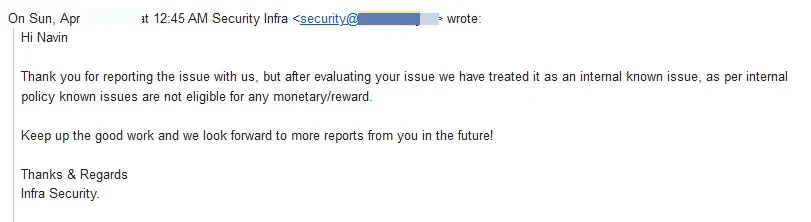
The following morning the researcher checked whether the SQL injection still worked. The time-based injection was no longer effective, and the endpoint that had been found was gone. The author points out that the endpoint had existed since at least 2020 or earlier, and concludes the team had no prior knowledge of it until the report prompted them to investigate and quietly fix it.
Later that day the researcher posted about the experience on Twitter, and many followers replied with similar stories from various bug bounty programmes in India.
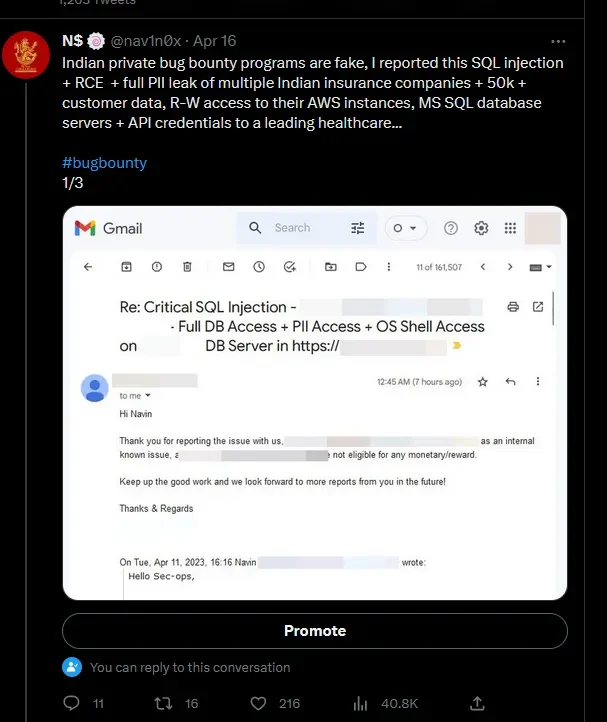
Criticality of the data
The author argues the data was of critical importance and could cause significant harm if leaked, and wonders what consequences the company would face in the US or EU, where stricter regulations and penalties apply. They reached out to the security team several times for clarification on whether the issue was known before the report, and received no further communication.
Fix
After the report, the endpoint was removed and the time-based injection no longer worked.
Variants to test
- Run WayBackURLs with
-dateson every subdomain in scope and grep the output forpass,Password,reset,loginandsignup. A positive result is an archived URL that still responds and behaves differently from the current login page. - Open archived mobile URLs, the ones on
m.hosts, from a desktop browser. A positive result is a page that renders a different flow, such as a password reset form, instead of redirecting to the desktop version. - Download the site with HTTrack and search for links to the archived paths. A path that appears in the archive but in no link on the live site is a candidate dead page.
- On any JSON endpoint, send a single quote in each parameter followed by a
waitfor delayand compare response times. A positive result is a delay matching the payload time plus normal processing time, repeated across fresh sessions. - When SQLMap fails on a JSON body, try injecting the stacked query directly as the data value with
--ignore-code=403and--hex, as in the commands above. A positive result is SQLMap identifying the injection point and returning the current user and database. - Watch for cookie sets that reset after a fixed number of attempts, such as the
loginattemptcookie here. A positive result is a fresh cookie set from the browser restoring access to the endpoint after the reset.
Glossary
- AJAX: a technique where JavaScript inside a page fetches data from the server in the background, without reloading the page.
- API: a defined way for one program to ask another for data or actions, usually over HTTP.
- AWS: Amazon Web Services, a cloud platform where companies rent servers and services.
- Blind injection: an injection where no data comes back in the response, so the attacker infers results from timing or from small changes in the page.
- Bug bounty programme: a company's offer to pay researchers who privately report security problems within a published scope.
- Burp Suite: a tool that sits between browser and server and lets you read, pause, edit and replay requests and responses.
- Code base: the collection of source files a piece of software is built from.
- Cookie: a small piece of text a site stores in your browser and your browser sends back on each request, used to recognise you.
- Database: an organised store of data, usually made of tables, managed by a database server.
- Database backup: a copy of a whole database kept for recovery; if reachable, it is as readable as the live data.
- Dead link / dead page: a page that exists on the server but that nothing on the site links to.
- Domain controller: the server in a Windows network that authenticates users and controls what they may access.
- Endpoint: a specific address on a server that accepts requests, such as a particular path on a website.
- Exchange: Microsoft's email server product.
- grep: a command-line tool that prints only the lines of its input that match a pattern.
- Hex encoding: representing data in base 16, often used to slip past filters that block certain characters.
- Hostname: the name of a machine on a network, such as
m.target.com. - HTTrack: a program that downloads a whole website to your computer for offline browsing.
- HTTP: the protocol browsers and servers use to exchange requests and responses.
- HTTP 200 OK: the status code meaning a request was handled successfully.
- HTTP 403: the status code meaning the server understood the request but refused it.
- Instance: one rented server on a cloud platform such as AWS.
- JSON: a text format for structured data made of names and values in curly braces.
- Kali: a Linux distribution preloaded with security tools.
- OS shell: a command prompt on the server itself, where commands run directly on the machine.
- Parameter: a named input a page or API accepts, like the
qin a search box. - Parameterisation: writing a query with placeholders so user values are handled as data and can never be read as code.
- ParamSpider: a tool that looks for archived copies of pages and lists the parameters they accept.
- PII: personally identifiable information, any data that can identify a specific person.
- POST: the HTTP method a browser uses to send data to a server.
- Proof of concept: a demonstration that a bug really works, usually the smallest set of steps that reproduces it.
- Recon: reconnaissance, the information-gathering phase before testing.
- Repeater: a Burp Suite tab where you resend the same request repeatedly, changing it each time.
- Request: the message a browser sends to a server asking for something.
- Response: the server's reply to a request.
- Scope: the list of systems a bug bounty programme allows you to test.
- Session: one browsing or logged-in visit, tracked by the server using a session cookie.
- Severity: how serious a bug is judged to be, which usually drives the reward.
- SQL: the language used to ask a database for data.
- SQLMap: a tool that automates SQL injection, trying payloads and extracting data.
- SSO: single sign-on, logging in once with an existing account, here a Google account, and having other sites trust that login.
- Stacked query: a database call that accepts more than one SQL statement at once.
- Subdomain: a name that sits under a main domain, such as
m.target.comundertarget.com. - Tamper script: a SQLMap option that transforms payloads to slip past filters.
- Time-based injection: an injection detected by making the database pause and measuring how long the response takes.
- WAF: web application firewall, a filter in front of a site that inspects requests and blocks suspicious ones.
- WayBackURLs: a tool that lists every URL the Internet Archive has recorded for a domain.
- Wildcard: a
*in a scope meaning any name in that position, such as any subdomain oftarget.com.




