Exploiting SQL Error SQLSTATE[42000] To Own MariaDB of A Large Online Media Leader
A parameter in a PHP endpoint was vulnerable to error-based SQL injection, as shown by a database syntax error when a quote was inserted. An attacker could use this to extract data from the MariaDB database, including password hashes.

I recently received a private invitation to hack into an EU-based Online Media and Entertainment organization. The target’s scope wasn’t extensive, but it did include a wildcard scope on a main website specific to an EU country, as well as a few web-apps and proprietary tools.
The full write-up lives on its author's site
It belongs to its author, so we link to it rather than copy it. The other two tabs are our own rewrites, checked against it.
Context
A private invitation arrived to test an EU-based online media and entertainment organisation. The scope was not large: a wildcard on a main website specific to one EU country, plus a few web apps and proprietary tools. The researcher normally picks the widest scope available, and this target alone would not have been interesting, but the bounty table listed high and critical rewards of $5000 and $10000, so the invitation was accepted.
The vulnerable feature was a PHP endpoint named ajax.php sitting under a path of the form /foo/bar/. It handled requests with roughly fifteen parameters, one of which, sales_ref, looked like a sales reference value. According to the triager, the subdomain held sales leads generated from page clicks, which the sales team used for analysis.
Setup
The work was done with a small, mostly free toolchain:
- Certificate transparency sources: crt.sh, Facebook's certificate transparency monitoring tool, and Netlas.io.
- SubFinder for passive subdomain enumeration, piped into HTTPX for HTTP probing.
- ParamSpider for bulk parameter discovery.
- EyeWitness for screenshots of the discovered URLs.
- WaybackURLs for archived URLs.
- Burp Suite (Repeater, Collaborator) for manual requests.
- SQLMap, plus dalfox and Ghauri as alternatives that were considered.
- A VPN, switched between locations during testing.
The request that produced the expected response was one intercepted from the browser, so it carried the appropriate cookie and PHP session ID.
Finding it
Reconnaissance started with subdomain enumeration through certificate transparency. With crt.sh and Facebook's CT monitoring the process is simple; with Netlas the following query was used to pull as many endpoints as possible:
https://app.netlas.io/certs/?q=certificate.subject.organizational_unit:"Org Name"&page=1&indices=
and a regex:
domain:/(.*\.)?domain\.[a-z0-9-]*/
The regex can return a lot of data, but it is only useful when the scope is built on country code top-level domains or common TLDs such as info, net, io and com.
After de-duplicating the subdomains, SubFinder and HTTPX were run in one pipeline:
subfinder --all -dL sub.list | httpx -o ~/final-sublist-httpx.txt
SubFinder performs the passive subdomain probe, HTTPX does the HTTP probing, and the results land in final-sublist-httpx.txt. That list then fed a bulk ParamSpider scan:
cat ~/final-sublist-httpx.txt | xargs -I % python3 ~/ParamSpider/paramspider.py -l high -o ./out/% -d % ;
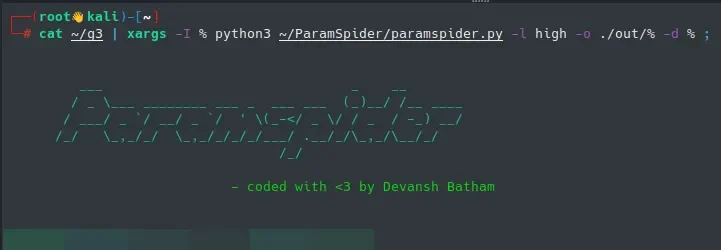
The discovered URLs were then inspected by hand, looking for long URLs with many parameters, since those give more places to inject. The researcher deliberately focused on PHP endpoints, where XSS, SQLi and SSRF are common. Sorting the URLs by .php extension produced a file with over 300 PHP endpoints.
Visual inspection came next. Blank pages, login screens, 403 pages, IIS default pages, RDP logins and PHPInfo pages are all worth a look because they can be vulnerable or leak information. Rather than opening each URL, EyeWitness was run over the list and the screenshots were reviewed one by one.
Nothing stood out until an endpoint with ajax.php appeared in the screenshots. The link was copied and passed to WaybackURLs:
─# waybackurls -dates https://sub.domain.com/foo/bar/ajax.php

WaybackURLs returned roughly 25 to 30 lines of archived data. These were past queries made against the target site, so they were copied into Burp Suite and sent to Repeater.

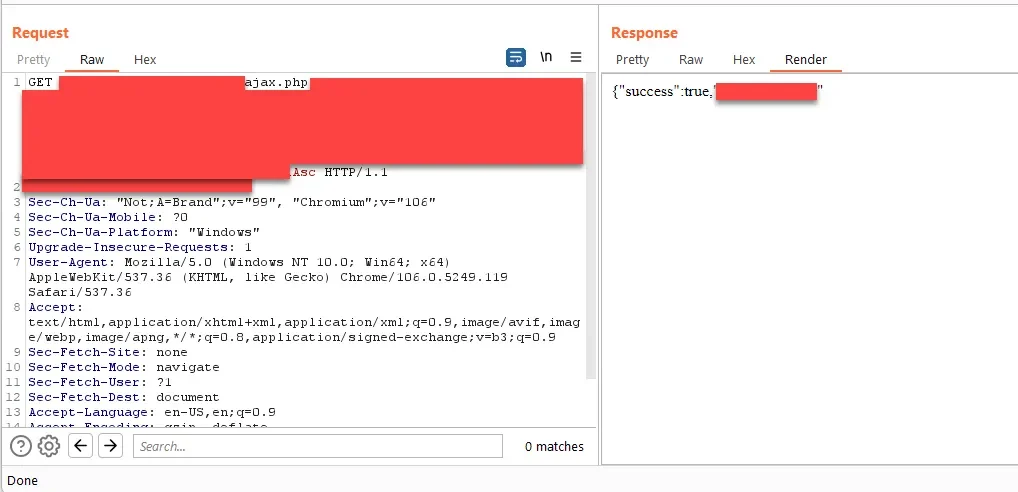
Replaying the archived requests produced a different response than expected. The researcher attributes the difference to the request having been intercepted from the browser, so it carried the right cookie and PHP session ID. The varying responses suggest the server applies some dynamic or session-based logic, returning different outcomes depending on which cookies or session IDs are present. That made the endpoint worth digging into further.

Exploitation
Step 1: probing the parameters
The URL under examination had about fifteen parameters. Each was tested by sending SQLi payloads to Burp Collaborator, and the response stayed the same regardless of payload, which suggested the server handled most of them properly.
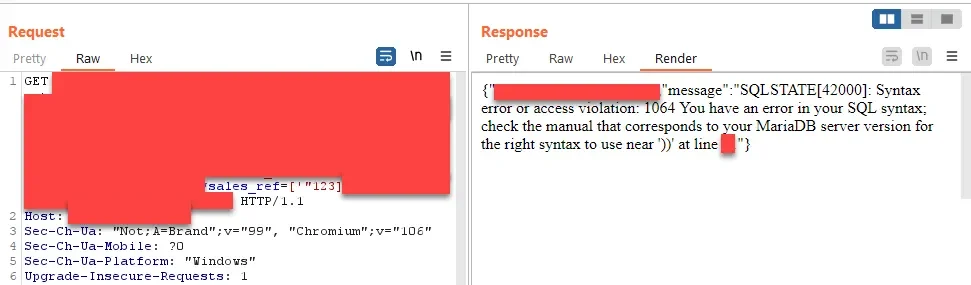
Testing continued until the parameter &***sales_ref=[123] was reached. Its purpose was not clear, but it looked like a sales reference. The payload &***sales_ref=['"123] was sent, and the response contained:
SQL error SQLSTATE[42000]: Syntax Error
That error points to a SQL injection in the sales_ref parameter.
All other activity, including Burp Suite scanning and dalfox, was paused at that point. The full error message read:
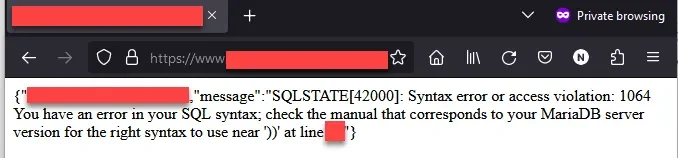
{"success":***,"**":**,"****":"SQLSTATE[42000]: Syntax error or access violation: 1064 You have an error in your SQL syntax; check the manual that corresponds to your MariaDB server version for the right syntax to use near ''\") ******"}
The message names MariaDB and reports error 1064, a syntax error near the injected fragment, which suggests the input reaches the SQL parser.
Step 2: confirming from a browser
The VPN was switched on, the URL was copied out of Burp Repeater and opened in a browser. The SQL error was still there, which confirmed the finding persisted outside the proxy and was ready for further investigation.
The VPN is used deliberately: switching locations reduces the chance of the WAF blacklisting the tester's IP. A few SQLi payloads at a regular interval may not raise suspicion, but bulk testing or automated scripts can trigger security measures.
Step 3: SQLMap fails
The request file was copied and SQLMap was started. In the first run, without specifying any parameter, it found no SQL injection. A second run with -p xxxsales_ref also found nothing.
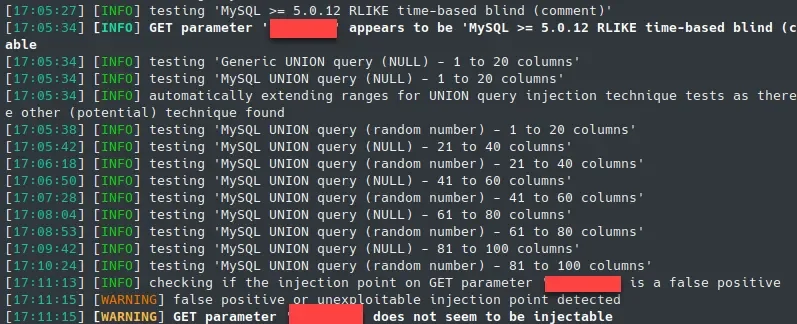
Multiple tamper scripts, adjusted delay and detection level were tried, and SQLMap still detected nothing substantial even though it recognised the possibility of injection. Ghauri was considered as an alternative, but it is not good at handling Ajax parameters, which is exactly what this endpoint uses.
Step 4: SQLMap in manual mode
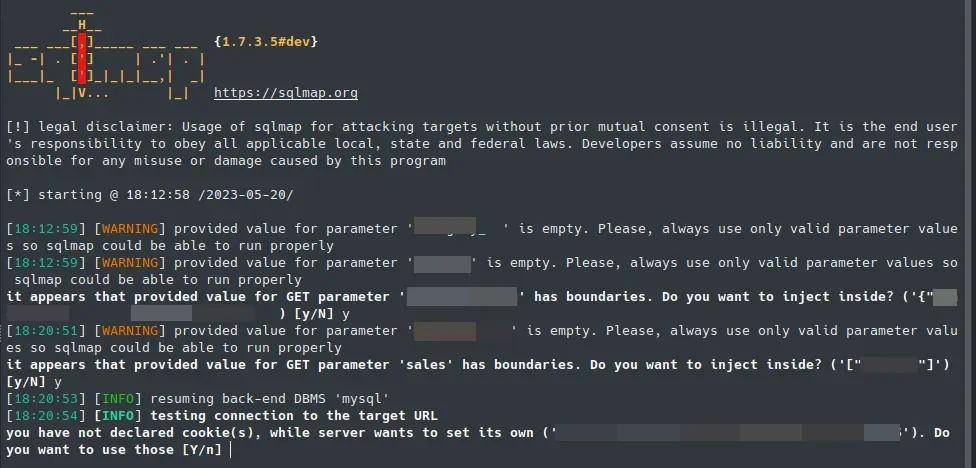
SQLMap was then run directly against the URL. The GET request was copied and SQLMap was executed without the -batch flag, so it runs interactively and gives more control.

The reason for the earlier failures became clear: with Ajax/JSON based parameters, SQLMap does not inject inside those boundaries by default, and with -batch it skips them automatically. In the third round, running interactively, the prompt asking whether to inject within the parameter boundaries was answered "yes".
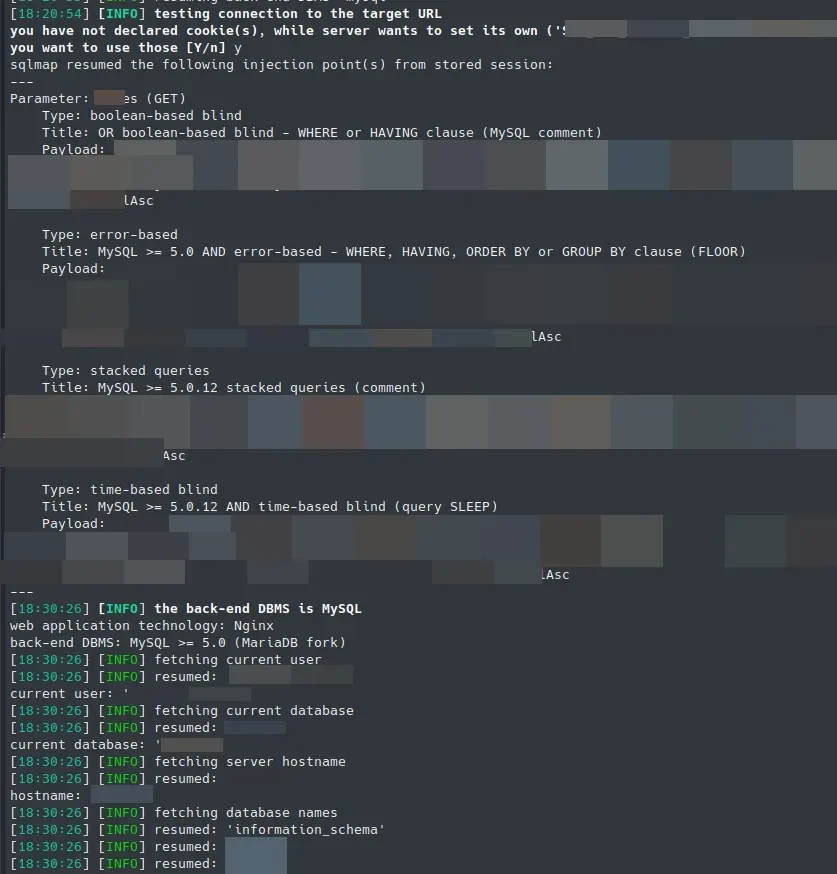
Within a few minutes SQLMap detected four injection types: boolean-based blind, error-based, stacked queries and time-based blind. It also identified a second parameter that had already been tested manually and confirmed vulnerable.
Step 5: dumping hashes
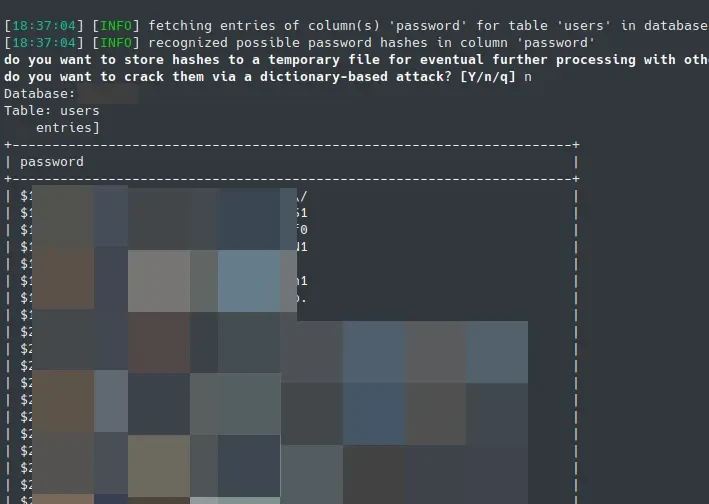
To raise the severity, the password hashes were dumped from the database, which yields sensitive information that could be used to reach user or administrator accounts.
Root cause
A quote and parenthesis in the sales_ref value break the SQL statement and MariaDB returns error 1064. The error text is passed back to the client inside the JSON response, which turns the endpoint into an error-based injection point and also discloses the database engine and version guidance. The report does not describe the server-side code, so the exact construction is not shown.
Existing defences did not stop it. The researcher rotated VPN locations to reduce the risk of a WAF blacklisting the IP, though the report does not say whether a WAF blocked any payloads. The session and cookie logic changed responses but did not prevent injection. SQLMap's default handling of Ajax/JSON parameters caused it to skip them, which explains the missed detection.
Impact
The injection allowed reading data from the database, including password hashes, which could be used to attack user or administrator accounts. The triager assessed the subdomain as low impact because it held no personally identifiable information or critical business data; it mainly contained sales leads generated from page clicks and used by the sales team for analysis. The researcher could not independently verify that assessment. The bounty paid was $3,000, below the $5000 and $10000 figures that had drawn attention to the programme.
Fix
The appropriate fix is to bind sales_ref and every other parameter as prepared-statement parameters instead of concatenating them into SQL, and to stop returning raw database error text to clients, logging it server-side instead.
Variants to test
- Run WaybackURLs against any
ajax.phpstyle endpoint and replay the archived queries in Repeater with and without the browser's cookie and session ID. A positive result is a response that differs by session state, which marks the endpoint as worth parameter testing. - Send a single quote and parenthesis into each parameter of a long URL, one at a time, and watch for database error text such as
SQLSTATE[42000]or1064. A positive result is an error naming the database engine. - When SQLMap reports nothing on an Ajax/JSON endpoint, rerun it without
-batchand answer "yes" to injecting within the parameter boundaries. A positive result is detection of boolean-based blind, error-based, stacked or time-based blind injection. - Try
-pwith the exact parameter name when the default run misses it, and compare results with and without tamper scripts. A positive result is a parameter that only shows up when named explicitly. - Repeat confirmation requests from a different VPN location. A positive result is the same error or behaviour from a fresh IP, showing the finding is not an artefact of one session or a cached response.
What happened, in plain words
A security researcher was invited to test the websites of a European online media and entertainment company. The invitation came with a list of rewards: the company would pay money for bugs found, with the biggest rewards listed as $5000 and $10000. That list is what convinced the researcher to take the job, because the target itself did not look very interesting.
While looking around, the researcher found a page on the company's website that passed a value into a database query. The page did not check that value properly. By putting a few odd characters into it, the researcher made the database complain with an error message, and that error message was shown back on the page. That is the classic sign of a SQL injection: a bug where text typed by a visitor is treated as instructions by the database.
From there the researcher was able to read data out of the database, including password hashes. The company paid a $3,000 reward. The person who reviewed the report explained that the affected part of the site held only sales leads, not personal information or critical business data, so the impact was judged lower than the researcher had hoped.
This article walks through the whole story from the beginning, explaining every tool and every term as it comes up, so that someone who has never done security testing can follow along.
The words you need before we start
A few ideas come up again and again, so here they are up front.
A website and a web server. When you type an address into your browser, your browser sends a request over the internet to a computer called a web server. The server sends back a response, usually a page of HTML (the language pages are written in). Everything in this article is about requests and responses.
A URL and its parameters. A URL is the address, for example https://example.com/shop/search. Often a URL carries extra values after a question mark, like ?colour=red&size=large. Each name=value pair is called a parameter. The page uses those values to decide what to show you. Think of a restaurant order form: the dish name and the table number are parameters, and the kitchen uses them to prepare the right plate.
An API. An API is a way for one piece of software to talk to another without a human clicking anything. A page like ajax.php is often an API endpoint: a script on the page sends it values and it replies with data, usually in a compact format called JSON (text that looks like {"name":"value"}). The name Ajax describes exactly this: a web page quietly fetching data in the background without reloading.
PHP. A programming language commonly used to build websites. Files ending in .php are scripts the server runs to produce a page. The researcher in this story deliberately looked for .php files because they are a common place to find certain bugs.
A cookie and a session ID. A cookie is a small piece of text your browser stores for a website and sends back with every request. A session ID is a cookie that identifies your particular visit, so the server can remember who you are between requests. Think of a coat-check ticket: the ticket itself means nothing, but it lets the attendant find your coat. If you lose the ticket, the attendant cannot help you, and the server behaves the same way when the cookie is missing.
A database and SQL. A database is an organised store of information, like a very large, very strict spreadsheet. SQL is the language used to ask it questions, for example "give me the row where the sales reference equals 123". MariaDB is one popular database program that speaks SQL.
SQL injection. If a website builds a SQL question by gluing together fixed text and whatever the visitor typed, a visitor can type characters that change the question. That is SQL injection. It is like a form that says "write your name" and a person writing "Bob, and also hand over all the files". A well-built site treats what you typed as data only, never as instructions.
An error-based injection. Sometimes the database refuses the malformed question and returns an error message. If the website passes that error back to the visitor, the error itself becomes a way to learn about the database. That is called error-based injection.
A WAF. A Web Application Firewall is a filter that sits in front of a website and blocks requests that look malicious. It is like a bouncer at a door who checks what you are carrying.
A VPN. A Virtual Private Network routes your internet traffic through a server in another location, so websites see that server's address instead of yours. Switching VPN locations changes the address the website sees.
A bounty. A reward paid by a company to someone who reports a security bug responsibly. A triager is the person at the company who reads the report, checks it, and decides how serious it is.
The invitation and the scope
The researcher received a private invitation to test an EU-based online media and entertainment organisation. The scope is the list of things you are allowed to test. Here it was not large: a wildcard on a main website specific to one EU country, plus a few web apps and proprietary tools.
A wildcard in a scope means every subdomain of a domain is fair game. If the scope says *.example.com, then shop.example.com, news.example.com and so on are all included. The researcher normally picks the widest scope available, because more surface means more chance of finding something. This target alone would not have been interesting, but the bounty table listed high and critical rewards of $5000 and $10000, so the invitation was accepted.
The vulnerable feature turned out to be a PHP endpoint named ajax.php, sitting under a path of the form /foo/bar/. It handled requests with roughly fifteen parameters. One of them, sales_ref, looked like a sales reference value. According to the triager, the subdomain held sales leads generated from page clicks, which the sales team used for analysis.
The tools used
The work was done with a small, mostly free toolchain. Each tool gets a short explanation, because the names will come back later.
- Certificate transparency sources: crt.sh, Facebook's certificate transparency monitoring tool, and Netlas.io. When a website uses HTTPS (the padlock in your browser), it needs a certificate. Certificates are published to public logs called certificate transparency logs. Those logs are a goldmine for finding subdomains, because every certificate names the sites it covers.
- SubFinder: a tool that collects subdomain names from many public sources. It is passive, meaning it asks third parties rather than probing the target directly.
- HTTPX: a tool that takes a list of hostnames and checks which ones actually answer over HTTP or HTTPS, and what they answer with.
- ParamSpider: a tool that crawls a site and collects URLs that contain parameters, so you get a list of places where input is accepted.
- EyeWitness: a tool that opens a list of URLs in a headless browser and saves a screenshot of each one, so you can look at many pages quickly.
- WaybackURLs: a tool that queries the Internet Archive (the Wayback Machine) for old URLs that were once seen on a site. Old URLs often reveal endpoints that are still live but no longer linked anywhere.
- Burp Suite: a proxy that sits between your browser and the website. It lets you see every request, edit it, and resend it. Repeater is the part that resends a request you have edited. Collaborator is a service that gives you a unique address you can put in a payload, so you can tell whether the server ever tried to contact it.
- SQLMap: an automated tool that tries many SQL injection techniques against a parameter.
- dalfox and Ghauri: alternative testing tools that were considered along the way.
- A VPN, switched between locations during testing.
The request that produced the expected response was one intercepted from the browser, so it carried the appropriate cookie and PHP session ID.
Finding it
Step 1: collecting subdomains
Reconnaissance, or recon, is the information-gathering phase before any testing. It is like walking around a building before trying the doors.
Recon started with subdomain enumeration through certificate transparency. With crt.sh and Facebook's CT monitoring the process is simple: you type the domain and read the results. With Netlas the following query was used to pull as many endpoints as possible:
https://app.netlas.io/certs/?q=certificate.subject.organizational_unit:"Org Name"&page=1&indices=
Line by line: this is a URL to a search page on Netlas. The part after ?q= is the search query. certificate.subject.organizational_unit is a field inside a certificate, the "organisational unit" line, which often contains a department or brand name. "Org Name" is the value being searched for, in quotes so the whole phrase is matched. &page=1 asks for the first page of results, and &indices= is an empty parameter that the site expects.
A regex was also used:
domain:/(.*\.)?domain\.[a-z0-9-]*/
A regex (regular expression) is a pattern for matching text. domain: tells Netlas to search the domain field. The slashes delimit the pattern. (.*\.)? means "optionally, any characters followed by a dot", so both example.com and sub.example.com match. domain\. is the literal word "domain" followed by a dot, and [a-z0-9-]* means "any number of lowercase letters, digits or hyphens", which is what a top-level domain looks like. The regex can return a lot of data, but it is only useful when the scope is built on country code top-level domains (like .de or .fr) or common TLDs such as info, net, io and com.
Step 2: probing which hosts are alive
After de-duplicating the subdomains (removing repeats), SubFinder and HTTPX were run in one pipeline:
subfinder --all -dL sub.list | httpx -o ~/final-sublist-httpx.txt
Line by line: subfinder is the tool name. --all tells it to use every source it has. -dL sub.list means "read the list of domains from the file sub.list". The vertical bar | is a pipe: it takes the output of the left command and feeds it as input to the right one. httpx receives that list of hostnames and checks each one over HTTP. -o ~/final-sublist-httpx.txt saves the output to a file in the home directory. The result is a list of hosts that actually respond.
That list then fed a bulk ParamSpider scan:
cat ~/final-sublist-httpx.txt | xargs -I % python3 ~/ParamSpider/paramspider.py -l high -o ./out/% -d % ;
Line by line: cat prints the contents of the file. xargs -I % takes each line and runs the following command once per line, substituting % with that line. python3 ~/ParamSpider/paramspider.py runs the ParamSpider script. -l high sets the level of crawling to high, meaning it looks harder. -o ./out/% writes the results for each host into its own folder under out/. -d % passes the host as the domain to scan. The trailing ; just ends the command.
Step 3: reading the results by hand
The discovered URLs were then inspected by hand, looking for long URLs with many parameters, since those give more places to inject. The researcher deliberately focused on PHP endpoints, where XSS, SQLi and SSRF are common. XSS (cross-site scripting) is when a site lets an attacker run their own JavaScript in a visitor's browser. SSRF (server-side request forgery) is when an attacker can make the server send requests to places it should not reach. Sorting the URLs by .php extension produced a file with over 300 PHP endpoints.
Step 4: looking at the pages
Visual inspection came next. Blank pages, login screens, 403 pages (403 is the HTTP status code for "forbidden"), IIS default pages (IIS is Microsoft's web server, and its default page is a well-known placeholder), RDP logins (Remote Desktop, a way to control a Windows machine remotely) and PHPInfo pages (a PHP diagnostic page that lists configuration details) are all worth a look because they can be vulnerable or leak information.
Rather than opening each URL, EyeWitness was run over the list and the screenshots were reviewed one by one. This is the equivalent of flicking through photographs of every door in the building instead of walking to each one.
Nothing stood out until an endpoint with ajax.php appeared in the screenshots. The link was copied and passed to WaybackURLs:
─# waybackurls -dates https://sub.domain.com/foo/bar/ajax.php
Line by line: ─# is just the shell prompt as it appeared in the terminal. waybackurls is the tool. -dates asks it to include the dates on which each URL was archived. The URL that follows is the endpoint being looked up. The tool returns every archived version of URLs it knows for that address.
Step 5: replaying old requests
WaybackURLs returned roughly 25 to 30 lines of archived data. These were past queries made against the target site, so they were copied into Burp Suite and sent to Repeater.
Replaying the archived requests produced a different response than expected. The researcher attributes the difference to the request having been intercepted from the browser, so it carried the right cookie and PHP session ID. The varying responses suggest the server applies some dynamic or session-based logic, returning different outcomes depending on which cookies or session IDs are present. That made the endpoint worth digging into further.
Exploitation
Step 1: probing the parameters
The URL under examination had about fifteen parameters. Each was tested by sending SQLi payloads to Burp Collaborator, and the response stayed the same regardless of payload, which suggested the server handled most of them properly. Sending to Collaborator is a way of asking "did the server ever try to contact this address?" If it did, the input reached somewhere it should not have.
Testing continued until the parameter &***sales_ref=[123] was reached. Its purpose was not clear, but it looked like a sales reference. The payload &***sales_ref=['"123] was sent, and the response contained:
SQL error SQLSTATE[42000]: Syntax Error
Line by line: SQLSTATE[42000] is a standard code the database uses to label an error. 42000 is the class for syntax errors, meaning the database could not understand the question it was given. Syntax Error is the plain description. Seeing this in a response means the text sent in the parameter reached the database and changed the question.
That error points to a SQL injection in the sales_ref parameter.
All other activity, including Burp Suite scanning and dalfox, was paused at that point. The full error message read:
{"success":***,"**":**,"****":"SQLSTATE[42000]: Syntax error or access violation: 1064 You have an error in your SQL syntax; check the manual that corresponds to your MariaDB server version for the right syntax to use near ''\") ******"}
Line by line: the outer braces and quotes mean this is a JSON response, the format an API uses to send structured data. "success":*** is a field whose value has been hidden here. The next fields are also hidden. The last field contains the database's own words: SQLSTATE[42000] is the error class, 1064 is MariaDB's specific error number for a syntax error, and the sentence tells the reader to check the manual for their MariaDB server version. The fragment near ''\") shows the part of the query the database choked on, which is the injected text. The message names MariaDB and reports error 1064, a syntax error near the injected fragment, which suggests the input reaches the SQL parser.
Step 2: confirming from a browser
The VPN was switched on, the URL was copied out of Burp Repeater and opened in a browser. The SQL error was still there, which confirmed the finding persisted outside the proxy and was ready for further investigation. This matters because a result seen only inside a proxy could be an artefact of the tool; seeing it in a normal browser shows it is real.
The VPN is used deliberately: switching locations reduces the chance of the WAF blacklisting the tester's IP. A few SQLi payloads at a regular interval may not raise suspicion, but bulk testing or automated scripts can trigger security measures. In other words, the bouncer may not notice one odd request, but a crowd of them gets the door shut.
Step 3: SQLMap fails
The request file was copied and SQLMap was started. In the first run, without specifying any parameter, it found no SQL injection. A second run with -p xxxsales_ref also found nothing.
Line by line: -p tells SQLMap which parameter to test. xxxsales_ref is the parameter name as it appeared in the request. Naming it explicitly should focus the tool, but here it still found nothing.
Multiple tamper scripts, adjusted delay and detection level were tried, and SQLMap still detected nothing substantial even though it recognised the possibility of injection. A tamper script is a small add-on that rewrites payloads to slip past filters. Delay is the pause between requests, and detection level controls how many different tests the tool tries. Ghauri was considered as an alternative, but it is not good at handling Ajax parameters, which is exactly what this endpoint uses.
Step 4: SQLMap in manual mode
SQLMap was then run directly against the URL. The GET request was copied and SQLMap was executed without the -batch flag, so it runs interactively and gives more control. A GET request is the ordinary kind of request a browser makes when you open a page, with all the values in the URL. -batch means "never ask me anything, just pick defaults"; leaving it off means the tool stops and asks questions.
The reason for the earlier failures became clear: with Ajax/JSON based parameters, SQLMap does not inject inside those boundaries by default, and with -batch it skips them automatically. In the third round, running interactively, the prompt asking whether to inject within the parameter boundaries was answered "yes".
Within a few minutes SQLMap detected four injection types. Each one is a different way of proving the bug:
- Boolean-based blind: the tool asks the database a question whose answer is true or false, and watches whether the page changes. It never sees the data, only a difference in behaviour, hence "blind".
- Error-based: the tool deliberately causes an error and reads the information in the error message.
- Stacked queries: the tool manages to send more than one SQL statement in a single request, one after the other.
- Time-based blind: the tool asks the database to wait a few seconds if a condition is true, and measures how long the response takes.
It also identified a second parameter that had already been tested manually and confirmed vulnerable.
Step 5: dumping hashes
To raise the severity, the password hashes were dumped from the database, which yields sensitive information that could be used to reach user or administrator accounts. A password hash is the scrambled form in which a well-built site stores passwords. It cannot be read directly, but it can be attacked offline, which is why it is still sensitive.
Why the bug existed
A quote and parenthesis in the sales_ref value break the SQL statement and MariaDB returns error 1064. The error text is passed back to the client inside the JSON response, which turns the endpoint into an error-based injection point and also discloses the database engine and version guidance. The report does not describe the server-side code, so the exact construction is not shown.
Existing defences did not stop it. The researcher rotated VPN locations to reduce the risk of a WAF blacklisting the IP, though the report does not say whether a WAF blocked any payloads. The session and cookie logic changed responses but did not prevent injection. SQLMap's default handling of Ajax/JSON parameters caused it to skip them, which explains the missed detection.
What it meant
The injection allowed reading data from the database, including password hashes, which could be used to attack user or administrator accounts. The triager assessed the subdomain as low impact because it held no personally identifiable information or critical business data; it mainly contained sales leads generated from page clicks and used by the sales team for analysis. The researcher could not independently verify that assessment. The bounty paid was $3,000, below the $5000 and $10000 figures that had drawn attention to the programme.
How to fix it
The appropriate fix is to bind sales_ref and every other parameter as prepared-statement parameters instead of concatenating them into SQL, and to stop returning raw database error text to clients, logging it server-side instead. A prepared statement is a way of sending SQL where the question and the values travel separately, so the database never mistakes a value for an instruction. It is the difference between handing a form to a clerk and letting a visitor write on the clerk's notepad.
Things worth trying yourself
- Run WaybackURLs against any
ajax.phpstyle endpoint and replay the archived queries in Repeater with and without the browser's cookie and session ID. A positive result is a response that differs by session state, which marks the endpoint as worth parameter testing. - Send a single quote and parenthesis into each parameter of a long URL, one at a time, and watch for database error text such as
SQLSTATE[42000]or1064. A positive result is an error naming the database engine. - When SQLMap reports nothing on an Ajax/JSON endpoint, rerun it without
-batchand answer "yes" to injecting within the parameter boundaries. A positive result is detection of boolean-based blind, error-based, stacked or time-based blind injection. - Try
-pwith the exact parameter name when the default run misses it, and compare results with and without tamper scripts. A positive result is a parameter that only shows up when named explicitly. - Repeat confirmation requests from a different VPN location. A positive result is the same error or behaviour from a fresh IP, showing the finding is not an artefact of one session or a cached response.
Glossary
- 403: an HTTP status code meaning the server understood the request but refuses to fulfil it.
- Ajax: a technique where a web page fetches data from the server in the background without reloading.
- API: a defined way for one piece of software to talk to another.
- Boolean-based blind injection: proving an injection by asking true or false questions and watching how the page changes, without seeing the data.
- Bounty: money paid by a company for a responsibly reported security bug.
- Burp Collaborator: a service that gives a unique address so you can tell whether a server tried to contact it.
- Burp Repeater: the part of Burp Suite that lets you edit and resend a single request.
- Burp Suite: a proxy tool that sits between your browser and a website so you can inspect and modify requests.
- Certificate transparency: public logs of HTTPS certificates, useful for discovering subdomains.
- Cookie: a small piece of text a browser stores for a site and sends back with each request.
- dalfox: a tool for testing cross-site scripting.
- Database: an organised store of information that can be queried.
- Error-based injection: learning about a database by causing it to return error messages.
- EyeWitness: a tool that takes screenshots of many URLs at once.
- GET request: the ordinary request a browser makes when opening a page, with values in the URL.
- Ghauri: an alternative SQL injection testing tool.
- Hash (password hash): the scrambled form in which a site stores a password.
- HTTPX: a tool that checks which hostnames respond over HTTP or HTTPS.
- IIS: Microsoft's web server software.
- JSON: a compact text format for structured data, using braces and quotes.
- MariaDB: a popular open-source database program that speaks SQL.
- Netlas.io: a search engine for internet data, including certificates.
- Parameter: a
name=valuepair in a URL or request that the page uses as input. - ParamSpider: a tool that collects URLs containing parameters.
- PHPInfo: a PHP diagnostic page that lists configuration details.
- Prepared statement: a way of sending SQL where the question and the values are kept separate, preventing injection.
- RDP: Remote Desktop Protocol, used to control a Windows machine remotely.
- Recon: the information-gathering phase before testing.
- Regex: a pattern for matching text.
- Scope: the list of systems you are allowed to test.
- Session ID: a cookie that identifies a particular visit so the server can remember you.
- SQL: the language used to ask a database questions.
- SQL injection: a bug where visitor input is treated as SQL instructions.
- SQLMap: a tool that automatically tests for SQL injection.
- SQLSTATE[42000]: a standard database error code for a syntax error.
- SSRF: server-side request forgery, where an attacker makes the server send requests it should not.
- Stacked queries: sending more than one SQL statement in a single request.
- Subdomain: a named part of a domain, such as
shopinshop.example.com. - SubFinder: a tool that collects subdomain names from public sources.
- Tamper script: an add-on that rewrites payloads to slip past filters.
- Time-based blind injection: proving an injection by measuring how long the server takes to respond.
- Triager: the person at a company who reviews and assesses a security report.
- URL: the address of a page or resource on the web.
- VPN: a service that routes your traffic through another location so sites see a different address.
- WAF: a Web Application Firewall, a filter that blocks requests that look malicious.
- WaybackURLs: a tool that looks up old URLs from the Internet Archive.
- Wildcard: in a scope, a rule that includes every subdomain of a domain.
- XSS: cross-site scripting, where a site lets an attacker run their own JavaScript in a visitor's browser.




