I Earned $3500 and 40 Points for A GraphQL Blind SQL Injection Vulnerability.
A GraphQL endpoint was vulnerable to blind SQL injection because user input was not properly sanitised. An attacker could send crafted queries to cause time delays, confirming the injection and potentially extracting data.

Thank you for your love and appreciation for my recent blog post on MySQL SQL Injection, which I discovered in a major international retail company.
The full write-up lives on its author's site
It belongs to its author, so we link to it rather than copy it. The other two tabs are our own rewrites, checked against it.
Context
The target was a private, invite-only web application. It had been listed on BugCrowd for over two years, with more than 250 bugs discovered and rewarded at the time the researcher joined. The scope was defined as target.*, covering a broad range of country code top-level domains such as target.co.uk, target.it, target.ae, target.co.in and target.com, but excluding subdomains.
The feature at the centre of the finding is a GraphQL query that retrieves or modifies a user's "gender" data. The query accepts three keywords: M for Male, F for Female and NA for Not Applicable. The researcher captured the full query after roughly an hour of sending requests and analysing the responses.
Setup
The researcher worked from a Kali VM. The tooling used across the engagement was:
- Firefox, to open the main website and read the SSL certificate.
- netlas.io and crt.sh, for certificate transparency searches.
- httpx, for probing the endpoint list.
- ParamSpider, for parameter discovery.
- Nuclei, for a default technology scan.
- Burp Suite (Community edition) and Burp Scanner, for active scanning and manual request capture.
- SQLMAP and Ghauri, for automated injection testing.
No special account or role was needed beyond the invitation to the platform. The researcher accepted the invite knowing that even a P3 would be hard to find, given the volume of prior testing.
Finding it
Enumerating ccTLDs from certificate transparency
Because the target operated in countries worldwide, the researcher reasoned that the ccTLDs could be found through certificate transparency services. The first step was to open target.com in Firefox and extract the Organization name from the SSL certificate, then copy it for further analysis.
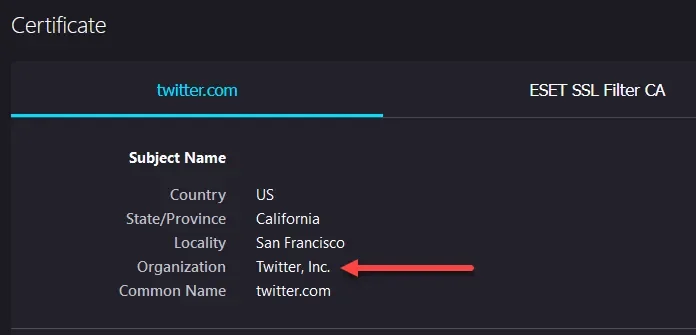
The screenshot shows the SSL certificate details opened in Firefox.
The researcher notes that many organisations register their SSL certificates under their own name, such as "Twitter, Inc.", so using the Organization name as part of the search criteria gives more accurate and comprehensive results when hunting for subdomains or ccTLD domains.
Using netlas.io and crt.sh with that Organization name produced over 7,000 results, including subdomains. After filtering and analysis, the list was narrowed to approximately 64 endpoints.
Probing and parameter discovery
The 64 endpoints were copied to the Kali VM and sent through httpx. Of those, 57 were live and responsive.
ParamSpider was then run against the live endpoints, excluding subdomains with the -subs False flag:
cat targets | xargs -n 1 -I {} python3 ~/ParamSpider/paramspider.py --subs False --domain {} --level high | urldedupe >> all-param.txt
This produced roughly 20,000 lines of URLs. After filtering out garbage data, about 12,000 relevant URLs remained. Inspecting them showed that the majority were similar product page links, for example:
https://www.target.co.xx/en/xxxx/category2/men/t-shirts.xxx?n=xx&s=xx&ww=xxx
More than 10,000 of these shared the same parameter structure and offered nothing useful. A few SQL injection and XSS tests on a subset found no vulnerabilities. Filtering out all product URLs left a curated list of approximately 1,600 URLs.
Nuclei scan
A default Nuclei scan over the curated list returned results within seconds. One finding stood out: a country-specific TLD website was using GraphQL, and the implementation appeared to be misconfigured, which warranted further investigation.
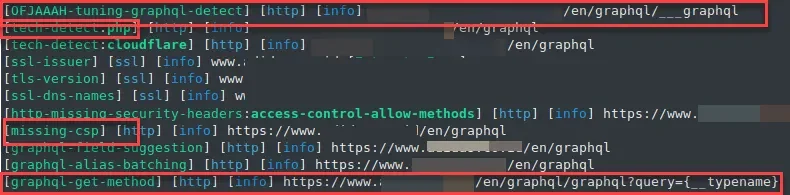
The screenshot shows the Nuclei scan result that flagged the GraphQL usage.
Burp Scanner
Burp was used to investigate the URLs further. An active scan returned a positive result: Burp Scanner detected a potential SQL injection when a single quote (') was submitted in the request body, and the server responded with a 500 Internal Server Error. That response strongly suggested a SQL injection, but the finding was still tentative and could have been a false positive.
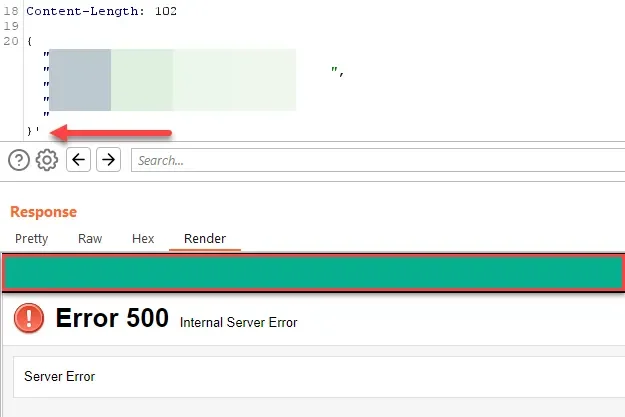
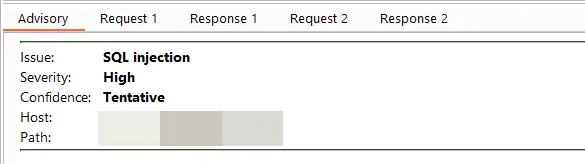
The screenshots show the Burp Scanner finding.
SQLMAP and Ghauri
The request was copied and sent to both SQLMAP and Ghauri. Neither tool identified any injection, which suggested the Burp finding might be a false positive.

The screenshot relates to the SQLMAP and Ghauri results.
Despite that, the researcher trusted Burp's detection and decided to investigate manually, setting the other endpoints aside until the question of SQL injection was settled.
Exploitation
Step 1: capture the GraphQL query
Burp Community edition was opened on a separate screen and a request was sent to the vulnerable URL. The researcher then captured requests and analysed the responses for different query types. After about an hour, the complete query used to retrieve or modify the "gender" data of a user was captured:
{ "query": "query ($_key***_0:String!, $_***_0:Int!) {***** (keyword:$_key***_0, ****:$_***_0){ key***_text, number_of_result, number_of_uses, ***_id, gender_cd, url }}", "variables":{ "_key***_0":"M", "_***_0":"1" }}
The query takes a string keyword (M, F or NA) and an integer. The selection set returns fields including the keyword text, the number of results, the number of uses, an identifier, the gender code and a URL. The parts of the query are partially masked in the published write-up.
Step 2: choose a payload family
The Nuclei scan had shown that the application runs PHP on Apache, so the researcher focused on MySQL SLEEP payloads.
Step 3: confirm the injection with a time delay
A specific payload produced a delay in the server response of precisely 10.121 seconds. That confirmed the SQL injection, and the researcher validated it further with various payloads using different time delays.
XOR(if(now()=sysdate(),sleep(9),0))XOR\"Z
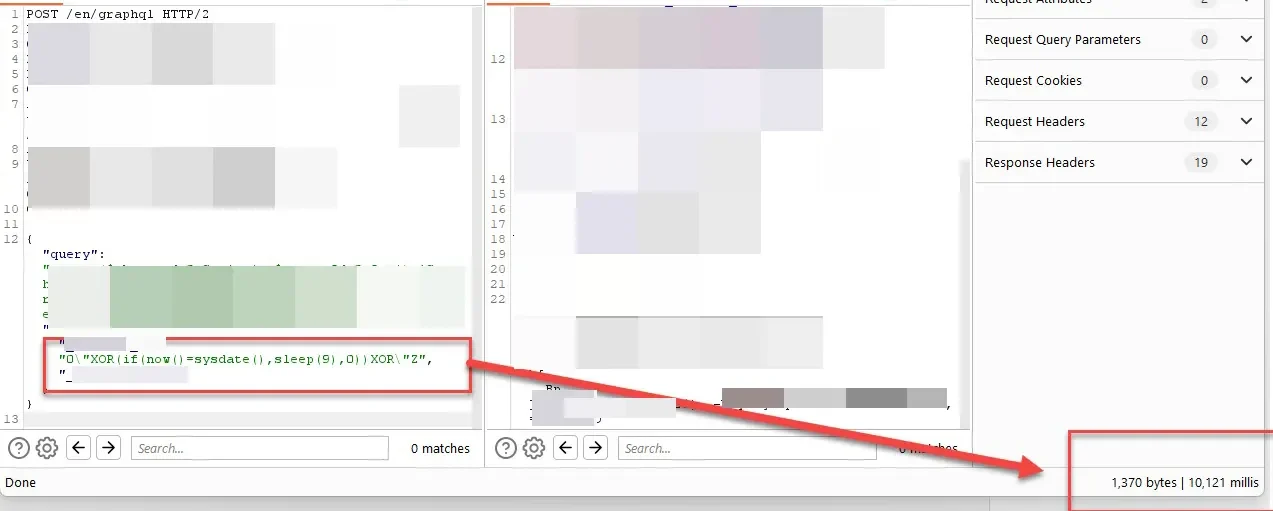
The screenshot relates to the delayed response.
Step 4: report
The report was submitted promptly. The researcher also asked the triager whether to run SQLMap to gather further details such as the host name, database or current user; the triager said they would consult the client. The report was triaged as a Blind SQL injection, and the target rewarded $3500 and 40 points.
Root cause
The report does not show the server-side code. What it does show is that a single quote in the request body produced a 500 Internal Server Error, and that a time-based MySQL payload in the same request produced a measurable delay. Taken together, this indicates that user-controlled input from the GraphQL query reaches a SQL statement without being safely parameterised. The Nuclei finding of a GraphQL misconfiguration is consistent with that, though the report does not describe the misconfiguration in detail.
Why the existing defences did not stop it is not stated. The automated scanners SQLMAP and Ghauri failed to detect the injection, which is a limitation of the tooling rather than a defence on the target.
Impact
This is a blind SQL injection: the attacker does not see query output directly and instead infers data through timing. In the researcher's own framing, the vulnerability was confirmed and validated, but the report was submitted before any data extraction was attempted. The researcher offered to run SQLMap to retrieve the host name, database or current user, and the triager deferred to the client.
Fix
The standard fix for this class of issue is to use parameterised queries or prepared statements for every value taken from the GraphQL query, rather than concatenating it into SQL. Input validation on the keyword and integer variables would add defence in depth, but parameterisation is the control that addresses the root cause.
Variants to test
- Other GraphQL variables. The query here took a string keyword and an integer. Try time-based payloads in every variable of every captured query, including integers, since numeric contexts are often overlooked. A positive result is a response delay that tracks the sleep interval.
- Single quote in the request body. Send a
'in each string variable and watch for a500or a changed error. A positive result is a server error that disappears when the quote is removed. - Time-based confirmation across payload families. If the stack is PHP on Apache, try MySQL
SLEEPpayloads; on other stacks, try the equivalent for PostgreSQL, MSSQL or Oracle. A positive result is a delay proportional to the value passed to the sleep function. - Do not stop at automated tools. SQLMAP and Ghauri both missed this injection. When Burp Scanner flags a candidate, capture the full request manually and test it by hand before dismissing it.
- Certificate transparency for ccTLD scope. When scope is
target.*without subdomains, pull the Organization name from the certificate and search netlas.io and crt.sh for it. A positive result is a list of country domains that the program's scope covers. - Filter product URLs early. In this engagement, more than 10,000 of roughly 12,000 URLs shared one parameter structure. Removing them left about 1,600 URLs and made the GraphQL endpoint visible.
What happened, in plain words
A security researcher found a serious bug in a private website that only invited people could use. The bug let someone sneak extra instructions into a database query, and the researcher could tell the instructions had run because the website took longer to answer. The company paid $3500 and gave 40 points for the report.
This article walks through the whole story slowly, assuming you have never done security testing before. You only need to know how to use a browser and a computer. Every tool and term is explained the first time it appears.
Background: what the researcher was looking at
The target was a private, invite-only web application. "Invite-only" means you cannot just sign up; someone has to let you in. Even so, the platform was popular among white-hat hackers (people who test systems with permission and report problems instead of abusing them).
It had been listed on BugCrowd for over two years. BugCrowd is a bug bounty platform: companies put their systems on it and offer money to anyone who finds and reports a security flaw. At the time the researcher joined, more than 250 bugs had already been found and rewarded there. That matters because it tells you the easy problems were long gone.
The scope was defined as target.*. "Scope" is the list of things you are allowed to test. The * is a wildcard meaning "anything", so target.* covered a broad range of country code top-level domains such as target.co.uk, target.it, target.ae, target.co.in and target.com, but excluded subdomains. A country code top-level domain (ccTLD) is the ending of a web address that belongs to a country: .co.uk for the United Kingdom, .it for Italy, .ae for the United Arab Emirates, .co.in for India. A subdomain is the part in front of the main name, like shop in shop.target.com.
The feature at the centre of the finding is a GraphQL query that retrieves or modifies a user's "gender" data. Let us unpack that.
An API (application programming interface) is the way one piece of software asks another for data or asks it to do something. Think of a restaurant: you do not walk into the kitchen, you tell the waiter what you want and the waiter brings it. The API is the waiter.
GraphQL is a particular style of API. Instead of many separate addresses for many separate things, there is usually one address, and you send it a description of exactly the data you want. That description is called a query. The query accepts three keywords for gender: M for Male, F for Female and NA for Not Applicable.
The researcher captured the full query after roughly an hour of sending requests and analysing the responses. "Capturing" means recording the exact request that the browser or tool sent, so it can be replayed and changed by hand.
The tools used
The researcher worked from a Kali VM. Kali is a Linux distribution made for security testing, and a VM (virtual machine) is a computer simulated inside your real computer, so you can run tools without disturbing your normal system.
The tooling used across the engagement was:
- Firefox, to open the main website and read the SSL certificate.
- netlas.io and crt.sh, for certificate transparency searches.
- httpx, for probing the endpoint list.
- ParamSpider, for parameter discovery.
- Nuclei, for a default technology scan.
- Burp Suite (Community edition) and Burp Scanner, for active scanning and manual request capture.
- SQLMAP and Ghauri, for automated injection testing.
A few of those need explaining now, the rest as they come up.
An SSL certificate is the digital ID card a website presents so your browser can confirm it is really talking to the right place, and so the traffic can be encrypted. Certificates contain public details about the owner, including an Organization name.
Certificate transparency (CT) is a public, permanent log of certificates that have been issued. Because it is public, anyone can search it. Services like crt.sh and netlas.io let you search those logs.
An endpoint is simply a specific address on a server that accepts requests, for example a particular page or API path.
No special account or role was needed beyond the invitation to the platform. The researcher accepted the invite knowing that even a P3 would be hard to find, given the volume of prior testing. Bug bounty programs often rank severity: P1 is the most serious, P2 next, and so on. Finding even a low-ranked P3 on a heavily tested target is not easy.
Finding it
Enumerating ccTLDs from certificate transparency
Because the target operated in countries worldwide, the researcher reasoned that the ccTLDs could be found through certificate transparency services. The logic: if the company runs sites in many countries, it probably obtained certificates for each of those country domains, and those certificates are in the public logs.
The first step was to open target.com in Firefox and extract the Organization name from the SSL certificate, then copy it for further analysis.
The screenshot shows the SSL certificate details opened in Firefox. In Firefox you can click the padlock next to the address bar and view the certificate to see these details.
The researcher notes that many organisations register their SSL certificates under their own name, such as "Twitter, Inc.", so using the Organization name as part of the search criteria gives more accurate and comprehensive results when hunting for subdomains or ccTLD domains. Searching for a generic word would return thousands of unrelated sites; searching for the exact registered organisation name narrows it to the right owner.
Using netlas.io and crt.sh with that Organization name produced over 7,000 results, including subdomains. After filtering and analysis, the list was narrowed to approximately 64 endpoints. Filtering here means removing duplicates, dead hosts and anything outside scope, so the researcher is left with a shortlist worth testing.
Probing and parameter discovery
The 64 endpoints were copied to the Kali VM and sent through httpx. httpx is a command-line tool that takes a list of addresses and checks which ones actually respond, and records basic details about each. Of those 64, 57 were live and responsive.
ParamSpider was then run against the live endpoints, excluding subdomains with the -subs False flag:
cat targets | xargs -n 1 -I {} python3 ~/ParamSpider/paramspider.py --subs False --domain {} --level high | urldedupe >> all-param.txt
Line by line, in plain words:
cat targetsprints the contents of a file calledtargets, which holds the list of endpoints, one per line.|is a pipe: it takes the output of the command on the left and feeds it as input to the command on the right.xargs -n 1 -I {}takes that list and runs the next command once per line, substituting each line wherever{}appears.-n 1means one item at a time.python3 ~/ParamSpider/paramspider.pyruns ParamSpider, a tool that visits pages and collects the parameters they accept. A parameter is the part of a web address after a question mark that passes a value to the site, like?colour=red;colouris the parameter andredis its value.--subs Falsetells ParamSpider not to include subdomains, matching the scope.--domain {}passes the current endpoint from the list as the domain to scan.--level highasks for a more thorough crawl.| urldeduperemoves duplicate URLs from the stream.>> all-param.txtappends everything to a file calledall-param.txtinstead of overwriting it.
This produced roughly 20,000 lines of URLs. After filtering out garbage data, about 12,000 relevant URLs remained. Inspecting them showed that the majority were similar product page links, for example:
https://www.target.co.xx/en/xxxx/category2/men/t-shirts.xxx?n=xx&s=xx&ww=xxx
This is a product listing page. The part after the ? is the query string, carrying parameters n, s and ww with placeholder values. More than 10,000 of these shared the same parameter structure and offered nothing useful. A few SQL injection and XSS tests on a subset found no vulnerabilities.
SQL injection is the bug class at the heart of this story. When a website builds a database command by gluing together text that came from the user, an attacker can supply text that changes the command. A useful comparison: if a form asks for your name and the site builds the sentence "Hello, NAME", typing Alice; delete everything could turn one instruction into two. SQL injection is the same idea aimed at a database.
XSS (cross-site scripting) is a related bug where an attacker gets their own code to run in another user's browser.
Filtering out all product URLs left a curated list of approximately 1,600 URLs. The reasoning is practical: if 10,000 URLs look identical in structure, testing them all wastes time, and the interesting differences are more likely in the remaining 1,600.
Nuclei scan
A default Nuclei scan over the curated list returned results within seconds. Nuclei is a scanner that runs a large library of ready-made checks against targets, looking for known technologies, misconfigurations and common issues.
One finding stood out: a country-specific TLD website was using GraphQL, and the implementation appeared to be misconfigured, which warranted further investigation. A misconfiguration means the software is set up in a way that exposes more than it should, for example leaving a debugging feature or an introspection page switched on.
The screenshot shows the Nuclei scan result that flagged the GraphQL usage.
Burp Scanner
Burp was used to investigate the URLs further. Burp Suite is a widely used tool that sits between your browser and the target, letting you see and edit every request and response. Burp Scanner is its automated component that tries many test inputs and flags suspicious behaviour.
An active scan returned a positive result: Burp Scanner detected a potential SQL injection when a single quote (') was submitted in the request body, and the server responded with a 500 Internal Server Error. The request body is the part of an HTTP request that carries data, as opposed to the address line. A 500 Internal Server Error is the server saying "something went wrong on my side".
Why a single quote? In SQL, text values are wrapped in single quotes, like 'Alice'. If the site pastes your input straight into a command, an extra quote can break the command's structure and cause an error. That error is a strong hint that your text reached the database as code rather than as plain data. But the finding was still tentative and could have been a false positive: a false positive is a warning that turns out not to be a real bug.
The screenshots show the Burp Scanner finding.
SQLMAP and Ghauri
The request was copied and sent to both SQLMAP and Ghauri. These are automated tools that try many injection techniques and report whether any worked. Neither tool identified any injection, which suggested the Burp finding might be a false positive.
The screenshot relates to the SQLMAP and Ghauri results.
Despite that, the researcher trusted Burp's detection and decided to investigate manually, setting the other endpoints aside until the question of SQL injection was settled. The reasoning is sound: automated tools only try the patterns they know, and a real bug can sit just outside those patterns. A human who can read the actual responses has an advantage.
Exploitation
Step 1: capture the GraphQL query
Burp Community edition was opened on a separate screen and a request was sent to the vulnerable URL. The researcher then captured requests and analysed the responses for different query types. After about an hour, the complete query used to retrieve or modify the "gender" data of a user was captured:
{ "query": "query ($_key***_0:String!, $_***_0:Int!) {***** (keyword:$_key***_0, ****:$_***_0){ key***_text, number_of_result, number_of_uses, ***_id, gender_cd, url }}", "variables":{ "_key***_0":"M", "_***_0":"1" }}
Line by line, in plain words:
- The outer braces
{ ... }hold a JSON object. JSON is a common text format for structured data, made of names and values in pairs. "query"is the name of the first field, and its value is a long string containing the GraphQL query itself.- Inside that string,
query ($_key***_0:String!, $_***_0:Int!)declares the query and its variables. A variable is a named slot you fill in each time you send the query, so you do not have to rewrite the whole thing.String!means the value must be text and is required;Int!means it must be a whole number and is required. The!is what marks it required. {***** (keyword:$_key***_0, ****:$_***_0){ ... }}is the part that asks for data, passing the two variables into it.- The inner list
key***_text, number_of_result, number_of_uses, ***_id, gender_cd, urlnames the fields to return: the keyword text, the number of results, the number of uses, an identifier, the gender code and a URL. "variables"is the second field of the outer object, holding the actual values:"_key***_0":"M"sets the keyword to Male, and"_***_0":"1"sets the integer to 1.
The query takes a string keyword (M, F or NA) and an integer. The selection set returns fields including the keyword text, the number of results, the number of uses, an identifier, the gender code and a URL. The parts of the query are partially masked in the published write-up, which is why you see asterisks.
Step 2: choose a payload family
The Nuclei scan had shown that the application runs PHP on Apache, so the researcher focused on MySQL SLEEP payloads. PHP is a programming language commonly used for websites; Apache is a web server, the program that answers requests. MySQL is a popular database system. SLEEP is a MySQL function that makes the database pause for a given number of seconds. If you can make the database pause on demand, you have proof that your text is being executed as a database instruction.
Step 3: confirm the injection with a time delay
A specific payload produced a delay in the server response of precisely 10.121 seconds. That confirmed the SQL injection, and the researcher validated it further with various payloads using different time delays.
XOR(if(now()=sysdate(),sleep(9),0))XOR\"Z
Line by line, in plain words:
This is called blind SQL injection: "blind" because the attacker does not see any data come back. Instead, they ask the database yes-or-no questions and watch the timing to learn the answer. It is like knocking on a wall and listening for how long the echo takes.
The screenshot relates to the delayed response.
Step 4: report
The report was submitted promptly. The researcher also asked the triager whether to run SQLMap to gather further details such as the host name, database or current user; the triager said they would consult the client. A triager is the person on the bug bounty platform who checks a report, confirms it is real and passes it to the company. The report was triaged as a Blind SQL injection, and the target rewarded $3500 and 40 points. Points are a reputation score some platforms give alongside money.
Root cause
The report does not show the server-side code. What it does show is that a single quote in the request body produced a 500 Internal Server Error, and that a time-based MySQL payload in the same request produced a measurable delay. Taken together, this indicates that user-controlled input from the GraphQL query reaches a SQL statement without being safely parameterised. Parameterised queries, also called prepared statements, are the standard defence: the database is told in advance which parts are data and which are instructions, so data can never become code. The Nuclei finding of a GraphQL misconfiguration is consistent with that, though the report does not describe the misconfiguration in detail.
Why the existing defences did not stop it is not stated. The automated scanners SQLMAP and Ghauri failed to detect the injection, which is a limitation of the tooling rather than a defence on the target.
Impact
This is a blind SQL injection: the attacker does not see query output directly and instead infers data through timing. In the researcher's own framing, the vulnerability was confirmed and validated, but the report was submitted before any data extraction was attempted. The researcher offered to run SQLMap to retrieve the host name, database or current user, and the triager deferred to the client.
Fix
The standard fix for this class of issue is to use parameterised queries or prepared statements for every value taken from the GraphQL query, rather than concatenating it into SQL. Input validation on the keyword and integer variables would add defence in depth, but parameterisation is the control that addresses the root cause. Defence in depth means adding several layers of protection so that one mistake does not open everything.
Variants to test
- Other GraphQL variables. The query here took a string keyword and an integer. Try time-based payloads in every variable of every captured query, including integers, since numeric contexts are often overlooked. A positive result is a response delay that tracks the sleep interval.
- Single quote in the request body. Send a
'in each string variable and watch for a500or a changed error. A positive result is a server error that disappears when the quote is removed. - Time-based confirmation across payload families. If the stack is PHP on Apache, try MySQL
SLEEPpayloads; on other stacks, try the equivalent for PostgreSQL, MSSQL or Oracle. A positive result is a delay proportional to the value passed to the sleep function. - Do not stop at automated tools. SQLMAP and Ghauri both missed this injection. When Burp Scanner flags a candidate, capture the full request manually and test it by hand before dismissing it.
- Certificate transparency for ccTLD scope. When scope is
target.*without subdomains, pull the Organization name from the certificate and search netlas.io and crt.sh for it. A positive result is a list of country domains that the program's scope covers. - Filter product URLs early. In this engagement, more than 10,000 of roughly 12,000 URLs shared one parameter structure. Removing them left about 1,600 URLs and made the GraphQL endpoint visible.
Glossary
- API: the way one piece of software asks another for data or asks it to do something.
- Apache: a web server program that answers requests from browsers.
- Blind SQL injection: SQL injection where the attacker cannot see query output and instead infers data from timing or other side effects.
- Bug bounty: a program that pays people for finding and reporting security flaws.
- BugCrowd: a bug bounty platform where companies list their systems and offer rewards.
- Burp Scanner: the automated scanning component of Burp Suite.
- Burp Suite: a tool that sits between your browser and a target so you can see and edit requests and responses.
- ccTLD: country code top-level domain, the country-specific ending of a web address such as
.co.ukor.it. - Certificate transparency (CT): a public, permanent log of issued SSL certificates that anyone can search.
- Endpoint: a specific address on a server that accepts requests.
- False positive: a warning that turns out not to be a real bug.
- GraphQL: a style of API where you send a description of exactly the data you want.
- Ghauri: an automated SQL injection testing tool.
- httpx: a command-line tool that checks which addresses in a list respond.
- JSON: a common text format for structured data made of names and values.
- Kali: a Linux distribution made for security testing.
- Misconfiguration: a setup that exposes more than it should.
- MySQL: a popular database system.
- Nuclei: a scanner that runs a large library of ready-made checks against targets.
- Parameter: the part of a web address after a question mark that passes a value to the site.
- Parameterised query: a database query where data and instructions are kept separate, so data cannot become code.
- ParamSpider: a tool that visits pages and collects the parameters they accept.
- PHP: a programming language commonly used for websites.
- Prepared statement: another name for a parameterised query.
- Request body: the part of an HTTP request that carries data, as opposed to the address line.
- Scope: the list of things you are allowed to test.
- SQL injection: a bug where user input changes the structure of a database command.
- SQLMAP: an automated SQL injection testing tool.
- SSL certificate: the digital ID card a website presents so your browser can confirm it is talking to the right place.
- Subdomain: the part in front of the main name, like
shopinshop.target.com. - Triager: the person on a bug bounty platform who checks a report and passes it to the company.
- VM (virtual machine): a computer simulated inside your real computer.
- White-hat hacker: someone who tests systems with permission and reports problems instead of abusing them.
- XSS (cross-site scripting): a bug where an attacker gets their own code to run in another user's browser.




