How Stale Reset Tokens Led to Full Account Takeover (Even After Changing Email)
Password-reset tokens remained valid after a user changed their account email address, because the server only checked expiry and single-use state. An attacker holding an old reset link sent to the previous email could set a new password and take over the account even after the email was changed.

Cybersecurity
The full write-up lives on its author's site
It belongs to its author, so we link to it rather than copy it. The other two tabs are our own rewrites, checked against it.
Context
This write-up describes a logic flaw in an account recovery flow: password-reset tokens that stay valid after the account's email address has been changed. The author, Yousef Abdullah, presents it as a finding from a security assessment rather than tying it to a named bug bounty programme, so the specific product and vendor are not identified in the text. The affected feature is the standard "Forgot Password" mechanism, which issues a unique, time-sensitive link to the address on file so the user can set a new password.
The expectation the author sets out is simple: when a user makes a sensitive account change, in this case updating the email address, any outstanding recovery credentials should stop working. The application in question does not do that.
Setup
The testing was done against the account management workflow using multiple test accounts. The only precondition is the ability to register accounts and to change the email address from within the account settings. No specific tooling, versions or request captures are given in the write-up; the reproduction is described entirely in terms of user actions in the web interface.
Two addresses are used throughout, referred to as Email A and Email B. Email A is the original address the account is created with and the one that receives the reset link. Email B is the new address the account is moved to before the link is redeemed.
Finding it
While testing the account management workflow across several test accounts, the author looked at what happens to active password-reset requests when the account's email is updated. The reset mechanism, as described, validates a token only against its expiration timestamp or its single-use state. It does not check whether the account's underlying email address or security state changed after the token was issued.
The consequence is that a reset link delivered to an old address remains fully functional after the user has moved the account to a new, secure address. That mismatch between what the user expects (a sensitive change revokes recovery credentials) and what the application does (the token survives the change) is the flaw.
Exploitation
Step 1: Initial state
Sign up for an account associated with Email A.
Step 2: Request reset
Trigger the "Forgot Password" feature for Email A. A password-reset link containing a unique token is delivered to Email A.
Step 3: Change email
Before opening or using the reset link, log into the account and navigate to Settings → General → User account. Update the account email from Email A to Email B and save.
Step 4: Redeem the stale token
Go back to the original email sent to Email A, open the old reset link, and submit a new password.
Step 5: Observation
The application accepts the token without error and confirms the password reset.
Step 6: Account takeover
Log into the account using Email B and the newly set password. The login succeeds seamlessly.
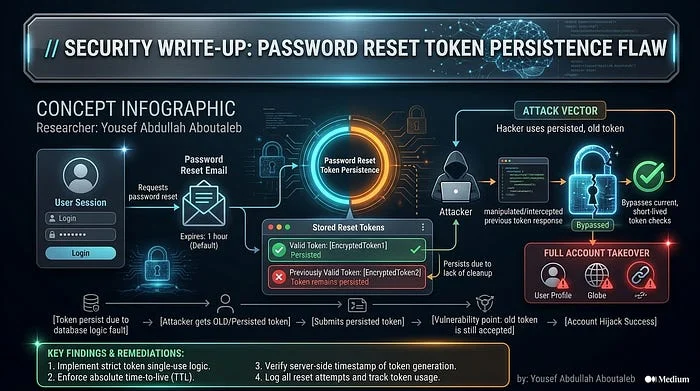
The screenshot at the top of the article shows the write-up's title and byline.
Root cause
The reset mechanism treats a token as valid as long as it has not expired and has not already been used. It does not bind the token to the email address it was issued for, and it does not compare the token's issue time against the time of the last change to sensitive credentials. Because the email change is not treated as a security event that invalidates outstanding recovery credentials, a token minted for Email A is still accepted after the account has moved to Email B.
The author's recommended fixes suggest the account record should carry a password_changed_at or credentials_updated_at timestamp that the redemption path consults, and that the token should reference the address it was generated for. The single-use and expiry checks are the only defences in place, and neither of them is triggered by an email change, so nothing stops the stale token from being redeemed.
Impact
If an unauthorised party obtains a previously issued reset link, for example through a compromised old inbox, a shared device, or an abandoned email domain, they can reset the password and gain complete control over the account under its new email. Users who change their email address specifically to migrate away from an unsafe or compromised mailbox remain exposed without realising it, which gives a false sense of security.
The author reports testing and independently confirming the behaviour across multiple test accounts, which points to an underlying logic issue in how tokens are managed rather than an isolated glitch. The impact depends on the attacker having access to a reset link issued before the email change; the write-up does not describe any way to obtain such a link without that prior access.
Fix
The author recommends three measures:
- Global token invalidation: automatically revoke and invalidate all outstanding or unused password-reset tokens immediately whenever an account's email address, or any other sensitive credential, is updated.
- Attribute binding: bind each password-reset token to the specific email address it was generated for, and during redemption verify that the token's bound email matches the account's current email address.
- State verification: maintain a
password_changed_atorcredentials_updated_attimestamp on the user record and reject any reset token issued before that timestamp.
- Password change instead of email change: request a reset, change the account password while logged in, then redeem the old reset link. A positive result is the old link still setting a new password.
- Other sensitive profile changes: change a recovery phone number, MFA enrolment or username between requesting and redeeming the reset. A positive result is the token surviving the change.
- Account deletion or deactivation and re-registration: request a reset, deactivate the account, then redeem the link. A positive result is the token being accepted against the reactivated or re-registered account.
- Multiple outstanding tokens: request several resets, change the email, then redeem each link. A positive result is any of the older links still working.
- Token reuse across addresses: request a reset for one address, change to another, then check whether a token issued for the new address can be redeemed against the old one. A positive result is cross-address acceptance.
- Session and API tokens: check whether the same email change revokes active sessions and API tokens, not just reset links. A positive result is a session or API token that continues to work after the change.
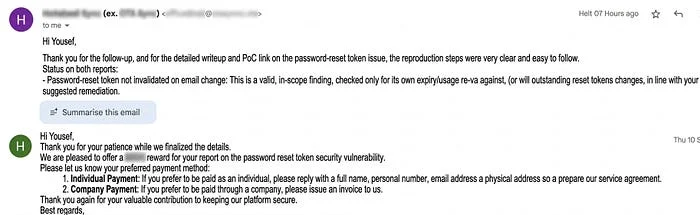
The closing image shows the author's sign-off as Yousef Abdullah, Security Researcher.
What happened, in plain words
Imagine you lose the key to your flat, so the building manager posts a spare key to your old address. Before the envelope arrives, you tell the manager you have moved and give them your new address. A sensible manager would cancel the spare key and cut a new one. In this story, the manager does nothing of the sort: the spare key still opens your door, even though you now live somewhere else.
That is the shape of the bug Yousef Abdullah describes. A website's "Forgot Password" feature sends a special link to your email address so you can set a new password. If you then change the email address on your account, you would expect that old link to stop working. It does not. The link keeps working, and anyone who can still read the old inbox can use it to set a new password and take over the account, even though the account now belongs to a different email address.
The author presents this as a finding from a security assessment. The write-up does not name the product, the vendor or a specific bug bounty programme, so we do not know which website it was. What we do know is the feature involved: the ordinary "Forgot Password" flow that most sites have.
The image at the top of the article shows its title and the author's byline.
Before going further, a few words on the pieces involved, because the rest of the article leans on them.
- Account: your personal record on a website, usually identified by an email address and protected by a password.
- Email address on file: the address the website stores for you. It is where the site sends password-reset links and other important messages.
- Password-reset token: a long, random string of characters that the website generates when you ask to reset your password. It is embedded in the reset link. Think of it as a temporary claim ticket: whoever holds the ticket can collect a new password. It is meant to be secret, to expire after a while, and to work only once.
- Stale: something left over from before, still lying around when it should have been thrown away. A stale token is one that was issued earlier and should no longer be honoured.
- Account takeover (ATO): when someone else gains control of your account, typically by setting a password you do not know so that you are locked out.
The author's expectation is simple and reasonable: when you make a sensitive change to your account, in this case changing the email address, any outstanding recovery credentials should stop working. The website in question does not do that.
Setup
The testing was done against the account management workflow, using several test accounts. The only things needed are the ability to register an account and the ability to change the email address from inside the account settings. The write-up does not mention any special tools, software versions or captured network requests. The whole reproduction is described in terms of what a person does in the web interface: clicking, typing, saving.
Two addresses are used throughout, called Email A and Email B.
Email Ais the original address the account is created with. It is the one that receives the reset link.Email Bis the new address the account is moved to before the link is used.
Keeping these two names straight is the key to following the steps. Everything happens between them.
Finding it
While testing the account management workflow across several test accounts, the author looked at a specific question: what happens to password-reset requests that are still outstanding when the account's email address is changed?
To understand the answer, it helps to know what a reset mechanism normally checks. When you click a reset link, the website looks at the token inside it and asks a few questions:
- Has this token expired? Tokens usually have a time limit, often an hour or a day.
- Has this token already been used? Tokens are normally single-use, so a second click should fail.
In this case, those two checks are the only ones the site performs. It does not ask a third question: has anything important about this account changed since the token was issued? Specifically, it does not check whether the email address on the account is still the same one the token was sent to.
The result is that a reset link delivered to an old address keeps working after the user has moved the account to a new, secure address. The user believes the sensitive change has closed off the old route in. The application leaves it wide open. That gap between expectation and behaviour is the flaw.
This kind of bug is called a logic flaw. Unlike a crash or a broken encryption routine, nothing in the code is technically malfunctioning. Every individual check works as designed. The problem is that a check is missing: the design did not account for a sequence of events (request a reset, then change the email) that leaves a door unlocked.
Exploitation
The author lays the reproduction out as six numbered steps. Each one is something you could do in a browser. Below each step is an explanation of why it is there.
Step 1: Initial state
Sign up for an account associated with Email A.
Why: you need a starting point. The account must belong to Email A so that reset links go to that inbox. This is the address the attacker will later be able to read from, in the scenario the author describes.
Step 2: Request reset
Trigger the "Forgot Password" feature for Email A. A password-reset link containing a unique token is delivered to Email A.
Why: this creates the stale token. The website generates a random token, stores it against the account, and emails a link containing it. At this moment the token is legitimate and fresh. The point of the test is to see what happens to it later.
Step 3: Change email
Before opening or using the reset link, log into the account and navigate to Settings → General → User account. Update the account email from Email A to Email B and save.
Why: this is the sensitive change that should invalidate the token. The order matters. The reset link must be requested first, then the email changed, so that the token is older than the change. If you changed the email first and then requested a reset, the link would go to the new address and there would be nothing stale to test.
The navigation path Settings → General → User account is the menu route inside the site where the email address can be edited. It is written as a chain of menu items: open Settings, then General, then User account.
Step 4: Redeem the stale token
Go back to the original email sent to Email A, open the old reset link, and submit a new password.
Why: this is the moment of truth. If the site is doing the right thing, it should reject the link, because the account no longer belongs to Email A. If it accepts the link, the token has survived a change it should not have survived.
Step 5: Observation
The application accepts the token without error and confirms the password reset.
Why this matters: the site has just let a link sent to an old address set a new password on an account that now belongs to a different address. The token was neither expired nor previously used, so the only two checks the site performs both passed. The missing check is the one that would have caught the email change.
Step 6: Account takeover
Log into the account using Email B and the newly set password. The login succeeds seamlessly.
Why: this proves the password change actually took effect on the live account, not just on some orphaned record. The account is now reachable with Email B as the username and the password that was set through the old link. In an attack, the person who controls the old inbox would now be inside the account, and the legitimate owner, who thinks they have moved to a safe address, would be locked out.
Root cause
The reset mechanism treats a token as valid as long as it has not expired and has not already been used. It does not tie the token to the email address it was issued for, and it does not compare the token's issue time against the time of the last change to sensitive credentials. Because the email change is not treated as a security event that invalidates outstanding recovery credentials, a token minted for Email A is still accepted after the account has moved to Email B.
In practical terms, the author's recommended fixes are to keep a password_changed_at or credentials_updated_at timestamp that the redemption path consults, and to have the token reference the address it was generated for. The single-use and expiry checks are the only defences in place, and neither of them is triggered by an email change, so nothing stops the stale token from being redeemed.
A useful comparison: a hotel key card is usually programmed to stop working the moment you check out, even if the card itself is still physically intact and has not reached any expiry date printed on it. Here, the card still works because the front desk never re-programmed the lock when the guest changed rooms.
Impact
If an unauthorised party obtains a previously issued reset link, they can reset the password and gain complete control over the account under its new email. The author lists three ways that could happen:
- A compromised old inbox: the attacker can already read the old email account, so they can open the reset link that was sent there.
- A shared device: someone else using the same computer or phone may still have access to the old mailbox or its history.
- An abandoned email domain: an address that is no longer controlled by the original owner, for example because a company or service shut down, can end up in someone else's hands.
Users who change their email address specifically to migrate away from an unsafe or compromised mailbox remain exposed without realising it. That is the false sense of security the author highlights: the very action taken to become safer does not close the old route in.
The author reports testing and independently confirming the behaviour across multiple test accounts. That points to an underlying logic issue in how tokens are managed rather than an isolated glitch on one account.
One limit worth stating plainly: the impact depends on the attacker having access to a reset link issued before the email change. In other words, this is not a bug that lets a stranger break in from nothing. It is a bug that fails to close a door the user believed they had closed.
Fix
The author recommends three measures. Each one closes the gap from a different angle.
- Global token invalidation: automatically revoke and invalidate all outstanding or unused password-reset tokens immediately whenever an account's email address, or any other sensitive credential, is updated. In plain terms: when something important changes, throw away every spare key that was cut before the change.
- Attribute binding: bind each password-reset token to the specific email address it was generated for, and during redemption verify that the token's bound email matches the account's current email address. In plain terms: write the address on the claim ticket, and check it at the counter before handing over the goods.
- State verification: maintain a
password_changed_atorcredentials_updated_attimestamp on the user record and reject any reset token issued before that timestamp. In plain terms: keep a note of when the locks were last changed, and refuse any key cut before that date.
Once you understand the shape of the bug, it is worth asking where else the same pattern might appear. The author lists several variations to try. Each one changes a single element of the original test.
- Password change instead of email change: request a reset, change the account password while logged in, then redeem the old reset link. A positive result is the old link still setting a new password. The idea is that changing your password should also cancel any outstanding reset requests.
- Other sensitive profile changes: change a recovery phone number, MFA enrolment or username between requesting and redeeming the reset. A positive result is the token surviving the change. MFA here means multi-factor authentication, an extra step such as a code from an app, on top of the password.
- Account deletion or deactivation and re-registration: request a reset, deactivate the account, then redeem the link. A positive result is the token being accepted against the reactivated or re-registered account. This tests whether a token outlives the account it was issued for.
- Multiple outstanding tokens: request several resets, change the email, then redeem each link. A positive result is any of the older links still working. If one link survives, the others probably do too.
- Token reuse across addresses: request a reset for one address, change to another, then check whether a token issued for the new address can be redeemed against the old one. A positive result is cross-address acceptance. This is the mirror image of the original bug.
- Session and API tokens: check whether the same email change revokes active sessions and API tokens, not just reset links. A positive result is a session or API token that continues to work after the change. A session is your logged-in state in a browser; an API token is a secret string that lets software talk to the site on your behalf. Both should be treated as sensitive credentials too.
The closing image shows the author's sign-off as Yousef Abdullah, Security Researcher.
Glossary
- API: a way for software to talk to a website without a human clicking buttons. An API token is a secret string that proves which account the software is acting for.
- Attribute binding: tying a token to a specific piece of information, such as the email address it was issued for, and checking that link when the token is used.
- Credentials: the things that prove who you are, such as a password, a reset link or a session.
- Email address on file: the address the website stores for you and sends important messages to.
- Expiration timestamp: the date and time after which a token is no longer valid.
- Global token invalidation: cancelling every outstanding token of a given kind at once, for example all unused reset links, when something important changes.
- Logic flaw: a bug where every individual check works as designed, but a check is missing or the order of events was not considered, so the overall behaviour is wrong.
- MFA (multi-factor authentication): an extra step beyond the password, such as a code from an app, used to prove it is really you.
- Password-reset token: a long, random string embedded in a reset link that acts as a temporary claim ticket for setting a new password.
- Redeem: to use a token, for example by opening the reset link and submitting a new password.
- Root cause: the underlying reason a bug exists, as opposed to its visible symptom.
- Session: your logged-in state in a browser, usually kept alive by a cookie, which is a small piece of data the site stores in your browser.
- Single-use: a token that is meant to work only once and then stop working.
- Stale: left over from before and still lying around when it should have been thrown away.
- State verification: checking the current state of an account, such as when its credentials were last changed, before accepting an older token.
- Timestamp: a recorded date and time, such as when a password was last changed.
- Token: a secret string that stands in for something, such as permission to reset a password or to stay logged in.
- Vendor: the company that makes or runs the website.
- Vulnerability: a weakness in a website or system that someone could use to do something they should not be able to do.




