Account Pre-Hijacking & Logic Bypass: How I Took Over Accounts on a Identity Platform
An identity platform allowed an attacker to register an account with a victim's email and keep their own password after the victim later signed up and verified the same email. In the business flow, tampering with a client-side verification flag let the attacker set up their own second factor, so the victim's verified account was tied to the attacker's password and authenticator.

Cybersecurity
The full write-up lives on its author's site
It belongs to its author, so we link to it rather than copy it. The other two tabs are our own rewrites, checked against it.
Context
The target was an identity platform, tested at app.[TARGET_NAME].com. The platform processes identity documents as part of KYC, so an account on it holds sensitive personal material once it is activated. The feature under review was the registration and verification flow: a user signs up with an email address, receives a verification code, enters it, and the account becomes verified. There was a separate business signup flow that additionally involved two-factor authentication setup.
The researcher, Yousef Abdullah, describes two ways the flow could be abused: a simple pre-hijack on individual registration, and a client-side enforcement bypass on business registration that let him attach his own authenticator to a victim's account.
Setup
The only tool named is Burp Suite, used to inspect the registration process and to intercept and modify responses. The testing was done against app.[TARGET_NAME].com. The researcher played both roles, attacker and victim. and set known passwords for each role: AttackerPass123 for the pre-created account and VictimPass123 for the later signup. No versions, headers or endpoint paths are given in the report.
Finding it
While walking through registration in Burp Suite, the researcher noticed that the system did not reject a second signup for an email address that already had an unverified account. There was no error such as "Email already exists". That alone is not a vulnerability, but it raises the question of which credentials survive once the real owner verifies the address. The second observation came from the business signup flow: the response body carried an isEmailVerified field that the front end appeared to trust. Both observations pointed at the same class of problem, decisions about account state being made in the wrong place.
Exploitation
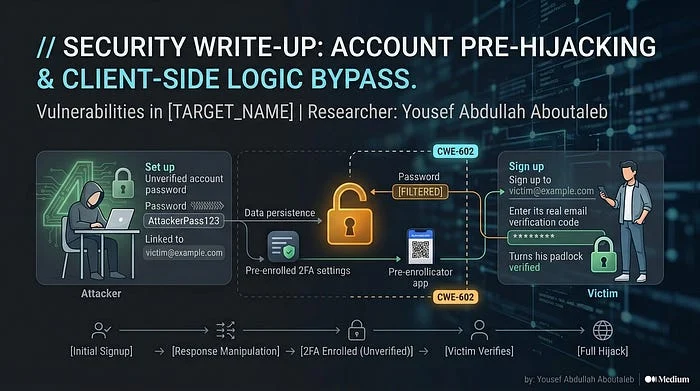
Step 1: Pre-create the account with the victim's email
The researcher registered an account using the victim's email address ([redacted]) and set the password to AttackerPass123. He deliberately did not verify the email. The account existed in an unverified state, tied to an address he did not control.
Step 2: The victim signs up with the same email
Acting as the victim, he signed up with the exact same email and set a new password, VictimPass123. The system showed no error indicating that the email already existed. The victim then received the verification code in their inbox, entered it, and the account became verified.
Step 3: Log in with the attacker's password
He tried logging in with AttackerPass123. It worked. The password set by the victim was ignored, and the attacker's password remained active on the now-verified account. The victim had proved ownership of the email, but the credential that survived belonged to the pre-created account.
Step 4: Bypass verification on the business flow
On the business signup flow the researcher used a client-side enforcement bypass, which he labels CWE-602. He signed up with the victim's email, then at the verification screen typed a wrong code, 000000, and intercepted the response. The response was JSON:
HTTP/1.1 200 OKContent-Type: application/json
{ "status": "success", "isEmailVerified": false, <--- Tampered to 'true' in Burp Suite "resetToken": "0x4A...FB"}
The important part is isEmailVerified, which the server returned as false and the front end used to decide whether the user could proceed. In Burp Suite he changed it to true. The front end trusted the modified response and redirected him straight to 2FA setup, where he scanned the QR code with his own authenticator app.
Step 5: The victim is locked behind the attacker's 2FA
When the real victim signed up later and verified their email, they were immediately asked for a 2FA code. That code belonged to the researcher's authenticator app. The victim was asked for a 2FA code that belonged to the researcher's authenticator app.
Root cause
Two design mistakes combine here. First, when an unverified account already exists for an email, the registration logic does not reject the new signup and does not overwrite the old record. The old password and any old second-factor material survive the victim's verification, so proving ownership of the email activates an account whose credentials the attacker chose. Second, the business flow lets the client decide whether the email is verified: the front end reads isEmailVerified from the response body and acts on it, so a tampered false becomes true and the server-side verification step is skipped. The front end trusted the modified response, which is the essence of CWE-602. Neither path involved breaking cryptography or guessing a code; both abused the order and location of state checks.
Impact
No phishing is required: the victim signs up normally and has no idea the account was pre-hijacked. The attacker gains complete access to the account as soon as the victim proves ownership of the email. Because the platform processes identity documents for KYC, an attacker could view all personal documents uploaded by the victim after activation. On the business flow, the attacker additionally controls the second factor, so the victim is prompted for a code they cannot produce.
Fix
The researcher recommends three measures for developers:
- If an unverified account already exists for an email, either block new signups or completely overwrite all old data, including passwords and 2FA keys.
- Never rely on JSON fields such as
isEmailVerifiedsent to the browser to make security decisions. Always validate status on the server side. - Automatically delete unverified registration attempts after 15 to 30 minutes.
The report does not say which of these, if any, the platform implemented.
Variants to test
- Repeat the pre-hijack on any signup flow that allows a second registration for an unverified email. A positive result is logging in with the first password after the real owner verifies.
- Check whether a pre-created account's 2FA enrolment survives the victim's signup. A positive result is the victim being asked for a code from the attacker's authenticator.
- Tamper with any client-trusted state field in a verification or onboarding response, such as
isEmailVerified, and see whether the front end advances. A positive result is reaching a later step, such as 2FA setup, without a valid code. - Submit a wrong verification code and inspect the response for fields the client uses to gate progress. A positive result is a success-shaped response that the UI acts on despite the failure.
- Leave an unverified registration dormant and return after the suggested expiry window. A positive result is the record still being present and still able to influence a later signup.
What happened, in plain words
A security researcher named Yousef Abdullah was testing a website that handles identity checks. The site lets people sign up with an email address, receive a code by email, type that code in, and then the account is confirmed. Once confirmed, the account can hold personal identity documents, which is why it matters so much who ends up controlling it.
He found two ways to end up in control of an account that belongs to someone else. The first is called account pre-hijacking: he signed up first using the victim's email address and his own password, without ever confirming the email. When the real owner later signed up with the same address and confirmed it, the site kept his password instead of replacing it. He could then log in to the victim's confirmed account.
The second was on a separate signup flow for businesses. There, the page that asks for the email code trusted a message from the server that said whether the email was confirmed. He changed that message in his browser tool from false to true, and the page let him continue to set up two-factor authentication with his own phone app. When the real victim later signed up and confirmed their email, they were asked for a code from his app, which they could not produce.
The ideas you need first
Before the steps, a few everyday ideas. None of them require any security background.
Signing up and confirming an email. When you create an account, the site usually sends a code to your email address. Typing that code proves you can read mail sent to that address. Until you do, the account is "unverified". The site is holding a half-finished account, waiting for proof.
Account pre-hijacking. Imagine a gym where you can reserve a membership by giving a name and a password, and you do not have to show any ID. Later the real person with that name comes in, shows their ID, and the receptionist marks the membership as verified. If the gym keeps the password from the reservation instead of asking the real person for a new one, the person who reserved it can walk in and use the membership. That is pre-hijacking: someone sets up an account in your name before you do, and the site later hands them the finished, verified account.
Two-factor authentication (2FA). A second proof of who you are, on top of your password. Usually an app on your phone shows a six-digit code that changes every 30 seconds. To set it up, the site shows a square barcode (a QR code) that your app scans. From then on, logging in needs your password and a current code from that app. Whoever holds the app holds the second key.
KYC. "Know Your Customer". Rules that require a service to check who its users really are, typically by collecting identity documents such as a passport or ID card. A confirmed account on such a platform can contain copies of those documents, so taking one over exposes very personal material.
Burp Suite. A tool that sits between your browser and a website. Normally your browser talks to the site directly. With Burp in the middle, every request (what your browser sends) and every response (what the site sends back) passes through it, and you can read them, pause them, and change them before they continue. Think of a postal worker who is allowed to open your letters, read them, and reseal them with different words inside.
Request and response. Your browser sends a request, for example "here is a signup form with this email and password". The server sends back a response, for example "done" or "that email is already used". Both are just text with a structure.
JSON. A simple text format for data, made of names and values in curly braces. A response like {"status": "success"} says: the field called status has the value success. It is how one program hands structured facts to another.
HTTP status line and headers. The first lines of a response tell you whether it worked and what kind of data follows. HTTP/1.1 200 OK means the request was handled. Content-Type: application/json says the body is JSON.
Client-side enforcement bypass (CWE-602). "Client-side" means the decision is made in your browser, on your computer, where you can change things. "Server-side" means the decision is made on the site's own computers, where you cannot reach. CWE-602 is the catalogue name for the mistake of trusting the browser to enforce a rule. If a bouncer checks tickets by asking you whether you have one, you can simply say yes. The rule has to be checked by someone you cannot edit.
Logic vulnerability. A flaw that comes from the order of steps or the rules of the flow, not from broken encryption or a guessable password. Nothing is cracked; the site is simply convinced to do the wrong thing in the right order.
The setup
The target was an identity platform, tested at app.[TARGET_NAME].com. The feature under review was registration and verification: sign up with an email, receive a code, enter it, account confirmed. A separate business signup flow also involved setting up two-factor authentication.
The only tool named is Burp Suite, used to watch the registration process and to intercept and change responses. The researcher played both roles, attacker and victim. and set known passwords for each: AttackerPass123 for the account he created first, and VictimPass123 for the later signup. The report gives no version numbers, no extra headers and no endpoint paths.
Finding it
While walking through registration in Burp Suite, he noticed the system did not reject a second signup for an email address that already had an unverified account. There was no error such as "Email already exists". On its own that is not a vulnerability, but it raises an obvious question: once the real owner confirms the address, whose password is still on the account?
The second observation came from the business signup flow. The response carried a field called isEmailVerified that the page appeared to trust. Both observations point at the same kind of problem: decisions about the state of an account being made in the wrong place, or in the wrong order.
Exploitation
Step 1: Create the account with the victim's email
He registered an account using the victim's email address ([redacted]) and set the password to AttackerPass123. He deliberately did not confirm the email. The account now existed in an unverified state, tied to an address he did not control.
Why do this? Because the site allows it. If the site had refused to start a signup for an address that might belong to someone else, or had thrown the half-finished account away quickly, there would be nothing to exploit. The unverified account is the seed of the whole attack.
Step 2: The victim signs up with the same email
Acting as the victim, he signed up with the exact same email and set a new password, VictimPass123. The system showed no error saying the email already existed. The victim then received the verification code in their inbox, entered it, and the account became confirmed.
Why does this matter? Because the victim did everything correctly. They proved they can read mail sent to that address. From the site's point of view, the account is now legitimately theirs. The question is what happened to the password that was already stored.
Step 3: Log in with the attacker's password
He tried logging in with AttackerPass123. It worked. The password the victim had set was ignored, and the attacker's password was still active on the now-confirmed account.
Why is this the takeover? The victim proved ownership of the email, but the credential that survived belonged to the account created earlier. The confirmation step activated an account whose password the attacker chose. No phishing, no trick link, no malware: the victim just signed up normally.
Step 4: Bypass verification on the business flow
On the business signup flow he used a client-side enforcement bypass, which he labels CWE-602. He signed up with the victim's email, then at the verification screen typed a wrong code, 000000, and intercepted the response. The response was JSON:
HTTP/1.1 200 OKContent-Type: application/json
Line by line: HTTP/1.1 200 OK is the status line, saying the request was handled successfully. Content-Type: application/json is a header saying the body that follows is JSON data. The two appear run together in the report as captured.
{ "status": "success", "isEmailVerified": false, <--- Tampered to 'true' in Burp Suite "resetToken": "0x4A...FB"}
Line by line: the outer curly braces hold a set of named values. "status": "success" says the operation is reported as successful. "isEmailVerified": false is the field that matters: it says the email is not confirmed. The note in the middle records that this value was changed to true in Burp Suite. "resetToken": "0x4A...FB" is a token, a short string the site uses to identify this particular attempt; it is shown shortened in the report.
The important part is isEmailVerified, which the server returned as false and the page used to decide whether the user could continue. In Burp Suite he changed it to true. The page trusted the modified response and sent him straight to 2FA setup, where he scanned the QR code with his own authenticator app.
Why does this work? Because the page asked the response, not the server, whether the email was confirmed. The response is text travelling to his own computer, and Burp let him rewrite it. The server had said false, but the page acted on the modified value. It is the bouncer who takes your word for it.
Step 5: The victim is locked behind the attacker's 2FA
When the real victim signed up later and confirmed their email, they were immediately asked for a 2FA code. That code belonged to the researcher's authenticator app. The victim was asked for a 2FA code that belonged to the researcher's authenticator app.
Why is this serious? The second factor is supposed to protect the account. Here it protects it from its owner. The victim cannot get past a code that only appears on someone else's phone.
Root cause
Two design mistakes combine here.
First, when an unverified account already exists for an email, the registration logic neither rejects the new signup nor overwrites the old record. The old password, and any old second-factor material, survive the victim's confirmation. Proving ownership of the email therefore activates an account whose credentials the attacker chose.
Second, the business flow lets the browser decide whether the email is confirmed. The page reads isEmailVerified from the response body and acts on it, so a tampered false becomes true and the server-side check is skipped. The page trusted the modified response, which is the essence of CWE-602.
Neither path required breaking encryption or guessing a code. Both abused the order of steps and the place where the state is checked.
Impact
No phishing is required: the victim signs up normally and has no idea the account was pre-hijacked. The attacker gains complete access to the account as soon as the victim proves ownership of the email. Because the platform processes identity documents for KYC, an attacker could view all personal documents uploaded by the victim after activation. On the business flow, the attacker also controls the second factor, so the victim is prompted for a code they cannot produce.
Fix
The researcher recommends three measures for developers:
- If an unverified account already exists for an email, either block new signups or completely overwrite all old data, including passwords and 2FA keys.
- Never rely on JSON fields such as
isEmailVerifiedsent to the browser to make security decisions. Always validate status on the server side. - Automatically delete unverified registration attempts after 15 to 30 minutes.
The report does not say which of these, if any, the platform implemented.
Variants to test
- Repeat the pre-hijack on any signup flow that allows a second registration for an unverified email. A positive result is logging in with the first password after the real owner confirms.
- Check whether a pre-created account's 2FA enrolment survives the victim's signup. A positive result is the victim being asked for a code from the attacker's authenticator.
- Tamper with any state field the browser trusts in a verification or onboarding response, such as
isEmailVerified, and see whether the page moves forward. A positive result is reaching a later step, such as 2FA setup, without a valid code. - Submit a wrong verification code and inspect the response for fields the page uses to gate progress. A positive result is a success-shaped response that the page acts on despite the failure.
- Leave an unverified registration dormant and return after the suggested expiry window. A positive result is the record still being present and still able to influence a later signup.
Glossary
- Account pre-hijacking: creating an account with someone else's email before they do, so that when they confirm the address the account still carries credentials you chose.
- API: the set of addresses and rules a program uses to talk to another program; here, the signup and verification requests the browser sends to the site.
- Authenticator app: a phone app that generates changing six-digit codes for two-factor authentication.
- Burp Suite: a tool that sits between browser and website so you can read, pause and change requests and responses.
- Client-side: happening in your browser, on your computer, where you can change things.
- Client-side enforcement bypass (CWE-602): a flaw where a rule is checked by the browser instead of the server, so the browser can be made to skip it.
- Content-Type: a response header saying what kind of data the body contains, for example JSON.
- CWE-602: the catalogue entry for relying on the client to enforce security.
- Email verification: proving you can read mail sent to an address by entering a code the site sends there.
- HTTP: the language browsers and websites use to exchange requests and responses.
- HTTP status line: the first line of a response, such as
HTTP/1.1 200 OK, saying whether the request was handled. - JSON: a text format of names and values in curly braces, used to pass structured data between programs.
- KYC: "Know Your Customer", rules requiring a service to check users' identities, often with identity documents.
- Logic vulnerability: a flaw in the order of steps or the rules of a flow, rather than in encryption or password strength.
- Phishing: tricking someone into handing over credentials or clicking a malicious link.
- QR code: a square barcode that a phone camera or authenticator app can scan.
- Request: what the browser sends to a website, such as a filled-in signup form.
- Response: what the website sends back, such as a success message or an error.
- Server-side: happening on the site's own computers, where a user cannot reach or edit it.
- Token: a short string the site uses to identify a particular session or attempt.
- Two-factor authentication (2FA): a second proof of identity on top of a password, usually a changing code from an app.
- Unverified account: a half-finished account whose email address has not yet been confirmed.
- Verification code: the short code sent by email that proves you can read mail at that address.


