How two forward slashes let anyone use a government website as a free file host
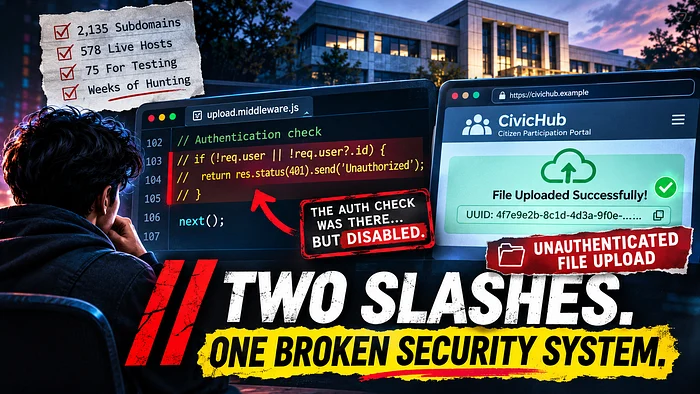
An upload endpoint on a government citizen-participation platform had its authentication check commented out, so anonymous requests could store files on the production image server. An attacker could use the trusted government domain as free, permanent, cacheable file hosting for phishing or other abuse.
 Published on medium.com
Cybersecurity
The full write-up lives on its author's site
It belongs to its author, so we link to it rather than copy it. The other two tabs are our own rewrites, checked against it.
Context
CivicHub is the city's open-source citizen-participation platform. The production deployment runs four vhosts on a single Azure IP, routed by Host header, with an identical acceptance stack: the admin server, the API server, the OAuth server and the image server. The codebase is published on GitHub as a 30.7 MB monorepo covering the admin server, the API server, the OAuth server and the image server.
The feature at the centre of this write-up is the project upload route, mounted under /api/project/:projectId/upload/ in apps/api-server/src/routes/api/upload.js. It accepts images and documents for a project and hands them to an internal image server, which stores them and serves them back under a UUID-based filename.
Setup
The work ran under the city's coordinated vulnerability disclosure programme. The house rules shaped everything that follows:
- Identify yourself on every request.
- No brute forcing, no denial of service, no touching personal data.
- Human pace: one request, then a 2.5-second pause, every time.
- Only submit findings rated medium or higher.
No account or credentials were used for the upload finding. The whole point is that none were needed.
Finding it
Passive recon came first, with zero packets sent to the target: certificate transparency logs, passive DNS and the urlscan archive. That produced 2,135 subdomain names under the city's top-level domain, resolving to 578 live addresses, clustered into a legacy estate of 144 hosts on one old subnet, a corporate block from an outsourcing era, and a growing Azure fleet. Nine third-party services sat behind the city's DNS, and internal hostnames leaked out of a public uptime-monitoring repository on GitHub.
Seventy-five hosts made the active shortlist; forty-three were alive. Most were well defended. The school-finder portal's Laravel CMS rejected every mass-assignment attempt with a 422. The IoT sensor register behind Entra resisted Application Proxy pre-auth tricks from method tampering to path normalisation. The traffic portal's eighteen dangerouslySetInnerHTML sinks were vendor-internal, with every write 403-gated at the API. The Mendix artist-studio platform denied every entity read through a textbook anonymous role. The parking-permits portal's 65 frontend routes and 107 endpoints were geo-fenced at the vendor's API for the researcher's entire region.
The document system's OAuth layer looked promising for days: a public connect-check endpoint that exchanged authorization codes before validating state, redirect URIs accepted across whole hosts, and a CORS policy that reflected arbitrary origins. Each was tested honestly and each came up thin: no demonstrable victim, no working exploit path, no credentials in the reflection. All were dropped as below the bar.
Round one on CivicHub itself produced a token leaking into a URL, rated low and filed in the below-bar drawer. Dropping it meant coming back, and coming back meant reading the source. The question asked at every file boundary was: who is allowed to be here, and who actually checks?
A matrix was built endpoint by endpoint, covering twenty-four API route families plus the auth, notification, stats and plugin routes, with every gate noted. In the middle of that matrix, in apps/api-server/src/routes/api/upload.js, two forward slashes stood out.
Exploitation
Step 1: read the route and find the disabled checkpoint
The upload route should begin with middleware that inspects the request for a valid session and returns a 401 when there is none. The checkpoint was present in the file, but commented out:
router .route('/images|/image|/document|/documents') .post(rateLimiter(), (req, res, next) => { // check if req.user is set // if (!req.user || !req.user?.id) { // console.log ('upload path: no user found', req.user); // return res.status(401).send('Unauthorized'); // } next(); }) .post(imageProxyMw);
The authorization branch still exists in the source; it is simply unreachable. The route chain is rateLimiter(), then a pass-through handler that calls next(), then imageProxyMw. Nothing between the rate limiter and the proxy checks identity.
Step 2: understand why anonymous requests survive the surrounding middleware
Three pieces of code make the missing check fatal rather than merely sloppy.
- The greeter. In the user middleware, requests arriving without an Authorization header are not rejected. They are given an identity:
req.user = { role: 'anonymous', id: null }. - The laundry. For upload paths specifically, any incoming Authorization header is replaced with a freshly minted internal JWT carrying
userId: '9999999', signed with the server's own secret and valid for five minutes, issued regardless of who is asking. - The smuggler. The upload proxy forwards accepted files to the internal image server and injects the internal
image-tokeninto every forwarded request, including the anonymous ones. The image server's own defence was correct and working; the trust boundary dissolved from the inside.
Step 3: build a minimal payload
One tiny transparent PNG, generated locally:
printf '[redacted]==' \ | base64 -d > poc.png
Step 4: POST it with no credentials
curl -s -X POST 'https://api.v2.example.com/api/project/1/upload/image' \ -F '[email protected];type=image/png'# (the real request also carried the programme's researcher-identification header)
The request carries no cookies and no tokens. The response was a 200:
{"name":"cvd-poc_png", "url":"https://image.v2.example.com/image/cvd-poc-802deca4-e2ed-43b3-82b1-fb1185812de9_png"}
This was production, the server running the city's real citizen-participation projects. The same behaviour held for images and documents across every route variant: 200, a JSON body, a fresh UUID.
Step 5: fetch the file back and read the headers
HTTP/2 200content-type: image/pngaccess-control-allow-origin: *cache-control: public,max-age=31536000x-width: 1x-height: 1
The consequences of those headers:
access-control-allow-origin: *means any website can fetch the file cross-origin from JavaScript.cache-control: public,max-age=31536000instructs every cache to store it as immutable for a full year.- The UUID filename is unguessable, so only the sender and the intended target know the URL.
- The image service has no delete endpoint. Every route it exposes was enumerated: upload yes, read yes, delete absent.
Step 6: work out the capacity
The rate limiter allows 100 uploads per minute per IP, which is roughly 144,000 files per day per IP, with no quota and no cleanup. The guardrails limit what each file is: SVGs are rejected with a 415 by a proper extension allowlist, and documents are forced to download as attachments. Nothing limits how many files there are or how long they live.
Step 7: leave a tidy proof
Exactly three marker files were left, each clearly named as the researcher's, each benign: two 1x1 PNGs and a tiny text-only PDF. All three URLs were disclosed in the report so they could be cleaned up the moment it landed.
Step 8: test the sibling candidate and watch it die
Going back over the codebase for other silenced gates turned up PUT /api/project/:id/user/:uid/reset-two-factor in the user routes. In the public source the handler has zero authorization checks, which would let any anonymous caller wipe an arbitrary user's two-factor authentication. It was tested read-only, with nonexistent user IDs first:
curl -s 'https:# → 404 {"message": "User not found"} ← the handler RAN unauthenticated
curl -s 'https://acc.api.v2.example.com/api/project/1/user/1/two-factor-status'# → 403 "You cannot manage two factor for this User"
The 404 shows the handler ran unauthenticated. The 403 shows an authorization check that is present and working in production but completely absent from the public repository. Production returned the same result. The GitHub repo lags the deployed code: the running version is newer and carries fixes that never reached the open-source mirror. The 2FA candidate was a fixed vulnerability preserved on GitHub long after it died in production. The upload finding survived the same test with the opposite verdict.
Root cause
The immediate mistake is a disabled control rather than a missing one. The 401 branch was written and then commented out, so the code looks like it has authentication in it and reviewers read what they expect to read. Disabled controls can stay disabled for years for exactly that reason.
That alone would not be fatal if anonymous requests were rejected elsewhere. They are not, because of the three middleware behaviours above: anonymous requests are given a role instead of a 401, upload requests get an internally signed JWT regardless of the caller, and the proxy injects the internal image-token into forwarded requests. Each piece is defensible in isolation; together they form a confused deputy held together by two forward slashes where a 401 used to be.
The design debt around the image service compounds it: no deletion, no retention policy and no quota on a service that was accidentally public.
Impact
The result is a free, permanent, highly available hosting service on a trusted government domain, with no account, no quota, no content moderation and no delete button. The researcher rated it medium, honestly bounded: no XSS, no RCE, file types restricted, rate limited.
What a genuine government hostname buys an attacker is the interesting part. Email filters that score sender and linked domains give government infrastructure the benefit of the doubt. Security-awareness training teaches users to check the domain, and this one is the domain, as legitimate as the city's own press releases and wearing the city's actual TLS certificate. The domain you would tell a victim to trust is the domain hosting the attack.
The cache headers extend the reach. A file cached as immutable for a year is not just available, it is distributed: once a corporate proxy or ISP cache has fetched it, the copy outlives the original, and deleting the file after a campaign does not recall what is already circulating. Unguessable UUID paths make one-to-one targeting discreet, and the CORS wildcard makes scripted embedding trivial.
Fix
The 401 branch is already written and sitting in the source behind the slashes. It should be uncommented, and the ghost-user branch that assigns req.user = { role: 'anonymous', id: null } should be deleted. The harder half is the debt the finding exposes: deletion, retention and quota on a service that was accidentally public.
Variants to test
- Commented-out auth middleware. Grep the source for
// if (!req.user,// return res.status(401and similar commented branches on routes that proxy to internal services. A positive result is a route where the only identity check is inside a comment and the handler still callsnext(). - Anonymous identity assignment. Look for middleware that sets a default user object instead of rejecting. A positive result is a request with no Authorization header that reaches a handler expecting
req.userand gets a role rather than a 401. - Header replacement on upload paths. Check whether an incoming Authorization header is overwritten with an internally signed token. A positive result is a request with a bogus or absent token that still produces a valid internal identity downstream.
- Internal token injection by proxies. Trace what the upload proxy adds to forwarded requests. A positive result is an internal service credential injected into requests that were never authenticated at the edge.
- Missing delete and retention. Enumerate every route the storage service exposes. A positive result is upload and read present, delete absent, and no documented retention.
- Cache and CORS on stored objects. Fetch an uploaded object and inspect
cache-controlandaccess-control-allow-origin. A positive result ispublic,max-age=31536000with*, meaning the object is distributed and embeddable. - Rate-limit capacity. Measure the per-IP upload allowance. A positive result is a high per-minute limit with no per-account or global quota behind it.
- Repository versus production drift. Test read-only, with nonexistent identifiers first, any handler that looks unauthenticated in public source. A positive result is a 403 or 404 from a check that does not exist in the repository, which tells you the mirror lags production and that source-only findings need live confirmation.
What happened, in plain words
A city government runs a website where residents can take part in civic projects: commenting, voting, sharing documents, that sort of thing. The platform is called CivicHub, and the city publishes its source code openly on GitHub, the way some governments do so others can reuse or audit it.
That platform has a feature for uploading files to a project: pictures and documents. Normally, a feature like that should only work for people who are logged in. The code that checks whether you are logged in was written. Then somebody put two forward slashes in front of it, which in most programming languages turns a line into a comment, meaning the computer ignores it. The check was switched off.
Because of that, a researcher with no account, no password and no permission of any kind was able to send a file to the live government system. The system accepted it, gave it a long random name, and made it available on the internet. The image service has no delete endpoint at all, and the server told every cache on the internet to keep a copy for a year.
This is the story of how that was found, why it mattered, and what the city needs to change. It is written for someone who uses a browser and a computer but has never done security work. Every technical idea is explained where it first appears.
The ground rules
The work happened under the city's coordinated vulnerability disclosure programme. That is an arrangement where a government says: if you find a security problem in our public systems, tell us privately and we will handle it properly, instead of treating you as a criminal. In exchange, the researcher follows rules.
The rules were:
- Identify yourself on every request. Every time the researcher's tools contacted the city's servers, they said who was asking.
- No brute forcing, no denial of service, no touching personal data. Brute forcing means guessing passwords or identifiers over and over; denial of service means flooding a system until it stops working for everyone. Both were forbidden.
- Human pace: one request, then a 2.5-second pause, every time. A request is one message from a browser or tool to a server asking for something. The researcher deliberately slowed down so the traffic looked like a person browsing, because it was a person.
- Only submit findings rated medium or higher. Findings are security problems you report. They get a severity rating, a rough label for how bad the problem is, and this programme only wanted medium and above.
That last rule is the one that shaped everything. It meant the researcher had to walk past smaller problems that other people might happily report and get paid for. It also meant the report queue stayed empty for weeks. Keep that in mind, because it becomes the point of the story.
No account and no credentials were used for the upload finding. That is the whole point: none were needed.
Looking without touching
The first phase was passive reconnaissance. Reconnaissance means gathering information about a target. Passive means doing it without sending any traffic to the target at all, so the target never sees you.
The researcher used public sources such as:
- Certificate transparency logs. When a website gets an HTTPS certificate (the padlock in your browser), that certificate is published to public logs. Those logs reveal hostnames.
- Passive DNS. Public records of which domain names have resolved to which addresses, collected by third parties.
- The urlscan archive. A public collection of scans of websites.
A hostname is a name like something.city.gov, and a subdomain is a name that sits under a bigger one. This produced 2,135 subdomain names under the city's top-level domain. A top-level domain is the ending, like .gov or .com; the city's own domain sits under one of these. Resolving them means looking up which of those names actually point to a live machine, and 578 did.
Those live addresses clustered into groups: a legacy estate of 144 hosts on one old network range, a corporate block left over from an era when work was outsourced, and a growing set of machines on Azure, Microsoft's cloud. That last cluster is the fingerprint of a government partway through moving to the cloud. Nine third-party services sat behind the city's DNS, and internal hostnames leaked out of a public uptime-monitoring repository on GitHub. An uptime monitor is a service that regularly checks whether sites are up; its public configuration accidentally revealed names of internal machines.
Seventy-five hosts made the shortlist for active testing, meaning the researcher would now actually send requests. Forty-three were alive. Most were well defended:
- The school-finder portal, built on Laravel (a framework, a toolkit for building web apps), rejected every attempt to sneak in extra fields with a 422. A 422 is an HTTP status code, a number a server sends back to say what happened; 422 means the data sent was not acceptable.
- The IoT sensor register behind Entra (Microsoft's identity service) resisted every trick for getting past its front gate, from changing the request method to fiddling with the path.
- The traffic portal had eighteen places where the code inserts content into the page in a way that can be dangerous, but all of them were internal to the vendor, and every attempt to write data was blocked with a 403 at the API. A 403 means forbidden.
- The artist-studio platform on Mendix (a low-code platform) denied every read through a textbook anonymous role, meaning visitors with no login were given a role that could see nothing.
- The parking-permits portal looked promising until the researcher worked out its 65 frontend routes and 107 endpoints from its code bundle, and found the vendor's API geo-fences the researcher's entire region. An API is the part of a service that other software talks to; an endpoint is one specific address in that API. Geo-fencing means blocking requests based on where they come from.
The researcher spent days dissecting the document system's OAuth layer. That layer uses OAuth, a standard way for one site to let you log in via another. The researcher found a public endpoint that swapped login codes before checking a security value called state, redirect addresses accepted across whole hosts, and a CORS policy that reflected arbitrary origins. Each was tested honestly and each came up thin: no real victim could be shown, no working attack path, no credentials exposed. All were dropped as below the bar.
Round one on CivicHub itself produced a token leaking into a URL. A token is a short string that acts like a temporary key, proving who you are or granting access. It was rated low and filed away. Dropping it meant coming back, and coming back meant reading the source code. At every file the researcher asked one question: who is allowed to be here, and who actually checks?
A matrix was built endpoint by endpoint, covering twenty-four families of API routes plus the auth, notification, stats and plugin routes, with every gate noted. A gate here means a check that decides whether a request may pass. In the middle of that matrix, in a file called apps/api-server/src/routes/api/upload.js, two forward slashes stood out.
Finding the open door
Step 1: read the route and find the disabled checkpoint
The upload route should begin with middleware. Middleware is code that runs before the main handler, like a doorman who checks your invitation before you get into the party. This one should inspect the request for a valid session and return a 401 when there is none. A session is the server's memory of you being logged in; a 401 means not authorised.
The checkpoint was present in the file, but commented out:
router .route('/images|/image|/document|/documents') .post(rateLimiter(), (req, res, next) => { // check if req.user is set // if (!req.user || !req.user?.id) { // console.log ('upload path: no user found', req.user); // return res.status(401).send('Unauthorized'); // } next(); }) .post(imageProxyMw);
Line by line:
router.route('/images|/image|/document|/documents')says: for these four address patterns, images or documents, do what follows..post(...)means this applies to POST requests. POST is the HTTP method used when you send data to a server, as opposed to GET, which asks for data.rateLimiter()is a guard that limits how often someone can call this route, to stop flooding.- The arrow function
(req, res, next) => { ... }is the handler.reqis the incoming request,resis the response you send back, andnextis a function that says "carry on to the next step". - The lines starting with
//are comments. The computer ignores them. Inside those comments is the real check: if there is no logged-in user, log it and send back a 401 saying Unauthorized. next();is the only line that actually runs. It waves the request straight through..post(imageProxyMw)is the next step: a proxy that forwards the file onward. A proxy is a middleman that passes a request from one place to another.
The authorisation branch still exists in the source; it is simply unreachable. The route chain is rateLimiter(), then a pass-through handler that calls next(), then imageProxyMw. Nothing between the rate limiter and the proxy checks identity.
Step 2: understand why anonymous requests survive the surrounding middleware
A switched-off check would not matter if anonymous requests were rejected somewhere else. Anonymous means no login at all. They were not rejected, because of three pieces of code. Each one looks reasonable on its own.
- The greeter. In the user middleware, requests arriving without an Authorization header are not rejected. A header is a small piece of information attached to a request, like a label on a parcel; the Authorization header is where a login token normally travels. Instead of a rejection, the request is given an identity:
req.user = { role: 'anonymous', id: null }. In plain words: the system does not turn the stranger away at the counter. It hands him a name badge that says anonymous and lets him walk the halls. - The laundry. For upload paths specifically, any incoming Authorization header is replaced with a freshly minted internal JWT carrying
userId: '9999999', signed with the server's own secret and valid for five minutes, issued regardless of who is asking. A JWT is a JSON Web Token, a signed string that proves an identity to a server; because it is signed with a secret only the server knows, the server trusts it. In plain words: the stranger does not just get into the building. The building issues him a company ID card under a number no auditor will ever miss. - The smuggler. The upload proxy forwards accepted files to the internal image server and injects the internal
image-tokeninto every forwarded request, including the anonymous ones. The image server's own defence was correct and working; the trust boundary dissolved from the inside. A trust boundary is the line between systems that trust each other and systems that do not. In plain words: the middleman carries a master key to the back room and uses it for everyone it escorts, invited or not.
Step 3: build a minimal payload
A payload is the data you send. Here it is one tiny transparent PNG, a one-pixel image, generated locally on the researcher's own machine:
printf '[redacted]==' \ | base64 -d > poc.png
Line by line:
printf '...'prints the long string of letters and digits. That string is the image file encoded as text, using a scheme called base64, which turns binary data into plain characters so it can travel safely through text-only channels.|is a pipe: it takes the output of the left command and feeds it to the right one.base64 -ddecodes the text back into the original binary data.> poc.pngwrites the result into a file calledpoc.png. PoC stands for proof of concept, a small demonstration that something is possible.
Why such a tiny file? Because the goal is not to upload something useful. The goal is to prove the door is open with the smallest, most harmless thing possible.
Step 4: POST it with no credentials
curl -s -X POST 'https://api.v2.example.com/api/project/1/upload/image' \ -F '[email protected];type=image/png'# (the real request also carried the programme's researcher-identification header)
Line by line:
curlis a command-line tool for sending requests to servers, like a browser without a window.-smeans silent: do not print progress noise.-X POSTsays use the POST method, the one for sending data.- The URL is the address being called: the upload endpoint for project number 1, image variant.
-F '[email protected];type=image/png'sends a form field namedimagewhose content is the filepoc.png, labelled as a PNG image. This is how a browser sends a file when you pick one in an upload box.- The comment notes that the real request also carried the programme's researcher-identification header, so the city could see who was asking.
The request carries no cookies and no tokens. A cookie is a small piece of data a site stores in your browser to remember you; a token is the key-like string described earlier. Neither was present. The response was a 200:
{"name":"cvd-poc_png", "url":"https://image.v2.example.com/image/cvd-poc-802deca4-e2ed-43b3-82b1-fb1185812de9_png"}
Line by line:
200is the status code for success. The server said yes."name":"cvd-poc_png"is the name the server gave the stored file."url":"..."is the public address where the file can now be fetched. The long string in the middle is a UUID, a universally unique identifier: a long random-looking label that is practically impossible to guess.
This was production, the server running the city's real citizen-participation projects, not a test copy. The same behaviour held for images and documents across every route variant: 200, a JSON body, a fresh UUID. JSON is a common text format for structured data, the kind of thing you see in curly braces with quoted names.
Step 5: fetch the file back and read the headers
Fetching the file back means simply visiting the URL the server returned, the way you would open a link in your browser. The response came with headers, the labels a server attaches to its answer:
HTTP/2 200content-type: image/pngaccess-control-allow-origin: *cache-control: public,max-age=31536000x-width: 1x-height: 1
Line by line:
HTTP/2 200means the answer used version 2 of HTTP, the language browsers and servers speak, and the status was 200, success.content-type: image/pngsays the file is a PNG image.access-control-allow-origin: *is a CORS header. CORS is the rule set that decides whether a web page from one site may read data from another site. The*means any origin, any website at all.cache-control: public,max-age=31536000tells caches how to store the file. A cache is a copy kept closer to the user to save time.publicmeans anyone may store it, andmax-age=31536000is a number of seconds, which is one full year.x-width: 1andx-height: 1are custom headers saying the image is one pixel wide and one pixel tall.
The consequences of those headers:
access-control-allow-origin: *means any website can fetch the file cross-origin from JavaScript. JavaScript is the programming language of web pages, and cross-origin means from a different site than the one hosting the file.cache-control: public,max-age=31536000instructs every cache to store it as immutable for a full year. Immutable means it is treated as never changing.- The UUID filename is unguessable, so only the sender and the intended target know the URL.
- The image service has no delete endpoint. Every route it exposes was enumerated, meaning listed one by one: upload yes, read yes, delete absent.
Step 6: work out the capacity
The rate limiter allows 100 uploads per minute per IP. An IP address is the numeric label of a machine on the internet, roughly its postal address. That works out to roughly 144,000 files per day per IP, with no quota and no cleanup. A quota is a cap on total use.
The guardrails limit what each file is: SVGs are rejected with a 415 by a proper extension allowlist, and documents are forced to download as attachments. SVG is a picture format that can contain code, which makes it risky; 415 means unsupported file type; an extension allowlist means only file types on an approved list are accepted. Forcing documents to download as attachments means the browser saves them instead of displaying them, which reduces risk. Nothing limits how many files there are or how long they live.
Step 7: leave a tidy proof
Exactly three marker files were left, each clearly named as the researcher's, each benign: two 1x1 PNGs and a tiny text-only PDF. All three URLs were disclosed in the report so they could be cleaned up the moment it landed. A proof of concept is a demonstration, and demonstrations should be tidy: leave the smallest possible trace, label it, and tell the owner where it is.
Step 8: test the sibling candidate and watch it die
After a find like that, you go back over the whole codebase looking for siblings: other places where a gate might have been silenced. That turned up PUT /api/project/:id/user/:uid/reset-two-factor in the user routes. PUT is the HTTP method for replacing something; two-factor authentication, or 2FA, is the second proof of identity beyond a password, such as a code from an app. In the public source the handler has zero authorisation checks, which would let any anonymous caller wipe an arbitrary user's second factor. If that were live, it would be a critical.
It was tested read-only, with nonexistent user IDs first. Read-only means sending requests that cannot change anything, and using IDs that do not exist means even a working endpoint has nothing real to damage:
curl -s 'https:# → 404 {"message": "User not found"} ← the handler RAN unauthenticated
Line by line:
curl -ssends a request quietly.- The URL is the address being tested.
404means not found.{"message": "User not found"}is the server's JSON answer saying no such user exists.- The note explains the important part: the handler ran. It was reached without any login, and only then did it fail to find the user. That is what an unauthenticated handler looks like.
curl -s 'https://acc.api.v2.example.com/api/project/1/user/1/two-factor-status'# → 403 "You cannot manage two factor for this User"
Line by line:
- This asks a related endpoint for the two-factor status of user 1.
403means forbidden."You cannot manage two factor for this User"is the server refusing.
The 403 shows an authorisation check that is present and working in production but completely absent from the public repository. Production returned the same result. The GitHub repo lags the deployed code: the running version is newer and carries fixes that never reached the open-source mirror. The 2FA candidate was a fixed vulnerability preserved on GitHub long after it died in production. The upload finding survived the same test with the opposite verdict.
Why it happened
The immediate mistake is a disabled control rather than a missing one. The 401 branch was written and then commented out, so the code looks like it has authentication in it, and reviewers read what they expect to read. That is why disabled controls can stay disabled for years.
That alone would not be fatal if anonymous requests were rejected elsewhere. They are not, because of the three middleware behaviours above: anonymous requests are given a role instead of a 401, upload requests get an internally signed JWT regardless of the caller, and the proxy injects the internal image-token into forwarded requests. Each piece is defensible in isolation; together they form a confused deputy held together by two forward slashes where a 401 used to be. A confused deputy is a program that has permission to do something and is tricked into doing it for someone who should not have that permission.
The design debt around the image service compounds it: no deletion, no retention policy and no quota on a service that was accidentally public. Retention policy means rules for how long data is kept.
Why it matters
The result is a free, permanent, highly available hosting service on a trusted government domain, with no account, no quota, no content moderation and no delete button. The researcher rated it medium, honestly bounded: no XSS, no RCE, file types restricted, rate limited. XSS, cross-site scripting, is an attack where code is slipped into a page and runs in a victim's browser; RCE, remote code execution, is an attack where an attacker runs their own programs on the server. Neither was possible here.
What a genuine government hostname buys an attacker is the interesting part. Email filters that score sender and linked domains give government infrastructure the benefit of the doubt. Security-awareness training teaches users to check the domain, and this one is the domain, as legitimate as the city's own press releases and wearing the city's actual TLS certificate. TLS is the technology behind HTTPS, the padlock. The domain you would tell a victim to trust is the domain hosting the attack.
The cache headers extend the reach. A file cached as immutable for a year is not just available, it is distributed: once a corporate proxy or ISP cache has fetched it, the copy outlives the original, and deleting the file after a campaign does not recall what is already circulating. An ISP is an internet service provider. Unguessable UUID paths make one-to-one targeting discreet, and the CORS wildcard makes scripted embedding trivial.
How to fix it
The 401 branch is already written and sitting in the source behind the slashes. It should be uncommented, and the ghost-user branch that assigns req.user = { role: 'anonymous', id: null } should be deleted. The harder half is the debt the finding exposes: deletion, retention and quota on a service that was accidentally public.
Variants to test
If you want to look for the same pattern elsewhere, these are the checks to try:
- Commented-out auth middleware. Grep the source for
// if (!req.user,// return res.status(401and similar commented branches on routes that proxy to internal services. Grep means search text for a pattern. A positive result is a route where the only identity check is inside a comment and the handler still callsnext(). - Anonymous identity assignment. Look for middleware that sets a default user object instead of rejecting. A positive result is a request with no Authorization header that reaches a handler expecting
req.userand gets a role rather than a 401. - Header replacement on upload paths. Check whether an incoming Authorization header is overwritten with an internally signed token. A positive result is a request with a bogus or absent token that still produces a valid internal identity downstream.
- Internal token injection by proxies. Trace what the upload proxy adds to forwarded requests. A positive result is an internal service credential injected into requests that were never authenticated at the edge.
- Missing delete and retention. Enumerate every route the storage service exposes. A positive result is upload and read present, delete absent, and no documented retention.
- Cache and CORS on stored objects. Fetch an uploaded object and inspect
cache-controlandaccess-control-allow-origin. A positive result ispublic,max-age=31536000with*, meaning the object is distributed and embeddable. - Rate-limit capacity. Measure the per-IP upload allowance. A positive result is a high per-minute limit with no per-account or global quota behind it.
- Repository versus production drift. Test read-only, with nonexistent identifiers first, any handler that looks unauthenticated in public source. A positive result is a 403 or 404 from a check that does not exist in the repository, which tells you the mirror lags production and that source-only findings need live confirmation.
Glossary
- 2FA (two-factor authentication): a second proof of identity beyond a password, such as a code from an app.
- Anonymous: with no login or identity at all.
- API: the part of a service that other software talks to, as opposed to the part a person clicks.
- Attachment: a file the browser saves rather than displays.
- Authorisation: the decision about what a known user is allowed to do.
- Base64: a way of turning binary data into plain text characters so it can travel through text channels.
- Brute forcing: guessing passwords or identifiers over and over until one works.
- Cache: a stored copy kept closer to the user to save time.
- Cache-control: the header that tells caches how to store a response.
- Certificate transparency log: a public record of HTTPS certificates issued for websites.
- Comment: text in code that the computer ignores, often marked with
//. - Confused deputy: a program with permission to do something that is tricked into doing it for someone who should not have that permission.
- Cookie: a small piece of data a site stores in your browser to remember you.
- CORS: the rules that decide whether a page from one site may read data from another site.
- Credentials: the things that prove who you are, such as a password or token.
- Cross-origin: from a different site than the one hosting the data.
- curl: a command-line tool for sending requests to servers.
- Denial of service: flooding a system until it stops working for everyone.
- DNS: the system that translates names like
city.govinto machine addresses. - Endpoint: one specific address in an API.
- Enumerate: to list things one by one.
- Extension allowlist: a rule that only file types on an approved list are accepted.
- Geo-fencing: blocking requests based on where they come from.
- GET / POST / PUT: HTTP methods; GET asks for data, POST sends data, PUT replaces something.
- Grep: to search text for a pattern.
- Header: a small piece of information attached to a request or response.
- Hostname: a name like
something.city.govthat points to a machine. - HTTP / HTTP/2: the language browsers and servers use to talk; version 2 is a newer form.
- HTTPS / TLS: the encrypted version of HTTP, shown by the padlock; TLS is the encryption technology behind it.
- Immutable: treated as never changing.
- IP address: the numeric label of a machine on the internet.
- ISP: an internet service provider.
- JavaScript: the programming language of web pages.
- JSON: a common text format for structured data.
- JWT: a signed string that proves an identity to a server.
- Laravel: a toolkit for building web apps.
- Mendix: a low-code platform for building apps.
- Middleware: code that runs before the main handler, like a doorman.
- Monorepo: one repository holding the code of several related programs.
- OAuth: a standard way for one site to let you log in via another.
- Passive DNS: public records of which domain names resolved to which addresses.
- Payload: the data you send in a request.
- PNG: a common image file format.
- PoC (proof of concept): a small demonstration that something is possible.
- Production: the live system real users use, as opposed to a test copy.
- Proxy: a middleman that passes a request from one place to another.
- Quota: a cap on total use.
- Rate limiter: a guard that limits how often something can be called.
- RCE (remote code execution): an attack where an attacker runs their own programs on the server.
- Reconnaissance: gathering information about a target.
- Redirect URI: the address a login flow sends you back to afterwards.
- Request: one message from a browser or tool to a server asking for something.
- Resolve: to look up which machine address a name points to.
- Retention policy: rules for how long data is kept.
- Route: one address pattern a server responds to.
- Session: the server's memory of you being logged in.
- Severity rating: a rough label for how bad a security problem is.
- Subdomain: a name that sits under a bigger domain name.
- SVG: a picture format that can contain code, which makes it risky.
- Token: a short string that acts like a temporary key, proving who you are or granting access.
- Top-level domain: the ending of a domain name, like
.govor.com. - Trust boundary: the line between systems that trust each other and systems that do not.
- UUID: a long random-looking label that is practically impossible to guess.
- Vulnerability: a weakness in software that can be used to do something harmful.
- XSS (cross-site scripting): an attack where code is slipped into a page and runs in a victim's browser.
- 422 / 401 / 403 / 404 / 415: HTTP status codes; 422 means unacceptable data, 401 not authorised, 403 forbidden, 404 not found, 415 unsupported file type.


