How we was able to takeover whole organization via Privilege Escalation
A user with the Database Administrator role could send the GraphQL request used to invite users, even though that role was not supposed to manage users. By doing so, the attacker could create a new account with full admin permissions and take over the organisation.
 Published on infosecwriteups.com
My brother was learning programing and I was teaching him some stuff, and he wanted to get started into bug-bounty, so I guided him (I will share you simple tips that I told him to do to get started), Let’s go
The full write-up lives on its author's site
It belongs to its author, so we link to it rather than copy it. The other two tabs are our own rewrites, checked against it.

Hi everyone, it's Yasser again (AKA Neroli). My brother was learning programming and I was teaching him some stuff, and he wanted to get started into bug bounty, so I guided him. This is the story of the first bug he found, a privilege escalation that let a low-privileged role take over a whole organization.
Context
We picked a target with many roles so we could play around with access control misconfigurations. The product let you create an organization and give permissions to each user, which makes it a good place to look for broken authorization: every role is a different set of things the backend is supposed to allow, and every one of those checks is a place where the server might trust the client too much.
The feature at the centre of the bug is user invitation. A full admin of an organization can invite new users and assign them a role. The client sends that invitation as a GraphQL query, and the server is responsible for deciding whether the caller is allowed to perform it.
Setup
We created an organization and two accounts inside it:
[redacted]with theDatabase Administratorrole[redacted]with theFull Adminrole
We intercepted the requests the application sends and replayed them. My brother started to play with the roles and test each permission blindly. It is not the best practice, but for someone who is new he was trying to see an issue.
Finding it
My brother found a role called Database Administrator, so we opened the docs to understand what this permission allows us to do.
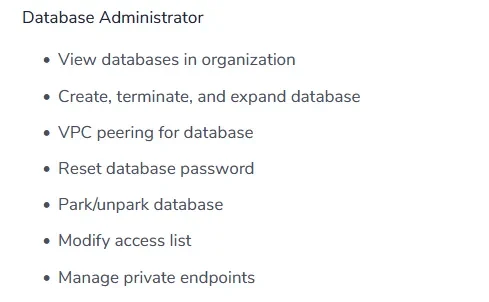
Database Administrator permissions
The documentation says a user with this role can access the database and edit it, but at the same time we were not able to control any user permissions or change them. In the organization, [redacted] is Database Administrator and [redacted] is Full Admin. The Database Administrator cannot change users' permissions or invite users.
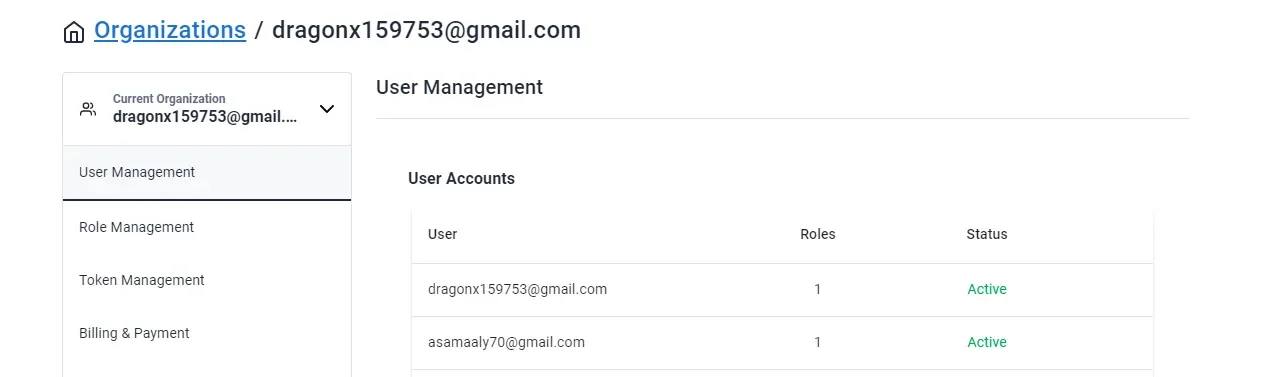
Database administrator
But the admin can.
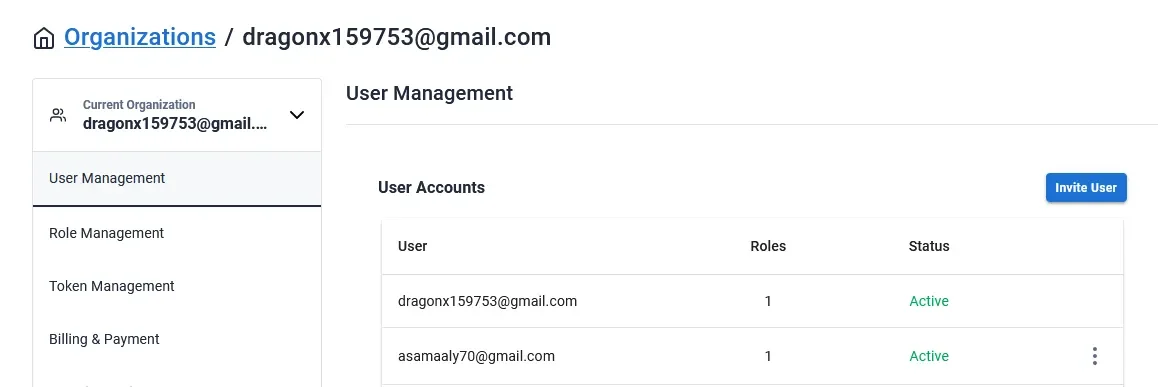
Full Admin
So the intended boundary was clear: the Database Administrator works with data, the Full Admin manages people and their permissions. The interesting question was where that boundary is actually enforced.
Thinking to violate the logic
We knew that the Database Administrator can access the database, and having a look at the requests being sent we found that they contain a GraphQL query. So why cannot the Database Administrator execute these queries? The role is trusted with the data layer, and the invitation flow is just another query hitting the same API. If the server checks the role only in the interface, or checks it against the wrong list, the query itself may go through.
Exploitation
Step 1: Capture the invitation request
After intercepting the request which is responsible for inviting users, we looked at the GraphQL query it carries.
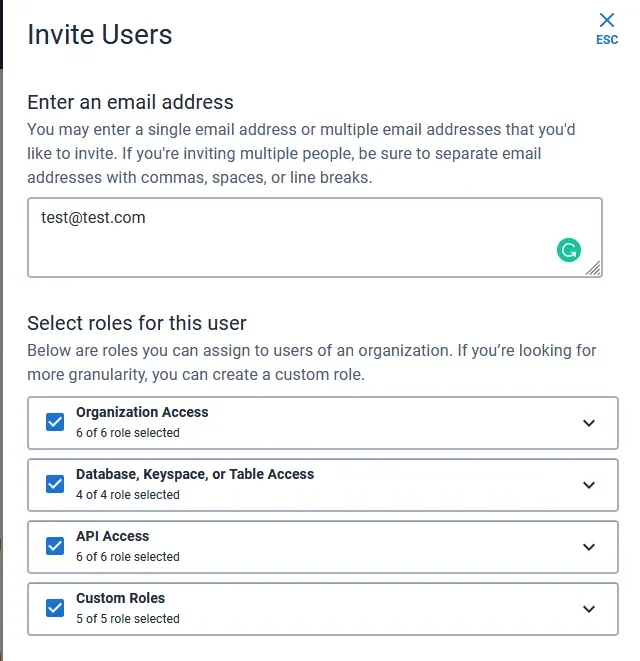
inviting users with full permission
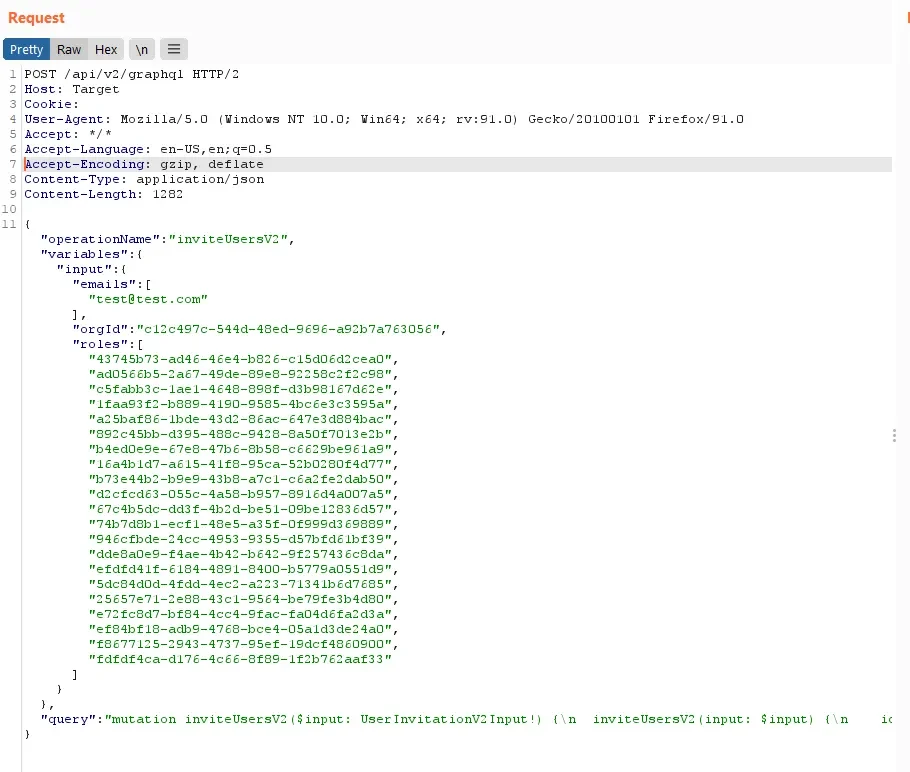
Invite user request
The request is the one a Full Admin sends when inviting a new member with full permission. The important part is the GraphQL query and the role identifier it passes: the role is selected by an id, and the server is expected to verify that the caller is allowed to assign it.
Step 2: Replay it with the low-privileged cookie
We used the same request with the Database Administrator user cookie, and we noticed that the request sent successfully.
My brother was so happy that he found his first bug on a production that many users use. We were on Discord and he was so loud.
Step 3: Reproduce it end to end
- Log in as
Database Administrator. - Create a temp account.
- Copy the above request and send an invitation to the created account.
- Accept the invitation from the new account and you will be a full admin.
Note that the roles in the request are static ids, so we can get them by creating a temp organization and intercepting the request. That detail matters: the role ids do not have to be guessed or stolen from a privileged session, because anyone who can create an organization can read them from their own invitation flow.
After that we found that the issue is also applicable on the edit user permissions request, so we had two ways to do it. HackerOne said it was a duplicate and the same issue. We were still arguing about that point.
Root cause
The invitation and permission-editing operations are GraphQL queries that the server executed for a Database Administrator, without checking that the caller holds the Full Admin role the feature requires. The role ids used in the request are static, so the only thing standing between a Database Administrator and a full admin account was the missing authorization check on the server. The Database Administrator could not invite users through the product, but the API behind it did not enforce the same rule.
Impact
A user holding the Database Administrator role, which the product documents as unable to invite users or change permissions, could invite an account of their choosing with full permissions and then log in as that account. From there they hold Full Admin over the organization. The same weakness applied to the edit user permissions request, giving a second path to the same outcome. The role ids in the request are static, so they can be obtained by creating a temp organization and intercepting the request.
Fix
The report does not say what the vendor changed. The fix should be a server-side authorization check on the invitation and permission-editing queries, verifying that the caller holds the role required for the operation rather than relying on the interface to hide it, and treating the role id in the request as untrusted input that the caller must be permitted to assign.
A note on triage
The report was at first closed as N/A because the triager did not follow the steps and chose the wrong role, so he got a forbidden response. We resubmitted it and also got N/A because the other triager thought that role ids are dynamic and change from organization to another, so we could not get the values unless we had a full admin account. My brother was really disappointed and I was struggling for a week to show the triagers that the issue is valid. Finally we got triaged with medium severity and a bounty of $500. If I had not argued, the issue was just going to be N/A.
Lessons learned
- When you are testing access control issues, always try to understand every role, not just test randomly.
- When you believe in the issue, try to make the report as clear as you can. Triagers face a huge amount of reports every day and they do not understand how every application works.
- You want to make money, so do not be rude with the triagers. I always go to HackerOne support and they always help.
Variants to test
- Replay privileged mutations with a lower-privileged session. Capture an invite, role change or permission edit as an admin, then resend it with the cookie of a role that the product says cannot perform it. A positive result is a success response and a visible change in the organization, not just a 200 with an error body.
- Check every role against every mutation. Enumerate the roles the product offers and, for each one, try the administrative queries. A positive result is any role performing an action outside its documented scope.
- Look for static identifiers in privileged requests. If role ids, permission ids or similar values are the same across organizations, they can be harvested from an organization you own. A positive result is a privileged request that succeeds with ids you obtained without privileged access.
- Test the edit path as well as the create path. The same missing check often exists on both the invite and the permission-edit operations, as it did here. A positive result is either path letting a low-privileged user grant full permissions.
- Verify the result from the other side. Accept the invitation or log in as the modified account and confirm the elevated role, so the report shows impact rather than a suspicious response code.
What happened, in plain words
A security researcher called Yasser Mohammed (known online as Neroli) was teaching his younger brother to program. The brother wanted to try bug bounty hunting, the practice of finding security flaws in real websites and reporting them, sometimes for a cash reward. Yasser guided him, and this is the story of the first bug the brother found.
The bug was a privilege escalation: a user with the Database Administrator role could invite a new account with full permissions. The product was a website where you can create an organisation and give each member a role, such as "Database Administrator" or "Full Admin". The Database Administrator is meant to work with data only. The Full Admin manages people and their permissions. The brother discovered that a Database Administrator could send the same request a Full Admin sends to invite a new user with full permissions, and the server accepted it. That let the low-privileged user create a brand new full admin account and take over the whole organisation.
The report was at first closed as N/A, and a resubmission also got N/A, before it was finally triaged with medium severity and a $500 bounty. The story is as much about persistence with the triage team as about the technical flaw.
The author's caption for this image is "me and my brother hacking the world with HTML".
The idea behind the target
We picked a target with many roles so we could play around with access control misconfigurations. Access control is the set of rules that decides who is allowed to do what. A misconfiguration is when those rules are set up wrongly, so someone gets in where they should not. A product with lots of roles is a good place to look, because every role is a different set of things the server is supposed to allow, and every one of those checks is a place where the server might trust the client too much.
The feature at the centre of the bug is user invitation. A full admin of an organisation can invite new users and assign them a role. The client, meaning the web page running in your browser, sends that invitation as a GraphQL query. GraphQL is a way for a web page to ask a server for exactly the data it wants, using a structured query language rather than a fixed list of URLs. The server is responsible for deciding whether the caller is allowed to perform the query. That last sentence is the heart of the whole story: the browser can ask for anything, but the server must check whether the person asking is allowed.
Setting up the test
We created an organisation and two accounts inside it:
[redacted]with theDatabase Administratorrole[redacted]with theFull Adminrole
We intercepted the requests the application sends. A proxy is a program that sits between your browser and the website and lets you see, pause and change every request and response. Think of it as a post office clerk who opens every letter you send and every reply you get, and can rewrite them before they go out. We used it to read and replay the requests the application sends. Replaying means sending the exact same request again, possibly with a small change.
My brother started to play with the roles and test each permission blindly. It is not the best practice, but for someone who is new he was trying to see an issue. Testing blindly means clicking around and trying things without a plan, which is how many beginners start.
Finding a strange permission
My brother found a role called Database Administrator, so we opened the docs to understand what this permission allows us to do.
Database Administrator permissions
The documentation says a user with this role can access the database and edit it, but at the same time we were not able to control any user permissions or change them. In the organisation, [redacted] is Database Administrator and [redacted] is Full Admin. The Database Administrator cannot change users' permissions or invite users.
Database administrator
But the admin can.
Full Admin
So the intended boundary was clear: the Database Administrator works with data, the Full Admin manages people and their permissions. The interesting question was where that boundary is actually enforced. Is it enforced in the browser, which just hides buttons from you, or on the server, which is the only place that really matters? A rule that lives only in the browser is like a shop that puts the expensive items behind a curtain: anyone who walks around the curtain can still take them.
Thinking about how to break the logic
We knew that the Database Administrator can access the database, and having a look at the requests being sent we found that they contain a GraphQL query. So why cannot the Database Administrator execute these queries? The role is trusted with the data layer, and the invitation flow is just another query hitting the same API. An API, short for application programming interface, is the set of requests a website's front end can send to its back end. If the server checks the role only in the interface, or checks it against the wrong list, the query itself may go through.
Exploitation
Step 1: Capture the invitation request
After intercepting the request which is responsible for inviting users, we looked at the GraphQL query it carries.
inviting users with full permission
Invite user request
The request is the one a Full Admin sends when inviting a new member with full permission. The important part is the GraphQL query and the role identifier it passes: the role is selected by an id, and the server is expected to verify that the caller is allowed to assign it. An id here is just a short label the system uses internally to refer to a role, like a product code on a shelf.
Step 2: Replay it with the low-privileged cookie
We used the same request with the Database Administrator user cookie, and we noticed that the request sent successfully. A cookie is a small piece of data your browser stores for a website and sends back with every request, and it is how the server knows who you are. Think of it as a wristband at an event: the door staff check the colour of your wristband to decide where you can go. Swapping the cookie means swapping the wristband, so the same request is now made as a different user.
My brother was so happy that he found his first bug on a production that many users use. We were on Discord and he was so loud.
Step 3: Reproduce it end to end
- Log in as
Database Administrator. - Create a temp account.
- Copy the above request and send an invitation to the created account.
- Accept the invitation from the new account and you will be a full admin.
Note that the roles in the request are static ids, so we can get them by creating a temp organisation and intercepting the request. That detail matters: the role ids do not have to be guessed or stolen from a privileged session, because anyone who can create an organisation can read them from their own invitation flow. Static here means the ids are the same everywhere and do not change from one organisation to another.
After that we found that the issue is also applicable on the edit user permissions request, so we had two ways to do it. HackerOne said it was a duplicate and the same issue. We were still arguing about that point.
Why it worked
The invitation and permission-editing operations are GraphQL queries that the server executed for a Database Administrator, without checking that the caller holds the Full Admin role the feature requires. The role ids used in the request are static, so the only thing standing between a Database Administrator and a full admin account was the missing authorisation check on the server. The Database Administrator could not invite users through the product, but the API behind it did not enforce the same rule. This is the classic broken function-level authorisation pattern: the client is trusted to only send requests it is allowed to send, and that trust is misplaced.
What an attacker could do
A user holding the Database Administrator role, which the product documents as unable to invite users or change permissions, could invite an account of their choosing with full permissions and then log in as that account. From there they hold Full Admin over the organisation. The same weakness applied to the edit user permissions request, giving a second path to the same outcome. The role ids in the request are static, so they can be obtained by creating a temp organisation and intercepting the request.
The fix
The report does not say what the vendor changed. The fix should be a server-side authorisation check on the invitation and permission-editing queries, verifying that the caller holds the role required for the operation rather than relying on the interface to hide it, and treating the role id in the request as untrusted input that the caller must be permitted to assign.
A note on triage
Triage is the process where the platform's staff read a report and decide whether it is a real, valid bug. The report was at first closed as N/A because the triager did not follow the steps and chose the wrong role, so he got a forbidden response. We resubmitted it and also got N/A because the other triager thought that role ids are dynamic and change from organisation to another, so we could not get the values unless we had a full admin account. My brother was really disappointed and I was struggling for a week to show the triagers that the issue is valid. Finally we got triaged with medium severity and a bounty of $500. If I had not argued, the issue was just going to be N/A.
Lessons learned
- When you are testing access control issues, always try to understand every role, not just test randomly.
- When you believe in the issue, try to make the report as clear as you can. Triagers face a huge amount of reports every day and they do not understand how every application works.
- You want to make money, so do not be rude with the triagers. I always go to HackerOne support and they always help.
Variants to test
- Replay privileged mutations with a lower-privileged session. Capture an invite, role change or permission edit as an admin, then resend it with the cookie of a role that the product says cannot perform it. A positive result is a success response and a visible change in the organisation, not just a 200 with an error body.
- Check every role against every mutation. Enumerate the roles the product offers and, for each one, try the administrative queries. A positive result is any role performing an action outside its documented scope.
- Look for static identifiers in privileged requests. If role ids, permission ids or similar values are the same across organisations, they can be harvested from an organisation you own. A positive result is a privileged request that succeeds with ids you obtained without privileged access.
- Test the edit path as well as the create path. The same missing check often exists on both the invite and the permission-edit operations, as it did here. A positive result is either path letting a low-privileged user grant full permissions.
- Verify the result from the other side. Accept the invitation or log in as the modified account and confirm the elevated role, so the report shows impact rather than a suspicious response code.
Glossary
- Access control: the rules that decide which user is allowed to do which action.
- API: the set of requests a website's front end sends to its back end to read or change data.
- Authenticated: logged in, meaning the server knows who you are.
- Authorisation: the check that a known user is allowed to perform a particular action.
- Broken function-level authorisation: a flaw where the server does not check that the caller may use a particular function, even though the interface hides it.
- Bug bounty: a programme that pays people for finding and reporting security flaws in a product.
- Cookie: a small piece of data stored by your browser and sent with requests, used by the server to identify your session.
- Database: an organised store of data that an application reads and writes.
- Database Administrator: in this product, a role that can access and edit the database but is documented as unable to manage users.
- Duplicate: a report describing a flaw that has already been reported, so it is not rewarded separately.
- Full Admin: in this product, a role that can manage users and their permissions.
- GraphQL: a query language that lets a client ask a server for exactly the data it wants.
- HackerOne: the bug bounty platform where the report was submitted.
- Id: a short internal label used by a system to refer to something, such as a role.
- Intercepting proxy: a tool that sits between your browser and a website so you can read, pause and change requests and responses.
- Mutation: in GraphQL, a query that changes data rather than just reading it.
- N/A: not applicable, a triage decision meaning the platform does not consider the report a valid bug.
- Organisation: in this product, a group of users with roles and permissions managed together.
- Permission: a specific thing a user is allowed to do.
- Privilege escalation: gaining more powers than your account is supposed to have.
- Production: the live version of a product that real users use.
- Replay: sending a captured request again, possibly with a small change.
- Request: a message your browser sends to a server asking it to do something.
- Response: the message a server sends back after a request.
- Role: a named set of permissions, such as Database Administrator or Full Admin.
- Server: the computer that runs the website and decides what to allow.
- Session: the period during which the server recognises you as a logged-in user, usually tracked by a cookie.
- Severity: a rating of how serious a bug is, here medium.
- Static id: an identifier that is the same everywhere and does not change between organisations.
- Triage: the process where platform staff review a report and decide whether it is valid.
- Triager: a member of the platform staff who performs triage.
- Untrusted input: data sent by the client that the server must not believe without checking.