Why u should use burp to test Path Traversal Vulnerability and also get RXSS
A path traversal in a profile endpoint revealed directory listing of an internal API, and an email template preview feature was vulnerable to reflected XSS. An attacker could send a test email containing a link to the XSS payload, potentially stealing an admin's cookies when clicked.
 Published on infosecwriteups.com
Hi everyone, It’s Yasser again (AKA Neroli) I told you that me and my brother (who is 16 years old) was doing some bugbounty and we found those cool bugs.
The full write-up lives on its author's site
It belongs to its author, so we link to it rather than copy it. The other two tabs are our own rewrites, checked against it.
Context
Yasser Mohammed (@boomneroli) picked a target with a lot of functionality that was easy to use. He did not do much recon: he and his brother went straight at the main domain, clicked around to understand how everything worked, then moved on to directory brute forcing to collect endpoints. The report does not name the target or the product beyond referring to it as Target.
The feature at the centre of the write-up is a profile endpoint that takes a numerical id in the path:
That endpoint normally returns a profile for the given id. The second feature is an internal endpoint that manages formal email templates, with a preview function and a Send a test Email action that sends mail from the company address to the company address.
Setup
No accounts, roles or versions are described. The tooling was Burp Suite, used to inspect responses and to replay requests, plus a small script the researcher wrote to take a screenshot of every URL found during brute forcing. The precondition for the whole chain is access to the internal template endpoint, which was discovered by browsing the endpoints that came out of the brute forcing.
Finding it
While the brute forcing was running, the brother sent random path traversal payloads. The screenshot script produced nothing useful, and the payloads appeared to do nothing, until he started reading the responses in Burp rather than in the browser.
He took the profile URL and appended traversal sequences to the id. The reasoning was that four levels up should reach the main directory:
Loaded in a browser, that URL simply lands on https://target. In Burp the response was different. Using show response in browser on the intercepted response returned a directory listing.
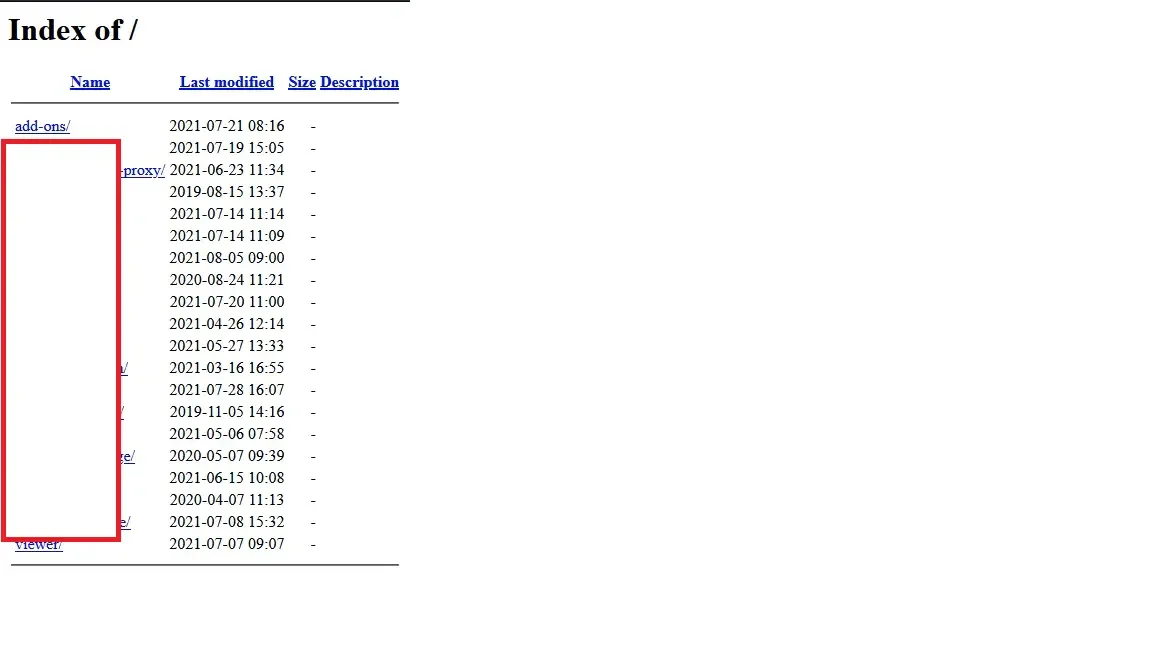
The screenshot shows the directory listing that came back when the response was rendered from Burp.
The researcher's hypothesis is that the site sits in front of an internal API that is vulnerable to directory listing, and that the browser and Burp take different paths to it:
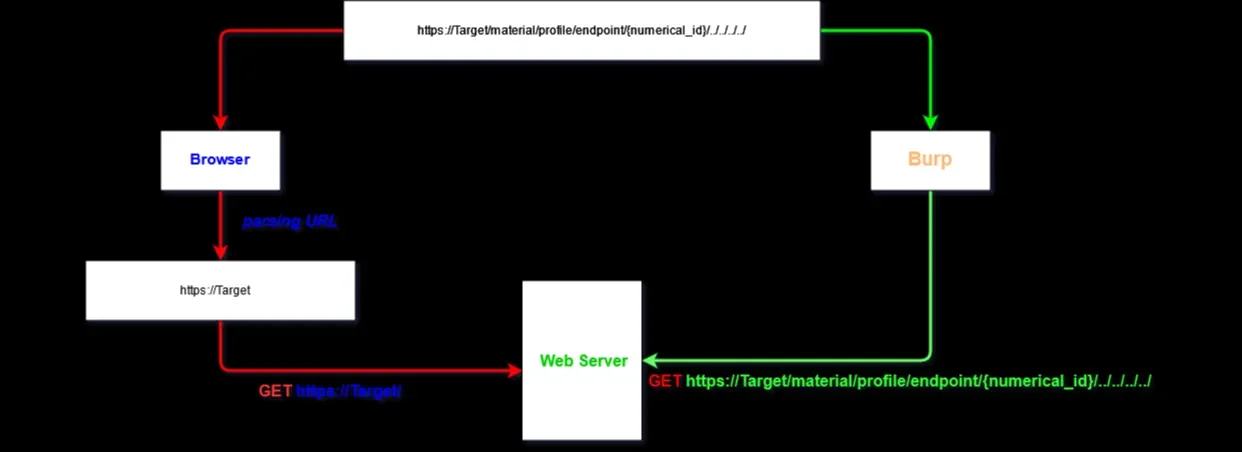
The diagram, captioned Burp vs Browser, illustrates the researcher's hypothesis for why the two tools saw different results for the same URL.
Exploitation
Step 1: Directory listing through path traversal
The traversal payload is appended to the numerical id in the profile path:
The four ../ sequences climb out of the profile path towards the main directory. In the browser the request is normalised and ends at the main domain, so nothing interesting is visible. In Burp the raw response is kept, and rendering it with show response in browser produced a directory listing. That listing is what made the internal endpoints visible.
Step 2: Finding the template endpoint
Browsing each of the endpoints exposed by the listing led to an internal endpoint responsible for formal email templates.
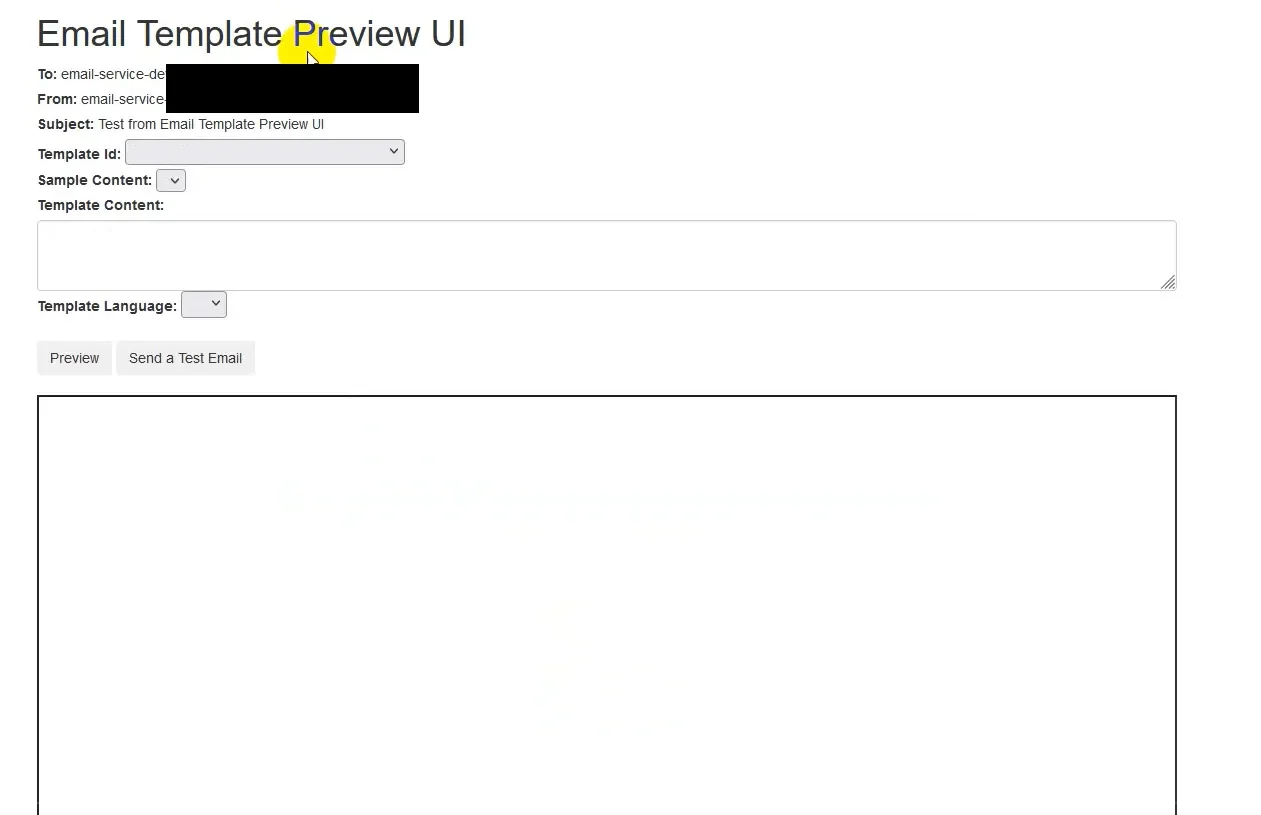
The screenshot shows the email template preview interface.
Step 3: Self-XSS in the preview
Picking a template, inserting a simple XSS payload and pressing preview produced an alert.
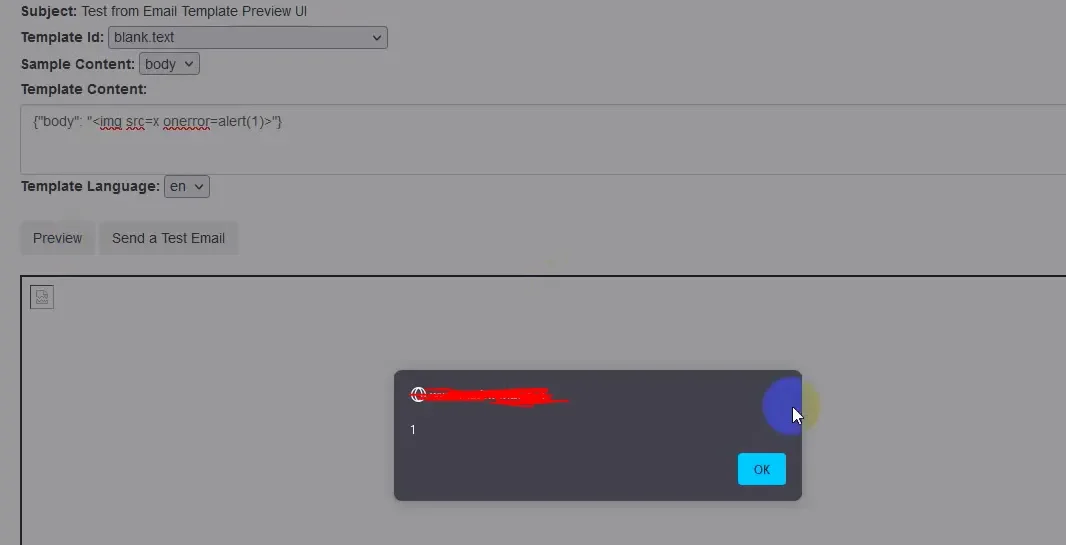
The screenshot is captioned XSS.
On its own this is self-XSS: the payload only runs for the person who typed it, so there is not much to do with it directly.
Step 4: Turning it into reflected XSS via CSRF
The researcher intercepted the request responsible for the XSS and built a simple CSRF proof of concept that reproduces it. As soon as the page is opened, the XSS executes.
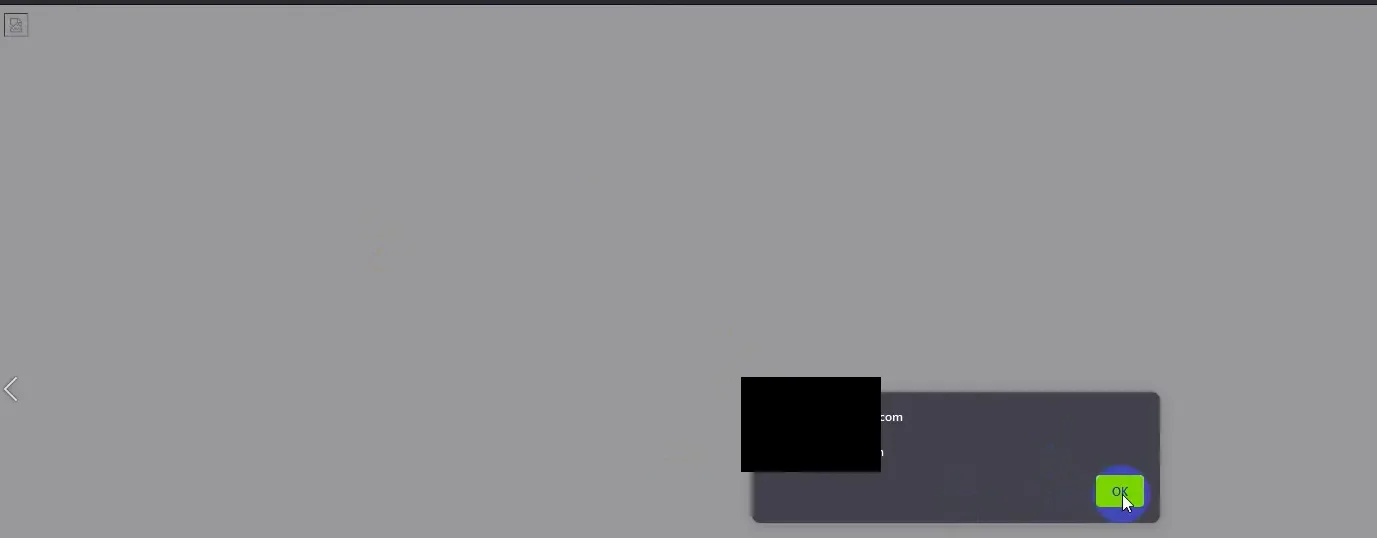
The screenshot is captioned RXSS.
This removes the self-XSS limitation: the victim does not have to paste anything, they only have to load a page the attacker controls.
Step 5: Delivering it through a test email
The template interface has a Send a test Email action, which appears to send a test email to the company address from the company address. Employees are therefore likely to open it as a normal email.
In one of the templates a URL can be inserted. The researcher put the RXSS URL there, so that when the admin opens the email and clicks the button they are redirected to the RXSS link and their cookies are captured.
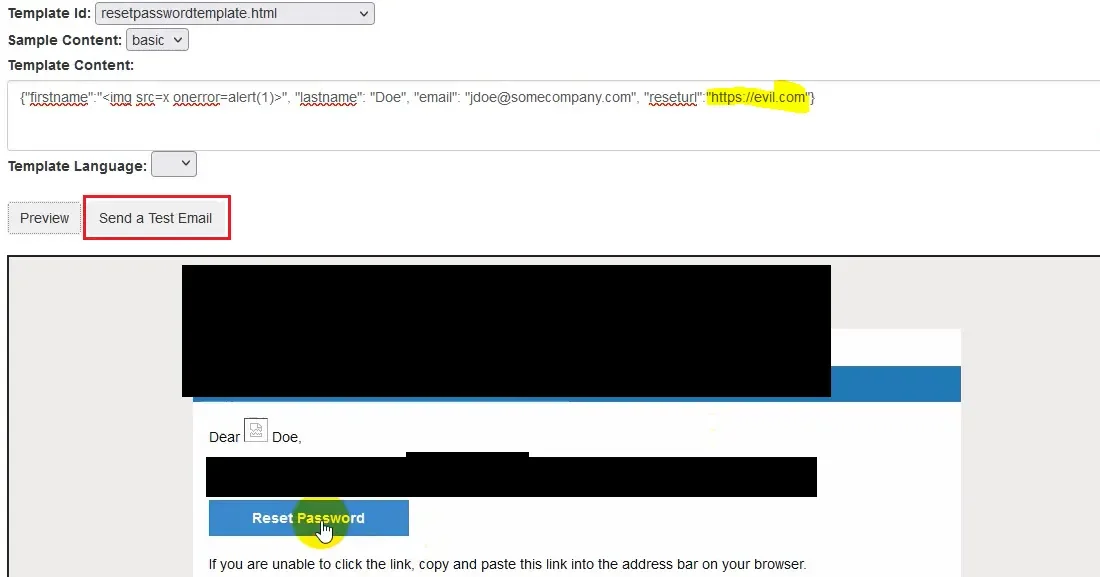
The screenshot shows a test email with the injected URL in place.
There are many templates, so the reset password email is not the only one that can be sent.
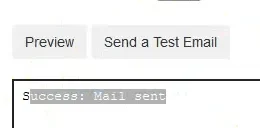
The screenshot is captioned after sending the test email.
Root cause
The report gives the researcher's own explanation rather than a code-level one. The browser normalises the path before sending it, which is why the same URL behaves differently in Burp; the raw request from Burp reaches the internal API with the traversal intact. The researcher notes that a friend explained the reason the path traversal happened, but the report does not record that explanation.
The test email appears to come from the company address, so employees are likely to open it as a normal email.
Impact
The path traversal exposed a directory listing of the internal API, which allowed internal endpoints to be enumerated, and the template preview could be made to execute JavaScript through a CSRF page. By placing the RXSS URL in a template and using Send a test Email, the attacker can get an admin to click through from a company email and capture their cookies, which the researcher describes as taking over the admin account. The chain depends on the admin opening the email and clicking the button.
The report notes that the bugs were first marked N/A, and that after a short argument in which the impact was demonstrated, the report was triaged and paid $700.
Fix
The report does not describe any fix that was applied. Based on the behaviour shown, the traversal needs the id to be validated and the path resolved without allowing ../ to escape the profile path, and the internal API should not serve directory listings. The template preview should encode template content rather than render it, and the preview request should be protected against cross-site submission. The test email feature should not let user-supplied URLs be embedded in templates sent from the company address.
Variants to test
- Compare browser and Burp responses for every path parameter. Append
../sequences to ids and slugs and render the raw response from Burp. A positive result is a response body that differs from what the browser shows, especially a directory listing. - Walk the listing. For each endpoint exposed by a listing, request it directly and look for internal admin or template functionality. A positive result is an internal page that is reachable without the expected authorisation.
- Test preview and render functions for stored and reflected XSS. Insert a simple payload into any field that is previewed, then intercept the preview request and replay it from a separate page. A positive result is an alert firing from the replayed request.
- Look for trusted delivery channels. Any feature that sends mail from the company address to the company address, such as test emails, invitations or password resets, is a candidate for delivering a link to an admin. A positive result is a template field that accepts a URL and a delivered email containing it.
- Check cookie handling on the internal endpoints. If the XSS fires in the internal context, check whether session cookies are reachable from JavaScript. A positive result is a cookie without
HttpOnlythat can be read by the payload.
What happened, in plain words
Yasser Mohammed (@boomneroli) and his brother were hunting for bugs on a website that had lots of features and was easy to use. They did not spend much time on reconnaissance (the early stage of looking around a target to map what exists). They went straight at the main domain, clicked around to understand how everything worked, then ran a directory brute force: a tool tries a long list of common folder and file names against the site to see which ones exist, like trying every key on a keyring to find which ones open doors. That produced a list of endpoints (addresses the site responds to).
The report does not name the target or the product; it just calls it Target.
Two features matter here. The first is a profile page that takes a number in its address:
Line by line: https:// is the secure web protocol; Target stands in for the site's name; /material/profile/endpoint/ is the path to the profile feature; {numerical_id} is a placeholder for a number that identifies one profile. Normally you get back that person's profile.
The second feature is an internal page for managing formal email templates (the reusable layouts the company uses for emails it sends out). It has a preview button and a Send a test Email action that sends mail from the company's own address to the company's own address.
While the brute forcing was running, the brother fired random path traversal payloads at the site. Path traversal is a trick where you put ../ in a path; in file systems .. means "go up one folder", so a chain of them tries to climb out of the folder the site intended you to stay in, like walking up the stairs in a building to reach a floor you were not given a key for. The screenshot script the researcher wrote (it visited every URL found and saved a picture of the page) produced nothing useful, and the payloads seemed to do nothing. That changed when the brother started reading the responses in Burp instead of in the browser.
Burp Suite is a tool that sits between your browser and the website, so you can see and edit every request and response. Think of it as a transparent mail room: you see each letter before it is delivered and can rewrite it.
He took the profile URL and added traversal sequences to the id. The reasoning: four levels up should reach the main directory.
Line by line: the first part is the same profile URL; then ../ four times, each meaning "go up one folder"; the final / is just a trailing slash. In a browser, that URL simply lands on https://target. In Burp the response was different. Using show response in browser on the intercepted response returned a directory listing.
The screenshot shows the directory listing that came back when the response was rendered from Burp.
The researcher's hypothesis is that the site sits in front of an internal API that is vulnerable to directory listing, and that the browser and Burp take different paths to it. An API (application programming interface) is the set of addresses a program uses to talk to another program; here it is the internal service the website calls behind the scenes. A directory listing is what a web server shows when it is asked for a folder and has no index page: a plain list of the files and folders inside, like opening a cupboard and seeing everything on the shelf instead of a closed door.
The diagram, captioned Burp vs Browser, illustrates the researcher's hypothesis for why the two tools saw different results for the same URL.
Finding RXSS
From here the researcher dug deeper. Browsing each of the endpoints exposed by the listing led to an internal endpoint responsible for formal email templates.
The screenshot shows the email template preview interface.
Picking a template, inserting a simple XSS payload and pressing preview produced an alert.
The screenshot is captioned XSS.
XSS (cross-site scripting) means getting a website to run JavaScript that you supplied. JavaScript is the programming language browsers run to make pages interactive; if an attacker's JavaScript runs on a site, it runs with that site's permissions. An alert is the browser's simplest pop-up box, used here only as proof that code ran.
On its own this is self-XSS: the payload only runs for the person who typed it, so there is not much to do with it directly. It is like writing on your own hand: nobody else sees it.
RXSS via CSRF
The researcher intercepted the request responsible for the XSS and built a simple CSRF proof of concept that reproduces it. As soon as the page is opened, the XSS executes.
The screenshot is captioned RXSS.
CSRF (cross-site request forgery) means making a logged-in victim's browser send a request to a site without the victim meaning to, usually by getting them to load a page you control. Reflected XSS means the payload is echoed straight back in the response to that request rather than stored on the server. A proof of concept is a minimal demonstration that the bug is real.
This removes the self-XSS limitation: the victim does not have to paste anything, they only have to load a page the attacker controls.
Taking over the admin account
The template interface has a Send a test Email action, which appears to send a test email to the company address from the company address. Employees are therefore likely to open it as a normal email.
In one of the templates a URL can be inserted. The researcher put the RXSS URL there, so that when the admin opens the email and clicks the button they are redirected to the RXSS link and their cookies are captured.
The screenshot shows a test email with the injected URL in place.
A cookie is a small piece of data the site stores in your browser to remember who you are; a session cookie is effectively a temporary pass that proves you are logged in. If someone else gets that pass, they can act as you. Capturing cookies is the goal here.
There are many templates, so the reset password email is not the only one that can be sent.
The screenshot is captioned after sending the test email.
Why it worked
The report gives the researcher's own explanation rather than a code-level one. The browser normalises the path before sending it (it tidies up ../ itself), which is why the same URL behaves differently in Burp; the raw request from Burp reaches the internal API with the traversal intact. The researcher notes that a friend explained the reason the path traversal happened, but the report does not record that explanation.
The test email appears to come from the company address, so employees are likely to open it as a normal email.
Impact
The path traversal exposed a directory listing of the internal API, which allowed internal endpoints to be enumerated, and the template preview could be made to execute JavaScript through a CSRF page. By placing the RXSS URL in a template and using Send a test Email, the attacker can get an admin to click through from a company email and capture their cookies, which the researcher describes as taking over the admin account. The chain depends on the admin opening the email and clicking the button.
The report notes that the bugs were first marked N/A (not applicable, i.e. rejected), and that after a short argument in which the impact was demonstrated, the report was triaged (accepted for review) and paid $700.
Fix
The report does not describe any fix that was applied. Based on the behaviour shown, the traversal needs the id to be validated and the path resolved without allowing ../ to escape the profile path, and the internal API should not serve directory listings. The template preview should encode template content rather than render it, and the preview request should be protected against cross-site submission. The test email feature should not let user-supplied URLs be embedded in templates sent from the company address.
Variants to test
- Compare browser and Burp responses for every path parameter. Append
../sequences to ids and slugs and render the raw response from Burp. A positive result is a response body that differs from what the browser shows, especially a directory listing. - Walk the listing. For each endpoint exposed by a listing, request it directly and look for internal admin or template functionality. A positive result is an internal page that is reachable without the expected authorisation.
- Test preview and render functions for stored and reflected XSS. Insert a simple payload into any field that is previewed, then intercept the preview request and replay it from a separate page. A positive result is an alert firing from the replayed request.
- Look for trusted delivery channels. Any feature that sends mail from the company address to the company address, such as test emails, invitations or password resets, is a candidate for delivering a link to an admin. A positive result is a template field that accepts a URL and a delivered email containing it.
- Check cookie handling on the internal endpoints. If the XSS fires in the internal context, check whether session cookies are reachable from JavaScript. A positive result is a cookie without
HttpOnly(a flag that hides a cookie from JavaScript) that can be read by the payload.
Glossary
- API: the set of addresses one program uses to talk to another program.
- Brute forcing (directory): trying a long list of common names against a site to discover which folders and files exist.
- Burp Suite: a tool that sits between your browser and a website so you can see, edit and replay requests and responses.
- Cookie: a small piece of data a site stores in your browser to remember who you are.
- CSRF: cross-site request forgery; making a logged-in victim's browser send a request they did not intend, usually by loading a page you control.
- Directory listing: a web server showing a plain list of the files and folders in a directory instead of a normal page.
- Endpoint: a specific address on a site that responds to requests.
- HttpOnly: a cookie flag that stops JavaScript from reading the cookie.
- JavaScript: the programming language browsers run to make pages interactive.
- N/A: not applicable; a report rejected as not a valid issue.
- Path traversal: using
../in a path to climb out of the folder the site intended you to stay in. - Proof of concept: a minimal demonstration that a bug is real.
- Reconnaissance: the early stage of looking around a target to map what exists.
- Reflected XSS: XSS where the payload is echoed straight back in the response to a request.
- RXSS: reflected cross-site scripting.
- Self-XSS: XSS that only runs for the person who typed the payload.
- Session cookie: a cookie that acts as a temporary pass proving you are logged in.
- Triaged: a report accepted for review by the program.
- XSS: cross-site scripting; getting a site to run JavaScript you supplied.