I Found a Stored XSS That Fires When You Click Follow
A community creator nickname field accepted raw HTML via a PATCH request, and the platform rendered it unsafely in a follow toast using dangerouslySetInnerHTML. An attacker could store a script that executes when any user clicks Follow on the attacker's profile.
 Published on medium.com
Cybersecurity
The full write-up lives on its author's site
It belongs to its author, so we link to it rather than copy it. The other two tabs are our own rewrites, checked against it.
Context
This is a stored cross-site scripting finding on a private bug bounty program. The affected feature is the platform's community section: creators get a public community profile, and other users can follow, unfollow or block them from that profile. When one of those actions succeeds, the community pages show a toast notification that includes the creator's nickname, for example You followed [nickname].
The platform keeps two separate nickname fields. The main account nickname, set in the normal profile settings, is enforced with a 20-character limit and its output is HTML-encoded. The community creator nickname lives on a different endpoint, is not exposed anywhere in the profile settings UI, and can only be set by sending a raw API request. That second field is where the bug lives.
Setup
The testing was done against a private program, with Burp open to watch what the application sends to the server. Two synthetic accounts were created specifically for the test:
| Role | Account | creatorId |
|---|---|---|
| Attacker | qa1794930896 |
ek2ey2 |
| Victim | qa1794930010 |
not given |
The request carried an API token, shown in the report as coming from /p/community/api/v1/api-token, and the session cookie. The victim only needs to be able to view the attacker's public community profile and click Follow.
Finding it
While editing the creator profile, the researcher noticed the application sending a PATCH request to:
/p/community/api/v1/creator/{creatorId}
That in itself is unremarkable. The interesting part was the request body: extra fields that the UI never sends were added by hand, to see how the server would react. One of them was nickname. The server accepted it without an error and answered {"status":"success"}.
That raised the question of how this field differs from the account-level nickname. The answer: the main account nickname is protected by a 20-character limit and HTML-encoded output, while the community creator nickname has no length limit, no HTML encoding, and no UI at all. It can only be written through a raw API request.
Exploitation
Step 1: store the payload as the attacker
The nickname was set with a PATCH to the creator endpoint, authenticated with the API token and the session cookie:
PATCH /p/community/api/v1/creator/ek2ey2 HTTP/1.1
Host: [TARGET_DOMAIN]
Content-Type: application/json
Api-Token: <token from /p/community/api/v1/api-token>
Cookie: NEO_SES=<my session>
{"nickname":"<img src=x onerror=alert(document.domain)>"}
The Api-Token header carries the token, shown in the report as coming from /p/community/api/v1/api-token, and NEO_SES is the session cookie. The body sets nickname to an image tag whose src does not exist, so the browser fires onerror, which calls alert(document.domain). The response was:
{"status":"success"}
To confirm the value was stored raw rather than encoded, the creator record was read back:
GET /p/community/api/v1/creator/ek2ey2
{
  "result": {
    "creator": {
      "creatorId": "ek2ey2",
      "nickname": "<img src=x onerror=alert(document.domain)>"
    }
  }
}
The HTML came back exactly as it was sent, with no encoding. Storing it is only half the problem; the next question was where that string gets rendered.
Step 2: open the attacker's profile as the victim
Logged in as the victim account, the attacker's public community profile was opened:
https://[TARGET_DOMAIN]/p/community/en/u/_ek2ey2
Step 3: click Follow
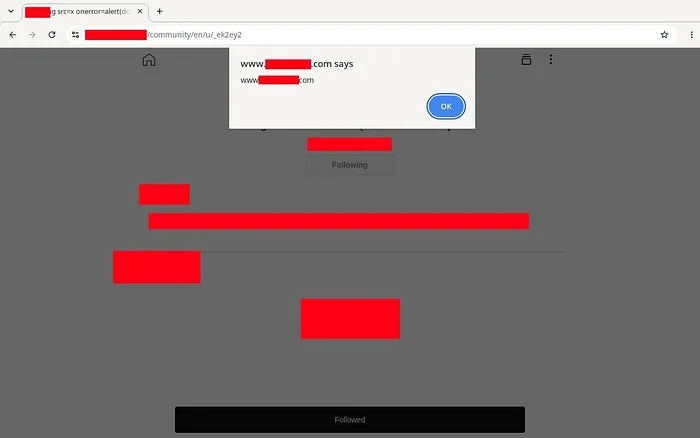
Clicking Follow sent the follow request and produced the toast. The browser tried to load src=x, failed, and fired onerror. An alert appeared reading:
[TARGET_DOMAIN] says [TARGET_DOMAIN]
That is JavaScript executing in the full target origin. The same behaviour was observed with Unfollow and Block: any action that triggers the toast containing the nickname fires the payload.
Root cause
Three separate failures had to line up.
- Mass assignment on the PATCH endpoint. The community creator API accepted a
nicknamefield that the UI never exposes. The server should allowlist exactly which fields each endpoint may update and reject everything else. - No validation on the community nickname. The account-level nickname API enforces a 20-character limit and HTML-encodes its output; the community nickname had neither control. Two APIs for the same concept, built at different times, with different security rules. The original API was done correctly and the later one skipped the same controls, a common pattern in older platforms.
dangerouslySetInnerHTMLon user input. The toast component rendered the message through React's raw-HTML prop:
{ __html: message }
dangerouslySetInnerHTML injects a string directly into the DOM as HTML, bypassing all escaping. It is intended for pre-sanitised, trusted content. Here the toast message was built by dropping the creator's nickname into a template string, so a nickname of <img src=x onerror=alert()> produced the message:
You followed <img src=x onerror=alert(document.domain)>
and that string was rendered as real HTML in the browser.
Impact
The proof of concept only calls alert(document.domain) to demonstrate execution, but the payload runs in the target origin with the victim's session. From there an attacker could, per the report:
- Read the victim's login email. The page at
https://[TARGET_DOMAIN]/en/accountis same-origin and loads in the authenticated session. - Call platform APIs as the victim. Post comments, change profile data, follow or unfollow accounts, all with the victim's cookies.
- Chain towards account takeover. The platform has a web bridge for account-level actions, which puts an attacker who can call same-origin APIs in a strong position.
The payload is stored once and fires for every user who interacts with the profile. No phishing link is needed: the victim only has to click Follow on what looks like a normal profile.
The final severity was Medium, CVSS 5.1. The UI:A (user interaction required) metric kept it out of High, because the victim has to click Follow or Block. The report notes that clicking Follow on someone's profile is one of the most normal things you do on the platform.
Triage
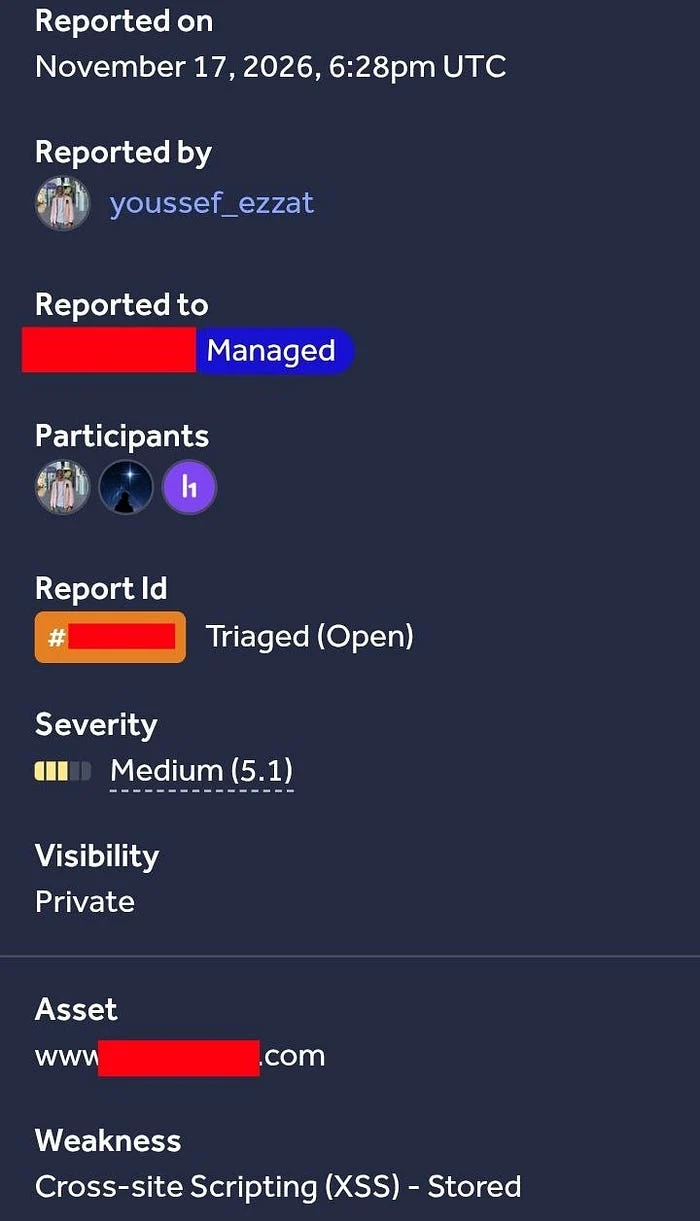
The triager initially could not reproduce the issue because the payload had been cleaned up after submission. After that was explained, and a fresh recording showing the alert firing with document.domain was provided along with a live window in which the triager could test it, the report was validated.
Fix
The report does not say what the platform changed. The controls it describes as necessary are:
- Explicitly allowlist the fields each endpoint may update, and reject anything not on the list, so
nicknamecannot be set through the creatorPATCH. - Apply the same validation to the community nickname as to the account nickname: a length limit and HTML encoding of the output.
- Render the toast through React's normal text interpolation (
{message}rather than{{__html: message}}), and reservedangerouslySetInnerHTMLfor trusted, already-sanitised HTML, never for strings containing user nicknames.
Variants to test
- Hidden fields in profile and settings requests. Intercept every
PATCH/PUTon profile, creator and organisation endpoints and add fields the UI never sends (nickname,displayName,bio,title,slug). A positive result is a success response plus the value coming back unchanged on a subsequentGET. - Parallel APIs for the same concept. Where a platform has a main and a community (or legacy and new) version of a field, compare their limits and encoding. A positive result is one version accepting characters or lengths the other rejects, or returning them unencoded.
- Toast and notification sinks. Trigger every action that produces a message containing your name (follow, unfollow, block, invite, mention) after storing HTML in the name field. A positive result is the browser attempting to load your
srcor firing your handler. dangerouslySetInnerHTMLin the JavaScript bundle. Search the front-end source for the prop and trace which strings reach it. A positive result is a user-controlled value flowing into the rendered HTML without sanitisation.- Stored values rendered in other users' contexts. After storing a payload, view the profile from a second account and from any admin or moderation view. A positive result is execution in a session other than the one that stored the value.
What happened, in plain words
A security researcher was testing a private bug bounty program. A bug bounty program is a scheme where a company invites independent testers to look for security problems in its systems and pays them for reporting what they find, instead of the company being attacked by criminals. The platform in question has a community section: people who create content get a public community profile, and other users can follow, unfollow or block them from that profile.
When one of those actions succeeds, the community pages show a small popup message, called a toast. A toast is the little box that slides in at the edge of the screen to confirm something, like "Saved" or "Message sent". This toast includes the creator's nickname, for example You followed [nickname].
The platform keeps two separate nickname fields. The main account nickname, the one you set in the normal profile settings, is limited to 20 characters and its output is HTML-encoded. HTML encoding means turning characters that have a special meaning in a web page, such as < and >, into harmless text codes, so that whatever the user typed is displayed as text and never treated as part of the page. The community creator nickname lives on a different endpoint, is not exposed anywhere in the profile settings screen, and can only be set by sending a raw API request. That second field is where the bug lives.
An API is the set of addresses and rules a website's own pages use to talk to its server behind the scenes. When you click a button, your browser sends a request to one of these addresses and the server answers with data, usually in a format called JSON, which is just structured text made of names and values. An endpoint is one specific address in that API, for example the one that handles creator profiles.
The bug is a stored cross-site scripting, usually shortened to stored XSS. Cross-site scripting means getting your own code, normally JavaScript, to run inside someone else's browser while they are using the affected website. JavaScript is the programming language that web pages use to make things happen in the browser. "Stored" means the malicious value is saved on the server first and then shown to other people later, rather than being slipped in through a link that the victim has to click. The everyday comparison: it is the difference between writing graffiti on a wall that everyone will walk past, and handing someone a note they have to choose to read.
Setup
The testing was done against a private program, with Burp open to watch what the application sends to the server. Burp, short for Burp Suite, is a tool that sits between your browser and the website and lets you read and edit every request before it leaves and every response when it comes back. Think of it as a transparent envelope you can open, read and rewrite before the postman delivers it.
Two synthetic accounts were created specifically for the test. Synthetic here means made up for testing, not belonging to real people.
| Role | Account | creatorId |
|---|---|---|
| Attacker | qa1794930896 |
ek2ey2 |
| Victim | qa1794930010 |
not given |
The request carried an API token, shown in the report as coming from /p/community/api/v1/api-token, and the session cookie. A session is the state of being logged in: the server remembers who you are between requests. A token is a short secret string that proves to the server that a request comes from an authorised user, a bit like a cloakroom ticket: whoever holds it gets the coat, so it must be kept private. The victim only needs to be able to view the attacker's public community profile and click Follow.
Finding it
While editing the creator profile, the researcher noticed the application sending a PATCH request to:
/p/community/api/v1/creator/{creatorId}
Line by line: PATCH is the name of the action being requested. Web requests have verbs, and each verb means something different. GET means "give me this", POST means "create this", and PATCH means "change part of this existing thing". The path /p/community/api/v1/creator/{creatorId} is the address on the server. {creatorId} is a placeholder for the identifier of a particular creator, the same way a postal address has a house number that changes from house to house. api/v1 is just a naming convention showing this is part of the API, version 1.
That in itself is unremarkable. The interesting part was the request body: extra fields that the UI never sends were added by hand, to see how the server would react. The request body is the part of the request that carries the actual data, like the contents of an envelope rather than the address on it. The UI, or user interface, is everything you see and click on screen. A field is one named piece of data in that body, for example nickname or bio.
One of them was nickname. The server accepted it without an error and answered {"status":"success"}. That answer is JSON: a pair of a name, status, and a value, success. The server was saying "done" to a field the screen never offers.
That raised the question of how this field differs from the account-level nickname. The answer: the main account nickname is protected by a 20-character limit and HTML-encoded output, while the community creator nickname has no length limit, no HTML encoding, and no UI at all. It can only be written through a raw API request. A raw request means one sent directly, by hand, rather than produced by clicking around the website.
Exploitation
Step 1: store the payload as the attacker
The nickname was set with a PATCH to the creator endpoint, authenticated with the API token and the session cookie. A cookie is a small piece of data the website asks your browser to keep and send back with every request to that site; the session cookie is the one that identifies your logged-in session. The payload is the malicious value being planted.
PATCH /p/community/api/v1/creator/ek2ey2 HTTP/1.1
Host: [TARGET_DOMAIN]
Content-Type: application/json
Api-Token: <token from /p/community/api/v1/api-token>
Cookie: NEO_SES=<my session>
Line by line: the first line says "change part of the creator with id ek2ey2, speaking version 1.1 of the HTTP protocol", HTTP being the language browsers and servers use to exchange requests and responses. Host names the website being talked to. Content-Type: application/json announces that the body is JSON, so the server knows how to read it. Api-Token carries the token, shown in the report as coming from /p/community/api/v1/api-token, and Cookie: NEO_SES=... carries the session cookie. Both are secrets and are shown here as placeholders.
{"nickname":"<img src=x onerror=alert(document.domain)>"}
This is the body. It sets nickname to an image tag. An HTML tag is a piece of markup in angle brackets that tells the browser to display or do something. <img> tells the browser to load a picture, and src=x says the picture is at the address x, which does not exist. onerror is an attribute, an extra instruction attached to the tag, that says what to do if loading fails. Because x does not exist, loading always fails, so the browser runs alert(document.domain). alert opens a popup box with a message, and document.domain is the address of the current website. So the payload is a picture that can never load, whose failure makes the browser show the site's own address in a popup. That popup is the proof that code ran.
The response was:
{"status":"success"}
Again, the server simply said the change was accepted.
To confirm the value was stored raw rather than encoded, the creator record was read back:
GET /p/community/api/v1/creator/ek2ey2
GET means "give me this". This asks the server to hand back the creator record with id ek2ey2, so the researcher can see exactly what was saved.
{
  "result": {
    "creator": {
      "creatorId": "ek2ey2",
      "nickname": "<img src=x onerror=alert(document.domain)>"
    }
  }
}
Line by line: the answer is wrapped in result, then creator, then the individual values. creatorId is the identifier, and nickname is the value that was sent. The HTML came back exactly as it was sent, with no encoding. If the server had encoded it, the angle brackets would have come back as harmless text codes instead. Storing it is only half the problem; the next question was where that string gets rendered. Rendered means turned into what you actually see on screen.
Step 2: open the attacker's profile as the victim
Logged in as the victim account, the attacker's public community profile was opened:
https://[TARGET_DOMAIN]/p/community/en/u/_ek2ey2
This is an ordinary web address. https:// is the secure form of the protocol, [TARGET_DOMAIN] stands for the site's name, and the rest of the path points at the community profile of creator ek2ey2. The point of this step is to look at the stored value from a different account, the way any other user would see it.
Step 3: click Follow
Clicking Follow sent the follow request and produced the toast. The browser tried to load src=x, failed, and fired onerror. An alert appeared reading:
[TARGET_DOMAIN] says [TARGET_DOMAIN]
That is JavaScript executing in the full target origin. The origin is the combination of protocol, domain and port that a browser treats as one security zone; code running in the target origin can read and act on that site as if it were the site itself. The same behaviour was observed with Unfollow and Block: any action that triggers the toast containing the nickname fires the payload.
The image shows the alert appearing after the Follow action, which is the moment the stored value stops being text and becomes running code.
Root cause
Three separate failures had to line up. A root cause is the underlying reason a bug exists, as opposed to the symptom you see.
- Mass assignment on the PATCH endpoint. The community creator API accepted a
nicknamefield that the UI never exposes. Mass assignment means a server takes whatever fields arrive in a request and saves them all, instead of accepting only the ones it expects. The everyday comparison: a form that asks for your name and address, but if you scribble "and also make me an administrator" in the margin, the clerk copies that into the file too. The server should allowlist exactly which fields each endpoint may update and reject everything else. An allowlist is a list of what is permitted, with everything not on the list refused. - No validation on the community nickname. Validation means checking input before accepting it. The account-level nickname API enforces a 20-character limit and HTML-encodes its output; the community nickname had neither control. Two APIs for the same concept, built at different times, with different security rules. The original API was done correctly and the later one skipped the same controls, a common pattern in older platforms.
dangerouslySetInnerHTMLon user input. The toast component rendered the message through React's raw-HTML prop. React is a popular JavaScript library for building user interfaces, and a component is one reusable piece of a page, such as the toast. A prop is a setting passed into a component, like an argument to a function.
{ __html: message }
Line by line: this is a small object with one key, __html, whose value is message. It is the special form React uses to say "take this string and put it into the page as real HTML". dangerouslySetInnerHTML injects a string directly into the DOM as HTML, bypassing all escaping. The DOM is the browser's live model of the page, the tree of elements it is currently displaying. Escaping is the act of neutralising special characters so they show as text. It is intended for pre-sanitised, trusted content; sanitised means cleaned of anything dangerous. Here the toast message was built by dropping the creator's nickname into a template string, a piece of text with a slot in it, so a nickname of <img src=x onerror=alert()> produced the message:
You followed <img src=x onerror=alert(document.domain)>
and that string was rendered as real HTML in the browser. The browser did not see text that happened to contain angle brackets; it saw an instruction to load an image and run code when the load failed.
Impact
The proof of concept only calls alert(document.domain) to demonstrate execution, but the payload runs in the target origin with the victim's session. From there an attacker could, per the report:
- Read the victim's login email. The page at
https://[TARGET_DOMAIN]/en/accountis same-origin and loads in the authenticated session. Same-origin means it belongs to the same security zone, so code running on the community pages is allowed to read it. - Call platform APIs as the victim. Post comments, change profile data, follow or unfollow accounts, all with the victim's cookies. The browser attaches the victim's cookies automatically, so the server cannot tell the difference between the victim and the injected code.
- Chain towards account takeover. The platform has a web bridge for account-level actions, which puts an attacker who can call same-origin APIs in a strong position. Account takeover means gaining full control of someone else's account.
The payload is stored once and fires for every user who interacts with the profile. No phishing link is needed: the victim only has to click Follow on what looks like a normal profile. Phishing means tricking someone into clicking a link or handing over details; here there is nothing to trick, because the dangerous value is already sitting on the real profile.
The final severity was Medium, CVSS 5.1. CVSS is a standard scoring system for the seriousness of a security flaw, and Medium is the middle band. The UI:A (user interaction required) metric kept it out of High, because the victim has to click Follow or Block. The report notes that clicking Follow on someone's profile is one of the most normal things you do on the platform.
Triage
Triage is the process where the receiving team checks a report, reproduces the problem and decides how serious it is. The triager initially could not reproduce the issue because the payload had been cleaned up after submission. After that was explained, and a fresh recording showing the alert firing with document.domain was provided along with a live window in which the triager could test it, the report was validated.
The image relates to that validation step, after the researcher supplied a fresh recording and a live window for testing.
Fix
The report does not say what the platform changed. The controls it describes as necessary are:
- Explicitly allowlist the fields each endpoint may update, and reject anything not on the list, so
nicknamecannot be set through the creatorPATCH. - Apply the same validation to the community nickname as to the account nickname: a length limit and HTML encoding of the output.
- Render the toast through React's normal text interpolation (
{message}rather than{{__html: message}}), and reservedangerouslySetInnerHTMLfor trusted, already-sanitised HTML, never for strings containing user nicknames. Interpolation here means inserting a value into text so that it is treated as text, not as markup.
Variants to test
These are other places to look for the same kind of mistake.
- Hidden fields in profile and settings requests. Intercept every
PATCH/PUTon profile, creator and organisation endpoints and add fields the UI never sends (nickname,displayName,bio,title,slug).PUTis likePATCHbut replaces the whole thing rather than part of it. A positive result is a success response plus the value coming back unchanged on a subsequentGET. - Parallel APIs for the same concept. Where a platform has a main and a community (or legacy and new) version of a field, compare their limits and encoding. A positive result is one version accepting characters or lengths the other rejects, or returning them unencoded.
- Toast and notification sinks. Trigger every action that produces a message containing your name (follow, unfollow, block, invite, mention) after storing HTML in the name field. A sink is the place where data ends up being used, in this case the toast. A positive result is the browser attempting to load your
srcor firing your handler. dangerouslySetInnerHTMLin the JavaScript bundle. Search the front-end source for the prop and trace which strings reach it. The bundle is the packaged JavaScript file the browser downloads to run the site. A positive result is a user-controlled value flowing into the rendered HTML without sanitisation.- Stored values rendered in other users' contexts. After storing a payload, view the profile from a second account and from any admin or moderation view. A positive result is execution in a session other than the one that stored the value.
Glossary
- API: the set of addresses and rules a website's own pages use to talk to its server behind the scenes.
- API token: a secret string that proves a request comes from an authorised user.
- Attribute: an extra instruction attached to an HTML tag, such as
onerror. - Bug bounty program: a scheme where a company pays independent testers for reporting security problems.
- Burp Suite: a tool that sits between browser and website and lets you read and edit requests and responses.
- Component: one reusable piece of a user interface, such as a toast.
- Cookie: a small piece of data a website asks the browser to keep and send back with every request to that site.
- Cross-site scripting (XSS): getting your own code to run inside someone else's browser while they use the affected website.
- CVSS: a standard scoring system for the seriousness of a security flaw.
- DOM: the browser's live model of the page, the tree of elements it is currently displaying.
- Endpoint: one specific address in an API.
- Escaping: neutralising special characters so they are shown as text rather than acted on.
- Field: one named piece of data in a request body.
- GET: the request verb meaning "give me this".
- HTML: the markup language that describes what a web page contains.
- HTML encoding: turning characters with special meaning, such as
<and>, into harmless text codes. - HTTP: the language browsers and servers use to exchange requests and responses.
- Interpolation: inserting a value into text so it is treated as text, not markup.
- JavaScript: the programming language web pages use to make things happen in the browser.
- JSON: structured text made of names and values, used to exchange data.
- Mass assignment: a server saving every field that arrives in a request instead of only the ones it expects.
- Origin: the combination of protocol, domain and port a browser treats as one security zone.
- PATCH: the request verb meaning "change part of this existing thing".
- Payload: the malicious value being planted.
- Phishing: tricking someone into clicking a link or handing over details.
- Prop: a setting passed into a React component.
- PUT: the request verb meaning "replace this whole thing".
- React: a popular JavaScript library for building user interfaces.
- Rendered: turned into what you actually see on screen.
- Root cause: the underlying reason a bug exists, as opposed to the symptom you see.
- Same-origin: belonging to the same security zone, so code from one page may read the other.
- Sanitised: cleaned of anything dangerous.
- Session: the state of being logged in, remembered by the server between requests.
- Sink: the place where data ends up being used.
- Stored XSS: cross-site scripting where the malicious value is saved on the server and shown to other people later.
- Toast: a small popup message confirming an action.
- Triage: the process where the receiving team checks a report, reproduces the problem and decides how serious it is.
- UI (user interface): everything you see and click on screen.
- Validation: checking input before accepting it.
- Allowlist: a list of what is permitted, with everything not on the list refused.



