The Motivation
The app generated OTPs on the client side and sent them to the server, allowing an attacker to intercept the request and obtain the OTP to log into any user's account. Additionally, a scratch card feature could be replayed to earn unlimited coins.
 Published on aseemshrey.in
This work started with me working on my videos on Android Hacking Series.
The full write-up lives on its author's site
It belongs to its author, so we link to it rather than copy it. The other two tabs are our own rewrites, checked against it.
Context
The target was an Android app for learning English, chosen from a shortlist of apps the researcher had seen advertised inside other apps and on YouTube. At the time of testing it had a user base of more than 10 million, which is why it was picked over the other candidates. The app offered an OTP-based login, a reward system with in-game coins that could be redeemed against subscriptions, and a scratch card feature that granted coins.
The work was done as part of an Android hacking video series, and the write-up is a walkthrough of the approach rather than a single bug: static analysis of the APK, then dynamic analysis of the app's network traffic. Four issues came out of it, described by the author as critical or high: two exposed cloud resources, an OTP bypass leading to account takeover, and a logic flaw in the reward system. The author notes that none of the four depended on Frida skills.
Setup
Tools and preconditions used across both stages:
- apktool, installed following its official instructions, for decompiling the APK.
- jadx / jadx-gui, downloaded from its GitHub releases page. jadx-gui runs on Linux and macOS via
./jadx-gui, and on Windows through ajadx-gui.batfile. - gf, run inside the apktool output directory to grep for secrets.
- A physical device or emulator; the author prefers Genymotion for speed. The test device was a Lenovo ZUK Z2+.
- Burp Suite on a laptop, with the device proxy pointed at it and the Burp CA certificate installed on the phone. The author points to PortSwigger's guide "Configuring an Android device to work with Burp", which boils down to setting Burp as the proxy in the Wi-Fi settings and installing the Burp CA cert on the phone.
- objection, built on top of Frida, for SSL unpinning. This requires USB debugging enabled, the device connected over USB, and frida-server running on the phone. On a non-rooted phone, frida-gadget has to be used instead; the author links a blog post on gadget injection without root.
- For the reward-system automation, Python with the Amazon SDK, because the endpoint checked a payload signature.
The APK itself was either pulled from the phone or downloaded from an online APK store such as evozi apk downloader, apkpure.com or apkonline.net.
Finding it
Static analysis
The APK was pulled from the installed app with adb:
adb shell pm path <app_identifier>
adb pull <path_of_base_apk>

The first command prints the on-device path of the base APK, and the second copies it to the local machine. The APK was then decompiled with apktool:
apktool d <app_identifier>
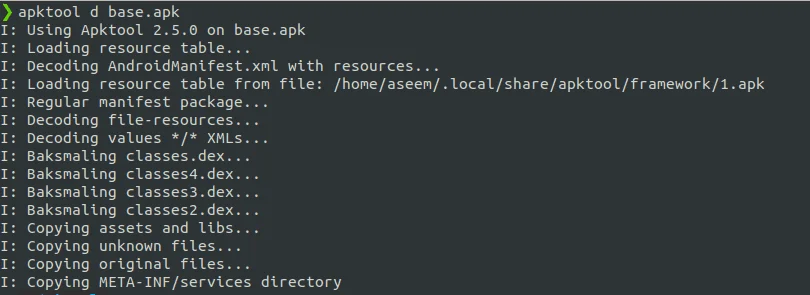
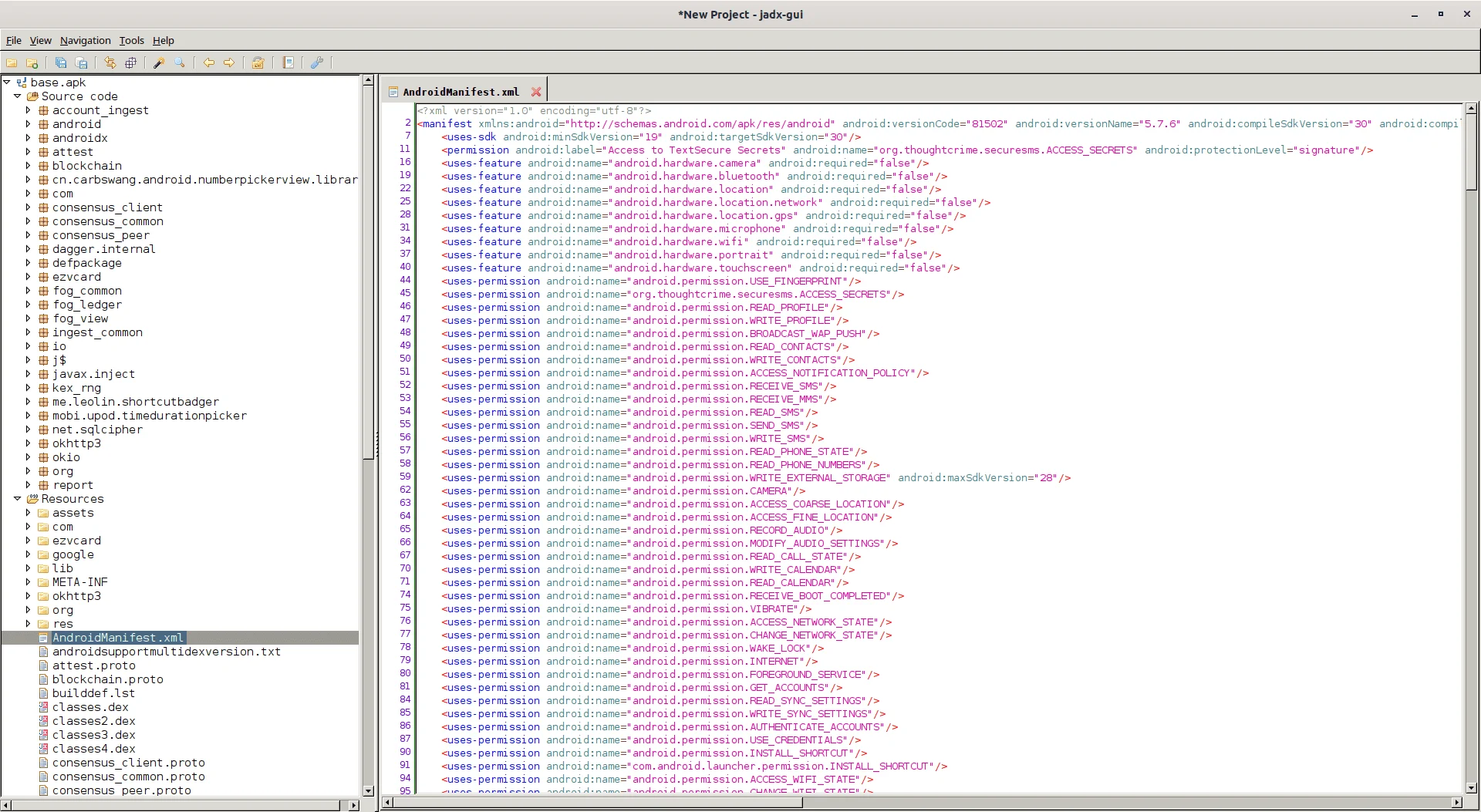
After that the author opened the app in jadx-gui to read AndroidManifest.xml and the code folders.
The author notes that after decompiling with apktool, grepping in certain regions or folders is faster than in jadx, and can produce easy wins.
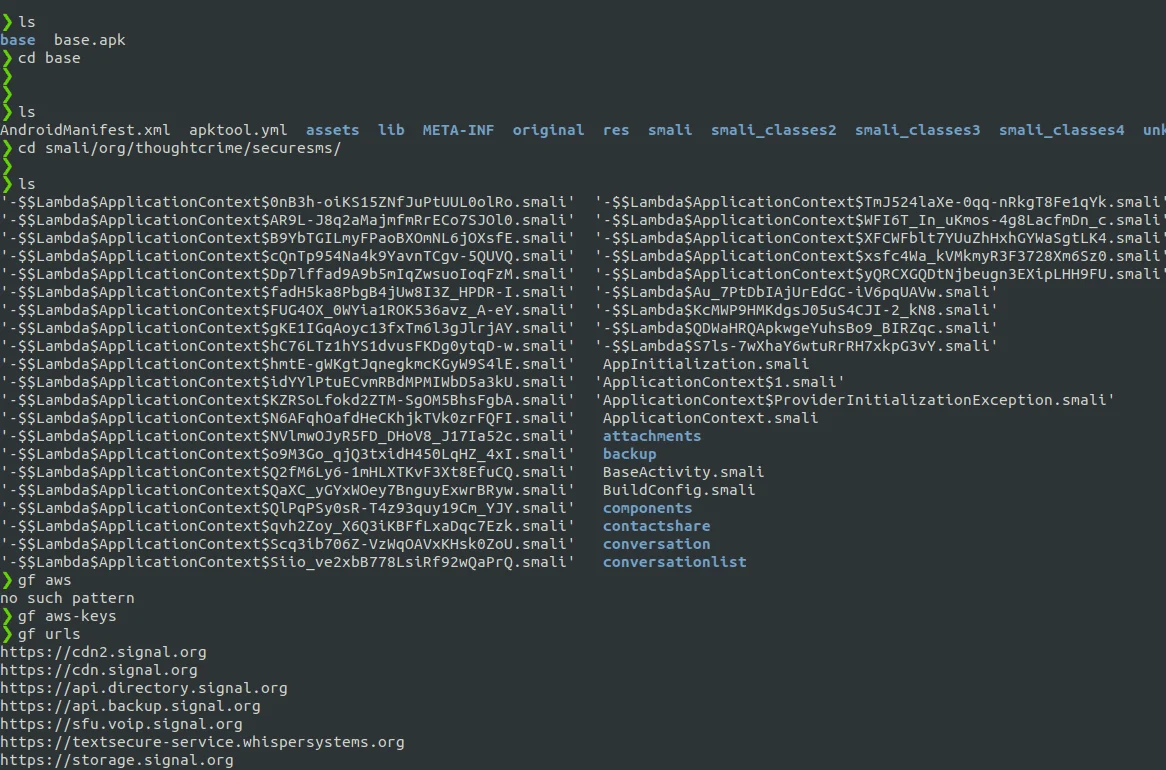
This static pass surfaced sensitive information in AndroidManifest.xml and in other files, which led to the first two bugs.
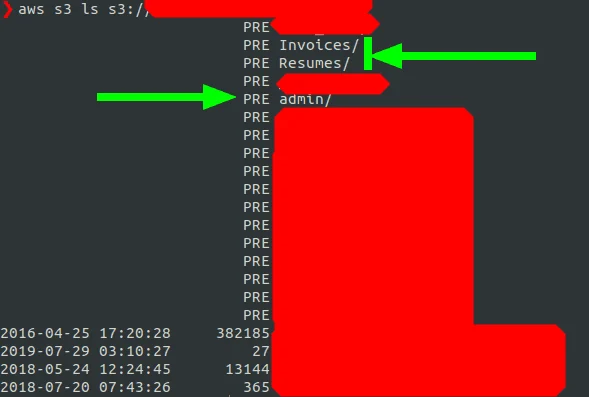
Bug 1: S3 buckets with write access. One bucket contained user PII, described as Aadhaar and PAN card data. A second bucket was a staging one and held less data. To demonstrate the issue the author uploaded a poc.txt, showing the bucket was world writable.
Bug 2: Open Firebase database. This one contained less sensitive information. The exposed endpoint took the form:
https://<victim's-project-name>.firebaseio.com/.json

A Constants.java file was also found. It held constants used by the app: the S3 bucket address, the SNS default topic ARN, the Google client ID for the OAuth client, and other values. The author notes it was not useful straight out of the decompiler but became more useful later.
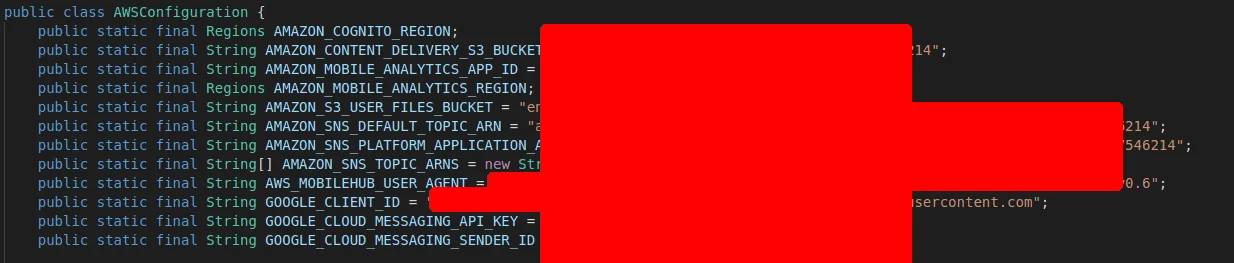
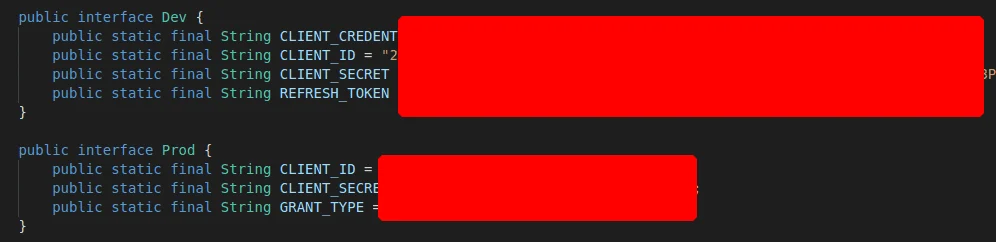
The second screenshot of the same file shows credentials for the dev and prod environments.
Dynamic analysis and SSL pinning
With Burp configured and the APK installed from the Play Store on the test device, no traffic from the app appeared in Burp, while HTTPS traffic from the phone's Chrome browser did. The author took this as an indication that the app used certificate pinning.
The write-up then explains pinning: certificate pinning restricts which certificates are considered valid for a particular site by pinning the CA issuer, public keys or even end-entity certificates, and clients treat all other certificates as invalid and refuse the HTTPS connection. Without pinning, installing the Burp CA is what lets Burp act as a middleman, proxying to the server on behalf of the client and vice versa.
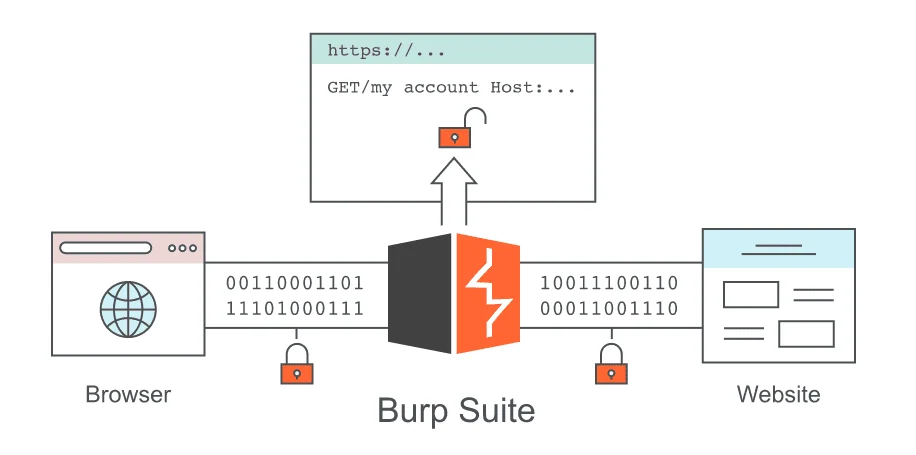
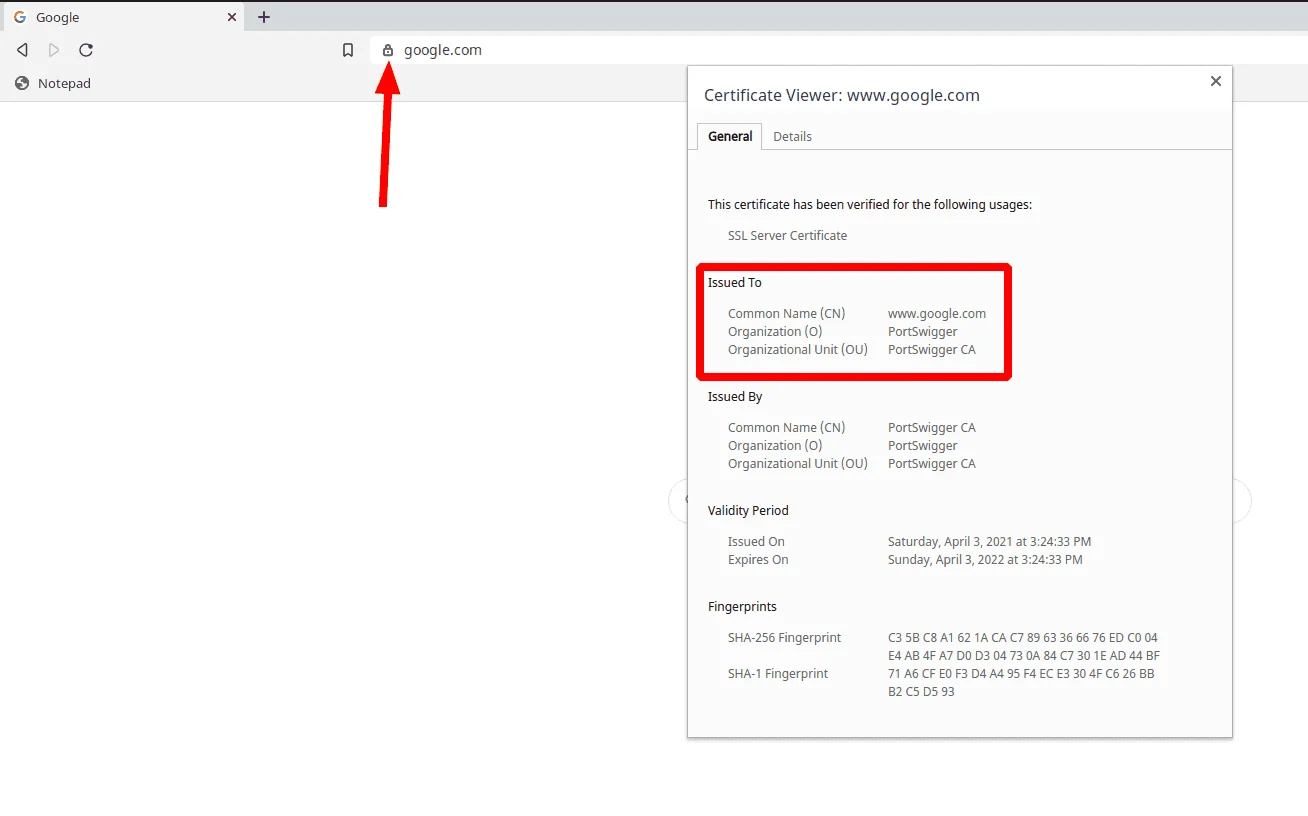
Because of that middleman position, every site visited through Burp shows the certificate authority as PortSwigger.
To unpin the app, the author used objection. With the device connected and frida-server running, the framework is started with:
objection --gadget <app_identifier> explore
and pinning is disabled from the objection prompt with:
android sslpinning disable
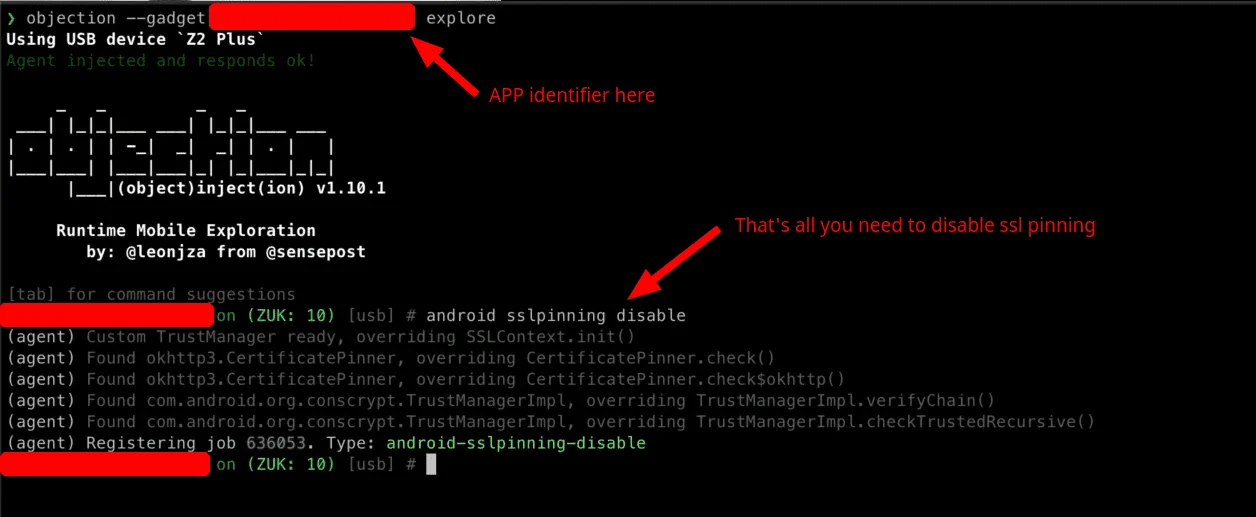
The author notes this works in most cases; determined apps may try to thwart it, which can be worked around with custom Frida scripts. After this, the app's traffic started to appear in Burp.
Exploitation
Step 1: OTP bypass and account takeover (Bug 3)
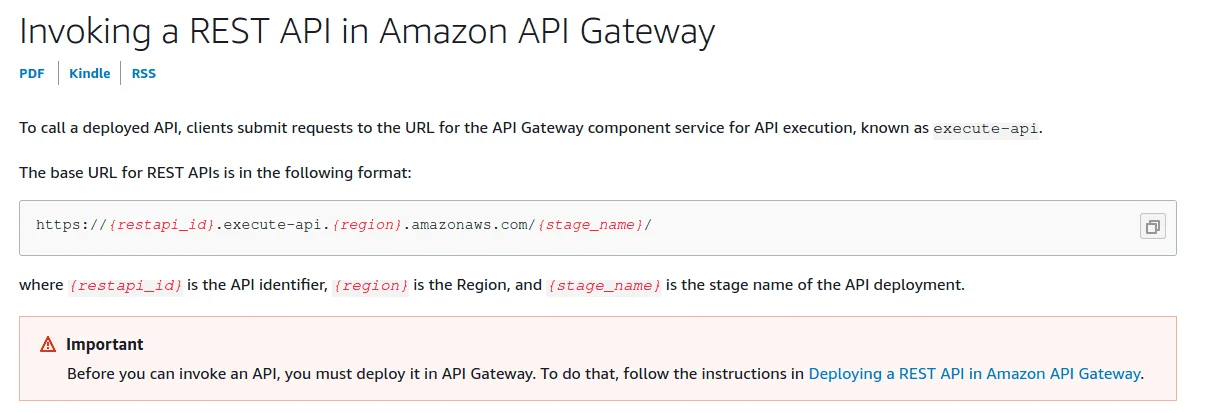
The app used OTP-based login. In Burp, the login requests went to an Amazon API Gateway, with a URL of the form:
https://{restapi_id}.execute-api.{region}.amazonaws.com

The key observation was that the OTP was present in the payload request.
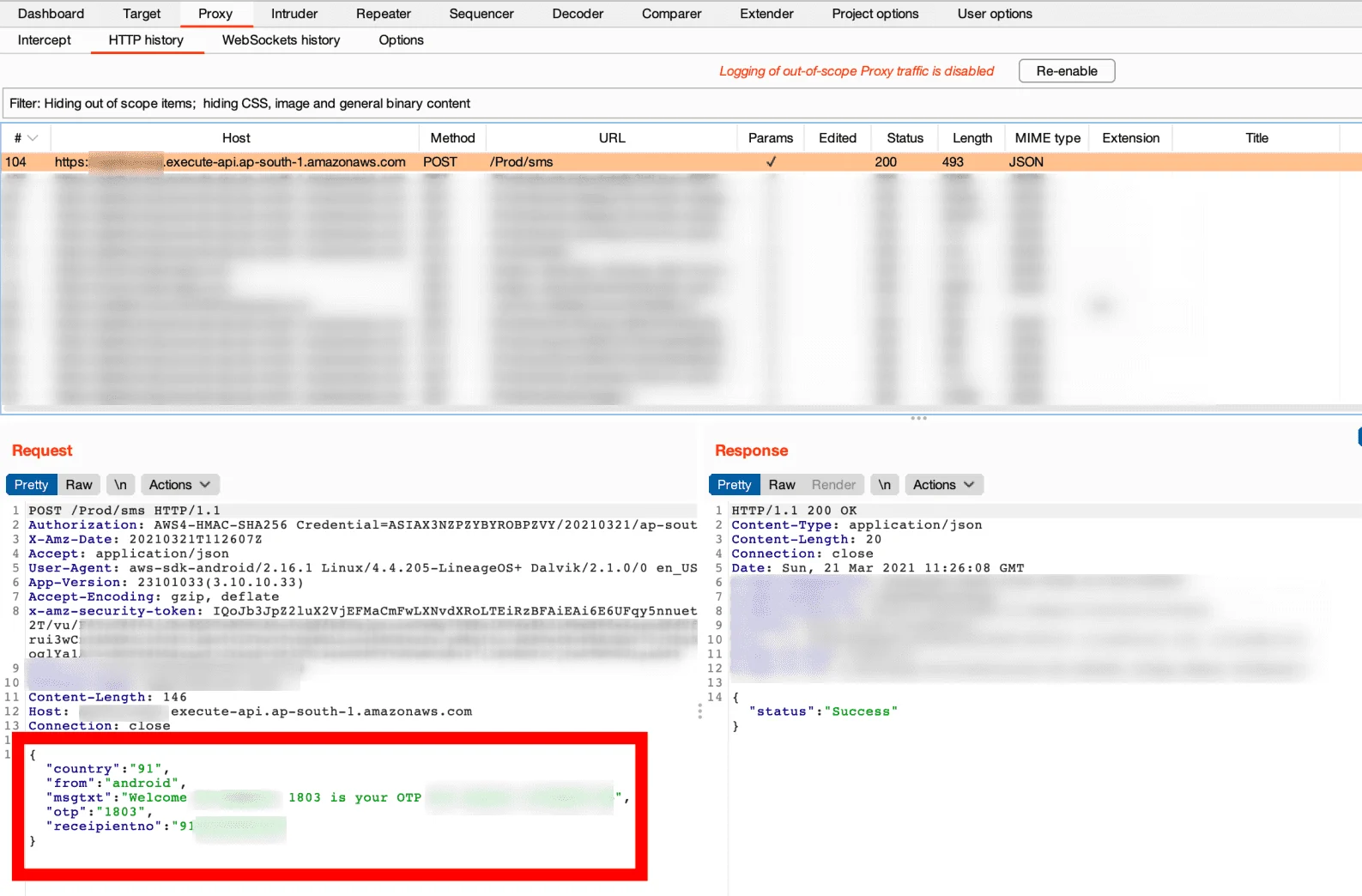
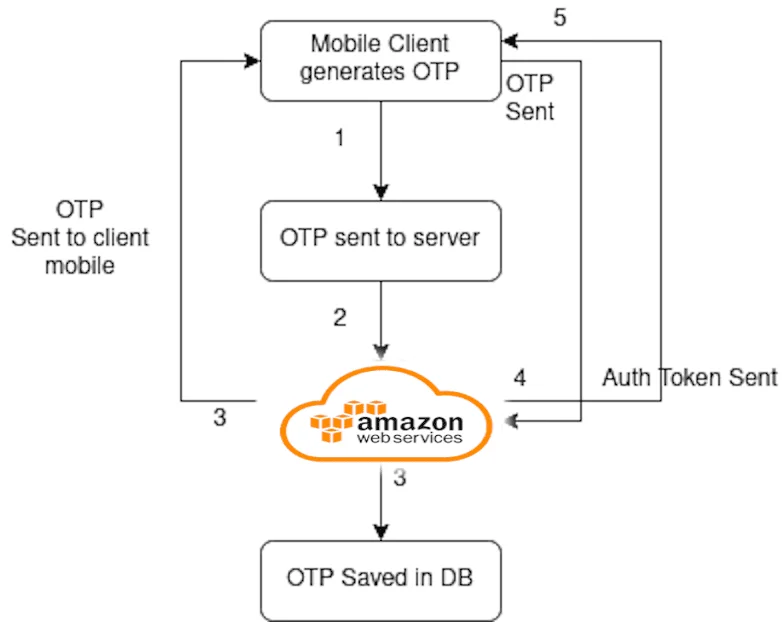
The OTP was generated on the mobile itself and sent to the AWS server. The request existed only so the server could send an SMS to the mobile user; when the user submitted the OTP for verification, the server generated an authentication token. Because the OTP travels in the intercepted request, an attacker who enters any victim's mobile number and intercepts the outgoing request already has the OTP needed to complete login. The author summarises the result as being able to log in to any of the 10M+ accounts using just the mobile number, with the earlier data leak helping to obtain customers' mobile numbers.
Two follow-up ideas were considered and ruled out:
- Skipping the request and logging in silently. This does not work, because unless the request is sent the server has no OTP stored to verify against for that mobile user, so the subsequent verify request has nothing to check.
- Abusing the service to send free SMS to arbitrary numbers. This is not easy: the payload signature is also added to the headers and the AWS SDK handles the signing. The author says they eventually worked out how to do it and deferred the detail to a second part.
Step 2: Unlimited coins through the reward system (Bug 4)
The app had a reward system granting coins that could be redeemed for subscriptions, which could otherwise be bought with fiat currency. A subscription cost either 5000 virtual coins or 1000 Indian rupees. The scratch card feature rewarded the user with in-game coins, and replaying the request granted coins again. The author automated the replay with a Python script to accumulate unlimited coins. This endpoint also checked the payload signature, so the Amazon SDK for Python was required, along with some of the values from the Constants.java file found during static analysis.
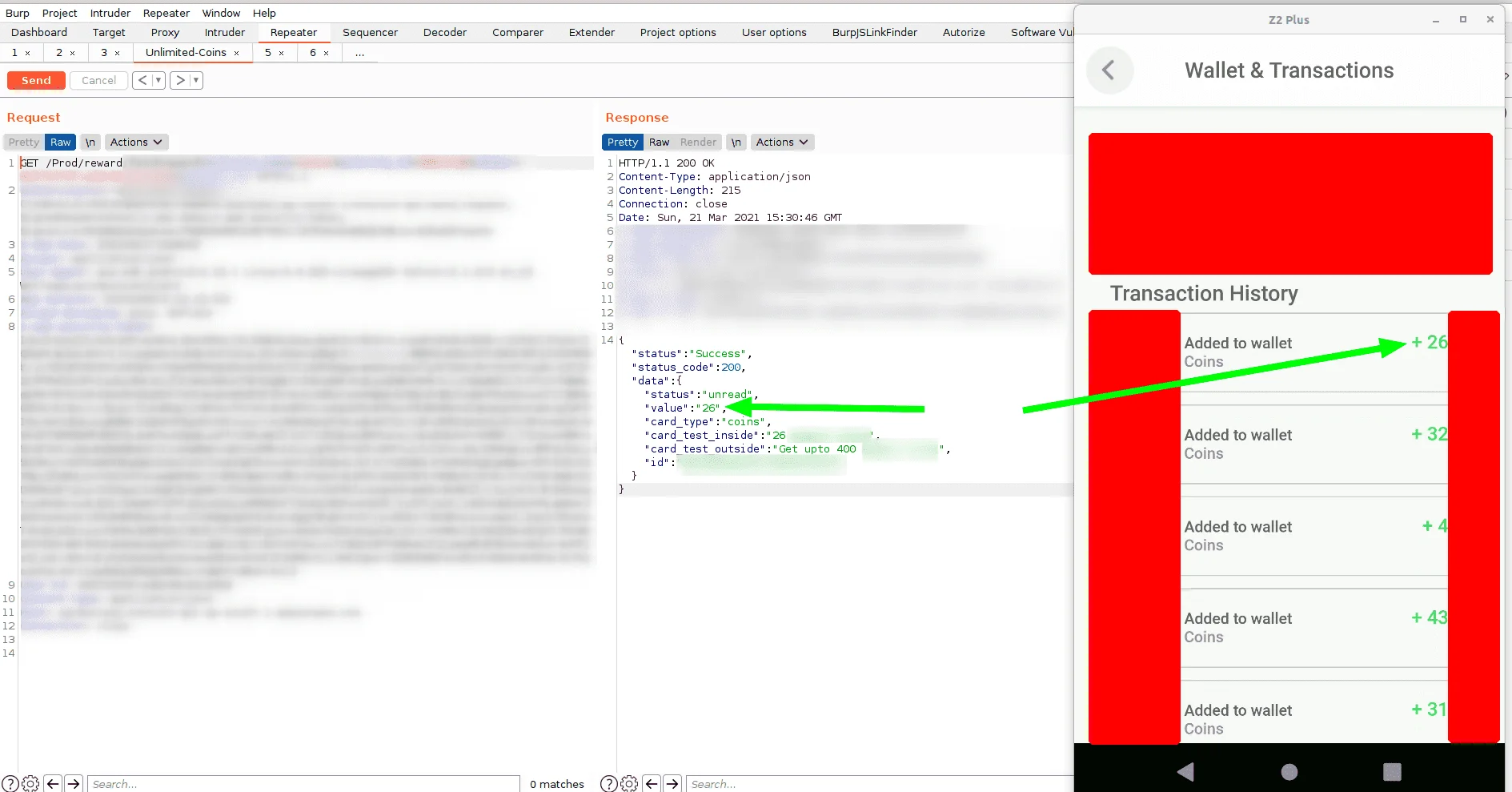
The author rates this bug as critical because it led to financial losses for the company.
Root cause
- OTP bypass: the OTP is generated client-side and included in the request that triggers the SMS, so the secret that should only reach the user's phone is visible to anyone who can observe the request. The OTP was generated on the mobile and sent to the AWS server, so anyone intercepting the request already had the OTP.
- S3 write access: the bucket policy allowed writes from anyone, which the
poc.txtupload demonstrated. The decompiledConstants.javaheld constants including the S3 bucket address. - Firebase: the database was readable at the
/.jsonpath without authentication. - Unlimited coins: the scratch card endpoint could be replayed to grant coins repeatedly, with no server-side control preventing the same reward from being claimed more than once. The scratch card endpoint could be replayed to grant coins repeatedly, even though it had payload signature checks.
Impact
With the OTP bug, an attacker could log in to any of the 10M+ accounts using only the victim's mobile number, and the exposed data helped obtain those numbers. The S3 bucket exposed user PII including Aadhaar and PAN card data, and was world writable, as the poc.txt upload showed. The Firebase database exposed less sensitive information. The coin bug allowed unlimited coins to be added to a wallet, which the author says caused financial losses for the company. The author reports all four issues to the company.
Fix
The write-up does not describe any fixes applied by the company. Based on the findings, the changes needed are: generate the OTP server-side and never include it in any response or request the client can observe; restrict the S3 bucket so that public write (and public read of PII) is not possible; require authentication on the Firebase database; and enforce the scratch card reward server-side so a given reward cannot be claimed more than once, independent of payload signature validity.
Variants to test
- OTP in the request payload. Intercept the login flow on other apps and look for the OTP in the request body or response. A positive result is an OTP you can read before it reaches the victim's phone and use to complete login for an arbitrary number.
- Client-side OTP generation. Compare the OTP in the request with the one delivered by SMS. If they match and the request is what triggers the SMS, the server is not the source of the secret.
- Replayable reward endpoints. Capture a scratch card, spin or daily-reward request and resend it unchanged. A positive result is the balance increasing on every replay.
- Signed requests as a false defence. Where a payload signature is present, check whether replaying the exact signed request still succeeds. If it does, the signature provides integrity but not freshness.
- Secrets in
Constants.javaandAndroidManifest.xml. Decompile an APK and grep for bucket names, ARNs, client IDs and credentials. A positive result is a live cloud resource reachable with those values. - S3 write access. Attempt to upload a harmless test object to any bucket found in an app. A positive result is a successful upload, as with the
poc.txthere. - Open Firebase paths. Request
https://<project>.firebaseio.com/.jsonfor any project name found in the app. A positive result is a JSON dump returned without authentication. - Pinning bypass coverage. After running
android sslpinning disable, check whether app traffic appears in Burp. If it does not, the app likely uses additional checks that need custom Frida hooks.
What happened, in plain words
A security researcher tested an Android app for learning English that had more than 10 million users. He found four serious problems. Two were cloud storage services left open to the internet: one was world writable and contained personal identity documents of users; the other was a database that anyone could read. The third was a flaw in the login system: the one-time password (OTP) that is supposed to be sent only to the user's phone was actually generated inside the app and sent in the network request, so anyone who could see that request already knew the OTP and could log in as any user. The fourth was a flaw in the app's reward system: a scratch card that gave virtual coins could be replayed to give unlimited coins, which could be redeemed for subscriptions.
The researcher found these by first taking the app apart on his computer (static analysis) and then watching the app's network traffic (dynamic analysis). He used free tools: apktool and jadx to decompile the app, Burp Suite to intercept traffic, and objection to bypass the app's certificate pinning so that traffic could be seen. He reported all four issues to the company.
This article walks through the same steps in beginner-friendly language. You do not need any prior security knowledge, only curiosity and a willingness to follow along.
The Motivation
The researcher was making a video series on Android hacking. He wanted to learn more about Android security, so he read blog posts, disclosed bug reports, watched videos, and practised on deliberately vulnerable apps. He was especially interested in dynamic instrumentation, which means using tools to change how an app behaves while it is running. He had very limited experience with Frida (a tool for this) from playing capture-the-flag competitions in college.
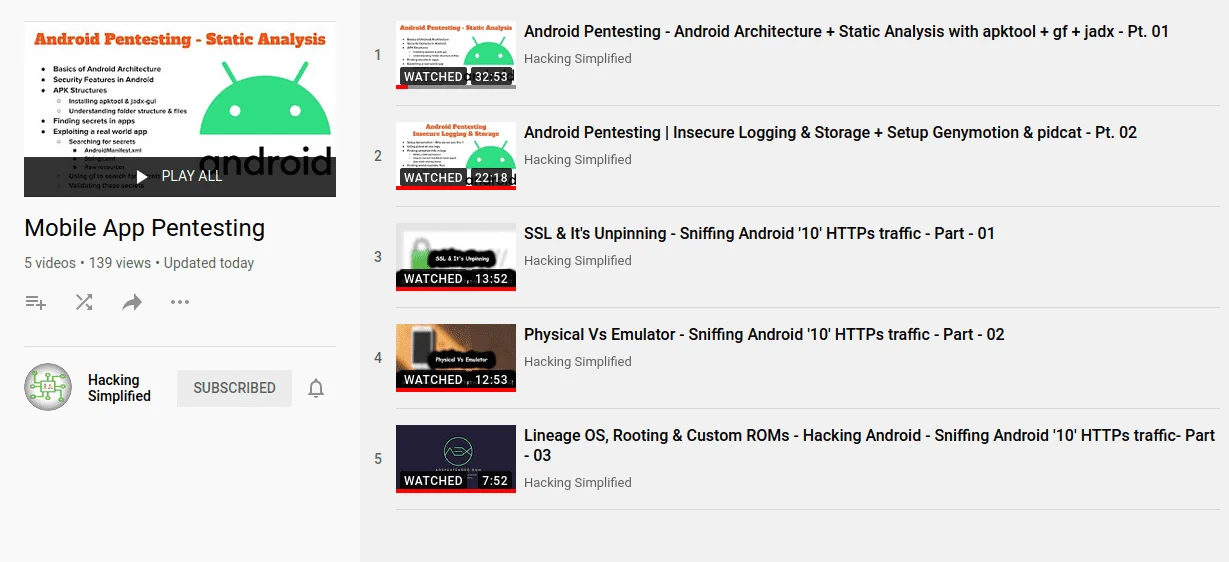
Android Hacking Series
He started by exploring Android security vulnerabilities. Most of what he had done before was static analysis, which means examining the app's code without running it. He had already covered that in the first two parts of his series. Now he wanted to focus on dynamic instrumentation: using Frida to bypass checks and encryption in the app. He had limited experience with it, so this was a learning journey.
tl;dr
- This is a walkthrough of his approach to Android app pentesting.
- Static and dynamic analyses complement each other.
- He found four vulnerabilities, all critical or high: account takeover, user PII leak, and others. None of them depended on his Frida skills, which shows that bug bounties are unpredictable.
- He will cover how to hook functions using Frida in the next part.
- He will also cover changing functions and responses from JavaScript code in Frida without an automated framework, in the next part.
The Story
He had a few candidate apps to test, all seen in advertisements inside other apps or on YouTube. He chose the one with the highest user base: more than 10 million at the time. The app helps people learn English in a fun way.
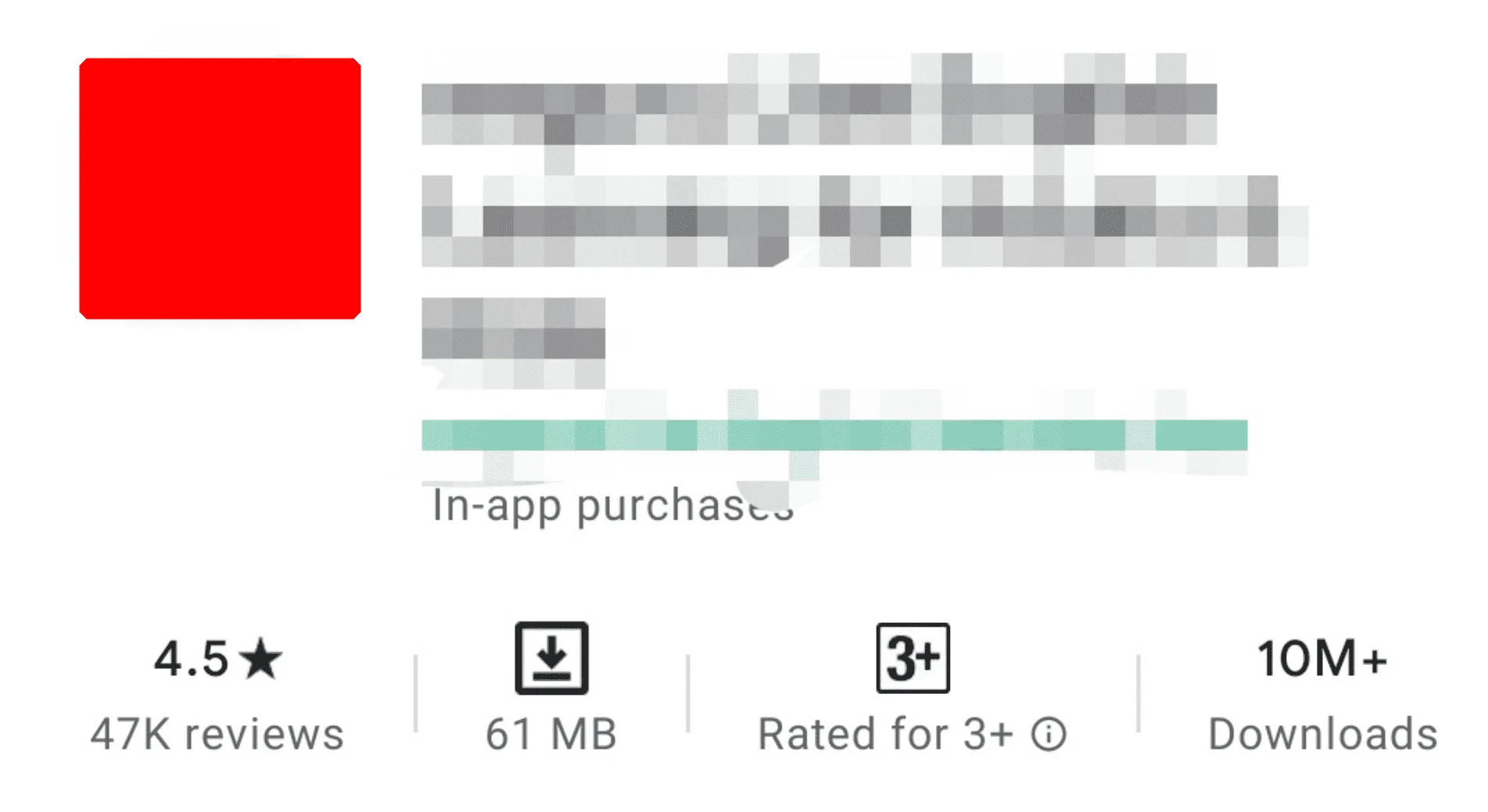
The App on PlayStore
Stage 1: Static Analysis
Always start by decompiling the app. He uses apktool and jadx. After decompiling with apktool, he finds that grepping (searching with a text tool) in certain regions or folders is faster than in jadx, and it can yield easy wins.
How to do it:
Prerequisites:
- Install apktool following the instructions on its website.
- Download and use jadx from its GitHub releases page.
Now pull the APK from the mobile or download it from an online APK store such as evozi apk downloader, apkpure.com, or apkonline.net.
He installed the app on a phone and pulled the APK onto his machine using adb (Android Debug Bridge, a command-line tool that lets you talk to an Android device from your computer):
adb shell pm path <app_identifier>
adb pull <path_of_base_apk>
Line by line:
adb shell pm path <app_identifier>: asks the phone's package manager where the APK file for the app with the given identifier is stored on the device. It prints a path like/data/app/.../base.apk.adb pull <path_of_base_apk>: copies that file from the phone to your computer.
Pulling signal app from mobile
Now with the APK on his local machine, he started decompiling it using apktool:
apktool d <app_identifier>
Line by line:
apktool d <app_identifier>: decompiles the APK. Thedstands for decode. It produces a folder with the app's resources,AndroidManifest.xml, and smali code (a human-readable form of the app's bytecode).
apktool decompiling the base.apk
After that he starts jadx-gui, which can be run on Linux and macOS as:
./jadx-gui
and on Windows there is a jadx-gui.bat file as well.
Signal App's AndroidManifest.xml in jadx-gui
You can manually check AndroidManifest.xml for secrets and also look in the app's code folders.
He prefers using gf (a wrapper around grep for finding secrets) in the decompiled directory from apktool to search for secrets, like this:
Searching for sensitive info in Signal App
Doing static analysis on the app, he found sensitive information in AndroidManifest.xml and in other files as well. Hence, always grep.
As luck would have it, he found the following:
Bug 1: S3 buckets with write access
One bucket contained user PII (Personally Identifiable Information such as Aadhaar, PAN card, etc.). The other bucket was a staging one and did not have a lot of data. He uploaded a poc.txt to show that it was world writable and hence vulnerable.
s3 bucket contents
Bug 2: Open Firebase database
This one contained less sensitive information.
https://<victim's-project-name>.firebaseio.com/.json
He also found a Constants.java file, which contained constants used in the app, such as the S3 bucket address, the SNS default topic ARN, the Google client ID for the OAuth client, etc. This was not useful straight out of the decompiler but later proved to be more useful.
Cloud Resources Keys, Contents of the Constants.java file
Credentials for Dev and Prod, Contents of the Constants.java file
Stage 2: Dynamic Analysis
How to do it:
Prerequisites:
- A physical device or emulator (Genymotion is fast, so he prefers that).
- Burp Suite running on your laptop.
- Install the Burp certificate and set the mobile proxy settings to pass through your laptop. Here is the guide by PortSwigger Labs: Configuring an Android device to work with Burp. Essentially it involves two steps:
- Set up Burp as a proxy in your Wi-Fi settings.
- Install the Burp CA certificate on your phone.
He set up Burp on his testing device, a Lenovo ZUK Z2+, and installed the APK from the Play Store onto it. He could not see the traffic coming through Burp.
He could see HTTPS traffic from his mobile's Chrome browser coming through Burp but not from this particular application. This is an indication that the app uses certificate pinning.
What is SSL Pinning?
Let's take a step back and ask: why did we need to add a Burp certificate to see HTTPS traffic? Why not just set up Burp as a proxy and let traffic pass through?
The answer is SSL Pinning.
Certificate pinning (SSL Pinning) restricts which certificates are considered valid for a particular website, limiting risk. Instead of allowing any trusted certificate to be used, operators "pin" the certificate authority (CA) issuer(s), public keys, or even end-entity certificates of their choice. Clients connecting to that server will treat all other certificates as invalid and refuse to make an HTTPS connection.
So whenever you make a request to an HTTPS website, certificates are involved that help prove the identity of the parties in the communication. The certificate helps prove the identity of the parties, and the communication between them is encrypted.
What purpose does this solve?
This ensures that no unauthorised person can view the traffic between the client and the server.
To view this traffic, Burp acts as a middleman, a proxy, and talks to the server on behalf of the client and vice versa.
BURP Suite Workflow, From Portswigger's Website
That is why when you pass all your traffic through Burp, you see the certificate authority as PortSwigger on every website you visit.
Certificate Organization: PortSwigger
A video explaining these details can be found on his channel here:
Unpinning the App
With a basic understanding of SSL pinning, let's start to unpin the app and get its HTTPS traffic going through Burp.
The easiest way he has seen to bypass certificate pinning is using the objection framework.
What is the Objection Framework?
It is a framework built on top of Frida (an instrumentation toolkit) that helps you hook into functions and libraries very easily. Moreover, it has many ready-to-use modules for common tasks like SSL unpinning.
The last part of the video series focuses on using this to SSL unpin the Flipkart app.
How do I SSL unpin the app using the objection framework?
First, connect your device using USB and enable USB debugging on it. You also need to run frida-server on your mobile phone; it is easier if you have a rooted phone, otherwise you need to use frida-gadget.
Here is a blog post explaining the same: Frida's Gadget Injection on Android: No Root, 2 Methods.
After the device is connected to the laptop and frida-server is up and running, start the objection framework with the following command:
objection --gadget <app_identifier> explore
Line by line:
objection: the command-line tool.--gadget <app_identifier>: tells objection to attach to the app with the given identifier using the Frida gadget (a way to inject Frida without root).explore: opens an interactive prompt where you can run commands.
You should see a screen similar to the screenshot below. Now to disable SSL pinning, all you need to do is run the following command:
android sslpinning disable
Line by line:
android sslpinning disable: an objection command that hooks the common SSL pinning functions in the app and makes them accept any certificate, effectively disabling pinning.
objection framework ssl unpinning
This works in most cases. Some really determined apps might try to thwart this, but even that can be worked around by writing custom Frida scripts.
Now traffic started to pour in.
Bug 3: OTP bypass login into any User's account
The app had an OTP-based login. In Burp Suite he could see the requests going to an Amazon API Gateway, as the URL was of the form:
https://{restapi_id}.execute-api.{region}.amazonaws.com
Line by line:
https://: the protocol.{restapi_id}: the unique identifier of the API Gateway deployment..execute-api.{region}.amazonaws.com: the domain pattern for Amazon API Gateway in a specific AWS region.
Request being sent on OTP login
He saw the OTP being sent in the payload request.
OTP bypass for logging into users' accounts
So the OTP was generated on the mobile itself and sent to the AWS server. The only reason the request was sent to the server was to send an SMS to the mobile user, and when the OTP was sent by the user to verify, an authentication token was generated by the server.
So they were now able to log in to anyone's account by just entering their mobile number and intercepting the request being sent. This way they would already have the OTP to log in to the app.
With this account takeover bug they could log in to any of the 10M+ accounts using just their mobile number. And the previous data leak helped in getting the mobile number of these customers.
Flow Diagram of The Auth Mechanism
Some other ideas that came to mind after finding this bug were:
- Can we avoid sending the request and silently log in to a victim's account? Well, this cannot be done because unless that request is sent, the server will not have the OTP to verify against a mobile user, and thus when you next send the verify request, there will not be any OTP to verify against for the backend.
- Can we go on abusing this service and send free SMS to any mobile user? This cannot be done easily. The payload signature is also added to the headers. The AWS SDK already handles the signing part. Eventually he figured out how to do this. He will talk about this in detail in the second part.
Bug 4: Reward System & Unlimited Free Coins
There is a reward system in the app that rewards users with coins. These coins could be redeemed to buy subscriptions, which otherwise could also be bought with fiat currency such as INR.
So to buy a subscription you either paid 5000 virtual coins or 1000 Indian rupees.
The fourth bug was adding unlimited coins to the wallet. This bug was critical as it led to financial losses for the company.
Unlimited Coins
How did you exploit it?
The app had a scratch card feature that rewarded the user with some in-game coins. You just needed to replay the request to get some coins.
He wrote a Python script and automated this to get unlimited coins. This endpoint also had payload signature checks, and hence the Amazon SDK for Python was required. Also, some of the values from the Constants.java file, which he found during the static analysis of the app, were required.
But where is Frida and bypassing payload checks?
Well, let's keep that for the next part. In the next part he will talk about Frida and Amazon's different services like Amazon Gateway and Cognito.
Summary
This post describes the approach he takes when pentesting an Android application. It includes things like:
- Static analysis
- SSL Unpinning through Frida
- Dynamic Analysis of the app's network requests
In this process he found and reported four issues to the company, described as critical or high.
Want to learn Android hacking?
He is still in the process of making videos on in-depth Android hacking, things like exploiting content providers, deeplink issues, etc.
You can check out the Mobile App Pentesting Series on his channel.
Thanks. Hope you learnt something.
Bugs are simple. Persistence is the key.
Check out the latest video from the channel:
Twitter: @AseemShrey

Hey! I'm Aseem Shrey.
const about_me = { loves: "CyberSec, Creating Stuff",
currently_reading: "Gandhi: The Years That Changed
the World, 1914-1948",
other_interests: [
"Reading 📚",
"IoT Projects 💡",
"Running 🏃( Aim to run a full marathon )",
"Swimming 🏊♂️"
],
online_presence: HackingSimplified AseemShrey
};
Ping me up if you wanna talk about anything.
About me, Join newsletter, GitHub.
Glossary
- APK: The file format used to distribute and install apps on Android.
- API: Application Programming Interface; a set of rules that lets one piece of software talk to another. Think of it as a waiter taking your order to the kitchen.
- API Gateway: An AWS service that acts as a front door for APIs, routing requests to the right backend.
- AWS: Amazon Web Services, a cloud computing platform.
- Burp Suite: A tool for intercepting and modifying web traffic between a browser or app and a server.
- CA certificate: A digital certificate issued by a Certificate Authority, used to establish trust in HTTPS.
- Certificate pinning: A security mechanism where an app or browser only trusts a specific certificate or public key for a particular server, refusing others.
- Constants.java: A Java source file containing constant values used throughout the app.
- Frida: A dynamic instrumentation toolkit that lets you inject JavaScript into running apps to hook functions and modify behaviour.
- frida-server: The component of Frida that runs on the Android device.
- frida-gadget: A way to use Frida without root by embedding a library into the app.
- Genymotion: An Android emulator known for its speed.
- gf: A command-line tool that wraps grep with patterns for finding secrets in code.
- jadx: A decompiler for Android APKs that produces Java source code.
- jadx-gui: The graphical interface for jadx.
- objection: A toolkit built on Frida that provides ready-made commands for common tasks like SSL unpinning.
- OTP: One-Time Password; a password valid for only one login session or transaction, often sent via SMS.
- PII: Personally Identifiable Information; data that can be used to identify a specific person, such as Aadhaar or PAN card numbers.
- Proxy: An intermediary server that sits between a client and a server, forwarding requests and responses.
- S3 bucket: A storage container in Amazon S3 (Simple Storage Service).
- SNS: Amazon Simple Notification Service, used for sending messages.
- SSL pinning: Another term for certificate pinning.
- Static analysis: Examining an app's code without running it.
- Dynamic analysis: Examining an app's behaviour while it is running.
- Token: A piece of data, often a string, that represents a user's authenticated session, allowing them to access resources without re-entering credentials.
- World writable: A permission setting that allows anyone to write to a resource.




