ManageEngine ServiceDesk Plus: Arbitrary File Upload
An authenticated user with minimal privileges could upload a JSP webshell to a publicly accessible directory because the file extension check was skipped when a specific parameter was set. This allowed remote code execution on the server.
 Published on medium.com
This article is a write up on how I found my second critical vulnerability at the company’s internal bounty program.
The full write-up lives on its author's site
It belongs to its author, so we link to it rather than copy it. The other two tabs are our own rewrites, checked against it.
Context
This is a write-up of a second critical finding at an internal bug bounty programme. The target was a subdomain discovered during enumeration and information gathering across the organisation's subdomains. That subdomain runs ManageEngine ServiceDesk Plus, which the author describes as carrying a lot of potential security risk.
ServiceDesk Plus is a helpdesk and IT service management product. The vulnerable feature here is its file attachment handling: the endpoint common/FileAttachment.jsp accepts uploaded files and normally checks the file extension before storing them. The bug is that the check can be skipped, and the uploaded file lands in a directory that is served directly over HTTP.
Setup
The exploitation path requires an authenticated account. The author explicitly did not care about the privileges of that account, because the flaw is reachable with minimum permission, for example a guest account. The account was obtained with the simplest credentials of all time, admin:admin, which the author compares to an earlier bug bounty case for another target (referred to as V*) that also used admin:admin.
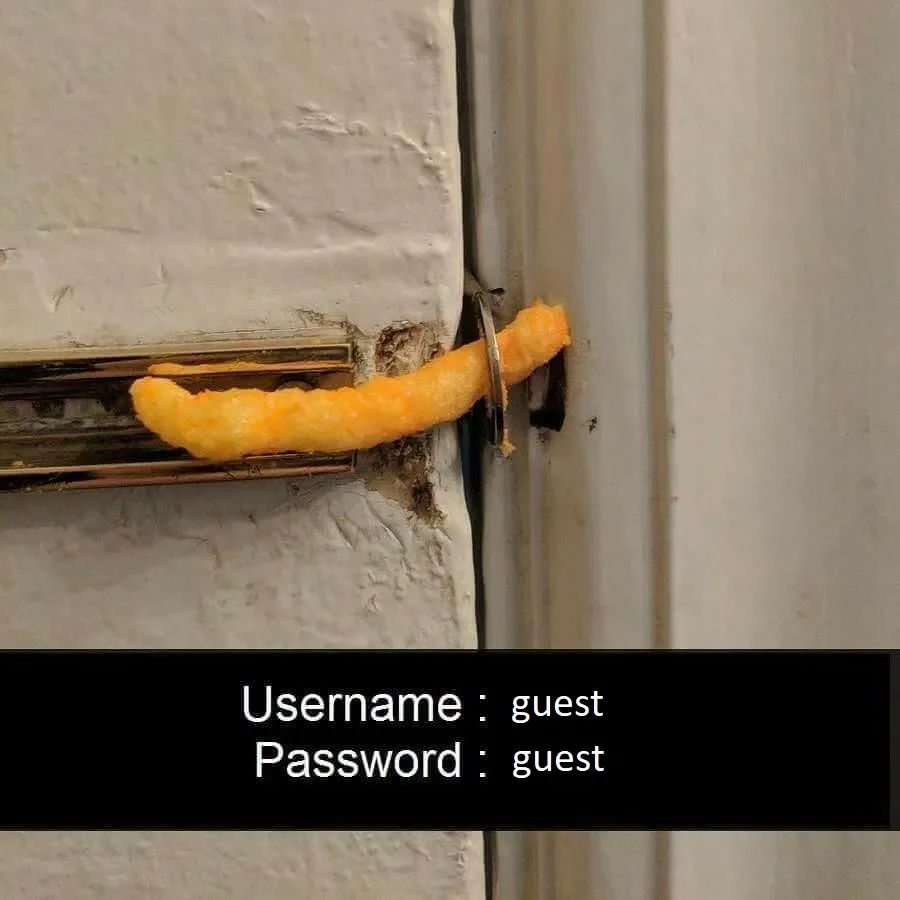
admin:admin
No specific product version is given in the text. The vulnerability is identified as CVE-2019-8394, and the references point to an Exploit-DB entry titled for Zoho ManageEngine ServiceDesk Plus (SDP) before 10.0 build 10012, arbitrary file upload.
The webshell used came from a public repository, https://github.com/SecurityRiskAdvisors/cmd.jsp.
Finding it
After enumerating subdomains and gathering information, the author found the ServiceDesk Plus instance and, within a few minutes, a way to get remote code execution on it. The method requires an authenticated user to send a POST request to a vulnerable endpoint.

2020 solving 2020 problems
The author quotes the following explanation of the flaw:
In file common/FileAttachment.jsp line 332 only check file upload extension when parameter 'module' equal to 'SSP' or 'DashBoard' or 'HomePage', and if parameter 'module' is set to 'CustomLogin' will skip check file upload extension function and upload arbitrary file to folder '/custom/login' and this file can access directly from url 'host:port/custom/login/filename' . An authenticated user with minimum permission (ex: guest) can upload webshell to server.
In other words, the extension check is conditional on the value of the module parameter. Only the values SSP, DashBoard and HomePage trigger it. Setting module to CustomLogin bypasses the check entirely, and the file is written into the /custom/login folder, which is reachable directly at host:port/custom/login/filename.
Exploitation
Step 1: authenticate and capture the cookies
The first step is to authenticate to the application with the guest credentials. The server responds with cookie parameters, which are needed for the upload request.
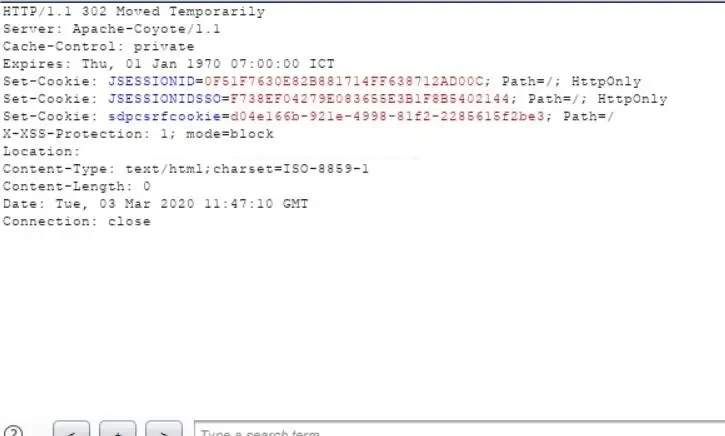
Step 2: build the upload request
Take the cookie parameters and the webshell content and place them in the sections shown in the image below. The webshell itself was taken from the linked repository.
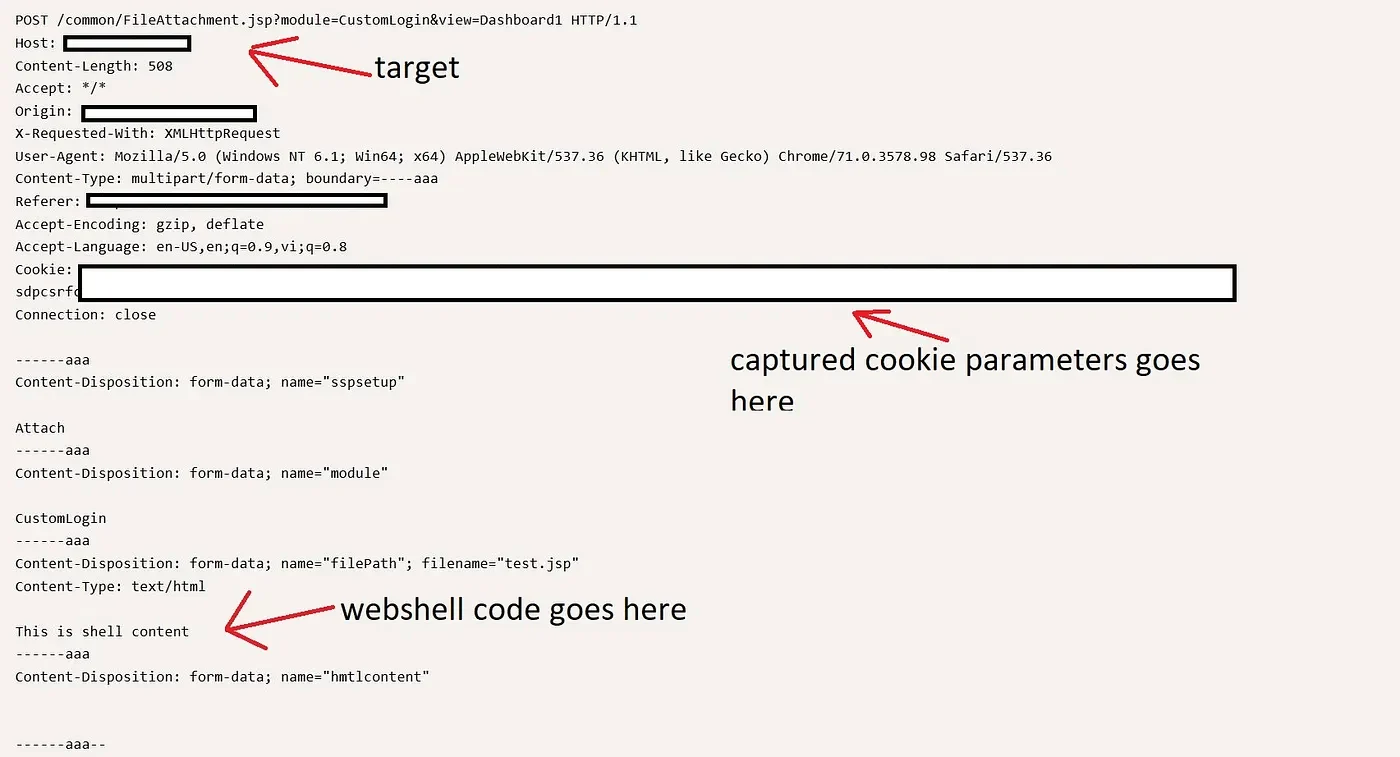
One practical note from the author: edit the webshell content so that it contains no newlines. Spaces are fine. The author spent half an hour struggling to get the shell to run properly because of this.
Step 3: confirm the upload and reach the shell
The server returned a 200 OK response. The uploaded file is then reachable at:
/custom/login/{your_shell_name}.jsp
Requesting that path brought up the shell, giving arbitrary code execution on the web server.
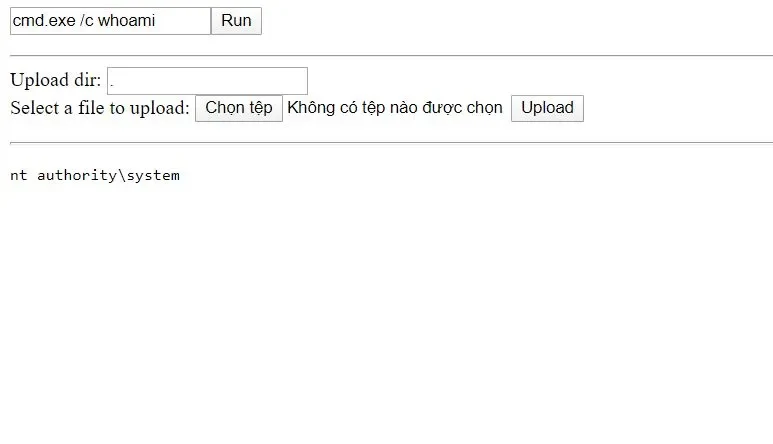
First time RCE on Window
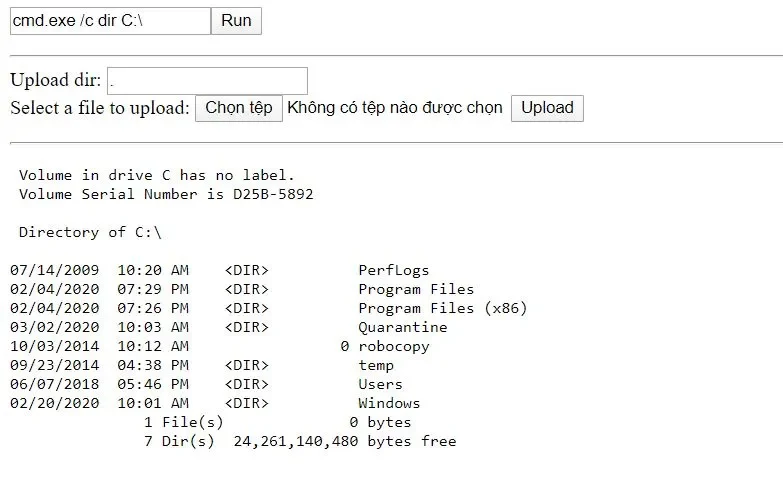
Corona Quarantine List?
Root cause
The extension check in common/FileAttachment.jsp (line 332) is applied only when the module parameter is one of SSP, DashBoard or HomePage. When module is set to CustomLogin, the extension check function is skipped and the file is written to the /custom/login folder. Because that folder is served directly, the uploaded JSP is reachable at host:port/custom/login/filename.
The design mistake is twofold: a security decision (whether to validate the upload) is driven by a client-supplied parameter, and the destination directory for that parameter value is web-accessible and capable of executing server-side code. The only precondition is an authenticated session with minimum permission, so the authorisation model does not compensate for the missing validation.
Impact
An authenticated user with minimum permission, such as a guest, can upload a webshell and execute arbitrary code on the web server. In this case the author obtained RCE on the subdomain. The author notes this was the second critical vulnerability found at the internal bounty programme.
Fix
The report does not describe a specific patch. The general guidance given in the conclusion is to keep applications up to date to mitigate security issues. The referenced Exploit-DB entry covers ServiceDesk Plus before 10.0 build 10012.
Variants to test
- Other
modulevalues. Try values other thanSSP,DashBoard,HomePageandCustomLoginoncommon/FileAttachment.jspand see whether the extension check is skipped and where the file lands. A positive result is a200 OKand the file retrievable from a predictable path. - Other upload endpoints with conditional validation. Look for parameters that switch validation branches (module, type, context, action) and set them to values the developer did not anticipate. A positive result is an uploaded executable extension (
.jsp,.jspx,.war) stored under a web-reachable directory. - Default credentials on the same product. Try
admin:adminand other trivial pairs against the login. A positive result is a session with any role, since the flaw only needs minimum permission. - Newline handling in uploaded payloads. If a shell uploads but does not execute, strip newlines from the payload (spaces are acceptable) and retry. A positive result is the shell executing instead of returning a static file or an error.
- Direct access to upload directories. After any successful upload, request the file at the path the application reports or at the directory named after the parameter value, for example
/custom/login/{name}.jsp. A positive result is execution of the uploaded code rather than a download prompt.
What happened, in plain words
A security researcher was looking around the different subdomains of a company as part of an internal bug bounty programme. A bug bounty programme is a scheme where an organisation invites people to look for security weaknesses in its systems and report them, often for a reward. A subdomain is a smaller address under a main domain, like helpdesk.example.com under example.com. During that search the researcher found one subdomain running a product called ManageEngine ServiceDesk Plus.
ServiceDesk Plus is a helpdesk and IT service management product: staff use it to log support tickets, track requests and manage IT work. One of its features lets users attach files to tickets. The researcher found that this file attachment feature could be tricked into accepting a file it should have refused, and that the accepted file would then be stored somewhere the web server would happily run it as a program. That is called remote code execution, or RCE: the attacker gets to run their own commands on the server, not just read or upload data.
The whole trick needed only a logged-in account with the lowest possible permissions, such as a guest account. The researcher got such an account with the credentials admin:admin, which is about as weak as a username and password pair can get.
The vulnerability has a public identifier, CVE-2019-8394. A CVE is a catalogue number for a known security flaw, so people can refer to the same bug unambiguously. The researcher also links to a public exploit database entry and to a small webshell file hosted on GitHub. A webshell is a tiny program uploaded to a server that lets the attacker run commands through the browser afterwards.
This article walks through the same steps the researcher took, explaining each concept from scratch. It is for learning only. Do not test any system you do not own or have written permission to test.
Finding the target
After a bunch of enumeration and information gathering on subdomains, the researcher found an interesting subdomain that uses ManageEngine ServiceDesk Plus. Enumeration here means systematically listing things: which subdomains exist, which services answer on them, which product is installed. It is like walking around a building trying every door to see which ones have a nameplate. The researcher describes the product as having lots of potential security risk.
A few minutes in, the researcher discovered a way to get RCE on this subdomain. The method required an authenticated user to send a POST request to a vulnerable endpoint. Two ideas need unpacking here.
A POST request is one of the basic ways a browser or program talks to a web server. When you fill in a form and press submit, your browser usually sends a POST request carrying the data you typed. An endpoint is the specific address on the server that receives that data, for example a script that handles file uploads. An authenticated user is simply someone who has logged in, so the server knows who they are.
The image is captioned "2020 solving 2020 problems".
The researcher then quotes an explanation of the flaw, which is the heart of the whole article:
In file common/FileAttachment.jsp line 332 only check file upload extension when parameter 'module' equal to 'SSP' or 'DashBoard' or 'HomePage', and if parameter 'module' is set to 'CustomLogin' will skip check file upload extension function and upload arbitrary file to folder '/custom/login' and this file can access directly from url 'host:port/custom/login/filename' . An authenticated user with minimum permission (ex: guest) can upload webshell to server.
Let us translate that slowly.
common/FileAttachment.jspis the server-side file that handles attachments. The.jspending means it is a JavaServer Page, a page that runs Java code on the server rather than just sending text to the browser.- Line 332 of that file is where the upload check lives.
- A file extension is the part after the last dot in a filename, like
.jpgor.pdf. Servers often use the extension to decide whether an upload is allowed. - A parameter is a named value sent along with a request, a bit like a field on a form. Here the parameter is called
module. - The check only runs when
moduleequalsSSP,DashBoardorHomePage. Ifmoduleis set toCustomLogin, the check is skipped entirely. - The uploaded file is then written into the folder
/custom/login, and that folder is reachable directly from a browser athost:port/custom/login/filename. - Because the folder is served directly and the file is a
.jsp, the uploaded file can be accessed directly from a browser athost:port/custom/login/filename. - An authenticated user with minimum permission, for example a guest, can therefore upload a webshell to the server.
The everyday comparison: imagine a building where the security guard only checks bags at three of the four entrances, and the fourth entrance leads straight into the server room. Choosing the right entrance is all it takes.
Getting an account
So the first thing is to acquire an account, and the researcher did not care about the privileges. Privileges are the permissions an account has: an administrator can change everything, a guest can usually do very little. The point is that the flaw does not need an administrator, so any account will do.
The researcher rolled the dice and found the simplest account credentials of all time. Credentials are the username and password pair used to log in. This reminded the researcher of a first bug bounty case for another target, referred to as V*, which also used admin:admin credentials, described as easy money easy life.
The image is captioned "admin:admin".
It is the equivalent of a new safe arriving with the combination 0000 and nobody bothering to change it.
Getting RCE, step by step
With the account in hand, the researcher dives into the process of gaining RCE.
Step 1: log in and capture the cookies
The first step is to authenticate to access the application with guest credentials. Then the server will send a response with cookie parameters.
A cookie is a small piece of data that a website asks your browser to store and send back on every later request. It is how a website remembers that you are logged in: after you sign in, the server hands your browser a cookie, and the browser shows that cookie on each following request like a wristband at an event. Cookie parameters here means the name and value pairs inside that cookie.
The image shows the login and the response carrying the cookie parameters.
Why this step matters: the upload request in the next step is a separate request, and the server will only accept it if it carries proof that the sender is logged in. That proof is the cookie. Without it, the server would treat the upload as anonymous and refuse it.
Step 2: build the upload request
After that, take the cookie parameters and webshell content and put them in sections showed in the image below. The webshell came from a public repository, https://github.com/SecurityRiskAdvisors/cmd.jsp.
The image shows where the cookie and the webshell content go in the request.
A webshell is a small script that, once it is running on the server, accepts commands and returns their output. The one used here is a .jsp file, so the server's Java environment will execute it.
One practical note from the researcher: edit your webshell content to have no newlines. Spaces are fine. The researcher struggled for half an hour to get the shell to run properly because of this. A newline is the invisible character produced when you press Enter. Some request formats treat a newline as the end of a value, so a payload containing one can be cut short or rejected. Removing them keeps the whole payload in one piece.
Why this step matters: the request has to combine three things at once, the right endpoint, the module value that skips the check, and the file content. The module parameter is the switch that decides whether the extension check runs. Setting it to CustomLogin is what turns an ordinary attachment upload into an arbitrary file upload.
Step 3: confirm the upload and reach the shell
The server sent back a 200 OK response. 200 OK is the standard HTTP status code meaning the request succeeded. The uploaded file is then reachable at:
/custom/login/{your_shell_name}.jsp
In this path, {your_shell_name} is a placeholder for whatever name you gave the uploaded file. Requesting that path brought up the shell, and from then on the researcher could execute arbitrary code on the web server.
The image is captioned "First time RCE on Window".
The image is captioned "Corona Quarantine List?".
Why this step matters: an upload that succeeds but lands somewhere unreachable would be harmless. Here the destination folder is served directly over HTTP, so the same file that was uploaded can be requested in a browser and executed by the server. That combination, upload plus direct execution, is what turns a file upload bug into remote code execution.
Why the flaw exists
The extension check in common/FileAttachment.jsp at line 332 is applied only when the module parameter is one of SSP, DashBoard or HomePage. When module is set to CustomLogin, the extension check function is skipped and the file is written to the /custom/login folder. Because that folder is served directly, the uploaded JSP is executed by the application server rather than treated as inert content.
The design mistake is twofold. First, a security decision, namely whether to validate the upload, is driven by a value the client supplies. That is like letting the visitor choose which security lane to walk through. Second, the destination directory for that parameter value is web-accessible and capable of executing server-side code. The only precondition is an authenticated session with minimum permission, so the authorisation model does not compensate for the missing validation.
Impact
An authenticated user with minimum permission, such as a guest, can upload a webshell and execute arbitrary code on the web server. In this case the researcher obtained RCE on the subdomain. The researcher notes this was the second critical vulnerability found at the internal bounty programme.
Fix
The report does not describe a specific patch. The general guidance in the conclusion is to keep applications up to date to mitigate security issues. The referenced Exploit-DB entry covers ServiceDesk Plus before 10.0 build 10012.
Variants to test
These are the same ideas generalised, so the pattern can be recognised elsewhere. Each one states what a positive result looks like.
- Other
modulevalues. Try values other thanSSP,DashBoard,HomePageandCustomLoginoncommon/FileAttachment.jspand see whether the extension check is skipped and where the file lands. A positive result is a200 OKand the file retrievable from a predictable path. - Other upload endpoints with conditional validation. Look for parameters that switch validation branches (module, type, context, action) and set them to values the developer did not anticipate. A positive result is an uploaded executable extension (
.jsp,.jspx,.war) stored under a web-reachable directory. - Default credentials on the same product. Try
admin:adminand other trivial pairs against the login. A positive result is a session with any role, since the flaw only needs minimum permission. - Newline handling in uploaded payloads. If a shell uploads but does not execute, strip newlines from the payload (spaces are acceptable) and retry. A positive result is the shell executing instead of returning a static file or an error.
- Direct access to upload directories. After any successful upload, request the file at the path the application reports or at the directory named after the parameter value, for example
/custom/login/{name}.jsp. A positive result is execution of the uploaded code rather than a download prompt.
Conclusion
The researcher's own closing advice is to always keep your application up to date to mitigate security issues, and to keep trying, because there is still a light at the end of the tunnel. The references given are the Exploit-DB entry for the arbitrary file upload, the CVE page for CVE-2019-8394, and the GitHub repository holding the webshell.
Glossary
- API: a defined way for one program to talk to another, like a service counter with fixed forms to fill in.
- Authenticated user: someone who has logged in, so the server knows who they are.
- Bug bounty programme: a scheme where an organisation invites people to find and report security weaknesses, often for a reward.
- Cookie: a small piece of data a website asks your browser to store and send back on later requests, commonly used to remember that you are logged in.
- Credentials: the username and password pair used to log in.
- CVE: a public catalogue number for a known security vulnerability, so people can refer to the same flaw unambiguously.
- Endpoint: the specific address on a server that receives a request, for example a script that handles uploads.
- Enumeration: systematically listing things, such as which subdomains or services exist.
- Exploit-DB: a public archive of published exploits and vulnerability details.
- File extension: the part of a filename after the last dot, like
.jpgor.jsp, often used to decide how a file is handled. - Guest account: an account with the lowest level of permission.
- HTTP status code: a number a server returns to say how a request went, such as
200 OKfor success. - JavaServer Page (JSP): a page that runs Java code on the server rather than only sending text to the browser.
- Newline: the invisible character produced by pressing Enter, which some request formats treat as the end of a value.
- Parameter: a named value sent with a request, like a field on a form.
- POST request: a request that carries data to the server, typically used when submitting a form.
- Privileges: the permissions an account has, from guest up to administrator.
- Remote code execution (RCE): a flaw that lets an attacker run their own commands on a server.
- Subdomain: a smaller address under a main domain, like
helpdesk.example.comunderexample.com. - Webshell: a small script uploaded to a server that lets an attacker run commands through the browser afterwards.
- Arbitrary file upload: a flaw that lets an attacker upload a file the application should have refused, often one that the server will later execute.


