Misconfiguration lead to company identity theft via bypass email verification.
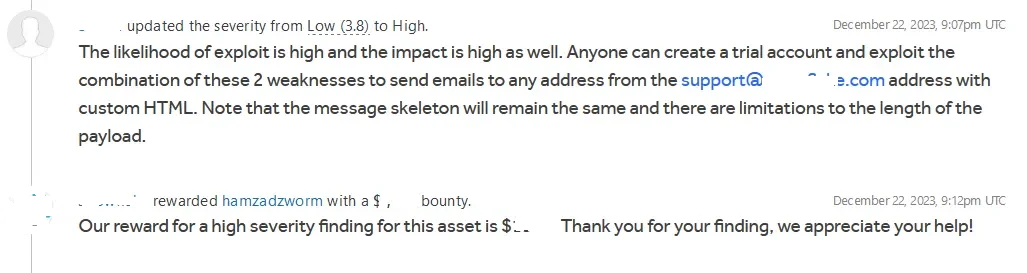
A user could change their account email to an unverified address and still post comments on support cases from a second, already-open tab, so the company's official support email sent HTML-injected content to the unverified address. An attacker could therefore send emails that appear to come from the company's support address, with attacker-controlled subject and body, to any address they choose.
 Published on hamzadzworm.medium.com
Hi all, this is hamzadzworm and today i want to share with you a logic issue that allowed me to bypass email verification then lead to identity theft
The full write-up lives on its author's site
It belongs to its author, so we link to it rather than copy it. The other two tabs are our own rewrites, checked against it.
Context
The target was a private company's platform that the researcher received an invite to. The features involved are user profile (specifically the display name field), a support case system that lets a user open a case and add comments to it, and the transactional email that the support system sends from the company's official support address ([redacted]). The report does not name the company or the product.
The bug is a chain: an HTML injection in the display name that is reflected into support notification emails, combined with a logic flaw that lets a user keep acting on an already-open support case tab after changing their email address to one that is still pending verification. Together these allow an attacker to send emails from the company's official support address, with attacker-controlled subject and body, to any address they choose.
Setup
The researcher was invited to the private company and started testing as a normal user. No special tooling, versions or roles are described in the report. The preconditions that matter for the exploit are:
- A normal user account on the platform.
- Access to the support case feature (create a case, add a comment).
- The ability to change the account email address from the profile page.
- Two browser tabs: one on the profile page, one on an already-loaded support case page.
Finding it
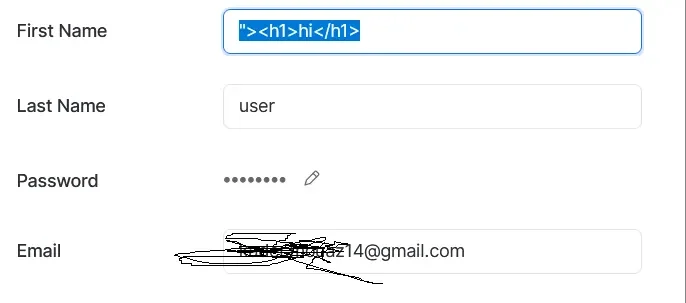
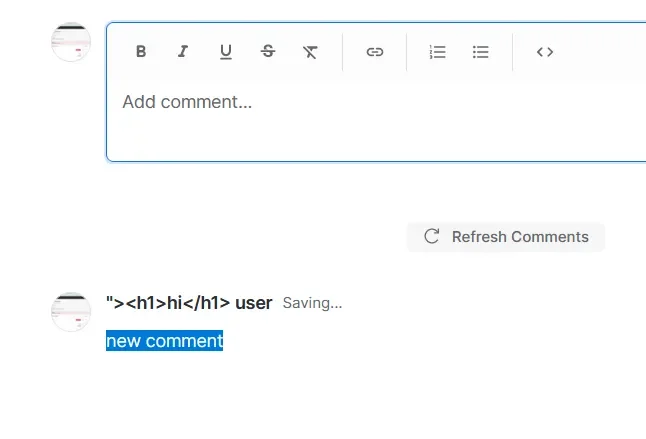
The researcher first updated the display name to an HTML injection payload. The report does not show the exact payload string. After some time they found they could create a support case.
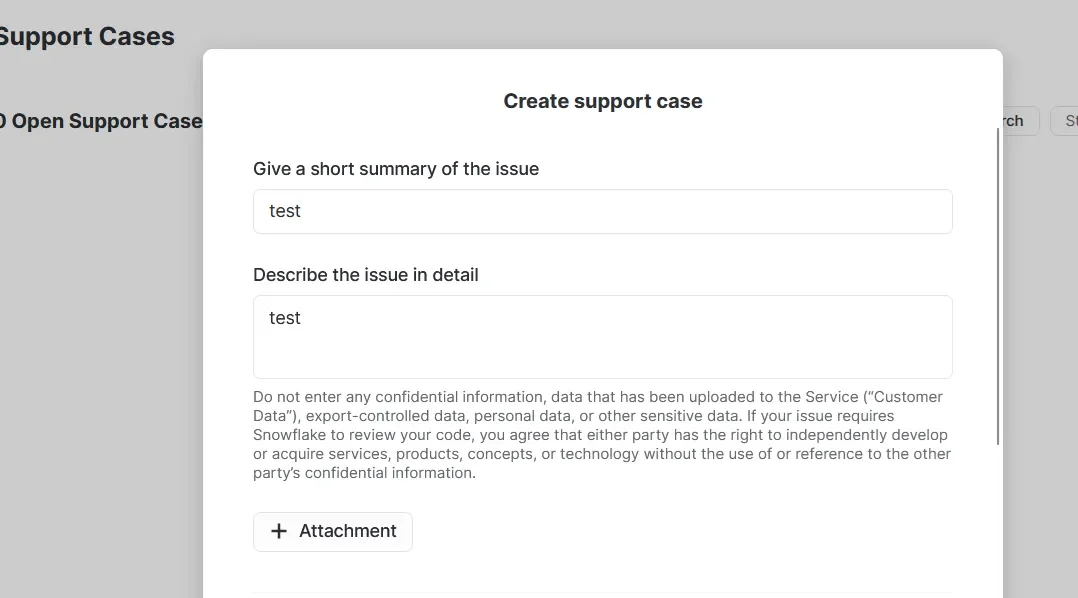
Creating a new case produced an email from [redacted], but the HTML injection in the name did not render in that email.
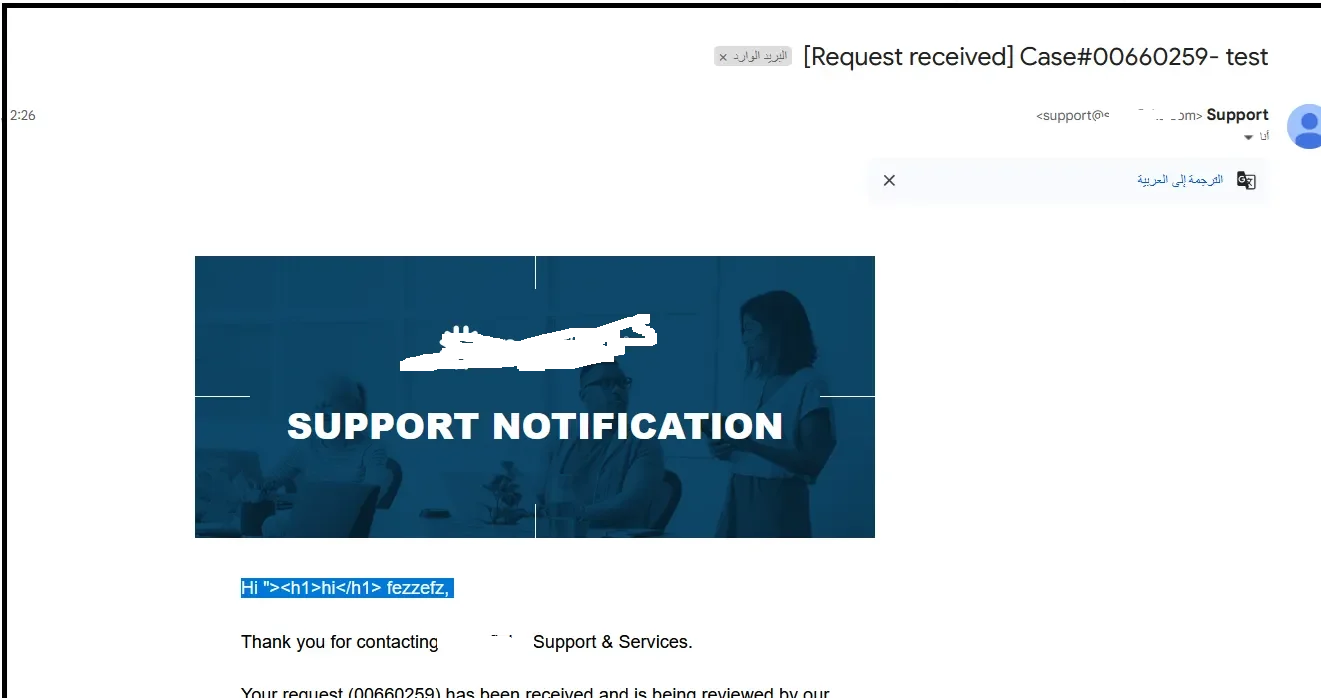
Because the email came from the company's official support address, the researcher reasoned that getting the injection to render there would amount to identity theft: an email that looks like it came from the company, with attacker-controlled content.
Exploitation
Step 1: Find a path where the name is reflected into the email
The researcher noticed that a support case allows adding a new comment, and expected that adding a comment would trigger an update email about the case. That is what happened after adding a comment.
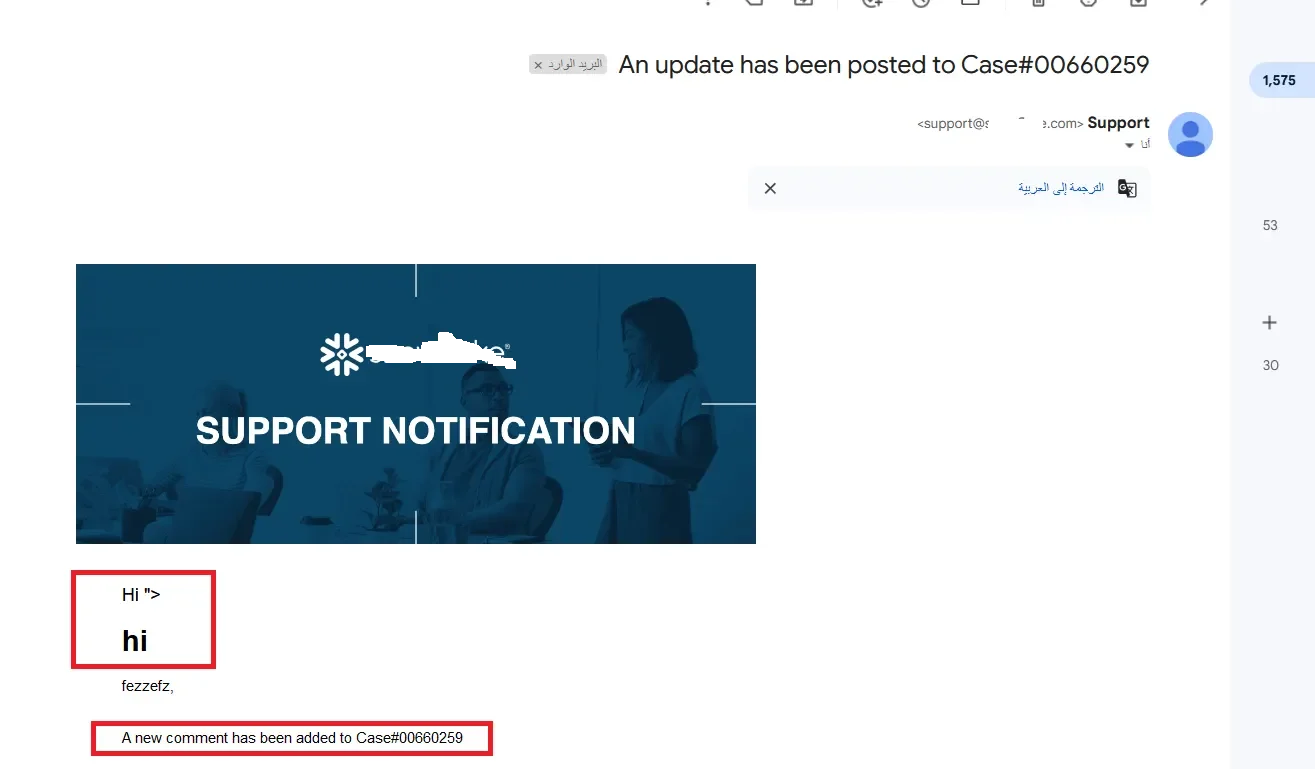
So the injection did not render when a new case was created, but it did render in the update email sent after a comment was added. At this point the injection was self-XSS only: the researcher was sending the email to themselves.
Step 2: Try to deliver the email to another user
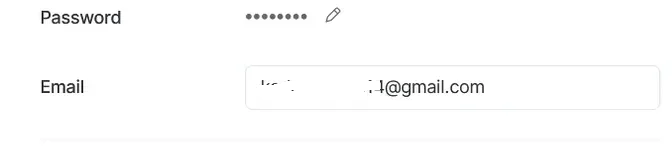
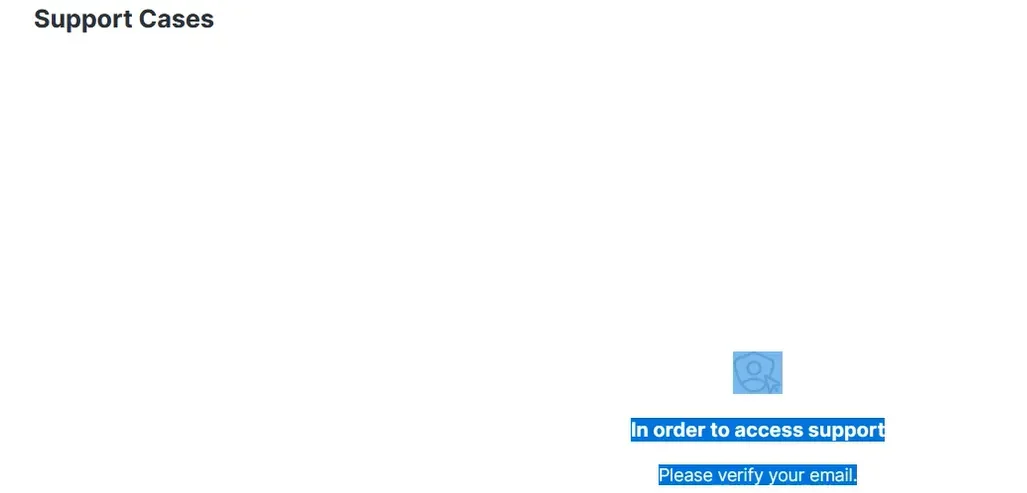
The obvious next step was to change the account email to another user's address, then comment on the support case so the victim receives the update email containing the HTML injection. When the researcher entered another user's email, the page refreshed and asked them to verify the email before performing any action such as accessing support cases.
Step 3: Work around the verification gate with two tabs
The researcher opened a new account with their own email and verified it, so they could access support cases with that account. The bypass relies on opening two tabs: one on the profile page where the email will be changed, and one on the support case page. The idea is that the support case page may not get refreshed when the email changes.
Steps as described in the report:
- Update the email on the profile tab.
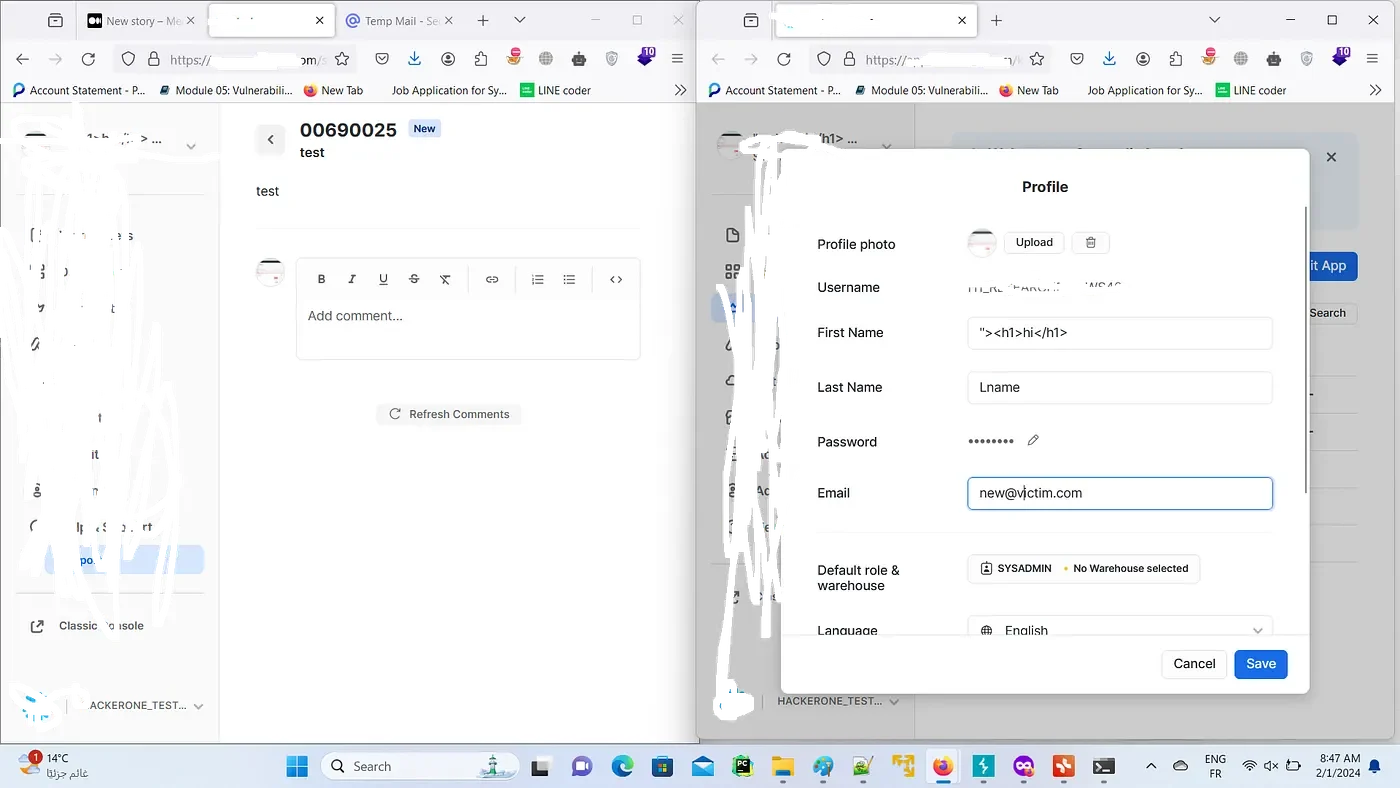
- The profile tab refreshes and asks to confirm the email before accessing support cases, but the other tab, already open, is not refreshed and is not asked to verify the email.
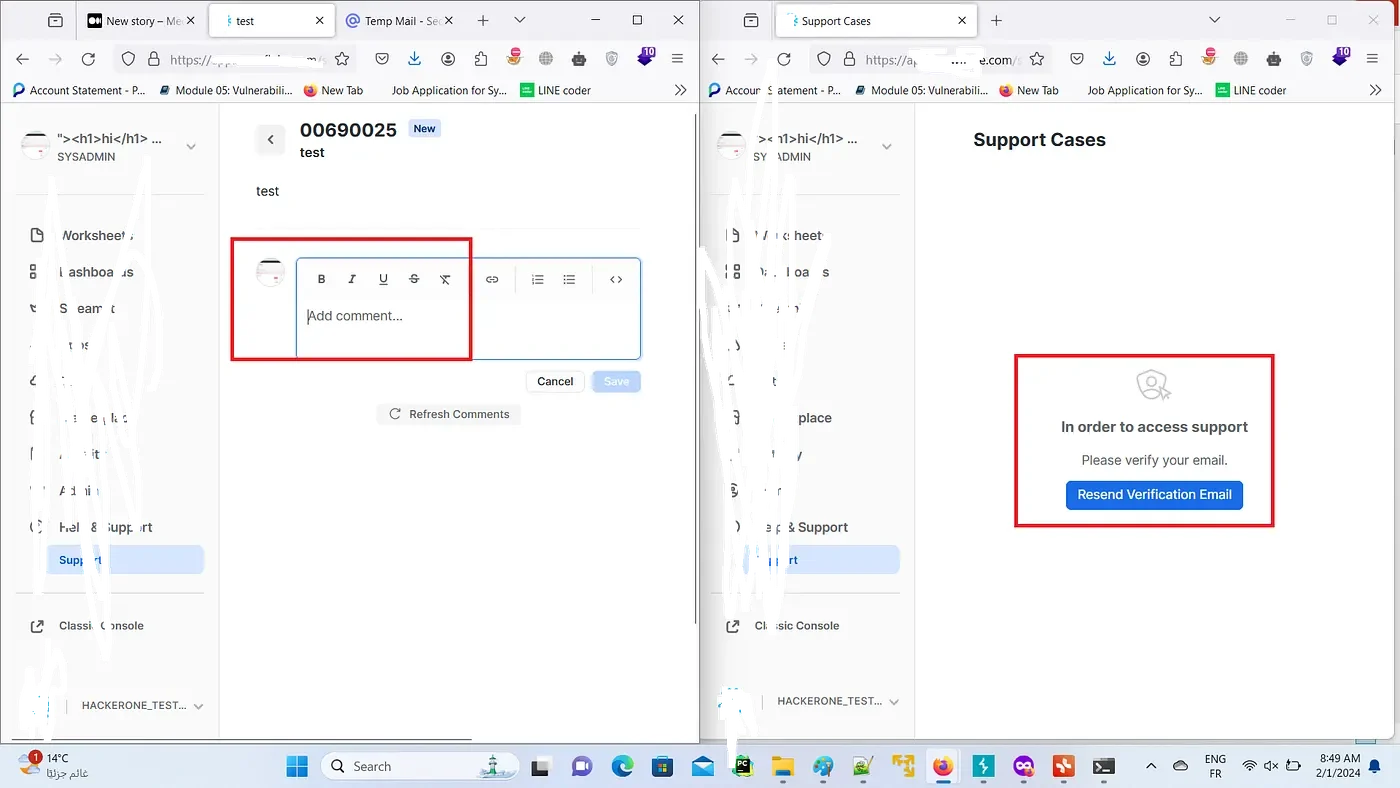
- Add a comment on the already-open support case tab. The update email, containing the HTML injection and sent from the company's official support address, goes to the email address that is pending verification.

That is how the researcher bypassed email verification and used the company's support cases to send emails with any subject and content to any email address.
Root cause
Two issues combine here.
First, the display name is stored without sanitisation and is rendered as HTML in the support case update email, but not in the new-case email.
Second, an already-loaded support case tab kept working after the email change, while the profile tab asked for verification. Changing the email puts the account into a pending-verification state, and the profile tab correctly reflects that, but an already-loaded support case tab keeps working: the comment is accepted and the notification email is sent to the new, unverified address. The comment on the already-open tab was accepted and the notification email went to the pending-verification address.
Impact
An attacker with a normal account can send emails from the company's official support address to any email address, with attacker-controlled subject and content, by abusing the HTML injection in the display name and the stale support case tab. The report frames this as company identity theft: recipients see a genuine sender address and attacker-controlled HTML content. The report shows the payload and the resulting email in screenshots, but does not describe the precise capabilities in the mail client.
Fix
Based on the root cause, the changes needed are: escape or sanitise the display name wherever it is rendered, including all email templates, so the creation and update templates behave consistently; and re-check the account's verification state on the server for every support case action (such as adding a comment), not only when the page is loaded, so a pending-verification account cannot act on a stale tab.
Variants to test
- Other email templates. Create, update, close or reopen a support case and check whether the display name is reflected unescaped in each notification. A positive result is HTML from the name rendering in the received email.
- Other profile fields. Change other user-controlled fields (for example, company, job title or signature) and see whether they appear unescaped in support emails. A positive result is the same rendering behaviour from a different field.
- Stale-tab checks on other gated actions. After changing the email to an unverified address, use an already-open tab to perform other actions that should require verification (for example, creating a case or editing the profile). A positive result is the action succeeding on the stale tab.
- Server-side enforcement. Replay the comment request directly (for example, with a proxy) after the email change, without relying on the browser tab. A positive result is the server accepting the request and sending the email to the unverified address.
- Recipient control. Try setting the email to an address the attacker does not own and confirm the notification is delivered there. A positive result is delivery to an arbitrary address without verification.
What happened, in plain words
A security researcher was invited to try out a private company's website. While using it like a normal customer, he found a way to make the company's own support email system send messages that looked completely genuine but contained content he controlled. In other words, he could send an email that appeared to come from the company's official support address, with whatever subject and body he wanted, to any email address he chose. The report calls this "company identity theft" because the recipient sees a real sender address and content the attacker wrote.
Two separate weaknesses had to be combined to make this work. The first is an HTML injection: the researcher put some HTML code into his profile display name, and that code later rendered in a support notification email. The second is a logic flaw: after changing his account email to an address that had not been verified yet, an already-open support case page kept working, so he could still post a comment and trigger the notification email to the unverified address.
To follow this you only need to know a few ideas:
- HTML is the language web pages are written in. Tags like
<b>make text bold,<a>makes a link,<img>shows a picture. When a website puts text a user typed into a page or an email without cleaning it first, the browser or mail client may treat that text as real HTML and act on it. That is HTML injection. - Sanitising (or escaping) means converting user text so it is displayed as plain characters instead of being interpreted as code. For example, turning
<into<so it shows up as a literal less-than sign. - Email verification is the step where a site sends a link or code to an address to prove the person controls it. Until that is done, the address is "pending verification".
- A support case is a ticket: a customer writes a message, the company replies, and the system emails updates to the customer.
The report does not name the company or the product.
Setting the scene
The researcher received an invite to a private company's platform and started testing it as an ordinary user. The report does not describe any special tools, software versions or user roles. The features that matter are:
- A user profile with a display name field.
- A support case system where a user can open a case and add comments to it.
- Transactional emails: automatic messages the support system sends from the company's official support address,
[redacted]. - The ability to change the account email address from the profile page.
For the final trick, the researcher also needed two browser tabs open at the same time: one on the profile page, one on an already-loaded support case page. We will see why later.
Finding the injection
The first thing the researcher did was change his display name to an HTML injection payload. The idea is simply that the name field accepted HTML code instead of treating it as plain text.
After some time he found he could create a support case.
Creating a new case caused the system to send an email from [redacted]. But the HTML in the display name did not render in that email: it arrived as ordinary text, not as working HTML.
Because the email came from the company's real support address, the researcher realised that if he could get his HTML to render inside such an email, the result would be an email that looks entirely official but carries content he controls. That is the identity theft angle.
Getting the HTML to render
The researcher then noticed that a support case lets you add a new comment. He expected that adding a comment would trigger an update email about the case, and that is exactly what happened.
So the HTML did not render in the email sent when a new case was created, but it did render in the update email sent after a comment was added. At this stage the researcher was only sending these emails to himself. In security terms this is self-XSS: the attacker can only inject code into their own view, which on its own is not a real attack against anyone else. The next challenge was to deliver the email to another person.
Trying to reach another user
The obvious next step: change the account email to another user's address, then comment on the support case so that the victim receives the update email containing the HTML. When the researcher entered another user's email address, the page refreshed and asked him to verify the email before doing anything else, such as accessing support cases.
This is a sensible defence: the site refuses to treat the new address as trusted until the owner proves they control it. The researcher now had to find a way around that check.
The two-tab trick
The researcher opened a new account with his own email and verified it, so that account could access support cases. Then he worked out a way around the verification gate by using two browser tabs at once:
- One tab on the profile page, where the email address would be changed.
- One tab on the support case page, already loaded.
The idea is that the support case page might not refresh itself when the email changes in the other tab. If the server only checks verification when a page is first loaded, and not when an action is submitted, the stale tab could still work.
Here are the steps as described in the report.
- Update the email on the profile tab.
- The profile tab refreshes and asks to confirm the email before accessing support cases. But the other tab, which was already open, is not refreshed and is not asked to verify the email.
- Add a comment on the already-open support case tab. The update email, containing the HTML injection and sent from the company's official support address, goes to the email address that is pending verification.
That is how the researcher bypassed email verification and used the company's support cases to send emails with any subject and content to any email address.
Why it worked
Two problems combine here.
First, the display name rendered as HTML in the support case update email, but not in the new-case email. A likely explanation is that the update template inserts the name unescaped while the creation template escapes it or uses a different field, but that is inference, not something the report states.
Second, an already-loaded support case tab kept working after the email change, while the profile tab asked for verification. Changing the email puts the account into a pending-verification state, and the profile tab correctly reflects that. But an already-loaded support case tab keeps working: the comment is accepted and the notification email is sent to the new, unverified address. The comment on the already-open tab was accepted and the notification email went to the pending-verification address.
A useful everyday comparison: imagine a building where the receptionist checks your badge when you enter the lobby, but nobody checks it again when you walk into individual rooms. If your badge is revoked while you are already inside, you can keep opening doors until you leave the building. Here, the "badge check" happens when the support page loads, and the comment action does not re-check it.
What an attacker could do
An attacker with a normal account can send emails from the company's official support address to any email address, with attacker-controlled subject and content, by abusing the HTML injection in the display name and the stale support case tab. The report frames this as company identity theft: recipients see a genuine sender address and attacker-controlled HTML content. The report shows the payload and the resulting email in screenshots, but does not describe the precise capabilities in the mail client.
How to fix it
Based on the root cause, two changes are needed:
- Escape or sanitise the display name wherever it is rendered, including all email templates, so the creation and update templates behave consistently.
- Re-check the account's verification state on the server for every support case action (such as adding a comment), not only when the page is loaded, so a pending-verification account cannot act on a stale tab.
Other places to test
If you want to look for similar issues, these are the variants worth trying:
- Other email templates. Create, update, close or reopen a support case and check whether the display name is reflected unescaped in each notification. A positive result is HTML from the name rendering in the received email.
- Other profile fields. Change other user-controlled fields (for example, company, job title or signature) and see whether they appear unescaped in support emails. A positive result is the same rendering behaviour from a different field.
- Stale-tab checks on other gated actions. After changing the email to an unverified address, use an already-open tab to perform other actions that should require verification (for example, creating a case or editing the profile). A positive result is the action succeeding on the stale tab.
- Server-side enforcement. Replay the comment request directly (for example, with a proxy) after the email change, without relying on the browser tab. A positive result is the server accepting the request and sending the email to the unverified address.
- Recipient control. Try setting the email to an address the attacker does not own and confirm the notification is delivered there. A positive result is delivery to an arbitrary address without verification.
Glossary
- HTML: the language used to structure web pages and emails; tags like
<b>or<a>tell the browser or mail client how to display content. - Sanitising / escaping: converting user text so special characters are shown literally instead of being treated as code.
- Email verification: the process of proving you control an email address, usually by clicking a link or entering a code sent to it.
- Pending verification: the state of an email address that has been entered but not yet confirmed.
- Support case: a ticket in a customer support system, where a user opens a request and can add comments.
- Transactional email: an automatic message triggered by an action, such as a support case update notification.
- Self-XSS: an injection that only affects the person who entered it, because the payload is only shown back to them.
- Logic flaw: a weakness in how a feature is designed or sequenced, rather than in a single line of code; here, the verification check happening at the wrong moment.
- Session: the state a website keeps about you while you are logged in, so it knows who you are across page loads.
- Stale tab: a browser tab that was loaded earlier and still holds the old state, even after something changed elsewhere.
- Proxy: a tool that sits between your browser and the server so you can inspect and modify requests; mentioned here only as a way to replay a request.
- Payload: the specific piece of input an attacker sends to trigger a weakness.






