5000$ for Apple Stored Xss And Another Blind Xss Still under review
A stored cross-site scripting flaw existed in a public profile field (the Location field) on an Apple subdomain, allowing an attacker to execute script in the browser of any user who viewed the profile and steal their session cookies. The reporter also mentions a separate blind XSS against an admin that is still under review.
 Published on hamzadzworm.medium.com
im going to share with you two vulnerabilities that i found at apple which are a stored and a blind xss they was at apple
The full write-up lives on its author's site
It belongs to its author, so we link to it rather than copy it. The other two tabs are our own rewrites, checked against it.
Context
Apple runs a large number of subdomains, and one of them hosted a user-facing service with a public profile feature. The researcher describes it as a subdomain with many functions, available for many countries, where each country had its own subdomain name. The feature that mattered here is the profile: a user could make their profile public, and then any other user could view it.
The write-up covers two findings: a stored XSS in that profile, and a separate blind XSS against an administrator. Only the first is described in technical detail here; the second is promised for a future write-up.
Setup
- Subdomain enumeration against Apple, which produced a list of about 12000 subdomains.
httprobeto filter the list down to live hosts.- Manual review of each live subdomain, function by function, as a normal user.
- Burp Suite to intercept and modify the profile submission request.
- A normal user account on the target service, with the profile set to public.
No versions, endpoints or parameter names are given in the write-up.
Finding it
The researcher was checking subdomains by hand rather than only scanning, on the reasoning that manual review avoids missing something interesting. One subdomain stood out because it had many functions and existed per country, which suggested it was a real, widely used product rather than a leftover.
After walking through the functions as a normal user, the researcher noticed that a profile could be made public and viewed by any other user. That made the profile fields the obvious place to try injection.
The first attempts were straightforward: an XSS payload in the profile name and in the bio. Both returned a 403, which the researcher attributes to a WAF filtering XSS in those fields.
Before giving up, the researcher looked at the Location field. The reasoning is worth spelling out because it is the core of the finding: the field was not expected to be injectable, and if the tester did not expect it, perhaps the defenders did not protect it either. That assumption turned out to be correct.
Exploitation
Step 1: confirm that HTML is accepted at all
A simple HTML tag was submitted in the Location field and it was accepted, including the quote character. The tag itself did not render as intended, so the request was intercepted in Burp Suite. In Burp the submitted HTML was visible in encoded form. Replacing the encoded request with the raw value and forwarding it made the HTML work.
This established two things: the Location field did not have the same filtering as name and bio, and the client-side encoding could be bypassed by editing the request in the proxy.
Step 2: probe the filter
The first XSS payload was the simplest one:
<script>alert(3)<script>
The word script was blocked. The next attempts were:
"-alert(8)-"
'-alert(8)-'
";a=alert,a()//
';a=confirm,a()//
From these the researcher concluded that script, confirm and alert were all filtered, but that tags and the double quote were still usable.
Step 3: find an unfiltered sink
The next probe was prompt:
"-prompt(8)-"
This was not blocked. With prompt available, the researcher moved to an image tag to see whether markup would actually be injected:
<img src="random image link">
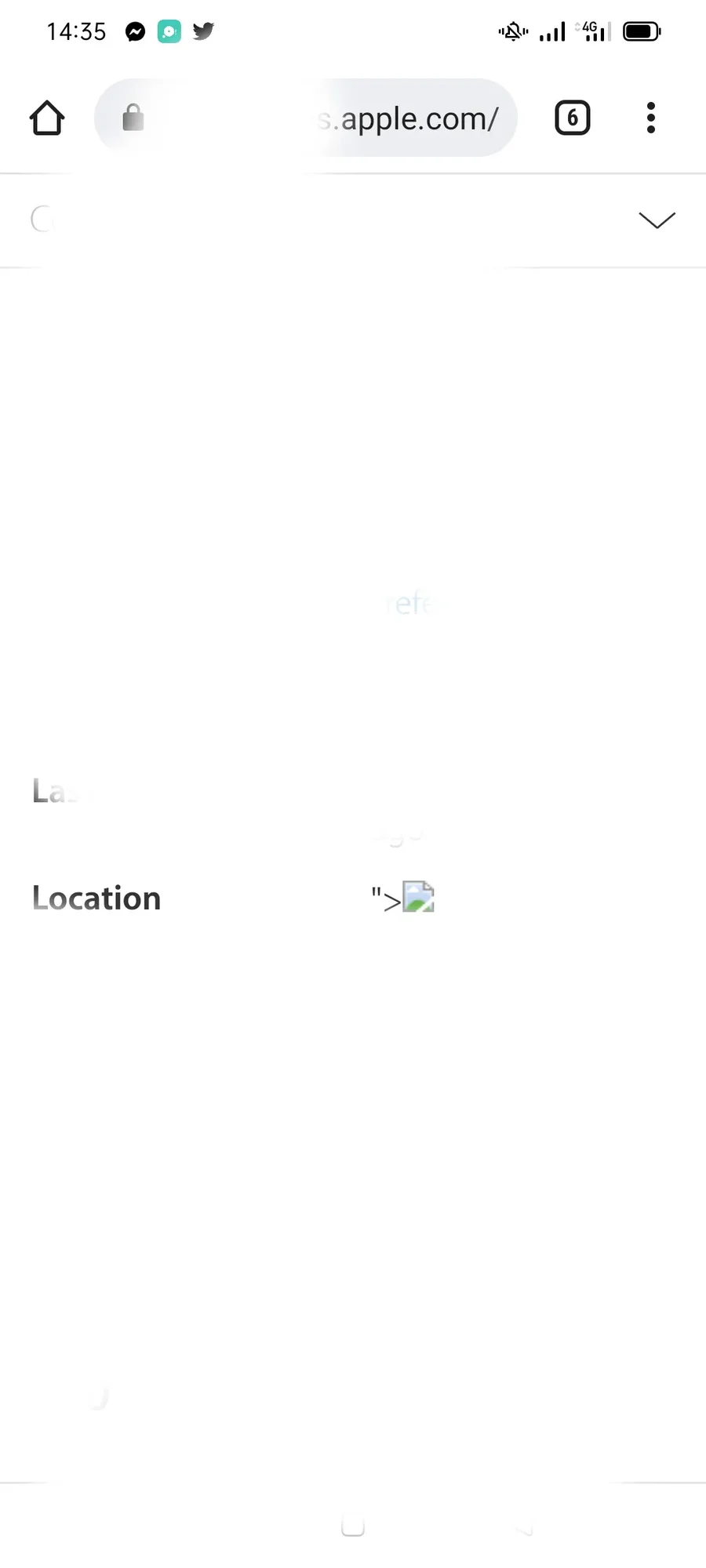
The image was added to the profile.
Step 4: execute JavaScript
The final payload was:
<image/src/onerror=prompt(8)>
It executed.
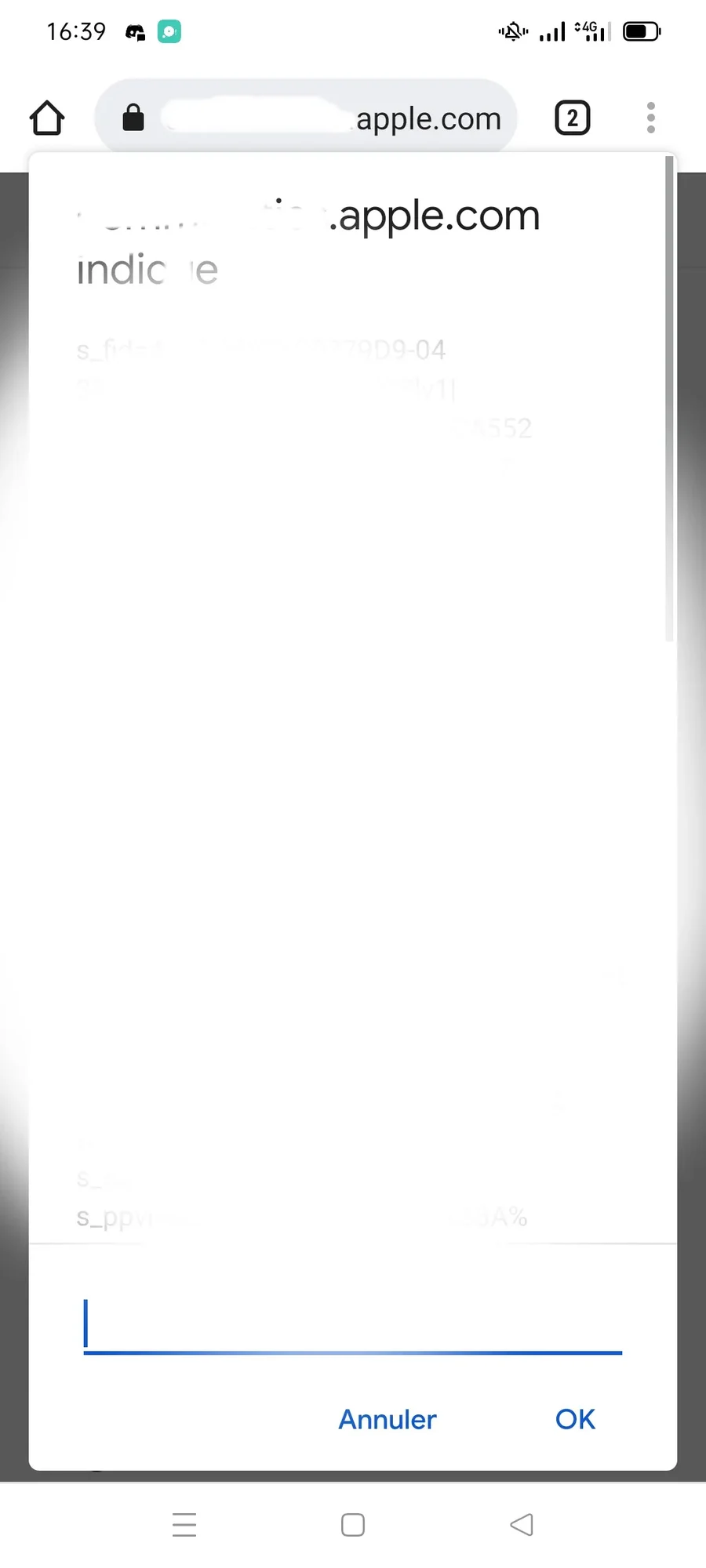
A report was submitted directly. The researcher also reported the same issue against several of the other country subdomains, since each country had its own subdomain for the same service.
Impact
The XSS was stored in a profile that could be made public, so any user who visited the attacker's profile would run the payload. The researcher states that this allowed account takeover of any user who visited the profile, because the payload sent the visitor's cookies back to the attacker, who could then use them to log in to the victim's account.
The impact depends on the profile being public and on a victim visiting it.
Root cause
The Location field was not covered by the same input handling as the profile name and bio. Those two fields returned 403 for XSS payloads, which points to a WAF rule set applied to them, while Location accepted tags and quotes. The client also encoded the value before sending it, but that is a client-side control only and was bypassed by editing the request in Burp Suite.
The filter that did apply to Location was a blocklist of specific words: script, confirm and alert were rejected, but prompt was not, and an onerror handler on an image tag was enough to execute. Blocklisting individual function names leaves the rest of the JavaScript surface available.
Fix
The write-up does not describe the fix itself. It shows a team response stating that the issue was fixed, followed by hall of fame eligibility and the researcher's name being added. What the change was is not stated.
What the finding calls for is consistent handling across all profile fields: output encoding of the Location value at render time, so that tags are treated as text, rather than relying on a word blocklist that can be walked around with a different function name or event handler.
Disclosure timeline
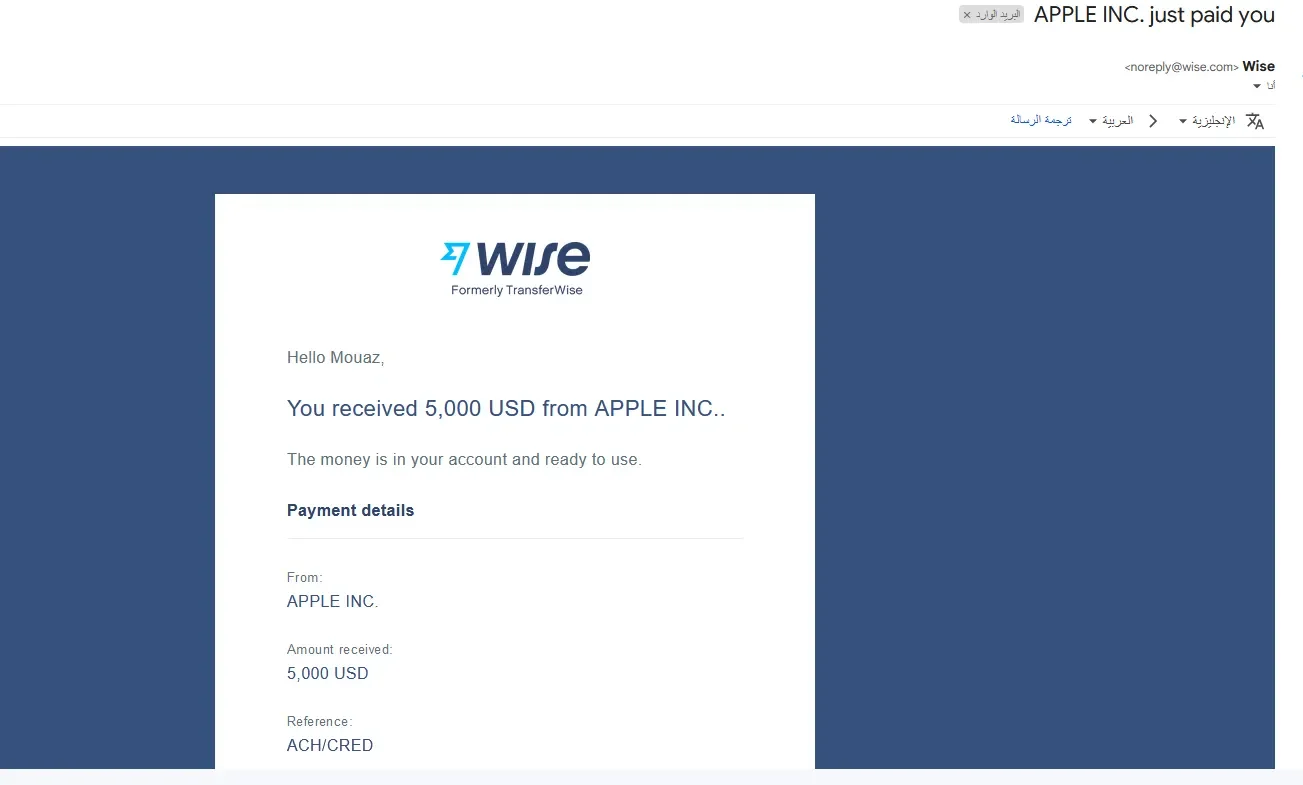
After submitting, the researcher was told the report was a duplicate. The team said the same exact finding had already been reported, and both of the researcher's reports were marked duplicate. After a lot of emails the researcher was able to prove being the reporter of both issues, and the team verified it.
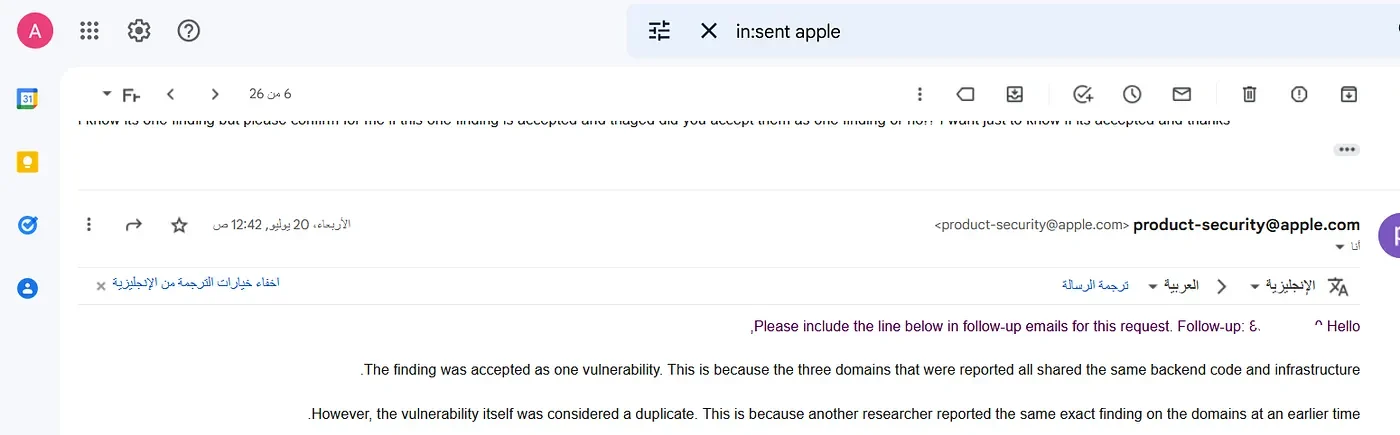
The team sent a mail stating that the issue was fixed.

A few days later the researcher was eligible for the hall of fame.

About one month later the expected email arrived.
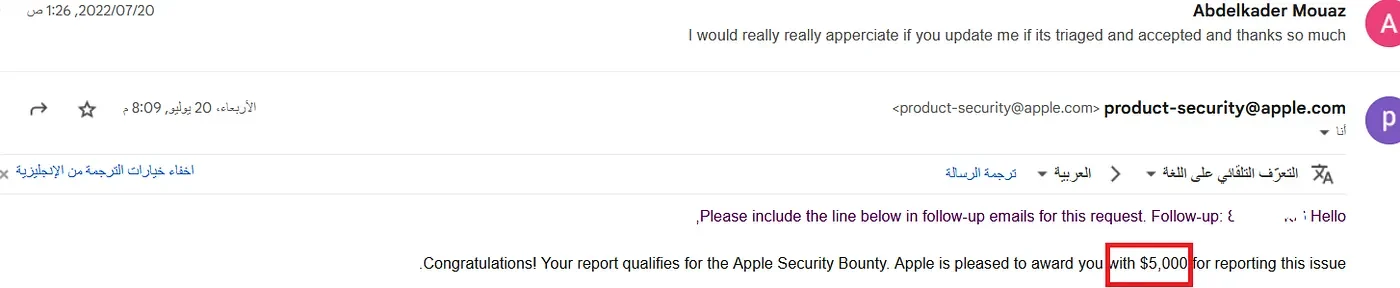
A few days after that, the researcher's name was added.
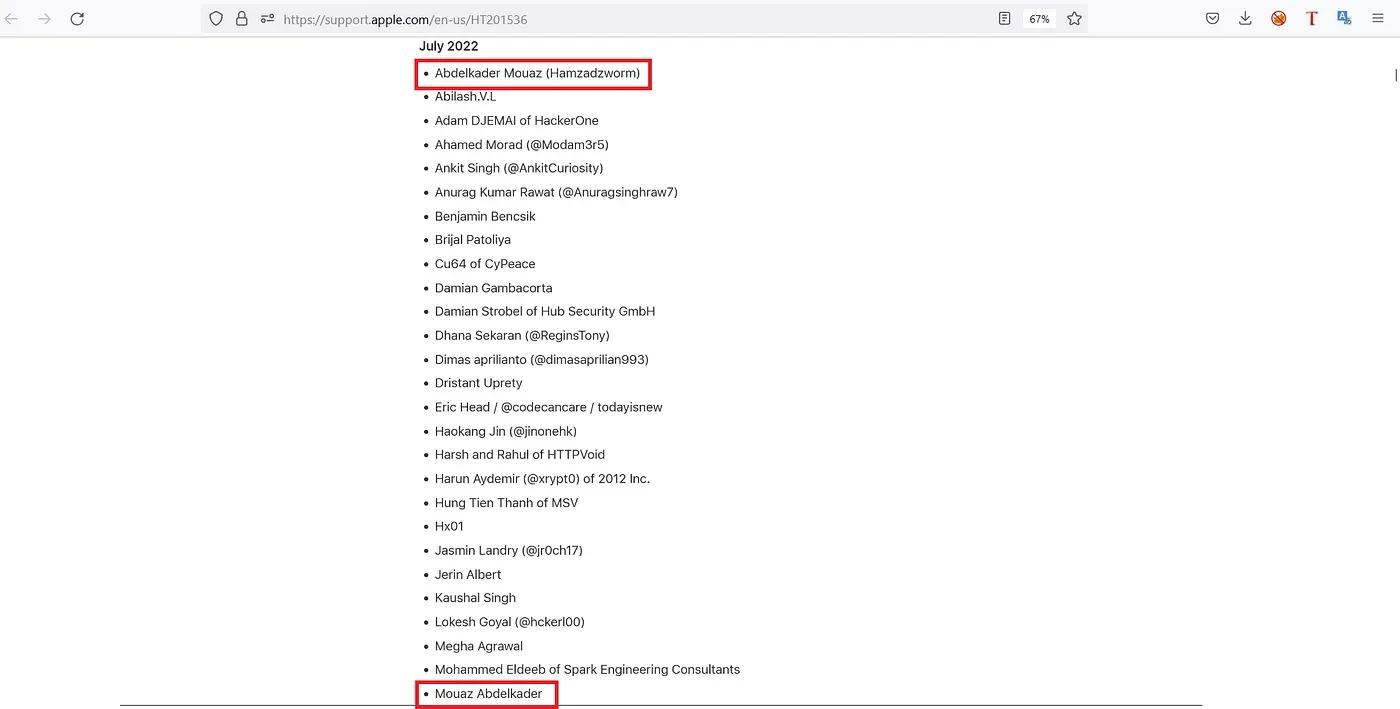
The name appears twice: the second entry is for the blind XSS against an administrator, which sent admin cookies and which the researcher planned to write up separately once a final response arrived.
Variants to test
- Fields excluded from the WAF rule set. On any multi-field profile or settings form, submit a harmless tag such as
<b>x</b>into every field, including ones that look unimportant like location, company, website or display preferences. A positive result is the tag rendering as markup in the public view while other fields return 403. - Client-side encoding bypass. When a form encodes input before sending, intercept the request and replace the encoded value with the raw one. A positive result is the server accepting and storing the unencoded value.
- Blocklist walking. When
script,alertandconfirmare blocked, try other functions and handlers, for exampleprompt,print, or anonerrorhandler on an image tag. A positive result is execution without a 403. - Per-country subdomains. Where a service is replicated per region or country, replay the same payload against each subdomain. A positive result is execution on a subdomain that was not covered by the fix applied to the first one.
- Stored payload reach. Make the profile public and view it from a second account. A positive result is the payload executing for the second user, which turns the finding into stored XSS with account takeover potential.
What happened, in plain words
A security researcher found two cross-site scripting (XSS) bugs in Apple's systems. One was a stored XSS in a public profile page, and the other was a blind XSS that affected an administrator. This article explains the first bug in detail, because the second was still being reviewed when the researcher wrote about it.
The researcher started by looking for Apple subdomains, found about 12,000 of them, and checked which ones were live. He then manually explored one interesting subdomain that had many features and was available in many countries, each with its own subdomain. On that site, users could make their profile public, and the profile had fields for name, bio, and location. The location field turned out to be vulnerable to XSS: it accepted HTML tags and a JavaScript payload that ran when other users viewed the profile. Because the profile was public, any user who visited the attacker's profile would run the malicious script, which could steal their session cookies and let the attacker log in as them.
The researcher reported the bug, but it was initially marked as a duplicate. After exchanging many emails, he proved he was the reporter of both issues, and the team verified that. He was later added to the hall of fame, and his name appeared twice: once for this stored XSS and once for the blind XSS against an admin.
Setting the stage
Before diving into the bug, let's understand the basic concepts and tools the researcher used.
Subdomains
A subdomain is a part of a larger domain name. For example, store.apple.com is a subdomain of apple.com. Companies like Apple own thousands of subdomains for different services, countries, and purposes. Finding all of them is called subdomain enumeration.
The researcher used subdomain enumeration to discover about 12,000 Apple subdomains. He then used a tool called httprobe to check which of those subdomains were actually live (responding to web requests). This is like making a list of all the doors in a huge building and then checking which ones are unlocked.
Manual testing
Automated scanners can find common issues, but they might miss subtle bugs. The researcher preferred to manually test each live subdomain, exploring every feature as a normal user would. This approach helps find things that automated tools overlook.
Burp Suite
Burp Suite is a tool that sits between your browser and the web server. It lets you intercept, inspect, and modify the requests your browser sends and the responses it receives. Think of it as a mail interception service: you can open letters, change their contents, and reseal them before they reach the recipient. The researcher used Burp Suite to see and modify the data sent when submitting the profile form.
Cross-site scripting (XSS)
XSS is a vulnerability that lets an attacker inject malicious JavaScript into a web page viewed by other users. When a victim loads the page, the script runs in their browser with the same permissions as the legitimate site. This can steal cookies, log keystrokes, or perform actions on behalf of the user.
There are different types of XSS:
- Stored XSS: The malicious script is saved on the server (e.g. in a profile field) and served to every user who views that page.
- Blind XSS: The script is stored and executed in a different context, often an admin panel, where the attacker cannot see the result directly.
Cookies and session tokens
When you log in to a website, the server gives your browser a cookie containing a session token. This token proves who you are for subsequent requests. If an attacker steals your cookie, they can impersonate you without needing your password. That's why XSS that can read cookies is dangerous: it can lead to account takeover.
Web application firewall (WAF)
A WAF is a security system that filters incoming traffic to a web application, blocking requests that look malicious. It often uses blocklists of known attack patterns. In this case, the WAF blocked certain XSS payloads in some fields but not others.
Finding the vulnerability
Step 1: Discovering the target
The researcher enumerated Apple subdomains and found about 12,000. He used httprobe to filter for live ones. Then he manually reviewed each live subdomain, looking for interesting features. One subdomain stood out: it had many functions and was available for many countries, each with its own subdomain name (e.g. us.example.com, uk.example.com). This suggested it was a real, widely used product, not a forgotten test server.
Step 2: Exploring the profile feature
As a normal user, the researcher explored the site's features. He noticed that users could make their profile public, meaning anyone could view it. The profile included fields like name, bio, and location. Public profiles are prime targets for stored XSS because any visitor can trigger the payload.
Step 3: Initial injection attempts
The researcher first tried to inject XSS payloads into the profile name and bio fields. Both attempts returned a 403 Forbidden error, indicating that a WAF was blocking the requests. The WAF was likely filtering out common XSS patterns in those fields.
Step 4: The overlooked field
Before giving up, the researcher examined the location field. He reasoned that if he didn't expect it to be injectable, maybe the developers didn't protect it either. This turned out to be correct. He tried submitting a simple HTML tag in the location field, and it was accepted, including the double quote character. However, the tag didn't render as expected. So he intercepted the request with Burp Suite and saw that the HTML was encoded. By replacing the encoded value with the raw HTML and forwarding the request, the HTML worked. This proved two things: the location field had weaker filtering, and the client-side encoding could be bypassed by editing the request.
Step 5: Probing the filter
With HTML accepted, the researcher tried to execute JavaScript. His first payload was the simplest:
<script>alert(3)<script>
This is a script tag that would show an alert box with the number 3. The word script was blocked. He then tried variations:
"-alert(8)-"
'-alert(8)-'
";a=alert,a()//
';a=confirm,a()//
These attempts aimed to call alert or confirm in different ways, but all were blocked. The researcher concluded that the words script, confirm, and alert were filtered, but tags and double quotes were still allowed.
Step 6: Finding an unfiltered function
Next, he tried prompt:
"-prompt(8)-"
This was not blocked. prompt is another JavaScript function that shows a dialog box, similar to alert. The filter only blocked specific words, so prompt slipped through.
Step 7: Injecting an image tag
With prompt available, the researcher tested whether an image tag would be injected:
<img src="random image link">
This is an HTML image tag. The image was added to the profile.
Step 8: Executing JavaScript
The final payload was:
<image/src/onerror=prompt(8)>
This tag is malformed (it uses <image> instead of <img>), but browsers are forgiving. The onerror attribute specifies JavaScript to run if the image fails to load. Since the src is invalid, the onerror fires, executing prompt(8). The payload worked, and the JavaScript executed.
Impact
The XSS was stored in a public profile. Any user who visited the attacker's profile would run the payload. The researcher states that this allowed account takeover: the payload sent the visitor's cookies to the attacker, who could then use them to log in as the victim. The impact depends on the profile being public and a victim visiting it.
Root cause
The location field was not protected by the same WAF rules as the name and bio fields. Those fields returned 403 for XSS payloads, indicating a WAF blocklist. The location field accepted tags and quotes. The client-side encoding was bypassed by editing the request in Burp Suite. The filter that did apply to location was a blocklist of specific words: script, confirm, and alert were blocked, but prompt was not. An onerror handler on an image tag was enough to execute JavaScript. Blocklisting individual function names leaves many other functions and event handlers available.
Fix
The write-up does not describe the fix. It shows a team response stating the issue was fixed, followed by hall of fame eligibility and the researcher's name being added. The exact change is not stated. The proper fix would be to apply consistent output encoding to all profile fields, treating tags as text, rather than relying on a word blocklist.
Disclosure timeline
After submitting, the researcher was told the report was a duplicate. The team said the same finding had already been reported, and both of the researcher's reports were marked duplicate. After many emails, the researcher proved he was the reporter of both issues, and the team verified it.
The team sent a mail stating the issue was fixed.
A few days later, the researcher was eligible for the hall of fame.
About one month later, the expected email arrived.
A few days after that, the researcher's name was added.
The name appears twice: the second entry is for the blind XSS against an administrator, which sent admin cookies and which the researcher planned to write up separately once a final response arrived.
Variants to test
- Fields excluded from the WAF rule set. On any multi-field form, submit a harmless tag like
<b>x</b>into every field, including ones that seem unimportant (location, company, website). If the tag renders as markup in the public view while other fields return 403, you've found a gap. - Client-side encoding bypass. When a form encodes input before sending, intercept the request and replace the encoded value with the raw one. If the server accepts and stores the unencoded value, the encoding is only client-side and can be bypassed.
- Blocklist walking. When
script,alert, andconfirmare blocked, try other functions and handlers, such asprompt,print, or anonerrorhandler on an image tag. If execution occurs without a 403, the blocklist is incomplete. - Per-country subdomains. Where a service is replicated per region, replay the same payload against each subdomain. If it executes on a subdomain not covered by the fix, the vulnerability persists.
- Stored payload reach. Make the profile public and view it from a second account. If the payload executes for the second user, it's a stored XSS with account takeover potential.
Glossary
- Subdomain: A domain that is part of a larger domain, e.g.
blog.example.comis a subdomain ofexample.com. - Subdomain enumeration: The process of discovering subdomains of a target domain.
- httprobe: A tool that takes a list of domains and checks which ones are live web servers.
- Burp Suite: A tool for intercepting and modifying HTTP traffic between a browser and a server.
- XSS (Cross-Site Scripting): A vulnerability that allows injecting malicious scripts into web pages viewed by other users.
- Stored XSS: XSS where the malicious script is saved on the server and served to other users.
- Blind XSS: XSS where the payload is stored and executed in a context not directly visible to the attacker, such as an admin panel.
- Cookie: A small piece of data stored by the browser, often used to maintain session state.
- Session token: A unique identifier used to authenticate a user's session, often stored in a cookie.
- Account takeover: Gaining unauthorised access to another user's account.
- WAF (Web Application Firewall): A security system that filters and monitors HTTP traffic to block attacks.
- 403 Forbidden: An HTTP status code indicating the server understood the request but refuses to authorise it.
- Blocklist: A list of disallowed items (e.g. words or patterns) that are blocked.
- Output encoding: The process of converting special characters into their HTML entities to prevent them from being interpreted as code.
- onerror: An HTML event attribute that specifies JavaScript to run when an error occurs, such as an image failing to load.
- prompt(): A JavaScript function that displays a dialog box asking for user input.
- alert(): A JavaScript function that displays a dialog box with a message.
- confirm(): A JavaScript function that displays a dialog box with OK and Cancel buttons.
- Hall of fame: A public list of researchers who have responsibly disclosed vulnerabilities, often maintained by the vendor.





