weird bug using fake id via photoshop worth $*
 Published on hamzadzworm.medium.com
Hi all i hope you are doing well, iam hamzadzworm(abdelkader mouaz) today i will share an issue that i found
The full write-up lives on its author's site
It belongs to its author, so we link to it rather than copy it. The other two tabs are our own rewrites, checked against it.
Context
The target was a private program on HackerOne, described by the researcher as very secure, with no reports resolved at the time. The researcher was invited to it and treated it as a challenge. The feature at the centre of the write-up is a support page that asks users to send in an identity card for verification. When a real ID card with a real name is submitted, it is accepted and nothing else happens. The report does not name the application, the endpoints or the parameters involved.
Setup
The researcher used Burp Suite, specifically Repeater, to save and resend the document submission request. The write-up does not give versions or any other tooling detail. The precondition for the later steps is the ability to change the account email address, which triggers a verification step before further actions such as sending an ID card are allowed.
Finding it
The first attempts were ordinary injection probing: JavaScript payloads in first name, last name and every other input, in the hope of a blind XSS. That failed because the site does not allow tags to be injected into inputs.
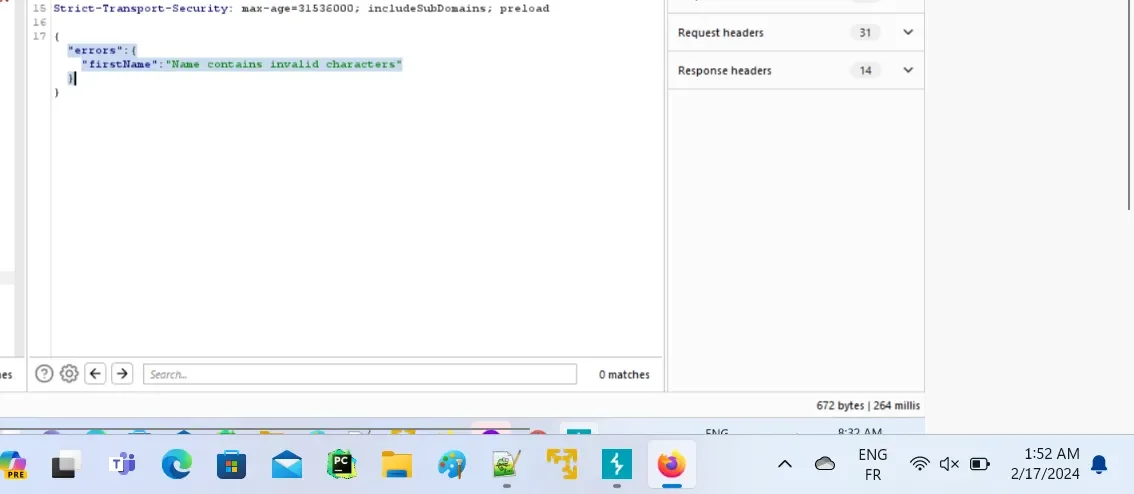
Digging further, the researcher found the support page that asks for an ID card. Submitting a real card with a real name is accepted with no visible effect, so the next step was to submit a fake ID card taken from Google Images to observe the behaviour.
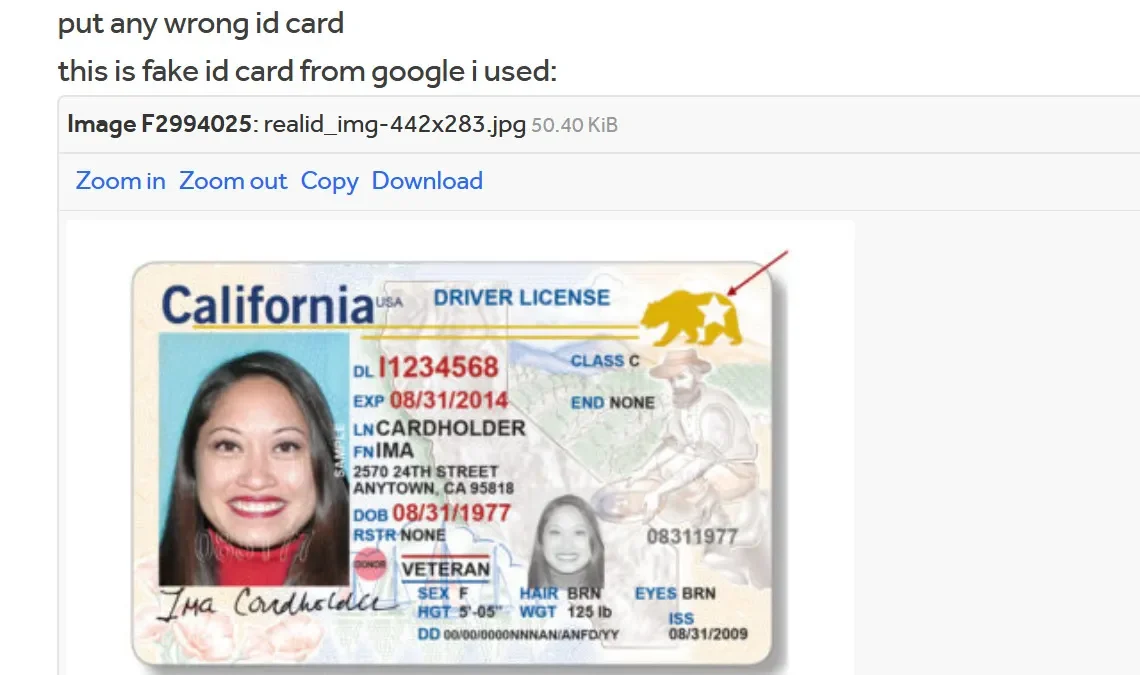
An email came back from support, and the researcher noticed that both names were present in it: the account name and the name written on the ID card. That means a function takes the name from the photo and sends it to the email address. The account name could not carry HTML, but the name read from the card could.
Exploitation
Step 1: HTML injection through the name on the ID card
The researcher edited the ID card photo and placed an HTML tag in the name field on the card, so that HTML was injected into the photo name, and submitted it again.
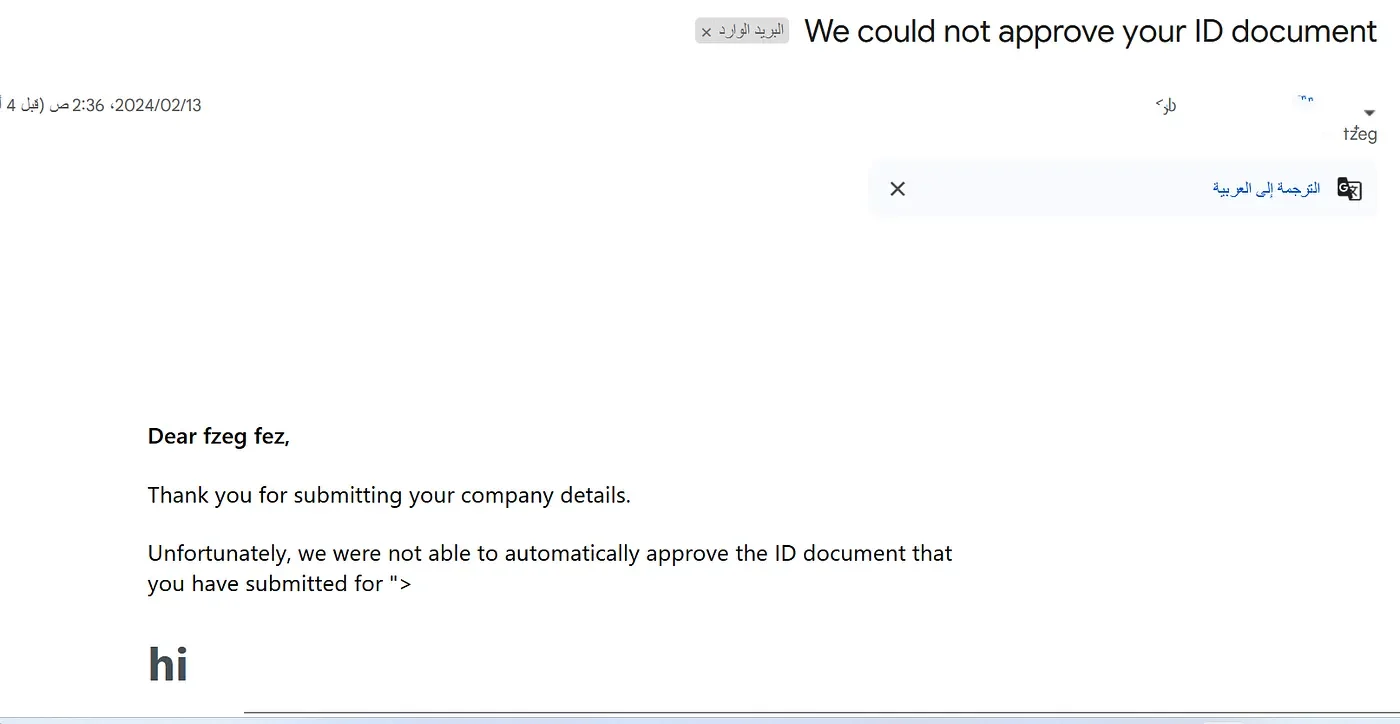
The result was that the HTML from the first name on the photo was reflected in the email. At this point the injection was still self HTML injection: it only affected the researcher's own inbox.
Step 2: Bypassing email verification with a saved request
To check whether the HTML injection would be delivered to a different address, the researcher changed the account email. Changing it redirected to a verification email step before the ID could be sent again. The researcher went back, confirmed the email, then sent the ID card and saved that request in Burp Suite Repeater.
After that, the email was changed again to another address. The application requested verification before any action in the account, including sending an ID card, could be performed. The researcher then went back to the saved send-ID-card request and replayed it. The document approval email was sent to the new email address without verification, and the HTML injection was in it. This turned the self HTML injection into an injection that could be aimed at other email addresses.
Step 3: Stored open redirection through an anchor tag
An <a href> was injected into the photo name to see whether a link would arrive in the email.
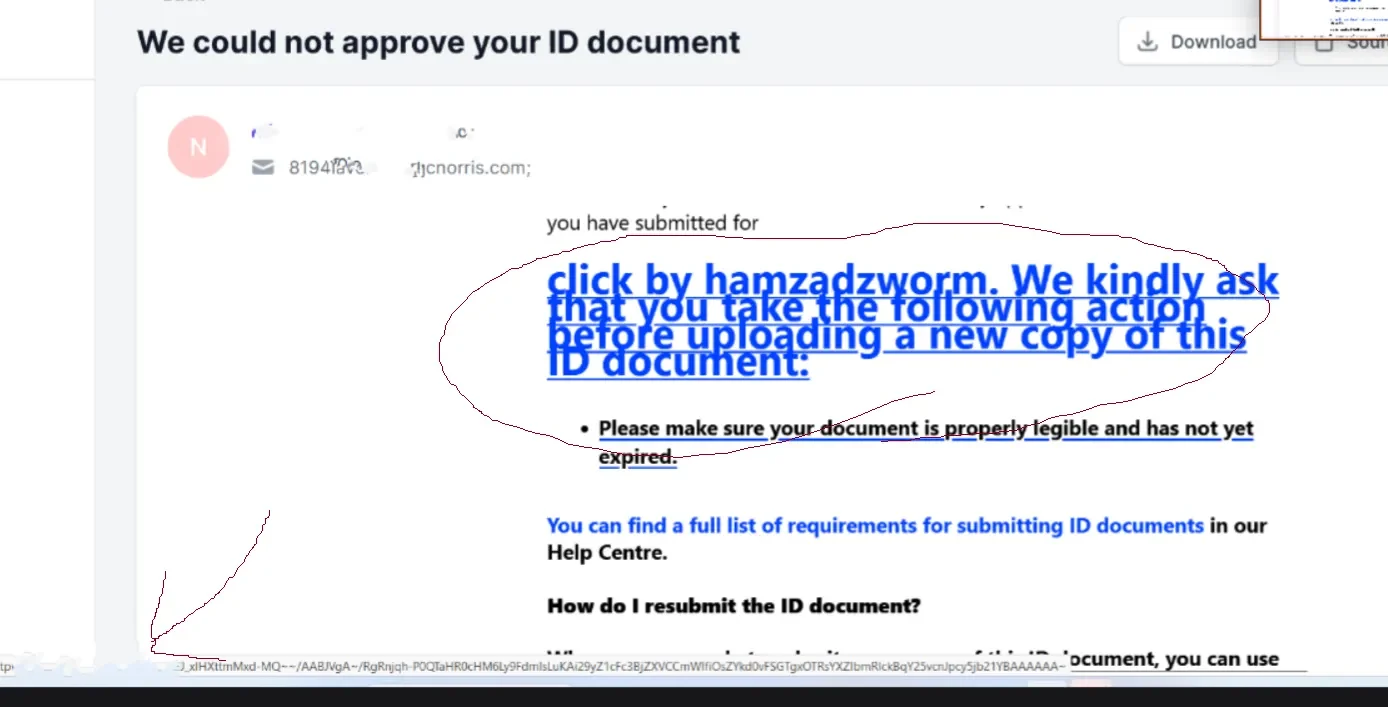
The link was injected and took this form:
website.com/token…… = {redirect to my website}
In the researcher's description this was a stored open redirection via the main domain.
Step 4: Targeting an existing user through an email alias
The next goal was to raise the impact by reaching an already existing user. The researcher went back to change the email and intercepted the change-email request. Trying an already existing user's email produced an error, so an alias was tried instead:
[redacted] = [redacted]
That was blocked, so the +1 was encoded:
[redacted] = victim%[redacted]
With the encoded alias, the document approval email was sent to an already existing user.

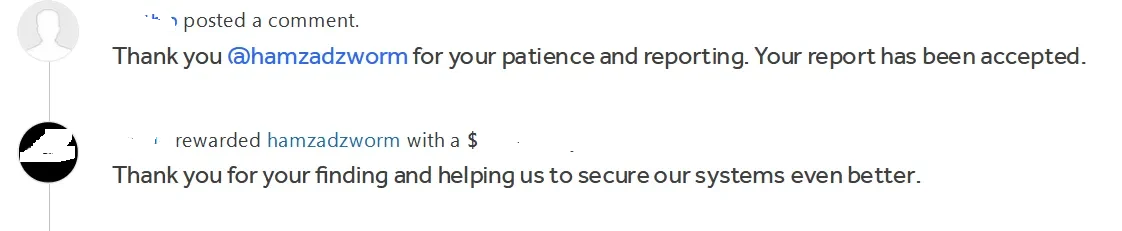
Root cause
From the behaviour shown, two weaknesses combine. First, the name extracted from the uploaded ID card is inserted into the approval email without being treated as untrusted text, so HTML in the card's name field is rendered in the message. Second, the document submission request is not bound to the verified email state: a request saved before an email change can be replayed afterwards, and the approval email goes to the new, unverified address.
Impact
An attacker who can submit an ID card can place HTML in the name on the card and have it rendered in the document approval email. By replaying a saved submission request after changing the account email, the attacker can deliver that email to an address that has not been verified. Using an encoded alias, the email can be delivered to an already existing user. The injected anchor produced a stored open redirection through the main domain, in the researcher's description.
Fix
Based on the behaviour described, the name read from the ID card should be HTML-encoded before it is placed in the email, and the document submission endpoint should require the current email to be verified at the time of the request rather than relying on a check performed earlier in the flow.
Variants to test
- Upload features that extract text from images (ID cards, invoices, receipts) and echo it into emails or dashboards. A positive result is a tag from the image text appearing unescaped in the generated message.
- Multi-step flows where a request is saved before a state change (email change, password change, role change) and replayed afterwards. A positive result is the action completing against the new state without the intervening verification.
- Email change endpoints that reject an existing address. Try
+aliases and their encoded forms such as%2B; a positive result is acceptance of the alias and delivery to the existing user's inbox. - Any reflected HTML in email templates that accepts a URL. A positive result is an anchor whose target points to an attacker-controlled domain, reachable from the application's main domain.
What happened, in plain words
A security researcher was invited to a private bug bounty program on HackerOne. A bug bounty program is a deal between a company and independent testers: the company says "try to break our website, and if you find a real problem we will pay you". A private program means only invited people can take part. This one was described as very secure, with no reports resolved at the time, so the researcher treated it as a challenge.
The feature at the centre of the story is a support page that asks you to send in a photo of your identity card (ID card) so the company can check who you are. When you send a real card with your real name, it is accepted and nothing else happens. The researcher sent a fake card taken from Google Images instead, just to watch what the site would do.
An email came back from support. In it, the researcher noticed two names: the name on the account and the name written on the ID card. That told the researcher something important: a piece of software on the server reads the name from the photo and puts it into the email. The account name could not carry HTML, but the name read from the card could. HTML is the language web pages are written in; a tag such as <a href="..."> is an instruction to the browser to make a link. If a website puts text from a user into a page or an email without cleaning it first, the browser treats that text as instructions rather than as plain words. That is called HTML injection.
The researcher edited the ID card photo, wrote an HTML tag in the name field on the card, and sent it again. The tag showed up in the approval email. At first this only affected the researcher's own inbox, which is called self HTML injection: you are only attacking yourself, so the impact is low.
To make it serious, the researcher needed the email to reach someone else. Changing the account email address forced a verification step: the site sent a confirmation email and would not let the account do anything, including sending an ID card, until the new address was confirmed. The researcher saved the send-ID-card request in a tool called Burp Suite Repeater, changed the email again, and replayed the saved request. The approval email, with the HTML in it, went to the new address without that address ever being verified. Now the injection could be aimed at other people.
Next the researcher injected an <a href> tag, a link, into the name on the card. The link arrived in the email and pointed through the site's main domain to the researcher's own website. In the researcher's description this was a stored open redirection: "stored" because the payload is saved on the server and reused, "open redirection" because the site can be made to send a visitor to an address the site owner did not choose.
The last goal was to reach an already existing user, not just a fresh address. Trying an existing user's email directly produced an error. Many email providers let you add a + suffix to your address, so [redacted] still delivers to [redacted]. The site blocked that too, so the researcher encoded the + as %2B, the way a browser writes special characters in a URL. With the encoded alias, the approval email was delivered to an already existing user.
The setup
The researcher used Burp Suite, specifically its Repeater tab. Burp Suite is a program that sits between your browser and a website so you can look at, edit and resend the requests your browser makes. Repeater is the part that lets you take one request, change it, and send it again as many times as you like. The write-up does not give versions or any other tooling detail.
The precondition for the later steps is the ability to change the account email address. On this site, changing it triggers a verification step before further actions such as sending an ID card are allowed. Keep that in mind: the whole trick later depends on the site checking verification at one moment and then trusting that check later.
Finding it
The first attempts were ordinary injection probing: JavaScript payloads in first name, last name and every other input, hoping for a blind XSS. JavaScript is the programming language browsers run; XSS (cross-site scripting) means getting your JavaScript to run inside someone else's browser session. "Blind" means you cannot see the result on your own screen, so you plant the payload and wait for it to fire somewhere else, for example when an administrator opens a page. That failed because the site does not allow tags to be injected into inputs: the form fields reject or neutralise the characters needed to build a tag.
The image shows the researcher's attempt to inject JavaScript code into the first name, last name and other inputs, and the fact that it did not work because the site does not allow tags in inputs.
Digging further, the researcher found the support page that asks for an ID card. Submitting a real card with a real name is accepted with no visible effect, so the next step was to submit a fake ID card taken from Google Images to observe the behaviour.
The image shows the fake ID card taken from Google Images that was submitted to the support page.
An email came back from support, and the researcher noticed that both names were present in it: the account name and the name written on the ID card. That means a function takes the name from the photo and sends it to the email address. This is the key observation of the whole report: the site trusts text that comes out of an image, and an image is something the user fully controls.
Exploitation
Step 1: HTML injection through the name on the ID card
The researcher edited the ID card photo and placed an HTML tag in the name field on the card, so that HTML was injected into the photo name, and submitted it again. The reasoning is simple: if the server reads the name from the picture and pastes it into an email, then whatever is written in the picture becomes part of the email. Writing a tag there is like writing instructions on a note that someone will later copy into a letter without reading it.
The image shows the result: the HTML from the first name on the photo was reflected in the email. The account name, which could not carry HTML, appears alongside the name read from the card, which the email checks automatically.
At this point the injection was still self HTML injection: it only affected the researcher's own inbox. Attacking yourself proves the mechanism works, but it does not harm anyone else, so it is not yet a serious finding.
Step 2: Bypassing email verification with a saved request
To check whether the HTML injection would be delivered to a different address, the researcher changed the account email. Changing it redirected to a verification email step before the ID could be sent again. The researcher went back, confirmed the email, then sent the ID card and saved that request in Burp Suite Repeater.
Think of it like a cloakroom ticket. The site gives you a ticket (the saved request) when everything is in order, and later accepts the ticket without checking whether the situation has changed. After that, the email was changed again to another address. The application requested verification before any action in the account, including sending an ID card, could be performed. The researcher then went back to the saved send-ID-card request and replayed it. The document approval email was sent to the new email address without verification, and the HTML injection was in it.
This is the moment the self HTML injection becomes an injection that can be aimed at other email addresses. The site checked verification when the request was first made, but did not re-check it when the same request arrived again later. In security terms, the request is not bound to the verified state of the account.
Step 3: Stored open redirection through an anchor tag
An <a href> was injected into the photo name to see whether a link would arrive in the email. An anchor tag is the HTML element that creates a clickable link; href is the attribute that says where the link goes. If the site lets you choose that destination, you can make an email that looks like it comes from the company but sends the reader somewhere you control.
The image shows the link arriving in the email after the anchor tag was placed in the photo name.
The link was injected and took this form:
website.com/token…… = {redirect to my website}
This line is the researcher's shorthand for the result: a link on the site's own domain, with a token in the path, which redirects to the researcher's website. A token here is a value the site uses to identify the link or the request. Because the link starts on the main domain, a reader is more likely to trust it. In the researcher's description this was a stored open redirection via the main domain: stored because the payload lives on the server and is reused in every email, open redirection because the site can be made to forward a visitor to an address the site owner did not choose.
Step 4: Targeting an existing user through an email alias
The next goal was to raise the impact by reaching an already existing user. Reaching a brand new address is less interesting than reaching a real customer who already has an account. The researcher went back to change the email and intercepted the change-email request. Intercepting means catching the request in Burp before it reaches the server, so you can read and modify it. Trying an already existing user's email produced an error, so an alias was tried instead:
[redacted] = [redacted]
This line means the two addresses are treated as the same mailbox by the email provider: mail sent to [redacted] still lands in [redacted]'s inbox. The +1 part is called an alias or subaddress. The report does not explain how the site's check treated the alias.
That was blocked, so the +1 was encoded:
[redacted] = victim%[redacted]
In a URL, certain characters have special meanings, so they are written in an encoded form. %2B is the encoded form of the + character. With the encoded alias, the document approval email was sent to an already existing user.
The two images show the result: the document approval email was sent to an already existing user through the encoded alias.
Root cause
From the behaviour shown, two weaknesses combine. First, the name extracted from the uploaded ID card is inserted into the approval email without being treated as untrusted text, so HTML in the card's name field is rendered in the message. Second, the document submission request is not bound to the verified email state: a request saved before an email change can be replayed afterwards, and the approval email goes to the new, unverified address. The alias encoding bypass suggests the change-email check compares the raw address string against existing accounts, so an encoded + alias of an existing address passes the check while still delivering to that user's mailbox.
A useful way to picture the first weakness: the site treats the name on the ID card like a label printed by a trusted machine, when in fact it is a note written by whoever uploaded the picture. The second weakness is like a door that checks your ticket once at the entrance and then never again, so you can walk back in later with the same ticket after the rules have changed.
Impact
An attacker who can submit an ID card can place HTML in the name on the card and have it rendered in the document approval email. By replaying a saved submission request after changing the account email, the attacker can deliver that email to an address that has not been verified. Using an encoded alias, the email can be delivered to an already existing user. The injected anchor produced a stored open redirection through the main domain, in the researcher's description.
Fix
Based on the behaviour described, the name read from the ID card should be HTML-encoded before it is placed in the email, and the document submission endpoint should require the current email to be verified at the time of the request rather than relying on a check performed earlier in the flow.
HTML-encoding means turning characters like < and > into harmless codes so the browser shows them as text instead of treating them as instructions. Normalising means converting an address to one standard form before comparing it, so [redacted], victim%[redacted] and [redacted] are all recognised as pointing at the same mailbox.
Variants to test
- Upload features that extract text from images (ID cards, invoices, receipts) and echo it into emails or dashboards. A positive result is a tag from the image text appearing unescaped in the generated message.
- Multi-step flows where a request is saved before a state change (email change, password change, role change) and replayed afterwards. A positive result is the action completing against the new state without the intervening verification.
- Email change endpoints that reject an existing address. Try
+aliases and their encoded forms such as%2B; a positive result is acceptance of the alias and delivery to the existing user's inbox. - Any reflected HTML in email templates that accepts a URL. A positive result is an anchor whose target points to an attacker-controlled domain, reachable from the application's main domain.
Glossary
- Bug bounty program: an arrangement where a company invites testers to find security problems and pays for valid reports.
- Private program: a bug bounty program open only to invited researchers.
- HackerOne: a platform that hosts bug bounty programs and their reports.
- HTML: the language used to describe the structure and content of web pages and many emails.
- HTML tag: an instruction in HTML, such as
<a href="...">, that tells the browser what to render. - HTML injection: putting HTML into a page or email through user-controlled input so the browser treats it as instructions.
- Self HTML injection: HTML injection that only affects the person who injected it, usually their own inbox or page.
- JavaScript: the programming language that runs inside web browsers.
- XSS (cross-site scripting): getting your JavaScript to run in someone else's browser session.
- Blind XSS: XSS where you cannot see the result yourself and wait for it to fire elsewhere, such as in an admin panel.
- Input: a field on a form, such as a name box, where the user types data.
- Payload: the piece of code or text an attacker sends to try to trigger a vulnerability.
- Burp Suite: a tool that sits between the browser and a website so requests can be inspected, edited and resent.
- Repeater: the Burp Suite tab that lets you take one request and send it again, with or without changes.
- Request: the message a browser sends to a server asking for something or submitting data.
- Intercept: catching a request in a tool before it reaches the server so it can be read or modified.
- Endpoint: a specific address on a server that handles a particular action.
- Verification email: an email sent to confirm that an address belongs to the person using it.
- Replay: sending a previously saved request again.
- Anchor tag: the HTML element
<a>that creates a link, withhrefgiving the destination. - Open redirection: a flaw where a site can be made to forward a visitor to an address the site owner did not choose.
- Stored: a payload that is saved on the server and reused later, rather than reflected once.
- Alias (subaddress): an extra part added to an email address with
+, such as[redacted], which still delivers to the base address. - URL encoding: writing special characters in a URL in a safe form, for example
+as%2B. - Normalise: convert a value to one standard form before comparing it.
- HTML-encoding: converting characters such as
<and>into harmless codes so they display as text. - Root cause: the underlying reason a vulnerability exists, as opposed to its visible symptom.
- Phishing: a message that pretends to come from a trusted party to trick the reader into clicking a link or giving information.





