How i got 250$ in 5 munites using my phone
The decline-invitation note field on Basecamp accepted HTML, so an invited user could leave markup that rendered for the account owner. The author claims this could be used to show a link that sends the owner to a fake login page and take over the account.
 Published on hamzadzworm.medium.com
so i said, lets go to hackerone and take a look in hacktivity maybe there is some new repports, like you know reading repports are better then talking with people :D
The full write-up lives on its author's site
It belongs to its author, so we link to it rather than copy it. The other two tabs are our own rewrites, checked against it.
Context
Basecamp runs a bug bounty programme on HackerOne. The researcher found the programme in HackerOne's programme directory shortly after it was added, signed up as a normal user, and started looking at the account settings. The feature that mattered is the member invitation flow: an existing user can invite someone to join their account by email, and the invitation carries a sender name that the inviter controls.
The invitation email also gives the recipient a way to decline. Declining takes the recipient to a page where they can leave a note explaining why they did not join, and that note is delivered back to the user who sent the invitation.
Setup
No special tooling is described. The researcher worked from a phone, created a normal account on Basecamp, and used a second email address of their own to receive the invitation, so that both sides of the flow (inviter and invitee) were under their control. The only precondition is the ability to send an invitation and to open it as the recipient.
Finding it
The first thing that stood out in settings was the invite-a-member option. The researcher invited themselves using a second email address and looked at the fields the invitation exposes to the sender: the sender name, and also the title and subject. All of these are places where attacker-controlled text reaches a page or an email read by someone else, so each was tried as an injection point.
An HTML payload in the sender name did not work: the report notes that a filter was in place. The same attempt against the title and the subject also failed. Accepting the invitation produced nothing new either.
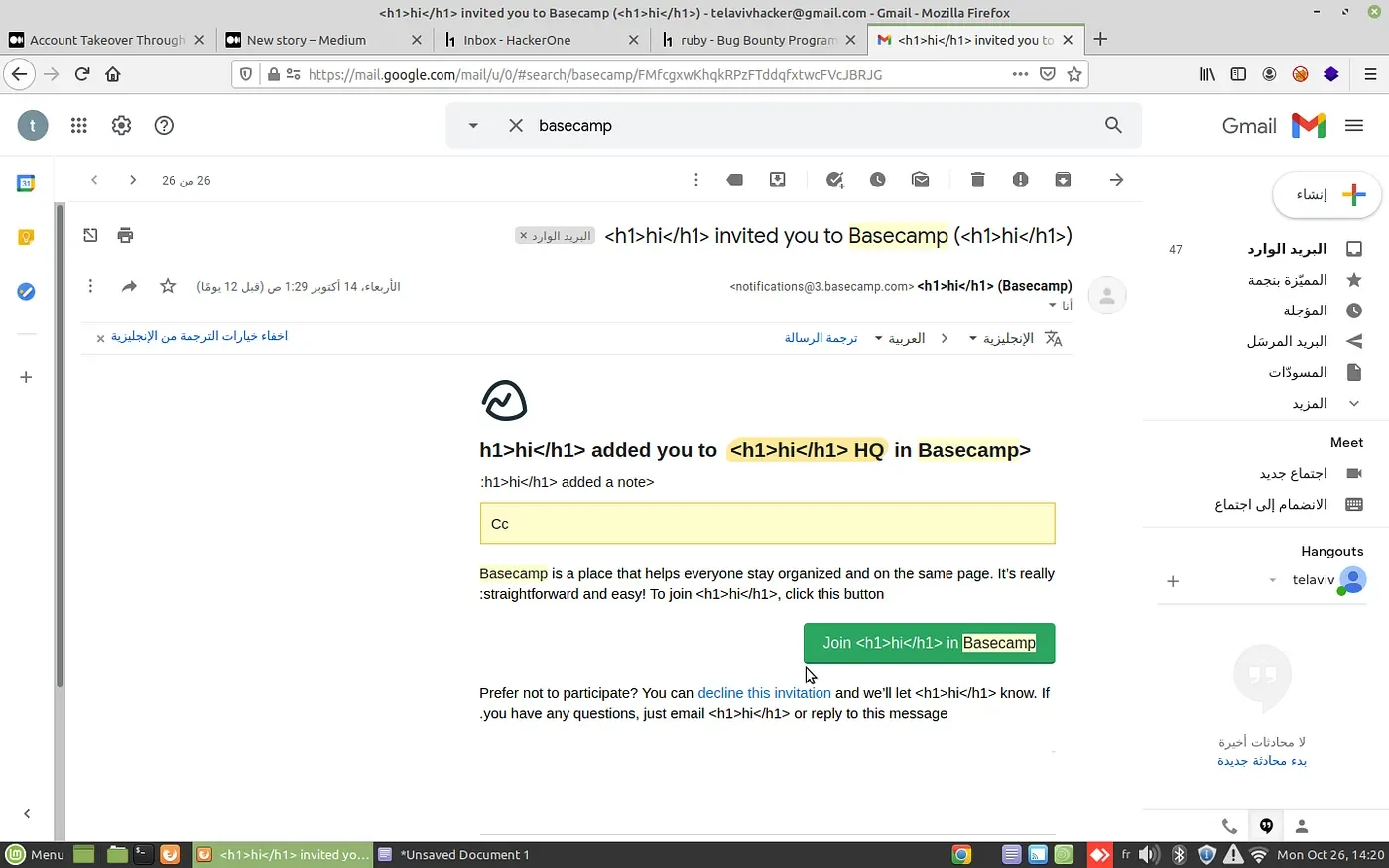
The turn came from the decline path. The invitation offers a "Decline this invitation" option, and clicking it leads to a page that asks the recipient to write a note for the user who invited them, explaining why they are not joining.
Exploitation
Step 1: send an invitation to a controlled address
The researcher invited themselves with a second email address, which gives control over both the inviter account and the invitee mailbox. This is what makes it possible to walk the whole flow and observe what each side sees.
Step 2: try the obvious fields
HTML was attempted in the sender name, and separately in the title and the subject of the invitation. None of them rendered: the sender name was filtered, and the other fields gave nothing.
Step 3: decline the invitation
Opening the invitation as the recipient and choosing "Decline this invitation" leads to the note form. The note is intended as free text from the invitee to the inviter.
Step 4: inject HTML into the decline note
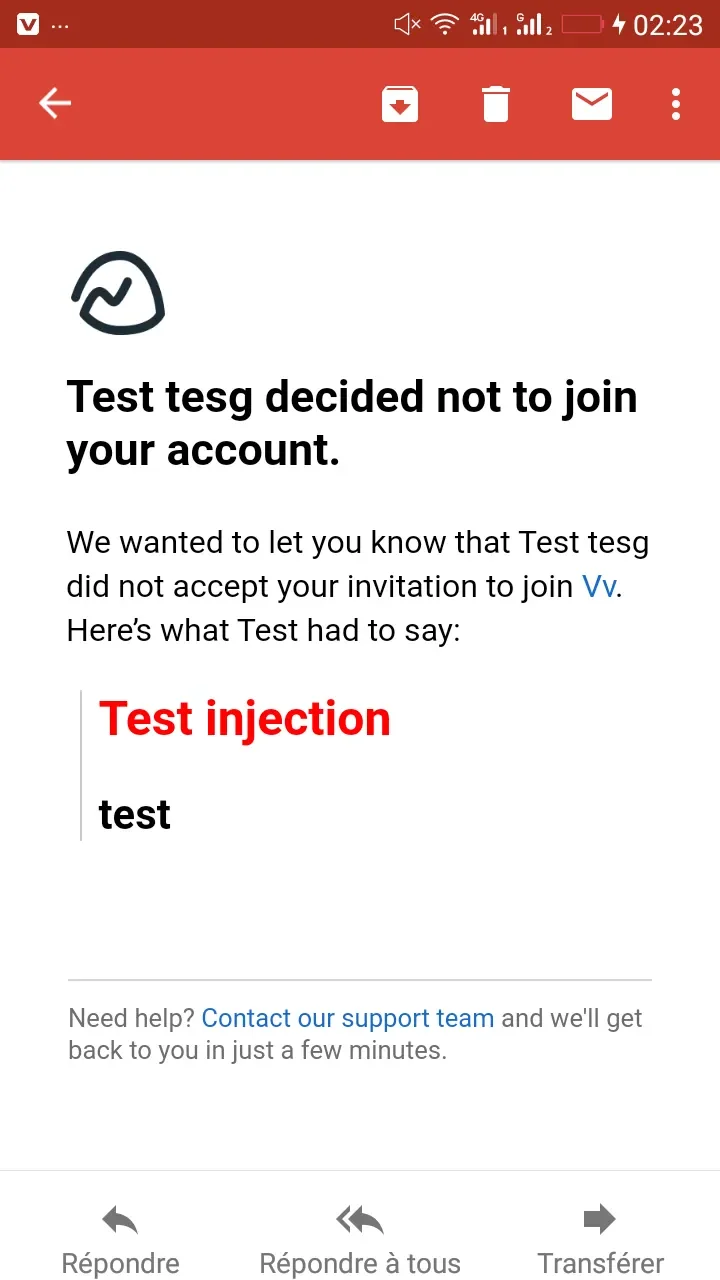
An HTML payload was written into the note field, and it rendered. The report shows the note containing a simple anchor tag, in the form:
<a href=…>
with a button as the visible element. The exact URL and button text are not given in the report beyond the examples of wording below.
Step 5: build the scenario for the security team
To show impact, the researcher described the flow end to end:
- User A invites User B to join their account.
- User B receives the invitation and clicks decline.
- User B is taken to a page asking for a note for User A, the person who sent the invitation.
- Anything written in that note is delivered to User A as the reason User B did not join.
- Because HTML in the note renders, User B can place a link with a button in it, for example with wording such as "click here to make user B join you" or "click here to know why user B didnt join you".
- User A can then be redirected to a malicious link that asks them to log in again, with the aim of taking over the account.
The report's own summary of the impact is that the injected link can redirect the inviter to a malicious page and ask them to log in again in order to take over the account.
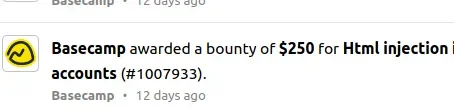
The report was submitted on 14 October, triaged the same day, and a bounty of 250 USD was awarded the same day.
Root cause
The decline note is presented to the inviter and rendered as HTML, while the sender name field was filtered. The sender name was filtered, and attempts on the title and subject gave nothing, while the note path rendered HTML. The report does not describe the server-side implementation, so the precise reason the note is rendered as HTML rather than text is not stated; likely the note is inserted into the page without HTML escaping, or is explicitly rendered as HTML.
Impact
The note is written by the invitee and read by the inviter, so an attacker needs to be invited, or to send an invitation from an account they control and have the victim accept and then read the decline note. Under those conditions the attacker can place a clickable link with attacker-chosen button text in front of the inviter. The report's stated goal is to redirect the inviter to a malicious link that asks them to log in again, in order to take over the account. That outcome depends on the victim following the link and re-entering credentials on the attacker's page; the report presents it as the intended impact rather than as a demonstrated account takeover.
Fix
The report does not say what change was made. The fix that follows from the finding is to treat the decline note as untrusted text everywhere it is displayed, applying HTML encoding on output in the same way the sender name field is handled, so that markup in the note is shown as text rather than rendered.
Variants to test
- Every field in an invitation flow: sender name, title, subject, and the decline note. Send an invitation to a controlled address and put a simple anchor or bold tag in each field, then check both the email and the web page where the invitation is read. A positive result is markup rendering as markup rather than as literal text.
- The accept path as well as the decline path. The report only found the note on decline; an equivalent optional message on acceptance is worth trying with the same payload.
- The notification the inviter receives. Check whether the note is rendered in an email, in an in-app notification, or both, and whether the encoding differs between them.
- Other user-to-user message fields in the same product, such as reasons for removal, rejection or comments on a shared object, using the same anchor payload and checking where the recipient sees it.
- Button and link wording that mimics the product's own UI, as in the report's examples, to judge whether a rendered link would be convincing to the recipient.
What happened, in plain words
A security researcher was browsing HackerOne, a website where companies publish programmes that pay people for finding security bugs in their products. He noticed a newly added programme for Basecamp, a product for managing projects and teams, and decided to take a look. He signed up as a normal user, found a feature that lets you invite someone to join your account by email, and started poking at the text fields that the invitation exposes. Most of them were protected against HTML injection, but one field on the decline path was not. He could put a clickable link with a button in a note that the person who sent the invitation would read, and that link could send them to a malicious page asking them to log in again. He reported it on 14 October, it was triaged the same day, and he was paid 250 USD the same day.
This article walks through the whole thing from zero: what the product does, what the feature does, what HTML injection is, and why each step was taken. No prior security knowledge is needed, only the ability to use a browser.
Background concepts
Before the steps, a few ideas that come up again and again.
- Bug bounty programme: a company says "if you find a security problem in our product and report it responsibly, we will pay you". HackerOne is one of the platforms that hosts these programmes. Companies list themselves in a directory, and researchers browse that directory looking for new targets.
- HTML: the language web pages are written in. Text like
<a href="...">click here</a>tells the browser to draw a clickable link with the words "click here". Normally, when a website shows text that a user typed, it converts the special characters (<,>,&) into harmless codes so the browser shows them as literal text instead of interpreting them as markup. That conversion is called HTML encoding or escaping. - If the injected HTML includes a link, the attacker can make the victim click something that looks like part of the site but goes somewhere else. This is the vulnerability class in this report.
- Filter: a check on the server that rejects or strips dangerous input. If a field is filtered, sending
<a href=...>might come back as plain text or be rejected outright. - Invitation flow: the sequence of steps where one user invites another to join their account. The inviter types a sender name, a title and a subject; the invitee receives an email, opens it, and either accepts or declines.
- Decline note: when the invitee declines, the product asks them to write a short note explaining why, and delivers that note back to the inviter. It is a message from one user to another, and it is the field that turned out to be vulnerable.
Setup
No special tools were used. The researcher worked from a phone, created a normal Basecamp account, and used a second email address of his own to receive the invitation. That way he controlled both sides of the flow: the account sending the invitation and the mailbox receiving it. The only precondition is being able to send an invitation and open it as the recipient.
Finding it
The first thing that stood out in the account settings was the option to invite a member. The researcher invited himself using a second email address and looked at the fields the invitation exposes to the sender: the sender name, and also the title and the subject. All of these are places where text controlled by one user reaches a page or an email read by someone else, so each was tried as an injection point.
An HTML payload in the sender name did not work: a filter was in place. The same attempt against the title and the subject also failed. Accepting the invitation produced nothing new either.
The screenshot accompanies the attempts on the invitation fields. The turn came from the decline path. The invitation offers a "Decline this invitation" option, and clicking it leads to a page that asks the recipient to write a note for the user who invited them, explaining why they are not joining.
Exploitation
Step 1: send an invitation to a controlled address
The researcher invited himself with a second email address, which gives control over both the inviter account and the invitee mailbox. This is what makes it possible to walk the whole flow and observe what each side sees. If you only controlled one side, you could not see what the other side receives.
Step 2: try the obvious fields
HTML was attempted in the sender name, and separately in the title and the subject of the invitation. None of them rendered: the sender name was filtered, and the other fields gave nothing. The lesson here is that the obvious fields are usually the ones developers remember to protect.
Step 3: decline the invitation
Opening the invitation as the recipient and choosing "Decline this invitation" leads to the note form. The note is intended as free text from the invitee to the inviter. This is the field that the researcher had not tried yet.
Step 4: inject HTML into the decline note
An HTML payload was written into the note field, and it rendered. The report shows the note containing a simple anchor tag, in the form:
<a href=…>
Line by line: <a opens an anchor element, which is the HTML tag for a link. href=… is the attribute that says where the link goes; the report leaves the actual URL out. The closing > ends the opening tag, and the visible text of the link (in this case a button) would sit between this tag and a matching </a>. The exact URL and button text are not given in the report beyond the examples of wording below.
The screenshot accompanies the point where the HTML in the note worked. That is the moment the vulnerability is confirmed: the browser is treating the note as markup.
Step 5: build the scenario for the security team
To show impact, the researcher described the flow end to end:
- User A invites User B to join their account.
- User B receives the invitation and clicks decline.
- User B is taken to a page asking for a note for User A, the person who sent the invitation.
- Anything written in that note is delivered to User A as the reason User B did not join.
- Because HTML in the note renders, User B can place a link with a button in it, for example with wording such as "click here to make user B join you" or "click here to know why user B didnt join you".
- User A can then be redirected to a malicious link that asks them to log in again, with the aim of taking over the account.
The report's own summary of the impact is that the injected link can redirect the inviter to a malicious page and ask them to log in again in order to take over the account. The report gives wording such as "click here to know why user B didnt join you" as an example of the button text.
The screenshot accompanies the report timeline.
Root cause
The decline note is presented to the inviter and rendered as HTML, while the sender name field was filtered. The sender name was filtered, and attempts on the title and subject gave nothing, while the note path rendered HTML. The report does not describe the server-side implementation, so the precise reason the note is rendered as HTML rather than text is not stated; likely the note is inserted into the page without HTML escaping, or is explicitly rendered as HTML.
Impact
The note is written by the invitee and read by the inviter, so an attacker needs to be invited, or to send an invitation from an account they control and have the victim accept and then read the decline note. Under those conditions the attacker can place a clickable link with attacker-chosen button text in front of the inviter. The report's stated goal is to redirect the inviter to a malicious link that asks them to log in again, in order to take over the account. That outcome depends on the victim following the link and re-entering credentials on the attacker's page; the report presents it as the intended impact rather than as a demonstrated account takeover.
Fix
The report does not say what change was made. The fix that follows from the finding is to treat the decline note as untrusted text everywhere it is displayed, applying HTML encoding on output in the same way the sender name field is handled, so that markup in the note is shown as text rather than rendered.
Variants to test
- Every field in an invitation flow: sender name, title, subject, and the decline note. Send an invitation to a controlled address and put a simple anchor or bold tag in each field, then check both the email and the web page where the invitation is read. A positive result is markup rendering as markup rather than as literal text.
- The accept path as well as the decline path. The report only found the note on decline; an equivalent optional message on acceptance is worth trying with the same payload.
- The notification the inviter receives. Check whether the note is rendered in an email, in an in-app notification, or both, and whether the encoding differs between them.
- Other user-to-user message fields in the same product, such as reasons for removal, rejection or comments on a shared object, using the same anchor payload and checking where the recipient sees it.
- Button and link wording that mimics the product's own UI, as in the report's examples, to judge whether a rendered link would be convincing to the recipient.
Glossary
- Bug bounty programme: a scheme where a company pays researchers for responsibly reporting security problems in its products.
- HackerOne: a platform that hosts bug bounty programmes and lets researchers browse them and submit reports.
- Basecamp: a product for managing projects and teams, in which users can invite others to join their account.
- HTML: the language web pages are written in; tags like
<a>tell the browser how to display content. - HTML encoding (escaping): converting special characters in user text into harmless codes so the browser shows them as text instead of interpreting them as markup.
- Filter: a server-side check that rejects or strips dangerous input.
- Anchor tag: the HTML element
<a>that creates a clickable link, with the destination in itshrefattribute. - Invitation flow: the sequence of steps where one user invites another to join their account, and the invitee accepts or declines.
- Decline note: the message an invitee writes when declining an invitation, delivered back to the inviter.
- Triaged: the state where the programme has reviewed a report and confirmed it is a valid issue.
- Bounty: the money paid to a researcher for a valid report.
- Account takeover: an attack where someone gains control of another person's account, often by tricking them into entering credentials on a fake page.




