nOAuth: Account Takeover via Microsoft Oauth
The website trusted the email claim from Microsoft OAuth, which an attacker can control by creating a free Azure tenant and setting the email to the victim's address. An attacker could then sign in with Microsoft and be logged into the victim's account.
 Published on bibek-shah.medium.com
Hi everyone, I want to share a cool and easy account takeover I recently found. I was able to perform a full account takeover via Sign In with the Microsoft feature.
The full write-up lives on its author's site
It belongs to its author, so we link to it rather than copy it. The other two tabs are our own rewrites, checked against it.
Context
The target was a website that offered several ways to sign in: email, and OAuth providers including Google, Microsoft and Apple. The feature of interest was Sign in with Microsoft. A misconfiguration in Microsoft's OAuth implementation had recently been discovered by Descope, and the researcher decided to test the target for it. The researcher decided to test the target for this issue, which is known as nOAuth.
Setup
To test the vulnerability, the attacker needs a Microsoft tenant organisation. Creating one is free. The researcher used the Azure portal to create a tenant and a user, then changed that user's email address to the victim's email. The victim account on the target site is a normal account created by signing up with the victim's email address and verifying it if required. No other tools or versions are mentioned.
Finding it
The researcher noticed that the target supported Sign in with Microsoft and decided to test it for the nOAuth vulnerability. The report references Descope's blog post on nOAuth as the source of the misconfiguration.
Exploitation
Step 1: Create a tenant
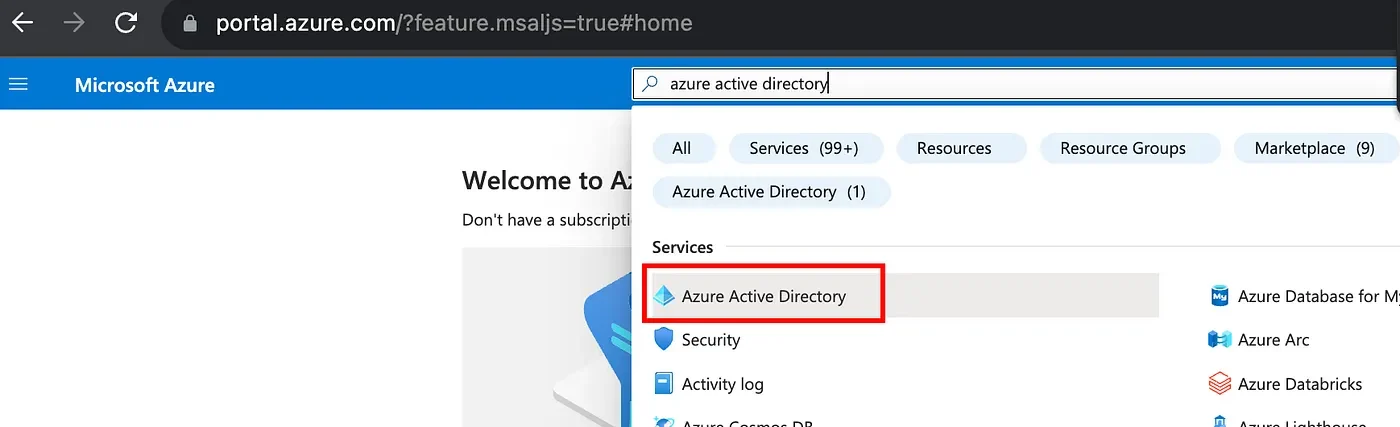
- Go to the Azure portal and search for Azure Active Directory.
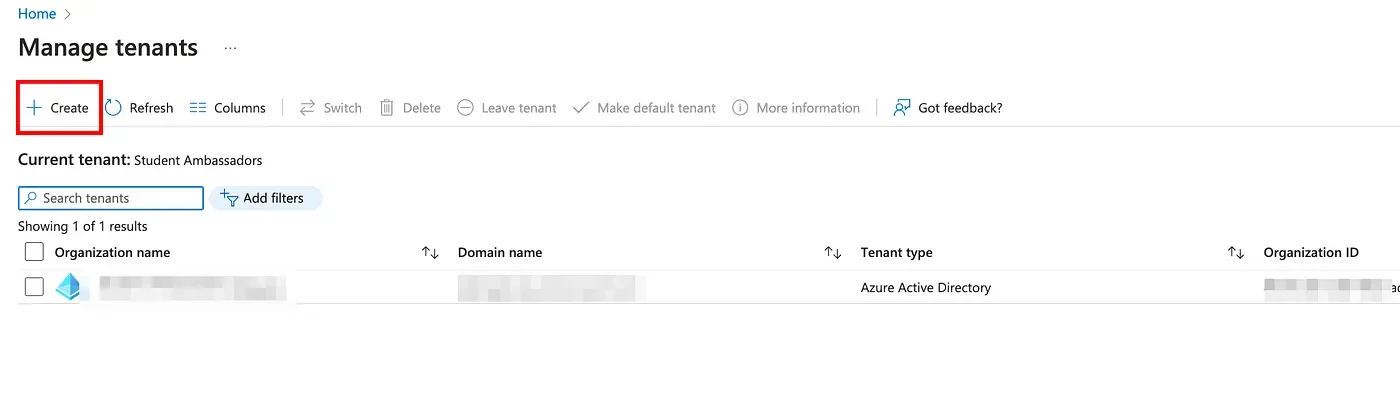
- Click on Create New Tenant and choose Tenant type Azure Active Directory.
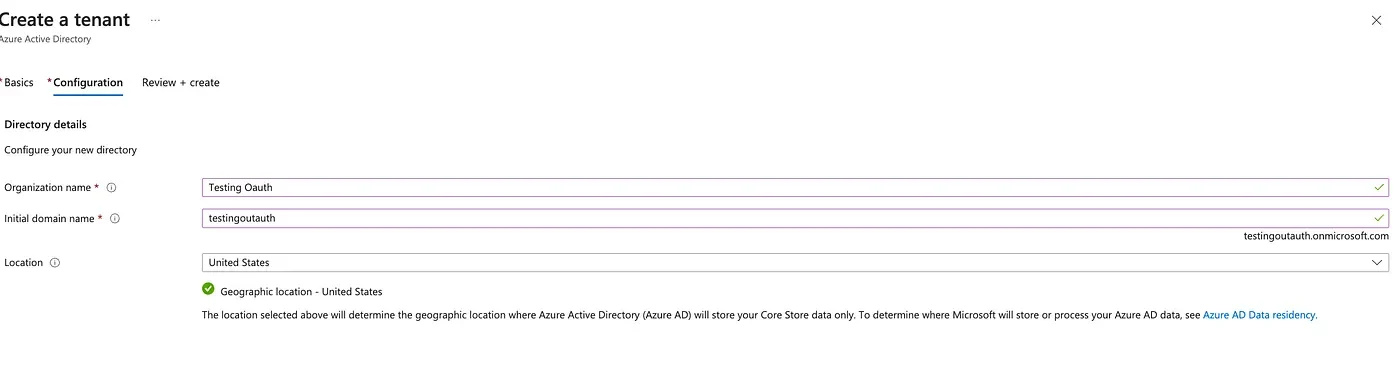
- Give it some name and click on review and create. After that it will give you a captcha; solve it and it will take roughly a minute to create.
Step 2: Create a user
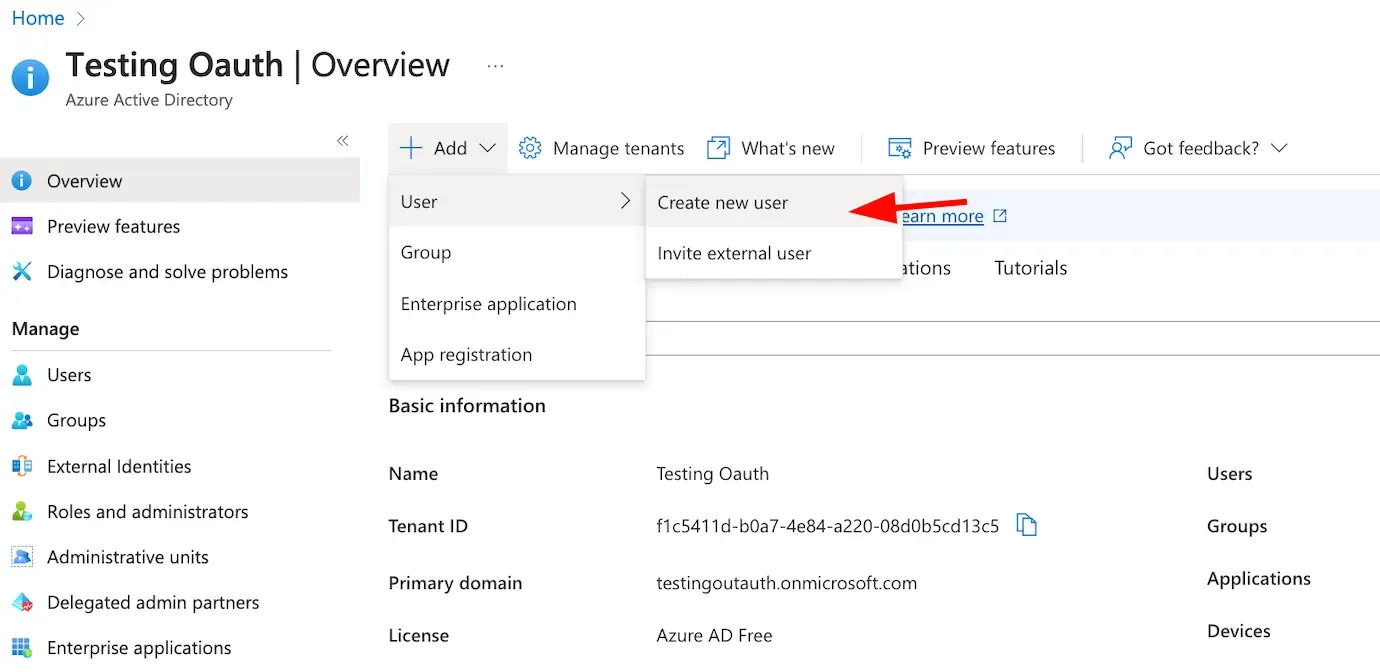
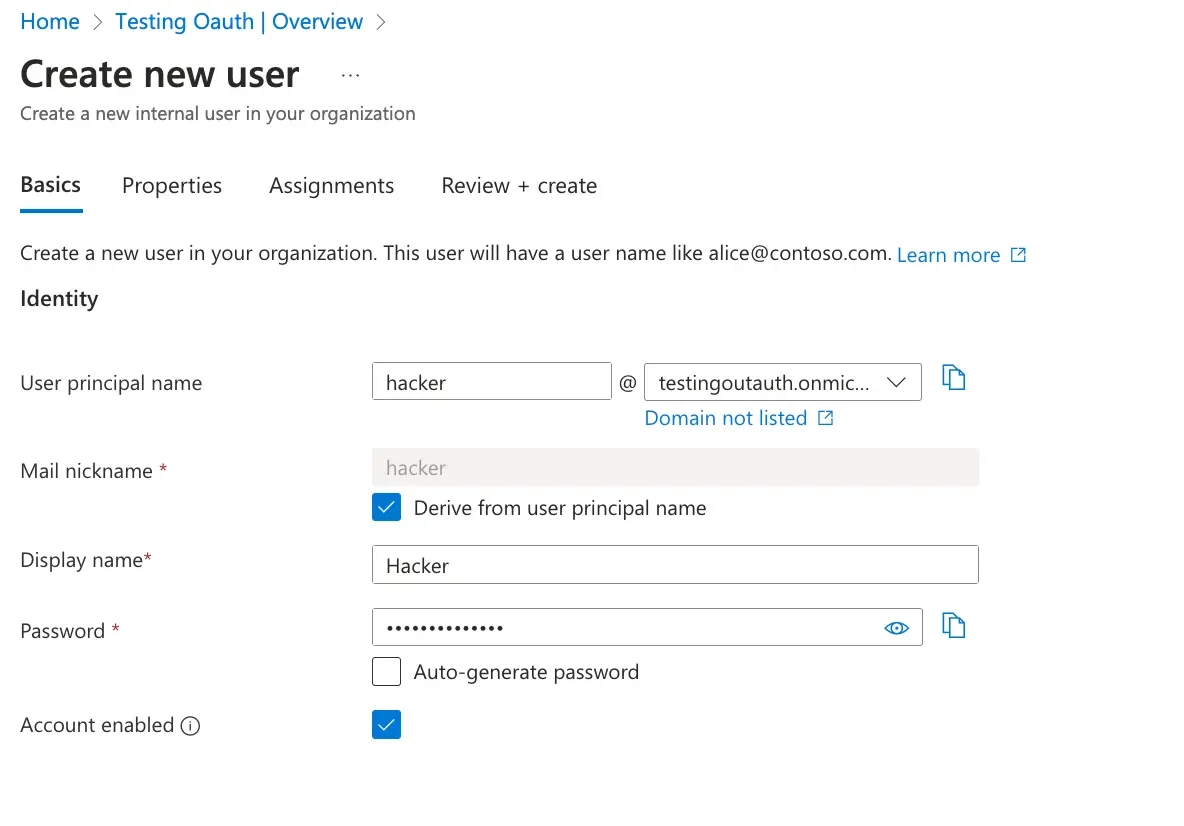
- Now that you have created a tenant, click on Add > User > Create a new user.
- Fill in the details and make sure you remember the password.
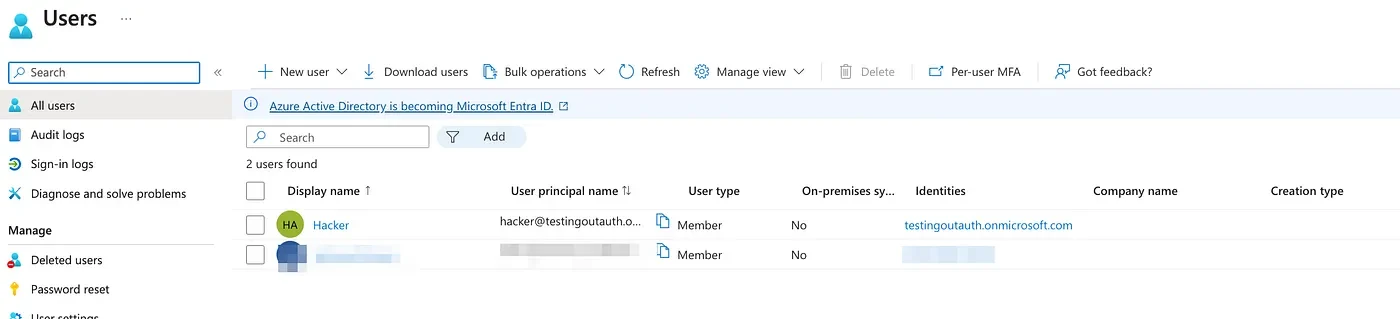
- Click on the User section from the left to show your created user.
Step 3: Set the victim's email
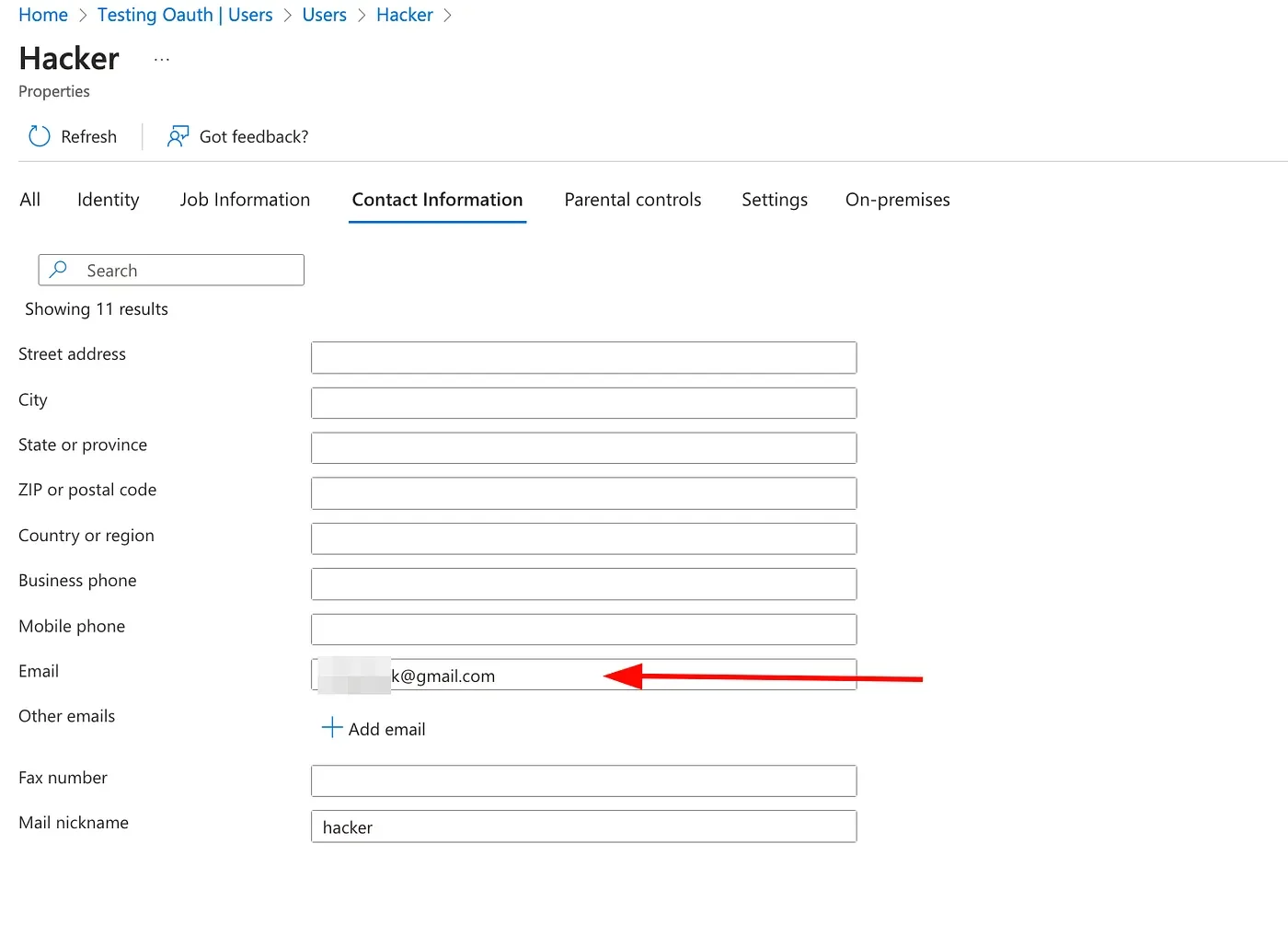
- Click on the user you created, go to the properties section, change the email from contacts and click on save. Enter your victim's email there; it can be any email.
Step 4: Prepare the victim account
Sign up using the victim's email on the website using any sign option and verify the account if required.
Step 5: Sign in as the attacker
- Choose to sign in with Microsoft and use the email and password from the account you created above.
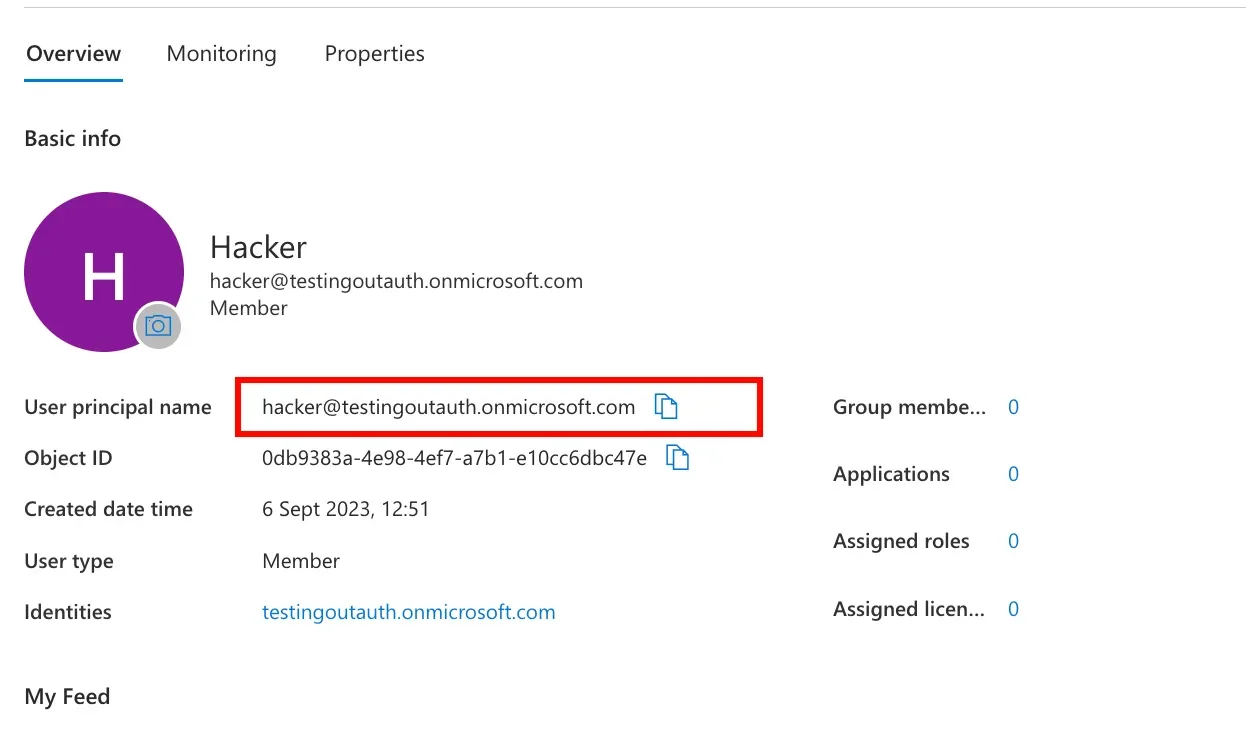
- Enter the details we created above in the Microsoft account login process. If the website is vulnerable, you will get logged into the victim's account.
The researcher describes this as simple yet critical, leading to account takeover. The company did not allow the proof of concept to be made public, so no request or response is shown.
Root cause
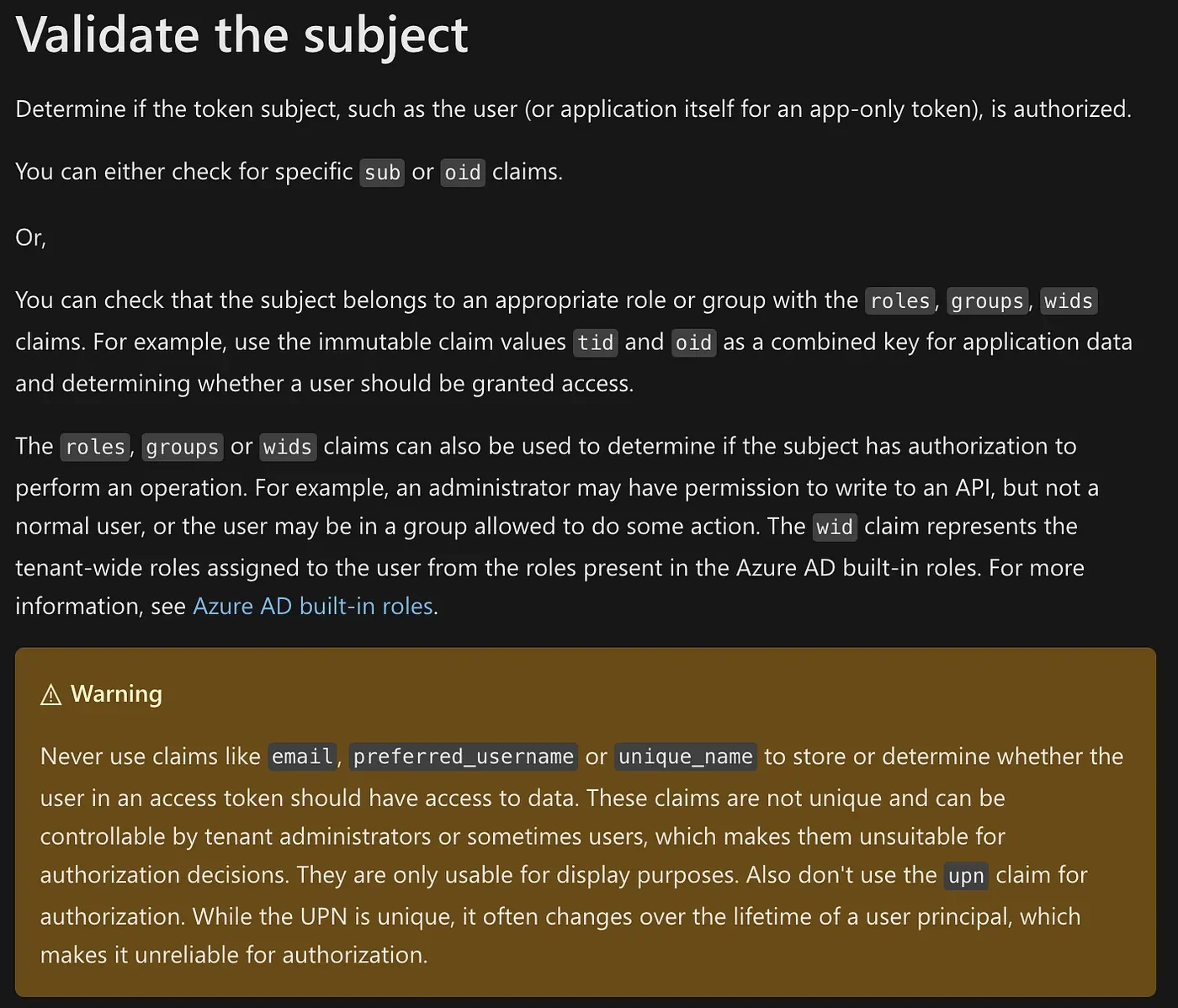
Vulnerable sites use claims like email and preferred_username which Microsoft warns not to use. Microsoft's documentation on claims validation warns against using claims like email and preferred_username. Sites that use this claim to identify or link accounts will trust an attacker-controlled value. The report does not show the exact code or configuration of the target, but the implication is that the site used the email claim from the Microsoft token to log the user in or link to an existing account.
Impact
An attacker can take over an account on a vulnerable site that offers Sign in with Microsoft and uses the email claim from Microsoft to identify users. The attacker needs to know the victim's email address and must be able to create a Microsoft tenant and user, which is free. The report does not state whether the target had additional conditions such as email verification or account linking rules.
Fix
Based on Microsoft's guidance, sites should not use the email or preferred_username claims to identify users. Instead, they should follow Microsoft's guidance on which claims to validate. If an email is needed, it should be treated as untrusted and verified separately.
Variants to test
- A positive result is logging into an account that was created with a different email.
- For example, create an account with email and password, then sign in with Microsoft using a tenant user whose email is set to the victim's email. If the site merges the accounts, that is a takeover.
- A positive result is the same as above.
- A positive result is being able to sign in with a token from a tenant that is not the site's own.
What happened, in plain words
A security researcher found a way to log into other people's accounts on a website, without knowing their passwords. The website let people sign in with their Microsoft account, the same way many sites offer "Sign in with Google" or "Sign in with Facebook". The researcher discovered that the site trusted the email address that Microsoft handed back after a successful Microsoft login. The problem is that Microsoft lets the owner of a Microsoft account change the email address shown on that account to any email, including someone else's. So the researcher created a free Microsoft account, set its email to the victim's email, clicked "Sign in with Microsoft" on the target site, and was let straight into the victim's account.
This kind of bug is called nOAuth. The "OAuth" part is the name of the standard that powers "Sign in with..." buttons. The bug comes from a misconfiguration in Microsoft's implementation that was written up by a company called Descope. The researcher read that write-up, noticed the target site had a Sign in with Microsoft button, and decided to test it.
Before going further, a few words for anyone new to this. A website account is normally tied to an email address: the site uses the email to know who you are. When you click "Sign in with Microsoft", the site does not see your Microsoft password. Instead, Microsoft checks your password on its own servers and then sends the website a small package of information about you, called a token. Inside that package are pieces of information called claims, for example your name, a unique ID for your account, and your email address. The website reads the claims and decides which account you are. If the website believes the email claim without checking it, and if an attacker can control that email claim, the attacker can pretend to be anyone.
That is the whole bug in one sentence: the site trusted a value that the user, not Microsoft, controls.
The setup: what the attacker needs
To try this, the attacker needs a Microsoft tenant. A tenant is Microsoft's word for an organisation inside its cloud directory, Azure Active Directory. Think of it as a private folder where you can create users that belong to you. Creating one is free, and you do not need a company or a credit card. The researcher used the Azure portal, which is Microsoft's website for managing these things, to create a tenant and then a user inside it.
The victim side is simple too. The victim is just a normal account on the target website, created by signing up with the victim's email address and verifying it if the site asks for that. The attacker does not need the victim to do anything, and does not need the victim's password.
No other tools, versions or special software are mentioned in the report.
Finding it
The researcher noticed that the target supported Sign in with Microsoft and decided to test it for the nOAuth vulnerability described by Descope. A stable identifier is a value that never changes for a given account, such as the sub claim, which stands for subject. The email claim, by contrast, is just a label the account owner can edit.
The report points to Descope's blog post on nOAuth as the source of the misconfiguration. That post is where the researcher learned that the email claim can be attacker-controlled.
Exploitation, step by step
Step 1: Create a tenant
- Go to the Azure portal and search for Azure Active Directory.
The screenshot shows the Azure portal search box with Azure Active Directory typed in, so the reader can find the service among the many Microsoft cloud products.
- Click on Create New Tenant and choose Tenant type Azure Active Directory.
This is the screen where Microsoft asks what kind of tenant you want. Choosing Azure Active Directory gives you the directory that holds users and their sign-in details.
- Give it some name and click on review and create. After that it will give you a captcha; solve it and it will take roughly a minute to create.
A captcha is the small puzzle that proves a human is filling in the form rather than a script. The tenant is not ready instantly; Microsoft takes about a minute to build it.
Step 2: Create a user
- Now that you have created a tenant, click on Add > User > Create a new user.
This creates a user account inside your own tenant. That user is the identity the attacker will later use to sign in to the target site.
- Fill in the details and make sure you remember the password.
The password matters because the attacker will type it into Microsoft's real login page later. Nothing is bypassed at Microsoft's end; the login is genuine, only the email attached to the account is chosen by the attacker.
- Click on the User section from the left to show your created user.
This is just navigation: the left-hand menu lists the users in the tenant so you can open the one you just made.
Step 3: Set the victim's email
- Click on the user you created, go to the properties section, change the email from contacts and click on save. Enter your victim's email there; it can be any email.
This is the heart of the trick. The email field on a Microsoft account is editable by the account owner. The attacker sets it to the victim's email address. Microsoft does not verify that the attacker owns that address, which is exactly the misconfiguration Descope wrote about. The report notes it can be any email, so the attacker only needs to know the victim's address.
Step 4: Prepare the victim account
Sign up using the victim's email on the website using any sign option and verify the account if required.
In a real attack the victim already has an account. Here the researcher creates one to stand in for the victim, so the test is repeatable. The point is that an account exists on the target site whose email matches the email the attacker has put on the Microsoft account.
Step 5: Sign in as the attacker
- Choose to sign in with Microsoft and use the email and password from the account you created above.
The screenshot shows the Microsoft sign-in prompt where the attacker enters the credentials of the tenant user. From Microsoft's point of view this is a normal, successful login.
- Enter the details we created above in the Microsoft account login process. If the website is vulnerable, you will get logged into the victim's account.
When Microsoft finishes the login, it sends the website a token containing the claims, including the email the attacker set. If the site uses that email to decide who you are, it matches the victim's account and hands the attacker a session for it. A session is what keeps you logged in: after a successful login the site gives your browser a cookie or token, and every later request carries it so the site knows it is still you. The attacker now holds the victim's session without ever knowing the victim's password.
The researcher calls this simple yet critical, because it leads to full account takeover. The company did not allow the proof of concept to be made public, so no request or response is shown.
Why this happens
Vulnerable sites use claims like email and preferred_username which Microsoft warns not to use. Microsoft's documentation on claims validation warns against using claims like email and preferred_username. Sites that use this claim to identify or link accounts will trust an attacker-controlled value.
The screenshot shows Microsoft's own warning about which claims to trust. The report does not show the exact code or configuration of the target, but the implication is that the site used the email claim from the Microsoft token to log the user in or to link the Microsoft identity to an existing account.
A useful comparison: imagine a club where the bouncer lets you in if you say a name, and never checks your ID. Anyone who knows a member's name can walk in as that member. The sub claim is the ID card; the email claim is the name you say out loud.
Impact
An attacker can take over an account on a vulnerable site that offers Sign in with Microsoft and uses the email claim from Microsoft to identify users. The attacker needs to know the victim's email address and must be able to create a Microsoft tenant and user, which is free. The report does not state whether the target had additional conditions such as email verification or account linking rules.
Fix
Based on Microsoft's guidance, sites should not use the email or preferred_username claims to identify users. Instead, they should follow Microsoft's guidance on which claims to validate. If an email is needed, it should be treated as untrusted and verified separately.
In plain terms: identify people by the ID card, not by the name they shout at the door. The sub claim cannot be edited by the account owner, so an attacker cannot make their account look like someone else's.
Variants to test
- A positive result is logging into an account that was created with a different email.
- For example, create an account with email and password, then sign in with Microsoft using a tenant user whose email is set to the victim's email. If the site merges the accounts, that is a takeover.
- A positive result is the same as above.
- A positive result is being able to sign in with a token from a tenant that is not the site's own.
Glossary
- Account takeover: gaining control of someone else's account without their password, usually by logging in as them.
- Attacker: the person trying to break in.
- Azure Active Directory: Microsoft's cloud service for managing users, groups and sign-in settings for an organisation.
- Azure portal: the website at portal.azure.com where Microsoft cloud services are managed.
- Captcha: a small puzzle used to prove a human is filling in a form rather than a script.
- Claim: a piece of information about a user inside a token, such as name, email or a unique ID.
- Cookie: a small piece of data a website stores in your browser so it can recognise you on later requests.
- Descope: the company whose blog post described the nOAuth misconfiguration in Microsoft's OAuth implementation.
- Email claim: the claim in a token that carries an email address; Microsoft does not verify it and the account owner can change it.
- Issuer (
iss): the claim that says which authority created a token. - Microsoft tenant: an organisation inside Azure Active Directory that holds its own users; creating one is free.
- nOAuth: the name for the bug where a site trusts an attacker-controlled email claim from Microsoft's OAuth login.
- OAuth: the standard behind "Sign in with..." buttons, which lets a site receive information about you from another provider without seeing your password there.
oidclaim: a stable identifier for a user in Azure AD, recommended for identifying users.preferred_usernameclaim: a claim carrying a username-like value; Microsoft warns against using it for identification.- Proof of concept (POC): a demonstration that a vulnerability can actually be exploited.
- Provider: the service that handles the login, such as Microsoft, Google or Apple.
- Session: the state that keeps you logged in after signing in, carried by a cookie or token on each request.
sub(subject) claim: a unique, immutable identifier for a user per application, recommended for identifying users.- Tenant ID (
tid): the claim that says which tenant a token belongs to. - Token: a package of information a provider sends to a website after a successful login, containing claims about the user.
- User principal name: the sign-in name of a user in a Microsoft tenant, which can be edited by the tenant administrator.
- Vulnerability: a weakness in a system that an attacker can use to do something the system's owner did not intend.



