OAuth Redirect URI Manipulation via X-Forwarded-Host Injection
The application built its Azure AD OAuth redirect_uri from the client-supplied X-Forwarded-Host header, so an attacker could change the callback hostname in the authorization request. The author did not confirm that this led to code interception or account takeover.

Host Header Injection
The full write-up lives on its author's site
It belongs to its author, so we link to it rather than copy it. The other two tabs are our own rewrites, checked against it.
Context
During an authorised black-box web application penetration test, the researcher identified an issue in the Azure Active Directory (Azure AD) authentication flow of target.com. The application appeared to build its OAuth redirect_uri from the client-supplied X-Forwarded-Host HTTP header. By changing that single header, the callback hostname embedded in the OAuth authorisation request could be changed.
The expected callback in this case was:
https://target.com/user/auth/azure_activedirectory_v2/callback
OAuth authentication normally redirects a user from the web application to an identity provider. The authorisation request carries a redirect_uri parameter that tells the identity provider where to return the browser after authentication. That value should be built from trusted, server-side configuration, not from an arbitrary value supplied by the client.
HTTP forwarding headers such as X-Forwarded-Host are commonly used by reverse proxies to pass the original hostname to the application. If the application trusts a client-controlled forwarding header without validating where it came from, that header can influence security-sensitive URL generation. The researcher set out to test whether the Azure AD flow was affected.
Setup
The assessment was an authorised black-box test, limited to the in-scope application and a self-owned anonymous session. The researcher used Firefox to map the legitimate authentication flow and inspect the related HTTP requests. No other tooling, versions or account roles are described in the report.
The report is explicit about the limits of what was demonstrated: the results show callback URL manipulation, but authorisation-code interception and account takeover were not confirmed.
Finding it
The researcher first mapped the legitimate authentication flow in Firefox. The endpoint that initiated the Azure AD authentication process was:
POST /user/auth/azure_activedirectory_v2 HTTP/2Host: target.com
That endpoint responded with an HTTP redirect to Microsoft's OAuth authorisation endpoint. The interesting part was the Location response header, because it contained the authorisation request, including the redirect_uri parameter.
Before any manipulation, the authentication request was sent without an X-Forwarded-Host header. The application returned an HTTP 302 Found response, and the resulting OAuth authorisation URL contained a redirect_uri pointing at the expected production hostname. A simplified, sanitised representation of the response is shown below:
HTTP/2 302 FoundLocation: https://login.microsoftonline.com/.../authorize ?client_id=[REDACTED] &redirect_uri=https%3A%2F%2Ftarget.com%2Fuser%2Fauth%2Fazure_activedirectory_v2%2Fcallback &response_type=code &scope=openid%20profile%20email &state=[REDACTED]
After URL-decoding the redirect_uri parameter, the callback was:
https://target.com/user/auth/azure_activedirectory_v2/callback
This established the expected behaviour and provided a baseline for comparison.
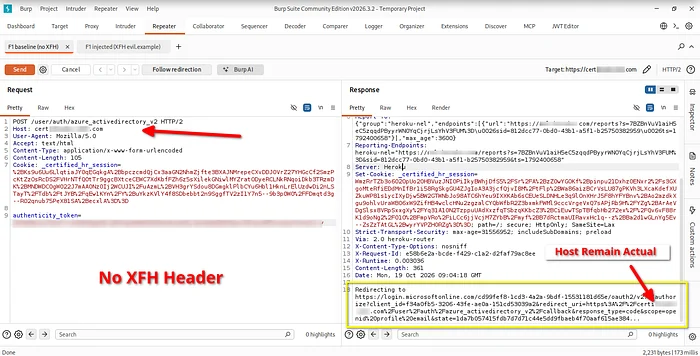
Under normal conditions, the application generates an OAuth callback using its expected hostname.
Exploitation
Step 1: repeat the request with one added header
After the baseline, the same request was repeated while keeping the session and CSRF token unchanged. The only relevant modification was the addition of this header:
X-Forwarded-Host: evil.example
Step 2: observe the new redirect
The application again returned a 302 Found response, but this time the authorisation URL contained a different callback hostname. The resulting response included:
Decoding the parameter revealed the following callback:
https://evil.example/user/auth/azure_activedirectory_v2/callback
The callback hostname had changed from target.com to evil.example after introducing the header. This was the key observation: a client-supplied HTTP header influenced the hostname embedded in a security-sensitive OAuth parameter.
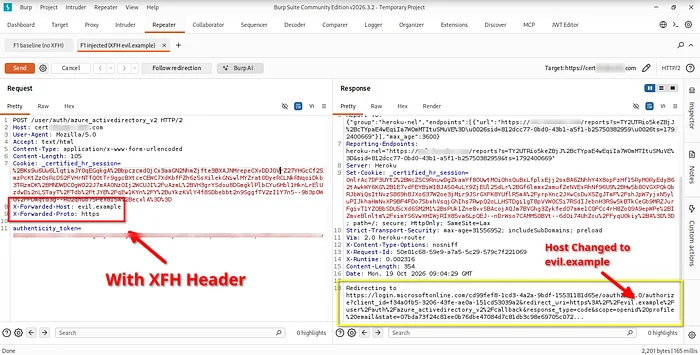
The application incorporated the attacker-supplied hostname into the OAuth callback URL.
Root cause
The application appeared to build the OAuth redirect_uri from the client-supplied X-Forwarded-Host header rather than from trusted server-side configuration. Because the header is accepted from the client and influenced URL generation, the hostname in the authorisation request changed with the header value. The report does not describe the server or proxy configuration, so why the header was trusted, and whether any proxy in front of the application was meant to strip or overwrite it, is not stated.
Impact
OAuth redirect URI handling is security-sensitive because the callback determines where the identity provider returns the authorisation response. If an attacker can influence that URL, the consequences depend on how the identity provider validates redirect URIs and how the rest of the authentication flow is implemented.
The assessment classified the finding as Medium severity. The proposed CVSS v3.1 vector was:
CVSS:3.1/AV:N/AC:L/PR:N/UI:R/S:U/C:L/I:L/A:N
The report is careful about the boundary of the claim: a manipulated callback parameter is a meaningful finding, but it should not automatically be described as account takeover. Authorisation-code interception and account takeover were not confirmed.
Fix
The report does not say what was changed. The principle it draws from the assessment is that OAuth callback URLs deserve special protection and their hostnames should be derived from trusted configuration, not from request headers. Request headers are not inherently trustworthy; their security depends on the architecture and the trust boundary between clients, proxies and applications.
Variants to test
A positive result is a 302 whose redirect_uri hostname matches the supplied value.
A positive result is any attacker-controlled value surviving into redirect_uri.
A positive result is a callback that points at a host you control.
A positive result is the same hostname substitution in any provider's authorisation request.
5. Negative controls. Testing related headers helps distinguish the demonstrated input from alternative explanations. This distinguishes the demonstrated input from alternative explanations, as the researcher notes in the lessons learned.
Lessons learned
- Request headers are not inherently trustworthy. Their security depends on the architecture and the trust boundary between clients, proxies and applications.
- OAuth callback URLs deserve special protection. Their hostnames should be derived from trusted configuration.
- Controlled comparisons strengthen findings. Establishing a baseline and changing one variable at a time helps isolate the actual cause.
- Negative controls matter. Testing related headers helps distinguish the demonstrated input from alternative explanations.
- Impact must be evidence-based. A manipulated callback parameter is a meaningful finding, but it should not automatically be described as account takeover.

What happened, in plain words
A security researcher was given permission to try to break a website, target.com, as part of an authorised test. The test was black-box, so the researcher worked out how the site behaves from the outside.
While doing that, the researcher looked at the part of the site that lets you sign in with a Microsoft work or school account, through a service called Azure Active Directory (Azure AD). That sign-in is built on a standard called OAuth, which is a way for one website to hand you over to another website to prove who you are, and then hand you back.
The problem was in the hand-back address. The site was building that address from a piece of information that the visitor's own browser sends, a request header called X-Forwarded-Host. Because the site appeared to use whatever value arrived in that header, the researcher changed the hand-back address from target.com to evil.example by adding one line to the request.
The researcher was careful about what this proves. It proves the hand-back address can be manipulated. It does not prove that a real attacker could steal a login or take over an account, and the researcher says so plainly. The finding was rated Medium severity.
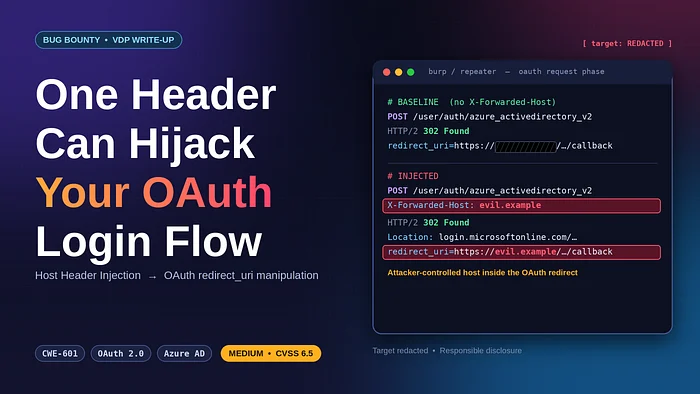
The ideas you need first
Before walking through the steps, here are the few concepts the rest of the article depends on. Each one is explained from zero.
Websites, requests and responses
When you type an address into a browser, the browser sends a request to a server, and the server sends back a response. The response is usually a web page, but it can also be a short instruction. One very common instruction is a redirect: the server says, in effect, "not here, go over there instead", and gives the address to go to. The browser follows it automatically, which is why you often do not notice it happening.
Headers
Every request and every response carries headers. Think of them as the labels on a parcel: small lines of text that describe the contents rather than being the contents. A request header might say what kind of browser is asking, or what language the visitor prefers. A response header might say what type of file is being returned, or where to redirect to.
Headers are just text, and text can be edited. Anyone can add a header to a request using a tool or a browser extension. So a header is only as trustworthy as the decision the server makes about it.
The Host header and forwarding headers
Every request includes a Host header, which names the site the browser thinks it is talking to, for example target.com. That is how one server can host many websites and still know which one you wanted.
Large websites often sit behind a reverse proxy. A reverse proxy is a front door: it receives all visitors first and then passes them on to the actual application servers behind it. Because the proxy is the one talking to the application, the application would otherwise only see the proxy's own name. To avoid that, proxies add forwarding headers, such as X-Forwarded-Host, to tell the application the hostname the visitor originally asked for. That is the legitimate purpose of the header.
The danger is simple: if the application believes a forwarding header that a visitor can set themselves, then the visitor controls what the application thinks its own hostname is.
OAuth, the identity provider and redirect_uri
OAuth is the standard behind the "Sign in with Microsoft", "Sign in with Google" and similar buttons. The idea is that your password is only ever typed into the company that owns your account, never into the website you are visiting.
The flow has three parties:
- The website you are visiting, often called the client or the application.
- The identity provider, the service that actually knows who you are. Here it is Microsoft's login service at
login.microsoftonline.com. - You, the user, with your browser.
When you click the sign-in button, the application sends your browser to the identity provider with an authorisation request. That request contains several parameters, which are just named values appended to a URL after a question mark. One of them is redirect_uri: the address the identity provider should send you back to once you have signed in. Another is state, a value the application uses to recognise its own request when you return. Another is client_id, which identifies the application to the identity provider.
Because the identity provider sends you, and a proof of your login, to whatever address is in redirect_uri, that address is security-sensitive. It should be built from the application's own trusted configuration, not from anything a visitor can supply.
URL encoding
URLs cannot contain every character directly, so some characters are written in an encoded form. %3A means a colon, %2F means a slash, and %20 means a space. So https%3A%2F%2Ftarget.com%2F... is just https://target.com/... written in a form that survives being placed inside another URL. Decoding means turning it back into readable text.
CSRF token and session
A session is how a website remembers you between requests, usually via a cookie, which is a small piece of data your browser stores and sends back automatically. A CSRF token is a random value placed in a form to prove that the request came from the site's own page and not from somewhere else. Keeping both unchanged during a test matters: it means the only thing that changed between two requests was the header under investigation.
The vulnerability class: host header injection
Host header injection is the general name for the problem where an application uses a hostname taken from the request, rather than from its own configuration, to build something important. The "something important" might be a password reset link, a cache key, or, as here, an OAuth callback address. The label on the parcel has been written by the sender, and the receiver believed it.
The expected callback
The researcher first established what the callback address should be. In this case it was:
https://target.com/user/auth/azure_activedirectory_v2/callback
Line by line: https is the secure web protocol; target.com is the site's own domain; /user/auth/azure_activedirectory_v2/callback is the path on that site that handles the return from Azure AD. The name of the path tells you the intended design: the callback belongs to target.com and nowhere else.
That value should come from trusted, server-side configuration. In other words, the site's own settings should say "our callback is this address", and no visitor should be able to change it.
Mapping the sign-in flow
The researcher used Firefox to watch the requests the browser made while signing in normally. This is the reconnaissance step: before trying to break anything, understand how the normal flow works, so you know what a normal result looks like.
The endpoint that started the Azure AD sign-in was:
POST /user/auth/azure_activedirectory_v2 HTTP/2Host: target.com
Line by line: POST is the request method, used when the browser is submitting something rather than just asking for a page. /user/auth/azure_activedirectory_v2 is the path being submitted to. HTTP/2 is the version of the web protocol in use. Host: target.com is the header that names the site. This is the request that begins the whole sign-in process.
That endpoint answered with a redirect to Microsoft's OAuth authorisation endpoint. The researcher focused on the Location response header, because that is where a redirect's destination is written, and that destination contained the authorisation request, including the redirect_uri parameter.
Establishing the baseline
Before changing anything, the researcher sent the sign-in request with no X-Forwarded-Host header at all. This is the baseline: a record of normal behaviour to compare later results against. Without a baseline, you cannot say that a change you made caused a difference.
The application returned an HTTP 302 Found response. 302 is the standard status code for a temporary redirect. The OAuth authorisation URL inside it contained a redirect_uri pointing at the expected production hostname. A simplified, sanitised version of the response is shown below:
HTTP/2 302 FoundLocation: https://login.microsoftonline.com/.../authorize ?client_id=[REDACTED] &redirect_uri=https%3A%2F%2Ftarget.com%2Fuser%2Fauth%2Fazure_activedirectory_v2%2Fcallback &response_type=code &scope=openid%20profile%20email &state=[REDACTED]
Line by line: HTTP/2 302 Found is the status line, saying the protocol version and that this is a redirect. Location: is the header holding the address to go to. That address is Microsoft's authorisation endpoint, https://login.microsoftonline.com/.../authorize, with the ... standing for parts the researcher removed. After the question mark come the parameters, separated by &. client_id=[REDACTED] identifies the application and has been blanked out. redirect_uri=https%3A%2F%2Ftarget.com%2F... is the encoded callback address, and decoding it gives back https://target.com/user/auth/azure_activedirectory_v2/callback. response_type=code asks the identity provider for an authorisation code, the short-lived value the application will later exchange for access. scope=openid%20profile%20email asks for permission to see basic profile and email information, with %20 being a space. state=[REDACTED] is the application's own marker, blanked out here.
After URL-decoding the redirect_uri parameter, the callback was:
https://target.com/user/auth/azure_activedirectory_v2/callback
This is the same address as the expected callback, which confirms the normal behaviour and gives a clean point of comparison.
Under normal conditions, the application generates an OAuth callback using its expected hostname.
Testing the header
With the baseline recorded, the researcher repeated the same request, keeping the session and CSRF token unchanged. That detail is what makes the test meaningful: if the session or token had changed too, you could not be sure which change caused any difference in the result.
The only relevant modification was the addition of this header:
X-Forwarded-Host: evil.example
Line by line: X-Forwarded-Host is the header name, the forwarding header described earlier. evil.example is the value the researcher chose. example is a reserved domain name intended for documentation and testing, so it is a safe placeholder rather than a real site. The whole line says: "pretend the visitor asked for evil.example".
The application again returned a 302 Found response, but this time the authorisation URL contained a different callback hostname. The resulting response included:
Line by line: everything is the same as the baseline response except one thing. The redirect_uri now reads https%3A%2F%2Fevil.example%2F..., which decodes to https://evil.example/.... The path after the hostname is unchanged; only the hostname moved. The status code, the identity provider, the client identifier, the response type, the scope and the state are all as before.
Decoding the parameter revealed the following callback:
https://evil.example/user/auth/azure_activedirectory_v2/callback
The callback hostname had changed from target.com to evil.example after introducing the header. This was the key observation: a client-supplied HTTP header influenced the hostname embedded in a security-sensitive OAuth parameter.
The application incorporated the attacker-supplied hostname into the OAuth callback URL.
Why it happened
The application built the OAuth redirect_uri from the client-supplied X-Forwarded-Host header rather than from trusted server-side configuration. Because the header is accepted from the client and influenced URL generation, the hostname in the authorisation request changed with the header value.
Think of it as a hotel receptionist who writes your room number on a form based on what you tell them, instead of checking the booking system. The form looks official, but the number on it is yours to choose.
The report does not describe the server or proxy configuration, so why the header was trusted, and whether any proxy in front of the application was meant to strip or overwrite it, is not stated.
What the impact could be
OAuth redirect URI handling is security-sensitive because the callback determines where the identity provider returns the authorisation response. If an attacker can influence that URL, the consequences depend on two things: how the identity provider validates redirect URIs, and how the rest of the authentication flow is implemented.
In plain terms, the identity provider is the gatekeeper here. Many identity providers keep a list of approved callback addresses for each application and refuse to send a login result anywhere else. Whether evil.example would be accepted is a question about Microsoft's configuration for this application, and the report does not answer it.
The assessment classified the finding as Medium severity. The proposed CVSS v3.1 vector was:
CVSS:3.1/AV:N/AC:L/PR:N/UI:R/S:U/C:L/I:L/A:N
CVSS is a standard scoring system for vulnerabilities. Each part of the vector is a shorthand for one property of the issue. AV:N means the attack can be carried out over the network rather than needing physical access. AC:L means the attack is easy to carry out, with no special conditions. PR:N means the attacker needs no privileges on the system. UI:R means a user has to be involved, for example by clicking something. S:U means the impact stays within the same security scope. C:L, I:L and A:N mean limited impact on confidentiality, limited impact on integrity, and no impact on availability. Put together, that is a real but bounded problem, which is why it lands at Medium.
The report is careful about the boundary of the claim: a manipulated callback parameter is a meaningful finding, but it should not automatically be described as account takeover. Authorisation-code interception and account takeover were not confirmed.
The fix
The report does not say what was changed. The principle it draws from the assessment is that OAuth callback URLs deserve special protection and their hostnames should be derived from trusted configuration, not from request headers. Request headers are not inherently trustworthy; their security depends on the architecture and the trust boundary between clients, proxies and applications.
In everyday terms: the receptionist should check the booking system, not the visitor's note.
Other things worth testing
A positive result is a 302 whose redirect_uri hostname matches the supplied value.
A positive result is any attacker-controlled value surviving into redirect_uri.
A positive result is a callback that points at a host you control.
A positive result is the same hostname substitution in any provider's authorisation request.
5. Negative controls. Testing related headers helps distinguish the demonstrated input from alternative explanations. This distinguishes the demonstrated input from alternative explanations, as the researcher notes in the lessons learned.
A negative control is worth explaining, because it is the idea that makes the whole test trustworthy. If you change one header and the callback changes, you think you have found the cause. But what if the callback changes on every second request anyway? A negative control is a header you expect to have no effect; if the callback stays the same with it, you have ruled out that alternative explanation.
Lessons learned
- Request headers are not inherently trustworthy. Their security depends on the architecture and the trust boundary between clients, proxies and applications.
- OAuth callback URLs deserve special protection. Their hostnames should be derived from trusted configuration.
- Controlled comparisons strengthen findings. Establishing a baseline and changing one variable at a time helps isolate the actual cause.
- Negative controls matter. Testing related headers helps distinguish the demonstrated input from alternative explanations.
- Impact must be evidence-based. A manipulated callback parameter is a meaningful finding, but it should not automatically be described as account takeover.
Glossary
- API: a defined way for one piece of software to talk to another, like a counter where you ask for something by name and get a defined answer back.
- Authorisation code: a short-lived value an identity provider gives back after login, which the application exchanges for access.
- Authorisation request: the request the application sends the user's browser to, at the identity provider, asking for a login.
- Azure AD (Azure Active Directory): Microsoft's service for managing work and school accounts and signing users in.
- Baseline: a recorded normal result, used as the comparison point for later tests.
- Black-box test: a security test where the tester has no inside knowledge of the code or configuration.
- Callback: the address the identity provider sends the user back to after login.
- Client: in OAuth, the application the user is visiting, as opposed to the identity provider.
client_id: the parameter that identifies which application is asking the identity provider for a login.- Cookie: a small piece of data a website stores in your browser, sent back automatically on later requests, often used to remember your session.
- CSRF token: a random value in a form that proves the request came from the site's own page.
- CVSS: a standard scoring system for rating the severity of a vulnerability.
- Forwarding header: a header a proxy adds to tell the application about the original request, such as the original hostname.
- Header: a line of text in a request or response that describes it, rather than being its content.
- Host header injection: a vulnerability where an application uses a hostname taken from the request to build something security-sensitive.
- HTTP: the protocol browsers and servers use to exchange requests and responses.
- HTTP/2: a version of HTTP.
- Identity provider: the service that actually knows who the user is and performs the login, such as Microsoft's login service.
Locationheader: the response header that holds the address a redirect points to.- Negative control: a test you expect to have no effect, used to rule out alternative explanations.
- OAuth: a standard that lets a website hand a user to an identity provider for login and get them back afterwards, without handling the password itself.
- Parameter: a named value attached to a URL after a question mark, separated by
&. POST: an HTTP method used when submitting data rather than just requesting a page.- Redirect: a response telling the browser to go to a different address instead.
redirect_uri: the OAuth parameter holding the address the identity provider should return the user to.- Reverse proxy: a front-door server that receives visitors and passes them on to the application servers behind it.
- Scope: in OAuth, the list of permissions the application is asking for.
- Session: how a website remembers a user across multiple requests.
state: an OAuth parameter the application uses to recognise its own request when the user returns.- Status code: a number in a response saying what kind of result it is, such as
302for a redirect. - Trust boundary: the line between parties that are trusted and parties that are not, such as between a visitor and the application.
- URL decoding: turning encoded characters such as
%2Fback into their readable form. - URL encoding: writing characters in a URL-safe form, such as
%3Afor a colon. X-Forwarded-Host: a forwarding header used to tell an application the hostname the visitor originally asked for.